


 Home
HomeTubeMagic's AI Tool Crafts Winning YouTube Thumbnails for Channel Growth
In today's competitive YouTube environment, compelling thumbnails are essential for grabbing attention. TubeMagic, an AI-driven thumbnail generator, provides a streamlined solution for creating engaging and visually striking thumbnails. By leveraging advanced artificial intelligence, TubeMagic simplifies the creation process, helping creators improve click-through rates and channel growth. This guide examines its capabilities, showing how to use this tool to refine your YouTube approach and build a successful channel.
Key Points
TubeMagic is an AI-powered tool for creating high-quality YouTube video thumbnails.
It provides features to brainstorm video concepts, draft scripts, and optimize content for better performance.
The Thumbnail Generator lets users create designs from a video link or custom description.
It offers customization options for backgrounds, text, and incorporated imagery.
TubeMagic uses AI to ensure thumbnails are visually attractive and optimized for viewer engagement.
Understanding TubeMagic: The AI Thumbnail Solution
What is TubeMagic?
TubeMagic is an AI-powered platform built to help YouTube creators effortlessly enhance their video thumbnails. Acknowledging the critical role of visual appeal in attracting viewers, it offers a suite of tools to generate, customize, and optimize thumbnails for maximum impact.
The goal is to make thumbnail creation efficient and accessible, regardless of a creator's design experience. By automating key design steps, TubeMagic allows creators to focus on their core strength: producing great video content.
TubeMagic stands out by offering more than thumbnail generation; it includes tools for idea generation, script writing, and performance optimization. These integrated features let creators manage their entire YouTube workflow from one platform, making it a comprehensive solution for channel growth.
Key Features of TubeMagic's Thumbnail Generator
The core of TubeMagic is its powerful AI thumbnail generator, featuring tools that simplify design and ensure visual appeal. Here’s a detailed look at the key features:
- AI-Powered Backgrounds:
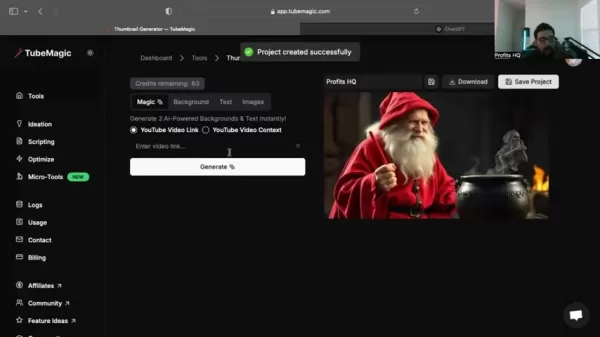
TubeMagic employs artificial intelligence to generate eye-catching backgrounds that elevate a thumbnail's overall look. Creators can choose from various AI-generated backgrounds or customize their own to match their brand.
- Customizable Text Options: Adding compelling text is crucial for communicating a video's core message. TubeMagic provides a range of customizable text options, including fonts, sizes, colors, and positioning, ensuring text is both readable and visually engaging.
- Image Integration: Users can easily integrate images into their thumbnails, whether screenshots from the video or custom graphics. TubeMagic ensures these images are properly sized and optimized for the thumbnail format.
- Contextual Generation:The tool can generate thumbnails based on a YouTube video link or a custom description. This contextual approach ensures the thumbnail accurately represents the video's content, attracting the right audience.
- User-Friendly Interface: TubeMagic features an intuitive, easy-to-navigate interface, making it accessible to both seasoned designers and beginners. This simplicity allows for quick generation and customization without a steep learning curve.
Integrating TubeMagic with ChatGPT for Enhanced Creativity
Leveraging ChatGPT for Superior Prompts
To get the best results from TubeMagic’s thumbnail generator, consider integrating it with ChatGPT. ChatGPT can help craft detailed, creative prompts that yield more effective designs from the AI.

By giving ChatGPT an initial prompt and asking for variations, you can explore a wider range of design ideas and ensure the final thumbnail is as compelling as possible.
For instance, with an initial prompt like: “Create an image of a helpful robot dispensing cash like an ATM, set in an environment that resembles the internet or web3. Make the image hyper-detailed.”
You can ask ChatGPT to refine and expand on this, generating numerous variations that add depth and creativity. This collaborative method combines the strengths of both AI tools, leading to more effective thumbnails.
The AI software might suggest prompts such as:
- Generate an image of a futuristic AI robot dispensing money like an ATM. Set the robot in a digital cyberspace environment evoking Web3. Ensure the image is highly detailed and visually striking.
- Create a depiction of a high-tech humanoid AI ejecting cash as if it were a money machine. The background should be an immersive internet-inspired setting, filled with neon digital elements.
- Design an illustration of a smart robotic entity seamlessly printing stacks of cash in a blockchain-inspired digital realm. Make the image hyper-realistic and rich in intricate details.
The key is to provide as much detail as possible, enabling the AI to generate highly relevant and visually appealing thumbnails. Combining ChatGPT's creative power with TubeMagic’s design capabilities can significantly boost your YouTube thumbnail quality and effectiveness.
Step-by-Step Guide to Using TubeMagic
Step 1: Accessing the Thumbnail Generator
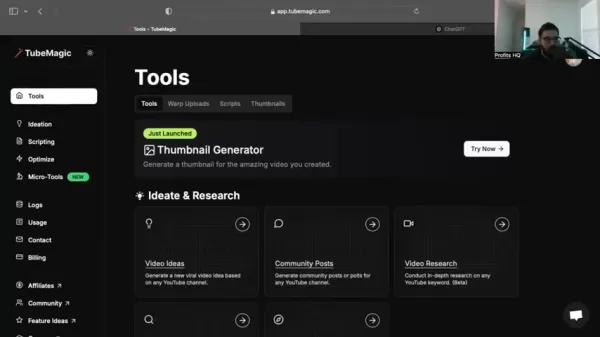
Start by logging into your TubeMagic account. From the dashboard, navigate to the 'Tools' section. Find the 'Thumbnail Generator' tool, often labeled 'Just Launched' or 'New'. Click the 'Try Now' button to enter the generator interface.
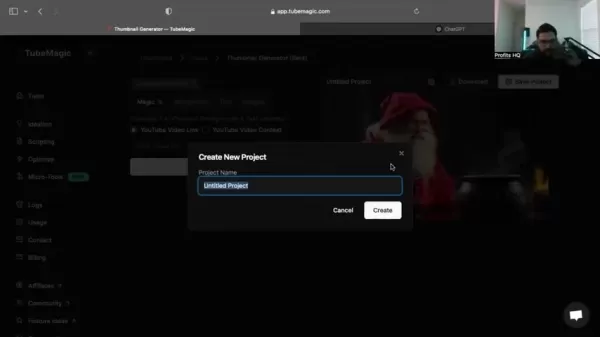
Step 2: Creating a New Project
Once inside the Thumbnail Generator, you’ll be prompted to start a new project. Enter a descriptive name for your project to keep your work organized.

This step helps you easily manage and revisit your thumbnail designs later.
Step 3: Providing Context or Video Link
TubeMagic offers two main ways to generate thumbnails: using a YouTube video link or providing custom context.
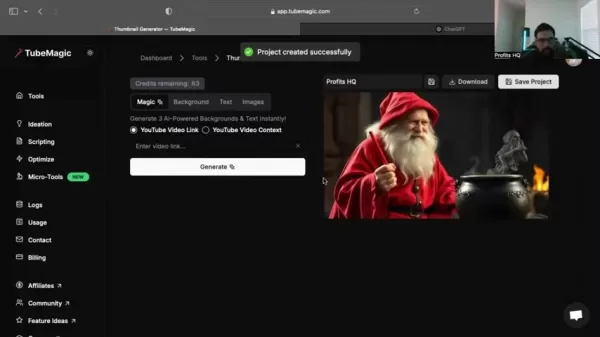
- YouTube Video Link: Paste your video's URL into the designated field. The AI will analyze the content and suggest relevant thumbnail designs.
- Custom Context: Choose the 'YouTube Video Context' option and type a detailed description of your video's content, including keywords and themes. This lets the AI generate thumbnails closely aligned with your subject matter.
Step 4: Generating and Customizing Thumbnails
After providing the necessary information, click 'Generate'. TubeMagic will create three thumbnail options based on your input. Review them and select the one that best fits your vision.
Once you've chosen a thumbnail, you can further customize it using TubeMagic's editing tools. Adjust the background, text, and images to achieve the desired look. The platform's intuitive interface allows for quick and easy modifications.
Step 5: Downloading Your Optimized Thumbnail
When satisfied with your design, click the 'Download' button. Your thumbnail will be downloaded in the optimal size and format for YouTube, ready to upload. Remember to save your project for future use and modifications.
Understanding TubeMagic Pricing
TubeMagic Pricing Plans
While specific pricing can change, TubeMagic typically offers several subscription plans to suit different needs. Plans usually vary by the number of monthly thumbnail generations, access to advanced features, and support levels.
It's best to visit the official TubeMagic website to review current pricing and select the plan that fits your budget and usage requirements.
Pros and Cons of TubeMagic
Pros
AI-Powered Thumbnail Generation: TubeMagic uses AI to create high-quality, visually appealing thumbnails.
Comprehensive Toolset: It offers features beyond thumbnails, including video idea generation and script writing.
User-Friendly Interface: The platform is easy to navigate, even for beginners.
Time-Saving: It automates many design steps, saving creators valuable time.
Cons
Beta Status: As a tool in beta, some features may be limited or still in development.
Reliance on AI: The output quality depends heavily on the AI's interpretation of the provided context.
Exploring TubeMagic's Core Features
Key Capabilities of TubeMagic
TubeMagic's strength lies in its core features, designed to improve the entire YouTube content creation process:
- Video Idea Generation: TubeMagic sparks creativity by suggesting video ideas based on trends, competitor analysis, and audience interests, helping you produce content that resonates.
- Scripting Assistance: The platform provides scripting tools with templates and AI-powered suggestions to create engaging, well-structured video scripts.
- Performance Optimization: TubeMagic offers performance insights and suggestions for improving titles, descriptions, and tags, ensuring your videos are optimized for search and engagement.
Unlocking Potential: Real-World Use Cases
Diverse Applications of TubeMagic
TubeMagic is a versatile tool beneficial for various YouTube content creators:
- Small Business Owners: Businesses can create professional thumbnails to attract customers and increase brand awareness.
- Educational Content Creators: Educators can design engaging thumbnails that highlight key learning points, attracting students and boosting interaction.
- Gaming YouTubers: Gamers can create eye-catching thumbnails showcasing exciting gameplay moments to grow their audience.
- Vloggers: Vloggers can design personalized thumbnails that capture their vlog's essence, fostering a deeper connection with viewers.
Frequently Asked Questions
Is TubeMagic suitable for beginners?
Yes, TubeMagic is designed with a user-friendly interface accessible to both experts and beginners. Its intuitive design allows for quick thumbnail creation and customization without a steep learning curve.
Can I use my own images in TubeMagic?
Yes, you can seamlessly integrate your own images into thumbnails. This enables personalized designs that reflect your brand identity and style.
How often are the AI models updated?
The AI models receive continuous updates to improve the quality and relevance of generated thumbnails, ensuring the tool remains aligned with current design trends and best practices.
Related Questions
How can I further enhance my YouTube thumbnails?
To further improve your YouTube thumbnails, consider these elements: High-Quality Imagery: Use clear, high-resolution images that capture your video's essence. Engaging Text: Add concise, compelling text highlighting the main viewer benefit. Consistent Branding: Maintain a uniform visual style across thumbnails to build brand recognition. Emotional Appeal: Create thumbnails that evoke curiosity or emotion to entice clicks. A/B Testing: Experiment with different designs to see which performs best with your audience.
Related article
 Meta Removes AI Photo Editing Feature Following User Backlash
Meta, the social media giant, is once again embroiled in a public debate regarding the delicate balance between artificial intelligence and user privacy. According to TechCrunch, Meta’s Superintelligence Labs introduced a new AI image generator, Muse
DeepMind CEO Hassabis: I sleep six hours a day, usually feel energetic around 1 a.m.
Fortune recently featured an interview with Demis Hassabis, CEO of Google DeepMind, revealing his unconventional approach to rest and productivity. Hassabis disclosed that he sleeps very little, structuring his waking hours into two distinct work blo
OpenAI, Anthropic Vie for Market Share Despite Revenue Shortfalls
Despite recent reports suggesting OpenAI missed revenue targets, creating pressure on tech stocks this Tuesday, private AI lab investors remain resilient. Seasoned backers have confirmed they will not reduce investment despite negative media coverage
Related Special Topic Recommendations
Animation Creation
Meta Removes AI Photo Editing Feature Following User Backlash
Meta, the social media giant, is once again embroiled in a public debate regarding the delicate balance between artificial intelligence and user privacy. According to TechCrunch, Meta’s Superintelligence Labs introduced a new AI image generator, Muse
DeepMind CEO Hassabis: I sleep six hours a day, usually feel energetic around 1 a.m.
Fortune recently featured an interview with Demis Hassabis, CEO of Google DeepMind, revealing his unconventional approach to rest and productivity. Hassabis disclosed that he sleeps very little, structuring his waking hours into two distinct work blo
OpenAI, Anthropic Vie for Market Share Despite Revenue Shortfalls
Despite recent reports suggesting OpenAI missed revenue targets, creating pressure on tech stocks this Tuesday, private AI lab investors remain resilient. Seasoned backers have confirmed they will not reduce investment despite negative media coverage
Related Special Topic Recommendations
Animation Creation
 AI Scene Animation Tools for Social Media Content
2026 Latest Best Top-rated AI Scene Animation Tools for Social Media Content are curated here by XIX.AI. These powerful game-changing tools offer real-world tests and detailed free vs paid comparison, helping creators boost productivity significantly. Explore now to unlock your AI edge.
 9 tools
 xix.ai
Video creation
AI Short-Form Video Hook Generators for Reels, Shorts, and Product Launch Campaigns
xix.ai
Video creation
AI Short-Form Video Hook Generators for Reels, Shorts, and Product Launch Campaigns
2026 Latest Best AI Short-Form Video Hook Generators for Reels Shorts and Product Launch Campaigns! XIX.AI curates top-rated powerful game-changing tools that deliver must-try results through real-world tests. This weekly updated page offers free vs paid comparison rankings to help you find the perfect solution for boosting content creativity and productivity. Explore now to Unlock your AI edge!
11 tools
xix.ai
writing
AI Article Outline Tools for Long Form Writing
2026 Latest Best Top-Rated AI Article Outline Tools for Long Form Writing! This curated collection features powerful, game-changing tools that deliver accurate, structured outlines with real-world tests to boost writing efficiency significantly. XIX.AI is part of this elite selection. Get a free vs paid comparison to help you choose the perfect tool. Explore now and Unlock your AI edge!
9 tools
xix.ai
chatbot
Best AI Roleplay Chat Apps for Language Practice, Interview Prep, and Daily Fluency
2026 Latest Best Top-rated AI Roleplay Chat Apps for Language Practice, Interview Prep, and Daily Fluency! XIX.AI curates a powerful game-changing collection that offers free vs paid comparison, real-world tests, and updated rankings weekly. These must-try tools help you boost writing skills, overcome fluency challenges, and improve communication efficiency across all daily scenarios. Explore now to discover your perfect tool for language growth!
10 tools
xix.ai
Music composition
AI Stem Separation Tools for Remix Production, Sampling Prep, and Karaoke Masters
2026 Latest Best Top-rated AI Stem Separation Tools Curated for Remix Production, Sampling Prep, and Karaoke Masters. These powerful game-changing tools offer real-world tests to deliver precise audio isolation, boosting productivity significantly. XIX.AI provides a weekly updated free vs paid comparison guide to help you find the must-try solution that suits your needs. Explore now to unlock your AI edge.
8 tools
xix.ai
Data Analysis
AI SQL Copilots for Revenue Dashboards, Funnel Analysis, and Product Metrics
2026 Latest Best AI SQL Copilots Ranked Top-Rated! XIX.AI curates a powerful game-changing collection for weekly updated real-world tests. These must-try tools help you generate accurate revenue dashboards, analyze sales funnels, and track product metrics swiftly, boosting productivity massively. Explore now to Discover your perfect tool for data-driven decision making! 238 characters
9 tools
xix.ai

 Comments (2)
0/500
Comments (2)
0/500
![DavidRodriguez]()
Krass, wie KI jetzt sogar Thumbnails optimiert! 🎯 TubeMagic klingt nach einem Game-Changer für kleinere Creator, die nicht stundenlang in Photoshop hängen wollen. Aber frage ich mich: Wenn alle das gleiche Tool nutzen, sehen am Ende nicht alle Vorschaubilder irgendwie gleich aus? Spannend wäre, ob es auch Nischen-Ästhetiken lernt – nicht jeder Kanal braucht knallige Clickbait-Bilder. Trotzdem, als jemand, der schon mal 2 Stunden für ein Thumbnail gebraucht hat... ich wär bereit, es zu testen! 😅
![StevenWalker]()
Не уверен, что AI-генераторы превьюшек действительно помогут набрать аудиторию 🤔 Сама идея интересная, но разве YouTube не занижает охват у автоматизированного контента? Интересно, есть ли у кого-то реальный опыт использования таких инструментов — поделитесь результатами!
In today's competitive YouTube environment, compelling thumbnails are essential for grabbing attention. TubeMagic, an AI-driven thumbnail generator, provides a streamlined solution for creating engaging and visually striking thumbnails. By leveraging advanced artificial intelligence, TubeMagic simplifies the creation process, helping creators improve click-through rates and channel growth. This guide examines its capabilities, showing how to use this tool to refine your YouTube approach and build a successful channel.
Key Points
TubeMagic is an AI-powered tool for creating high-quality YouTube video thumbnails.
It provides features to brainstorm video concepts, draft scripts, and optimize content for better performance.
The Thumbnail Generator lets users create designs from a video link or custom description.
It offers customization options for backgrounds, text, and incorporated imagery.
TubeMagic uses AI to ensure thumbnails are visually attractive and optimized for viewer engagement.
Understanding TubeMagic: The AI Thumbnail Solution
What is TubeMagic?
TubeMagic is an AI-powered platform built to help YouTube creators effortlessly enhance their video thumbnails. Acknowledging the critical role of visual appeal in attracting viewers, it offers a suite of tools to generate, customize, and optimize thumbnails for maximum impact.
The goal is to make thumbnail creation efficient and accessible, regardless of a creator's design experience. By automating key design steps, TubeMagic allows creators to focus on their core strength: producing great video content.
TubeMagic stands out by offering more than thumbnail generation; it includes tools for idea generation, script writing, and performance optimization. These integrated features let creators manage their entire YouTube workflow from one platform, making it a comprehensive solution for channel growth.
Key Features of TubeMagic's Thumbnail Generator
The core of TubeMagic is its powerful AI thumbnail generator, featuring tools that simplify design and ensure visual appeal. Here’s a detailed look at the key features:
- AI-Powered Backgrounds:
TubeMagic employs artificial intelligence to generate eye-catching backgrounds that elevate a thumbnail's overall look. Creators can choose from various AI-generated backgrounds or customize their own to match their brand.
- Customizable Text Options: Adding compelling text is crucial for communicating a video's core message. TubeMagic provides a range of customizable text options, including fonts, sizes, colors, and positioning, ensuring text is both readable and visually engaging.
- Image Integration: Users can easily integrate images into their thumbnails, whether screenshots from the video or custom graphics. TubeMagic ensures these images are properly sized and optimized for the thumbnail format.
- Contextual Generation:The tool can generate thumbnails based on a YouTube video link or a custom description. This contextual approach ensures the thumbnail accurately represents the video's content, attracting the right audience.
- User-Friendly Interface: TubeMagic features an intuitive, easy-to-navigate interface, making it accessible to both seasoned designers and beginners. This simplicity allows for quick generation and customization without a steep learning curve.
Integrating TubeMagic with ChatGPT for Enhanced Creativity
Leveraging ChatGPT for Superior Prompts
To get the best results from TubeMagic’s thumbnail generator, consider integrating it with ChatGPT. ChatGPT can help craft detailed, creative prompts that yield more effective designs from the AI.
By giving ChatGPT an initial prompt and asking for variations, you can explore a wider range of design ideas and ensure the final thumbnail is as compelling as possible.
For instance, with an initial prompt like: “Create an image of a helpful robot dispensing cash like an ATM, set in an environment that resembles the internet or web3. Make the image hyper-detailed.”
You can ask ChatGPT to refine and expand on this, generating numerous variations that add depth and creativity. This collaborative method combines the strengths of both AI tools, leading to more effective thumbnails.
The AI software might suggest prompts such as:
- Generate an image of a futuristic AI robot dispensing money like an ATM. Set the robot in a digital cyberspace environment evoking Web3. Ensure the image is highly detailed and visually striking.
- Create a depiction of a high-tech humanoid AI ejecting cash as if it were a money machine. The background should be an immersive internet-inspired setting, filled with neon digital elements.
- Design an illustration of a smart robotic entity seamlessly printing stacks of cash in a blockchain-inspired digital realm. Make the image hyper-realistic and rich in intricate details.
The key is to provide as much detail as possible, enabling the AI to generate highly relevant and visually appealing thumbnails. Combining ChatGPT's creative power with TubeMagic’s design capabilities can significantly boost your YouTube thumbnail quality and effectiveness.
Step-by-Step Guide to Using TubeMagic
Step 1: Accessing the Thumbnail Generator
Start by logging into your TubeMagic account. From the dashboard, navigate to the 'Tools' section. Find the 'Thumbnail Generator' tool, often labeled 'Just Launched' or 'New'. Click the 'Try Now' button to enter the generator interface.
Step 2: Creating a New Project
Once inside the Thumbnail Generator, you’ll be prompted to start a new project. Enter a descriptive name for your project to keep your work organized.
This step helps you easily manage and revisit your thumbnail designs later.
Step 3: Providing Context or Video Link
TubeMagic offers two main ways to generate thumbnails: using a YouTube video link or providing custom context.
- YouTube Video Link: Paste your video's URL into the designated field. The AI will analyze the content and suggest relevant thumbnail designs.
- Custom Context: Choose the 'YouTube Video Context' option and type a detailed description of your video's content, including keywords and themes. This lets the AI generate thumbnails closely aligned with your subject matter.
Step 4: Generating and Customizing Thumbnails
After providing the necessary information, click 'Generate'. TubeMagic will create three thumbnail options based on your input. Review them and select the one that best fits your vision.
Once you've chosen a thumbnail, you can further customize it using TubeMagic's editing tools. Adjust the background, text, and images to achieve the desired look. The platform's intuitive interface allows for quick and easy modifications.
Step 5: Downloading Your Optimized Thumbnail
When satisfied with your design, click the 'Download' button. Your thumbnail will be downloaded in the optimal size and format for YouTube, ready to upload. Remember to save your project for future use and modifications.
Understanding TubeMagic Pricing
TubeMagic Pricing Plans
While specific pricing can change, TubeMagic typically offers several subscription plans to suit different needs. Plans usually vary by the number of monthly thumbnail generations, access to advanced features, and support levels.
It's best to visit the official TubeMagic website to review current pricing and select the plan that fits your budget and usage requirements.
Pros and Cons of TubeMagic
Pros
AI-Powered Thumbnail Generation: TubeMagic uses AI to create high-quality, visually appealing thumbnails.
Comprehensive Toolset: It offers features beyond thumbnails, including video idea generation and script writing.
User-Friendly Interface: The platform is easy to navigate, even for beginners.
Time-Saving: It automates many design steps, saving creators valuable time.
Cons
Beta Status: As a tool in beta, some features may be limited or still in development.
Reliance on AI: The output quality depends heavily on the AI's interpretation of the provided context.
Exploring TubeMagic's Core Features
Key Capabilities of TubeMagic
TubeMagic's strength lies in its core features, designed to improve the entire YouTube content creation process:
- Video Idea Generation: TubeMagic sparks creativity by suggesting video ideas based on trends, competitor analysis, and audience interests, helping you produce content that resonates.
- Scripting Assistance: The platform provides scripting tools with templates and AI-powered suggestions to create engaging, well-structured video scripts.
- Performance Optimization: TubeMagic offers performance insights and suggestions for improving titles, descriptions, and tags, ensuring your videos are optimized for search and engagement.
Unlocking Potential: Real-World Use Cases
Diverse Applications of TubeMagic
TubeMagic is a versatile tool beneficial for various YouTube content creators:
- Small Business Owners: Businesses can create professional thumbnails to attract customers and increase brand awareness.
- Educational Content Creators: Educators can design engaging thumbnails that highlight key learning points, attracting students and boosting interaction.
- Gaming YouTubers: Gamers can create eye-catching thumbnails showcasing exciting gameplay moments to grow their audience.
- Vloggers: Vloggers can design personalized thumbnails that capture their vlog's essence, fostering a deeper connection with viewers.
Frequently Asked Questions
Is TubeMagic suitable for beginners?
Yes, TubeMagic is designed with a user-friendly interface accessible to both experts and beginners. Its intuitive design allows for quick thumbnail creation and customization without a steep learning curve.
Can I use my own images in TubeMagic?
Yes, you can seamlessly integrate your own images into thumbnails. This enables personalized designs that reflect your brand identity and style.
How often are the AI models updated?
The AI models receive continuous updates to improve the quality and relevance of generated thumbnails, ensuring the tool remains aligned with current design trends and best practices.
Related Questions
How can I further enhance my YouTube thumbnails?
To further improve your YouTube thumbnails, consider these elements: High-Quality Imagery: Use clear, high-resolution images that capture your video's essence. Engaging Text: Add concise, compelling text highlighting the main viewer benefit. Consistent Branding: Maintain a uniform visual style across thumbnails to build brand recognition. Emotional Appeal: Create thumbnails that evoke curiosity or emotion to entice clicks. A/B Testing: Experiment with different designs to see which performs best with your audience.








 Meta Removes AI Photo Editing Feature Following User Backlash
Meta, the social media giant, is once again embroiled in a public debate regarding the delicate balance between artificial intelligence and user privacy. According to TechCrunch, Meta’s Superintelligence Labs introduced a new AI image generator, Muse
Meta Removes AI Photo Editing Feature Following User Backlash
Meta, the social media giant, is once again embroiled in a public debate regarding the delicate balance between artificial intelligence and user privacy. According to TechCrunch, Meta’s Superintelligence Labs introduced a new AI image generator, Muse
 DeepMind CEO Hassabis: I sleep six hours a day, usually feel energetic around 1 a.m.
Fortune recently featured an interview with Demis Hassabis, CEO of Google DeepMind, revealing his unconventional approach to rest and productivity. Hassabis disclosed that he sleeps very little, structuring his waking hours into two distinct work blo
DeepMind CEO Hassabis: I sleep six hours a day, usually feel energetic around 1 a.m.
Fortune recently featured an interview with Demis Hassabis, CEO of Google DeepMind, revealing his unconventional approach to rest and productivity. Hassabis disclosed that he sleeps very little, structuring his waking hours into two distinct work blo
 OpenAI, Anthropic Vie for Market Share Despite Revenue Shortfalls
Despite recent reports suggesting OpenAI missed revenue targets, creating pressure on tech stocks this Tuesday, private AI lab investors remain resilient. Seasoned backers have confirmed they will not reduce investment despite negative media coverage
OpenAI, Anthropic Vie for Market Share Despite Revenue Shortfalls
Despite recent reports suggesting OpenAI missed revenue targets, creating pressure on tech stocks this Tuesday, private AI lab investors remain resilient. Seasoned backers have confirmed they will not reduce investment despite negative media coverage
2026 Latest Best Top-rated AI Scene Animation Tools for Social Media Content are curated here by XIX.AI. These powerful game-changing tools offer real-world tests and detailed free vs paid comparison, helping creators boost productivity significantly. Explore now to unlock your AI edge.
9 tools
xix.ai

2026 Latest Best AI Short-Form Video Hook Generators for Reels Shorts and Product Launch Campaigns! XIX.AI curates top-rated powerful game-changing tools that deliver must-try results through real-world tests. This weekly updated page offers free vs paid comparison rankings to help you find the perfect solution for boosting content creativity and productivity. Explore now to Unlock your AI edge!
11 tools
xix.ai

2026 Latest Best Top-Rated AI Article Outline Tools for Long Form Writing! This curated collection features powerful, game-changing tools that deliver accurate, structured outlines with real-world tests to boost writing efficiency significantly. XIX.AI is part of this elite selection. Get a free vs paid comparison to help you choose the perfect tool. Explore now and Unlock your AI edge!
9 tools
xix.ai

2026 Latest Best Top-rated AI Roleplay Chat Apps for Language Practice, Interview Prep, and Daily Fluency! XIX.AI curates a powerful game-changing collection that offers free vs paid comparison, real-world tests, and updated rankings weekly. These must-try tools help you boost writing skills, overcome fluency challenges, and improve communication efficiency across all daily scenarios. Explore now to discover your perfect tool for language growth!
10 tools
xix.ai

2026 Latest Best Top-rated AI Stem Separation Tools Curated for Remix Production, Sampling Prep, and Karaoke Masters. These powerful game-changing tools offer real-world tests to deliver precise audio isolation, boosting productivity significantly. XIX.AI provides a weekly updated free vs paid comparison guide to help you find the must-try solution that suits your needs. Explore now to unlock your AI edge.
8 tools
xix.ai

2026 Latest Best AI SQL Copilots Ranked Top-Rated! XIX.AI curates a powerful game-changing collection for weekly updated real-world tests. These must-try tools help you generate accurate revenue dashboards, analyze sales funnels, and track product metrics swiftly, boosting productivity massively. Explore now to Discover your perfect tool for data-driven decision making! 238 characters
9 tools
xix.ai

Krass, wie KI jetzt sogar Thumbnails optimiert! 🎯 TubeMagic klingt nach einem Game-Changer für kleinere Creator, die nicht stundenlang in Photoshop hängen wollen. Aber frage ich mich: Wenn alle das gleiche Tool nutzen, sehen am Ende nicht alle Vorschaubilder irgendwie gleich aus? Spannend wäre, ob es auch Nischen-Ästhetiken lernt – nicht jeder Kanal braucht knallige Clickbait-Bilder. Trotzdem, als jemand, der schon mal 2 Stunden für ein Thumbnail gebraucht hat... ich wär bereit, es zu testen! 😅
Не уверен, что AI-генераторы превьюшек действительно помогут набрать аудиторию 🤔 Сама идея интересная, но разве YouTube не занижает охват у автоматизированного контента? Интересно, есть ли у кого-то реальный опыт использования таких инструментов — поделитесь результатами!












