


 Home
HomeHow to change your hairstyle with AI in 2025? A complete photo editing guide.
Personalizing photos is a major trend in today's digital world. Whether updating a social media profile or just having fun with different aesthetics, the demand for tools to change hairstyles and improve photo quality has never been higher. Artificial intelligence offers groundbreaking solutions, making these advanced edits simple and accessible. This guide explains how to use Gemini AI to instantly experiment with new hairstyles and achieve professional-grade photo enhancements. Thanks to its user-friendly interface and powerful algorithms, you can effortlessly create stunning, transformed images.
Key Points
Use Gemini AI to effortlessly change hairstyles in your photos.
Improve photo quality with AI-powered smoothing and editing tools.
Find out where to download Gemini AI and check its availability.
Follow a clear, step-by-step guide to transform your photos with Gemini AI.
Learn how to craft effective prompts to get the AI results you want.
Discover how AI makes professional-level photo editing achievable for everyone.
Get solutions for common issues to ensure the best results from Gemini AI.
Introduction to AI-Powered Photo Editing
The Rise of AI in Photo Editing
Artificial intelligence has transformed countless industries, and photo editing is a prime example. Advanced AI algorithms can now handle complex tasks like facial recognition, style application, and image enhancement with incredible speed and precision. This technology has democratized professional-grade editing, allowing anyone to create stunning visuals without specialized skills or costly software. By automating tedious adjustments, AI tools let users focus on creativity. As AI continues to evolve, we can expect even more sophisticated and intuitive editing solutions.
Introducing Gemini AI: Your Photo Editing Companion
Gemini AI is a standout tool for easily transforming your photos. Designed for accessibility, it lets you change hairstyles in an instant and perform a variety of edits with minimal effort. Whether you want to smooth skin tones, boost colors, or add artistic effects, Gemini AI offers a comprehensive set of features to meet your goals. Its smart algorithms and intuitive design make it ideal for both beginners and seasoned editors, opening up new avenues for photo personalization and enhancement. With Gemini AI, you can consistently make your photos look their absolute best.
Step-by-Step Guide to Changing Hairstyles with Gemini AI
Downloading and Installing Gemini AI
To begin transforming your photos, you first need to download and install the Gemini AI app. Follow these steps:
- Accessing the App Store: Gemini AI is available on both the Google Play Store and Apple App Store. Open the store on your mobile device.
- Searching for Gemini AI: Use the search function to find the official Gemini AI application.
- Downloading the App: Tap the download or install button. Ensure you have a stable internet connection and enough storage space.
- Installation: The app will install automatically. Follow any on-screen prompts to grant necessary permissions.
- Signing Up/Logging In: Open the app and create a new account or log in to an existing one to save your edits and access all features.
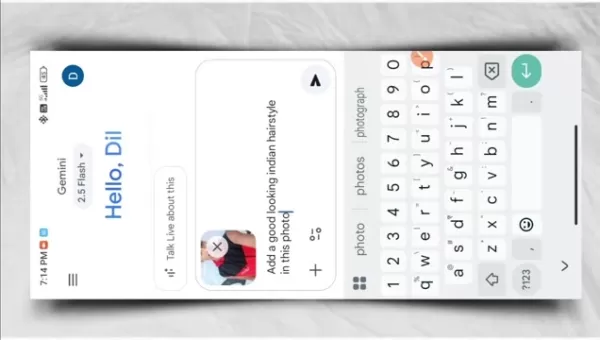
Selecting the Right Photo
The quality of your starting image is crucial for a successful transformation. Keep these tips in mind when choosing a photo:
- Choose a Clear Image: Select a high-resolution photo. Blurry or pixelated images will not produce optimal results.
- Ensure Good Lighting: Photos with even, natural light work best. Avoid harsh shadows or overexposed areas.
- Select a Face-Forward Image: A forward-facing portrait helps the AI accurately detect facial features for a seamless blend.
- Avoid Obstructions: Make sure the face and hair are clearly visible without hats, sunglasses, or other accessories blocking the view.
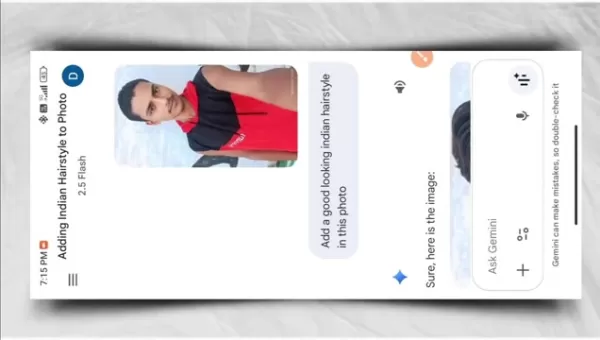
Providing the Correct Prompt
Gemini AI works by interpreting your instructions. To get the best results, provide clear and descriptive prompts:
- Accessing the Prompt Feature: Open your photo in Gemini AI and find the prompt or command field.
- Entering a Detailed Prompt: Be specific about the hairstyle change. For example, type "Add a stylish, modern bob haircut." or "Give this person long, wavy hair."
- Submitting the Prompt: Submit your prompt and wait a moment for the AI to process the request and generate the new look.
Here are some example prompts for inspiration:
- "Change the hairstyle to a sleek pixie cut."
- "Add voluminous, curly hair."
- "Give him a neat, business-appropriate haircut."
- "Try a vibrant red hair color."
- "Create a messy, textured bun."
Editing and Refining the Hairstyle
After the AI generates the initial change, you can use Gemini AI's editing tools to perfect the look:
- Adjusting Placement: Fine-tune the position of the new hairstyle on the head for a natural fit.
- Refining Edges: Smooth out any jagged edges to ensure the hairstyle blends seamlessly with the scalp and face.
- Color Correction: Adjust the hair color to match the lighting and skin tones in the original photo.
- Adding Details: Incorporate subtle details like highlights or texture to enhance realism.
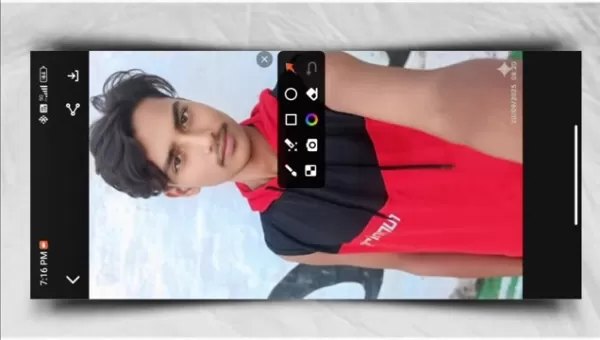
Saving and Downloading the Edited Photo
Once you are happy with the edit, save and download your new photo:
- Previewing the Final Result: Review the final image to ensure everything looks perfect.
- Saving the Photo: Save the edited version within the Gemini AI app's library.
- Downloading the Photo: Export the photo to your device's gallery, choosing your preferred resolution and file format.
- Sharing the Photo: Share your creation directly on social media or with friends from the app.
Additional Tips for Flawless Photo Transformations
Using AI Tools in Conjunction
Combining Gemini AI with other editing applications can take your results to the next level. Start with Gemini for the primary hairstyle change, then use other apps for refinements like skin retouching, color grading, and background adjustments.
- Skin Smoothing: Use specialized AI tools to achieve a flawless, natural-looking complexion.
- Color Correction: Adjust the overall color balance and vibrancy to make the image pop.
- Background Enhancement: Clean up or creatively alter the background to better highlight the subject.
Follow this workflow for optimal results:
- Start with Basic Enhancements: Make initial corrections to brightness and contrast in a general editing app.
- Apply AI Hairstyles: Import the photo into Gemini AI to apply and adjust the new hairstyle.
- Fine-Tune with Specific Tools: Use dedicated apps for final touches on skin and background.
- Compare and Adjust: Regularly compare the edited version with the original to maintain a natural look.
- Save and Share: Save the final image in high quality and share it across your platforms.
Troubleshooting Common Issues
Even with advanced AI, you might encounter some challenges. Here are common issues and their solutions:
- Inaccurate Hairstyle Placement: Ensure your original photo is clear and forward-facing. Use the manual adjustment tools to correct placement.
- Unnatural Look: Refine the edges and adjust color blending to make the hairstyle integrate more naturally.
- Poor Resolution: Always begin with a high-resolution source image to maintain quality.
- App Crashes: Check that your device meets the app's system requirements and keep it updated.
Additional tips for a smooth experience:
- Restart the App: A simple restart can often resolve minor glitches.
- Clear Cache: Clearing the app's cache can free up memory and improve performance.
- Reinstall the App: If problems continue, try uninstalling and reinstalling the latest version.
Understanding Gemini AI Pricing
Free vs. Premium Features
Gemini AI offers a free version with basic capabilities and a premium subscription that unlocks advanced features. The free version includes standard edits and hairstyle changes, while the premium tier provides high-resolution exports, advanced smoothing, and an ad-free experience.
Here’s a comparison of the two:
- Free Version: Basic hairstyle changes, standard editing tools, lower resolution exports, and includes advertisements.
- Premium Version: Advanced editing features, high-resolution downloads, no ads, priority support, and exclusive hairstyle options.
Subscription Plans
To access the full suite of features, consider a premium subscription. Plans are typically available on a monthly or annual basis.
- Monthly Plan: A flexible option for short-term needs or testing the premium features.
- Annual Plan: Offers the best value for frequent users, often at a discounted yearly rate.
Before subscribing, consider these points:
- Evaluate Your Needs: Identify which features are essential for your editing workflow.
- Check for Free Trials: Look for a free trial period to test the premium features before purchasing.
- Read Reviews: See what other users say about the app's performance and value.
- Compare Plans: Review the details of each plan to find the best fit for your budget and requirements.
The Pros
and Cons
of Gemini AI
Pros
User-Friendly Interface: Intuitive and easy to navigate for all skill levels.
High-Quality Transformations: Delivers realistic and natural-looking edits.
Versatile Features: A wide array of editing and customization tools.
Affordable Pricing: Competitive subscription plans offering good value.
Frequent Updates: Regular updates with new features and improvements.
Cons
Internet Dependency: Requires a stable internet connection for full functionality.
Learning Curve: Mastering all advanced features and prompts takes some time.
Potential for Over-Editing: It's possible to overuse tools, leading to an artificial look.
Privacy Concerns: As with many AI apps, users should be mindful of data privacy policies.
Exploring the Core Features of Gemini AI
Hairstyle Transformation
The hallmark feature of Gemini AI is its instant hairstyle transformation. The AI analyzes your photo and integrates a new hairstyle realistically. You can browse a vast library of styles, from timeless classics to the latest trends, to find the perfect match. Customization options allow you to adjust placement, color, and detail for a flawless finish.
To maximize this feature:
- Explore Different Styles: Don't be afraid to experiment with various looks.
- Use Detailed Prompts: Clear instructions help the AI understand your vision.
- Adjust Placement and Color: Fine-tune these elements for a natural blend.
Advanced Smoothing
Gemini AI's advanced smoothing tool enhances photo quality by reducing imperfections for a polished finish. The AI intelligently smooths skin and evens out textures while preserving important details, resulting in a professional-looking image.
Tips for best results:
- Apply Smoothing Sparingly: Overuse can make skin look plastic. Use a light touch.
- Adjust the Intensity: Control the strength of the smoothing effect.
- Focus on Problem Areas: Target specific blemishes for spot correction.
Realistic Integration
Gemini AI excels at realistically integrating new elements into photos. It analyzes the original image's lighting, shadows, and textures to ensure added elements like hairstyles blend seamlessly. This attention to detail creates authentic and believable transformations.
Key factors for realistic integration:
- Lighting Analysis: The AI matches the light source and direction.
- Shadow Generation: It creates natural shadows for depth.
- Texture Matching: Textures are blended to maintain consistency.
- Color Correction: Colors are adjusted to harmonize with the original photo.
Versatile Use Cases for Gemini AI
Social Media Enhancements
Gemini AI is perfect for creating standout social media content. From refreshing your profile picture to designing engaging posts, its tools for hairstyle changes and quality enhancements help you present your best self online and grow your audience.
Personal Branding
For professionals and entrepreneurs, a strong visual identity is key. Gemini AI helps create high-quality headshots and branded imagery that build credibility and trust with your audience, reinforcing your personal brand.
Creative Photo Projects
Beyond practical edits, Gemini AI is a powerful tool for creative exploration. Experiment with surreal styles, conceptual art, or simply have fun transforming your photos in imaginative ways, unlocking new avenues for artistic expression.
Frequently Asked Questions
Is Gemini AI available on all devices?
Yes, Gemini AI is available for both iOS and Android devices via their respective app stores. Please check that your device meets the minimum operating system and storage requirements. Keeping the app updated ensures you have the latest features and best performance.
Can I use Gemini AI offline?
Gemini AI requires an active internet connection because its powerful AI processing happens in the cloud. A stable Wi-Fi or mobile data connection is necessary for the app to function correctly. Offline mode is not supported for core features.
How often is Gemini AI updated?
The development team frequently releases updates to improve functionality, add new features, and fix bugs. Updates are typically rolled out every few weeks. Enable auto-updates in your device's app store settings to always have the latest version.
What type of prompts work best with Gemini AI?
Clear, specific, and descriptive prompts yield the best results. Instead of "change hair," try "add shoulder-length blonde hair with subtle waves." Detailed instructions help the AI accurately interpret your vision. Experiment to learn which phrasing works best.
Related Questions
How can I ensure my edited photos look natural?
To maintain a natural look, start with a high-quality, well-lit photo. Apply edits subtly and avoid over-processing. Pay close attention to blending new elements with the original photo's lighting and texture. Regularly compare your edit with the original to ensure changes are harmonious. Getting a second opinion can also help identify any areas that look artificial.
Are there any privacy concerns when using AI photo editing apps?
Yes, privacy is an important consideration. Always review an app's privacy policy to understand how your photos and data are handled. Use apps from reputable developers, be cautious with permissions, and delete photos from the app's servers after editing if possible. Stay informed about data usage practices to protect your privacy.
Related article
 Ctrip Business Travel Unveils AI Ecosystem with 7 Industry Agents and 17 Core Capabilities
Ctrip Business Travel has officially unveiled the "Ctrip Business Travel AI Ecosystem," leveraging large language models to fundamentally restructure corporate travel management. This comprehensive ecosystem addresses four core scenarios: travel arra
Stripe to Acquire OpenRouter as AI Model Routing Gains Momentum
Stripe has agreed to acquire OpenRouter, an AI model-routing platform that gives developers access to hundreds of models through a single interface. The deal adds model selection and routing to Stripe’s existing work around AI usage and token-based b
Former OpenAI Researcher Barrett Zoph Returns to Google to Support Gemini Development
Barret Zoph, who previously abruptly left and joined OpenAI due to a disagreement with Thinking Machines Lab CEO Miriam Mularati, has once again changed employers. Alphabet's Google announced that Zoph will return as Vice President of Research, bring
Related Special Topic Recommendations
Design & Art
Ctrip Business Travel Unveils AI Ecosystem with 7 Industry Agents and 17 Core Capabilities
Ctrip Business Travel has officially unveiled the "Ctrip Business Travel AI Ecosystem," leveraging large language models to fundamentally restructure corporate travel management. This comprehensive ecosystem addresses four core scenarios: travel arra
Stripe to Acquire OpenRouter as AI Model Routing Gains Momentum
Stripe has agreed to acquire OpenRouter, an AI model-routing platform that gives developers access to hundreds of models through a single interface. The deal adds model selection and routing to Stripe’s existing work around AI usage and token-based b
Former OpenAI Researcher Barrett Zoph Returns to Google to Support Gemini Development
Barret Zoph, who previously abruptly left and joined OpenAI due to a disagreement with Thinking Machines Lab CEO Miriam Mularati, has once again changed employers. Alphabet's Google announced that Zoph will return as Vice President of Research, bring
Related Special Topic Recommendations
Design & Art
 Top AI Illustration Tools: Create Editorial Scenes and Cover Art Faster
2026 Latest Top-rated AI Illustration Tools: Our curated list features the best powerfully designed tools for creating stunning editorial scenes and eye-catching cover art quickly. Each option has gone through rigorous real-world tests, offering a free vs paid comparison to help you find the perfect match for your workflow. Try these must-try solutions today to unlock your AI edge and boost your creative productivity. Explore now at XIX.AI.
 10 tools
 xix.ai
Education and Learning
Top AI Tutors for Exam Prep: Practice Math, Science, and English
xix.ai
Education and Learning
Top AI Tutors for Exam Prep: Practice Math, Science, and English
2026 Latest Top-Rated Best AI Tutors for Exam Prep are here on XIX.AI! Our curated list features powerful game-changing tools that offer free vs paid comparison, real-world tests, and weekly updated rankings. They help boost your writing efficiency, simplify complex topic learning, and unlock your academic potential. Explore now to Discover your perfect exam prep tool and Start creating today to Unlock your AI edge!
10 tools
xix.ai
Finance
AI Budget Planning Tools for Personal Money Management
2026 Latest Best Top-Rated AI Budget Planning Tools for Personal Money Management are here on XIX.AI! This curated collection features powerful, game-changing solutions that help you conduct real-world tests, understand spending habits, and create personalized plans to boost productivity. Enjoy a free vs paid comparison along with detailed rankings. Must-try tools designed to simplify money management and unlock your AI edge. Explore now!
11 tools
xix.ai
Health & Wellness
AI Sleep Tracking Assistants: Improve Recovery with Better Bedtime Habits
2026 Latest Best Top-Rated AI Sleep Tracking Assistants curated for ultimate recovery. This fully updated weekly guide features powerful tools that deliver real-world tests, free vs paid comparison, and detailed rankings to help you find the must-try solution that boosts sleep quality and supports better bedtime habits. Explore now at XIX.AI to Unlock your AI edge.
10 tools
xix.ai
Data Analysis
AI SQL Copilots for Product and Revenue Analytics
2026 Latest Best Top-Rated AI SQL Copilots for Product and Revenue Analytics! XIX.AI has curated a powerful, game-changing collection of must-try tools that undergo real-world tests through weekly updated rankings. These tools help users boost productivity significantly by accelerating data analysis, streamlining complex queries, and generating accurate insights to drive smarter business decisions. Explore now to Discover your perfect tool for unlocking your AI edge!
14 tools
xix.ai
Education and Learning
Best AI Homework Helpers That Teach: Learn Concepts, Not Just Answers
2026 Latest Best Top-Rated AI Homework Helpers That Teach Core Concepts Not Just Answers Powerful Tools for Students Must-Try Curated List Weekly Updated Free vs Paid Comparison Real-World Tests Accurate Rankings to Help You Unlock Your Full Learning Potential Explore now to Discover your perfect tool for smarter studying.
10 tools
xix.ai

 Comments (1)
0/500
Comments (1)
0/500
![HarperJones]()
AI로 머리 모양을 바꾸다니... 흥미롭네요! 2002년에 최초로 디지털 메이크업 툴이 나왔을 때도 다들 너무 대박이라고 했었죠. 저는 그때 당시 유행했던 메이크업 필터들을 많이 사용해 봤어요 ㅎㅎ 이 기사처럼 미래에 개인화 기술이 어떻게 변할지 궁금합니다. AI가 단순히 사진 편집을 넘어 실제 자신의 외모에 대한 만족도에 어떤 영향을 미칠지 약간 걱정되네요. 🧐
Personalizing photos is a major trend in today's digital world. Whether updating a social media profile or just having fun with different aesthetics, the demand for tools to change hairstyles and improve photo quality has never been higher. Artificial intelligence offers groundbreaking solutions, making these advanced edits simple and accessible. This guide explains how to use Gemini AI to instantly experiment with new hairstyles and achieve professional-grade photo enhancements. Thanks to its user-friendly interface and powerful algorithms, you can effortlessly create stunning, transformed images.
Key Points
Use Gemini AI to effortlessly change hairstyles in your photos.
Improve photo quality with AI-powered smoothing and editing tools.
Find out where to download Gemini AI and check its availability.
Follow a clear, step-by-step guide to transform your photos with Gemini AI.
Learn how to craft effective prompts to get the AI results you want.
Discover how AI makes professional-level photo editing achievable for everyone.
Get solutions for common issues to ensure the best results from Gemini AI.
Introduction to AI-Powered Photo Editing
The Rise of AI in Photo Editing
Artificial intelligence has transformed countless industries, and photo editing is a prime example. Advanced AI algorithms can now handle complex tasks like facial recognition, style application, and image enhancement with incredible speed and precision. This technology has democratized professional-grade editing, allowing anyone to create stunning visuals without specialized skills or costly software. By automating tedious adjustments, AI tools let users focus on creativity. As AI continues to evolve, we can expect even more sophisticated and intuitive editing solutions.
Introducing Gemini AI: Your Photo Editing Companion
Gemini AI is a standout tool for easily transforming your photos. Designed for accessibility, it lets you change hairstyles in an instant and perform a variety of edits with minimal effort. Whether you want to smooth skin tones, boost colors, or add artistic effects, Gemini AI offers a comprehensive set of features to meet your goals. Its smart algorithms and intuitive design make it ideal for both beginners and seasoned editors, opening up new avenues for photo personalization and enhancement. With Gemini AI, you can consistently make your photos look their absolute best.
Step-by-Step Guide to Changing Hairstyles with Gemini AI
Downloading and Installing Gemini AI
To begin transforming your photos, you first need to download and install the Gemini AI app. Follow these steps:
- Accessing the App Store: Gemini AI is available on both the Google Play Store and Apple App Store. Open the store on your mobile device.
- Searching for Gemini AI: Use the search function to find the official Gemini AI application.
- Downloading the App: Tap the download or install button. Ensure you have a stable internet connection and enough storage space.
- Installation: The app will install automatically. Follow any on-screen prompts to grant necessary permissions.
- Signing Up/Logging In: Open the app and create a new account or log in to an existing one to save your edits and access all features.
Selecting the Right Photo
The quality of your starting image is crucial for a successful transformation. Keep these tips in mind when choosing a photo:
- Choose a Clear Image: Select a high-resolution photo. Blurry or pixelated images will not produce optimal results.
- Ensure Good Lighting: Photos with even, natural light work best. Avoid harsh shadows or overexposed areas.
- Select a Face-Forward Image: A forward-facing portrait helps the AI accurately detect facial features for a seamless blend.
- Avoid Obstructions: Make sure the face and hair are clearly visible without hats, sunglasses, or other accessories blocking the view.
Providing the Correct Prompt
Gemini AI works by interpreting your instructions. To get the best results, provide clear and descriptive prompts:
- Accessing the Prompt Feature: Open your photo in Gemini AI and find the prompt or command field.
- Entering a Detailed Prompt: Be specific about the hairstyle change. For example, type "Add a stylish, modern bob haircut." or "Give this person long, wavy hair."
- Submitting the Prompt: Submit your prompt and wait a moment for the AI to process the request and generate the new look.
Here are some example prompts for inspiration:
- "Change the hairstyle to a sleek pixie cut."
- "Add voluminous, curly hair."
- "Give him a neat, business-appropriate haircut."
- "Try a vibrant red hair color."
- "Create a messy, textured bun."
Editing and Refining the Hairstyle
After the AI generates the initial change, you can use Gemini AI's editing tools to perfect the look:
- Adjusting Placement: Fine-tune the position of the new hairstyle on the head for a natural fit.
- Refining Edges: Smooth out any jagged edges to ensure the hairstyle blends seamlessly with the scalp and face.
- Color Correction: Adjust the hair color to match the lighting and skin tones in the original photo.
- Adding Details: Incorporate subtle details like highlights or texture to enhance realism.
Saving and Downloading the Edited Photo
Once you are happy with the edit, save and download your new photo:
- Previewing the Final Result: Review the final image to ensure everything looks perfect.
- Saving the Photo: Save the edited version within the Gemini AI app's library.
- Downloading the Photo: Export the photo to your device's gallery, choosing your preferred resolution and file format.
- Sharing the Photo: Share your creation directly on social media or with friends from the app.
Additional Tips for Flawless Photo Transformations
Using AI Tools in Conjunction
Combining Gemini AI with other editing applications can take your results to the next level. Start with Gemini for the primary hairstyle change, then use other apps for refinements like skin retouching, color grading, and background adjustments.
- Skin Smoothing: Use specialized AI tools to achieve a flawless, natural-looking complexion.
- Color Correction: Adjust the overall color balance and vibrancy to make the image pop.
- Background Enhancement: Clean up or creatively alter the background to better highlight the subject.
Follow this workflow for optimal results:
- Start with Basic Enhancements: Make initial corrections to brightness and contrast in a general editing app.
- Apply AI Hairstyles: Import the photo into Gemini AI to apply and adjust the new hairstyle.
- Fine-Tune with Specific Tools: Use dedicated apps for final touches on skin and background.
- Compare and Adjust: Regularly compare the edited version with the original to maintain a natural look.
- Save and Share: Save the final image in high quality and share it across your platforms.
Troubleshooting Common Issues
Even with advanced AI, you might encounter some challenges. Here are common issues and their solutions:
- Inaccurate Hairstyle Placement: Ensure your original photo is clear and forward-facing. Use the manual adjustment tools to correct placement.
- Unnatural Look: Refine the edges and adjust color blending to make the hairstyle integrate more naturally.
- Poor Resolution: Always begin with a high-resolution source image to maintain quality.
- App Crashes: Check that your device meets the app's system requirements and keep it updated.
Additional tips for a smooth experience:
- Restart the App: A simple restart can often resolve minor glitches.
- Clear Cache: Clearing the app's cache can free up memory and improve performance.
- Reinstall the App: If problems continue, try uninstalling and reinstalling the latest version.
Understanding Gemini AI Pricing
Free vs. Premium Features
Gemini AI offers a free version with basic capabilities and a premium subscription that unlocks advanced features. The free version includes standard edits and hairstyle changes, while the premium tier provides high-resolution exports, advanced smoothing, and an ad-free experience.
Here’s a comparison of the two:
- Free Version: Basic hairstyle changes, standard editing tools, lower resolution exports, and includes advertisements.
- Premium Version: Advanced editing features, high-resolution downloads, no ads, priority support, and exclusive hairstyle options.
Subscription Plans
To access the full suite of features, consider a premium subscription. Plans are typically available on a monthly or annual basis.
- Monthly Plan: A flexible option for short-term needs or testing the premium features.
- Annual Plan: Offers the best value for frequent users, often at a discounted yearly rate.
Before subscribing, consider these points:
- Evaluate Your Needs: Identify which features are essential for your editing workflow.
- Check for Free Trials: Look for a free trial period to test the premium features before purchasing.
- Read Reviews: See what other users say about the app's performance and value.
- Compare Plans: Review the details of each plan to find the best fit for your budget and requirements.
The Pros
and Cons
of Gemini AI
Pros
User-Friendly Interface: Intuitive and easy to navigate for all skill levels.
High-Quality Transformations: Delivers realistic and natural-looking edits.
Versatile Features: A wide array of editing and customization tools.
Affordable Pricing: Competitive subscription plans offering good value.
Frequent Updates: Regular updates with new features and improvements.
Cons
Internet Dependency: Requires a stable internet connection for full functionality.
Learning Curve: Mastering all advanced features and prompts takes some time.
Potential for Over-Editing: It's possible to overuse tools, leading to an artificial look.
Privacy Concerns: As with many AI apps, users should be mindful of data privacy policies.
Exploring the Core Features of Gemini AI
Hairstyle Transformation
The hallmark feature of Gemini AI is its instant hairstyle transformation. The AI analyzes your photo and integrates a new hairstyle realistically. You can browse a vast library of styles, from timeless classics to the latest trends, to find the perfect match. Customization options allow you to adjust placement, color, and detail for a flawless finish.
To maximize this feature:
- Explore Different Styles: Don't be afraid to experiment with various looks.
- Use Detailed Prompts: Clear instructions help the AI understand your vision.
- Adjust Placement and Color: Fine-tune these elements for a natural blend.
Advanced Smoothing
Gemini AI's advanced smoothing tool enhances photo quality by reducing imperfections for a polished finish. The AI intelligently smooths skin and evens out textures while preserving important details, resulting in a professional-looking image.
Tips for best results:
- Apply Smoothing Sparingly: Overuse can make skin look plastic. Use a light touch.
- Adjust the Intensity: Control the strength of the smoothing effect.
- Focus on Problem Areas: Target specific blemishes for spot correction.
Realistic Integration
Gemini AI excels at realistically integrating new elements into photos. It analyzes the original image's lighting, shadows, and textures to ensure added elements like hairstyles blend seamlessly. This attention to detail creates authentic and believable transformations.
Key factors for realistic integration:
- Lighting Analysis: The AI matches the light source and direction.
- Shadow Generation: It creates natural shadows for depth.
- Texture Matching: Textures are blended to maintain consistency.
- Color Correction: Colors are adjusted to harmonize with the original photo.
Versatile Use Cases for Gemini AI
Social Media Enhancements
Gemini AI is perfect for creating standout social media content. From refreshing your profile picture to designing engaging posts, its tools for hairstyle changes and quality enhancements help you present your best self online and grow your audience.
Personal Branding
For professionals and entrepreneurs, a strong visual identity is key. Gemini AI helps create high-quality headshots and branded imagery that build credibility and trust with your audience, reinforcing your personal brand.
Creative Photo Projects
Beyond practical edits, Gemini AI is a powerful tool for creative exploration. Experiment with surreal styles, conceptual art, or simply have fun transforming your photos in imaginative ways, unlocking new avenues for artistic expression.
Frequently Asked Questions
Is Gemini AI available on all devices?
Yes, Gemini AI is available for both iOS and Android devices via their respective app stores. Please check that your device meets the minimum operating system and storage requirements. Keeping the app updated ensures you have the latest features and best performance.
Can I use Gemini AI offline?
Gemini AI requires an active internet connection because its powerful AI processing happens in the cloud. A stable Wi-Fi or mobile data connection is necessary for the app to function correctly. Offline mode is not supported for core features.
How often is Gemini AI updated?
The development team frequently releases updates to improve functionality, add new features, and fix bugs. Updates are typically rolled out every few weeks. Enable auto-updates in your device's app store settings to always have the latest version.
What type of prompts work best with Gemini AI?
Clear, specific, and descriptive prompts yield the best results. Instead of "change hair," try "add shoulder-length blonde hair with subtle waves." Detailed instructions help the AI accurately interpret your vision. Experiment to learn which phrasing works best.
Related Questions
How can I ensure my edited photos look natural?
To maintain a natural look, start with a high-quality, well-lit photo. Apply edits subtly and avoid over-processing. Pay close attention to blending new elements with the original photo's lighting and texture. Regularly compare your edit with the original to ensure changes are harmonious. Getting a second opinion can also help identify any areas that look artificial.
Are there any privacy concerns when using AI photo editing apps?
Yes, privacy is an important consideration. Always review an app's privacy policy to understand how your photos and data are handled. Use apps from reputable developers, be cautious with permissions, and delete photos from the app's servers after editing if possible. Stay informed about data usage practices to protect your privacy.








 Ctrip Business Travel Unveils AI Ecosystem with 7 Industry Agents and 17 Core Capabilities
Ctrip Business Travel has officially unveiled the "Ctrip Business Travel AI Ecosystem," leveraging large language models to fundamentally restructure corporate travel management. This comprehensive ecosystem addresses four core scenarios: travel arra
Ctrip Business Travel Unveils AI Ecosystem with 7 Industry Agents and 17 Core Capabilities
Ctrip Business Travel has officially unveiled the "Ctrip Business Travel AI Ecosystem," leveraging large language models to fundamentally restructure corporate travel management. This comprehensive ecosystem addresses four core scenarios: travel arra
 Stripe to Acquire OpenRouter as AI Model Routing Gains Momentum
Stripe has agreed to acquire OpenRouter, an AI model-routing platform that gives developers access to hundreds of models through a single interface. The deal adds model selection and routing to Stripe’s existing work around AI usage and token-based b
Stripe to Acquire OpenRouter as AI Model Routing Gains Momentum
Stripe has agreed to acquire OpenRouter, an AI model-routing platform that gives developers access to hundreds of models through a single interface. The deal adds model selection and routing to Stripe’s existing work around AI usage and token-based b
 Former OpenAI Researcher Barrett Zoph Returns to Google to Support Gemini Development
Barret Zoph, who previously abruptly left and joined OpenAI due to a disagreement with Thinking Machines Lab CEO Miriam Mularati, has once again changed employers. Alphabet's Google announced that Zoph will return as Vice President of Research, bring
Former OpenAI Researcher Barrett Zoph Returns to Google to Support Gemini Development
Barret Zoph, who previously abruptly left and joined OpenAI due to a disagreement with Thinking Machines Lab CEO Miriam Mularati, has once again changed employers. Alphabet's Google announced that Zoph will return as Vice President of Research, bring

2026 Latest Top-rated AI Illustration Tools: Our curated list features the best powerfully designed tools for creating stunning editorial scenes and eye-catching cover art quickly. Each option has gone through rigorous real-world tests, offering a free vs paid comparison to help you find the perfect match for your workflow. Try these must-try solutions today to unlock your AI edge and boost your creative productivity. Explore now at XIX.AI.
10 tools
xix.ai

2026 Latest Top-Rated Best AI Tutors for Exam Prep are here on XIX.AI! Our curated list features powerful game-changing tools that offer free vs paid comparison, real-world tests, and weekly updated rankings. They help boost your writing efficiency, simplify complex topic learning, and unlock your academic potential. Explore now to Discover your perfect exam prep tool and Start creating today to Unlock your AI edge!
10 tools
xix.ai

2026 Latest Best Top-Rated AI Budget Planning Tools for Personal Money Management are here on XIX.AI! This curated collection features powerful, game-changing solutions that help you conduct real-world tests, understand spending habits, and create personalized plans to boost productivity. Enjoy a free vs paid comparison along with detailed rankings. Must-try tools designed to simplify money management and unlock your AI edge. Explore now!
11 tools
xix.ai

2026 Latest Best Top-Rated AI Sleep Tracking Assistants curated for ultimate recovery. This fully updated weekly guide features powerful tools that deliver real-world tests, free vs paid comparison, and detailed rankings to help you find the must-try solution that boosts sleep quality and supports better bedtime habits. Explore now at XIX.AI to Unlock your AI edge.
10 tools
xix.ai

2026 Latest Best Top-Rated AI SQL Copilots for Product and Revenue Analytics! XIX.AI has curated a powerful, game-changing collection of must-try tools that undergo real-world tests through weekly updated rankings. These tools help users boost productivity significantly by accelerating data analysis, streamlining complex queries, and generating accurate insights to drive smarter business decisions. Explore now to Discover your perfect tool for unlocking your AI edge!
14 tools
xix.ai

2026 Latest Best Top-Rated AI Homework Helpers That Teach Core Concepts Not Just Answers Powerful Tools for Students Must-Try Curated List Weekly Updated Free vs Paid Comparison Real-World Tests Accurate Rankings to Help You Unlock Your Full Learning Potential Explore now to Discover your perfect tool for smarter studying.
10 tools
xix.ai

AI로 머리 모양을 바꾸다니... 흥미롭네요! 2002년에 최초로 디지털 메이크업 툴이 나왔을 때도 다들 너무 대박이라고 했었죠. 저는 그때 당시 유행했던 메이크업 필터들을 많이 사용해 봤어요 ㅎㅎ 이 기사처럼 미래에 개인화 기술이 어떻게 변할지 궁금합니다. AI가 단순히 사진 편집을 넘어 실제 자신의 외모에 대한 만족도에 어떤 영향을 미칠지 약간 걱정되네요. 🧐












