


 Home
HomeTexTalky 2025 Full Review: Advanced Realistic AI Text-to-Speech Voice Generator
In the dynamic world of content creation, artificial intelligence (AI) tools have become indispensable partners. TexTalky, an AI-powered text-to-speech application, stands out for its capacity to produce remarkably lifelike voices and simplify audio transcription. This detailed review examines TexTalky's primary features, performance, and overall value, offering a thorough assessment for creators seeking effective, high-quality audio solutions.
Key Points
TexTalky is a flexible AI tool for text-to-speech conversion and audio transcription.
It provides a selection of natural-sounding voices and supports numerous languages.
Core functionalities encompass text-to-speech conversion, voice personalization, and transcription services.
The application delivers consistent performance suitable for both personal and professional projects.
Pricing includes a free tier alongside premium plans for extended capabilities.
An exclusive promotional code offers discounted lifetime access.
TexTalky: An AI Text-to-Speech Overview
What is TexTalky?
TexTalky
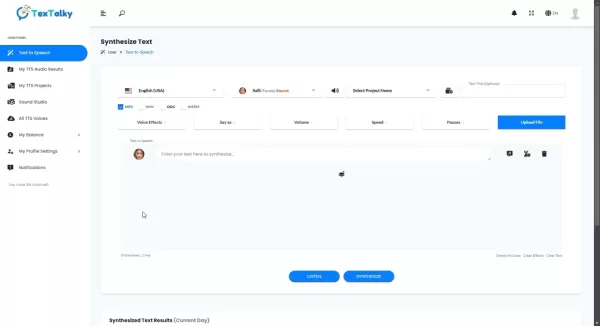
is a multifaceted application designed to convert written text into spoken audio. It enables users to effortlessly generate speech from text and transcribe audio files into written format. This AI-driven platform has gained recognition for its potential to accelerate content production and improve accessibility. Whether you are a creator, educator, or business professional, TexTalky delivers a comprehensive set of tools to address diverse audio requirements. Utilizing sophisticated AI algorithms, TexTalky creates authentic, human-like voices that engage listeners and elevate your content. With support for a vast array of languages, the app facilitates worldwide communication and helps overcome language obstacles. Its intuitive interface ensures a smooth experience for users of all skill levels.
Primary advantages of using TexTalky:
- Improved Content Accessibility: Transform written material into audio, making it available to a wider audience, including those with visual impairments.
- Efficient Content Production: Quickly produce high-quality voiceovers for videos, presentations, and other media, saving valuable time and effort.
- Enhanced Communication: Connect with global audiences using multiple languages and accents.
- Compelling Voiceovers: Generate realistic, natural-sounding audio that captures audience attention and boosts engagement.
TexTalky integrates with:
- AWS
- Azure
- Google Cloud
- IBM
- OpenAI
Exploring TexTalky's Text-to-Speech Features
Realistic Voice Generation
A defining feature of TexTalky
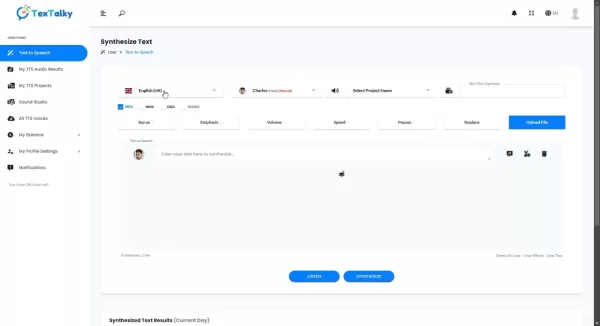
is its ability to produce convincingly natural voices. The application offers a wide variety of voice profiles, each with distinct characteristics and accents. Users can fine-tune attributes such as speaking rate and pitch to match the specific tone of their project. This degree of personalization guarantees that the final audio output aligns perfectly with the content's intended style. Move beyond the robotic, monotone delivery of older text-to-speech systems; TexTalky animates your text with voices that sound genuinely human. This feature is especially useful for creating captivating narrations for videos, podcasts, and similar media. With TexTalky, you can easily produce audio that resonates with listeners and makes a strong impact.
Advantages of realistic voice generation:
- Greater Listener Engagement: Natural voices are more effective at capturing and holding audience interest.
- Increased Perceived Quality: Professional-sounding narration enhances the credibility and persuasiveness of your content.
- Superior Accessibility: Lifelike voices offer a more pleasant listening experience for individuals with visual impairments, promoting inclusiveness.
Available voice customization settings:
- Speech Rate Adjustment
- Pitch Modification
- Volume Control
- Emphasis and Intonation Settings
Multi-Language Support
TexTalky
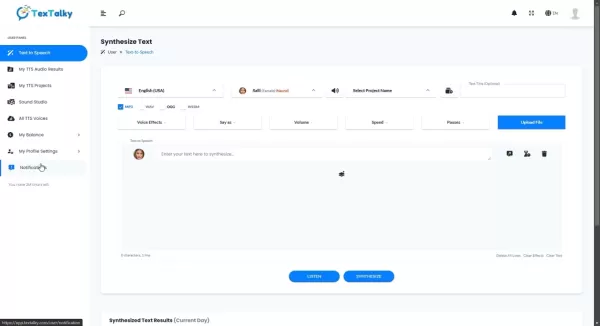
serves a worldwide user base with its extensive support for multiple languages. The app accommodates over 140 languages and accents, allowing you to communicate effectively with diverse audiences. This capability is essential for businesses and creators aiming to grow their international presence. Whether you require voiceovers in Spanish, French, Mandarin, or another language, TexTalky provides the necessary support. By removing language barriers, the app enables fluid communication and fosters cross-cultural connections.
Languages supported include:
- English (various accents)
- Spanish
- French
- German
- Mandarin Chinese
- Japanese
- Arabic
- Hindi
- And many others
The application is built for ease of use and efficiency, supporting a broad spectrum of languages, making it well-suited for various personal and professional applications.
Using TexTalky: A Step-by-Step Guide
Text-to-Speech Conversion
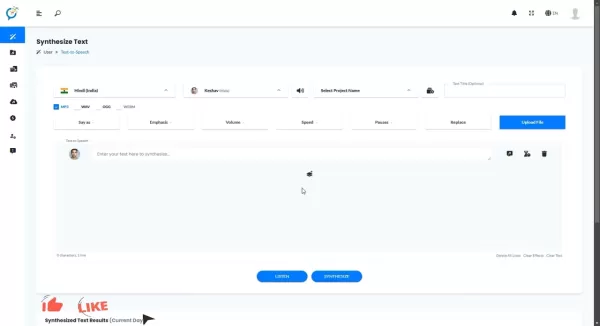
Converting text to speech with TexTalky
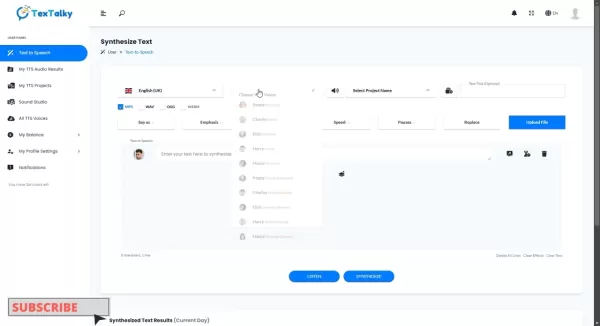
involves a simple process:
- Input Your Text: Copy and paste or type your text into the provided field.
- Choose Language and Voice: Select your desired language and voice from the available options.
- Customize Settings: Adjust parameters like speed and pitch to suit your preferences.
- Generate Audio: Click the 'Synthesize' button to create the audio file.
- Download the File: Save the generated audio in your preferred format.
For example:
- Copy this sample text: 'Explore examples of natural-sounding AI voiceovers provided by TexTalky, suitable for a wide range of applications including promotional and explainer videos.'
- Select 'English (UK)' as the language and 'Amy (Female)' as the voice.
- Click 'Synthesize'.
- Preview and download the resulting MP3 file.
TexTalky Pricing and Plans
Overview of TexTalky's Subscription Options
TexTalky provides a variety of pricing tiers
designed to meet different needs and budgets. These include a free plan with basic features and premium subscriptions that unlock full functionality. The paid plans are tailored for individual users, small teams, and larger enterprises.
TexTalky's pricing is competitive within the market, offering strong value for regular users.
Here is an overview of the current plans:
- Explorer: $9 per month for up to 2 hours of voiceover audio.
- Plus: $24 per month for up to 8 hours of voiceover audio.
- Pro: $49 per month for up to 20 hours of voiceover audio.
- Lifetime Deal - Plus: $59 for lifetime access
- Lifetime Deal - Unlimited: $119 for lifetime access
Notable features included in premium plans are:
- Access to All Supported Languages
- Priority Support
- Sound Studio Access
- AI Voice Cloning
- AI Image Generation
- Commercial Usage Rights
TexTalky: Weighing the Pros and Cons
Pros
Authentic, natural-sounding voice output
Comprehensive multi-language support
Flexible voice customization options
Intuitive and easy-to-use interface
Cost-effective pricing structure
Integrated sound editing studio
AI-powered voice cloning capability
Cons
Free version has restricted features
Requires a stable internet connection
Onboarding process could be improved
TexTalky's Core Features
Key Functionalities of TexTalky
TexTalky includes a robust suite of features aimed at empowering creators and improving audio accessibility. Its central capabilities are:
- **Text-to-Speech Conversion
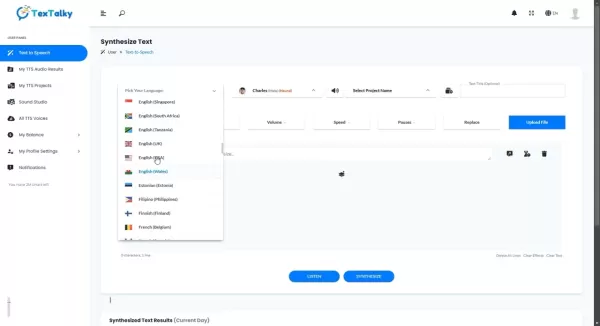
:** Transform written text into spoken audio using realistic AI-generated voices.
- Multi-Language Support : Utilize over 140 languages and accents for global reach.
- Voice Customization : Modify speed, pitch, and other vocal attributes to fit your project.
- Audio Transcription: Accurately convert audio files into text transcripts.
- Sound Studio: Edit and refine audio files with built-in editing tools.
- AI Voice Cloning: Create a digital replica of your own voice for unique narrations.
Additional functionalities include:
- AI Writing Assistance
- AI Image Creation
- AI Chatbot Features
Diverse Use Cases for TexTalky
Applications of TexTalky in Different Fields
TexTalky's adaptability makes it applicable across numerous sectors. Prominent use cases involve:
- E-learning: Convert educational materials, lectures, and guides into engaging audio formats to support different learning styles.
- Marketing: Develop compelling voiceovers for ads, product demos, and promotional content.
- Video Production: Generate professional narrations for explainer videos, corporate training, and other visual media.
- Podcasting: Start a podcast easily with AI-generated narration and audio content.
- Audiobook Production: Transform books, manuals, and other texts into immersive listening experiences.
- IVR Systems: Integrate TexTalky into interactive voice response systems for clear, dynamic customer prompts.
- Customer Support: Improve customer service interactions with natural-sounding automated replies.
Frequently Asked Questions About TexTalky
What is TexTalky?
TexTalky is an AI-based text-to-speech application that converts written text into spoken words and transcribes audio into text. It features a wide selection of realistic voices and supports many languages.
How many languages does TexTalky support?
TexTalky supports more than 140 languages and accents, facilitating communication with a global audience.
Does TexTalky offer a free version?
Yes, a free version of TexTalky is available with core features. Paid subscriptions offer expanded access and advanced tools.
Can I customize the voice settings in TexTalky?
Absolutely. TexTalky allows users to adjust voice settings including speed, pitch, and volume to achieve the desired audio output.
How can I get a discount on TexTalky's lifetime subscription?
Request a special offer by leaving a comment below, and a promotional code for a discounted lifetime subscription will be sent to you.
Related Questions About AI Text-to-Speech Technology
What are the benefits of using AI text-to-speech technology?
AI text-to-speech technology provides significant advantages, such as improved content accessibility, faster content production, better communication, and engaging audio narration. It allows creators to efficiently produce high-quality audio that reaches a broader audience.Benefits of AI Text-to-Speech:AccessibilityEfficiencyEngagement
Related article
 Meta Removes AI Photo Editing Feature Following User Backlash
Meta, the social media giant, is once again embroiled in a public debate regarding the delicate balance between artificial intelligence and user privacy. According to TechCrunch, Meta’s Superintelligence Labs introduced a new AI image generator, Muse
DeepMind CEO Hassabis: I sleep six hours a day, usually feel energetic around 1 a.m.
Fortune recently featured an interview with Demis Hassabis, CEO of Google DeepMind, revealing his unconventional approach to rest and productivity. Hassabis disclosed that he sleeps very little, structuring his waking hours into two distinct work blo
OpenAI, Anthropic Vie for Market Share Despite Revenue Shortfalls
Despite recent reports suggesting OpenAI missed revenue targets, creating pressure on tech stocks this Tuesday, private AI lab investors remain resilient. Seasoned backers have confirmed they will not reduce investment despite negative media coverage
Related Special Topic Recommendations
Video creation
Meta Removes AI Photo Editing Feature Following User Backlash
Meta, the social media giant, is once again embroiled in a public debate regarding the delicate balance between artificial intelligence and user privacy. According to TechCrunch, Meta’s Superintelligence Labs introduced a new AI image generator, Muse
DeepMind CEO Hassabis: I sleep six hours a day, usually feel energetic around 1 a.m.
Fortune recently featured an interview with Demis Hassabis, CEO of Google DeepMind, revealing his unconventional approach to rest and productivity. Hassabis disclosed that he sleeps very little, structuring his waking hours into two distinct work blo
OpenAI, Anthropic Vie for Market Share Despite Revenue Shortfalls
Despite recent reports suggesting OpenAI missed revenue targets, creating pressure on tech stocks this Tuesday, private AI lab investors remain resilient. Seasoned backers have confirmed they will not reduce investment despite negative media coverage
Related Special Topic Recommendations
Video creation
 AI Short-Form Video Hook Generators for Reels, Shorts, and Product Launch Campaigns
2026 Latest Best AI Short-Form Video Hook Generators for Reels Shorts and Product Launch Campaigns! XIX.AI curates top-rated powerful game-changing tools that deliver must-try results through real-world tests. This weekly updated page offers free vs paid comparison rankings to help you find the perfect solution for boosting content creativity and productivity. Explore now to Unlock your AI edge!
 11 tools
 xix.ai
writing
AI Article Outline Tools for Long Form Writing
xix.ai
writing
AI Article Outline Tools for Long Form Writing
2026 Latest Best Top-Rated AI Article Outline Tools for Long Form Writing! This curated collection features powerful, game-changing tools that deliver accurate, structured outlines with real-world tests to boost writing efficiency significantly. XIX.AI is part of this elite selection. Get a free vs paid comparison to help you choose the perfect tool. Explore now and Unlock your AI edge!
9 tools
xix.ai
chatbot
Best AI Roleplay Chat Apps for Language Practice, Interview Prep, and Daily Fluency
2026 Latest Best Top-rated AI Roleplay Chat Apps for Language Practice, Interview Prep, and Daily Fluency! XIX.AI curates a powerful game-changing collection that offers free vs paid comparison, real-world tests, and updated rankings weekly. These must-try tools help you boost writing skills, overcome fluency challenges, and improve communication efficiency across all daily scenarios. Explore now to discover your perfect tool for language growth!
10 tools
xix.ai
Music composition
AI Stem Separation Tools for Remix Production, Sampling Prep, and Karaoke Masters
2026 Latest Best Top-rated AI Stem Separation Tools Curated for Remix Production, Sampling Prep, and Karaoke Masters. These powerful game-changing tools offer real-world tests to deliver precise audio isolation, boosting productivity significantly. XIX.AI provides a weekly updated free vs paid comparison guide to help you find the must-try solution that suits your needs. Explore now to unlock your AI edge.
8 tools
xix.ai
Data Analysis
AI SQL Copilots for Revenue Dashboards, Funnel Analysis, and Product Metrics
2026 Latest Best AI SQL Copilots Ranked Top-Rated! XIX.AI curates a powerful game-changing collection for weekly updated real-world tests. These must-try tools help you generate accurate revenue dashboards, analyze sales funnels, and track product metrics swiftly, boosting productivity massively. Explore now to Discover your perfect tool for data-driven decision making! 238 characters
9 tools
xix.ai
Music composition
Best AI Melody Writing Tools for Song Drafts
2026 Latest Best Top-Rated AI Melody Writing Tools for Song Drafts! XIX.AI has curated a highly powerful game-changing collection that goes through rigorous real-world tests to deliver the best writing experience. You can find detailed free vs paid comparisons, accurate rankings, and must-try options designed to help you create stunning song drafts effortlessly and boost your creative productivity significantly. Explore now to discover your perfect tool!
8 tools
xix.ai

 Comments (1)
0/500
Comments (1)
0/500
![EmmaTurner]()
この記事を読んで、AI音声合成の進化に驚きました。特にTexTalkyのリアルな声質は、ポッドキャスト制作に革命をもたらす可能性があると感じます。でも、あまりにも自然すぎて、詐欺や偽情報に悪用されるリスクも心配ですね。AI倫理についてもっと議論が必要な気がします。🤔
In the dynamic world of content creation, artificial intelligence (AI) tools have become indispensable partners. TexTalky, an AI-powered text-to-speech application, stands out for its capacity to produce remarkably lifelike voices and simplify audio transcription. This detailed review examines TexTalky's primary features, performance, and overall value, offering a thorough assessment for creators seeking effective, high-quality audio solutions.
Key Points
TexTalky is a flexible AI tool for text-to-speech conversion and audio transcription.
It provides a selection of natural-sounding voices and supports numerous languages.
Core functionalities encompass text-to-speech conversion, voice personalization, and transcription services.
The application delivers consistent performance suitable for both personal and professional projects.
Pricing includes a free tier alongside premium plans for extended capabilities.
An exclusive promotional code offers discounted lifetime access.
TexTalky: An AI Text-to-Speech Overview
What is TexTalky?
TexTalky
is a multifaceted application designed to convert written text into spoken audio. It enables users to effortlessly generate speech from text and transcribe audio files into written format. This AI-driven platform has gained recognition for its potential to accelerate content production and improve accessibility. Whether you are a creator, educator, or business professional, TexTalky delivers a comprehensive set of tools to address diverse audio requirements. Utilizing sophisticated AI algorithms, TexTalky creates authentic, human-like voices that engage listeners and elevate your content. With support for a vast array of languages, the app facilitates worldwide communication and helps overcome language obstacles. Its intuitive interface ensures a smooth experience for users of all skill levels.
Primary advantages of using TexTalky:
- Improved Content Accessibility: Transform written material into audio, making it available to a wider audience, including those with visual impairments.
- Efficient Content Production: Quickly produce high-quality voiceovers for videos, presentations, and other media, saving valuable time and effort.
- Enhanced Communication: Connect with global audiences using multiple languages and accents.
- Compelling Voiceovers: Generate realistic, natural-sounding audio that captures audience attention and boosts engagement.
TexTalky integrates with:
- AWS
- Azure
- Google Cloud
- IBM
- OpenAI
Exploring TexTalky's Text-to-Speech Features
Realistic Voice Generation
A defining feature of TexTalky
is its ability to produce convincingly natural voices. The application offers a wide variety of voice profiles, each with distinct characteristics and accents. Users can fine-tune attributes such as speaking rate and pitch to match the specific tone of their project. This degree of personalization guarantees that the final audio output aligns perfectly with the content's intended style. Move beyond the robotic, monotone delivery of older text-to-speech systems; TexTalky animates your text with voices that sound genuinely human. This feature is especially useful for creating captivating narrations for videos, podcasts, and similar media. With TexTalky, you can easily produce audio that resonates with listeners and makes a strong impact.
Advantages of realistic voice generation:
- Greater Listener Engagement: Natural voices are more effective at capturing and holding audience interest.
- Increased Perceived Quality: Professional-sounding narration enhances the credibility and persuasiveness of your content.
- Superior Accessibility: Lifelike voices offer a more pleasant listening experience for individuals with visual impairments, promoting inclusiveness.
Available voice customization settings:
- Speech Rate Adjustment
- Pitch Modification
- Volume Control
- Emphasis and Intonation Settings
Multi-Language Support
TexTalky
serves a worldwide user base with its extensive support for multiple languages. The app accommodates over 140 languages and accents, allowing you to communicate effectively with diverse audiences. This capability is essential for businesses and creators aiming to grow their international presence. Whether you require voiceovers in Spanish, French, Mandarin, or another language, TexTalky provides the necessary support. By removing language barriers, the app enables fluid communication and fosters cross-cultural connections.
Languages supported include:
- English (various accents)
- Spanish
- French
- German
- Mandarin Chinese
- Japanese
- Arabic
- Hindi
- And many others
The application is built for ease of use and efficiency, supporting a broad spectrum of languages, making it well-suited for various personal and professional applications.
Using TexTalky: A Step-by-Step Guide
Text-to-Speech Conversion
Converting text to speech with TexTalky
involves a simple process:
- Input Your Text: Copy and paste or type your text into the provided field.
- Choose Language and Voice: Select your desired language and voice from the available options.
- Customize Settings: Adjust parameters like speed and pitch to suit your preferences.
- Generate Audio: Click the 'Synthesize' button to create the audio file.
- Download the File: Save the generated audio in your preferred format.
For example:
- Copy this sample text: 'Explore examples of natural-sounding AI voiceovers provided by TexTalky, suitable for a wide range of applications including promotional and explainer videos.'
- Select 'English (UK)' as the language and 'Amy (Female)' as the voice.
- Click 'Synthesize'.
- Preview and download the resulting MP3 file.
TexTalky Pricing and Plans
Overview of TexTalky's Subscription Options
TexTalky provides a variety of pricing tiers
designed to meet different needs and budgets. These include a free plan with basic features and premium subscriptions that unlock full functionality. The paid plans are tailored for individual users, small teams, and larger enterprises.
TexTalky's pricing is competitive within the market, offering strong value for regular users.
Here is an overview of the current plans:
- Explorer: $9 per month for up to 2 hours of voiceover audio.
- Plus: $24 per month for up to 8 hours of voiceover audio.
- Pro: $49 per month for up to 20 hours of voiceover audio.
- Lifetime Deal - Plus: $59 for lifetime access
- Lifetime Deal - Unlimited: $119 for lifetime access
Notable features included in premium plans are:
- Access to All Supported Languages
- Priority Support
- Sound Studio Access
- AI Voice Cloning
- AI Image Generation
- Commercial Usage Rights
TexTalky: Weighing the Pros and Cons
Pros
Authentic, natural-sounding voice output
Comprehensive multi-language support
Flexible voice customization options
Intuitive and easy-to-use interface
Cost-effective pricing structure
Integrated sound editing studio
AI-powered voice cloning capability
Cons
Free version has restricted features
Requires a stable internet connection
Onboarding process could be improved
TexTalky's Core Features
Key Functionalities of TexTalky
TexTalky includes a robust suite of features aimed at empowering creators and improving audio accessibility. Its central capabilities are:
- **Text-to-Speech Conversion
:** Transform written text into spoken audio using realistic AI-generated voices.
- Multi-Language Support : Utilize over 140 languages and accents for global reach.
- Voice Customization : Modify speed, pitch, and other vocal attributes to fit your project.
- Audio Transcription: Accurately convert audio files into text transcripts.
- Sound Studio: Edit and refine audio files with built-in editing tools.
- AI Voice Cloning: Create a digital replica of your own voice for unique narrations.
Additional functionalities include:
- AI Writing Assistance
- AI Image Creation
- AI Chatbot Features
Diverse Use Cases for TexTalky
Applications of TexTalky in Different Fields
TexTalky's adaptability makes it applicable across numerous sectors. Prominent use cases involve:
- E-learning: Convert educational materials, lectures, and guides into engaging audio formats to support different learning styles.
- Marketing: Develop compelling voiceovers for ads, product demos, and promotional content.
- Video Production: Generate professional narrations for explainer videos, corporate training, and other visual media.
- Podcasting: Start a podcast easily with AI-generated narration and audio content.
- Audiobook Production: Transform books, manuals, and other texts into immersive listening experiences.
- IVR Systems: Integrate TexTalky into interactive voice response systems for clear, dynamic customer prompts.
- Customer Support: Improve customer service interactions with natural-sounding automated replies.
Frequently Asked Questions About TexTalky
What is TexTalky?
TexTalky is an AI-based text-to-speech application that converts written text into spoken words and transcribes audio into text. It features a wide selection of realistic voices and supports many languages.
How many languages does TexTalky support?
TexTalky supports more than 140 languages and accents, facilitating communication with a global audience.
Does TexTalky offer a free version?
Yes, a free version of TexTalky is available with core features. Paid subscriptions offer expanded access and advanced tools.
Can I customize the voice settings in TexTalky?
Absolutely. TexTalky allows users to adjust voice settings including speed, pitch, and volume to achieve the desired audio output.
How can I get a discount on TexTalky's lifetime subscription?
Request a special offer by leaving a comment below, and a promotional code for a discounted lifetime subscription will be sent to you.
Related Questions About AI Text-to-Speech Technology
What are the benefits of using AI text-to-speech technology?
AI text-to-speech technology provides significant advantages, such as improved content accessibility, faster content production, better communication, and engaging audio narration. It allows creators to efficiently produce high-quality audio that reaches a broader audience.Benefits of AI Text-to-Speech:AccessibilityEfficiencyEngagement








 Meta Removes AI Photo Editing Feature Following User Backlash
Meta, the social media giant, is once again embroiled in a public debate regarding the delicate balance between artificial intelligence and user privacy. According to TechCrunch, Meta’s Superintelligence Labs introduced a new AI image generator, Muse
Meta Removes AI Photo Editing Feature Following User Backlash
Meta, the social media giant, is once again embroiled in a public debate regarding the delicate balance between artificial intelligence and user privacy. According to TechCrunch, Meta’s Superintelligence Labs introduced a new AI image generator, Muse
 DeepMind CEO Hassabis: I sleep six hours a day, usually feel energetic around 1 a.m.
Fortune recently featured an interview with Demis Hassabis, CEO of Google DeepMind, revealing his unconventional approach to rest and productivity. Hassabis disclosed that he sleeps very little, structuring his waking hours into two distinct work blo
DeepMind CEO Hassabis: I sleep six hours a day, usually feel energetic around 1 a.m.
Fortune recently featured an interview with Demis Hassabis, CEO of Google DeepMind, revealing his unconventional approach to rest and productivity. Hassabis disclosed that he sleeps very little, structuring his waking hours into two distinct work blo
 OpenAI, Anthropic Vie for Market Share Despite Revenue Shortfalls
Despite recent reports suggesting OpenAI missed revenue targets, creating pressure on tech stocks this Tuesday, private AI lab investors remain resilient. Seasoned backers have confirmed they will not reduce investment despite negative media coverage
OpenAI, Anthropic Vie for Market Share Despite Revenue Shortfalls
Despite recent reports suggesting OpenAI missed revenue targets, creating pressure on tech stocks this Tuesday, private AI lab investors remain resilient. Seasoned backers have confirmed they will not reduce investment despite negative media coverage

2026 Latest Best AI Short-Form Video Hook Generators for Reels Shorts and Product Launch Campaigns! XIX.AI curates top-rated powerful game-changing tools that deliver must-try results through real-world tests. This weekly updated page offers free vs paid comparison rankings to help you find the perfect solution for boosting content creativity and productivity. Explore now to Unlock your AI edge!
11 tools
xix.ai

2026 Latest Best Top-Rated AI Article Outline Tools for Long Form Writing! This curated collection features powerful, game-changing tools that deliver accurate, structured outlines with real-world tests to boost writing efficiency significantly. XIX.AI is part of this elite selection. Get a free vs paid comparison to help you choose the perfect tool. Explore now and Unlock your AI edge!
9 tools
xix.ai

2026 Latest Best Top-rated AI Roleplay Chat Apps for Language Practice, Interview Prep, and Daily Fluency! XIX.AI curates a powerful game-changing collection that offers free vs paid comparison, real-world tests, and updated rankings weekly. These must-try tools help you boost writing skills, overcome fluency challenges, and improve communication efficiency across all daily scenarios. Explore now to discover your perfect tool for language growth!
10 tools
xix.ai

2026 Latest Best Top-rated AI Stem Separation Tools Curated for Remix Production, Sampling Prep, and Karaoke Masters. These powerful game-changing tools offer real-world tests to deliver precise audio isolation, boosting productivity significantly. XIX.AI provides a weekly updated free vs paid comparison guide to help you find the must-try solution that suits your needs. Explore now to unlock your AI edge.
8 tools
xix.ai

2026 Latest Best AI SQL Copilots Ranked Top-Rated! XIX.AI curates a powerful game-changing collection for weekly updated real-world tests. These must-try tools help you generate accurate revenue dashboards, analyze sales funnels, and track product metrics swiftly, boosting productivity massively. Explore now to Discover your perfect tool for data-driven decision making! 238 characters
9 tools
xix.ai

2026 Latest Best Top-Rated AI Melody Writing Tools for Song Drafts! XIX.AI has curated a highly powerful game-changing collection that goes through rigorous real-world tests to deliver the best writing experience. You can find detailed free vs paid comparisons, accurate rankings, and must-try options designed to help you create stunning song drafts effortlessly and boost your creative productivity significantly. Explore now to discover your perfect tool!
8 tools
xix.ai

この記事を読んで、AI音声合成の進化に驚きました。特にTexTalkyのリアルな声質は、ポッドキャスト制作に革命をもたらす可能性があると感じます。でも、あまりにも自然すぎて、詐欺や偽情報に悪用されるリスクも心配ですね。AI倫理についてもっと議論が必要な気がします。🤔












