


 Home
HomeSmart Shopping Assistant Enhanced by AlloyDB and Vertex AI
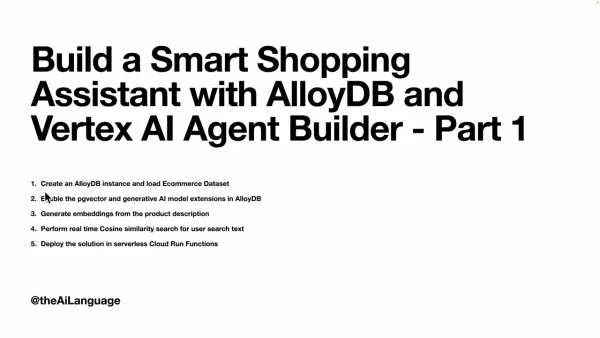
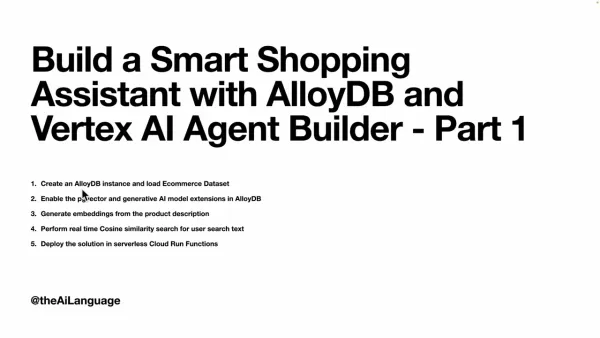
In the bustling world of e-commerce, standing out requires more than just a good product lineup. It's about creating a shopping experience that feels personal and efficient. In this guide, we'll walk through the process of building a smart shopping assistant using AlloyDB and Vertex AI Agent Builder. We're going to explore how these technologies can integrate with e-commerce data to offer real-time cosine similarity search and smart recommendations, all while being deployed on serverless Cloud Run functions. The goal? To give your users a shopping experience that's not only intuitive but also incredibly satisfying.
Key Points
- Setting up an AlloyDB instance and loading an e-commerce dataset.
- Activating pgvector and generative AI model extensions in AlloyDB.
- Generating embeddings from product descriptions.
- Conducting real-time cosine similarity search based on user input.
- Deploying the solution on serverless Cloud Run Functions.
Building a Smart Shopping Assistant: A Comprehensive Guide
AlloyDB and Vertex AI: A Powerful Combination
This project harnesses the power of AlloyDB, Google Cloud's PostgreSQL-compatible database service, and Vertex AI Agent Builder, Google's platform for crafting intelligent agents. AlloyDB serves as the backbone for analytics, while Vertex AI adds the magic of conversational AI to the mix. AlloyDB provides the muscle needed to manage large e-commerce datasets, and Vertex AI brings in the smarts for natural language processing and real-time recommendations. Together, they pave the way for a shopping assistant that's both responsive and helpful.
The advantages of this integration include:
- Real-time product search and recommendations
- Customized shopping experiences
- Scalability to handle expanding e-commerce data
- Cost-effective deployment using serverless technology
Part 1: Laying the Foundation with AlloyDB
Let's start by setting up AlloyDB and getting it ready for AI integration. Here's what you need to do:
- Create an AlloyDB instance: Set up an instance on the cloud platform and load an e-commerce dataset.
- Enable pgvector and generative AI extensions: These extensions unlock AlloyDB's ability to work with vector embeddings and integrate with AI models, allowing for similarity searches and intelligent responses.
- Generate embeddings: Transform product descriptions into numerical vectors that encapsulate their semantic essence.
- Real-time Cosine Similarity Search: Conduct real-time searches to match user text with product data.
- Serverless Deployment: Deploy the solution on Cloud Run Functions to benefit from serverless scalability and cost efficiency.
AlloyDB as an Analytics Engine: Content Extraction, Embeddings, and Vector Search
AlloyDB is the heart of our analytics, performing essential functions like:
- Content Extraction: It digs into the data to uncover relationships between products, categories, and customer behavior, providing context for our shopping assistant.
- Embedding Creation: It converts product descriptions and user queries into embeddings, enabling semantic text comparison.

- Vector Search: By comparing query embeddings with product embeddings, AlloyDB finds the top 25 most relevant matches. Gemini then validates these, and the results are formatted into JSON.
Step-by-Step Guide: Setting Up Your Google Cloud Project
Acquiring a Google Cloud Project
Before diving into the tech side of things, you'll need a Google Cloud project. If you're new to this, you can create a project and enjoy a free trial that comes with $300 in credits to help cover the costs of testing and deploying your smart shopping assistant.
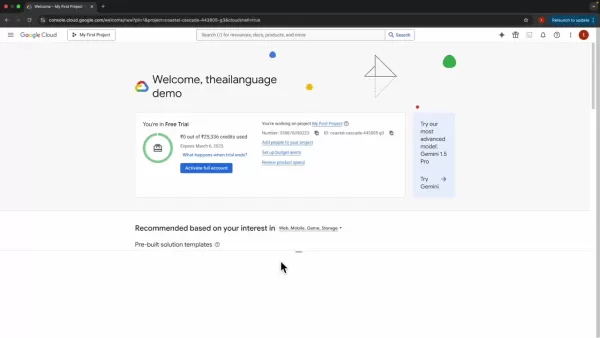
Refer to the video (timestamp at 4:30) in the description to create your Google Cloud Project.
- Head to the Google Cloud Console.
- If you're not signed up yet, create an account.
- Once logged in, create a new project and activate the free trial.
- Make sure you're in the console and that your project is selected.
Activating Cloud Shell
To manage your Google Cloud services, you'll need to fire up Cloud Shell, a browser-based terminal that gives you access to the gcloud command-line tool.
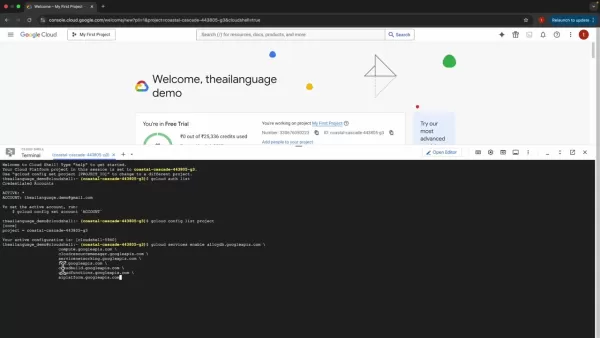
- Click the "Activate Cloud Shell" icon in the Google Cloud Console.
- Give it a moment to initialize.
- Sign in to your account.
Authentication and Project Configuration
Before moving forward, make sure you're authenticated and your project is set up correctly. Here's how:
- Check your authentication by running the command 'gcloud auth list'.
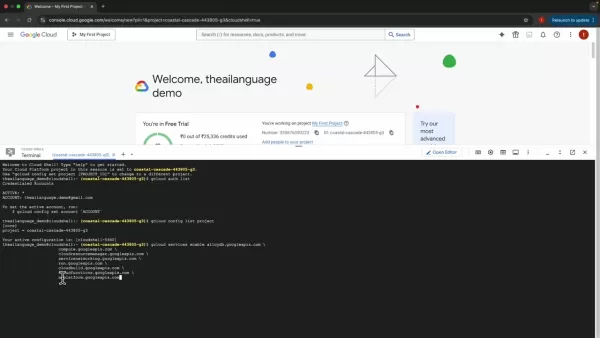
- Authorize Cloud Shell when prompted.
- List your projects with the command 'gcloud config list project'.
Enabling Essential Google Cloud APIs
To use AlloyDB and other Google Cloud services, you need to enable the necessary APIs. You can do this with the gcloud command-line tool.
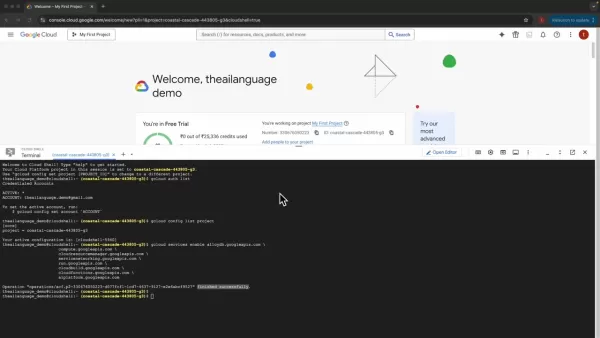
Run the following command to enable the required APIs:
gcloud services enable alloydb.googleapis.com compute.googleapis.com cloudresourcemanager.googleapis.com servicenetworking.googleapis.com run.googleapis.com sqladmin.googleapis.com cloudfunctions.googleapis.com aiplatform.googleapis.com
This command activates the APIs needed for AlloyDB, a fully managed PostgreSQL database from Google, and enables features for Gemini 1.5. It might take a few minutes to complete.
Creating an AlloyDB Instance: Step-by-Step
Setting Up Your AlloyDB Instance
With your Google Cloud project ready, it's time to set up an AlloyDB instance. Here's how you do it:
- Search for AlloyDB in the Google Cloud Console.
- Create a cluster and set up a password.
- Choose the region for your instance.
- Select the default networking option.
Connecting to AlloyDB Studio and Adding Data
Once your AlloyDB instance is up and running, you'll need to add data to start building your knowledge base.

- Go to AlloyDB Studio to create an e-commerce database. Wait for the instance to be ready.
- Select PostgreSQL as your database and authenticate.
- You'll be taken to AlloyDB Studio, where you'll see multiple editor windows.
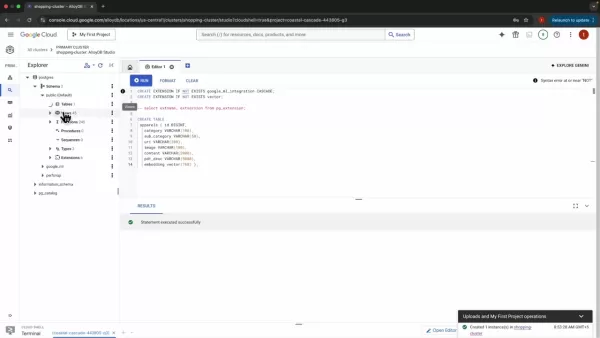
- Create the pg_vector and googleml integration extensions.
- Create the Apparel Table and run the command to set it up.
- Create a table within AlloyDB, such as an apparel table with different categories.
Adding the ML Flag through Google Cloud Console
To enable search capabilities, you'll need to add a Google Cloud flag using the Cloud Shell:
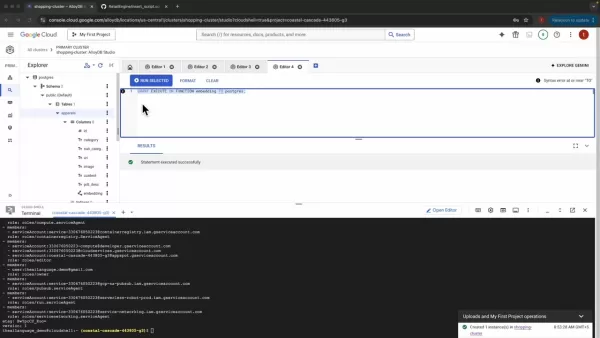
- Go to your primary instance and select "edit instance".
- Choose the advanced options and select flags.
- Click "add database flag".
- Select google_ml integration to enable model support and click on it. This setting allows the AlloyDB service account to act as the user for Vertex AI.
Understanding Google Cloud Costs: AlloyDB, Vertex AI, and Cloud Run
Google Cloud Pricing Considerations
Service Cost Details AlloyDB Costs are based on the compute and memory resources used. Vertex AI Depends on the AI operations performed on product descriptions and user search text. Cloud Run Deployment costs depend on the traffic and the resources used for handling it.
However, the $300 in credit from the free trial should cover most, if not all, of these costs during the initial implementation phase.
The Benefits and Drawbacks: A Balanced Perspective
Pros
- Personalized Shopping Experience: Offers tailored product recommendations and search results, boosting customer satisfaction and sales.
- Real-Time Responsiveness: Delivers instant answers and dynamically adjusts recommendations based on user behavior.
- Scalability and Cost-Effectiveness: Utilizes serverless technology to manage growing e-commerce data and reduce operational costs.
- AI-Powered Intelligence: Incorporates natural language understanding and vector search for a more intuitive and efficient shopping experience.
Cons
- Implementation Complexity: Requires expertise in database management, AI integration, and serverless deployment.
- Data Preparation: Converting e-commerce data into formats suitable for AlloyDB and Vertex AI can be time-consuming.
- Model Training: Training and optimizing AI models can be computationally expensive and require specialized skills.
- Ongoing Maintenance: Regular monitoring and retraining of AI models are necessary to keep them accurate and relevant.
Features of this Knowledge Engine
Features of Google AlloyDB
AlloyDB, Google Cloud's fully managed PostgreSQL, acts as our analytics engine. Here's what it brings to the table:
- Content Extraction: Analyzes relationships between content and user searches.
- Content Embedding: Converts text into numerical vectors for semantic analysis.
- Find Answers: Identifies the most relevant search results for users.
Putting Your Smart Shopping Assistant to Use
E-commerce Personalization
Imagine a customer looking for a "pink casual pure cotton" top. Our smart shopping assistant can use this query to find products that not only fit into the women's top category but also match the user's specific preferences for color, style, and fabric. This level of personalization makes the shopping experience more relevant and enjoyable.
Customer Support Chatbots
A customer service chatbot can leverage this knowledge engine to provide real-time answers to product-related questions. By analyzing the customer's query and comparing it to product descriptions, the chatbot can deliver accurate and helpful information, enhancing customer satisfaction and reducing support costs.
Frequently Asked Questions
What is AlloyDB?
AlloyDB for PostgreSQL is a fully managed, PostgreSQL-compatible database service on Google Cloud Platform, known for its high performance and availability. It combines the best of open-source PostgreSQL with Google's innovations.
What is Vertex AI Agent Builder?
Vertex AI Agent Builder is Google Cloud's platform for building and deploying AI-powered agents and conversational interfaces. It offers tools for natural language understanding, dialog management, and integration with various data sources.
What embedding model is being used?
This implementation uses the text embedding 004 model from the Vertex AI service to perform user searches.
Related Questions and Further Exploration
How do I further personalize the shopping assistant experience?
To take personalization to the next level, you can incorporate user behavior data. This means analyzing past purchases, browsing history, and other interactions to build a detailed user profile. The shopping assistant can then use this profile to fine-tune product recommendations and search results, making the shopping experience even more tailored to each user's preferences.
Related article
 Stripe to Acquire OpenRouter as AI Model Routing Gains Momentum
Stripe has agreed to acquire OpenRouter, an AI model-routing platform that gives developers access to hundreds of models through a single interface. The deal adds model selection and routing to Stripe’s existing work around AI usage and token-based b
Former OpenAI Researcher Barrett Zoph Returns to Google to Support Gemini Development
Barret Zoph, who previously abruptly left and joined OpenAI due to a disagreement with Thinking Machines Lab CEO Miriam Mularati, has once again changed employers. Alphabet's Google announced that Zoph will return as Vice President of Research, bring
How Recursive Intelligence Raised $335M at $4B Valuation in 4 Months
The co-founders of startup Ricursive Intelligence seemed destined to be co-founders.Anna Goldie, CEO, and Azalia Mirhoseini, CTO, are so well-known in the AI community that they were among those AI engineers who “got those weird emails from Zuckerber
Related Special Topic Recommendations
Design & Art
Stripe to Acquire OpenRouter as AI Model Routing Gains Momentum
Stripe has agreed to acquire OpenRouter, an AI model-routing platform that gives developers access to hundreds of models through a single interface. The deal adds model selection and routing to Stripe’s existing work around AI usage and token-based b
Former OpenAI Researcher Barrett Zoph Returns to Google to Support Gemini Development
Barret Zoph, who previously abruptly left and joined OpenAI due to a disagreement with Thinking Machines Lab CEO Miriam Mularati, has once again changed employers. Alphabet's Google announced that Zoph will return as Vice President of Research, bring
How Recursive Intelligence Raised $335M at $4B Valuation in 4 Months
The co-founders of startup Ricursive Intelligence seemed destined to be co-founders.Anna Goldie, CEO, and Azalia Mirhoseini, CTO, are so well-known in the AI community that they were among those AI engineers who “got those weird emails from Zuckerber
Related Special Topic Recommendations
Design & Art
 Top AI Illustration Tools: Create Editorial Scenes and Cover Art Faster
2026 Latest Top-rated AI Illustration Tools: Our curated list features the best powerfully designed tools for creating stunning editorial scenes and eye-catching cover art quickly. Each option has gone through rigorous real-world tests, offering a free vs paid comparison to help you find the perfect match for your workflow. Try these must-try solutions today to unlock your AI edge and boost your creative productivity. Explore now at XIX.AI.
 10 tools
 xix.ai
Education and Learning
Top AI Tutors for Exam Prep: Practice Math, Science, and English
xix.ai
Education and Learning
Top AI Tutors for Exam Prep: Practice Math, Science, and English
2026 Latest Top-Rated Best AI Tutors for Exam Prep are here on XIX.AI! Our curated list features powerful game-changing tools that offer free vs paid comparison, real-world tests, and weekly updated rankings. They help boost your writing efficiency, simplify complex topic learning, and unlock your academic potential. Explore now to Discover your perfect exam prep tool and Start creating today to Unlock your AI edge!
10 tools
xix.ai
Finance
AI Budget Planning Tools for Personal Money Management
2026 Latest Best Top-Rated AI Budget Planning Tools for Personal Money Management are here on XIX.AI! This curated collection features powerful, game-changing solutions that help you conduct real-world tests, understand spending habits, and create personalized plans to boost productivity. Enjoy a free vs paid comparison along with detailed rankings. Must-try tools designed to simplify money management and unlock your AI edge. Explore now!
11 tools
xix.ai
Health & Wellness
AI Sleep Tracking Assistants: Improve Recovery with Better Bedtime Habits
2026 Latest Best Top-Rated AI Sleep Tracking Assistants curated for ultimate recovery. This fully updated weekly guide features powerful tools that deliver real-world tests, free vs paid comparison, and detailed rankings to help you find the must-try solution that boosts sleep quality and supports better bedtime habits. Explore now at XIX.AI to Unlock your AI edge.
10 tools
xix.ai
Data Analysis
AI SQL Copilots for Product and Revenue Analytics
2026 Latest Best Top-Rated AI SQL Copilots for Product and Revenue Analytics! XIX.AI has curated a powerful, game-changing collection of must-try tools that undergo real-world tests through weekly updated rankings. These tools help users boost productivity significantly by accelerating data analysis, streamlining complex queries, and generating accurate insights to drive smarter business decisions. Explore now to Discover your perfect tool for unlocking your AI edge!
14 tools
xix.ai
Education and Learning
Best AI Homework Helpers That Teach: Learn Concepts, Not Just Answers
2026 Latest Best Top-Rated AI Homework Helpers That Teach Core Concepts Not Just Answers Powerful Tools for Students Must-Try Curated List Weekly Updated Free vs Paid Comparison Real-World Tests Accurate Rankings to Help You Unlock Your Full Learning Potential Explore now to Discover your perfect tool for smarter studying.
10 tools
xix.ai

 Comments (18)
0/500
Comments (18)
0/500
![EdwardBaker]()
Interesting guide! The combo of AlloyDB and Vertex AI for a shopping assistant sounds powerful. I wonder how it compares to the real-time recommendation engines some big players already use. Integration cost might be a hurdle for smaller shops though. Will keep an eye on this! 👍
![AnthonyMoore]()
Les assistants shopping IA deviennent vraiment indispensables 🛍️ C'est marrant de voir comment Google pousse ses solutions cloud dans tous les domaines. J'espère que ça va pas remplacer totalement le conseil humain...
![JuanCarter]()
This smart shopping assistant sounds like a game-changer! Using AlloyDB and Vertex AI to make e-commerce feel so personal is wild. Can’t wait to see how it handles my weird shopping habits 😄. Does it really get me better than my mom picking my clothes?
![StevenAllen]()
스마트 쇼핑 어시스턴트는 꽤 멋지지만, 가끔 필요 없는 물건을 추천해. 마치 나를 너무 잘 아는 것 같으면서도, 충분히 아는 것 같지 않아? 그래도 쇼핑이 더 쉬워졌어. 좀 더 정확했으면 좋겠어! 🛍️🤔
![DonaldGonzález]()
スマートショッピングアシスタントはかなりクールだけど、時々必要ないものを提案してくる。まるで私のことをよく知っているようで、でも十分じゃない?それでもショッピングが簡単になる。もう少し正確だといいな!🛍️🤔
![RalphHill]()
O assistente de compras inteligente é bem legal, mas às vezes sugere coisas que eu não preciso. Parece que me conhece muito bem, mas também não o suficiente? Ainda assim, facilita as compras. Só queria que fosse um pouco mais preciso! 🛍️🤔
In the bustling world of e-commerce, standing out requires more than just a good product lineup. It's about creating a shopping experience that feels personal and efficient. In this guide, we'll walk through the process of building a smart shopping assistant using AlloyDB and Vertex AI Agent Builder. We're going to explore how these technologies can integrate with e-commerce data to offer real-time cosine similarity search and smart recommendations, all while being deployed on serverless Cloud Run functions. The goal? To give your users a shopping experience that's not only intuitive but also incredibly satisfying.
Key Points
- Setting up an AlloyDB instance and loading an e-commerce dataset.
- Activating pgvector and generative AI model extensions in AlloyDB.
- Generating embeddings from product descriptions.
- Conducting real-time cosine similarity search based on user input.
- Deploying the solution on serverless Cloud Run Functions.
Building a Smart Shopping Assistant: A Comprehensive Guide
AlloyDB and Vertex AI: A Powerful Combination
This project harnesses the power of AlloyDB, Google Cloud's PostgreSQL-compatible database service, and Vertex AI Agent Builder, Google's platform for crafting intelligent agents. AlloyDB serves as the backbone for analytics, while Vertex AI adds the magic of conversational AI to the mix. AlloyDB provides the muscle needed to manage large e-commerce datasets, and Vertex AI brings in the smarts for natural language processing and real-time recommendations. Together, they pave the way for a shopping assistant that's both responsive and helpful.
The advantages of this integration include:
- Real-time product search and recommendations
- Customized shopping experiences
- Scalability to handle expanding e-commerce data
- Cost-effective deployment using serverless technology
Part 1: Laying the Foundation with AlloyDB
Let's start by setting up AlloyDB and getting it ready for AI integration. Here's what you need to do:
- Create an AlloyDB instance: Set up an instance on the cloud platform and load an e-commerce dataset.
- Enable pgvector and generative AI extensions: These extensions unlock AlloyDB's ability to work with vector embeddings and integrate with AI models, allowing for similarity searches and intelligent responses.
- Generate embeddings: Transform product descriptions into numerical vectors that encapsulate their semantic essence.
- Real-time Cosine Similarity Search: Conduct real-time searches to match user text with product data.
- Serverless Deployment: Deploy the solution on Cloud Run Functions to benefit from serverless scalability and cost efficiency.
AlloyDB as an Analytics Engine: Content Extraction, Embeddings, and Vector Search
AlloyDB is the heart of our analytics, performing essential functions like:
- Content Extraction: It digs into the data to uncover relationships between products, categories, and customer behavior, providing context for our shopping assistant.
- Embedding Creation: It converts product descriptions and user queries into embeddings, enabling semantic text comparison.
- Vector Search: By comparing query embeddings with product embeddings, AlloyDB finds the top 25 most relevant matches. Gemini then validates these, and the results are formatted into JSON.
Step-by-Step Guide: Setting Up Your Google Cloud Project
Acquiring a Google Cloud Project
Before diving into the tech side of things, you'll need a Google Cloud project. If you're new to this, you can create a project and enjoy a free trial that comes with $300 in credits to help cover the costs of testing and deploying your smart shopping assistant.
Refer to the video (timestamp at 4:30) in the description to create your Google Cloud Project.
- Head to the Google Cloud Console.
- If you're not signed up yet, create an account.
- Once logged in, create a new project and activate the free trial.
- Make sure you're in the console and that your project is selected.
Activating Cloud Shell
To manage your Google Cloud services, you'll need to fire up Cloud Shell, a browser-based terminal that gives you access to the gcloud command-line tool.
- Click the "Activate Cloud Shell" icon in the Google Cloud Console.
- Give it a moment to initialize.
- Sign in to your account.
Authentication and Project Configuration
Before moving forward, make sure you're authenticated and your project is set up correctly. Here's how:
- Check your authentication by running the command 'gcloud auth list'.
- Authorize Cloud Shell when prompted.
- List your projects with the command 'gcloud config list project'.
Enabling Essential Google Cloud APIs
To use AlloyDB and other Google Cloud services, you need to enable the necessary APIs. You can do this with the gcloud command-line tool.
Run the following command to enable the required APIs:
gcloud services enable alloydb.googleapis.com compute.googleapis.com cloudresourcemanager.googleapis.com servicenetworking.googleapis.com run.googleapis.com sqladmin.googleapis.com cloudfunctions.googleapis.com aiplatform.googleapis.comThis command activates the APIs needed for AlloyDB, a fully managed PostgreSQL database from Google, and enables features for Gemini 1.5. It might take a few minutes to complete.
Creating an AlloyDB Instance: Step-by-Step
Setting Up Your AlloyDB Instance
With your Google Cloud project ready, it's time to set up an AlloyDB instance. Here's how you do it:
- Search for AlloyDB in the Google Cloud Console.
- Create a cluster and set up a password.
- Choose the region for your instance.
- Select the default networking option.
Connecting to AlloyDB Studio and Adding Data
Once your AlloyDB instance is up and running, you'll need to add data to start building your knowledge base.
- Go to AlloyDB Studio to create an e-commerce database. Wait for the instance to be ready.
- Select PostgreSQL as your database and authenticate.
- You'll be taken to AlloyDB Studio, where you'll see multiple editor windows.
- Create the pg_vector and googleml integration extensions.
- Create the Apparel Table and run the command to set it up.
- Create a table within AlloyDB, such as an apparel table with different categories.
Adding the ML Flag through Google Cloud Console
To enable search capabilities, you'll need to add a Google Cloud flag using the Cloud Shell:
- Go to your primary instance and select "edit instance".
- Choose the advanced options and select flags.
- Click "add database flag".
- Select google_ml integration to enable model support and click on it. This setting allows the AlloyDB service account to act as the user for Vertex AI.
Understanding Google Cloud Costs: AlloyDB, Vertex AI, and Cloud Run
Google Cloud Pricing Considerations
| Service | Cost Details |
|---|---|
| AlloyDB | Costs are based on the compute and memory resources used. |
| Vertex AI | Depends on the AI operations performed on product descriptions and user search text. |
| Cloud Run | Deployment costs depend on the traffic and the resources used for handling it. |
However, the $300 in credit from the free trial should cover most, if not all, of these costs during the initial implementation phase.
The Benefits and Drawbacks: A Balanced Perspective
Pros
- Personalized Shopping Experience: Offers tailored product recommendations and search results, boosting customer satisfaction and sales.
- Real-Time Responsiveness: Delivers instant answers and dynamically adjusts recommendations based on user behavior.
- Scalability and Cost-Effectiveness: Utilizes serverless technology to manage growing e-commerce data and reduce operational costs.
- AI-Powered Intelligence: Incorporates natural language understanding and vector search for a more intuitive and efficient shopping experience.
Cons
- Implementation Complexity: Requires expertise in database management, AI integration, and serverless deployment.
- Data Preparation: Converting e-commerce data into formats suitable for AlloyDB and Vertex AI can be time-consuming.
- Model Training: Training and optimizing AI models can be computationally expensive and require specialized skills.
- Ongoing Maintenance: Regular monitoring and retraining of AI models are necessary to keep them accurate and relevant.
Features of this Knowledge Engine
Features of Google AlloyDB
AlloyDB, Google Cloud's fully managed PostgreSQL, acts as our analytics engine. Here's what it brings to the table:
- Content Extraction: Analyzes relationships between content and user searches.
- Content Embedding: Converts text into numerical vectors for semantic analysis.
- Find Answers: Identifies the most relevant search results for users.
Putting Your Smart Shopping Assistant to Use
E-commerce Personalization
Imagine a customer looking for a "pink casual pure cotton" top. Our smart shopping assistant can use this query to find products that not only fit into the women's top category but also match the user's specific preferences for color, style, and fabric. This level of personalization makes the shopping experience more relevant and enjoyable.
Customer Support Chatbots
A customer service chatbot can leverage this knowledge engine to provide real-time answers to product-related questions. By analyzing the customer's query and comparing it to product descriptions, the chatbot can deliver accurate and helpful information, enhancing customer satisfaction and reducing support costs.
Frequently Asked Questions
What is AlloyDB?
AlloyDB for PostgreSQL is a fully managed, PostgreSQL-compatible database service on Google Cloud Platform, known for its high performance and availability. It combines the best of open-source PostgreSQL with Google's innovations.
What is Vertex AI Agent Builder?
Vertex AI Agent Builder is Google Cloud's platform for building and deploying AI-powered agents and conversational interfaces. It offers tools for natural language understanding, dialog management, and integration with various data sources.
What embedding model is being used?
This implementation uses the text embedding 004 model from the Vertex AI service to perform user searches.
Related Questions and Further Exploration
How do I further personalize the shopping assistant experience?
To take personalization to the next level, you can incorporate user behavior data. This means analyzing past purchases, browsing history, and other interactions to build a detailed user profile. The shopping assistant can then use this profile to fine-tune product recommendations and search results, making the shopping experience even more tailored to each user's preferences.








 Stripe to Acquire OpenRouter as AI Model Routing Gains Momentum
Stripe has agreed to acquire OpenRouter, an AI model-routing platform that gives developers access to hundreds of models through a single interface. The deal adds model selection and routing to Stripe’s existing work around AI usage and token-based b
Stripe to Acquire OpenRouter as AI Model Routing Gains Momentum
Stripe has agreed to acquire OpenRouter, an AI model-routing platform that gives developers access to hundreds of models through a single interface. The deal adds model selection and routing to Stripe’s existing work around AI usage and token-based b
 Former OpenAI Researcher Barrett Zoph Returns to Google to Support Gemini Development
Barret Zoph, who previously abruptly left and joined OpenAI due to a disagreement with Thinking Machines Lab CEO Miriam Mularati, has once again changed employers. Alphabet's Google announced that Zoph will return as Vice President of Research, bring
Former OpenAI Researcher Barrett Zoph Returns to Google to Support Gemini Development
Barret Zoph, who previously abruptly left and joined OpenAI due to a disagreement with Thinking Machines Lab CEO Miriam Mularati, has once again changed employers. Alphabet's Google announced that Zoph will return as Vice President of Research, bring
 How Recursive Intelligence Raised $335M at $4B Valuation in 4 Months
The co-founders of startup Ricursive Intelligence seemed destined to be co-founders.Anna Goldie, CEO, and Azalia Mirhoseini, CTO, are so well-known in the AI community that they were among those AI engineers who “got those weird emails from Zuckerber
How Recursive Intelligence Raised $335M at $4B Valuation in 4 Months
The co-founders of startup Ricursive Intelligence seemed destined to be co-founders.Anna Goldie, CEO, and Azalia Mirhoseini, CTO, are so well-known in the AI community that they were among those AI engineers who “got those weird emails from Zuckerber

2026 Latest Top-rated AI Illustration Tools: Our curated list features the best powerfully designed tools for creating stunning editorial scenes and eye-catching cover art quickly. Each option has gone through rigorous real-world tests, offering a free vs paid comparison to help you find the perfect match for your workflow. Try these must-try solutions today to unlock your AI edge and boost your creative productivity. Explore now at XIX.AI.
10 tools
xix.ai

2026 Latest Top-Rated Best AI Tutors for Exam Prep are here on XIX.AI! Our curated list features powerful game-changing tools that offer free vs paid comparison, real-world tests, and weekly updated rankings. They help boost your writing efficiency, simplify complex topic learning, and unlock your academic potential. Explore now to Discover your perfect exam prep tool and Start creating today to Unlock your AI edge!
10 tools
xix.ai

2026 Latest Best Top-Rated AI Budget Planning Tools for Personal Money Management are here on XIX.AI! This curated collection features powerful, game-changing solutions that help you conduct real-world tests, understand spending habits, and create personalized plans to boost productivity. Enjoy a free vs paid comparison along with detailed rankings. Must-try tools designed to simplify money management and unlock your AI edge. Explore now!
11 tools
xix.ai

2026 Latest Best Top-Rated AI Sleep Tracking Assistants curated for ultimate recovery. This fully updated weekly guide features powerful tools that deliver real-world tests, free vs paid comparison, and detailed rankings to help you find the must-try solution that boosts sleep quality and supports better bedtime habits. Explore now at XIX.AI to Unlock your AI edge.
10 tools
xix.ai

2026 Latest Best Top-Rated AI SQL Copilots for Product and Revenue Analytics! XIX.AI has curated a powerful, game-changing collection of must-try tools that undergo real-world tests through weekly updated rankings. These tools help users boost productivity significantly by accelerating data analysis, streamlining complex queries, and generating accurate insights to drive smarter business decisions. Explore now to Discover your perfect tool for unlocking your AI edge!
14 tools
xix.ai

2026 Latest Best Top-Rated AI Homework Helpers That Teach Core Concepts Not Just Answers Powerful Tools for Students Must-Try Curated List Weekly Updated Free vs Paid Comparison Real-World Tests Accurate Rankings to Help You Unlock Your Full Learning Potential Explore now to Discover your perfect tool for smarter studying.
10 tools
xix.ai

Interesting guide! The combo of AlloyDB and Vertex AI for a shopping assistant sounds powerful. I wonder how it compares to the real-time recommendation engines some big players already use. Integration cost might be a hurdle for smaller shops though. Will keep an eye on this! 👍
Les assistants shopping IA deviennent vraiment indispensables 🛍️ C'est marrant de voir comment Google pousse ses solutions cloud dans tous les domaines. J'espère que ça va pas remplacer totalement le conseil humain...
This smart shopping assistant sounds like a game-changer! Using AlloyDB and Vertex AI to make e-commerce feel so personal is wild. Can’t wait to see how it handles my weird shopping habits 😄. Does it really get me better than my mom picking my clothes?
스마트 쇼핑 어시스턴트는 꽤 멋지지만, 가끔 필요 없는 물건을 추천해. 마치 나를 너무 잘 아는 것 같으면서도, 충분히 아는 것 같지 않아? 그래도 쇼핑이 더 쉬워졌어. 좀 더 정확했으면 좋겠어! 🛍️🤔
スマートショッピングアシスタントはかなりクールだけど、時々必要ないものを提案してくる。まるで私のことをよく知っているようで、でも十分じゃない?それでもショッピングが簡単になる。もう少し正確だといいな!🛍️🤔
O assistente de compras inteligente é bem legal, mas às vezes sugere coisas que eu não preciso. Parece que me conhece muito bem, mas também não o suficiente? Ainda assim, facilita as compras. Só queria que fosse um pouco mais preciso! 🛍️🤔












