


 Home
HomeScenario AI Simplifies Game Creation with Enhanced Creative Freedom
In today's fast-paced game development landscape, artificial intelligence (AI) plays an increasingly vital role. Scenario AI enhances game creation by offering professional creative control, empowering developers and artists to boost productivity and elevate their projects. This article explores Scenario AI's standout features, benefits, practical applications, and what makes it a preferred AI solution.
Key Features
Scenario AI simplifies game development while maintaining professional creative oversight.
The platform enables seamless model blending and combination to optimize creative processes.
A robust free tier allows users to explore Scenario AI's capabilities without commitment.
Its techniques can be applied across platforms like ComfyUI and Automatic1111.
The integrated Canvas tool provides instant image editing capabilities.
Exploring Scenario AI
Core Functionality
Scenario AI transforms game asset creation by delivering professional-grade creative tools that streamline workflows. Designed specifically for game developers and artists, it leverages AI to produce high-quality characters, assets, and environments. The platform stands out through its innovative model blending technology.

This blending capability proves particularly valuable in production environments where maintaining consistent parameters matters. Features like saving LoRA combinations and predefined prompt embeddings make it indispensable for game development. The integrated Canvas editor enables real-time image adjustments, inpainting, and updates.
Accessible Free Tier
Scenario AI offers substantial free access, letting users thoroughly evaluate the platform before upgrading. This makes it ideal for independent developers and small studios exploring AI solutions.
The free tier typically includes:
- Monthly allocation of AI generations
- Core features like model blending and Canvas editing
- Limited custom model training capabilities
- Tutorial resources and community support
Advanced Model Blending
Scenario AI's model combination technology provides unmatched creative flexibility for maintaining project consistency.
Key capabilities include:
- Saving and reusing customized LoRA combinations
- Creating predefined prompt templates
- Implementing style-specific trigger words
Canvas Editing Tool
The integrated Canvas tool offers comprehensive image editing directly within the platform.
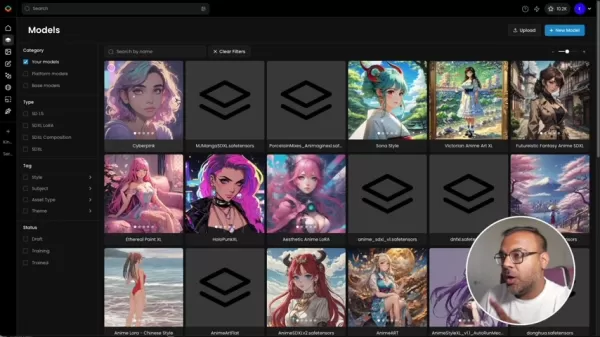
Essential features:
- Precise inpainting capabilities
- Instant editing feedback
- Image upscaling options
- Background removal tools
Alternative Solutions
Competing AI Platforms
While Scenario AI excels in game development, these alternatives offer complementary capabilities:
- DeepMotion: Specializes in motion capture and animation
- Artomatix: Focuses on texture and material generation
- RunwayML: Broad creative AI toolkit
- Inworld AI: Advanced AI character interaction
- Convai: Versatile NPC creation
- Charisma AI: Story-driven AI agents
Getting Started
Account Setup
Begin by visiting scenario.com and creating an account:
- Access the Scenario AI website
- Complete registration
- Verify your account
- Log in to your dashboard
Importing Custom Models
Expand your creative options by integrating Civit AI LoRAs:
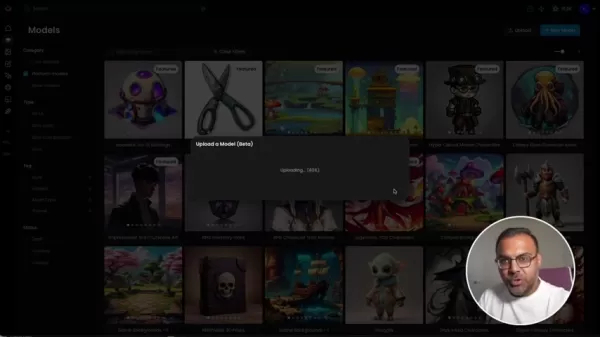
- Locate SDXL 1.0-compatible LoRAs
- Download desired models
- Upload through Scenario AI's interface
- Configure and organize imported models
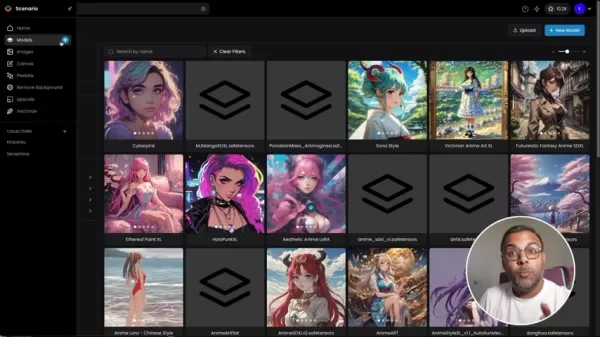
Creating Custom Styles
Combine models effortlessly:
- Initiate new model creation
- Configure model parameters
- Test and save your compositions
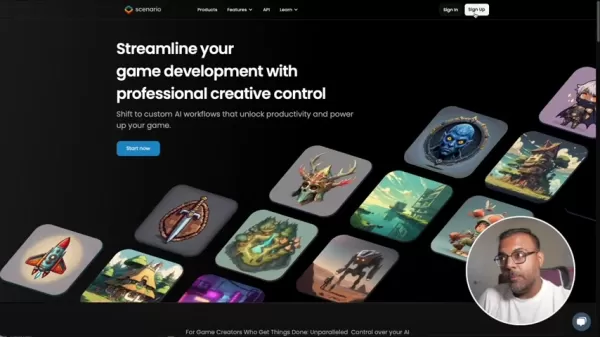
Image Refinement
Enhance generated assets:
- Access Canvas editor
- Make layer adjustments
- Leverage AI refinement tools
Pricing Structure
Subscription Options
Scenario AI offers flexible plans:
- Free tier with core features
- Indie plan for solo developers
- Team-focused Studio plan
- Custom Enterprise solutions
Pros and Cons
Advantages
Professional-grade creative control
Intuitive model blending
Generous free access
Comprehensive built-in editing
Developer API integration
Limitations
Advanced features require subscription
Online connectivity required
Custom training needs paid license
Primary Features
Efficient Asset Production
Scenario AI accelerates asset creation for characters, environments, and props through optimized workflows.
Custom Model Development
Tailor AI models to match your game's unique aesthetic with specialized training options.
Instant Canvas Editing
The real-time Canvas tool streamlines asset refinement with comprehensive editing capabilities.
Collaboration Features
Team plans enable synchronized workflows across development teams.
Developer Integration
The Scenario API allows direct implementation into existing game engines.
Practical Applications
Character Development
Generate diverse character designs while maintaining consistent styles across projects.
World Building
Create immersive environments from landscapes to architectural spaces.
Prop Generation
Produce themed game items and accessories matching your artistic vision.
Concept Visualization
Quickly iterate and present design concepts using AI-powered visualization.
Common Queries
Is Scenario AI viable for indie developers?
Absolutely. The accessible free tier and affordable plans make it ideal for independent creators.
Can I integrate custom models?
Yes, Scenario AI supports custom model training and blending.
Does it work with other development tools?
The platform offers API integration and compatible workflows with major game engines.
What support options exist?
Scenario AI provides community resources, tutorials, and premium support options.
Comparative Analysis
How does Scenario AI compare to alternatives?
Scenario AI specializes in game development with superior creative control and streamlined workflows compared to broader AI tools.
Related article
 Ctrip Business Travel Unveils AI Ecosystem with 7 Industry Agents and 17 Core Capabilities
Ctrip Business Travel has officially unveiled the "Ctrip Business Travel AI Ecosystem," leveraging large language models to fundamentally restructure corporate travel management. This comprehensive ecosystem addresses four core scenarios: travel arra
Stripe to Acquire OpenRouter as AI Model Routing Gains Momentum
Stripe has agreed to acquire OpenRouter, an AI model-routing platform that gives developers access to hundreds of models through a single interface. The deal adds model selection and routing to Stripe’s existing work around AI usage and token-based b
Former OpenAI Researcher Barrett Zoph Returns to Google to Support Gemini Development
Barret Zoph, who previously abruptly left and joined OpenAI due to a disagreement with Thinking Machines Lab CEO Miriam Mularati, has once again changed employers. Alphabet's Google announced that Zoph will return as Vice President of Research, bring
Related Special Topic Recommendations
Design & Art
Ctrip Business Travel Unveils AI Ecosystem with 7 Industry Agents and 17 Core Capabilities
Ctrip Business Travel has officially unveiled the "Ctrip Business Travel AI Ecosystem," leveraging large language models to fundamentally restructure corporate travel management. This comprehensive ecosystem addresses four core scenarios: travel arra
Stripe to Acquire OpenRouter as AI Model Routing Gains Momentum
Stripe has agreed to acquire OpenRouter, an AI model-routing platform that gives developers access to hundreds of models through a single interface. The deal adds model selection and routing to Stripe’s existing work around AI usage and token-based b
Former OpenAI Researcher Barrett Zoph Returns to Google to Support Gemini Development
Barret Zoph, who previously abruptly left and joined OpenAI due to a disagreement with Thinking Machines Lab CEO Miriam Mularati, has once again changed employers. Alphabet's Google announced that Zoph will return as Vice President of Research, bring
Related Special Topic Recommendations
Design & Art
 Top AI Illustration Tools: Create Editorial Scenes and Cover Art Faster
2026 Latest Top-rated AI Illustration Tools: Our curated list features the best powerfully designed tools for creating stunning editorial scenes and eye-catching cover art quickly. Each option has gone through rigorous real-world tests, offering a free vs paid comparison to help you find the perfect match for your workflow. Try these must-try solutions today to unlock your AI edge and boost your creative productivity. Explore now at XIX.AI.
 10 tools
 xix.ai
Education and Learning
Top AI Tutors for Exam Prep: Practice Math, Science, and English
xix.ai
Education and Learning
Top AI Tutors for Exam Prep: Practice Math, Science, and English
2026 Latest Top-Rated Best AI Tutors for Exam Prep are here on XIX.AI! Our curated list features powerful game-changing tools that offer free vs paid comparison, real-world tests, and weekly updated rankings. They help boost your writing efficiency, simplify complex topic learning, and unlock your academic potential. Explore now to Discover your perfect exam prep tool and Start creating today to Unlock your AI edge!
10 tools
xix.ai
Finance
AI Budget Planning Tools for Personal Money Management
2026 Latest Best Top-Rated AI Budget Planning Tools for Personal Money Management are here on XIX.AI! This curated collection features powerful, game-changing solutions that help you conduct real-world tests, understand spending habits, and create personalized plans to boost productivity. Enjoy a free vs paid comparison along with detailed rankings. Must-try tools designed to simplify money management and unlock your AI edge. Explore now!
11 tools
xix.ai
Health & Wellness
AI Sleep Tracking Assistants: Improve Recovery with Better Bedtime Habits
2026 Latest Best Top-Rated AI Sleep Tracking Assistants curated for ultimate recovery. This fully updated weekly guide features powerful tools that deliver real-world tests, free vs paid comparison, and detailed rankings to help you find the must-try solution that boosts sleep quality and supports better bedtime habits. Explore now at XIX.AI to Unlock your AI edge.
10 tools
xix.ai
Data Analysis
AI SQL Copilots for Product and Revenue Analytics
2026 Latest Best Top-Rated AI SQL Copilots for Product and Revenue Analytics! XIX.AI has curated a powerful, game-changing collection of must-try tools that undergo real-world tests through weekly updated rankings. These tools help users boost productivity significantly by accelerating data analysis, streamlining complex queries, and generating accurate insights to drive smarter business decisions. Explore now to Discover your perfect tool for unlocking your AI edge!
14 tools
xix.ai
Education and Learning
Best AI Homework Helpers That Teach: Learn Concepts, Not Just Answers
2026 Latest Best Top-Rated AI Homework Helpers That Teach Core Concepts Not Just Answers Powerful Tools for Students Must-Try Curated List Weekly Updated Free vs Paid Comparison Real-World Tests Accurate Rankings to Help You Unlock Your Full Learning Potential Explore now to Discover your perfect tool for smarter studying.
10 tools
xix.ai

 Comments (2)
0/500
Comments (2)
0/500
![AlbertThomas]()
솔직히 AI로 게임 만드는 거 처음 봤을 때는 '이런 것도 다 AI가?' 싶었는데, Scenario AI 보니까 그래픽 같은 부분에서는 확실히 창작의 자유도를 줄 것 같네요. 특히 독립 개발자나 소규모 팀에 큰 도움 될 듯! 다만 모든 걸 AI에 의존하면 결과물이 좀 획일화되지 않을까 약간 걱정되기도... 🎮
![JasonAnderson]()
Spannend, dass KI jetzt auch bei der Spieleentwicklung so stark hilft! Aber ich frage mich, ob diese Tools langfristig nicht Originalität und Arbeitsplätze gefährden? 🤔 Entwickler werden produktiver, klar, aber ist das nur eine bessere Maschine oder etwas Fundamentales? Ich bleibe skeptisch.
In today's fast-paced game development landscape, artificial intelligence (AI) plays an increasingly vital role. Scenario AI enhances game creation by offering professional creative control, empowering developers and artists to boost productivity and elevate their projects. This article explores Scenario AI's standout features, benefits, practical applications, and what makes it a preferred AI solution.
Key Features
Scenario AI simplifies game development while maintaining professional creative oversight.
The platform enables seamless model blending and combination to optimize creative processes.
A robust free tier allows users to explore Scenario AI's capabilities without commitment.
Its techniques can be applied across platforms like ComfyUI and Automatic1111.
The integrated Canvas tool provides instant image editing capabilities.
Exploring Scenario AI
Core Functionality
Scenario AI transforms game asset creation by delivering professional-grade creative tools that streamline workflows. Designed specifically for game developers and artists, it leverages AI to produce high-quality characters, assets, and environments. The platform stands out through its innovative model blending technology.
This blending capability proves particularly valuable in production environments where maintaining consistent parameters matters. Features like saving LoRA combinations and predefined prompt embeddings make it indispensable for game development. The integrated Canvas editor enables real-time image adjustments, inpainting, and updates.
Accessible Free Tier
Scenario AI offers substantial free access, letting users thoroughly evaluate the platform before upgrading. This makes it ideal for independent developers and small studios exploring AI solutions.
The free tier typically includes:
- Monthly allocation of AI generations
- Core features like model blending and Canvas editing
- Limited custom model training capabilities
- Tutorial resources and community support
Advanced Model Blending
Scenario AI's model combination technology provides unmatched creative flexibility for maintaining project consistency.
Key capabilities include:
- Saving and reusing customized LoRA combinations
- Creating predefined prompt templates
- Implementing style-specific trigger words
Canvas Editing Tool
The integrated Canvas tool offers comprehensive image editing directly within the platform.
Essential features:
- Precise inpainting capabilities
- Instant editing feedback
- Image upscaling options
- Background removal tools
Alternative Solutions
Competing AI Platforms
While Scenario AI excels in game development, these alternatives offer complementary capabilities:
- DeepMotion: Specializes in motion capture and animation
- Artomatix: Focuses on texture and material generation
- RunwayML: Broad creative AI toolkit
- Inworld AI: Advanced AI character interaction
- Convai: Versatile NPC creation
- Charisma AI: Story-driven AI agents
Getting Started
Account Setup
Begin by visiting scenario.com and creating an account:
- Access the Scenario AI website
- Complete registration
- Verify your account
- Log in to your dashboard
Importing Custom Models
Expand your creative options by integrating Civit AI LoRAs:
- Locate SDXL 1.0-compatible LoRAs
- Download desired models
- Upload through Scenario AI's interface
- Configure and organize imported models
Creating Custom Styles
Combine models effortlessly:
- Initiate new model creation
- Configure model parameters
- Test and save your compositions
Image Refinement
Enhance generated assets:
- Access Canvas editor
- Make layer adjustments
- Leverage AI refinement tools
Pricing Structure
Subscription Options
Scenario AI offers flexible plans:
- Free tier with core features
- Indie plan for solo developers
- Team-focused Studio plan
- Custom Enterprise solutions
Pros and Cons
Advantages
Professional-grade creative control
Intuitive model blending
Generous free access
Comprehensive built-in editing
Developer API integration
Limitations
Advanced features require subscription
Online connectivity required
Custom training needs paid license
Primary Features
Efficient Asset Production
Scenario AI accelerates asset creation for characters, environments, and props through optimized workflows.
Custom Model Development
Tailor AI models to match your game's unique aesthetic with specialized training options.
Instant Canvas Editing
The real-time Canvas tool streamlines asset refinement with comprehensive editing capabilities.
Collaboration Features
Team plans enable synchronized workflows across development teams.
Developer Integration
The Scenario API allows direct implementation into existing game engines.
Practical Applications
Character Development
Generate diverse character designs while maintaining consistent styles across projects.
World Building
Create immersive environments from landscapes to architectural spaces.
Prop Generation
Produce themed game items and accessories matching your artistic vision.
Concept Visualization
Quickly iterate and present design concepts using AI-powered visualization.
Common Queries
Is Scenario AI viable for indie developers?
Absolutely. The accessible free tier and affordable plans make it ideal for independent creators.
Can I integrate custom models?
Yes, Scenario AI supports custom model training and blending.
Does it work with other development tools?
The platform offers API integration and compatible workflows with major game engines.
What support options exist?
Scenario AI provides community resources, tutorials, and premium support options.
Comparative Analysis
How does Scenario AI compare to alternatives?
Scenario AI specializes in game development with superior creative control and streamlined workflows compared to broader AI tools.








 Ctrip Business Travel Unveils AI Ecosystem with 7 Industry Agents and 17 Core Capabilities
Ctrip Business Travel has officially unveiled the "Ctrip Business Travel AI Ecosystem," leveraging large language models to fundamentally restructure corporate travel management. This comprehensive ecosystem addresses four core scenarios: travel arra
Ctrip Business Travel Unveils AI Ecosystem with 7 Industry Agents and 17 Core Capabilities
Ctrip Business Travel has officially unveiled the "Ctrip Business Travel AI Ecosystem," leveraging large language models to fundamentally restructure corporate travel management. This comprehensive ecosystem addresses four core scenarios: travel arra
 Stripe to Acquire OpenRouter as AI Model Routing Gains Momentum
Stripe has agreed to acquire OpenRouter, an AI model-routing platform that gives developers access to hundreds of models through a single interface. The deal adds model selection and routing to Stripe’s existing work around AI usage and token-based b
Stripe to Acquire OpenRouter as AI Model Routing Gains Momentum
Stripe has agreed to acquire OpenRouter, an AI model-routing platform that gives developers access to hundreds of models through a single interface. The deal adds model selection and routing to Stripe’s existing work around AI usage and token-based b
 Former OpenAI Researcher Barrett Zoph Returns to Google to Support Gemini Development
Barret Zoph, who previously abruptly left and joined OpenAI due to a disagreement with Thinking Machines Lab CEO Miriam Mularati, has once again changed employers. Alphabet's Google announced that Zoph will return as Vice President of Research, bring
Former OpenAI Researcher Barrett Zoph Returns to Google to Support Gemini Development
Barret Zoph, who previously abruptly left and joined OpenAI due to a disagreement with Thinking Machines Lab CEO Miriam Mularati, has once again changed employers. Alphabet's Google announced that Zoph will return as Vice President of Research, bring

2026 Latest Top-rated AI Illustration Tools: Our curated list features the best powerfully designed tools for creating stunning editorial scenes and eye-catching cover art quickly. Each option has gone through rigorous real-world tests, offering a free vs paid comparison to help you find the perfect match for your workflow. Try these must-try solutions today to unlock your AI edge and boost your creative productivity. Explore now at XIX.AI.
10 tools
xix.ai

2026 Latest Top-Rated Best AI Tutors for Exam Prep are here on XIX.AI! Our curated list features powerful game-changing tools that offer free vs paid comparison, real-world tests, and weekly updated rankings. They help boost your writing efficiency, simplify complex topic learning, and unlock your academic potential. Explore now to Discover your perfect exam prep tool and Start creating today to Unlock your AI edge!
10 tools
xix.ai

2026 Latest Best Top-Rated AI Budget Planning Tools for Personal Money Management are here on XIX.AI! This curated collection features powerful, game-changing solutions that help you conduct real-world tests, understand spending habits, and create personalized plans to boost productivity. Enjoy a free vs paid comparison along with detailed rankings. Must-try tools designed to simplify money management and unlock your AI edge. Explore now!
11 tools
xix.ai

2026 Latest Best Top-Rated AI Sleep Tracking Assistants curated for ultimate recovery. This fully updated weekly guide features powerful tools that deliver real-world tests, free vs paid comparison, and detailed rankings to help you find the must-try solution that boosts sleep quality and supports better bedtime habits. Explore now at XIX.AI to Unlock your AI edge.
10 tools
xix.ai

2026 Latest Best Top-Rated AI SQL Copilots for Product and Revenue Analytics! XIX.AI has curated a powerful, game-changing collection of must-try tools that undergo real-world tests through weekly updated rankings. These tools help users boost productivity significantly by accelerating data analysis, streamlining complex queries, and generating accurate insights to drive smarter business decisions. Explore now to Discover your perfect tool for unlocking your AI edge!
14 tools
xix.ai

2026 Latest Best Top-Rated AI Homework Helpers That Teach Core Concepts Not Just Answers Powerful Tools for Students Must-Try Curated List Weekly Updated Free vs Paid Comparison Real-World Tests Accurate Rankings to Help You Unlock Your Full Learning Potential Explore now to Discover your perfect tool for smarter studying.
10 tools
xix.ai

솔직히 AI로 게임 만드는 거 처음 봤을 때는 '이런 것도 다 AI가?' 싶었는데, Scenario AI 보니까 그래픽 같은 부분에서는 확실히 창작의 자유도를 줄 것 같네요. 특히 독립 개발자나 소규모 팀에 큰 도움 될 듯! 다만 모든 걸 AI에 의존하면 결과물이 좀 획일화되지 않을까 약간 걱정되기도... 🎮
Spannend, dass KI jetzt auch bei der Spieleentwicklung so stark hilft! Aber ich frage mich, ob diese Tools langfristig nicht Originalität und Arbeitsplätze gefährden? 🤔 Entwickler werden produktiver, klar, aber ist das nur eine bessere Maschine oder etwas Fundamentales? Ich bleibe skeptisch.












