


 Home
HomeQwen PC Edition Adds AI Voice Input for Direct Speech-to-Text in Apps
On May 7, Qwen introduced AI-powered voice input for PCs, enabling users to activate it via hotkeys in any desktop application. The feature can eliminate filler words, correct mistakes, and format spoken content, while also adapting its responses based on context. Users can also issue commands for writing, answering questions, or translating.
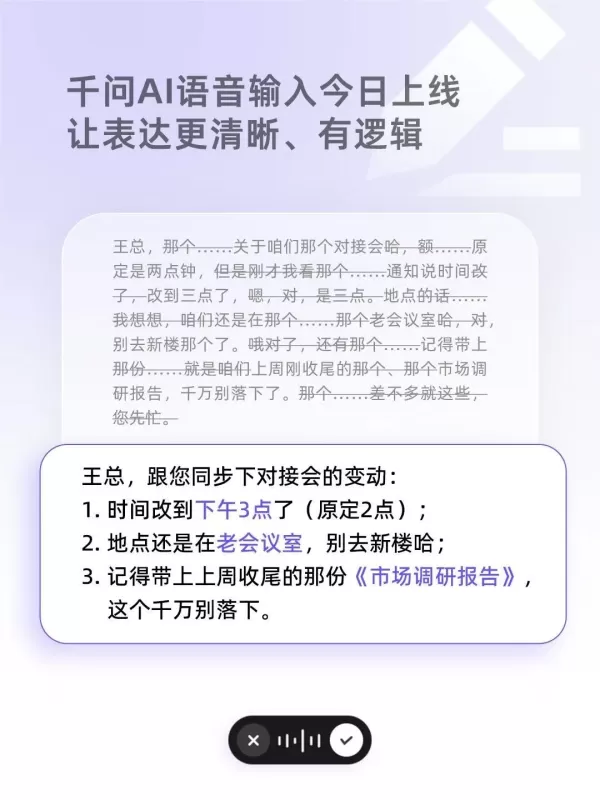
Qwen's voice input showcases strong semantic parsing. For instance, when given a spoken passage with speech errors like, "Boss Wang, the meeting is scheduled at two o'clock... no, three o'clock, the location is the old meeting room, remember to bring that... market research report," Qwen can filter out filler words like "um" or "that" in real time, correct the errors, and output structured text directly: "Boss Wang, the meeting is scheduled at 3 p.m., the location is the old meeting room, please bring the market research report."
Restructuring colloquial speech goes beyond simple text simplification; it also involves correcting logical errors and organizing content structurally. When users draft weekly reports or meeting minutes, even if their expressions are logically disjointed, Qwen can perform semantic summarization based on the context. For example, if a user casually mentions work progress, Qwen can automatically organize it into a structured weekly report with clear bullet points.
While working or creating, users can rely on Qwen via voice commands without leaving the editor. For instance, to insert last year's GDP data into the text, simply say, "Insert the national GDP data for 2025." When browsing websites or reading professional English papers, if something is unclear, select the text and say, "Explain this" or "Translate this," and Qwen will automatically provide explanations or translations.
In scenarios like DingTalk, WeChat, or emails, users can also ask Qwen to generate replies based on the context. For example, when replying to an English email from a client, users can simply state their requirements in Chinese verbally, and Qwen will generate a properly formatted English email reply in the input box.
Currently, Qwen's voice input feature is fully available, and all users can freely use it through the Qwen PC client.
Related article
 Spotify aims to become the home for AI-generated personal audio
In recent years, tools such as Google’s NotebookLM, Hero, and Adobe Acrobat have empowered users to generate podcasts from source materials like documents, schedules, and articles. Spotify now enables access to these audio files within its platform,
AI LIVE London: Transforming AI and Industrial Automation
AI LIVE: The London Summit takes place 20–21 October 2026 at Olympia London. Credit: BizClikAI LIVE: The London Summit convenes global leaders to resolve operational bottlenecks and scale AI across industrial automation.The primary constraint on indu
Google’s Genie world model now simulates real streets with Street View
Most of us have used Google Street View to show a friend our old neighborhood or dropped the little person icon into Paris to check if our hotel is in a trendy area. Now, imagine experiencing that with full immersion and interactivity—simulating the
Related Special Topic Recommendations
design
Spotify aims to become the home for AI-generated personal audio
In recent years, tools such as Google’s NotebookLM, Hero, and Adobe Acrobat have empowered users to generate podcasts from source materials like documents, schedules, and articles. Spotify now enables access to these audio files within its platform,
AI LIVE London: Transforming AI and Industrial Automation
AI LIVE: The London Summit takes place 20–21 October 2026 at Olympia London. Credit: BizClikAI LIVE: The London Summit convenes global leaders to resolve operational bottlenecks and scale AI across industrial automation.The primary constraint on indu
Google’s Genie world model now simulates real streets with Street View
Most of us have used Google Street View to show a friend our old neighborhood or dropped the little person icon into Paris to check if our hotel is in a trendy area. Now, imagine experiencing that with full immersion and interactivity—simulating the
Related Special Topic Recommendations
design
 AI Mockup Generators: Present Apps, Packaging, and Posters Better
2026 Latest Best AI Mockup Generators Top-rated curated list showing powerful game-changing tools that help creators present apps packaging and posters in stunning quality with real-world tests and free vs paid comparison Explore now to Unlock your AI edge
 10 tools
 xix.ai
Design & Art
AI Style Transfer Platforms: Reimagine Photos with Distinct Visual Looks
xix.ai
Design & Art
AI Style Transfer Platforms: Reimagine Photos with Distinct Visual Looks
2026 Latest Best Top-rated AI Style Transfer Platforms ranked by expert assessments. This curated collection offers powerful game-changing tools that help users reimagine photos with stunning distinct visual looks, boosting creativity and productivity effortlessly. XIX.AI stands out as a trusted source for weekly updated free vs paid comparison insights along with real-world tests. Explore now to Discover your perfect tool and Unlock your AI edge.
10 tools
xix.ai
Business
AI Shopify Competitor Monitoring Platforms for Pricing, Merchandising, and Promotions
2026 Latest Best AI platforms for tracking competitors on Shopify to stay ahead in pricing, merchandising, and promotions. XIX.AI curates top-rated, powerful tools that offer real-world tests and free vs paid comparison through weekly updated rankings. Must-try solutions help boost productivity and unlock your AI edge. Explore now!
10 tools
xix.ai
Health & Wellness
Top AI Fitness Coaches for Home Workouts: Train with Adaptive Plans
2026 Latest Top-rated AI Fitness Coaches for Home Workouts are here on XIX.AI! Our curated list features powerful, game-changing tools that create adaptive workout plans tailored to your goals, helping you boost productivity and break through fitness plateaus. Get a free vs paid comparison along with real-world tests and updated rankings weekly. Explore now to Discover your perfect tool and Start creating today to Unlock your AI edge!
10 tools
xix.ai
Social Media
AI Comment Moderation Tools for TikTok Shops and High-Volume Brand Communities
2026 Latest Best Top-rated AI Comment Moderation Tools for TikTok Shops and High-Volume Brand Communities are curated here by XIX.AI. Our weekly updated rankings feature powerful, game-changing solutions that deliver real-world tests results to help you boost content quality, enhance writing efficiency, and streamline community management effortlessly. Free vs paid comparison insights are also available. Explore now to Discover your perfect tool for unlocking your AI edge!
9 tools
xix.ai
Video creation
CapCut AI Video Editors for Reels, Shorts, Ads, and Social Commerce Launches
2026 Latest Best CapCut AI Video Editors for Reels Shorts Ads and Social Commerce Launches! This curated list features top-rated powerful game-changing tools that deliver impressive results through real-world tests. You’ll find a free vs paid comparison along with detailed rankings to help you choose the perfect fit. XIX.AI offers expert insights to help you unlock your AI edge in content creation. Explore now to discover your ideal tool and boost your productivity today!
14 tools
xix.ai

 Comments (1)
0/500
Comments (1)
0/500
![RobertMartin]()
PC版Qwenの音声入力、便利そうだけどOfficeで使ったら「あの〜」とか「えーと」が自動削除されるの期待大!リアルタイム変換の精度次第だけど、ホットキー一発で起動する仕様はデスクトップ環境に最適だと思う。日本語の訛りや早口にはまだ強いかどうか気になるので、試してみたいな🎤✨
On May 7, Qwen introduced AI-powered voice input for PCs, enabling users to activate it via hotkeys in any desktop application. The feature can eliminate filler words, correct mistakes, and format spoken content, while also adapting its responses based on context. Users can also issue commands for writing, answering questions, or translating.
Qwen's voice input showcases strong semantic parsing. For instance, when given a spoken passage with speech errors like, "Boss Wang, the meeting is scheduled at two o'clock... no, three o'clock, the location is the old meeting room, remember to bring that... market research report," Qwen can filter out filler words like "um" or "that" in real time, correct the errors, and output structured text directly: "Boss Wang, the meeting is scheduled at 3 p.m., the location is the old meeting room, please bring the market research report."
Restructuring colloquial speech goes beyond simple text simplification; it also involves correcting logical errors and organizing content structurally. When users draft weekly reports or meeting minutes, even if their expressions are logically disjointed, Qwen can perform semantic summarization based on the context. For example, if a user casually mentions work progress, Qwen can automatically organize it into a structured weekly report with clear bullet points.
While working or creating, users can rely on Qwen via voice commands without leaving the editor. For instance, to insert last year's GDP data into the text, simply say, "Insert the national GDP data for 2025." When browsing websites or reading professional English papers, if something is unclear, select the text and say, "Explain this" or "Translate this," and Qwen will automatically provide explanations or translations.
In scenarios like DingTalk, WeChat, or emails, users can also ask Qwen to generate replies based on the context. For example, when replying to an English email from a client, users can simply state their requirements in Chinese verbally, and Qwen will generate a properly formatted English email reply in the input box.
Currently, Qwen's voice input feature is fully available, and all users can freely use it through the Qwen PC client.








 Spotify aims to become the home for AI-generated personal audio
In recent years, tools such as Google’s NotebookLM, Hero, and Adobe Acrobat have empowered users to generate podcasts from source materials like documents, schedules, and articles. Spotify now enables access to these audio files within its platform,
Spotify aims to become the home for AI-generated personal audio
In recent years, tools such as Google’s NotebookLM, Hero, and Adobe Acrobat have empowered users to generate podcasts from source materials like documents, schedules, and articles. Spotify now enables access to these audio files within its platform,
 AI LIVE London: Transforming AI and Industrial Automation
AI LIVE: The London Summit takes place 20–21 October 2026 at Olympia London. Credit: BizClikAI LIVE: The London Summit convenes global leaders to resolve operational bottlenecks and scale AI across industrial automation.The primary constraint on indu
AI LIVE London: Transforming AI and Industrial Automation
AI LIVE: The London Summit takes place 20–21 October 2026 at Olympia London. Credit: BizClikAI LIVE: The London Summit convenes global leaders to resolve operational bottlenecks and scale AI across industrial automation.The primary constraint on indu
 Google’s Genie world model now simulates real streets with Street View
Most of us have used Google Street View to show a friend our old neighborhood or dropped the little person icon into Paris to check if our hotel is in a trendy area. Now, imagine experiencing that with full immersion and interactivity—simulating the
Google’s Genie world model now simulates real streets with Street View
Most of us have used Google Street View to show a friend our old neighborhood or dropped the little person icon into Paris to check if our hotel is in a trendy area. Now, imagine experiencing that with full immersion and interactivity—simulating the

2026 Latest Best AI Mockup Generators Top-rated curated list showing powerful game-changing tools that help creators present apps packaging and posters in stunning quality with real-world tests and free vs paid comparison Explore now to Unlock your AI edge
10 tools
xix.ai

2026 Latest Best Top-rated AI Style Transfer Platforms ranked by expert assessments. This curated collection offers powerful game-changing tools that help users reimagine photos with stunning distinct visual looks, boosting creativity and productivity effortlessly. XIX.AI stands out as a trusted source for weekly updated free vs paid comparison insights along with real-world tests. Explore now to Discover your perfect tool and Unlock your AI edge.
10 tools
xix.ai

2026 Latest Best AI platforms for tracking competitors on Shopify to stay ahead in pricing, merchandising, and promotions. XIX.AI curates top-rated, powerful tools that offer real-world tests and free vs paid comparison through weekly updated rankings. Must-try solutions help boost productivity and unlock your AI edge. Explore now!
10 tools
xix.ai

2026 Latest Top-rated AI Fitness Coaches for Home Workouts are here on XIX.AI! Our curated list features powerful, game-changing tools that create adaptive workout plans tailored to your goals, helping you boost productivity and break through fitness plateaus. Get a free vs paid comparison along with real-world tests and updated rankings weekly. Explore now to Discover your perfect tool and Start creating today to Unlock your AI edge!
10 tools
xix.ai

2026 Latest Best Top-rated AI Comment Moderation Tools for TikTok Shops and High-Volume Brand Communities are curated here by XIX.AI. Our weekly updated rankings feature powerful, game-changing solutions that deliver real-world tests results to help you boost content quality, enhance writing efficiency, and streamline community management effortlessly. Free vs paid comparison insights are also available. Explore now to Discover your perfect tool for unlocking your AI edge!
9 tools
xix.ai

2026 Latest Best CapCut AI Video Editors for Reels Shorts Ads and Social Commerce Launches! This curated list features top-rated powerful game-changing tools that deliver impressive results through real-world tests. You’ll find a free vs paid comparison along with detailed rankings to help you choose the perfect fit. XIX.AI offers expert insights to help you unlock your AI edge in content creation. Explore now to discover your ideal tool and boost your productivity today!
14 tools
xix.ai

PC版Qwenの音声入力、便利そうだけどOfficeで使ったら「あの〜」とか「えーと」が自動削除されるの期待大!リアルタイム変換の精度次第だけど、ホットキー一発で起動する仕様はデスクトップ環境に最適だと思う。日本語の訛りや早口にはまだ強いかどうか気になるので、試してみたいな🎤✨












