


 Home
HomeAI-Powered Thumbnail and Title Creation with Pikzels: A Review
In the fast-paced digital world, captivating thumbnails and titles are critical for grabbing attention on platforms like YouTube. Content creators need efficient tools to boost visibility and streamline workflows. Pikzels.com offers an AI-driven solution, generating eye-catching thumbnails and titles in moments. This review dives into Pikzels’ features, pricing, use cases, and its impact on elevating video performance, showing how it can transform your video marketing strategy and help you shine in a competitive online space.
Key Highlights
Pikzels.com harnesses AI to create viral thumbnails and titles swiftly.
It offers an intuitive interface for brainstorming and refining video content.
Features include AI-generated thumbnails, title suggestions, and face swap tools.
Pricing options suit various needs, with flexible monthly and yearly plans.
Trusted by many creators, Pikzels has enhanced countless videos.
A Discord account is required to access the platform’s tools.
It prioritizes simplicity, especially for those new to thumbnail design.
Pikzels Unveiled: AI-Driven Thumbnail and Title Creation
What is Pikzels?
Pikzels.com is an AI-powered platform that enables creators to craft viral thumbnails and titles for videos in seconds.
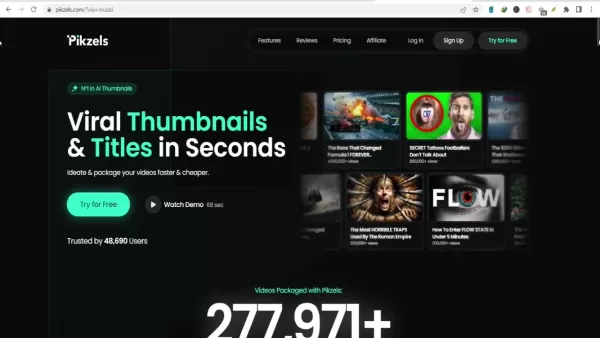
It simplifies the creative process by automating thumbnail design and title creation, saving time for YouTube creators. Using advanced AI, Pikzels analyzes trends to produce engaging, click-worthy content. Creators can ideate and package videos quickly and cost-effectively, making it a vital tool for growing an online audience.
Key advantages of Pikzels include:
- Time Efficiency: Create thumbnails and titles in moments, freeing up time for content creation.
- Boosted Engagement: AI-optimized designs drive higher click-through rates.
- Budget-Friendly: Affordable plans cater to diverse financial needs.
- Accessible Interface: Easy to use for both novices and seasoned creators.
With Pikzels, creators can focus on producing quality content while the platform handles elements that boost visibility and engagement. Its blend of AI innovation and ease of use makes it a standout in the crowded video content landscape.
Pikzels’ Core Features Explored
AI Thumbnail Creation
A standout feature of Pikzels is its AI thumbnail generator.
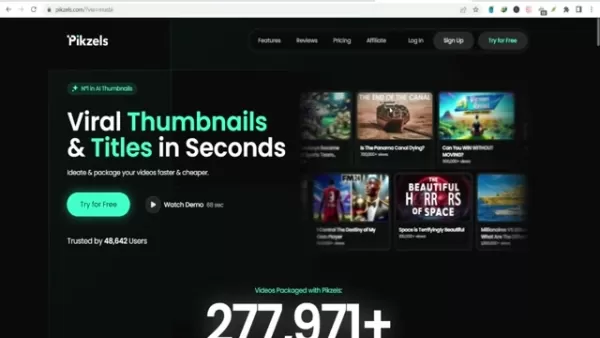
This tool crafts visually striking thumbnails designed to capture attention. AI algorithms evaluate video content and propose designs aligned with trending styles. Users can tweak these to reflect their brand’s identity. The thumbnail generator eliminates hours of manual design, speeding up the creative process.
Advantages of AI Thumbnail Creation:
- Fast and Effective: Thumbnails generated in seconds.
- Engagement-Optimized: Designs crafted to maximize clicks.
- Customizable: Adapt designs to suit your brand’s look.
This feature is ideal for creators without design expertise, offering a quick way to produce professional thumbnails that attract viewers.
AI Title Suggestions
Pikzels also provides an AI-powered title creation tool. Compelling titles are key to drawing viewers and boosting search rankings. The tool analyzes video content to suggest optimized titles that enhance discoverability and engagement. Creators can refine these to match their content’s tone.
Benefits of AI Title Suggestions:
- Engaging Titles: AI crafts titles tailored for search and clicks.
- Beat Writer’s Block: Instant title ideas for any video.
- Customizable: Adjust suggestions to fit your style.
This tool ensures videos are visually appealing and paired with titles that resonate, improving performance and reaching broader audiences.
Face Swap Tool
Pikzels’ face swap feature adds a creative twist to thumbnails.

It allows creators to swap faces seamlessly, injecting fun and intrigue into visuals. The user-friendly tool delivers professional results with smooth transitions, perfect for creating standout thumbnails in competitive spaces.
Benefits of Face Swap:
- Captivating Visuals: Adds a playful, eye-catching element.
- Easy to Use: Accessible for beginners.
- Polished Output: Ensures a professional look.
The face swap feature makes thumbnails memorable, encouraging clicks and boosting engagement.
How to Use Pikzels: A Step-by-Step Guide
Step 1: Brainstorm Content Ideas
Start by generating content ideas with Pikzels. The platform suggests trending topics to spark inspiration.
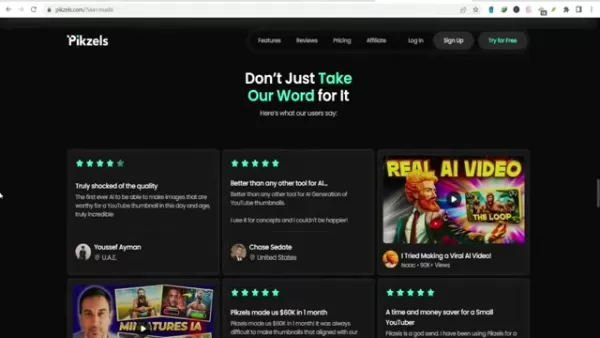
It provides category-based suggestions, helping creators craft engaging video concepts. The AI-powered idea generator cuts research time and keeps creators competitive.
How to Brainstorm Ideas:
- Explore Categories: Browse suggestions for inspiration.
- Use AI Idea Generator: Get tailored content ideas.
- Track Trends: Identify topics with viral potential.
Pikzels’ idea tools help creators align with audience interests, increasing the chances of viral success.
Step 2: Craft Thumbnails from Prompts
Next, create thumbnails using Pikzels’ AI. Enter a prompt about your video, and the AI generates multiple thumbnail options in under 30 seconds.

How to Create Thumbnails:
- Input a Prompt: Describe your video’s content.
- Generate Options: AI produces varied thumbnail designs.
- Customize: Refine designs to align with your brand.
This feature simplifies thumbnail creation, delivering professional visuals quickly.
Step 3: Boost Thumbnails with Face Swap
Enhance thumbnails using the face swap tool. Upload a photo, and the AI integrates your face into the thumbnail, boosting recognition and engagement.
How to Use Face Swap:
- Upload a Photo: Select a high-quality image.
- AI Face Swap: Watch the seamless integration.
- Adjust Results: Fine-tune for a professional finish.
This feature strengthens audience connection, driving clicks through personalized visuals.
Step 4: Generate Compelling Titles
Finally, create video titles with Pikzels’ AI.
Input your video topic, and the AI suggests attention-grabbing titles tailored for engagement.
How to Generate Titles:
- Enter Topic: Describe your video’s focus.
- Generate Options: AI provides multiple title ideas.
- Customize: Refine to match your brand’s voice.
Pikzels ensures titles captivate viewers, enhancing video performance.
Pikzels Pricing: Choose Your Plan
Pricing Overview
Pikzels offers flexible pricing plans for creators, from solo YouTubers to teams.
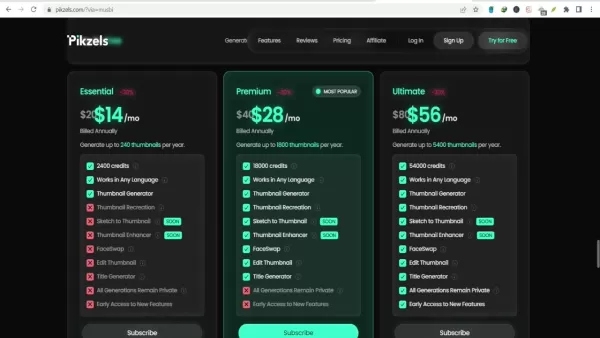
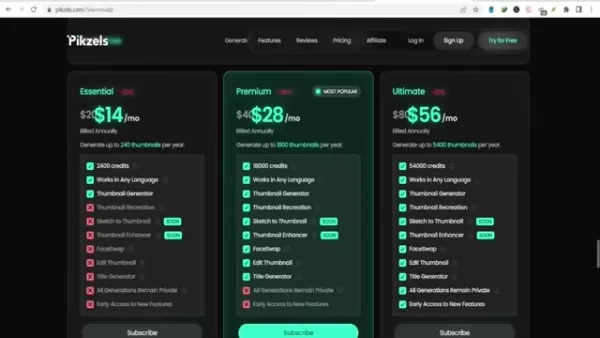
Plans vary by features, credits, and cost, with monthly and annual options. Annual plans provide discounts, and a free trial lets users test five thumbnails without a credit card.
Pricing Summary:
- Essential: Ideal for individuals, with basic features and limited credits.
- Premium: Balances features and credits for growing channels.
- Ultimate: Suits professionals with full access and ample credits.
Below is a detailed pricing table.
Pricing Details
Compare plans to find the best fit:
Feature Essential Premium Ultimate Monthly Cost $14/month $28/month $56/month Annual Cost $168/year $336/year $672/year Credits 2400 credits/year 18000 credits/year 54000 credits/year Thumbnail Generator ✓ ✓ ✓ Works in Any Language ✓ ✓ ✓ Thumbnail Recreation ✓ ✓ ✓ Sketch to Thumbnail ✗ Soon Soon Thumbnail Enhancer ✗ Soon Soon FaceSwap ✗ ✓ ✓ Edit Thumbnail ✗ ✓ ✓ Title Generator ✗ ✓ ✓ All Generations Private ✓ ✓ ✓ Early Access ✗ ✓ ✓
These plans ensure Pikzels fits every creator’s budget and goals.
Pikzels: Pros and Cons
Pros
AI-driven thumbnail and title tools save time and effort.
Intuitive interface simplifies professional content creation.
Affordable plans suit various budgets.
Face swap adds a creative edge to thumbnails.
Free trial lets users test the platform risk-free.
Cons
Discord login requirement may inconvenience some users.
Features like sketch to thumbnail are still in development.
Essential plan credits may fall short for heavy users.
AI reliance might limit creative control for some.
Lack of advanced editing tools may require external software.
Core Features: In-Depth Look
Breaking Down Pikzels’ Tools
Pikzels blends AI automation with user-friendly design to streamline video creation.
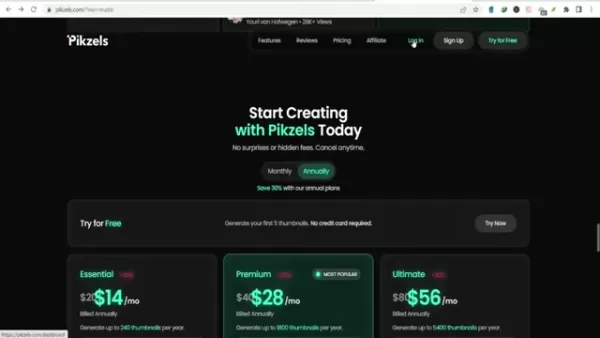
Its features enhance video appeal, boost viewership, and save time.
Core Features:
- Thumbnail Generator: AI creates engaging thumbnails based on video content.
- Title Generator: Suggests optimized titles for better search rankings.
- Thumbnail Recreation: Replicates designs for brand consistency.
- Sketch to Thumbnail (Coming Soon): Turn sketches into thumbnails.
- Thumbnail Enhancer (Coming Soon): Automatically improves thumbnail quality.
- FaceSwap: Adds fun, professional face swaps to thumbnails.
- Edit Thumbnail: Allows manual tweaks for perfect results.
- Private Generations: Keeps all content secure.
- Multilingual Support: Creates content in various languages.
- Early Access: Premium users get new features first.
Pikzels empowers creators to produce standout videos with ease.
Use Cases: Pikzels in Action
Practical Applications
Pikzels serves creators from solo YouTubers to large media firms, streamlining workflows and boosting online presence.
Use Cases:
- YouTube Creators: Generate thumbnails and titles to boost clicks and views.
- Social Media Marketers: Create engaging visuals for ads and posts.
- Educational Institutions: Craft appealing thumbnails for online courses.
- Small Businesses: Produce professional video marketing content.
- E-commerce: Enhance product videos for better visibility and sales.
Pikzels’ versatile tools benefit creators across industries.
Pikzels FAQs
What is Pikzels?
Pikzels is an AI platform that generates viral thumbnails and titles for videos in seconds, simplifying content creation.
How does Pikzels use AI?
It uses AI to analyze content, suggest designs, and create optimized thumbnails and titles for engagement and search.
What features does Pikzels offer?
Features include AI thumbnail and title creation, thumbnail recreation, face swap, and upcoming sketch-to-thumbnail tools.
How much does Pikzels cost?
Pricing varies by plan. Visit Pikzels.com for details.
Is there a free trial?
Yes, users can try five thumbnails free, no credit card needed.
Do I need a Discord account?
Yes, a Discord account is required to log in.
What is thumbnail recreation?
It recreates thumbnails from existing designs for brand consistency.
Does Pikzels support multiple languages?
Yes, it creates content in various languages.
What do premium users get?
Premium users gain early access to new features.
Related Questions
How does AI improve video creation?
AI streamlines thumbnail design, title creation, and editing, saving time while optimizing engagement and search rankings. Tools like Pikzels make high-quality, audience-focused video production efficient and accessible.
Related article
 Ctrip Business Travel Unveils AI Ecosystem with 7 Industry Agents and 17 Core Capabilities
Ctrip Business Travel has officially unveiled the "Ctrip Business Travel AI Ecosystem," leveraging large language models to fundamentally restructure corporate travel management. This comprehensive ecosystem addresses four core scenarios: travel arra
Stripe to Acquire OpenRouter as AI Model Routing Gains Momentum
Stripe has agreed to acquire OpenRouter, an AI model-routing platform that gives developers access to hundreds of models through a single interface. The deal adds model selection and routing to Stripe’s existing work around AI usage and token-based b
Former OpenAI Researcher Barrett Zoph Returns to Google to Support Gemini Development
Barret Zoph, who previously abruptly left and joined OpenAI due to a disagreement with Thinking Machines Lab CEO Miriam Mularati, has once again changed employers. Alphabet's Google announced that Zoph will return as Vice President of Research, bring
Related Special Topic Recommendations
Design & Art
Ctrip Business Travel Unveils AI Ecosystem with 7 Industry Agents and 17 Core Capabilities
Ctrip Business Travel has officially unveiled the "Ctrip Business Travel AI Ecosystem," leveraging large language models to fundamentally restructure corporate travel management. This comprehensive ecosystem addresses four core scenarios: travel arra
Stripe to Acquire OpenRouter as AI Model Routing Gains Momentum
Stripe has agreed to acquire OpenRouter, an AI model-routing platform that gives developers access to hundreds of models through a single interface. The deal adds model selection and routing to Stripe’s existing work around AI usage and token-based b
Former OpenAI Researcher Barrett Zoph Returns to Google to Support Gemini Development
Barret Zoph, who previously abruptly left and joined OpenAI due to a disagreement with Thinking Machines Lab CEO Miriam Mularati, has once again changed employers. Alphabet's Google announced that Zoph will return as Vice President of Research, bring
Related Special Topic Recommendations
Design & Art
 Top AI Illustration Tools: Create Editorial Scenes and Cover Art Faster
2026 Latest Top-rated AI Illustration Tools: Our curated list features the best powerfully designed tools for creating stunning editorial scenes and eye-catching cover art quickly. Each option has gone through rigorous real-world tests, offering a free vs paid comparison to help you find the perfect match for your workflow. Try these must-try solutions today to unlock your AI edge and boost your creative productivity. Explore now at XIX.AI.
 10 tools
 xix.ai
Education and Learning
Top AI Tutors for Exam Prep: Practice Math, Science, and English
xix.ai
Education and Learning
Top AI Tutors for Exam Prep: Practice Math, Science, and English
2026 Latest Top-Rated Best AI Tutors for Exam Prep are here on XIX.AI! Our curated list features powerful game-changing tools that offer free vs paid comparison, real-world tests, and weekly updated rankings. They help boost your writing efficiency, simplify complex topic learning, and unlock your academic potential. Explore now to Discover your perfect exam prep tool and Start creating today to Unlock your AI edge!
10 tools
xix.ai
Finance
AI Budget Planning Tools for Personal Money Management
2026 Latest Best Top-Rated AI Budget Planning Tools for Personal Money Management are here on XIX.AI! This curated collection features powerful, game-changing solutions that help you conduct real-world tests, understand spending habits, and create personalized plans to boost productivity. Enjoy a free vs paid comparison along with detailed rankings. Must-try tools designed to simplify money management and unlock your AI edge. Explore now!
11 tools
xix.ai
Health & Wellness
AI Sleep Tracking Assistants: Improve Recovery with Better Bedtime Habits
2026 Latest Best Top-Rated AI Sleep Tracking Assistants curated for ultimate recovery. This fully updated weekly guide features powerful tools that deliver real-world tests, free vs paid comparison, and detailed rankings to help you find the must-try solution that boosts sleep quality and supports better bedtime habits. Explore now at XIX.AI to Unlock your AI edge.
10 tools
xix.ai
Data Analysis
AI SQL Copilots for Product and Revenue Analytics
2026 Latest Best Top-Rated AI SQL Copilots for Product and Revenue Analytics! XIX.AI has curated a powerful, game-changing collection of must-try tools that undergo real-world tests through weekly updated rankings. These tools help users boost productivity significantly by accelerating data analysis, streamlining complex queries, and generating accurate insights to drive smarter business decisions. Explore now to Discover your perfect tool for unlocking your AI edge!
14 tools
xix.ai
Education and Learning
Best AI Homework Helpers That Teach: Learn Concepts, Not Just Answers
2026 Latest Best Top-Rated AI Homework Helpers That Teach Core Concepts Not Just Answers Powerful Tools for Students Must-Try Curated List Weekly Updated Free vs Paid Comparison Real-World Tests Accurate Rankings to Help You Unlock Your Full Learning Potential Explore now to Discover your perfect tool for smarter studying.
10 tools
xix.ai

 Comments (2)
0/500
Comments (2)
0/500
![JamesGreen]()
Pikzels scheint echt praktisch zu sein, um Thumbnails und Titel zu erstellen. Ich frage mich aber, ob solche KI-Tools langfristig nicht dazu führen, dass alles irgendwie gleich aussieht? 🤔 Die Vielfalt könnte verloren gehen, auch wenn es die Arbeit erleichtert.
![RogerKing]()
Just tried Pikzels and honestly, it's a game-changer for my small channel. The auto-suggested titles feel surprisingly relevant, though I wish there was a bit more customization for niche topics like retro gaming. Still, cuts my editing time in half! Anyone else find AI thumbnails sometimes feel 'too perfect' though? 😅
In the fast-paced digital world, captivating thumbnails and titles are critical for grabbing attention on platforms like YouTube. Content creators need efficient tools to boost visibility and streamline workflows. Pikzels.com offers an AI-driven solution, generating eye-catching thumbnails and titles in moments. This review dives into Pikzels’ features, pricing, use cases, and its impact on elevating video performance, showing how it can transform your video marketing strategy and help you shine in a competitive online space.
Key Highlights
Pikzels.com harnesses AI to create viral thumbnails and titles swiftly.
It offers an intuitive interface for brainstorming and refining video content.
Features include AI-generated thumbnails, title suggestions, and face swap tools.
Pricing options suit various needs, with flexible monthly and yearly plans.
Trusted by many creators, Pikzels has enhanced countless videos.
A Discord account is required to access the platform’s tools.
It prioritizes simplicity, especially for those new to thumbnail design.
Pikzels Unveiled: AI-Driven Thumbnail and Title Creation
What is Pikzels?
Pikzels.com is an AI-powered platform that enables creators to craft viral thumbnails and titles for videos in seconds.
It simplifies the creative process by automating thumbnail design and title creation, saving time for YouTube creators. Using advanced AI, Pikzels analyzes trends to produce engaging, click-worthy content. Creators can ideate and package videos quickly and cost-effectively, making it a vital tool for growing an online audience.
Key advantages of Pikzels include:
- Time Efficiency: Create thumbnails and titles in moments, freeing up time for content creation.
- Boosted Engagement: AI-optimized designs drive higher click-through rates.
- Budget-Friendly: Affordable plans cater to diverse financial needs.
- Accessible Interface: Easy to use for both novices and seasoned creators.
With Pikzels, creators can focus on producing quality content while the platform handles elements that boost visibility and engagement. Its blend of AI innovation and ease of use makes it a standout in the crowded video content landscape.
Pikzels’ Core Features Explored
AI Thumbnail Creation
A standout feature of Pikzels is its AI thumbnail generator.
This tool crafts visually striking thumbnails designed to capture attention. AI algorithms evaluate video content and propose designs aligned with trending styles. Users can tweak these to reflect their brand’s identity. The thumbnail generator eliminates hours of manual design, speeding up the creative process.
Advantages of AI Thumbnail Creation:
- Fast and Effective: Thumbnails generated in seconds.
- Engagement-Optimized: Designs crafted to maximize clicks.
- Customizable: Adapt designs to suit your brand’s look.
This feature is ideal for creators without design expertise, offering a quick way to produce professional thumbnails that attract viewers.
AI Title Suggestions
Pikzels also provides an AI-powered title creation tool. Compelling titles are key to drawing viewers and boosting search rankings. The tool analyzes video content to suggest optimized titles that enhance discoverability and engagement. Creators can refine these to match their content’s tone.
Benefits of AI Title Suggestions:
- Engaging Titles: AI crafts titles tailored for search and clicks.
- Beat Writer’s Block: Instant title ideas for any video.
- Customizable: Adjust suggestions to fit your style.
This tool ensures videos are visually appealing and paired with titles that resonate, improving performance and reaching broader audiences.
Face Swap Tool
Pikzels’ face swap feature adds a creative twist to thumbnails.
It allows creators to swap faces seamlessly, injecting fun and intrigue into visuals. The user-friendly tool delivers professional results with smooth transitions, perfect for creating standout thumbnails in competitive spaces.
Benefits of Face Swap:
- Captivating Visuals: Adds a playful, eye-catching element.
- Easy to Use: Accessible for beginners.
- Polished Output: Ensures a professional look.
The face swap feature makes thumbnails memorable, encouraging clicks and boosting engagement.
How to Use Pikzels: A Step-by-Step Guide
Step 1: Brainstorm Content Ideas
Start by generating content ideas with Pikzels. The platform suggests trending topics to spark inspiration.
It provides category-based suggestions, helping creators craft engaging video concepts. The AI-powered idea generator cuts research time and keeps creators competitive.
How to Brainstorm Ideas:
- Explore Categories: Browse suggestions for inspiration.
- Use AI Idea Generator: Get tailored content ideas.
- Track Trends: Identify topics with viral potential.
Pikzels’ idea tools help creators align with audience interests, increasing the chances of viral success.
Step 2: Craft Thumbnails from Prompts
Next, create thumbnails using Pikzels’ AI. Enter a prompt about your video, and the AI generates multiple thumbnail options in under 30 seconds.
How to Create Thumbnails:
- Input a Prompt: Describe your video’s content.
- Generate Options: AI produces varied thumbnail designs.
- Customize: Refine designs to align with your brand.
This feature simplifies thumbnail creation, delivering professional visuals quickly.
Step 3: Boost Thumbnails with Face Swap
Enhance thumbnails using the face swap tool. Upload a photo, and the AI integrates your face into the thumbnail, boosting recognition and engagement.
How to Use Face Swap:
- Upload a Photo: Select a high-quality image.
- AI Face Swap: Watch the seamless integration.
- Adjust Results: Fine-tune for a professional finish.
This feature strengthens audience connection, driving clicks through personalized visuals.
Step 4: Generate Compelling Titles
Finally, create video titles with Pikzels’ AI.
Input your video topic, and the AI suggests attention-grabbing titles tailored for engagement.
How to Generate Titles:
- Enter Topic: Describe your video’s focus.
- Generate Options: AI provides multiple title ideas.
- Customize: Refine to match your brand’s voice.
Pikzels ensures titles captivate viewers, enhancing video performance.
Pikzels Pricing: Choose Your Plan
Pricing Overview
Pikzels offers flexible pricing plans for creators, from solo YouTubers to teams.
Plans vary by features, credits, and cost, with monthly and annual options. Annual plans provide discounts, and a free trial lets users test five thumbnails without a credit card.
Pricing Summary:
- Essential: Ideal for individuals, with basic features and limited credits.
- Premium: Balances features and credits for growing channels.
- Ultimate: Suits professionals with full access and ample credits.
Below is a detailed pricing table.
Pricing Details
Compare plans to find the best fit:
| Feature | Essential | Premium | Ultimate |
|---|---|---|---|
| Monthly Cost | $14/month | $28/month | $56/month |
| Annual Cost | $168/year | $336/year | $672/year |
| Credits | 2400 credits/year | 18000 credits/year | 54000 credits/year |
| Thumbnail Generator | ✓ | ✓ | ✓ |
| Works in Any Language | ✓ | ✓ | ✓ |
| Thumbnail Recreation | ✓ | ✓ | ✓ |
| Sketch to Thumbnail | ✗ | Soon | Soon |
| Thumbnail Enhancer | ✗ | Soon | Soon |
| FaceSwap | ✗ | ✓ | ✓ |
| Edit Thumbnail | ✗ | ✓ | ✓ |
| Title Generator | ✗ | ✓ | ✓ |
| All Generations Private | ✓ | ✓ | ✓ |
| Early Access | ✗ | ✓ | ✓ |
These plans ensure Pikzels fits every creator’s budget and goals.
Pikzels: Pros and Cons
Pros
AI-driven thumbnail and title tools save time and effort.
Intuitive interface simplifies professional content creation.
Affordable plans suit various budgets.
Face swap adds a creative edge to thumbnails.
Free trial lets users test the platform risk-free.
Cons
Discord login requirement may inconvenience some users.
Features like sketch to thumbnail are still in development.
Essential plan credits may fall short for heavy users.
AI reliance might limit creative control for some.
Lack of advanced editing tools may require external software.
Core Features: In-Depth Look
Breaking Down Pikzels’ Tools
Pikzels blends AI automation with user-friendly design to streamline video creation.
Its features enhance video appeal, boost viewership, and save time.
Core Features:
- Thumbnail Generator: AI creates engaging thumbnails based on video content.
- Title Generator: Suggests optimized titles for better search rankings.
- Thumbnail Recreation: Replicates designs for brand consistency.
- Sketch to Thumbnail (Coming Soon): Turn sketches into thumbnails.
- Thumbnail Enhancer (Coming Soon): Automatically improves thumbnail quality.
- FaceSwap: Adds fun, professional face swaps to thumbnails.
- Edit Thumbnail: Allows manual tweaks for perfect results.
- Private Generations: Keeps all content secure.
- Multilingual Support: Creates content in various languages.
- Early Access: Premium users get new features first.
Pikzels empowers creators to produce standout videos with ease.
Use Cases: Pikzels in Action
Practical Applications
Pikzels serves creators from solo YouTubers to large media firms, streamlining workflows and boosting online presence.
Use Cases:
- YouTube Creators: Generate thumbnails and titles to boost clicks and views.
- Social Media Marketers: Create engaging visuals for ads and posts.
- Educational Institutions: Craft appealing thumbnails for online courses.
- Small Businesses: Produce professional video marketing content.
- E-commerce: Enhance product videos for better visibility and sales.
Pikzels’ versatile tools benefit creators across industries.
Pikzels FAQs
What is Pikzels?
Pikzels is an AI platform that generates viral thumbnails and titles for videos in seconds, simplifying content creation.
How does Pikzels use AI?
It uses AI to analyze content, suggest designs, and create optimized thumbnails and titles for engagement and search.
What features does Pikzels offer?
Features include AI thumbnail and title creation, thumbnail recreation, face swap, and upcoming sketch-to-thumbnail tools.
How much does Pikzels cost?
Pricing varies by plan. Visit Pikzels.com for details.
Is there a free trial?
Yes, users can try five thumbnails free, no credit card needed.
Do I need a Discord account?
Yes, a Discord account is required to log in.
What is thumbnail recreation?
It recreates thumbnails from existing designs for brand consistency.
Does Pikzels support multiple languages?
Yes, it creates content in various languages.
What do premium users get?
Premium users gain early access to new features.
Related Questions
How does AI improve video creation?
AI streamlines thumbnail design, title creation, and editing, saving time while optimizing engagement and search rankings. Tools like Pikzels make high-quality, audience-focused video production efficient and accessible.








 Ctrip Business Travel Unveils AI Ecosystem with 7 Industry Agents and 17 Core Capabilities
Ctrip Business Travel has officially unveiled the "Ctrip Business Travel AI Ecosystem," leveraging large language models to fundamentally restructure corporate travel management. This comprehensive ecosystem addresses four core scenarios: travel arra
Ctrip Business Travel Unveils AI Ecosystem with 7 Industry Agents and 17 Core Capabilities
Ctrip Business Travel has officially unveiled the "Ctrip Business Travel AI Ecosystem," leveraging large language models to fundamentally restructure corporate travel management. This comprehensive ecosystem addresses four core scenarios: travel arra
 Stripe to Acquire OpenRouter as AI Model Routing Gains Momentum
Stripe has agreed to acquire OpenRouter, an AI model-routing platform that gives developers access to hundreds of models through a single interface. The deal adds model selection and routing to Stripe’s existing work around AI usage and token-based b
Stripe to Acquire OpenRouter as AI Model Routing Gains Momentum
Stripe has agreed to acquire OpenRouter, an AI model-routing platform that gives developers access to hundreds of models through a single interface. The deal adds model selection and routing to Stripe’s existing work around AI usage and token-based b
 Former OpenAI Researcher Barrett Zoph Returns to Google to Support Gemini Development
Barret Zoph, who previously abruptly left and joined OpenAI due to a disagreement with Thinking Machines Lab CEO Miriam Mularati, has once again changed employers. Alphabet's Google announced that Zoph will return as Vice President of Research, bring
Former OpenAI Researcher Barrett Zoph Returns to Google to Support Gemini Development
Barret Zoph, who previously abruptly left and joined OpenAI due to a disagreement with Thinking Machines Lab CEO Miriam Mularati, has once again changed employers. Alphabet's Google announced that Zoph will return as Vice President of Research, bring

2026 Latest Top-rated AI Illustration Tools: Our curated list features the best powerfully designed tools for creating stunning editorial scenes and eye-catching cover art quickly. Each option has gone through rigorous real-world tests, offering a free vs paid comparison to help you find the perfect match for your workflow. Try these must-try solutions today to unlock your AI edge and boost your creative productivity. Explore now at XIX.AI.
10 tools
xix.ai

2026 Latest Top-Rated Best AI Tutors for Exam Prep are here on XIX.AI! Our curated list features powerful game-changing tools that offer free vs paid comparison, real-world tests, and weekly updated rankings. They help boost your writing efficiency, simplify complex topic learning, and unlock your academic potential. Explore now to Discover your perfect exam prep tool and Start creating today to Unlock your AI edge!
10 tools
xix.ai

2026 Latest Best Top-Rated AI Budget Planning Tools for Personal Money Management are here on XIX.AI! This curated collection features powerful, game-changing solutions that help you conduct real-world tests, understand spending habits, and create personalized plans to boost productivity. Enjoy a free vs paid comparison along with detailed rankings. Must-try tools designed to simplify money management and unlock your AI edge. Explore now!
11 tools
xix.ai

2026 Latest Best Top-Rated AI Sleep Tracking Assistants curated for ultimate recovery. This fully updated weekly guide features powerful tools that deliver real-world tests, free vs paid comparison, and detailed rankings to help you find the must-try solution that boosts sleep quality and supports better bedtime habits. Explore now at XIX.AI to Unlock your AI edge.
10 tools
xix.ai

2026 Latest Best Top-Rated AI SQL Copilots for Product and Revenue Analytics! XIX.AI has curated a powerful, game-changing collection of must-try tools that undergo real-world tests through weekly updated rankings. These tools help users boost productivity significantly by accelerating data analysis, streamlining complex queries, and generating accurate insights to drive smarter business decisions. Explore now to Discover your perfect tool for unlocking your AI edge!
14 tools
xix.ai

2026 Latest Best Top-Rated AI Homework Helpers That Teach Core Concepts Not Just Answers Powerful Tools for Students Must-Try Curated List Weekly Updated Free vs Paid Comparison Real-World Tests Accurate Rankings to Help You Unlock Your Full Learning Potential Explore now to Discover your perfect tool for smarter studying.
10 tools
xix.ai

Pikzels scheint echt praktisch zu sein, um Thumbnails und Titel zu erstellen. Ich frage mich aber, ob solche KI-Tools langfristig nicht dazu führen, dass alles irgendwie gleich aussieht? 🤔 Die Vielfalt könnte verloren gehen, auch wenn es die Arbeit erleichtert.
Just tried Pikzels and honestly, it's a game-changer for my small channel. The auto-suggested titles feel surprisingly relevant, though I wish there was a bit more customization for niche topics like retro gaming. Still, cuts my editing time in half! Anyone else find AI thumbnails sometimes feel 'too perfect' though? 😅












