


 Home
HomeAdobe Photoshop AI Feature 'Generative Fill' Expands Image Boundaries
Adobe Photoshop continues to advance, integrating state-of-the-art AI to streamline creative work. A standout new feature is Generative Fill, which lets users effortlessly extend images past their original edges. This smart tool uses artificial intelligence to create new content that blends perfectly with the existing picture. Think about widening a portrait's background, adding elements to a landscape, or crafting surreal dreamscapes. For photographers, designers, and digital artists, Generative Fill unlocks a whole new realm of creative potential.
Key Points
Generative Fill employs AI to intelligently expand images.
It's accessible in the Photoshop beta.
The tool provides several variations for each expansion.
You need to make a selection around the area you want to extend.
Users can guide the AI with a text prompt or let it work automatically.
It performs impressively well on a wide variety of images.
The feature will be added to commercial Photoshop releases in the future.
Understanding Photoshop Generative Fill
What is Generative Fill?
Generative Fill is an AI-driven feature in Adobe Photoshop that allows users to extend images beyond their original borders. By analyzing the existing image, the AI creates new content that integrates flawlessly with the surrounding area. This enables the creation of larger, more immersive, and visually compelling compositions.
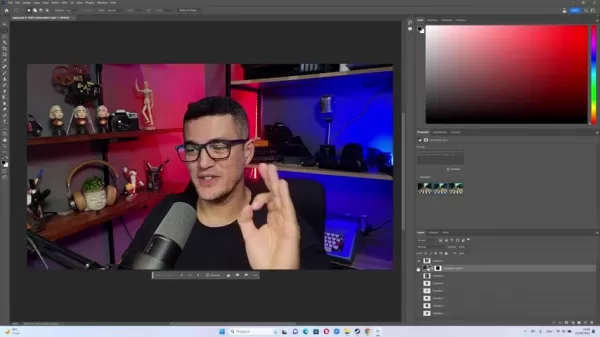
Imagine it as a digital toolkit for extending your photos. You're not simply stretching or distorting what's there; you're adding fresh, contextually appropriate details. This transforms creative workflows, from adjusting product shots for marketing to building expansive landscapes for art. The precision and realism of Generative Fill ensure expanded areas feel authentic to the original, making it an essential tool for today's digital creators. It offers an unprecedented level of creative control.
Availability and Requirements
Generative Fill is currently available in the Photoshop beta version, which is not yet part of the main public release. To try it, you must download the Photoshop beta app via your Adobe Creative Cloud subscription.
Because the feature relies on powerful AI processing, a computer with solid performance is recommended for the best experience. Slower systems may encounter longer wait times.
Adobe intends to bring Generative Fill to the standard, commercially available versions of Photoshop, though a specific launch date has not been announced. Watch for official updates from Adobe on its full release.
The Core Concept: Expanding Creative Horizons
At its heart, Generative Fill gives creators exceptional flexibility and control. Old methods for enlarging an image often caused awkward stretching, pixelation, and a clear drop in quality. Generative Fill avoids these problems by smartly generating new pixels, preserving the look and feel of the original artwork.
This is incredibly useful when an image is cropped too tightly or needs adapting for different formats. For instance, a portrait might need to fit a widescreen banner. Instead of cropping or stretching it poorly, Generative Fill can naturally extend the background, keeping the subject in focus and the composition intact.
The option to guide the AI with a prompt adds even more versatility. For photographers, graphic designers, and digital artists, Generative Fill is set to redefine how we approach image editing and expansion.
Exploring Practical Examples with Album Covers
Expanding The Beatles' 'Abbey Road' Cover
The iconic 'Abbey Road' album cover is instantly recognizable. But what exists beyond that famous crosswalk? With Generative Fill, we can envision a wider view, filling in the surrounding street with appropriate details.
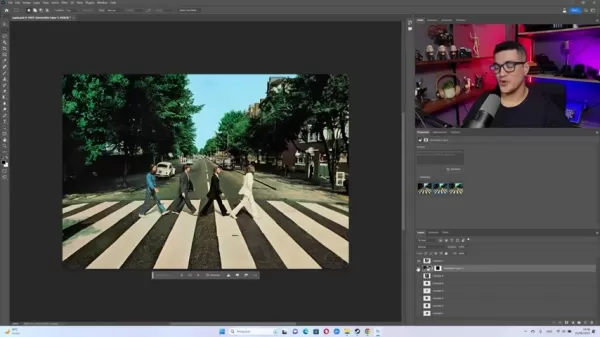
This not only broadens the visual story but also demonstrates how the AI can imagine beyond a classic frame, adding depth and curiosity to a well-known photo.
Reimagining Adele's '21' Cover
Adele's '21' album features a close-up, black-and-white portrait. Using Generative Fill, we can extend the background to create a sense of space and mood around her.
The AI intelligently fills the space around Adele, offering multiple variations that present different artistic interpretations of the original cover. While the AI can sometimes have trouble with text and logos, the generated backgrounds produce an engaging and immersive result.
Transforming Eminem's 'The Eminem Show' Cover
Eminem's 'The Eminem Show' album art is stark and dramatic. Expanding it with Generative Fill can yield interesting, sometimes surprising, outcomes.
The AI interprets the imagery and creates three distinct scenes: a rural landscape, a blood-stained room, and a ominous forest. The quality can vary, but it highlights the AI's potential to completely alter an image's setting and atmosphere.
Enrique Iglesias's Self Titled Album
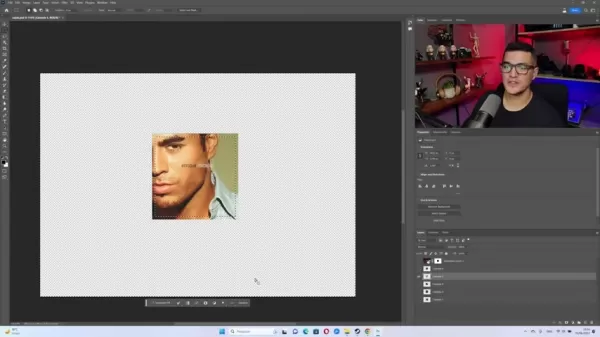
The Enrique Iglesias album cover shows only half his face against a plain backdrop. Using Generative Fill reveals what the AI creates with minimal information to work from. The AI generated three images, each portraying a person quite different from the original artwork.
Bob Dylan’s the Freewheelin’
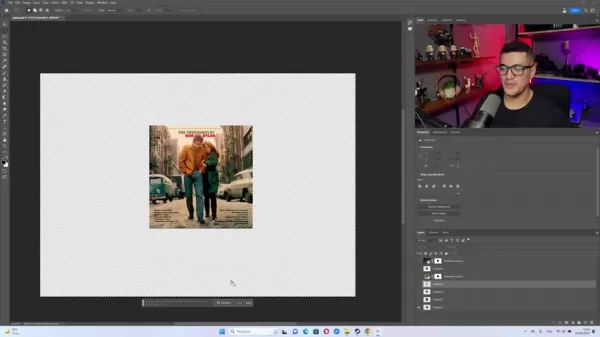
The 'Freewheelin'' album artwork shows Bob Dylan and his girlfriend walking down a street. With Generative Fill, we can extend the street beyond the original frame. The AI smartly generates more of the street, along with additional cars and buildings in the background, creating a highly realistic extension.
Step-by-Step Guide: Using Generative Fill
Step 1: Open Your Image in Photoshop Beta
Launch the Photoshop beta app and open the image you wish to expand. Make sure the image layer is unlocked and ready for editing.
Step 2: Increase Canvas Size with the Crop Tool
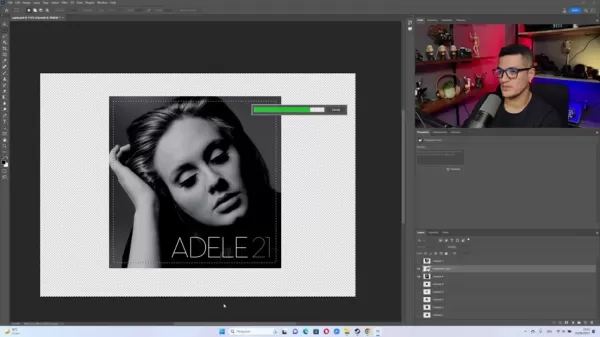
Select the Crop Tool from the toolbar. Drag the crop handles outward to enlarge the canvas beyond the image's original borders. This creates a transparent area where the AI will generate content. Press Enter to confirm the new canvas size.
Step 3: Select the Area to Fill with Rectangular Marquee Tool
Use the Rectangular Marquee Tool to select the transparent area you want filled. It's helpful to include a small buffer of the original image inside the selection to give the AI useful context.
Step 4: Invert the Selection
Go to Select > Inverse. This flips the selection so the area you initially selected (the transparent part) is now unselected, and the rest of the canvas is selected for filling.
Step 5: Access and Use Generative Fill
With the new area selected, find the Generative Fill option. Click the 'Generate' button. Photoshop will analyze the image and create new content to fill the space seamlessly. The AI may attempt to generate text, which often appears garbled, so keep this in mind for coherent results.
Step 6: Explore Variations
Generative Fill produces several variations of the expanded content automatically. Use the arrow keys or the Variations panel to cycle through the different options and pick the one that best matches your vision.
Advantages and Disadvantages of Generative Fill
Pros
Seamless Image Expansion: Creates new content that blends naturally with the original image.
Creative Flexibility: Unlocks new opportunities for photographers, designers, and artists.
Multiple Variations: Provides several options for each expansion, so you can choose the best fit.
Ease of Use: Features a simple, intuitive interface suitable for all skill levels.
Potential Time Savings: Accelerates complex editing tasks by automating the expansion process.
Cons
Beta Version Limitations: Only available in the beta version, restricting general access.
AI Accuracy: Generated content can sometimes be unpredictable or inaccurate.
Processing Power: Requires a reasonably powerful computer for smooth operation.
Ethical Considerations: Raises questions about authenticity and potential misuse.
Text Generation Limitations: The AI frequently produces incoherent or illegible text.
Frequently Asked Questions
Is Generative Fill available in the standard version of Photoshop?
No, it is currently exclusive to the Photoshop beta version.
Can I use Generative Fill on any type of image?
Yes, it works effectively on various image types, including photos, illustrations, and digital paintings.
What happens if I don't like the generated variations?
You can click 'Generate' again to produce a fresh set of variations until you find a suitable one.
Does Generative Fill require a powerful computer?
A computer with decent specifications is recommended for optimal performance due to the AI's processing needs.
Will Generative Fill be available in commercial versions of Photoshop?
Yes, Adobe plans to include Generative Fill in future commercial releases of Photoshop.
Related Questions
How does Generative Fill compare to traditional image expansion techniques?
Traditional methods like stretching or copying pixels often degrade image quality and detail. Generative Fill creates entirely new pixels based on the surrounding context, leading to a more natural and seamless expansion. For example, enlarging a landscape photo the old way would distort mountains and trees, making them look fake. Generative Fill analyzes the scene and generates new, fitting elements that blend perfectly, maintaining perspective and lighting. It can also match the style of the original, such as adding vintage-appropriate details to an old photo. This ability to produce high-quality, context-aware detail is what sets Generative Fill apart.
What are the potential ethical considerations of using AI for image manipulation?
Using AI for image editing brings up important ethical issues, particularly concerning authenticity and misuse. Transparency is key—disclosing the use of AI in altered images helps avoid deception. The technology's ease of use necessitates responsible practices and clear guidelines. News outlets, for instance, may need stricter verification for images in reports. In art and design, creators should be open about their use of AI to maintain honesty. It's vital to view AI-generated content critically and always verify the source and authenticity of images.
What future advancements can we expect in AI-powered image editing?
AI-powered image editing is advancing rapidly. We can anticipate major improvements in the accuracy and realism of generated content. As algorithms grow more sophisticated, they'll better replicate real-world complexity for more convincing edits. Future tools will likely offer greater user control, allowing precise guidance over style, details, and even emotional tone. We'll also see AI integrated into more editing tasks, like object removal, color grading, and creating scenes from text descriptions. These developments will further merge reality with imagination, offering incredible new tools for artists, designers, and storytellers. AI is poised to generate images on an unprecedented scale, opening even more creative avenues.
Related article
 Former OpenAI Researcher Barrett Zoph Returns to Google to Support Gemini Development
Barret Zoph, who previously abruptly left and joined OpenAI due to a disagreement with Thinking Machines Lab CEO Miriam Mularati, has once again changed employers. Alphabet's Google announced that Zoph will return as Vice President of Research, bring
How Recursive Intelligence Raised $335M at $4B Valuation in 4 Months
The co-founders of startup Ricursive Intelligence seemed destined to be co-founders.Anna Goldie, CEO, and Azalia Mirhoseini, CTO, are so well-known in the AI community that they were among those AI engineers who “got those weird emails from Zuckerber
AI race won’t wait, nor will this TechCrunch Disrupt 25% discount
Every founder building in AI right now is asking the same question: Are we moving fast enough, and effectively enough? TechCrunch Disrupt 2026 puts you in the same room as the people wrestling with that existential question at the highest levels. Fro
Related Special Topic Recommendations
Design & Art
Former OpenAI Researcher Barrett Zoph Returns to Google to Support Gemini Development
Barret Zoph, who previously abruptly left and joined OpenAI due to a disagreement with Thinking Machines Lab CEO Miriam Mularati, has once again changed employers. Alphabet's Google announced that Zoph will return as Vice President of Research, bring
How Recursive Intelligence Raised $335M at $4B Valuation in 4 Months
The co-founders of startup Ricursive Intelligence seemed destined to be co-founders.Anna Goldie, CEO, and Azalia Mirhoseini, CTO, are so well-known in the AI community that they were among those AI engineers who “got those weird emails from Zuckerber
AI race won’t wait, nor will this TechCrunch Disrupt 25% discount
Every founder building in AI right now is asking the same question: Are we moving fast enough, and effectively enough? TechCrunch Disrupt 2026 puts you in the same room as the people wrestling with that existential question at the highest levels. Fro
Related Special Topic Recommendations
Design & Art
 Top AI Illustration Tools: Create Editorial Scenes and Cover Art Faster
2026 Latest Top-rated AI Illustration Tools: Our curated list features the best powerfully designed tools for creating stunning editorial scenes and eye-catching cover art quickly. Each option has gone through rigorous real-world tests, offering a free vs paid comparison to help you find the perfect match for your workflow. Try these must-try solutions today to unlock your AI edge and boost your creative productivity. Explore now at XIX.AI.
 10 tools
 xix.ai
Education and Learning
Top AI Tutors for Exam Prep: Practice Math, Science, and English
xix.ai
Education and Learning
Top AI Tutors for Exam Prep: Practice Math, Science, and English
2026 Latest Top-Rated Best AI Tutors for Exam Prep are here on XIX.AI! Our curated list features powerful game-changing tools that offer free vs paid comparison, real-world tests, and weekly updated rankings. They help boost your writing efficiency, simplify complex topic learning, and unlock your academic potential. Explore now to Discover your perfect exam prep tool and Start creating today to Unlock your AI edge!
10 tools
xix.ai
Finance
AI Budget Planning Tools for Personal Money Management
2026 Latest Best Top-Rated AI Budget Planning Tools for Personal Money Management are here on XIX.AI! This curated collection features powerful, game-changing solutions that help you conduct real-world tests, understand spending habits, and create personalized plans to boost productivity. Enjoy a free vs paid comparison along with detailed rankings. Must-try tools designed to simplify money management and unlock your AI edge. Explore now!
11 tools
xix.ai
Health & Wellness
AI Sleep Tracking Assistants: Improve Recovery with Better Bedtime Habits
2026 Latest Best Top-Rated AI Sleep Tracking Assistants curated for ultimate recovery. This fully updated weekly guide features powerful tools that deliver real-world tests, free vs paid comparison, and detailed rankings to help you find the must-try solution that boosts sleep quality and supports better bedtime habits. Explore now at XIX.AI to Unlock your AI edge.
10 tools
xix.ai
Data Analysis
AI SQL Copilots for Product and Revenue Analytics
2026 Latest Best Top-Rated AI SQL Copilots for Product and Revenue Analytics! XIX.AI has curated a powerful, game-changing collection of must-try tools that undergo real-world tests through weekly updated rankings. These tools help users boost productivity significantly by accelerating data analysis, streamlining complex queries, and generating accurate insights to drive smarter business decisions. Explore now to Discover your perfect tool for unlocking your AI edge!
14 tools
xix.ai
Education and Learning
Best AI Homework Helpers That Teach: Learn Concepts, Not Just Answers
2026 Latest Best Top-Rated AI Homework Helpers That Teach Core Concepts Not Just Answers Powerful Tools for Students Must-Try Curated List Weekly Updated Free vs Paid Comparison Real-World Tests Accurate Rankings to Help You Unlock Your Full Learning Potential Explore now to Discover your perfect tool for smarter studying.
10 tools
xix.ai

 Comments (2)
0/500
Comments (2)
0/500
![JackSanchez]()
這個功能太酷了!以後修圖不用再辛苦補背景了,AI直接幫我延伸畫面,感覺像魔法一樣。不過有點擔心,這樣會不會讓設計師的某些基礎技能變得不重要啊?🤔
![AlbertHill]()
Photoshop ajoute encore un outil incroyable 🤖 'Remplissage génératif' semble magique... Mais quelle mouche pique Adobe récemment ? On dirait qu'ils veulent combler tous les retours à chaque mise à jour, c'est presque suspect 😅 Est-ce que ça ne va pas rendre les retoucheurs trop passifs à force ? Enfin, pour les petits projets, ça va clairement accélérer le workflow.
Adobe Photoshop continues to advance, integrating state-of-the-art AI to streamline creative work. A standout new feature is Generative Fill, which lets users effortlessly extend images past their original edges. This smart tool uses artificial intelligence to create new content that blends perfectly with the existing picture. Think about widening a portrait's background, adding elements to a landscape, or crafting surreal dreamscapes. For photographers, designers, and digital artists, Generative Fill unlocks a whole new realm of creative potential.
Key Points
Generative Fill employs AI to intelligently expand images.
It's accessible in the Photoshop beta.
The tool provides several variations for each expansion.
You need to make a selection around the area you want to extend.
Users can guide the AI with a text prompt or let it work automatically.
It performs impressively well on a wide variety of images.
The feature will be added to commercial Photoshop releases in the future.
Understanding Photoshop Generative Fill
What is Generative Fill?
Generative Fill is an AI-driven feature in Adobe Photoshop that allows users to extend images beyond their original borders. By analyzing the existing image, the AI creates new content that integrates flawlessly with the surrounding area. This enables the creation of larger, more immersive, and visually compelling compositions.
Imagine it as a digital toolkit for extending your photos. You're not simply stretching or distorting what's there; you're adding fresh, contextually appropriate details. This transforms creative workflows, from adjusting product shots for marketing to building expansive landscapes for art. The precision and realism of Generative Fill ensure expanded areas feel authentic to the original, making it an essential tool for today's digital creators. It offers an unprecedented level of creative control.
Availability and Requirements
Generative Fill is currently available in the Photoshop beta version, which is not yet part of the main public release. To try it, you must download the Photoshop beta app via your Adobe Creative Cloud subscription.
Because the feature relies on powerful AI processing, a computer with solid performance is recommended for the best experience. Slower systems may encounter longer wait times.
Adobe intends to bring Generative Fill to the standard, commercially available versions of Photoshop, though a specific launch date has not been announced. Watch for official updates from Adobe on its full release.
The Core Concept: Expanding Creative Horizons
At its heart, Generative Fill gives creators exceptional flexibility and control. Old methods for enlarging an image often caused awkward stretching, pixelation, and a clear drop in quality. Generative Fill avoids these problems by smartly generating new pixels, preserving the look and feel of the original artwork.
This is incredibly useful when an image is cropped too tightly or needs adapting for different formats. For instance, a portrait might need to fit a widescreen banner. Instead of cropping or stretching it poorly, Generative Fill can naturally extend the background, keeping the subject in focus and the composition intact.
The option to guide the AI with a prompt adds even more versatility. For photographers, graphic designers, and digital artists, Generative Fill is set to redefine how we approach image editing and expansion.
Exploring Practical Examples with Album Covers
Expanding The Beatles' 'Abbey Road' Cover
The iconic 'Abbey Road' album cover is instantly recognizable. But what exists beyond that famous crosswalk? With Generative Fill, we can envision a wider view, filling in the surrounding street with appropriate details.
This not only broadens the visual story but also demonstrates how the AI can imagine beyond a classic frame, adding depth and curiosity to a well-known photo.
Reimagining Adele's '21' Cover
Adele's '21' album features a close-up, black-and-white portrait. Using Generative Fill, we can extend the background to create a sense of space and mood around her.
The AI intelligently fills the space around Adele, offering multiple variations that present different artistic interpretations of the original cover. While the AI can sometimes have trouble with text and logos, the generated backgrounds produce an engaging and immersive result.
Transforming Eminem's 'The Eminem Show' Cover
Eminem's 'The Eminem Show' album art is stark and dramatic. Expanding it with Generative Fill can yield interesting, sometimes surprising, outcomes.
The AI interprets the imagery and creates three distinct scenes: a rural landscape, a blood-stained room, and a ominous forest. The quality can vary, but it highlights the AI's potential to completely alter an image's setting and atmosphere.
Enrique Iglesias's Self Titled Album
The Enrique Iglesias album cover shows only half his face against a plain backdrop. Using Generative Fill reveals what the AI creates with minimal information to work from. The AI generated three images, each portraying a person quite different from the original artwork.
Bob Dylan’s the Freewheelin’
The 'Freewheelin'' album artwork shows Bob Dylan and his girlfriend walking down a street. With Generative Fill, we can extend the street beyond the original frame. The AI smartly generates more of the street, along with additional cars and buildings in the background, creating a highly realistic extension.
Step-by-Step Guide: Using Generative Fill
Step 1: Open Your Image in Photoshop Beta
Launch the Photoshop beta app and open the image you wish to expand. Make sure the image layer is unlocked and ready for editing.
Step 2: Increase Canvas Size with the Crop Tool
Select the Crop Tool from the toolbar. Drag the crop handles outward to enlarge the canvas beyond the image's original borders. This creates a transparent area where the AI will generate content. Press Enter to confirm the new canvas size.
Step 3: Select the Area to Fill with Rectangular Marquee Tool
Use the Rectangular Marquee Tool to select the transparent area you want filled. It's helpful to include a small buffer of the original image inside the selection to give the AI useful context.
Step 4: Invert the Selection
Go to Select > Inverse. This flips the selection so the area you initially selected (the transparent part) is now unselected, and the rest of the canvas is selected for filling.
Step 5: Access and Use Generative Fill
With the new area selected, find the Generative Fill option. Click the 'Generate' button. Photoshop will analyze the image and create new content to fill the space seamlessly. The AI may attempt to generate text, which often appears garbled, so keep this in mind for coherent results.
Step 6: Explore Variations
Generative Fill produces several variations of the expanded content automatically. Use the arrow keys or the Variations panel to cycle through the different options and pick the one that best matches your vision.
Advantages and Disadvantages of Generative Fill
Pros
Seamless Image Expansion: Creates new content that blends naturally with the original image.
Creative Flexibility: Unlocks new opportunities for photographers, designers, and artists.
Multiple Variations: Provides several options for each expansion, so you can choose the best fit.
Ease of Use: Features a simple, intuitive interface suitable for all skill levels.
Potential Time Savings: Accelerates complex editing tasks by automating the expansion process.
Cons
Beta Version Limitations: Only available in the beta version, restricting general access.
AI Accuracy: Generated content can sometimes be unpredictable or inaccurate.
Processing Power: Requires a reasonably powerful computer for smooth operation.
Ethical Considerations: Raises questions about authenticity and potential misuse.
Text Generation Limitations: The AI frequently produces incoherent or illegible text.
Frequently Asked Questions
Is Generative Fill available in the standard version of Photoshop?
No, it is currently exclusive to the Photoshop beta version.
Can I use Generative Fill on any type of image?
Yes, it works effectively on various image types, including photos, illustrations, and digital paintings.
What happens if I don't like the generated variations?
You can click 'Generate' again to produce a fresh set of variations until you find a suitable one.
Does Generative Fill require a powerful computer?
A computer with decent specifications is recommended for optimal performance due to the AI's processing needs.
Will Generative Fill be available in commercial versions of Photoshop?
Yes, Adobe plans to include Generative Fill in future commercial releases of Photoshop.
Related Questions
How does Generative Fill compare to traditional image expansion techniques?
Traditional methods like stretching or copying pixels often degrade image quality and detail. Generative Fill creates entirely new pixels based on the surrounding context, leading to a more natural and seamless expansion. For example, enlarging a landscape photo the old way would distort mountains and trees, making them look fake. Generative Fill analyzes the scene and generates new, fitting elements that blend perfectly, maintaining perspective and lighting. It can also match the style of the original, such as adding vintage-appropriate details to an old photo. This ability to produce high-quality, context-aware detail is what sets Generative Fill apart.
What are the potential ethical considerations of using AI for image manipulation?
Using AI for image editing brings up important ethical issues, particularly concerning authenticity and misuse. Transparency is key—disclosing the use of AI in altered images helps avoid deception. The technology's ease of use necessitates responsible practices and clear guidelines. News outlets, for instance, may need stricter verification for images in reports. In art and design, creators should be open about their use of AI to maintain honesty. It's vital to view AI-generated content critically and always verify the source and authenticity of images.
What future advancements can we expect in AI-powered image editing?
AI-powered image editing is advancing rapidly. We can anticipate major improvements in the accuracy and realism of generated content. As algorithms grow more sophisticated, they'll better replicate real-world complexity for more convincing edits. Future tools will likely offer greater user control, allowing precise guidance over style, details, and even emotional tone. We'll also see AI integrated into more editing tasks, like object removal, color grading, and creating scenes from text descriptions. These developments will further merge reality with imagination, offering incredible new tools for artists, designers, and storytellers. AI is poised to generate images on an unprecedented scale, opening even more creative avenues.








 Former OpenAI Researcher Barrett Zoph Returns to Google to Support Gemini Development
Barret Zoph, who previously abruptly left and joined OpenAI due to a disagreement with Thinking Machines Lab CEO Miriam Mularati, has once again changed employers. Alphabet's Google announced that Zoph will return as Vice President of Research, bring
Former OpenAI Researcher Barrett Zoph Returns to Google to Support Gemini Development
Barret Zoph, who previously abruptly left and joined OpenAI due to a disagreement with Thinking Machines Lab CEO Miriam Mularati, has once again changed employers. Alphabet's Google announced that Zoph will return as Vice President of Research, bring
 How Recursive Intelligence Raised $335M at $4B Valuation in 4 Months
The co-founders of startup Ricursive Intelligence seemed destined to be co-founders.Anna Goldie, CEO, and Azalia Mirhoseini, CTO, are so well-known in the AI community that they were among those AI engineers who “got those weird emails from Zuckerber
How Recursive Intelligence Raised $335M at $4B Valuation in 4 Months
The co-founders of startup Ricursive Intelligence seemed destined to be co-founders.Anna Goldie, CEO, and Azalia Mirhoseini, CTO, are so well-known in the AI community that they were among those AI engineers who “got those weird emails from Zuckerber
 AI race won’t wait, nor will this TechCrunch Disrupt 25% discount
Every founder building in AI right now is asking the same question: Are we moving fast enough, and effectively enough? TechCrunch Disrupt 2026 puts you in the same room as the people wrestling with that existential question at the highest levels. Fro
AI race won’t wait, nor will this TechCrunch Disrupt 25% discount
Every founder building in AI right now is asking the same question: Are we moving fast enough, and effectively enough? TechCrunch Disrupt 2026 puts you in the same room as the people wrestling with that existential question at the highest levels. Fro

2026 Latest Top-rated AI Illustration Tools: Our curated list features the best powerfully designed tools for creating stunning editorial scenes and eye-catching cover art quickly. Each option has gone through rigorous real-world tests, offering a free vs paid comparison to help you find the perfect match for your workflow. Try these must-try solutions today to unlock your AI edge and boost your creative productivity. Explore now at XIX.AI.
10 tools
xix.ai

2026 Latest Top-Rated Best AI Tutors for Exam Prep are here on XIX.AI! Our curated list features powerful game-changing tools that offer free vs paid comparison, real-world tests, and weekly updated rankings. They help boost your writing efficiency, simplify complex topic learning, and unlock your academic potential. Explore now to Discover your perfect exam prep tool and Start creating today to Unlock your AI edge!
10 tools
xix.ai

2026 Latest Best Top-Rated AI Budget Planning Tools for Personal Money Management are here on XIX.AI! This curated collection features powerful, game-changing solutions that help you conduct real-world tests, understand spending habits, and create personalized plans to boost productivity. Enjoy a free vs paid comparison along with detailed rankings. Must-try tools designed to simplify money management and unlock your AI edge. Explore now!
11 tools
xix.ai

2026 Latest Best Top-Rated AI Sleep Tracking Assistants curated for ultimate recovery. This fully updated weekly guide features powerful tools that deliver real-world tests, free vs paid comparison, and detailed rankings to help you find the must-try solution that boosts sleep quality and supports better bedtime habits. Explore now at XIX.AI to Unlock your AI edge.
10 tools
xix.ai

2026 Latest Best Top-Rated AI SQL Copilots for Product and Revenue Analytics! XIX.AI has curated a powerful, game-changing collection of must-try tools that undergo real-world tests through weekly updated rankings. These tools help users boost productivity significantly by accelerating data analysis, streamlining complex queries, and generating accurate insights to drive smarter business decisions. Explore now to Discover your perfect tool for unlocking your AI edge!
14 tools
xix.ai

2026 Latest Best Top-Rated AI Homework Helpers That Teach Core Concepts Not Just Answers Powerful Tools for Students Must-Try Curated List Weekly Updated Free vs Paid Comparison Real-World Tests Accurate Rankings to Help You Unlock Your Full Learning Potential Explore now to Discover your perfect tool for smarter studying.
10 tools
xix.ai

這個功能太酷了!以後修圖不用再辛苦補背景了,AI直接幫我延伸畫面,感覺像魔法一樣。不過有點擔心,這樣會不會讓設計師的某些基礎技能變得不重要啊?🤔
Photoshop ajoute encore un outil incroyable 🤖 'Remplissage génératif' semble magique... Mais quelle mouche pique Adobe récemment ? On dirait qu'ils veulent combler tous les retours à chaque mise à jour, c'est presque suspect 😅 Est-ce que ça ne va pas rendre les retoucheurs trop passifs à force ? Enfin, pour les petits projets, ça va clairement accélérer le workflow.












