


 Home
HomePhotoshop 27.7 Update Removes Tools, Adds Local AI Generative Credits
Adobe officially launched the Photoshop 27.7 update yesterday. The key highlight of this release is the introduction of the "Remove Tool" with on-device AI model support, significantly enhancing privacy security and eliminating dependency on cloud connectivity. Additionally, Adobe has substantially increased the generative AI credits for Creative Cloud subscribers and implemented multiple workflow experience optimizations.

Core Feature One: The Remove Tool Embraces On-Device AI
The standout feature of Photoshop 27.7 is the local processing capability of the Remove Tool. Users can now remove objects directly on their local machine without needing to upload images to the cloud. This change not only addresses privacy concerns but also drastically reduces the need for network bandwidth.
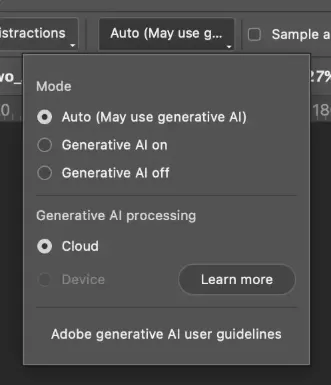
Flexible Switching: Users can freely toggle between cloud and on-device processing based on their hardware, and can download, delete, or manage local AI models at any time.
Hardware Requirements (Mac): To ensure efficient local AI performance, Adobe has set specific hardware standards for Macs: devices must be equipped with an M1 Pro chip or later, have 24GB of RAM or more, and run macOS Sonoma (14.0) or newer. If a device doesn't meet these requirements, the options will be unavailable, and the existing cloud-based processing method will remain in use.
Core Feature Two: Enhanced Generative AI Credits and Firefly Integration
Major Credit Boost: Adobe has significantly raised the creative allowances for subscription users. Eligible Creative Cloud subscribers can now receive up to 100 generative AI credits monthly—a substantial increase from the previous 25—greatly expanding access to Firefly's creative AI features.
Firefly Ideation Boards Integration: The new version deeply integrates Photoshop with Firefly Ideation Boards. Users can share PSD files directly to Ideation Boards to quickly create mood boards and compare variations, streamlining the visual concept development and social media content iteration process.
Other Efficiency and Experience Enhancements
More User-Friendly Workflow:
Background Layer Settings: A new preference allows JPEG files to open directly as standard layers. Users can also create new documents with transparent canvases from the start, removing the need to frequently unlock background layers.
Interface Refresh: The "Save for Web" dialog has been updated with a more modern design.
Performance Improvement: Adobe has restructured the internal measurement module, reducing background telemetry overhead and ensuring faster response times when working with complex documents.
Key Bug Fixes: Adobe has resolved several frequently reported issues, including version conflicts on Windows and problems recognizing WebP files with long path names, further improving software stability.
For creative professionals who prioritize maximum privacy and local processing efficiency, the on-device Remove Tool update is the most valuable evolution in this release. Mac users who meet the hardware requirements are encouraged to update via the Creative Cloud desktop app to experience this new local creation mode.
Related article
 Anthropic Expands Claude AI Coding Tools to Japan in Push for Overseas Growth
Anthropic, a prominent U.S. artificial intelligence firm, is intensifying its global outreach. On Wednesday, the company hosted a major developer gathering, "Code with Claude," in Tokyo, drawing close to 500 software engineers. This initiative seeks
India’s Software Giant Cuts Hiring, Promises No Layoffs as AI Agents Scale Up
As artificial intelligence reshapes traditional labor-intensive business models, Tata Consultancy Services (TCS), a premier Indian software outsourcing firm, has unveiled its strategic response. During Tuesday’s annual general meeting, the chairman o
China Locks AI Models During Gaokam to Block Instant Homework Help
With the 2026 Gaokao fast approaching, rumors regarding the suspension of AI tools during the exam period have ignited intense online debate. In response to public concern, major AI platforms and educational apps have clarified their stance: rather t
Related Special Topic Recommendations
Design & Art
Anthropic Expands Claude AI Coding Tools to Japan in Push for Overseas Growth
Anthropic, a prominent U.S. artificial intelligence firm, is intensifying its global outreach. On Wednesday, the company hosted a major developer gathering, "Code with Claude," in Tokyo, drawing close to 500 software engineers. This initiative seeks
India’s Software Giant Cuts Hiring, Promises No Layoffs as AI Agents Scale Up
As artificial intelligence reshapes traditional labor-intensive business models, Tata Consultancy Services (TCS), a premier Indian software outsourcing firm, has unveiled its strategic response. During Tuesday’s annual general meeting, the chairman o
China Locks AI Models During Gaokam to Block Instant Homework Help
With the 2026 Gaokao fast approaching, rumors regarding the suspension of AI tools during the exam period have ignited intense online debate. In response to public concern, major AI platforms and educational apps have clarified their stance: rather t
Related Special Topic Recommendations
Design & Art
 Best AI Style Transfer Tools for Creative Experiments
2026 Latest Best Top-rated AI Style Transfer Tools for Creative Experiments! XIX.AI has curated a powerful, game-changing collection of must-try tools that deliver exceptional results through real-world tests and rigorous rankings. These top solutions help creatives boost productivity significantly by accelerating content creation and unlocking endless creative possibilities. Explore now to discover your perfect tool and start creating today!
 9 tools
 xix.ai
Comic Creation
Best AI Dialogue Bubble Tools for Visual Storytelling
xix.ai
Comic Creation
Best AI Dialogue Bubble Tools for Visual Storytelling
2026 Latest Best Top-Rated AI Dialogue Bubble Tools for Visual Storytelling are here on XIX.AI! This curated collection features powerful, game-changing tools that help creators boost productivity and overcome creative bottlenecks. Get a free vs paid comparison, see real-world tests, and check the latest rankings to find the must-try solutions perfect for crafting engaging visual narratives. Explore now to discover your ideal tool!
10 tools
xix.ai
Meeting Assistant
Top AI Meeting Summary Tools: Track Decisions and Follow-Ups Clearly
2026 Latest Top-Rated Best AI Meeting Summary Tools for Clear Decision Tracking and Effortless Follow-Ups. This curated list showcases powerful, game-changing solutions that boost productivity dramatically by automating meeting notes, identifying key action items, and streamlining team coordination across all projects. Get a free vs paid comparison along with real-world tests and weekly updated rankings to help you find the perfect tool. Explore now to unlock your AI edge!
9 tools
xix.ai
Data Analysis
Best AI Data Cleaning Tools: Fix Missing Values and Duplicates Fast
2026 Latest Best Top-rated AI Data Cleaning Tools for quick fixing of missing values and duplicates. This curated list showcases powerful, game-changing solutions that boost productivity significantly. Each option has undergone rigorous real-world tests to ensure reliability. Get a free vs paid comparison and discover the must-try tool that fits your needs best. Explore now at XIX.AI to Unlock your AI edge.
11 tools
xix.ai
Design & Art
Best AI Creative Ideation Tools for Artists: Break Through Visual Blocks
2026 Latest Best Top-Rated AI Creative Ideation Tools for Artists are curated by XIX.AI to help creators break through visual blocks and boost creativity instantly. These powerful game-changing tools offer real-world tests, detailed free vs paid comparison, and weekly updated rankings. Discover your perfect tool to accelerate content creation and unlock your AI edge today. Explore now!
14 tools
xix.ai
Music composition
AI Beat Makers for TikTok Background Tracks, Reels Audio, and Creator Promo Music
2026 Latest Best AI Beat Makers for TikTok Background Tracks, Reels Audio, and Creator Promo Music! XIX.AI has curated a top-rated list of powerful game-changing tools that go through real-world tests to deliver flawless music for every content need. You’ll find detailed free vs paid comparison data, weekly updated rankings, and must-try options to help you boost creativity and productivity. Explore now to discover your perfect tool!
11 tools
xix.ai

 Comments (0)
0/500
Comments (0)
0/500
Adobe officially launched the Photoshop 27.7 update yesterday. The key highlight of this release is the introduction of the "Remove Tool" with on-device AI model support, significantly enhancing privacy security and eliminating dependency on cloud connectivity. Additionally, Adobe has substantially increased the generative AI credits for Creative Cloud subscribers and implemented multiple workflow experience optimizations.
Core Feature One: The Remove Tool Embraces On-Device AI
The standout feature of Photoshop 27.7 is the local processing capability of the Remove Tool. Users can now remove objects directly on their local machine without needing to upload images to the cloud. This change not only addresses privacy concerns but also drastically reduces the need for network bandwidth.
Flexible Switching: Users can freely toggle between cloud and on-device processing based on their hardware, and can download, delete, or manage local AI models at any time.
Hardware Requirements (Mac): To ensure efficient local AI performance, Adobe has set specific hardware standards for Macs: devices must be equipped with an M1 Pro chip or later, have 24GB of RAM or more, and run macOS Sonoma (14.0) or newer. If a device doesn't meet these requirements, the options will be unavailable, and the existing cloud-based processing method will remain in use.
Core Feature Two: Enhanced Generative AI Credits and Firefly Integration
Major Credit Boost: Adobe has significantly raised the creative allowances for subscription users. Eligible Creative Cloud subscribers can now receive up to 100 generative AI credits monthly—a substantial increase from the previous 25—greatly expanding access to Firefly's creative AI features.
Firefly Ideation Boards Integration: The new version deeply integrates Photoshop with Firefly Ideation Boards. Users can share PSD files directly to Ideation Boards to quickly create mood boards and compare variations, streamlining the visual concept development and social media content iteration process.
Other Efficiency and Experience Enhancements
More User-Friendly Workflow:
Background Layer Settings: A new preference allows JPEG files to open directly as standard layers. Users can also create new documents with transparent canvases from the start, removing the need to frequently unlock background layers.
Interface Refresh: The "Save for Web" dialog has been updated with a more modern design.
Performance Improvement: Adobe has restructured the internal measurement module, reducing background telemetry overhead and ensuring faster response times when working with complex documents.
Key Bug Fixes: Adobe has resolved several frequently reported issues, including version conflicts on Windows and problems recognizing WebP files with long path names, further improving software stability.
For creative professionals who prioritize maximum privacy and local processing efficiency, the on-device Remove Tool update is the most valuable evolution in this release. Mac users who meet the hardware requirements are encouraged to update via the Creative Cloud desktop app to experience this new local creation mode.








 Anthropic Expands Claude AI Coding Tools to Japan in Push for Overseas Growth
Anthropic, a prominent U.S. artificial intelligence firm, is intensifying its global outreach. On Wednesday, the company hosted a major developer gathering, "Code with Claude," in Tokyo, drawing close to 500 software engineers. This initiative seeks
Anthropic Expands Claude AI Coding Tools to Japan in Push for Overseas Growth
Anthropic, a prominent U.S. artificial intelligence firm, is intensifying its global outreach. On Wednesday, the company hosted a major developer gathering, "Code with Claude," in Tokyo, drawing close to 500 software engineers. This initiative seeks
 India’s Software Giant Cuts Hiring, Promises No Layoffs as AI Agents Scale Up
As artificial intelligence reshapes traditional labor-intensive business models, Tata Consultancy Services (TCS), a premier Indian software outsourcing firm, has unveiled its strategic response. During Tuesday’s annual general meeting, the chairman o
India’s Software Giant Cuts Hiring, Promises No Layoffs as AI Agents Scale Up
As artificial intelligence reshapes traditional labor-intensive business models, Tata Consultancy Services (TCS), a premier Indian software outsourcing firm, has unveiled its strategic response. During Tuesday’s annual general meeting, the chairman o
 China Locks AI Models During Gaokam to Block Instant Homework Help
With the 2026 Gaokao fast approaching, rumors regarding the suspension of AI tools during the exam period have ignited intense online debate. In response to public concern, major AI platforms and educational apps have clarified their stance: rather t
China Locks AI Models During Gaokam to Block Instant Homework Help
With the 2026 Gaokao fast approaching, rumors regarding the suspension of AI tools during the exam period have ignited intense online debate. In response to public concern, major AI platforms and educational apps have clarified their stance: rather t

2026 Latest Best Top-rated AI Style Transfer Tools for Creative Experiments! XIX.AI has curated a powerful, game-changing collection of must-try tools that deliver exceptional results through real-world tests and rigorous rankings. These top solutions help creatives boost productivity significantly by accelerating content creation and unlocking endless creative possibilities. Explore now to discover your perfect tool and start creating today!
9 tools
xix.ai

2026 Latest Best Top-Rated AI Dialogue Bubble Tools for Visual Storytelling are here on XIX.AI! This curated collection features powerful, game-changing tools that help creators boost productivity and overcome creative bottlenecks. Get a free vs paid comparison, see real-world tests, and check the latest rankings to find the must-try solutions perfect for crafting engaging visual narratives. Explore now to discover your ideal tool!
10 tools
xix.ai

2026 Latest Top-Rated Best AI Meeting Summary Tools for Clear Decision Tracking and Effortless Follow-Ups. This curated list showcases powerful, game-changing solutions that boost productivity dramatically by automating meeting notes, identifying key action items, and streamlining team coordination across all projects. Get a free vs paid comparison along with real-world tests and weekly updated rankings to help you find the perfect tool. Explore now to unlock your AI edge!
9 tools
xix.ai

2026 Latest Best Top-rated AI Data Cleaning Tools for quick fixing of missing values and duplicates. This curated list showcases powerful, game-changing solutions that boost productivity significantly. Each option has undergone rigorous real-world tests to ensure reliability. Get a free vs paid comparison and discover the must-try tool that fits your needs best. Explore now at XIX.AI to Unlock your AI edge.
11 tools
xix.ai

2026 Latest Best Top-Rated AI Creative Ideation Tools for Artists are curated by XIX.AI to help creators break through visual blocks and boost creativity instantly. These powerful game-changing tools offer real-world tests, detailed free vs paid comparison, and weekly updated rankings. Discover your perfect tool to accelerate content creation and unlock your AI edge today. Explore now!
14 tools
xix.ai

2026 Latest Best AI Beat Makers for TikTok Background Tracks, Reels Audio, and Creator Promo Music! XIX.AI has curated a top-rated list of powerful game-changing tools that go through real-world tests to deliver flawless music for every content need. You’ll find detailed free vs paid comparison data, weekly updated rankings, and must-try options to help you boost creativity and productivity. Explore now to discover your perfect tool!
11 tools
xix.ai












