


 Home
HomeNoteGPT Launches AI-Powered Tool to Streamline YouTube Study
In our fast-moving world, absorbing information efficiently is more critical than ever. As a vast repository of knowledge, YouTube can be time-consuming to navigate due to lengthy videos. NoteGPT changes the game by using AI to instantly summarize YouTube videos, provide full transcripts, generate mind maps, and even answer your questions. This article explores how NoteGPT can transform your YouTube learning and significantly boost your productivity.
Key Points
NoteGPT utilizes AI to provide quick YouTube video summaries, saving you considerable time.
It delivers accurate video transcripts in multiple languages.
The tool creates customizable mind maps for improved visual comprehension.
NoteGPT features a Q&A function to answer specific questions about the video's content.
It's completely free, making sophisticated learning tools accessible to all.
Unlocking Efficient Learning with NoteGPT
What is NoteGPT?
NoteGPT is an AI-powered tool designed to enhance your learning efficiency from YouTube videos. It offers more than just summaries, providing a suite of features that streamline the entire learning process. Whether you're studying for an exam, researching a topic, or keeping up with new information, NoteGPT can substantially improve your experience.
The tool works by automatically analyzing YouTube video content. It delivers a concise summary, a complete transcript, and a structured mind map. Additionally, it can answer specific questions related to the video.
How NoteGPT Works: A Step-by-Step Guide
Using NoteGPT is simple. Follow this detailed guide to begin:
- Accessing the Tool:

Start by visiting the NoteGPT website via the link in the description.
- Logging In:Sign in using your email address to access the platform.
- Navigating to YouTube Summary:After logging in, locate the 'YouTube Summary' section on the homepage.
- Copying the YouTube Link:Open your chosen YouTube video, click the 'Share' button, and copy the video link.
- Pasting the Link: Paste the copied link into the designated field on NoteGPT.
- Generating Summary: Click the 'Create' or 'Summarize' button to start the AI analysis.
- Reviewing the Summary: NoteGPT will then produce a well-organized summary, a full transcript, and a mind map highlighting the video's key points.
Key Features of NoteGPT
NoteGPT is packed with features that make learning from YouTube more efficient and effective:
- Instant Video Summarization: Obtain a concise summary of any YouTube video in seconds.
- Accurate Transcripts: Access the entire video transcript for easy searching of specific details.
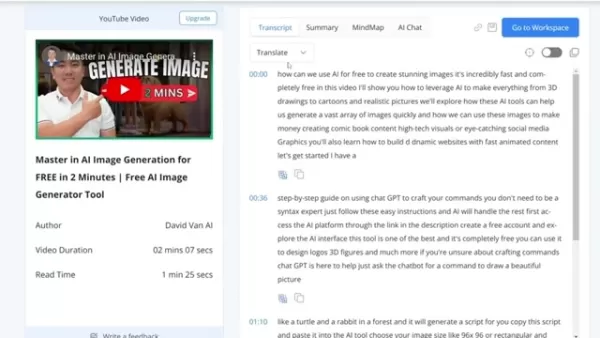
Note GPT includes a translation function to convert video content into your preferred language.
- Multi-Language Support: Translate transcripts into various languages for global users.
- Mind Map Generation: Visualize video content with automatically created mind maps.The AI builds a mental map of the video's ideas. This mind map is formatted for convenient downloading.
- Q&A Support: Ask the AI specific questions about the video for immediate answers.
NoteGPT vs Traditional Learning Methods
Efficiency and Speed
Traditional methods like reading textbooks or attending lectures can be slow and inefficient. NoteGPT offers a faster, more efficient way to learn from YouTube. By providing summaries, transcripts, and mind maps, it helps you quickly grasp core concepts and identify critical insights.
Accessibility and Convenience
NoteGPT makes learning more accessible and convenient. The tool works on any internet-connected device, allowing you to learn from YouTube anytime, anywhere. Whether commuting, waiting in line, or relaxing at home, NoteGPT makes it easy to stay informed and acquire new knowledge.
Engagement and Interactivity
NoteGPT fosters engagement and interactivity. Its Q&A feature lets you ask specific questions and get instant AI-generated answers. This interactive approach helps maintain your engagement with the material and deepens your understanding.
Advanced Tips for Maximizing NoteGPT
Customizing Mind Maps
After NoteGPT generates a mind map, customize it to fit your learning style. Adjust the layout, apply colors, and add personal notes or connections to create a map tailored to your needs. This enhances visual learning and improves retention of key concepts.
Leveraging the Q&A Feature
Use the Q&A feature extensively to clarify any confusing points. Pose specific questions about the video and review the AI's answers. This interactive practice can deepen your understanding and address any knowledge gaps.
Combining NoteGPT with Other Learning Resources
While powerful on its own, NoteGPT is even more effective when combined with other resources. Use it to summarize videos and generate transcripts, then supplement with textbooks, articles, or other online materials for a comprehensive understanding of any topic.
NoteGPT Pricing
Free Access
One of NoteGPT's most appealing aspects is its cost.
NoteGPT is entirely free to use. This removes financial barriers to advanced learning tools, making it an excellent choice for students, educators, and lifelong learners on a budget. Free access ensures that efficient, quality learning is available to everyone.
Weighing the Advantages and Disadvantages of NoteGPT
Pros
Saves significant time by providing quick video summaries.
Delivers precise transcripts in multiple languages.
Creates customizable mind maps for visual learners.
Offers a Q&A feature for instant clarification.
It is a completely free tool.
Cons
Reliance on AI may occasionally produce imperfect summaries.
The Q&A feature might not always deliver fully comprehensive answers.
Requires a stable internet connection to function.
NoteGPT Core Features
AI-Powered Summarization
Fast and Accurate Summaries: NoteGPT employs advanced AI to deliver concise, accurate summaries of YouTube videos. These summaries highlight main points and key insights, letting you grasp the video's essence without watching it entirely.
Time-Saving: By generating instant summaries, NoteGPT saves you valuable time and effort. You can quickly assess a video's relevance to your interests or research before diving deeper.
Transcript and Translation
Comprehensive Transcripts: NoteGPT produces complete transcripts of YouTube videos, enabling easy searching and review of key sections.
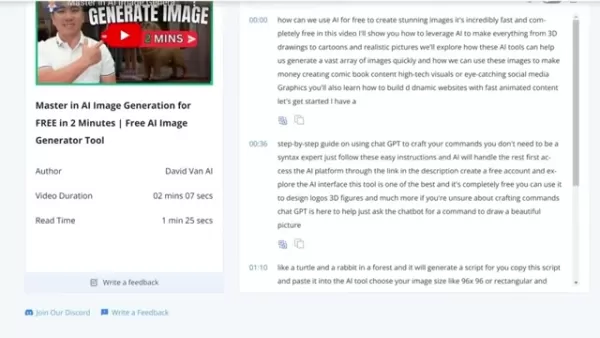
You can review the entire transcript quickly.
Multi-Language Translation: The tool can translate transcripts into numerous languages, broadening access for a global audience. This is particularly useful for language learners or researchers needing information in different languages.
Mind Map Generation
Visual Learning: NoteGPT automatically generates mind maps that visually represent YouTube video content. These maps are powerful tools for visual learners, helping organize and recall information more effectively.
Customizable Formats: The generated mind maps can be customized to suit your learning style. You can modify the layout, colors, and other visual elements for optimal comprehension.
AI-Powered Q&A
Instant Answers: NoteGPT's Q&A feature allows you to ask specific questions about video content and receive immediate AI-generated answers. This is especially helpful for clarifying complex concepts or specific points of interest.
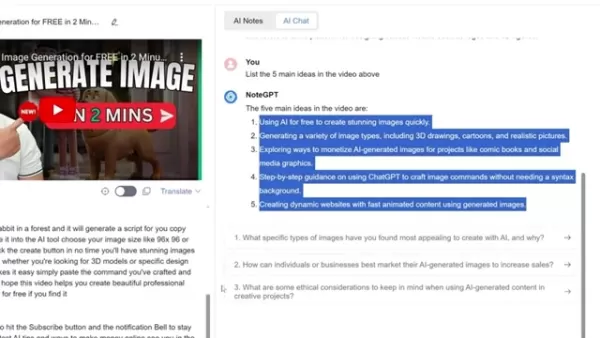
The AI tool saves you time and effort while delivering the information you need.
Interactive Learning: By providing instant answers, NoteGPT encourages an interactive learning experience and keeps you engaged with the material.
Real-World Use Cases of NoteGPT
Academic Research
Researchers can use NoteGPT to rapidly summarize and analyze numerous YouTube videos on their topic.
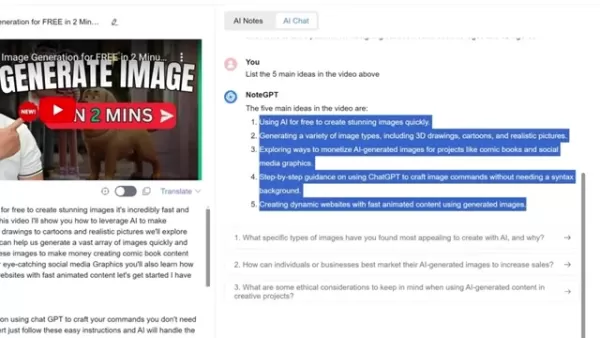
By providing summaries, transcripts, and mind maps, NoteGPT simplifies identifying relevant information and extracting key insights.
Professional Development
Professionals can use NoteGPT to stay current with industry trends and best practices. The tool allows for quick and efficient consumption of YouTube video content, helping you learn new skills and improve job performance.
Language Learning
Language learners can use NoteGPT to enhance listening comprehension and vocabulary. By providing transcripts and translations, the tool makes it easier to understand videos in different languages.
Content Creation
Content creators can use NoteGPT to research and analyze videos within their niche. The tool can help identify popular topics, understand audience preferences, and generate fresh ideas for your own content.
Frequently Asked Questions about NoteGPT
Is NoteGPT really free to use?
Yes, NoteGPT is completely free. There are no hidden fees or subscription charges, making it accessible to everyone. The creators' goal is to democratize access to advanced learning tools, ensuring efficient, high-quality learning is available to all.
What types of YouTube videos can NoteGPT summarize?
NoteGPT can summarize almost any YouTube video, regardless of length or topic. Its AI is designed to process a wide array of content, from lectures and tutorials to documentaries and interviews. This versatility ensures reliable summaries across diverse subjects and formats.
How accurate are the transcripts generated by NoteGPT?
NoteGPT uses advanced speech recognition to generate accurate transcripts. While accuracy can depend on the original video's audio quality, the transcripts are generally reliable. Furthermore, the summary is well-organized and includes the full transcript. It's always a good practice to review AI-generated transcripts for complete accuracy.
Can I customize the mind maps generated by NoteGPT?
Absolutely. NoteGPT allows you to customize its generated mind maps. You can adjust the layout, add colors, and incorporate personal notes or connections to tailor the map to your learning preferences. You also have the flexibility to reformat the map and download it once complete.
Related Questions about AI-Powered Learning
How is AI changing education?
AI is transforming education through personalized learning, automated grading, and intelligent tutoring systems. It can analyze student data to identify learning gaps and customize instruction. Moreover, AI-powered tools provide instant feedback and support, significantly enhancing learning outcomes.
What are the ethical considerations of using AI in education?
Using AI in education raises important ethical questions concerning data privacy, algorithmic bias, and potential job displacement for educators. It's vital to ensure AI systems are used responsibly, transparently, and equitably to minimize negative impacts on students and teachers.
How can students prepare for the future of work in an AI-driven world?
Students can prepare by developing skills that complement AI, such as critical thinking, creativity, communication, and collaboration. Embracing lifelong learning is also essential to adapt to new technologies and industry shifts, ensuring ongoing relevance in the evolving workforce.
Related article
 Ctrip Business Travel Unveils AI Ecosystem with 7 Industry Agents and 17 Core Capabilities
Ctrip Business Travel has officially unveiled the "Ctrip Business Travel AI Ecosystem," leveraging large language models to fundamentally restructure corporate travel management. This comprehensive ecosystem addresses four core scenarios: travel arra
Stripe to Acquire OpenRouter as AI Model Routing Gains Momentum
Stripe has agreed to acquire OpenRouter, an AI model-routing platform that gives developers access to hundreds of models through a single interface. The deal adds model selection and routing to Stripe’s existing work around AI usage and token-based b
Former OpenAI Researcher Barrett Zoph Returns to Google to Support Gemini Development
Barret Zoph, who previously abruptly left and joined OpenAI due to a disagreement with Thinking Machines Lab CEO Miriam Mularati, has once again changed employers. Alphabet's Google announced that Zoph will return as Vice President of Research, bring
Related Special Topic Recommendations
Design & Art
Ctrip Business Travel Unveils AI Ecosystem with 7 Industry Agents and 17 Core Capabilities
Ctrip Business Travel has officially unveiled the "Ctrip Business Travel AI Ecosystem," leveraging large language models to fundamentally restructure corporate travel management. This comprehensive ecosystem addresses four core scenarios: travel arra
Stripe to Acquire OpenRouter as AI Model Routing Gains Momentum
Stripe has agreed to acquire OpenRouter, an AI model-routing platform that gives developers access to hundreds of models through a single interface. The deal adds model selection and routing to Stripe’s existing work around AI usage and token-based b
Former OpenAI Researcher Barrett Zoph Returns to Google to Support Gemini Development
Barret Zoph, who previously abruptly left and joined OpenAI due to a disagreement with Thinking Machines Lab CEO Miriam Mularati, has once again changed employers. Alphabet's Google announced that Zoph will return as Vice President of Research, bring
Related Special Topic Recommendations
Design & Art
 Top AI Illustration Tools: Create Editorial Scenes and Cover Art Faster
2026 Latest Top-rated AI Illustration Tools: Our curated list features the best powerfully designed tools for creating stunning editorial scenes and eye-catching cover art quickly. Each option has gone through rigorous real-world tests, offering a free vs paid comparison to help you find the perfect match for your workflow. Try these must-try solutions today to unlock your AI edge and boost your creative productivity. Explore now at XIX.AI.
 10 tools
 xix.ai
Education and Learning
Top AI Tutors for Exam Prep: Practice Math, Science, and English
xix.ai
Education and Learning
Top AI Tutors for Exam Prep: Practice Math, Science, and English
2026 Latest Top-Rated Best AI Tutors for Exam Prep are here on XIX.AI! Our curated list features powerful game-changing tools that offer free vs paid comparison, real-world tests, and weekly updated rankings. They help boost your writing efficiency, simplify complex topic learning, and unlock your academic potential. Explore now to Discover your perfect exam prep tool and Start creating today to Unlock your AI edge!
10 tools
xix.ai
Finance
AI Budget Planning Tools for Personal Money Management
2026 Latest Best Top-Rated AI Budget Planning Tools for Personal Money Management are here on XIX.AI! This curated collection features powerful, game-changing solutions that help you conduct real-world tests, understand spending habits, and create personalized plans to boost productivity. Enjoy a free vs paid comparison along with detailed rankings. Must-try tools designed to simplify money management and unlock your AI edge. Explore now!
11 tools
xix.ai
Health & Wellness
AI Sleep Tracking Assistants: Improve Recovery with Better Bedtime Habits
2026 Latest Best Top-Rated AI Sleep Tracking Assistants curated for ultimate recovery. This fully updated weekly guide features powerful tools that deliver real-world tests, free vs paid comparison, and detailed rankings to help you find the must-try solution that boosts sleep quality and supports better bedtime habits. Explore now at XIX.AI to Unlock your AI edge.
10 tools
xix.ai
Data Analysis
AI SQL Copilots for Product and Revenue Analytics
2026 Latest Best Top-Rated AI SQL Copilots for Product and Revenue Analytics! XIX.AI has curated a powerful, game-changing collection of must-try tools that undergo real-world tests through weekly updated rankings. These tools help users boost productivity significantly by accelerating data analysis, streamlining complex queries, and generating accurate insights to drive smarter business decisions. Explore now to Discover your perfect tool for unlocking your AI edge!
14 tools
xix.ai
Education and Learning
Best AI Homework Helpers That Teach: Learn Concepts, Not Just Answers
2026 Latest Best Top-Rated AI Homework Helpers That Teach Core Concepts Not Just Answers Powerful Tools for Students Must-Try Curated List Weekly Updated Free vs Paid Comparison Real-World Tests Accurate Rankings to Help You Unlock Your Full Learning Potential Explore now to Discover your perfect tool for smarter studying.
10 tools
xix.ai

 Comments (0)
0/500
Comments (0)
0/500
In our fast-moving world, absorbing information efficiently is more critical than ever. As a vast repository of knowledge, YouTube can be time-consuming to navigate due to lengthy videos. NoteGPT changes the game by using AI to instantly summarize YouTube videos, provide full transcripts, generate mind maps, and even answer your questions. This article explores how NoteGPT can transform your YouTube learning and significantly boost your productivity.
Key Points
NoteGPT utilizes AI to provide quick YouTube video summaries, saving you considerable time.
It delivers accurate video transcripts in multiple languages.
The tool creates customizable mind maps for improved visual comprehension.
NoteGPT features a Q&A function to answer specific questions about the video's content.
It's completely free, making sophisticated learning tools accessible to all.
Unlocking Efficient Learning with NoteGPT
What is NoteGPT?
NoteGPT is an AI-powered tool designed to enhance your learning efficiency from YouTube videos. It offers more than just summaries, providing a suite of features that streamline the entire learning process. Whether you're studying for an exam, researching a topic, or keeping up with new information, NoteGPT can substantially improve your experience.
The tool works by automatically analyzing YouTube video content. It delivers a concise summary, a complete transcript, and a structured mind map. Additionally, it can answer specific questions related to the video.
How NoteGPT Works: A Step-by-Step Guide
Using NoteGPT is simple. Follow this detailed guide to begin:
- Accessing the Tool:
Start by visiting the NoteGPT website via the link in the description.
- Logging In:Sign in using your email address to access the platform.
- Navigating to YouTube Summary:After logging in, locate the 'YouTube Summary' section on the homepage.
- Copying the YouTube Link:Open your chosen YouTube video, click the 'Share' button, and copy the video link.
- Pasting the Link: Paste the copied link into the designated field on NoteGPT.
- Generating Summary: Click the 'Create' or 'Summarize' button to start the AI analysis.
- Reviewing the Summary: NoteGPT will then produce a well-organized summary, a full transcript, and a mind map highlighting the video's key points.
Key Features of NoteGPT
NoteGPT is packed with features that make learning from YouTube more efficient and effective:
- Instant Video Summarization: Obtain a concise summary of any YouTube video in seconds.
- Accurate Transcripts: Access the entire video transcript for easy searching of specific details.
Note GPT includes a translation function to convert video content into your preferred language.
- Multi-Language Support: Translate transcripts into various languages for global users.
- Mind Map Generation: Visualize video content with automatically created mind maps.The AI builds a mental map of the video's ideas. This mind map is formatted for convenient downloading.
- Q&A Support: Ask the AI specific questions about the video for immediate answers.
NoteGPT vs Traditional Learning Methods
Efficiency and Speed
Traditional methods like reading textbooks or attending lectures can be slow and inefficient. NoteGPT offers a faster, more efficient way to learn from YouTube. By providing summaries, transcripts, and mind maps, it helps you quickly grasp core concepts and identify critical insights.
Accessibility and Convenience
NoteGPT makes learning more accessible and convenient. The tool works on any internet-connected device, allowing you to learn from YouTube anytime, anywhere. Whether commuting, waiting in line, or relaxing at home, NoteGPT makes it easy to stay informed and acquire new knowledge.
Engagement and Interactivity
NoteGPT fosters engagement and interactivity. Its Q&A feature lets you ask specific questions and get instant AI-generated answers. This interactive approach helps maintain your engagement with the material and deepens your understanding.
Advanced Tips for Maximizing NoteGPT
Customizing Mind Maps
After NoteGPT generates a mind map, customize it to fit your learning style. Adjust the layout, apply colors, and add personal notes or connections to create a map tailored to your needs. This enhances visual learning and improves retention of key concepts.
Leveraging the Q&A Feature
Use the Q&A feature extensively to clarify any confusing points. Pose specific questions about the video and review the AI's answers. This interactive practice can deepen your understanding and address any knowledge gaps.
Combining NoteGPT with Other Learning Resources
While powerful on its own, NoteGPT is even more effective when combined with other resources. Use it to summarize videos and generate transcripts, then supplement with textbooks, articles, or other online materials for a comprehensive understanding of any topic.
NoteGPT Pricing
Free Access
One of NoteGPT's most appealing aspects is its cost.
NoteGPT is entirely free to use. This removes financial barriers to advanced learning tools, making it an excellent choice for students, educators, and lifelong learners on a budget. Free access ensures that efficient, quality learning is available to everyone.
Weighing the Advantages and Disadvantages of NoteGPT
Pros
Saves significant time by providing quick video summaries.
Delivers precise transcripts in multiple languages.
Creates customizable mind maps for visual learners.
Offers a Q&A feature for instant clarification.
It is a completely free tool.
Cons
Reliance on AI may occasionally produce imperfect summaries.
The Q&A feature might not always deliver fully comprehensive answers.
Requires a stable internet connection to function.
NoteGPT Core Features
AI-Powered Summarization
Fast and Accurate Summaries: NoteGPT employs advanced AI to deliver concise, accurate summaries of YouTube videos. These summaries highlight main points and key insights, letting you grasp the video's essence without watching it entirely.
Time-Saving: By generating instant summaries, NoteGPT saves you valuable time and effort. You can quickly assess a video's relevance to your interests or research before diving deeper.
Transcript and Translation
Comprehensive Transcripts: NoteGPT produces complete transcripts of YouTube videos, enabling easy searching and review of key sections.
You can review the entire transcript quickly.
Multi-Language Translation: The tool can translate transcripts into numerous languages, broadening access for a global audience. This is particularly useful for language learners or researchers needing information in different languages.
Mind Map Generation
Visual Learning: NoteGPT automatically generates mind maps that visually represent YouTube video content. These maps are powerful tools for visual learners, helping organize and recall information more effectively.
Customizable Formats: The generated mind maps can be customized to suit your learning style. You can modify the layout, colors, and other visual elements for optimal comprehension.
AI-Powered Q&A
Instant Answers: NoteGPT's Q&A feature allows you to ask specific questions about video content and receive immediate AI-generated answers. This is especially helpful for clarifying complex concepts or specific points of interest.
The AI tool saves you time and effort while delivering the information you need.
Interactive Learning: By providing instant answers, NoteGPT encourages an interactive learning experience and keeps you engaged with the material.
Real-World Use Cases of NoteGPT
Academic Research
Researchers can use NoteGPT to rapidly summarize and analyze numerous YouTube videos on their topic.
By providing summaries, transcripts, and mind maps, NoteGPT simplifies identifying relevant information and extracting key insights.
Professional Development
Professionals can use NoteGPT to stay current with industry trends and best practices. The tool allows for quick and efficient consumption of YouTube video content, helping you learn new skills and improve job performance.
Language Learning
Language learners can use NoteGPT to enhance listening comprehension and vocabulary. By providing transcripts and translations, the tool makes it easier to understand videos in different languages.
Content Creation
Content creators can use NoteGPT to research and analyze videos within their niche. The tool can help identify popular topics, understand audience preferences, and generate fresh ideas for your own content.
Frequently Asked Questions about NoteGPT
Is NoteGPT really free to use?
Yes, NoteGPT is completely free. There are no hidden fees or subscription charges, making it accessible to everyone. The creators' goal is to democratize access to advanced learning tools, ensuring efficient, high-quality learning is available to all.
What types of YouTube videos can NoteGPT summarize?
NoteGPT can summarize almost any YouTube video, regardless of length or topic. Its AI is designed to process a wide array of content, from lectures and tutorials to documentaries and interviews. This versatility ensures reliable summaries across diverse subjects and formats.
How accurate are the transcripts generated by NoteGPT?
NoteGPT uses advanced speech recognition to generate accurate transcripts. While accuracy can depend on the original video's audio quality, the transcripts are generally reliable. Furthermore, the summary is well-organized and includes the full transcript. It's always a good practice to review AI-generated transcripts for complete accuracy.
Can I customize the mind maps generated by NoteGPT?
Absolutely. NoteGPT allows you to customize its generated mind maps. You can adjust the layout, add colors, and incorporate personal notes or connections to tailor the map to your learning preferences. You also have the flexibility to reformat the map and download it once complete.
Related Questions about AI-Powered Learning
How is AI changing education?
AI is transforming education through personalized learning, automated grading, and intelligent tutoring systems. It can analyze student data to identify learning gaps and customize instruction. Moreover, AI-powered tools provide instant feedback and support, significantly enhancing learning outcomes.
What are the ethical considerations of using AI in education?
Using AI in education raises important ethical questions concerning data privacy, algorithmic bias, and potential job displacement for educators. It's vital to ensure AI systems are used responsibly, transparently, and equitably to minimize negative impacts on students and teachers.
How can students prepare for the future of work in an AI-driven world?
Students can prepare by developing skills that complement AI, such as critical thinking, creativity, communication, and collaboration. Embracing lifelong learning is also essential to adapt to new technologies and industry shifts, ensuring ongoing relevance in the evolving workforce.








 Ctrip Business Travel Unveils AI Ecosystem with 7 Industry Agents and 17 Core Capabilities
Ctrip Business Travel has officially unveiled the "Ctrip Business Travel AI Ecosystem," leveraging large language models to fundamentally restructure corporate travel management. This comprehensive ecosystem addresses four core scenarios: travel arra
Ctrip Business Travel Unveils AI Ecosystem with 7 Industry Agents and 17 Core Capabilities
Ctrip Business Travel has officially unveiled the "Ctrip Business Travel AI Ecosystem," leveraging large language models to fundamentally restructure corporate travel management. This comprehensive ecosystem addresses four core scenarios: travel arra
 Stripe to Acquire OpenRouter as AI Model Routing Gains Momentum
Stripe has agreed to acquire OpenRouter, an AI model-routing platform that gives developers access to hundreds of models through a single interface. The deal adds model selection and routing to Stripe’s existing work around AI usage and token-based b
Stripe to Acquire OpenRouter as AI Model Routing Gains Momentum
Stripe has agreed to acquire OpenRouter, an AI model-routing platform that gives developers access to hundreds of models through a single interface. The deal adds model selection and routing to Stripe’s existing work around AI usage and token-based b
 Former OpenAI Researcher Barrett Zoph Returns to Google to Support Gemini Development
Barret Zoph, who previously abruptly left and joined OpenAI due to a disagreement with Thinking Machines Lab CEO Miriam Mularati, has once again changed employers. Alphabet's Google announced that Zoph will return as Vice President of Research, bring
Former OpenAI Researcher Barrett Zoph Returns to Google to Support Gemini Development
Barret Zoph, who previously abruptly left and joined OpenAI due to a disagreement with Thinking Machines Lab CEO Miriam Mularati, has once again changed employers. Alphabet's Google announced that Zoph will return as Vice President of Research, bring

2026 Latest Top-rated AI Illustration Tools: Our curated list features the best powerfully designed tools for creating stunning editorial scenes and eye-catching cover art quickly. Each option has gone through rigorous real-world tests, offering a free vs paid comparison to help you find the perfect match for your workflow. Try these must-try solutions today to unlock your AI edge and boost your creative productivity. Explore now at XIX.AI.
10 tools
xix.ai

2026 Latest Top-Rated Best AI Tutors for Exam Prep are here on XIX.AI! Our curated list features powerful game-changing tools that offer free vs paid comparison, real-world tests, and weekly updated rankings. They help boost your writing efficiency, simplify complex topic learning, and unlock your academic potential. Explore now to Discover your perfect exam prep tool and Start creating today to Unlock your AI edge!
10 tools
xix.ai

2026 Latest Best Top-Rated AI Budget Planning Tools for Personal Money Management are here on XIX.AI! This curated collection features powerful, game-changing solutions that help you conduct real-world tests, understand spending habits, and create personalized plans to boost productivity. Enjoy a free vs paid comparison along with detailed rankings. Must-try tools designed to simplify money management and unlock your AI edge. Explore now!
11 tools
xix.ai

2026 Latest Best Top-Rated AI Sleep Tracking Assistants curated for ultimate recovery. This fully updated weekly guide features powerful tools that deliver real-world tests, free vs paid comparison, and detailed rankings to help you find the must-try solution that boosts sleep quality and supports better bedtime habits. Explore now at XIX.AI to Unlock your AI edge.
10 tools
xix.ai

2026 Latest Best Top-Rated AI SQL Copilots for Product and Revenue Analytics! XIX.AI has curated a powerful, game-changing collection of must-try tools that undergo real-world tests through weekly updated rankings. These tools help users boost productivity significantly by accelerating data analysis, streamlining complex queries, and generating accurate insights to drive smarter business decisions. Explore now to Discover your perfect tool for unlocking your AI edge!
14 tools
xix.ai

2026 Latest Best Top-Rated AI Homework Helpers That Teach Core Concepts Not Just Answers Powerful Tools for Students Must-Try Curated List Weekly Updated Free vs Paid Comparison Real-World Tests Accurate Rankings to Help You Unlock Your Full Learning Potential Explore now to Discover your perfect tool for smarter studying.
10 tools
xix.ai












