


 Home
HomeAI Inpainting Mastery: FluxDev Techniques for Flawless Image Editing
In the dynamic world of AI-powered image editing, inpainting emerges as a transformative technique. This guide explores a refined inpainting process using the FluxDev model, empowering you to achieve precise, high-quality image enhancements.
Key Points
Discover the benefits of the Flux inpainting workflow for targeted image adjustments.
Learn to leverage ControlNet for enhanced environmental understanding.
Master mask creation and refinement for seamless edit integration.
Explore advanced prompting strategies to steer AI generation.
Understand the role of mask blurring and denoising for smooth blending.
Compare Flux inpainting with SDXL for informed workflow choices.
Enhance skills in refining AI inpainting results.
Introduction to AI Inpainting with FluxDev Model
What is AI Inpainting?
AI inpainting is an advanced image editing method that uses artificial intelligence to reconstruct missing or unwanted image sections.
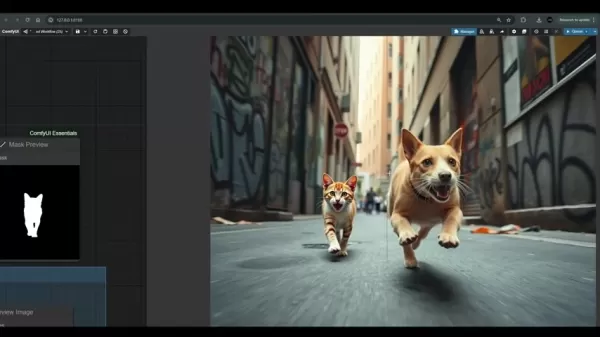
Unlike conventional techniques like cloning or patching, AI inpainting algorithms evaluate surrounding areas to generate content that blends seamlessly with the original image, delivering natural and visually appealing results.
The FluxDev model’s tailored inpainting workflow excels in making precise changes to specific, often small, image regions. It prioritizes high-quality outputs, ensuring edits align with the original image’s style and context. This approach is ideal for tasks like removing imperfections, adding subtle details, or correcting minor flaws while preserving the image’s overall aesthetic.
Why Choose FluxDev Model for Inpainting?
Despite potential commercial use restrictions, the FluxDev model shines in specific inpainting applications due to its adaptability and precise control. Key advantages include:
- Precision Editing: Allows detailed modifications while maintaining image integrity.
- Contextual Intelligence: Pairs effectively with ControlNet for improved perspective and context awareness.
- Seamless Blending: Ensures edited areas merge flawlessly with the original image.
Key Differences: FluxDev Model vs. SDXL Inpainting
ControlNet Integration and Text Prompts
Both FluxDev and SDXL deliver robust inpainting capabilities, but their workflows differ in critical ways.
Feature FluxDev Model SDXL Inpainting ControlNet Lacks direct support Supports ControlNet for enhanced environmental context Text Prompts Enables direct text-based prompts Limited text prompt functionality Commercial Use Subject to usage restrictions Typically offers more flexible commercial terms Integration Blends edits seamlessly with the original image May struggle with perfect blending
Step-by-Step Guide: Inpainting with FluxDev in ComfyUI
Step 1: Loading the Image and Defining the Mask
Begin by importing the target image into ComfyUI using the 'Load Image' node, which supports inpainting workflows. Then, mark the areas for modification.
- Activate Masking: Right-click and select ‘Choose File to Upload’ to draw directly on the image, creating a mask for targeted edits.
- Adjust Mask Settings: Access the editor window, use the color negative button, and fine-tune the mask thickness.
Step 2: Refining the Mask
Next, refine the mask to align with the image’s editing needs.
- Mask Cropping: Use cropping tools to perfect the mask’s boundaries.
- Image Resizing: Adjust the image size as needed.
- VAE Encoding: Process the image with VAE and apply a latent noise mask.
Step 3: Preparing Models and Crafting Prompts
Configure the FluxDev model, CLIP, VAE, and prompts clearly, avoiding overly complex instructions.
- Model Selection: Load all required diffusion models.
- Refined Prompts: Craft precise, specific prompts to guide the inpainting process.
Step 4: Configuring Key Parameters
Set critical parameters to ensure the new content integrates naturally with the image’s existing pixels.
- Blur Adjustment: Choose an appropriate blur level.
- Denoise Settings: Adjust denoising based on proximity to the original image.
Step 5: Executing the Workflow in ComfyUI
Once masks, prompts, and parameters are finalized, run the inpainting process.
- Start Processing: Click the 'Queue Prompt' button to process the image.
- Review Results: Inspect the output, noting that results are for personal use only.
Pricing and Availability
FluxDev Model Pricing
Pricing for the FluxDev model varies by platform. Always review licensing restrictions before starting your project.
Flux Inpainting Pros and Cons
Pros
Advanced Functionality: Offers precise selection tools and ControlNet integration.
Detail-Oriented Edits: Enables modifications to small areas with high accuracy.
Quality Retention: Preserves the original image’s aesthetic integrity.
Cons
Learning Curve: Requires familiarity with ComfyUI.
Complexity: Involves numerous prompts and settings, demanding foundational knowledge.
Licensing Limits: Commercial use may be restricted; verify terms before use.
Core Features of Flux Inpainting Workflow
Precision Masking and Editing
Provides tools for accurate selection, enabling targeted image adjustments.
ControlNet Integration
Enhances AI clarity through ControlNet, improving prompt-driven edits.
Use Cases for AI Inpainting
Product Imagery
Flux enhances product visuals, such as updating text on a white jar to a modern, compelling phrase.
Seamless Texture Generation
AI delivers high-quality, blurred textures for seamless image enhancements.
FAQ
What are the key differences between Flux and SDXL inpainting?
ControlNet support, text prompt capabilities, and commercial use restrictions are primary distinctions.
What is a mask crop region node?
The mask crop region node defines the dimensions used in the workflow, providing a clear view of the image’s construction process.
Related Questions
Can I use both SDXL inpainting workflow and Flux?
Both workflows are adaptable, but Flux offers greater functionality and a broader range of tools, such as text-based prompting, for enhanced image editing.
Related article
 Stripe to Acquire OpenRouter as AI Model Routing Gains Momentum
Stripe has agreed to acquire OpenRouter, an AI model-routing platform that gives developers access to hundreds of models through a single interface. The deal adds model selection and routing to Stripe’s existing work around AI usage and token-based b
Former OpenAI Researcher Barrett Zoph Returns to Google to Support Gemini Development
Barret Zoph, who previously abruptly left and joined OpenAI due to a disagreement with Thinking Machines Lab CEO Miriam Mularati, has once again changed employers. Alphabet's Google announced that Zoph will return as Vice President of Research, bring
How Recursive Intelligence Raised $335M at $4B Valuation in 4 Months
The co-founders of startup Ricursive Intelligence seemed destined to be co-founders.Anna Goldie, CEO, and Azalia Mirhoseini, CTO, are so well-known in the AI community that they were among those AI engineers who “got those weird emails from Zuckerber
Related Special Topic Recommendations
Design & Art
Stripe to Acquire OpenRouter as AI Model Routing Gains Momentum
Stripe has agreed to acquire OpenRouter, an AI model-routing platform that gives developers access to hundreds of models through a single interface. The deal adds model selection and routing to Stripe’s existing work around AI usage and token-based b
Former OpenAI Researcher Barrett Zoph Returns to Google to Support Gemini Development
Barret Zoph, who previously abruptly left and joined OpenAI due to a disagreement with Thinking Machines Lab CEO Miriam Mularati, has once again changed employers. Alphabet's Google announced that Zoph will return as Vice President of Research, bring
How Recursive Intelligence Raised $335M at $4B Valuation in 4 Months
The co-founders of startup Ricursive Intelligence seemed destined to be co-founders.Anna Goldie, CEO, and Azalia Mirhoseini, CTO, are so well-known in the AI community that they were among those AI engineers who “got those weird emails from Zuckerber
Related Special Topic Recommendations
Design & Art
 Top AI Illustration Tools: Create Editorial Scenes and Cover Art Faster
2026 Latest Top-rated AI Illustration Tools: Our curated list features the best powerfully designed tools for creating stunning editorial scenes and eye-catching cover art quickly. Each option has gone through rigorous real-world tests, offering a free vs paid comparison to help you find the perfect match for your workflow. Try these must-try solutions today to unlock your AI edge and boost your creative productivity. Explore now at XIX.AI.
 10 tools
 xix.ai
Education and Learning
Top AI Tutors for Exam Prep: Practice Math, Science, and English
xix.ai
Education and Learning
Top AI Tutors for Exam Prep: Practice Math, Science, and English
2026 Latest Top-Rated Best AI Tutors for Exam Prep are here on XIX.AI! Our curated list features powerful game-changing tools that offer free vs paid comparison, real-world tests, and weekly updated rankings. They help boost your writing efficiency, simplify complex topic learning, and unlock your academic potential. Explore now to Discover your perfect exam prep tool and Start creating today to Unlock your AI edge!
10 tools
xix.ai
Finance
AI Budget Planning Tools for Personal Money Management
2026 Latest Best Top-Rated AI Budget Planning Tools for Personal Money Management are here on XIX.AI! This curated collection features powerful, game-changing solutions that help you conduct real-world tests, understand spending habits, and create personalized plans to boost productivity. Enjoy a free vs paid comparison along with detailed rankings. Must-try tools designed to simplify money management and unlock your AI edge. Explore now!
11 tools
xix.ai
Health & Wellness
AI Sleep Tracking Assistants: Improve Recovery with Better Bedtime Habits
2026 Latest Best Top-Rated AI Sleep Tracking Assistants curated for ultimate recovery. This fully updated weekly guide features powerful tools that deliver real-world tests, free vs paid comparison, and detailed rankings to help you find the must-try solution that boosts sleep quality and supports better bedtime habits. Explore now at XIX.AI to Unlock your AI edge.
10 tools
xix.ai
Data Analysis
AI SQL Copilots for Product and Revenue Analytics
2026 Latest Best Top-Rated AI SQL Copilots for Product and Revenue Analytics! XIX.AI has curated a powerful, game-changing collection of must-try tools that undergo real-world tests through weekly updated rankings. These tools help users boost productivity significantly by accelerating data analysis, streamlining complex queries, and generating accurate insights to drive smarter business decisions. Explore now to Discover your perfect tool for unlocking your AI edge!
14 tools
xix.ai
Education and Learning
Best AI Homework Helpers That Teach: Learn Concepts, Not Just Answers
2026 Latest Best Top-Rated AI Homework Helpers That Teach Core Concepts Not Just Answers Powerful Tools for Students Must-Try Curated List Weekly Updated Free vs Paid Comparison Real-World Tests Accurate Rankings to Help You Unlock Your Full Learning Potential Explore now to Discover your perfect tool for smarter studying.
10 tools
xix.ai

 Comments (2)
0/500
Comments (2)
0/500
![LiamCarter]()
This FluxDev inpainting guide is exactly what I needed! The step-by-step breakdown makes it feel so accessible, even for a hobbyist like me. I’m especially curious about how it handles textures—anyone tested it on messy backgrounds? 🎨🤔
![GeorgeJones]()
와, AI로 사진 보정하는 기술이 이렇게 발전했나요? 🤔 FluxDev 모델로 결점을 지우는 방법이 정말 혁신적이네요. 개인적으로 예전에 포토샵으로 몇 시간씩 걸려서 하던 작업이 이제는 자동화된다니... 혹시 이 기술이 영상 편집에도 적용될 수 있을까요? 앞으로 더 발전하면 전문가들 작업 방식이 완전히 바뀔 것 같아요. 한편으로는 가짜 영상 만드는 데 악용될까 봐 조금 걱정되기도 하네요.
In the dynamic world of AI-powered image editing, inpainting emerges as a transformative technique. This guide explores a refined inpainting process using the FluxDev model, empowering you to achieve precise, high-quality image enhancements.
Key Points
Discover the benefits of the Flux inpainting workflow for targeted image adjustments.
Learn to leverage ControlNet for enhanced environmental understanding.
Master mask creation and refinement for seamless edit integration.
Explore advanced prompting strategies to steer AI generation.
Understand the role of mask blurring and denoising for smooth blending.
Compare Flux inpainting with SDXL for informed workflow choices.
Enhance skills in refining AI inpainting results.
Introduction to AI Inpainting with FluxDev Model
What is AI Inpainting?
AI inpainting is an advanced image editing method that uses artificial intelligence to reconstruct missing or unwanted image sections.
Unlike conventional techniques like cloning or patching, AI inpainting algorithms evaluate surrounding areas to generate content that blends seamlessly with the original image, delivering natural and visually appealing results.
The FluxDev model’s tailored inpainting workflow excels in making precise changes to specific, often small, image regions. It prioritizes high-quality outputs, ensuring edits align with the original image’s style and context. This approach is ideal for tasks like removing imperfections, adding subtle details, or correcting minor flaws while preserving the image’s overall aesthetic.
Why Choose FluxDev Model for Inpainting?
Despite potential commercial use restrictions, the FluxDev model shines in specific inpainting applications due to its adaptability and precise control. Key advantages include:
- Precision Editing: Allows detailed modifications while maintaining image integrity.
- Contextual Intelligence: Pairs effectively with ControlNet for improved perspective and context awareness.
- Seamless Blending: Ensures edited areas merge flawlessly with the original image.
Key Differences: FluxDev Model vs. SDXL Inpainting
ControlNet Integration and Text Prompts
Both FluxDev and SDXL deliver robust inpainting capabilities, but their workflows differ in critical ways.
| Feature | FluxDev Model | SDXL Inpainting |
|---|---|---|
| ControlNet | Lacks direct support | Supports ControlNet for enhanced environmental context |
| Text Prompts | Enables direct text-based prompts | Limited text prompt functionality |
| Commercial Use | Subject to usage restrictions | Typically offers more flexible commercial terms |
| Integration | Blends edits seamlessly with the original image | May struggle with perfect blending |
Step-by-Step Guide: Inpainting with FluxDev in ComfyUI
Step 1: Loading the Image and Defining the Mask
Begin by importing the target image into ComfyUI using the 'Load Image' node, which supports inpainting workflows. Then, mark the areas for modification.
- Activate Masking: Right-click and select ‘Choose File to Upload’ to draw directly on the image, creating a mask for targeted edits.
- Adjust Mask Settings: Access the editor window, use the color negative button, and fine-tune the mask thickness.
Step 2: Refining the Mask
Next, refine the mask to align with the image’s editing needs.
- Mask Cropping: Use cropping tools to perfect the mask’s boundaries.
- Image Resizing: Adjust the image size as needed.
- VAE Encoding: Process the image with VAE and apply a latent noise mask.
Step 3: Preparing Models and Crafting Prompts
Configure the FluxDev model, CLIP, VAE, and prompts clearly, avoiding overly complex instructions.
- Model Selection: Load all required diffusion models.
- Refined Prompts: Craft precise, specific prompts to guide the inpainting process.
Step 4: Configuring Key Parameters
Set critical parameters to ensure the new content integrates naturally with the image’s existing pixels.
- Blur Adjustment: Choose an appropriate blur level.
- Denoise Settings: Adjust denoising based on proximity to the original image.
Step 5: Executing the Workflow in ComfyUI
Once masks, prompts, and parameters are finalized, run the inpainting process.
- Start Processing: Click the 'Queue Prompt' button to process the image.
- Review Results: Inspect the output, noting that results are for personal use only.
Pricing and Availability
FluxDev Model Pricing
Pricing for the FluxDev model varies by platform. Always review licensing restrictions before starting your project.
Flux Inpainting Pros and Cons
Pros
Advanced Functionality: Offers precise selection tools and ControlNet integration.
Detail-Oriented Edits: Enables modifications to small areas with high accuracy.
Quality Retention: Preserves the original image’s aesthetic integrity.
Cons
Learning Curve: Requires familiarity with ComfyUI.
Complexity: Involves numerous prompts and settings, demanding foundational knowledge.
Licensing Limits: Commercial use may be restricted; verify terms before use.
Core Features of Flux Inpainting Workflow
Precision Masking and Editing
Provides tools for accurate selection, enabling targeted image adjustments.
ControlNet Integration
Enhances AI clarity through ControlNet, improving prompt-driven edits.
Use Cases for AI Inpainting
Product Imagery
Flux enhances product visuals, such as updating text on a white jar to a modern, compelling phrase.
Seamless Texture Generation
AI delivers high-quality, blurred textures for seamless image enhancements.
FAQ
What are the key differences between Flux and SDXL inpainting?
ControlNet support, text prompt capabilities, and commercial use restrictions are primary distinctions.
What is a mask crop region node?
The mask crop region node defines the dimensions used in the workflow, providing a clear view of the image’s construction process.
Related Questions
Can I use both SDXL inpainting workflow and Flux?
Both workflows are adaptable, but Flux offers greater functionality and a broader range of tools, such as text-based prompting, for enhanced image editing.








 Stripe to Acquire OpenRouter as AI Model Routing Gains Momentum
Stripe has agreed to acquire OpenRouter, an AI model-routing platform that gives developers access to hundreds of models through a single interface. The deal adds model selection and routing to Stripe’s existing work around AI usage and token-based b
Stripe to Acquire OpenRouter as AI Model Routing Gains Momentum
Stripe has agreed to acquire OpenRouter, an AI model-routing platform that gives developers access to hundreds of models through a single interface. The deal adds model selection and routing to Stripe’s existing work around AI usage and token-based b
 Former OpenAI Researcher Barrett Zoph Returns to Google to Support Gemini Development
Barret Zoph, who previously abruptly left and joined OpenAI due to a disagreement with Thinking Machines Lab CEO Miriam Mularati, has once again changed employers. Alphabet's Google announced that Zoph will return as Vice President of Research, bring
Former OpenAI Researcher Barrett Zoph Returns to Google to Support Gemini Development
Barret Zoph, who previously abruptly left and joined OpenAI due to a disagreement with Thinking Machines Lab CEO Miriam Mularati, has once again changed employers. Alphabet's Google announced that Zoph will return as Vice President of Research, bring
 How Recursive Intelligence Raised $335M at $4B Valuation in 4 Months
The co-founders of startup Ricursive Intelligence seemed destined to be co-founders.Anna Goldie, CEO, and Azalia Mirhoseini, CTO, are so well-known in the AI community that they were among those AI engineers who “got those weird emails from Zuckerber
How Recursive Intelligence Raised $335M at $4B Valuation in 4 Months
The co-founders of startup Ricursive Intelligence seemed destined to be co-founders.Anna Goldie, CEO, and Azalia Mirhoseini, CTO, are so well-known in the AI community that they were among those AI engineers who “got those weird emails from Zuckerber

2026 Latest Top-rated AI Illustration Tools: Our curated list features the best powerfully designed tools for creating stunning editorial scenes and eye-catching cover art quickly. Each option has gone through rigorous real-world tests, offering a free vs paid comparison to help you find the perfect match for your workflow. Try these must-try solutions today to unlock your AI edge and boost your creative productivity. Explore now at XIX.AI.
10 tools
xix.ai

2026 Latest Top-Rated Best AI Tutors for Exam Prep are here on XIX.AI! Our curated list features powerful game-changing tools that offer free vs paid comparison, real-world tests, and weekly updated rankings. They help boost your writing efficiency, simplify complex topic learning, and unlock your academic potential. Explore now to Discover your perfect exam prep tool and Start creating today to Unlock your AI edge!
10 tools
xix.ai

2026 Latest Best Top-Rated AI Budget Planning Tools for Personal Money Management are here on XIX.AI! This curated collection features powerful, game-changing solutions that help you conduct real-world tests, understand spending habits, and create personalized plans to boost productivity. Enjoy a free vs paid comparison along with detailed rankings. Must-try tools designed to simplify money management and unlock your AI edge. Explore now!
11 tools
xix.ai

2026 Latest Best Top-Rated AI Sleep Tracking Assistants curated for ultimate recovery. This fully updated weekly guide features powerful tools that deliver real-world tests, free vs paid comparison, and detailed rankings to help you find the must-try solution that boosts sleep quality and supports better bedtime habits. Explore now at XIX.AI to Unlock your AI edge.
10 tools
xix.ai

2026 Latest Best Top-Rated AI SQL Copilots for Product and Revenue Analytics! XIX.AI has curated a powerful, game-changing collection of must-try tools that undergo real-world tests through weekly updated rankings. These tools help users boost productivity significantly by accelerating data analysis, streamlining complex queries, and generating accurate insights to drive smarter business decisions. Explore now to Discover your perfect tool for unlocking your AI edge!
14 tools
xix.ai

2026 Latest Best Top-Rated AI Homework Helpers That Teach Core Concepts Not Just Answers Powerful Tools for Students Must-Try Curated List Weekly Updated Free vs Paid Comparison Real-World Tests Accurate Rankings to Help You Unlock Your Full Learning Potential Explore now to Discover your perfect tool for smarter studying.
10 tools
xix.ai

This FluxDev inpainting guide is exactly what I needed! The step-by-step breakdown makes it feel so accessible, even for a hobbyist like me. I’m especially curious about how it handles textures—anyone tested it on messy backgrounds? 🎨🤔
와, AI로 사진 보정하는 기술이 이렇게 발전했나요? 🤔 FluxDev 모델로 결점을 지우는 방법이 정말 혁신적이네요. 개인적으로 예전에 포토샵으로 몇 시간씩 걸려서 하던 작업이 이제는 자동화된다니... 혹시 이 기술이 영상 편집에도 적용될 수 있을까요? 앞으로 더 발전하면 전문가들 작업 방식이 완전히 바뀔 것 같아요. 한편으로는 가짜 영상 만드는 데 악용될까 봐 조금 걱정되기도 하네요.












