


 Home
HomeLuminar AI's Body AI Refines Portrait Photography
In portrait photography, capturing the perfect image often goes beyond just having a good eye and a steady hand. Lens distortion, camera angles, and subtle lighting differences can all shape how a subject is perceived. Fortunately, modern AI-powered editing tools like Luminar AI are making it easier to enhance body shapes and ensure subjects look their absolute best. A standout feature is Body AI, which provides a natural and intuitive way to fine-tune body features in your photos. This guide explores the power of Luminar AI's Body AI, explaining its capabilities and how it can take your portrait work to the next level.
Key Points
Body AI is a feature in Luminar AI designed to enhance body shapes in photographs.
It tackles common problems like lens distortion and unflattering camera angles that can alter how a body appears.
Luminar AI uses artificial intelligence to intelligently identify body features and apply adjustments that look natural.
The tool provides sliders for shaping the overall body and refining specific areas like the abdomen.
It allows photographers to make subtle enhancements that complement the subject's natural physique.
Body AI offers a user-friendly and non-destructive way to achieve desired results in portrait editing.
Users should practice responsible and ethical use of Body AI, respecting the subject's authentic look.
Experimenting with different settings can unlock a wide variety of aesthetic possibilities.
Understanding Luminar AI's Body AI
What is Body AI?
Body AI is a specialized tool built into Luminar AI, the photo editing software designed to intelligently adjust the human body's appearance in an image. It aims to solve common challenges photographers face, such as lens distortion, tricky camera angles, and lighting conditions. These factors can change how a subject's body shape looks in a photo, sometimes in unflattering or misleading ways. The Body AI feature uses advanced artificial intelligence algorithms to analyze and adjust the body's shape. Unlike traditional manual editing, which can be time-consuming and often looks unnatural, Body AI offers a streamlined approach focused on natural and realistic enhancement. This means it understands the subtleties of human anatomy and applies changes that complement the subject's unique physique.
The goal of Body AI is not to drastically change someone's appearance but to subtly refine the image so the subject looks their best while remaining authentically themselves. By intelligently identifying key body features and understanding the photo's composition, Body AI provides a range of adjustments that are both powerful and easy to use. This enables both amateur and professional photographers to achieve impressive results quickly and efficiently. With Luminar AI's intuitive interface, photographers can easily access and fine-tune Body AI settings, making it an essential tool for modern portrait photography.
How Camera Angles and Lens Distortion Affect Body Shape
Camera angles and lens distortion are critical factors that can dramatically influence how a subject's body shape is perceived in a photograph. Understanding these elements is vital for any photographer aiming to capture accurate and flattering portraits.
Camera angles play a pivotal role. A low angle can make a subject appear taller and more commanding, while a high angle can make them seem smaller or more diminutive. Shooting from the side can accentuate certain curves or features, whereas a straight-on shot may offer a more balanced view. Choosing the wrong angle can unintentionally distort proportions, leading to an inaccurate representation of the subject's body.
Lens distortion is another major factor. For instance, wide-angle lenses tend to exaggerate perspective, making objects closer to the camera look larger and those farther away appear smaller. This can result in a portrait where the subject's face or upper body seems disproportionately large compared to their lower body. On the other hand, telephoto lenses can compress distances, potentially flattening features and reducing the sense of depth. If not managed properly, these distortions can harm the image's overall quality and misrepresent the subject's physical attributes.
Therefore, photographers must carefully consider both camera angles and lens distortion to capture portraits that are both aesthetically pleasing and true to life. By understanding these factors, photographers can use Luminar AI's Body AI to make targeted refinements, correcting any unwanted distortions and enhancing the subject's natural body shape in a subtle, realistic way.
Using Body AI in Luminar AI: A Step-by-Step Guide
Step 1: Open Your Image in Luminar AI
Start by launching Luminar AI and opening the portrait you want to edit. Go to the 'Catalog' tab and choose the image from your library, or import a new one.
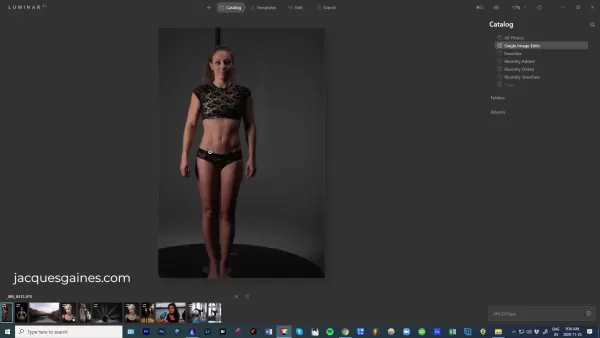
The interface is intuitive and user-friendly, making it easy for beginners and experienced photographers alike to get started.
Step 2: Access the Portrait Tab
Once your image is open, switch to the 'Edit' panel. Look for the 'Portrait' tab, usually marked by a smiley face icon. This tab contains all the AI-powered tools specifically designed for portrait enhancement, including Body AI.
Step 3: Activate Body AI
Within the 'Portrait' tab, find the 'Body' section. Click on it to reveal the Body AI controls. This activates the AI analysis, which intelligently identifies the subject's body and prepares the tools for adjustment.
Step 4: Adjust the Shape Slider
Begin by adjusting the 'Shape' slider. Moving it to the left will make the subject appear slimmer, while moving it to the right will add fullness. Make small, incremental adjustments and observe the changes carefully. The goal is to enhance subtly while preserving a natural look.
Step 5: Refine the Abdomen Area
Next, use the 'Abdomen' and 'Abdomen Area' sliders to fine-tune the midsection. The 'Abdomen' slider adjusts the overall size, while the 'Abdomen Area' slider lets you target specific regions. Again, subtle adjustments are key to achieving a realistic and flattering result.
Step 6: Compare Before and After
Throughout the editing process, use the 'Before/After' toggle to compare your adjustments with the original image. This helps you gauge the impact of your edits and ensures you're not overdoing it. Remember, the best portrait enhancements are those that improve without being obvious.
Step 7: Apply Additional Enhancements
Once you're happy with the Body AI adjustments, consider applying other enhancements in Luminar AI. You can refine skin texture, adjust lighting, or add creative effects to further polish the overall image. Experiment with different tools to achieve your desired look.
Step 8: Export Your Edited Image
Finally, when you're completely satisfied with the portrait, export it in your preferred format. Choose the appropriate settings for resolution, file type, and color space to ensure the highest quality for your intended use.
Luminar AI: Pricing and Plans
Understanding Luminar AI's Pricing Structure
Luminar AI offers a variety of purchasing options to suit different needs and budgets. These typically include:
- Perpetual License: A one-time purchase that grants lifetime access to the current version of Luminar AI.
- Subscription Plan: A recurring payment (monthly or annual) that provides access to the latest version and all updates.
- Bundle Deals: Packages that combine Luminar AI with other software or resources, often at a discounted price.
Specific pricing and availability may change, so it's best to check the official Luminar website for the latest information. Watch for special promotions or discounts, especially if you're a student or educator.
Pros and Cons of Using Body AI in Luminar AI
Pros
User-friendly interface makes it accessible to both beginners and experienced photographers.
AI-powered algorithms intelligently analyze and adjust body shapes for natural-looking results.
Saves time and effort compared to traditional manual editing methods.
Offers precise control over specific areas like the abdomen.
Helps address common issues like lens distortion and unflattering camera angles.
Allows for subtle enhancements that complement the subject's natural features.
Promotes a non-destructive editing workflow, preserving the original image quality.
Cons
Overuse can lead to unnatural or unrealistic results.
Requires responsible and ethical use to avoid misrepresenting someone's image.
Effectiveness may vary depending on the image quality and complexity.
May not be suitable for all body types or poses.
Can be seen as promoting unrealistic beauty standards if not used carefully.
Reliance on AI may limit creative expression and manual control.
Requires purchasing Luminar AI, either via subscription or a one-time license.
Key features of Luminar AI's Body AI
Shape Slider
The Shape slider allows for overall adjustments to the body shape, making the subject appear leaner or fuller. It's designed to work intelligently, maintaining natural proportions even with significant changes.
Abdomen Slider
This slider focuses specifically on the abdominal area, enabling photographers to refine the midsection. Whether reducing the appearance of bulk or enhancing muscle definition, the Abdomen slider provides precise control.
Abdomen Area Slider
For even more targeted adjustments, the Abdomen Area slider lets you modify specific regions within the midsection. This is particularly useful for addressing minor imperfections or emphasizing natural contours.
Frequently Asked Questions About Body AI
Is Body AI ethical to use?
The ethics of using Body AI are an important consideration. It's crucial to use the tool responsibly and with respect for the subject's true appearance. Subtle enhancements are generally acceptable, but drastic alterations that misrepresent someone can be unethical. Always consider the potential impact on the subject and strive to maintain authenticity.
Does Body AI work on all body types?
Yes, Body AI is designed to work on a wide range of body types. The AI algorithms are trained to intelligently recognize and adjust various body shapes and sizes. However, its effectiveness can vary based on image quality and portrait complexity. Experimenting with different settings is key to getting the best results.
Can Body AI be used on group photos?
While Body AI is primarily designed for individual portraits, it may work on group photos if the subjects are clearly defined and not overlapping. However, accuracy and effectiveness may be reduced. For optimal results, it's best to use Body AI on individual images.
Is Body AI difficult to learn?
No, Body AI is designed to be user-friendly and intuitive. The controls are straightforward, and the AI handles much of the complexity. With a little practice, even beginners can quickly learn to use Body AI to enhance their portraits effectively.
Can Body AI be used for commercial purposes?
Yes, Body AI can be used for commercial purposes as long as it's done ethically and with respect for the subject. If you're using Body AI for advertising or promotional materials, be transparent about any enhancements to avoid misleading consumers.
Related Questions on Portrait Photography
How can I improve my portrait photography skills?
Improving your portrait photography skills requires a blend of technical knowledge, artistic vision, and consistent practice. Here are some tips to help you grow:Master the Basics: Understand the fundamentals of aperture, shutter speed, ISO, and white balance. These settings directly impact your image's exposure and overall look.Learn About Lighting: Lighting is crucial. Experiment with different light sources—natural, artificial, direct, diffused—to see how they affect mood and appearance. Study lighting patterns like Rembrandt, split, and butterfly lighting.Master Composition: Apply composition rules like the rule of thirds, leading lines, and symmetry to create visually appealing portraits. Pay close attention to background and foreground elements.Connect with Your Subjects: Build rapport to make your subjects feel comfortable and relaxed. A genuine connection leads to more natural and authentic portraits.Direct Your Subjects: Provide clear, concise directions on posing, expressions, and movements. Help them understand your vision and how they can contribute.Experiment with Posing: Explore different poses that flatter various body types and personalities. Learn classic poses and adapt them to suit your subjects.Invest in Quality Gear: While creativity is key, the right equipment makes a difference. Consider investing in a good camera, lenses, and lighting.Edit Your Photos: Post-processing is essential. Learn to use software like Luminar AI to enhance portraits, correct flaws, and develop a cohesive style.Seek Inspiration: Study the work of renowned portrait photographers. Analyze their lighting, composition, and posing choices to gain inspiration.Practice Consistently: The best way to improve is through regular practice. Shoot often, experiment with techniques, and learn from your mistakes.By focusing on these areas, you can steadily enhance your portrait photography skills and create stunning images that capture your subjects' essence. The key is to combine technical skill with artistic expression to develop your unique style.
Related article
 Meta Removes AI Photo Editing Feature Following User Backlash
Meta, the social media giant, is once again embroiled in a public debate regarding the delicate balance between artificial intelligence and user privacy. According to TechCrunch, Meta’s Superintelligence Labs introduced a new AI image generator, Muse
DeepMind CEO Hassabis: I sleep six hours a day, usually feel energetic around 1 a.m.
Fortune recently featured an interview with Demis Hassabis, CEO of Google DeepMind, revealing his unconventional approach to rest and productivity. Hassabis disclosed that he sleeps very little, structuring his waking hours into two distinct work blo
OpenAI, Anthropic Vie for Market Share Despite Revenue Shortfalls
Despite recent reports suggesting OpenAI missed revenue targets, creating pressure on tech stocks this Tuesday, private AI lab investors remain resilient. Seasoned backers have confirmed they will not reduce investment despite negative media coverage
Related Special Topic Recommendations
Video creation
Meta Removes AI Photo Editing Feature Following User Backlash
Meta, the social media giant, is once again embroiled in a public debate regarding the delicate balance between artificial intelligence and user privacy. According to TechCrunch, Meta’s Superintelligence Labs introduced a new AI image generator, Muse
DeepMind CEO Hassabis: I sleep six hours a day, usually feel energetic around 1 a.m.
Fortune recently featured an interview with Demis Hassabis, CEO of Google DeepMind, revealing his unconventional approach to rest and productivity. Hassabis disclosed that he sleeps very little, structuring his waking hours into two distinct work blo
OpenAI, Anthropic Vie for Market Share Despite Revenue Shortfalls
Despite recent reports suggesting OpenAI missed revenue targets, creating pressure on tech stocks this Tuesday, private AI lab investors remain resilient. Seasoned backers have confirmed they will not reduce investment despite negative media coverage
Related Special Topic Recommendations
Video creation
 AI Short-Form Video Hook Generators for Reels, Shorts, and Product Launch Campaigns
2026 Latest Best AI Short-Form Video Hook Generators for Reels Shorts and Product Launch Campaigns! XIX.AI curates top-rated powerful game-changing tools that deliver must-try results through real-world tests. This weekly updated page offers free vs paid comparison rankings to help you find the perfect solution for boosting content creativity and productivity. Explore now to Unlock your AI edge!
 11 tools
 xix.ai
writing
AI Article Outline Tools for Long Form Writing
xix.ai
writing
AI Article Outline Tools for Long Form Writing
2026 Latest Best Top-Rated AI Article Outline Tools for Long Form Writing! This curated collection features powerful, game-changing tools that deliver accurate, structured outlines with real-world tests to boost writing efficiency significantly. XIX.AI is part of this elite selection. Get a free vs paid comparison to help you choose the perfect tool. Explore now and Unlock your AI edge!
9 tools
xix.ai
chatbot
Best AI Roleplay Chat Apps for Language Practice, Interview Prep, and Daily Fluency
2026 Latest Best Top-rated AI Roleplay Chat Apps for Language Practice, Interview Prep, and Daily Fluency! XIX.AI curates a powerful game-changing collection that offers free vs paid comparison, real-world tests, and updated rankings weekly. These must-try tools help you boost writing skills, overcome fluency challenges, and improve communication efficiency across all daily scenarios. Explore now to discover your perfect tool for language growth!
10 tools
xix.ai
Music composition
AI Stem Separation Tools for Remix Production, Sampling Prep, and Karaoke Masters
2026 Latest Best Top-rated AI Stem Separation Tools Curated for Remix Production, Sampling Prep, and Karaoke Masters. These powerful game-changing tools offer real-world tests to deliver precise audio isolation, boosting productivity significantly. XIX.AI provides a weekly updated free vs paid comparison guide to help you find the must-try solution that suits your needs. Explore now to unlock your AI edge.
8 tools
xix.ai
Data Analysis
AI SQL Copilots for Revenue Dashboards, Funnel Analysis, and Product Metrics
2026 Latest Best AI SQL Copilots Ranked Top-Rated! XIX.AI curates a powerful game-changing collection for weekly updated real-world tests. These must-try tools help you generate accurate revenue dashboards, analyze sales funnels, and track product metrics swiftly, boosting productivity massively. Explore now to Discover your perfect tool for data-driven decision making! 238 characters
9 tools
xix.ai
Music composition
Best AI Melody Writing Tools for Song Drafts
2026 Latest Best Top-Rated AI Melody Writing Tools for Song Drafts! XIX.AI has curated a highly powerful game-changing collection that goes through rigorous real-world tests to deliver the best writing experience. You can find detailed free vs paid comparisons, accurate rankings, and must-try options designed to help you create stunning song drafts effortlessly and boost your creative productivity significantly. Explore now to discover your perfect tool!
8 tools
xix.ai

 Comments (2)
0/500
Comments (2)
0/500
![ArthurLopez]()
Wait, so AI can now fix lens distortion and lighting issues in portraits? That's kinda wild but also a bit scary—are we slowly losing the 'art' part of photography? 😅 Still, for someone like me who can't hold a camera steady, this might be a lifesaver.
![PaulMartínez]()
Krass, wie KI jetzt sogar Körperproportionen in Porträts optimiert! Das erinnert mich an die Debatte um Photoshop und Realitätsverlust. Wo zieht man die Grenze zwischen 'Verbesserung' und 'Verfälschung'? Spannend, aber auch ein bisschen gruselig. 😅
In portrait photography, capturing the perfect image often goes beyond just having a good eye and a steady hand. Lens distortion, camera angles, and subtle lighting differences can all shape how a subject is perceived. Fortunately, modern AI-powered editing tools like Luminar AI are making it easier to enhance body shapes and ensure subjects look their absolute best. A standout feature is Body AI, which provides a natural and intuitive way to fine-tune body features in your photos. This guide explores the power of Luminar AI's Body AI, explaining its capabilities and how it can take your portrait work to the next level.
Key Points
Body AI is a feature in Luminar AI designed to enhance body shapes in photographs.
It tackles common problems like lens distortion and unflattering camera angles that can alter how a body appears.
Luminar AI uses artificial intelligence to intelligently identify body features and apply adjustments that look natural.
The tool provides sliders for shaping the overall body and refining specific areas like the abdomen.
It allows photographers to make subtle enhancements that complement the subject's natural physique.
Body AI offers a user-friendly and non-destructive way to achieve desired results in portrait editing.
Users should practice responsible and ethical use of Body AI, respecting the subject's authentic look.
Experimenting with different settings can unlock a wide variety of aesthetic possibilities.
Understanding Luminar AI's Body AI
What is Body AI?
Body AI is a specialized tool built into Luminar AI, the photo editing software designed to intelligently adjust the human body's appearance in an image. It aims to solve common challenges photographers face, such as lens distortion, tricky camera angles, and lighting conditions. These factors can change how a subject's body shape looks in a photo, sometimes in unflattering or misleading ways. The Body AI feature uses advanced artificial intelligence algorithms to analyze and adjust the body's shape. Unlike traditional manual editing, which can be time-consuming and often looks unnatural, Body AI offers a streamlined approach focused on natural and realistic enhancement. This means it understands the subtleties of human anatomy and applies changes that complement the subject's unique physique.
The goal of Body AI is not to drastically change someone's appearance but to subtly refine the image so the subject looks their best while remaining authentically themselves. By intelligently identifying key body features and understanding the photo's composition, Body AI provides a range of adjustments that are both powerful and easy to use. This enables both amateur and professional photographers to achieve impressive results quickly and efficiently. With Luminar AI's intuitive interface, photographers can easily access and fine-tune Body AI settings, making it an essential tool for modern portrait photography.
How Camera Angles and Lens Distortion Affect Body Shape
Camera angles and lens distortion are critical factors that can dramatically influence how a subject's body shape is perceived in a photograph. Understanding these elements is vital for any photographer aiming to capture accurate and flattering portraits.
Camera angles play a pivotal role. A low angle can make a subject appear taller and more commanding, while a high angle can make them seem smaller or more diminutive. Shooting from the side can accentuate certain curves or features, whereas a straight-on shot may offer a more balanced view. Choosing the wrong angle can unintentionally distort proportions, leading to an inaccurate representation of the subject's body.
Lens distortion is another major factor. For instance, wide-angle lenses tend to exaggerate perspective, making objects closer to the camera look larger and those farther away appear smaller. This can result in a portrait where the subject's face or upper body seems disproportionately large compared to their lower body. On the other hand, telephoto lenses can compress distances, potentially flattening features and reducing the sense of depth. If not managed properly, these distortions can harm the image's overall quality and misrepresent the subject's physical attributes.
Therefore, photographers must carefully consider both camera angles and lens distortion to capture portraits that are both aesthetically pleasing and true to life. By understanding these factors, photographers can use Luminar AI's Body AI to make targeted refinements, correcting any unwanted distortions and enhancing the subject's natural body shape in a subtle, realistic way.
Using Body AI in Luminar AI: A Step-by-Step Guide
Step 1: Open Your Image in Luminar AI
Start by launching Luminar AI and opening the portrait you want to edit. Go to the 'Catalog' tab and choose the image from your library, or import a new one.
The interface is intuitive and user-friendly, making it easy for beginners and experienced photographers alike to get started.
Step 2: Access the Portrait Tab
Once your image is open, switch to the 'Edit' panel. Look for the 'Portrait' tab, usually marked by a smiley face icon. This tab contains all the AI-powered tools specifically designed for portrait enhancement, including Body AI.
Step 3: Activate Body AI
Within the 'Portrait' tab, find the 'Body' section. Click on it to reveal the Body AI controls. This activates the AI analysis, which intelligently identifies the subject's body and prepares the tools for adjustment.
Step 4: Adjust the Shape Slider
Begin by adjusting the 'Shape' slider. Moving it to the left will make the subject appear slimmer, while moving it to the right will add fullness. Make small, incremental adjustments and observe the changes carefully. The goal is to enhance subtly while preserving a natural look.
Step 5: Refine the Abdomen Area
Next, use the 'Abdomen' and 'Abdomen Area' sliders to fine-tune the midsection. The 'Abdomen' slider adjusts the overall size, while the 'Abdomen Area' slider lets you target specific regions. Again, subtle adjustments are key to achieving a realistic and flattering result.
Step 6: Compare Before and After
Throughout the editing process, use the 'Before/After' toggle to compare your adjustments with the original image. This helps you gauge the impact of your edits and ensures you're not overdoing it. Remember, the best portrait enhancements are those that improve without being obvious.
Step 7: Apply Additional Enhancements
Once you're happy with the Body AI adjustments, consider applying other enhancements in Luminar AI. You can refine skin texture, adjust lighting, or add creative effects to further polish the overall image. Experiment with different tools to achieve your desired look.
Step 8: Export Your Edited Image
Finally, when you're completely satisfied with the portrait, export it in your preferred format. Choose the appropriate settings for resolution, file type, and color space to ensure the highest quality for your intended use.
Luminar AI: Pricing and Plans
Understanding Luminar AI's Pricing Structure
Luminar AI offers a variety of purchasing options to suit different needs and budgets. These typically include:
- Perpetual License: A one-time purchase that grants lifetime access to the current version of Luminar AI.
- Subscription Plan: A recurring payment (monthly or annual) that provides access to the latest version and all updates.
- Bundle Deals: Packages that combine Luminar AI with other software or resources, often at a discounted price.
Specific pricing and availability may change, so it's best to check the official Luminar website for the latest information. Watch for special promotions or discounts, especially if you're a student or educator.
Pros and Cons of Using Body AI in Luminar AI
Pros
User-friendly interface makes it accessible to both beginners and experienced photographers.
AI-powered algorithms intelligently analyze and adjust body shapes for natural-looking results.
Saves time and effort compared to traditional manual editing methods.
Offers precise control over specific areas like the abdomen.
Helps address common issues like lens distortion and unflattering camera angles.
Allows for subtle enhancements that complement the subject's natural features.
Promotes a non-destructive editing workflow, preserving the original image quality.
Cons
Overuse can lead to unnatural or unrealistic results.
Requires responsible and ethical use to avoid misrepresenting someone's image.
Effectiveness may vary depending on the image quality and complexity.
May not be suitable for all body types or poses.
Can be seen as promoting unrealistic beauty standards if not used carefully.
Reliance on AI may limit creative expression and manual control.
Requires purchasing Luminar AI, either via subscription or a one-time license.
Key features of Luminar AI's Body AI
Shape Slider
The Shape slider allows for overall adjustments to the body shape, making the subject appear leaner or fuller. It's designed to work intelligently, maintaining natural proportions even with significant changes.
Abdomen Slider
This slider focuses specifically on the abdominal area, enabling photographers to refine the midsection. Whether reducing the appearance of bulk or enhancing muscle definition, the Abdomen slider provides precise control.
Abdomen Area Slider
For even more targeted adjustments, the Abdomen Area slider lets you modify specific regions within the midsection. This is particularly useful for addressing minor imperfections or emphasizing natural contours.
Frequently Asked Questions About Body AI
Is Body AI ethical to use?
The ethics of using Body AI are an important consideration. It's crucial to use the tool responsibly and with respect for the subject's true appearance. Subtle enhancements are generally acceptable, but drastic alterations that misrepresent someone can be unethical. Always consider the potential impact on the subject and strive to maintain authenticity.
Does Body AI work on all body types?
Yes, Body AI is designed to work on a wide range of body types. The AI algorithms are trained to intelligently recognize and adjust various body shapes and sizes. However, its effectiveness can vary based on image quality and portrait complexity. Experimenting with different settings is key to getting the best results.
Can Body AI be used on group photos?
While Body AI is primarily designed for individual portraits, it may work on group photos if the subjects are clearly defined and not overlapping. However, accuracy and effectiveness may be reduced. For optimal results, it's best to use Body AI on individual images.
Is Body AI difficult to learn?
No, Body AI is designed to be user-friendly and intuitive. The controls are straightforward, and the AI handles much of the complexity. With a little practice, even beginners can quickly learn to use Body AI to enhance their portraits effectively.
Can Body AI be used for commercial purposes?
Yes, Body AI can be used for commercial purposes as long as it's done ethically and with respect for the subject. If you're using Body AI for advertising or promotional materials, be transparent about any enhancements to avoid misleading consumers.
Related Questions on Portrait Photography
How can I improve my portrait photography skills?
Improving your portrait photography skills requires a blend of technical knowledge, artistic vision, and consistent practice. Here are some tips to help you grow:Master the Basics: Understand the fundamentals of aperture, shutter speed, ISO, and white balance. These settings directly impact your image's exposure and overall look.Learn About Lighting: Lighting is crucial. Experiment with different light sources—natural, artificial, direct, diffused—to see how they affect mood and appearance. Study lighting patterns like Rembrandt, split, and butterfly lighting.Master Composition: Apply composition rules like the rule of thirds, leading lines, and symmetry to create visually appealing portraits. Pay close attention to background and foreground elements.Connect with Your Subjects: Build rapport to make your subjects feel comfortable and relaxed. A genuine connection leads to more natural and authentic portraits.Direct Your Subjects: Provide clear, concise directions on posing, expressions, and movements. Help them understand your vision and how they can contribute.Experiment with Posing: Explore different poses that flatter various body types and personalities. Learn classic poses and adapt them to suit your subjects.Invest in Quality Gear: While creativity is key, the right equipment makes a difference. Consider investing in a good camera, lenses, and lighting.Edit Your Photos: Post-processing is essential. Learn to use software like Luminar AI to enhance portraits, correct flaws, and develop a cohesive style.Seek Inspiration: Study the work of renowned portrait photographers. Analyze their lighting, composition, and posing choices to gain inspiration.Practice Consistently: The best way to improve is through regular practice. Shoot often, experiment with techniques, and learn from your mistakes.By focusing on these areas, you can steadily enhance your portrait photography skills and create stunning images that capture your subjects' essence. The key is to combine technical skill with artistic expression to develop your unique style.








 Meta Removes AI Photo Editing Feature Following User Backlash
Meta, the social media giant, is once again embroiled in a public debate regarding the delicate balance between artificial intelligence and user privacy. According to TechCrunch, Meta’s Superintelligence Labs introduced a new AI image generator, Muse
Meta Removes AI Photo Editing Feature Following User Backlash
Meta, the social media giant, is once again embroiled in a public debate regarding the delicate balance between artificial intelligence and user privacy. According to TechCrunch, Meta’s Superintelligence Labs introduced a new AI image generator, Muse
 DeepMind CEO Hassabis: I sleep six hours a day, usually feel energetic around 1 a.m.
Fortune recently featured an interview with Demis Hassabis, CEO of Google DeepMind, revealing his unconventional approach to rest and productivity. Hassabis disclosed that he sleeps very little, structuring his waking hours into two distinct work blo
DeepMind CEO Hassabis: I sleep six hours a day, usually feel energetic around 1 a.m.
Fortune recently featured an interview with Demis Hassabis, CEO of Google DeepMind, revealing his unconventional approach to rest and productivity. Hassabis disclosed that he sleeps very little, structuring his waking hours into two distinct work blo
 OpenAI, Anthropic Vie for Market Share Despite Revenue Shortfalls
Despite recent reports suggesting OpenAI missed revenue targets, creating pressure on tech stocks this Tuesday, private AI lab investors remain resilient. Seasoned backers have confirmed they will not reduce investment despite negative media coverage
OpenAI, Anthropic Vie for Market Share Despite Revenue Shortfalls
Despite recent reports suggesting OpenAI missed revenue targets, creating pressure on tech stocks this Tuesday, private AI lab investors remain resilient. Seasoned backers have confirmed they will not reduce investment despite negative media coverage

2026 Latest Best AI Short-Form Video Hook Generators for Reels Shorts and Product Launch Campaigns! XIX.AI curates top-rated powerful game-changing tools that deliver must-try results through real-world tests. This weekly updated page offers free vs paid comparison rankings to help you find the perfect solution for boosting content creativity and productivity. Explore now to Unlock your AI edge!
11 tools
xix.ai

2026 Latest Best Top-Rated AI Article Outline Tools for Long Form Writing! This curated collection features powerful, game-changing tools that deliver accurate, structured outlines with real-world tests to boost writing efficiency significantly. XIX.AI is part of this elite selection. Get a free vs paid comparison to help you choose the perfect tool. Explore now and Unlock your AI edge!
9 tools
xix.ai

2026 Latest Best Top-rated AI Roleplay Chat Apps for Language Practice, Interview Prep, and Daily Fluency! XIX.AI curates a powerful game-changing collection that offers free vs paid comparison, real-world tests, and updated rankings weekly. These must-try tools help you boost writing skills, overcome fluency challenges, and improve communication efficiency across all daily scenarios. Explore now to discover your perfect tool for language growth!
10 tools
xix.ai

2026 Latest Best Top-rated AI Stem Separation Tools Curated for Remix Production, Sampling Prep, and Karaoke Masters. These powerful game-changing tools offer real-world tests to deliver precise audio isolation, boosting productivity significantly. XIX.AI provides a weekly updated free vs paid comparison guide to help you find the must-try solution that suits your needs. Explore now to unlock your AI edge.
8 tools
xix.ai

2026 Latest Best AI SQL Copilots Ranked Top-Rated! XIX.AI curates a powerful game-changing collection for weekly updated real-world tests. These must-try tools help you generate accurate revenue dashboards, analyze sales funnels, and track product metrics swiftly, boosting productivity massively. Explore now to Discover your perfect tool for data-driven decision making! 238 characters
9 tools
xix.ai

2026 Latest Best Top-Rated AI Melody Writing Tools for Song Drafts! XIX.AI has curated a highly powerful game-changing collection that goes through rigorous real-world tests to deliver the best writing experience. You can find detailed free vs paid comparisons, accurate rankings, and must-try options designed to help you create stunning song drafts effortlessly and boost your creative productivity significantly. Explore now to discover your perfect tool!
8 tools
xix.ai

Wait, so AI can now fix lens distortion and lighting issues in portraits? That's kinda wild but also a bit scary—are we slowly losing the 'art' part of photography? 😅 Still, for someone like me who can't hold a camera steady, this might be a lifesaver.
Krass, wie KI jetzt sogar Körperproportionen in Porträts optimiert! Das erinnert mich an die Debatte um Photoshop und Realitätsverlust. Wo zieht man die Grenze zwischen 'Verbesserung' und 'Verfälschung'? Spannend, aber auch ein bisschen gruselig. 😅












