


 Home
HomeiFLYTEK AI Smart Recorder: A Thorough Review of Its Features and Value
In today's digital landscape, the ability to capture clean audio and convert it to text efficiently is vital for journalists, students, and professionals. The iFLYTEK AI Smart Recorder tackles this challenge head-on with real-time offline transcription, a compact build, and a strong emphasis on data security. This detailed review examines whether the device delivers on its promises and if its cost represents good value.
Key Points
Its sleek and attractive design features a sophisticated deep blue and gray finish.
Its compact footprint, reminiscent of a classic Nokia phone, ensures excellent portability.
It provides real-time offline transcription with a claimed accuracy rate of 98%.
A generous 10-meter recording range effectively captures audio in larger settings.
It offers superior noise cancellation compared to standard smartphone recordings.
Comprehensive data security measures include password protection and no cloud uploads.
Unboxing and Design
Aesthetic Design and Build Quality
The iFLYTEK AI Smart Recorder makes a strong first impression with its premium design.
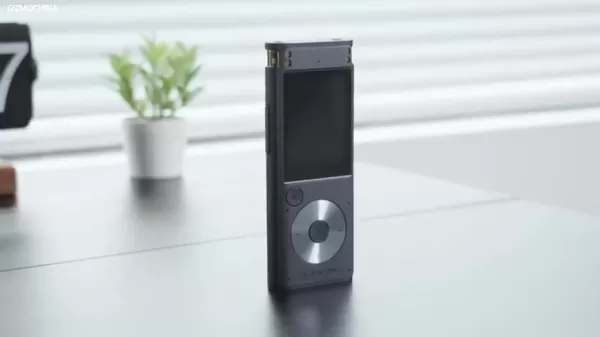
The elegant deep blue and gray color scheme, accentuated by gold trim around the microphones, conveys sophistication. The unibody plastic construction feels solid and durable, free from seams that could weaken the structure. Tactile metal buttons enhance the premium feel, contributing to the overall impression of a well-made device.
In contrast to modern smartphones with protruding camera lenses and fragile glass backs, this recorder emphasizes durability and practicality. Its design is both visually appealing and engineered for professional use, making it an ideal choice for interviews, lectures, or note-taking without the intrusiveness of a smartphone.
Compact Size and Portability
A key advantage of the iFLYTEK recorder is its exceptionally small size.
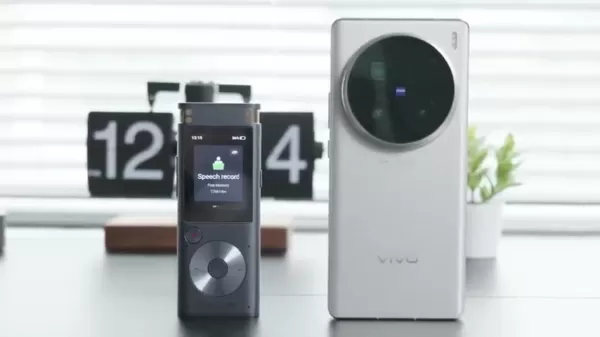
It's substantially more compact than most smartphones, allowing for easy transport in a pocket or bag. The reviewer compared its size to older Nokia phones, highlighting its true pocket-friendly nature. Despite its small stature, the device has a satisfying weight that suggests robustness. This compact form factor is perfect for mobile professionals, from journalists conducting field interviews to students recording lectures. Its light weight makes it comfortable to hold for long periods during recordings.
Performance and Accuracy
Transcription Accuracy Testing
The device's headline feature is its impressive 98% transcription accuracy.

Testing across various scenarios, including recordings with multiple speakers at different distances, confirmed its reliability. The device consistently produced accurate transcriptions, making it a dependable tool for capturing critical information.
10-Meter Recording Distance Test
To evaluate the 10-meter range claim, audio was played from a speaker placed at that distance. While a slight volume decrease was noted, the audio remained perfectly clear and understandable. This confirms the device's effectiveness in larger rooms and conference settings.
Noise Reduction Testing
The noise reduction capabilities were tested by recording near a busy roadway. In a direct comparison with an iPhone 15 Pro, the iFLYTEK recorder demonstrated significantly better noise suppression, producing clearer, more intelligible audio with less background interference.
How to Use the iFLYTEK AI Smart Recorder
Basic Setup and Configuration
Power On: Press and hold the side power button until the display illuminates.
Language Settings: Access the settings menu to choose your primary transcription language from Chinese, English, Japanese, Korean, or Russian.
Password Protection: For enhanced security, navigate to settings to set a password. This will be required each time you transfer files to a computer.
Recording Mode: Select the optimal recording mode for your environment: Intelligent, Conference, or Speech. The Intelligent mode is recommended for general use.Once configured, the device is ready for action.
Recording Audio
- Start Recording: Press the prominent red record button to begin. The screen will show elapsed time and audio levels.
- Positioning: Place the recorder on a stable surface or hold it steady, ensuring the microphones are directed toward the sound source.
- Monitoring: Watch the audio level indicators on the screen to prevent distortion (clipping) or recording levels that are too quiet.
- Stop Recording: Press the red button again to stop. The file is automatically saved to the internal storage.
Transcribing Audio
- Access Recordings: Go to the "My Files" directory to view your saved recordings.
- Select Recording: Choose the file you wish to transcribe. The device will immediately begin converting the speech to text.
- Review and Edit: Check the transcribed text on the screen. You can pause, rewind, or fast-forward the audio to verify accuracy.
- Export Transcription: Connect the recorder to a computer via the USB-C cable. After entering your password, you can copy the transcription text files to your computer.
Pricing and Value Proposition
Cost Analysis
Priced at $250, the iFLYTEK AI Smart Recorder occupies the premium segment of the voice recorder market. While this is higher than basic models, the investment is justified by its unique feature set.
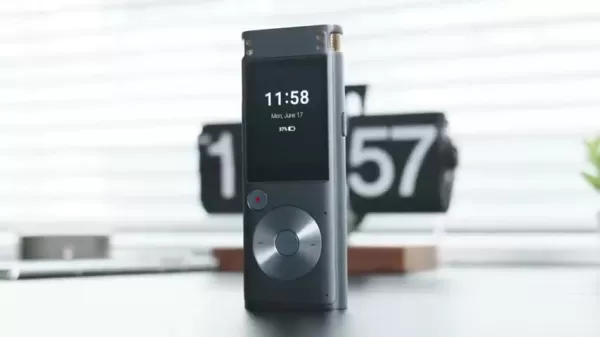
The combination of real-time offline transcription, long-range recording, advanced noise reduction, and robust data security offers significant value for professionals who depend on accurate and efficient audio documentation. When compared to other high-end recorders and considering the time savings its features provide, the $250 price tag represents a sensible investment for those requiring top-tier recording and transcription technology.
iFLYTEK AI Smart Recorder: Pros and Cons
Pros
Outstanding transcription accuracy, reportedly reaching 98%.
Real-time transcription works completely offline.
Compact and highly portable design, similar to a classic Nokia phone.
Effective recording range of up to 10 meters.
Advanced noise reduction technology for clearer audio.
Strong data security features to protect your content.
Cons
The $250 price point may be a barrier for some users.
Real-time transcription is currently limited to Chinese and English.
Its plastic construction, while durable, lacks the premium feel of metal.
The touchscreen interface can be less intuitive than physical buttons.
Key Features of the iFLYTEK AI Smart Recorder
Real-Time Offline Transcription
The cornerstone of the iFLYTEK AI Smart Recorder is its ability to transcribe audio to text offline in real time.
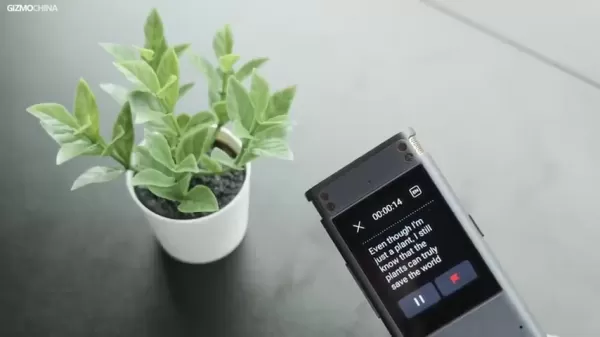
This functionality is indispensable where internet access is unreliable or restricted. Boasting 98% accuracy, the transcriptions are highly reliable and require little correction.
This offline capability is revolutionary for professionals needing immediate transcriptions in secure or remote locations. Generating text from speech instantly drastically cuts down processing time, streamlining the review, editing, and sharing of information.
10-Meter Recording Distance and Noise Reduction
With an effective range of 10 meters, the recorder captures clear audio in spacious environments like lecture halls or meeting rooms. This is supported by sophisticated noise reduction technology that filters out background distractions for superior voice clarity.

Its array of two directional and four omnidirectional microphones ensures excellent audio pickup. These combined features deliver a superior recording experience, even in acoustically challenging conditions.
Data Security Features
Data security is a fundamental aspect of the iFLYTEK recorder's design, offering multiple safeguards for sensitive recordings. Key security features include:
- Password Protection: Set a password to prevent unauthorized access to the device and its stored files.
- Internal Storage: The 32GB of internal ROM eliminates the need for removable SD cards, reducing the risk of data loss or theft.
- Offline Operation: Functioning entirely offline ensures no data is ever uploaded to the cloud, giving you full control over your recordings and transcriptions.Together, these features create a secure environment for handling confidential information, making the recorder a trusted tool for privacy-conscious professionals.
Ideal Use Cases for the iFLYTEK AI Smart Recorder
Journalists and Reporters
Journalists and reporters will find the iFLYTEK recorder invaluable for accurately capturing interviews and press conferences.

The real-time offline transcription allows for quick on-the-spot review and editing of material, saving time and ensuring no crucial detail is overlooked.
Students and Academics
Students can use the recorder to document lectures, seminars, and group study sessions. The 10-meter range ensures clear audio capture even from the back of a lecture hall. The resulting transcripts are perfect for creating study notes and reviewing course material.
Legal Professionals
Lawyers, paralegals, and legal professionals can depend on the iFLYTEK recorder for depositions, client meetings, and court proceedings. Its high accuracy and security features are essential for maintaining the integrity of legal documentation.
Business Professionals
Business professionals can enhance meeting productivity by using the recorder for conferences and calls. The transcription feature simplifies creating minutes, assigning tasks, and tracking action items during follow-up.
Frequently Asked Questions
What languages does the iFLYTEK AI Smart Recorder support for transcription?
The iFLYTEK AI Smart Recorder provides transcription support for five languages: Chinese, English, Japanese, Korean, and Russian.
Does the iFLYTEK AI Smart Recorder require an internet connection for transcription?
No, the device performs all transcription tasks offline in real time, eliminating the need for an internet connection.
What is the storage capacity of the iFLYTEK AI Smart Recorder?
It comes with 32GB of built-in storage, capable of holding approximately 175 hours of recorded audio.
How does the iFLYTEK AI Smart Recorder protect my data?
It employs multiple security layers, including device password protection, non-removable internal storage, and fully offline operation to ensure your data remains private and secure.
What is the recording distance of the iFLYTEK AI Smart Recorder?
The device effectively captures audio from up to 10 meters away, making it suitable for use in large rooms and conference settings.
Related Questions
What are the best voice recorders for journalists in 2025?
The ideal voice recorder for a journalist in 2025 depends on specific requirements. Leading contenders include the iFLYTEK AI Smart Recorder for its offline transcription; the Sony ICD-UX570, praised for its user-friendly operation; and the Zoom H1n, recognized for its exceptional audio fidelity. Key factors to weigh are recording quality, battery performance, storage capacity, ease of use, and overall cost.
How can I improve the audio quality of my recordings?
To achieve better audio quality, consider these tips: Invest in a quality microphone or dedicated recorder. Record in a quiet space with minimal ambient noise. Position the microphone as close as possible to the speaker. Use a pop filter or windscreen to minimize plosive sounds and wind noise. Carefully adjust input levels to avoid distortion. Perform post-recording edits to remove unwanted noise and enhance clarity.
Are there any free transcription services available?
Yes, several free transcription services exist, though their accuracy can vary. Options like Google Docs Voice Typing, Otter.ai (free plan), and Descript (free plan) are useful for short clips or draft transcriptions. However, for critical, lengthy, or sensitive audio, a professional service or a dedicated device like the iFLYTEK AI Smart Recorder is recommended for guaranteed accuracy and security.
Related article
 Ctrip Business Travel Unveils AI Ecosystem with 7 Industry Agents and 17 Core Capabilities
Ctrip Business Travel has officially unveiled the "Ctrip Business Travel AI Ecosystem," leveraging large language models to fundamentally restructure corporate travel management. This comprehensive ecosystem addresses four core scenarios: travel arra
Stripe to Acquire OpenRouter as AI Model Routing Gains Momentum
Stripe has agreed to acquire OpenRouter, an AI model-routing platform that gives developers access to hundreds of models through a single interface. The deal adds model selection and routing to Stripe’s existing work around AI usage and token-based b
Former OpenAI Researcher Barrett Zoph Returns to Google to Support Gemini Development
Barret Zoph, who previously abruptly left and joined OpenAI due to a disagreement with Thinking Machines Lab CEO Miriam Mularati, has once again changed employers. Alphabet's Google announced that Zoph will return as Vice President of Research, bring
Related Special Topic Recommendations
Design & Art
Ctrip Business Travel Unveils AI Ecosystem with 7 Industry Agents and 17 Core Capabilities
Ctrip Business Travel has officially unveiled the "Ctrip Business Travel AI Ecosystem," leveraging large language models to fundamentally restructure corporate travel management. This comprehensive ecosystem addresses four core scenarios: travel arra
Stripe to Acquire OpenRouter as AI Model Routing Gains Momentum
Stripe has agreed to acquire OpenRouter, an AI model-routing platform that gives developers access to hundreds of models through a single interface. The deal adds model selection and routing to Stripe’s existing work around AI usage and token-based b
Former OpenAI Researcher Barrett Zoph Returns to Google to Support Gemini Development
Barret Zoph, who previously abruptly left and joined OpenAI due to a disagreement with Thinking Machines Lab CEO Miriam Mularati, has once again changed employers. Alphabet's Google announced that Zoph will return as Vice President of Research, bring
Related Special Topic Recommendations
Design & Art
 Top AI Illustration Tools: Create Editorial Scenes and Cover Art Faster
2026 Latest Top-rated AI Illustration Tools: Our curated list features the best powerfully designed tools for creating stunning editorial scenes and eye-catching cover art quickly. Each option has gone through rigorous real-world tests, offering a free vs paid comparison to help you find the perfect match for your workflow. Try these must-try solutions today to unlock your AI edge and boost your creative productivity. Explore now at XIX.AI.
 10 tools
 xix.ai
Education and Learning
Top AI Tutors for Exam Prep: Practice Math, Science, and English
xix.ai
Education and Learning
Top AI Tutors for Exam Prep: Practice Math, Science, and English
2026 Latest Top-Rated Best AI Tutors for Exam Prep are here on XIX.AI! Our curated list features powerful game-changing tools that offer free vs paid comparison, real-world tests, and weekly updated rankings. They help boost your writing efficiency, simplify complex topic learning, and unlock your academic potential. Explore now to Discover your perfect exam prep tool and Start creating today to Unlock your AI edge!
10 tools
xix.ai
Finance
AI Budget Planning Tools for Personal Money Management
2026 Latest Best Top-Rated AI Budget Planning Tools for Personal Money Management are here on XIX.AI! This curated collection features powerful, game-changing solutions that help you conduct real-world tests, understand spending habits, and create personalized plans to boost productivity. Enjoy a free vs paid comparison along with detailed rankings. Must-try tools designed to simplify money management and unlock your AI edge. Explore now!
11 tools
xix.ai
Health & Wellness
AI Sleep Tracking Assistants: Improve Recovery with Better Bedtime Habits
2026 Latest Best Top-Rated AI Sleep Tracking Assistants curated for ultimate recovery. This fully updated weekly guide features powerful tools that deliver real-world tests, free vs paid comparison, and detailed rankings to help you find the must-try solution that boosts sleep quality and supports better bedtime habits. Explore now at XIX.AI to Unlock your AI edge.
10 tools
xix.ai
Data Analysis
AI SQL Copilots for Product and Revenue Analytics
2026 Latest Best Top-Rated AI SQL Copilots for Product and Revenue Analytics! XIX.AI has curated a powerful, game-changing collection of must-try tools that undergo real-world tests through weekly updated rankings. These tools help users boost productivity significantly by accelerating data analysis, streamlining complex queries, and generating accurate insights to drive smarter business decisions. Explore now to Discover your perfect tool for unlocking your AI edge!
14 tools
xix.ai
Education and Learning
Best AI Homework Helpers That Teach: Learn Concepts, Not Just Answers
2026 Latest Best Top-Rated AI Homework Helpers That Teach Core Concepts Not Just Answers Powerful Tools for Students Must-Try Curated List Weekly Updated Free vs Paid Comparison Real-World Tests Accurate Rankings to Help You Unlock Your Full Learning Potential Explore now to Discover your perfect tool for smarter studying.
10 tools
xix.ai

 Comments (4)
0/500
Comments (4)
0/500
![JoseRoberts]()
Honestly, I'm still skeptical about real-time offline transcription. How accurate can it be with heavy accents or background noise? My experience with similar devices has been hit-or-miss. Would love to see a side-by-side comparison with competitors like Otter or Sony. 🤔
![StevenHill]()
이 기사 정말 실용적인 정보네요! 저도 강의 녹음할 때마다 번거로웠는데, 플라이텍 녹음기가 오프라인에서 실시간 텍스트 변환이 된다니 신기하네요 ㅎㅎ 하지만 한 가지 궁금한 점은... 개인정보 보안은 어떻게 처리할까요? AI가 항상 녹음 내용을 분석한다면 사생활 노출 우려가 있을 것 같아요. 한국어 지원은 잘 될지 모르겠지만, 혹시 사용해보신 분 계신가요? 👀
![ScottMartinez]()
Offline-Transkription in Echtzeit? Das ist ja mal eine praktische Funktion für Konferenzen, wo die Netzabdeckung oft schlecht ist. Aber wie akkurat ist die Erkennung bei Fachbegriffen? Würde gerne wissen, ob das Ding auch mit meinem bayrischen Dialekt klarkommt 😅
![RogerJackson]()
오프라인으로 실시간 필기가 가능하다니 정말 신기해요✨ 한국에서도 비슷한 앱 많지만 번역과 AI 분류 기능까지 훨씬 발전한 것 같아요. 생각보다 가격이 저렴해서 학생들이 강의 녹음에 사용하기 좋을 것 같네요. 근데 보안 문제는 없는 건가요? 아이폰 유저들도 사용할 수 있는지 궁금하네요! 👍
In today's digital landscape, the ability to capture clean audio and convert it to text efficiently is vital for journalists, students, and professionals. The iFLYTEK AI Smart Recorder tackles this challenge head-on with real-time offline transcription, a compact build, and a strong emphasis on data security. This detailed review examines whether the device delivers on its promises and if its cost represents good value.
Key Points
Its sleek and attractive design features a sophisticated deep blue and gray finish.
Its compact footprint, reminiscent of a classic Nokia phone, ensures excellent portability.
It provides real-time offline transcription with a claimed accuracy rate of 98%.
A generous 10-meter recording range effectively captures audio in larger settings.
It offers superior noise cancellation compared to standard smartphone recordings.
Comprehensive data security measures include password protection and no cloud uploads.
Unboxing and Design
Aesthetic Design and Build Quality
The iFLYTEK AI Smart Recorder makes a strong first impression with its premium design.
The elegant deep blue and gray color scheme, accentuated by gold trim around the microphones, conveys sophistication. The unibody plastic construction feels solid and durable, free from seams that could weaken the structure. Tactile metal buttons enhance the premium feel, contributing to the overall impression of a well-made device.
In contrast to modern smartphones with protruding camera lenses and fragile glass backs, this recorder emphasizes durability and practicality. Its design is both visually appealing and engineered for professional use, making it an ideal choice for interviews, lectures, or note-taking without the intrusiveness of a smartphone.
Compact Size and Portability
A key advantage of the iFLYTEK recorder is its exceptionally small size.
It's substantially more compact than most smartphones, allowing for easy transport in a pocket or bag. The reviewer compared its size to older Nokia phones, highlighting its true pocket-friendly nature. Despite its small stature, the device has a satisfying weight that suggests robustness. This compact form factor is perfect for mobile professionals, from journalists conducting field interviews to students recording lectures. Its light weight makes it comfortable to hold for long periods during recordings.
Performance and Accuracy
Transcription Accuracy Testing
The device's headline feature is its impressive 98% transcription accuracy.
Testing across various scenarios, including recordings with multiple speakers at different distances, confirmed its reliability. The device consistently produced accurate transcriptions, making it a dependable tool for capturing critical information.
10-Meter Recording Distance Test
To evaluate the 10-meter range claim, audio was played from a speaker placed at that distance. While a slight volume decrease was noted, the audio remained perfectly clear and understandable. This confirms the device's effectiveness in larger rooms and conference settings.
Noise Reduction Testing
The noise reduction capabilities were tested by recording near a busy roadway. In a direct comparison with an iPhone 15 Pro, the iFLYTEK recorder demonstrated significantly better noise suppression, producing clearer, more intelligible audio with less background interference.
How to Use the iFLYTEK AI Smart Recorder
Basic Setup and Configuration
Power On: Press and hold the side power button until the display illuminates.
Language Settings: Access the settings menu to choose your primary transcription language from Chinese, English, Japanese, Korean, or Russian.
Password Protection: For enhanced security, navigate to settings to set a password. This will be required each time you transfer files to a computer.
Recording Mode: Select the optimal recording mode for your environment: Intelligent, Conference, or Speech. The Intelligent mode is recommended for general use.Once configured, the device is ready for action.
Recording Audio
- Start Recording: Press the prominent red record button to begin. The screen will show elapsed time and audio levels.
- Positioning: Place the recorder on a stable surface or hold it steady, ensuring the microphones are directed toward the sound source.
- Monitoring: Watch the audio level indicators on the screen to prevent distortion (clipping) or recording levels that are too quiet.
- Stop Recording: Press the red button again to stop. The file is automatically saved to the internal storage.
Transcribing Audio
- Access Recordings: Go to the "My Files" directory to view your saved recordings.
- Select Recording: Choose the file you wish to transcribe. The device will immediately begin converting the speech to text.
- Review and Edit: Check the transcribed text on the screen. You can pause, rewind, or fast-forward the audio to verify accuracy.
- Export Transcription: Connect the recorder to a computer via the USB-C cable. After entering your password, you can copy the transcription text files to your computer.
Pricing and Value Proposition
Cost Analysis
Priced at $250, the iFLYTEK AI Smart Recorder occupies the premium segment of the voice recorder market. While this is higher than basic models, the investment is justified by its unique feature set.
The combination of real-time offline transcription, long-range recording, advanced noise reduction, and robust data security offers significant value for professionals who depend on accurate and efficient audio documentation. When compared to other high-end recorders and considering the time savings its features provide, the $250 price tag represents a sensible investment for those requiring top-tier recording and transcription technology.
iFLYTEK AI Smart Recorder: Pros and Cons
Pros
Outstanding transcription accuracy, reportedly reaching 98%.
Real-time transcription works completely offline.
Compact and highly portable design, similar to a classic Nokia phone.
Effective recording range of up to 10 meters.
Advanced noise reduction technology for clearer audio.
Strong data security features to protect your content.
Cons
The $250 price point may be a barrier for some users.
Real-time transcription is currently limited to Chinese and English.
Its plastic construction, while durable, lacks the premium feel of metal.
The touchscreen interface can be less intuitive than physical buttons.
Key Features of the iFLYTEK AI Smart Recorder
Real-Time Offline Transcription
The cornerstone of the iFLYTEK AI Smart Recorder is its ability to transcribe audio to text offline in real time.
This functionality is indispensable where internet access is unreliable or restricted. Boasting 98% accuracy, the transcriptions are highly reliable and require little correction.
This offline capability is revolutionary for professionals needing immediate transcriptions in secure or remote locations. Generating text from speech instantly drastically cuts down processing time, streamlining the review, editing, and sharing of information.
10-Meter Recording Distance and Noise Reduction
With an effective range of 10 meters, the recorder captures clear audio in spacious environments like lecture halls or meeting rooms. This is supported by sophisticated noise reduction technology that filters out background distractions for superior voice clarity.
Its array of two directional and four omnidirectional microphones ensures excellent audio pickup. These combined features deliver a superior recording experience, even in acoustically challenging conditions.
Data Security Features
Data security is a fundamental aspect of the iFLYTEK recorder's design, offering multiple safeguards for sensitive recordings. Key security features include:
- Password Protection: Set a password to prevent unauthorized access to the device and its stored files.
- Internal Storage: The 32GB of internal ROM eliminates the need for removable SD cards, reducing the risk of data loss or theft.
- Offline Operation: Functioning entirely offline ensures no data is ever uploaded to the cloud, giving you full control over your recordings and transcriptions.Together, these features create a secure environment for handling confidential information, making the recorder a trusted tool for privacy-conscious professionals.
Ideal Use Cases for the iFLYTEK AI Smart Recorder
Journalists and Reporters
Journalists and reporters will find the iFLYTEK recorder invaluable for accurately capturing interviews and press conferences.
The real-time offline transcription allows for quick on-the-spot review and editing of material, saving time and ensuring no crucial detail is overlooked.
Students and Academics
Students can use the recorder to document lectures, seminars, and group study sessions. The 10-meter range ensures clear audio capture even from the back of a lecture hall. The resulting transcripts are perfect for creating study notes and reviewing course material.
Legal Professionals
Lawyers, paralegals, and legal professionals can depend on the iFLYTEK recorder for depositions, client meetings, and court proceedings. Its high accuracy and security features are essential for maintaining the integrity of legal documentation.
Business Professionals
Business professionals can enhance meeting productivity by using the recorder for conferences and calls. The transcription feature simplifies creating minutes, assigning tasks, and tracking action items during follow-up.
Frequently Asked Questions
What languages does the iFLYTEK AI Smart Recorder support for transcription?
The iFLYTEK AI Smart Recorder provides transcription support for five languages: Chinese, English, Japanese, Korean, and Russian.
Does the iFLYTEK AI Smart Recorder require an internet connection for transcription?
No, the device performs all transcription tasks offline in real time, eliminating the need for an internet connection.
What is the storage capacity of the iFLYTEK AI Smart Recorder?
It comes with 32GB of built-in storage, capable of holding approximately 175 hours of recorded audio.
How does the iFLYTEK AI Smart Recorder protect my data?
It employs multiple security layers, including device password protection, non-removable internal storage, and fully offline operation to ensure your data remains private and secure.
What is the recording distance of the iFLYTEK AI Smart Recorder?
The device effectively captures audio from up to 10 meters away, making it suitable for use in large rooms and conference settings.
Related Questions
What are the best voice recorders for journalists in 2025?
The ideal voice recorder for a journalist in 2025 depends on specific requirements. Leading contenders include the iFLYTEK AI Smart Recorder for its offline transcription; the Sony ICD-UX570, praised for its user-friendly operation; and the Zoom H1n, recognized for its exceptional audio fidelity. Key factors to weigh are recording quality, battery performance, storage capacity, ease of use, and overall cost.
How can I improve the audio quality of my recordings?
To achieve better audio quality, consider these tips: Invest in a quality microphone or dedicated recorder. Record in a quiet space with minimal ambient noise. Position the microphone as close as possible to the speaker. Use a pop filter or windscreen to minimize plosive sounds and wind noise. Carefully adjust input levels to avoid distortion. Perform post-recording edits to remove unwanted noise and enhance clarity.
Are there any free transcription services available?
Yes, several free transcription services exist, though their accuracy can vary. Options like Google Docs Voice Typing, Otter.ai (free plan), and Descript (free plan) are useful for short clips or draft transcriptions. However, for critical, lengthy, or sensitive audio, a professional service or a dedicated device like the iFLYTEK AI Smart Recorder is recommended for guaranteed accuracy and security.








 Ctrip Business Travel Unveils AI Ecosystem with 7 Industry Agents and 17 Core Capabilities
Ctrip Business Travel has officially unveiled the "Ctrip Business Travel AI Ecosystem," leveraging large language models to fundamentally restructure corporate travel management. This comprehensive ecosystem addresses four core scenarios: travel arra
Ctrip Business Travel Unveils AI Ecosystem with 7 Industry Agents and 17 Core Capabilities
Ctrip Business Travel has officially unveiled the "Ctrip Business Travel AI Ecosystem," leveraging large language models to fundamentally restructure corporate travel management. This comprehensive ecosystem addresses four core scenarios: travel arra
 Stripe to Acquire OpenRouter as AI Model Routing Gains Momentum
Stripe has agreed to acquire OpenRouter, an AI model-routing platform that gives developers access to hundreds of models through a single interface. The deal adds model selection and routing to Stripe’s existing work around AI usage and token-based b
Stripe to Acquire OpenRouter as AI Model Routing Gains Momentum
Stripe has agreed to acquire OpenRouter, an AI model-routing platform that gives developers access to hundreds of models through a single interface. The deal adds model selection and routing to Stripe’s existing work around AI usage and token-based b
 Former OpenAI Researcher Barrett Zoph Returns to Google to Support Gemini Development
Barret Zoph, who previously abruptly left and joined OpenAI due to a disagreement with Thinking Machines Lab CEO Miriam Mularati, has once again changed employers. Alphabet's Google announced that Zoph will return as Vice President of Research, bring
Former OpenAI Researcher Barrett Zoph Returns to Google to Support Gemini Development
Barret Zoph, who previously abruptly left and joined OpenAI due to a disagreement with Thinking Machines Lab CEO Miriam Mularati, has once again changed employers. Alphabet's Google announced that Zoph will return as Vice President of Research, bring

2026 Latest Top-rated AI Illustration Tools: Our curated list features the best powerfully designed tools for creating stunning editorial scenes and eye-catching cover art quickly. Each option has gone through rigorous real-world tests, offering a free vs paid comparison to help you find the perfect match for your workflow. Try these must-try solutions today to unlock your AI edge and boost your creative productivity. Explore now at XIX.AI.
10 tools
xix.ai

2026 Latest Top-Rated Best AI Tutors for Exam Prep are here on XIX.AI! Our curated list features powerful game-changing tools that offer free vs paid comparison, real-world tests, and weekly updated rankings. They help boost your writing efficiency, simplify complex topic learning, and unlock your academic potential. Explore now to Discover your perfect exam prep tool and Start creating today to Unlock your AI edge!
10 tools
xix.ai

2026 Latest Best Top-Rated AI Budget Planning Tools for Personal Money Management are here on XIX.AI! This curated collection features powerful, game-changing solutions that help you conduct real-world tests, understand spending habits, and create personalized plans to boost productivity. Enjoy a free vs paid comparison along with detailed rankings. Must-try tools designed to simplify money management and unlock your AI edge. Explore now!
11 tools
xix.ai

2026 Latest Best Top-Rated AI Sleep Tracking Assistants curated for ultimate recovery. This fully updated weekly guide features powerful tools that deliver real-world tests, free vs paid comparison, and detailed rankings to help you find the must-try solution that boosts sleep quality and supports better bedtime habits. Explore now at XIX.AI to Unlock your AI edge.
10 tools
xix.ai

2026 Latest Best Top-Rated AI SQL Copilots for Product and Revenue Analytics! XIX.AI has curated a powerful, game-changing collection of must-try tools that undergo real-world tests through weekly updated rankings. These tools help users boost productivity significantly by accelerating data analysis, streamlining complex queries, and generating accurate insights to drive smarter business decisions. Explore now to Discover your perfect tool for unlocking your AI edge!
14 tools
xix.ai

2026 Latest Best Top-Rated AI Homework Helpers That Teach Core Concepts Not Just Answers Powerful Tools for Students Must-Try Curated List Weekly Updated Free vs Paid Comparison Real-World Tests Accurate Rankings to Help You Unlock Your Full Learning Potential Explore now to Discover your perfect tool for smarter studying.
10 tools
xix.ai

Honestly, I'm still skeptical about real-time offline transcription. How accurate can it be with heavy accents or background noise? My experience with similar devices has been hit-or-miss. Would love to see a side-by-side comparison with competitors like Otter or Sony. 🤔
이 기사 정말 실용적인 정보네요! 저도 강의 녹음할 때마다 번거로웠는데, 플라이텍 녹음기가 오프라인에서 실시간 텍스트 변환이 된다니 신기하네요 ㅎㅎ 하지만 한 가지 궁금한 점은... 개인정보 보안은 어떻게 처리할까요? AI가 항상 녹음 내용을 분석한다면 사생활 노출 우려가 있을 것 같아요. 한국어 지원은 잘 될지 모르겠지만, 혹시 사용해보신 분 계신가요? 👀
Offline-Transkription in Echtzeit? Das ist ja mal eine praktische Funktion für Konferenzen, wo die Netzabdeckung oft schlecht ist. Aber wie akkurat ist die Erkennung bei Fachbegriffen? Würde gerne wissen, ob das Ding auch mit meinem bayrischen Dialekt klarkommt 😅
오프라인으로 실시간 필기가 가능하다니 정말 신기해요✨ 한국에서도 비슷한 앱 많지만 번역과 AI 분류 기능까지 훨씬 발전한 것 같아요. 생각보다 가격이 저렴해서 학생들이 강의 녹음에 사용하기 좋을 것 같네요. 근데 보안 문제는 없는 건가요? 아이폰 유저들도 사용할 수 있는지 궁금하네요! 👍












