


 Home
HomeHow to create realistic audio free in Google AI Studio 2025 step-by-step?
For African folktale creators, Google AI Studio is a game-changing tool. It grants storytellers free, unlimited access to incredibly lifelike AI voices. You can produce long-form audio narrations for your projects directly from your Android phone or computer. Here is a practical guide to making the most of this powerful platform.
Key Points
Access to realistic AI voices is completely free and unlimited with Google AI Studio.
Content creators focusing on African folktales will find it exceptionally helpful.
The platform is capable of generating long audio narrations.
It works seamlessly on both Android devices and desktop computers.
Switching your mobile browser to desktop mode is essential for the full experience.
Getting Started with Google AI Studio
Accessing Google AI Studio
First, open the Chrome browser on your device and search for Google AI Studio. Click the result that takes you directly to the official platform interface.
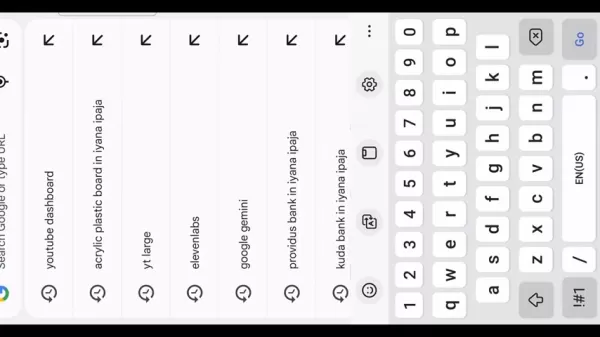
This is your starting point for audio creation. A stable internet connection is recommended for smooth operation. Regularly visiting the platform helps you stay current with new features and voice options, allowing you to consistently produce fresh and captivating content. Mastering this first step is key to effectively integrating AI narration into your storytelling workflow.
Converting to Desktop View
When using Google AI Studio on an Android phone, switching to desktop view is essential to see all features.
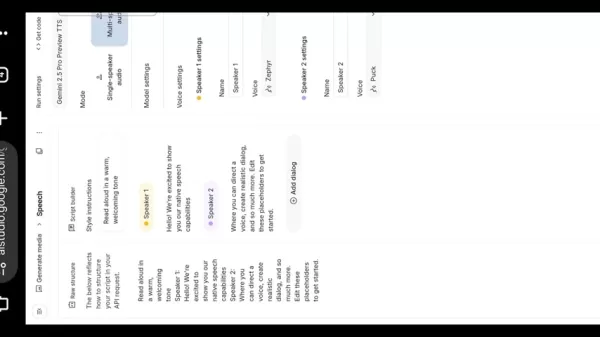
Tap the three-dot menu in Chrome's top-right corner, scroll down, and select Desktop site. This changes your browser's interface to mimic a desktop, unlocking the complete set of voice selection and customization tools. This setup ensures you have full functionality for managing your audio projects efficiently.
Enhancing Your Folktale Storytelling with Visuals and Sound Effects
Incorporating Visual Elements for a Captivating Experience
Visuals are a powerful tool for bringing folktales to life, especially for younger viewers. High-quality illustrations or animations can make your narrative more immersive and engaging. Well-chosen visuals support the story and help maintain audience focus. They work in harmony with the audio to create a rich, cohesive experience that sparks imagination and draws viewers into the world of your tale.
Selecting Sound Effects and Background Music
The right audio atmosphere is crucial for impactful storytelling. Relevant sound effects add realism to scenes, while thoughtful background music establishes mood and emotion. Consider the tone of each scene and choose audio elements that enhance it. Ensure sound quality is high and that music complements, rather than competes with, the narrator's voice. A well-crafted sonic landscape deeply immerses your audience in the heart of the folktale.
Step-by-Step Guide to Using Google AI Studio
Selecting a Voice
In desktop view, find the section for choosing a voice. This choice is vital for matching the narration's tone to your African folktale.
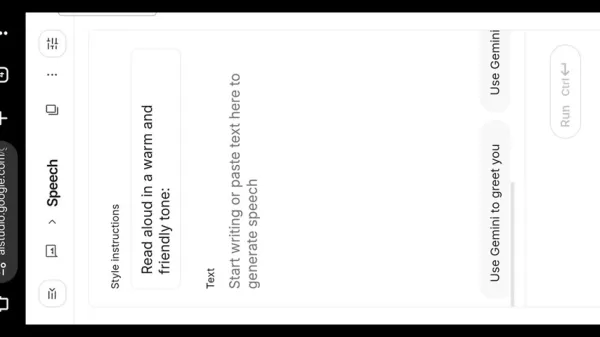
The platform offers a diverse range of voices, each with its own character. Preview them to find the best fit for your story. The right voice sets the narrative's personality, making it more engaging and helping to captivate your listeners from the start.
Adjusting Style Instructions
After picking a voice, personalize the delivery style.
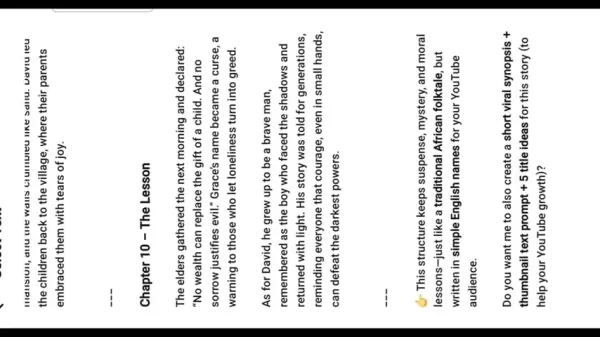
Tailor the instructions to your storytelling goals. For folktales, a prompt like Read aloud in a warm and storytelling tone can add authenticity and emotional depth. This fine-tuning allows the AI to deliver your script with the nuance that resonates with audiences.
Pasting Your Script
With voice and style ready, paste your prepared script into the text box.
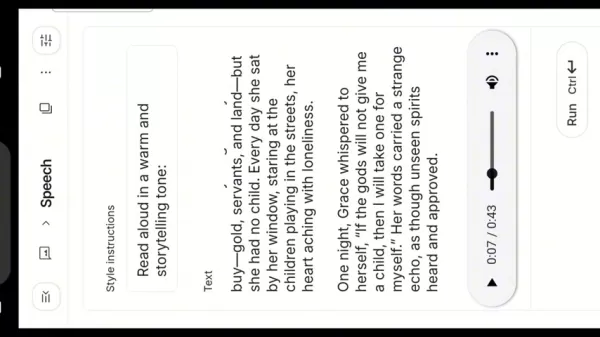
This is where the AI processes your text. A well-formatted script with clear punctuation helps the AI generate natural-sounding speech with proper pauses and emphasis, resulting in a more compelling and fluid narration.
Generating and Downloading the Audio
Click the Run button to generate the audio based on your selections. Once processing is complete, tap the three dots next to the audio player to download the file. This gives you a high-quality audio track ready to be seamlessly integrated into your folktale video projects, streamlining your content creation process.
Evaluating Google AI Studio
Pros
Free and unlimited access
Highly realistic AI voices
Supports long-form audio generation
Available on Android and desktop
Cons
Mobile use requires desktop view
May need fine-tuning of style instructions
Frequently Asked Questions
Is Google AI Studio really free?
Yes, it offers completely free and unrestricted access to its AI voice generation, making it perfect for creators on a budget.
Can I use Google AI Studio on my Android phone?
Yes, it is fully accessible on Android. For the best experience, remember to enable desktop site mode in your browser.
Can Google AI Studio generate long audio files?
Absolutely. It is designed to handle lengthy narrations, which is ideal for detailed folktales.
How realistic are the AI voices in Google AI Studio?
The voices are remarkably lifelike, which is highly effective for creating authentic and engaging storytelling audio.
Can I customize the tone of the AI voices?
Yes, by adjusting the style instructions, you can influence the narration's tone and delivery to better suit your story.
Related Questions
What other AI tools are useful for content creation?
Many AI tools can boost content creation, including writing assistants, video editors, and graphic design platforms. Each offers unique features—from improving text readability and simplifying complex edits to generating visuals quickly. Integrating these tools can significantly enhance your workflow, helping you produce high-quality, engaging content more efficiently.
Related article
 Ctrip Business Travel Unveils AI Ecosystem with 7 Industry Agents and 17 Core Capabilities
Ctrip Business Travel has officially unveiled the "Ctrip Business Travel AI Ecosystem," leveraging large language models to fundamentally restructure corporate travel management. This comprehensive ecosystem addresses four core scenarios: travel arra
Stripe to Acquire OpenRouter as AI Model Routing Gains Momentum
Stripe has agreed to acquire OpenRouter, an AI model-routing platform that gives developers access to hundreds of models through a single interface. The deal adds model selection and routing to Stripe’s existing work around AI usage and token-based b
Former OpenAI Researcher Barrett Zoph Returns to Google to Support Gemini Development
Barret Zoph, who previously abruptly left and joined OpenAI due to a disagreement with Thinking Machines Lab CEO Miriam Mularati, has once again changed employers. Alphabet's Google announced that Zoph will return as Vice President of Research, bring
Related Special Topic Recommendations
Design & Art
Ctrip Business Travel Unveils AI Ecosystem with 7 Industry Agents and 17 Core Capabilities
Ctrip Business Travel has officially unveiled the "Ctrip Business Travel AI Ecosystem," leveraging large language models to fundamentally restructure corporate travel management. This comprehensive ecosystem addresses four core scenarios: travel arra
Stripe to Acquire OpenRouter as AI Model Routing Gains Momentum
Stripe has agreed to acquire OpenRouter, an AI model-routing platform that gives developers access to hundreds of models through a single interface. The deal adds model selection and routing to Stripe’s existing work around AI usage and token-based b
Former OpenAI Researcher Barrett Zoph Returns to Google to Support Gemini Development
Barret Zoph, who previously abruptly left and joined OpenAI due to a disagreement with Thinking Machines Lab CEO Miriam Mularati, has once again changed employers. Alphabet's Google announced that Zoph will return as Vice President of Research, bring
Related Special Topic Recommendations
Design & Art
 Top AI Illustration Tools: Create Editorial Scenes and Cover Art Faster
2026 Latest Top-rated AI Illustration Tools: Our curated list features the best powerfully designed tools for creating stunning editorial scenes and eye-catching cover art quickly. Each option has gone through rigorous real-world tests, offering a free vs paid comparison to help you find the perfect match for your workflow. Try these must-try solutions today to unlock your AI edge and boost your creative productivity. Explore now at XIX.AI.
 10 tools
 xix.ai
Education and Learning
Top AI Tutors for Exam Prep: Practice Math, Science, and English
xix.ai
Education and Learning
Top AI Tutors for Exam Prep: Practice Math, Science, and English
2026 Latest Top-Rated Best AI Tutors for Exam Prep are here on XIX.AI! Our curated list features powerful game-changing tools that offer free vs paid comparison, real-world tests, and weekly updated rankings. They help boost your writing efficiency, simplify complex topic learning, and unlock your academic potential. Explore now to Discover your perfect exam prep tool and Start creating today to Unlock your AI edge!
10 tools
xix.ai
Finance
AI Budget Planning Tools for Personal Money Management
2026 Latest Best Top-Rated AI Budget Planning Tools for Personal Money Management are here on XIX.AI! This curated collection features powerful, game-changing solutions that help you conduct real-world tests, understand spending habits, and create personalized plans to boost productivity. Enjoy a free vs paid comparison along with detailed rankings. Must-try tools designed to simplify money management and unlock your AI edge. Explore now!
11 tools
xix.ai
Health & Wellness
AI Sleep Tracking Assistants: Improve Recovery with Better Bedtime Habits
2026 Latest Best Top-Rated AI Sleep Tracking Assistants curated for ultimate recovery. This fully updated weekly guide features powerful tools that deliver real-world tests, free vs paid comparison, and detailed rankings to help you find the must-try solution that boosts sleep quality and supports better bedtime habits. Explore now at XIX.AI to Unlock your AI edge.
10 tools
xix.ai
Data Analysis
AI SQL Copilots for Product and Revenue Analytics
2026 Latest Best Top-Rated AI SQL Copilots for Product and Revenue Analytics! XIX.AI has curated a powerful, game-changing collection of must-try tools that undergo real-world tests through weekly updated rankings. These tools help users boost productivity significantly by accelerating data analysis, streamlining complex queries, and generating accurate insights to drive smarter business decisions. Explore now to Discover your perfect tool for unlocking your AI edge!
14 tools
xix.ai
Education and Learning
Best AI Homework Helpers That Teach: Learn Concepts, Not Just Answers
2026 Latest Best Top-Rated AI Homework Helpers That Teach Core Concepts Not Just Answers Powerful Tools for Students Must-Try Curated List Weekly Updated Free vs Paid Comparison Real-World Tests Accurate Rankings to Help You Unlock Your Full Learning Potential Explore now to Discover your perfect tool for smarter studying.
10 tools
xix.ai

 Comments (2)
0/500
Comments (2)
0/500
![ArthurJackson]()
Гугл делает AI-голоса доступными для африканских сказочников — это круто! 😊 Но бесплатно и неограниченно? Интересно, как долго продлится эта щедрость. Может, скоро начнут брать плату, как это обычно бывает. В любом случае, шаг вперёд для локальных создателей.
![KevinHarris]()
Гугл снова удивляет! Бесплатный ИИ для озвучки африканских сказок — это круто, но не приведёт ли это к исчезновению живых рассказчиков? 🤔 Технология удобная, но культурное наследие должно сохраняться через человеческое общение.
For African folktale creators, Google AI Studio is a game-changing tool. It grants storytellers free, unlimited access to incredibly lifelike AI voices. You can produce long-form audio narrations for your projects directly from your Android phone or computer. Here is a practical guide to making the most of this powerful platform.
Key Points
Access to realistic AI voices is completely free and unlimited with Google AI Studio.
Content creators focusing on African folktales will find it exceptionally helpful.
The platform is capable of generating long audio narrations.
It works seamlessly on both Android devices and desktop computers.
Switching your mobile browser to desktop mode is essential for the full experience.
Getting Started with Google AI Studio
Accessing Google AI Studio
First, open the Chrome browser on your device and search for Google AI Studio. Click the result that takes you directly to the official platform interface.
This is your starting point for audio creation. A stable internet connection is recommended for smooth operation. Regularly visiting the platform helps you stay current with new features and voice options, allowing you to consistently produce fresh and captivating content. Mastering this first step is key to effectively integrating AI narration into your storytelling workflow.
Converting to Desktop View
When using Google AI Studio on an Android phone, switching to desktop view is essential to see all features.
Tap the three-dot menu in Chrome's top-right corner, scroll down, and select Desktop site. This changes your browser's interface to mimic a desktop, unlocking the complete set of voice selection and customization tools. This setup ensures you have full functionality for managing your audio projects efficiently.
Enhancing Your Folktale Storytelling with Visuals and Sound Effects
Incorporating Visual Elements for a Captivating Experience
Visuals are a powerful tool for bringing folktales to life, especially for younger viewers. High-quality illustrations or animations can make your narrative more immersive and engaging. Well-chosen visuals support the story and help maintain audience focus. They work in harmony with the audio to create a rich, cohesive experience that sparks imagination and draws viewers into the world of your tale.
Selecting Sound Effects and Background Music
The right audio atmosphere is crucial for impactful storytelling. Relevant sound effects add realism to scenes, while thoughtful background music establishes mood and emotion. Consider the tone of each scene and choose audio elements that enhance it. Ensure sound quality is high and that music complements, rather than competes with, the narrator's voice. A well-crafted sonic landscape deeply immerses your audience in the heart of the folktale.
Step-by-Step Guide to Using Google AI Studio
Selecting a Voice
In desktop view, find the section for choosing a voice. This choice is vital for matching the narration's tone to your African folktale.
The platform offers a diverse range of voices, each with its own character. Preview them to find the best fit for your story. The right voice sets the narrative's personality, making it more engaging and helping to captivate your listeners from the start.
Adjusting Style Instructions
After picking a voice, personalize the delivery style.
Tailor the instructions to your storytelling goals. For folktales, a prompt like Read aloud in a warm and storytelling tone can add authenticity and emotional depth. This fine-tuning allows the AI to deliver your script with the nuance that resonates with audiences.
Pasting Your Script
With voice and style ready, paste your prepared script into the text box.
This is where the AI processes your text. A well-formatted script with clear punctuation helps the AI generate natural-sounding speech with proper pauses and emphasis, resulting in a more compelling and fluid narration.
Generating and Downloading the Audio
Click the Run button to generate the audio based on your selections. Once processing is complete, tap the three dots next to the audio player to download the file. This gives you a high-quality audio track ready to be seamlessly integrated into your folktale video projects, streamlining your content creation process.
Evaluating Google AI Studio
Pros
Free and unlimited access
Highly realistic AI voices
Supports long-form audio generation
Available on Android and desktop
Cons
Mobile use requires desktop view
May need fine-tuning of style instructions
Frequently Asked Questions
Is Google AI Studio really free?
Yes, it offers completely free and unrestricted access to its AI voice generation, making it perfect for creators on a budget.
Can I use Google AI Studio on my Android phone?
Yes, it is fully accessible on Android. For the best experience, remember to enable desktop site mode in your browser.
Can Google AI Studio generate long audio files?
Absolutely. It is designed to handle lengthy narrations, which is ideal for detailed folktales.
How realistic are the AI voices in Google AI Studio?
The voices are remarkably lifelike, which is highly effective for creating authentic and engaging storytelling audio.
Can I customize the tone of the AI voices?
Yes, by adjusting the style instructions, you can influence the narration's tone and delivery to better suit your story.
Related Questions
What other AI tools are useful for content creation?
Many AI tools can boost content creation, including writing assistants, video editors, and graphic design platforms. Each offers unique features—from improving text readability and simplifying complex edits to generating visuals quickly. Integrating these tools can significantly enhance your workflow, helping you produce high-quality, engaging content more efficiently.








 Ctrip Business Travel Unveils AI Ecosystem with 7 Industry Agents and 17 Core Capabilities
Ctrip Business Travel has officially unveiled the "Ctrip Business Travel AI Ecosystem," leveraging large language models to fundamentally restructure corporate travel management. This comprehensive ecosystem addresses four core scenarios: travel arra
Ctrip Business Travel Unveils AI Ecosystem with 7 Industry Agents and 17 Core Capabilities
Ctrip Business Travel has officially unveiled the "Ctrip Business Travel AI Ecosystem," leveraging large language models to fundamentally restructure corporate travel management. This comprehensive ecosystem addresses four core scenarios: travel arra
 Stripe to Acquire OpenRouter as AI Model Routing Gains Momentum
Stripe has agreed to acquire OpenRouter, an AI model-routing platform that gives developers access to hundreds of models through a single interface. The deal adds model selection and routing to Stripe’s existing work around AI usage and token-based b
Stripe to Acquire OpenRouter as AI Model Routing Gains Momentum
Stripe has agreed to acquire OpenRouter, an AI model-routing platform that gives developers access to hundreds of models through a single interface. The deal adds model selection and routing to Stripe’s existing work around AI usage and token-based b
 Former OpenAI Researcher Barrett Zoph Returns to Google to Support Gemini Development
Barret Zoph, who previously abruptly left and joined OpenAI due to a disagreement with Thinking Machines Lab CEO Miriam Mularati, has once again changed employers. Alphabet's Google announced that Zoph will return as Vice President of Research, bring
Former OpenAI Researcher Barrett Zoph Returns to Google to Support Gemini Development
Barret Zoph, who previously abruptly left and joined OpenAI due to a disagreement with Thinking Machines Lab CEO Miriam Mularati, has once again changed employers. Alphabet's Google announced that Zoph will return as Vice President of Research, bring

2026 Latest Top-rated AI Illustration Tools: Our curated list features the best powerfully designed tools for creating stunning editorial scenes and eye-catching cover art quickly. Each option has gone through rigorous real-world tests, offering a free vs paid comparison to help you find the perfect match for your workflow. Try these must-try solutions today to unlock your AI edge and boost your creative productivity. Explore now at XIX.AI.
10 tools
xix.ai

2026 Latest Top-Rated Best AI Tutors for Exam Prep are here on XIX.AI! Our curated list features powerful game-changing tools that offer free vs paid comparison, real-world tests, and weekly updated rankings. They help boost your writing efficiency, simplify complex topic learning, and unlock your academic potential. Explore now to Discover your perfect exam prep tool and Start creating today to Unlock your AI edge!
10 tools
xix.ai

2026 Latest Best Top-Rated AI Budget Planning Tools for Personal Money Management are here on XIX.AI! This curated collection features powerful, game-changing solutions that help you conduct real-world tests, understand spending habits, and create personalized plans to boost productivity. Enjoy a free vs paid comparison along with detailed rankings. Must-try tools designed to simplify money management and unlock your AI edge. Explore now!
11 tools
xix.ai

2026 Latest Best Top-Rated AI Sleep Tracking Assistants curated for ultimate recovery. This fully updated weekly guide features powerful tools that deliver real-world tests, free vs paid comparison, and detailed rankings to help you find the must-try solution that boosts sleep quality and supports better bedtime habits. Explore now at XIX.AI to Unlock your AI edge.
10 tools
xix.ai

2026 Latest Best Top-Rated AI SQL Copilots for Product and Revenue Analytics! XIX.AI has curated a powerful, game-changing collection of must-try tools that undergo real-world tests through weekly updated rankings. These tools help users boost productivity significantly by accelerating data analysis, streamlining complex queries, and generating accurate insights to drive smarter business decisions. Explore now to Discover your perfect tool for unlocking your AI edge!
14 tools
xix.ai

2026 Latest Best Top-Rated AI Homework Helpers That Teach Core Concepts Not Just Answers Powerful Tools for Students Must-Try Curated List Weekly Updated Free vs Paid Comparison Real-World Tests Accurate Rankings to Help You Unlock Your Full Learning Potential Explore now to Discover your perfect tool for smarter studying.
10 tools
xix.ai

Гугл делает AI-голоса доступными для африканских сказочников — это круто! 😊 Но бесплатно и неограниченно? Интересно, как долго продлится эта щедрость. Может, скоро начнут брать плату, как это обычно бывает. В любом случае, шаг вперёд для локальных создателей.
Гугл снова удивляет! Бесплатный ИИ для озвучки африканских сказок — это круто, но не приведёт ли это к исчезновению живых рассказчиков? 🤔 Технология удобная, но культурное наследие должно сохраняться через человеческое общение.












