


 Home
HomeFirebase Studio Launches Free Platform to Revolutionize AI App Development
Firebase Studio is an innovative cloud-native development environment that empowers developers to quickly prototype, build, and deploy full-stack applications infused with AI. Designed for simplicity and speed, it provides a collaborative workspace accessible from anywhere, containing all the tools needed for application development. With support for diverse programming languages and frameworks, Firebase Studio accelerates the entire development lifecycle using AI agents, spanning backend, frontend, and mobile app creation. Best of all, it's free to use during its current preview phase.
Key Points
Firebase Studio is a cloud-based AI development environment.
It facilitates rapid prototyping and full-stack application development.
The platform supports a variety of programming languages and frameworks.
It integrates with Gemini AI to enhance functionality.
Firebase Studio offers a collaborative workspace for teams.
Access is currently free during the preview period.
Unveiling Firebase Studio: The AI-Powered Development Revolution
What is Firebase Studio?
Firebase Studio is a cloud-based development environment designed to help developers efficiently build and deploy production-ready, full-stack AI applications.
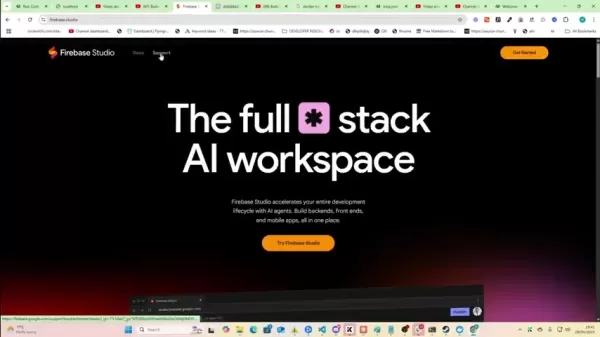
. It is an agentic, cloud-based platform for building and shipping production-quality full-stack AI apps, including APIs, backends, frontends, and mobile solutions. Firebase Studio combines Project IDX with specialized AI agents and Gemini assistance within Firebase to deliver a unified, collaborative workspace accessible from anywhere. It supports various languages and frameworks, making it a versatile tool for developers. The core promise of Firebase Studio is to accelerate the entire development lifecycle from concept to deployment using AI capabilities.
A key feature is its integration with Gemini 2.5 Pro, Google's advanced AI model. This allows developers to leverage AI for code generation, error debugging, and user interface design, making development faster, more efficient, and accessible to developers of all skill levels.
Google's decision to offer Firebase Studio for free during its preview phase is a significant advantage for developers. It enables exploration of this powerful tool without financial commitment, broadening access to this new technology. This move highlights Google's commitment to democratizing AI. Members of the Google Developer Program gain access to up to 30 workspaces.
Supported Languages and Frameworks in Firebase Studio
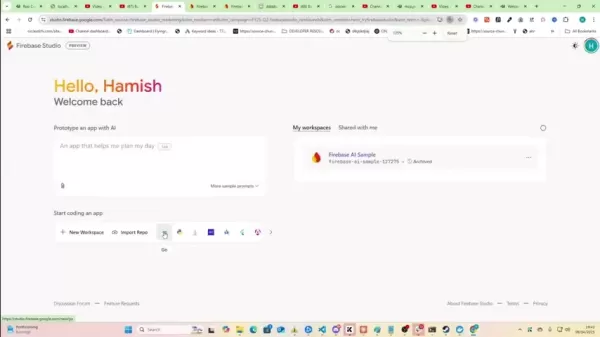
Firebase Studio supports a broad range of popular languages and frameworks, such as:
Go
Python Flask
Java
.NET
Android Studio Cloud
Flutter
Angular
Next.js
Astro
MongoDB
React Native + Expo
This extensive support ensures developers can use their preferred tools and technologies to build AI-powered applications. Whether you're an experienced developer or just starting, Firebase Studio has something to offer.
Why Mobile Apps and AI is the Perfect Marriage for Future Success
The Future Is in the Hands of Mobile Devices
In an era where smartphones are ubiquitous, mobile applications provide unparalleled access to a vast and engaged audience. From streamlining daily tasks to offering entertainment and information, mobile apps have become essential to modern life.
Now, consider the addition of Artificial Intelligence (AI), a transformative force reshaping industries and how we interact with technology. AI's ability to automate processes, analyze data, and personalize experiences unlocks endless opportunities for innovation.
The combination of mobile apps and AI creates unprecedented potential for businesses, developers, and users. AI-powered mobile apps deliver intelligent, adaptive, and personalized experiences, opening new revenue streams, enhancing customer engagement, and driving digital transformation.
Getting Started with Firebase Studio: A Quick Guide
Creating a New Project
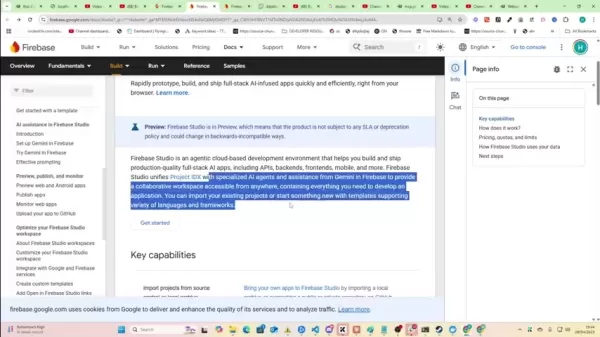
- Visit the Firebase Studio website (firebase.google.com/studio) and sign in with your Google account.
- Click the "Get Started" button.
- Select a project template: React Native + Expo
.
- Name your workspace and choose your preferred method for opening the app (Development Build or Expo Go).
- Click "Create" to initialize your project.
Exploring the Interface
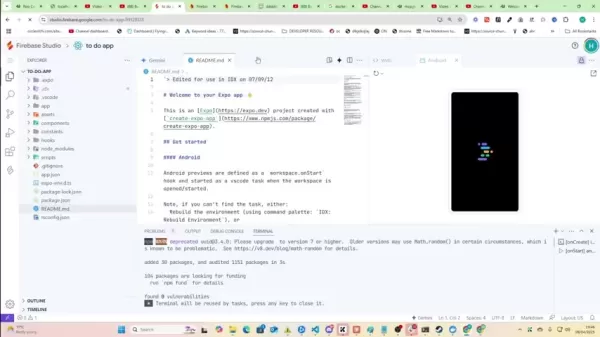
Once your project is created, you'll see the Firebase Studio interface, which includes:
- A code editor for writing and editing code.
- A file explorer for managing project files.
- A terminal for running commands and debugging.
- An integrated Android emulator for testing mobile apps.
- The option to add the Gemini API
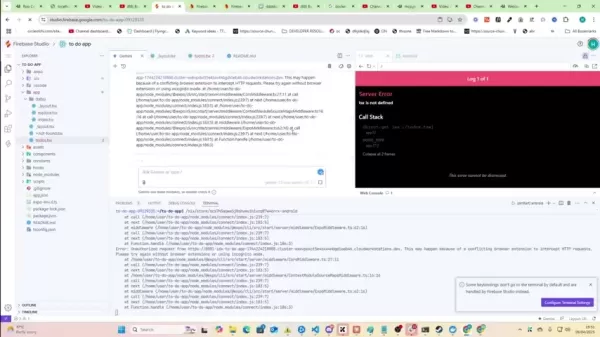
to incorporate Generative AI features into your app.
Utilizing Gemini AI
A core feature of Firebase Studio is its Gemini AI integration. You can use Gemini to:
- Generate code snippets.
- Debug errors.
- Design user interfaces.
To use Gemini, simply type your query into the Gemini panel, and the AI will provide relevant suggestions and solutions.
Firebase Studio Pricing
Free During Preview
Currently, Firebase Studio is free during the preview phase
. This allows developers to explore its capabilities without any financial commitment.
Please note this is a limited-time offer, and pricing may change. Monitor the Firebase Studio website for updates on pricing and availability. To use Gemini 2.5 Pro, you will need a Google AI Studio API Key.
Weighing the Options: Firebase Studio's Merits and Drawbacks
Pros
AI-powered code generation and debugging.
Full-stack development support.
Cross-platform compatibility.
Collaborative workspace.
Free during preview phase.
Cons
As a preview product, it may experience some instability.
Potential feature limitations during the preview period.
Key Capabilities of Firebase Studio
AI-Powered Code Generation and Debugging
Firebase Studio's integration with Gemini AI enables developers to generate code, debug errors, and design user interfaces using natural language prompts. This significantly speeds up development and makes it more accessible to developers at all levels.
Full-Stack Development
Firebase Studio supports full-stack development, allowing developers to build both frontend and backend components within a single environment. This simplifies the process and reduces reliance on multiple disparate tools.
Cross-Platform Support
Firebase Studio supports a wide range of platforms, including web, Android, and iOS. This enables developers to build applications deployable across multiple devices and operating systems with minimal effort.
Collaborative Workspace
Firebase Studio provides a collaborative workspace where teams can work on projects together in real-time. This enhances communication and collaboration, simplifying the development of complex applications.
Illustrative Use Cases for Firebase Studio
Mobile App Development
Firebase Studio can be used to rapidly prototype and build mobile applications for Android and iOS. The AI-powered code generation and debugging features can dramatically accelerate the development timeline.
Web Application Development
Firebase Studio is suitable for building modern, AI-enhanced web applications. Support for popular frameworks like React and Angular facilitates the creation of sophisticated web apps.
Backend Development
Firebase Studio can be used to develop application backends, including APIs and databases. Integration with Firebase services simplifies data management and application scaling.
Frequently Asked Questions about Firebase Studio
Is Firebase Studio really free?
Yes, Firebase Studio is free during its preview phase. Please note this is a limited-time offer, and future pricing may change.
What languages and frameworks does Firebase Studio support?
Firebase Studio supports many popular languages and frameworks, including Go, Python Flask, Java, .NET, Android Studio Cloud, Flutter, Angular, Next.js, Astro, MongoDB, and React Native + Expo.
Does Firebase Studio requires coding?
Firebase is a low-code platform enabling rapid application development with less code and more visual tools. However, coding may still be necessary for complex applications or highly specific features.
Can I get more help with AI development?
Yes, you can find additional resources at the AI Automation School. Visit their site for further learning opportunities.
Dive Deeper: Addressing Related Inquiries
How does Firebase Studio compare to other development environments?
Firebase Studio sets itself apart through its deep AI integration. The AI-powered features for code generation, debugging, and design offer significant advantages in speed and efficiency. Its use of Google's Gemini 2.5 Pro provides cutting-edge, advanced potential compared to other platforms.
What are the limitations of Firebase Studio?
As a preview product, Firebase Studio may have limitations. The product is not covered by an SLA or deprecation policy and may introduce backward-incompatible changes. The full feature set may not be available yet, and Google may alter certain aspects in future releases.
Related article
 Meta Open-Sources 30B-Parameter Muse Glimmer for Local AI Agent on Consumer Hardware
On August 10, Meta launched Muse Glimmer, an open-source model designed to empower local AI agents on consumer hardware, marking a key step in its "Personal Superintelligence" strategy. With 30 billion parameters, this model is the open-source counte
GPT-5.6 May Launch Next Week, Focusing on Agent-Level Operational Capabilities
The competitive landscape of artificial intelligence is intensifying rapidly. Recent leaks regarding test updates have brought the new flagship model, GPT-5.6, into the spotlight. Market consensus suggests an official launch in the latter half of Jun
Cloudflare: Modernising Apps Triples Odds of AI Returns
For many organisations, the AI debate has moved on from whether to adopt the technology to a harder question: why do the results feel uneven? New tools are in place, pilots are running, and budgets are rising, yet clear AI returns remain elusive. Acc
Related Special Topic Recommendations
chatbot
Meta Open-Sources 30B-Parameter Muse Glimmer for Local AI Agent on Consumer Hardware
On August 10, Meta launched Muse Glimmer, an open-source model designed to empower local AI agents on consumer hardware, marking a key step in its "Personal Superintelligence" strategy. With 30 billion parameters, this model is the open-source counte
GPT-5.6 May Launch Next Week, Focusing on Agent-Level Operational Capabilities
The competitive landscape of artificial intelligence is intensifying rapidly. Recent leaks regarding test updates have brought the new flagship model, GPT-5.6, into the spotlight. Market consensus suggests an official launch in the latter half of Jun
Cloudflare: Modernising Apps Triples Odds of AI Returns
For many organisations, the AI debate has moved on from whether to adopt the technology to a harder question: why do the results feel uneven? New tools are in place, pilots are running, and budgets are rising, yet clear AI returns remain elusive. Acc
Related Special Topic Recommendations
chatbot
 Top AI Customer Chatbots: Answer FAQs and Qualify Leads 24/7
2026 Latest Top-rated AI Customer Chatbots featured on this curated list are the best solutions for answering customer FAQs instantly and qualifying leads around the clock. XIX.AI has conducted rigorous real-world tests to deliver a detailed free vs paid comparison along with up-to-date rankings, helping you find a powerful game-changing tool that boosts productivity significantly. Explore now to Discover your perfect AI chatbot solution!
 9 tools
 xix.ai
Design & Art
AI Storyboard Generators for Ad Creative Teams
xix.ai
Design & Art
AI Storyboard Generators for Ad Creative Teams
2026 Latest Best AI Storyboard Generators for Ad Creative Teams! XIX.AI has curated a top-rated list of powerful, game-changing tools that help teams create stunning visual content faster through real-world tests and rigorous weekly updated rankings. Enjoy a free vs paid comparison to find the perfect fit for your workflow. Explore now to unlock your AI edge in ad creation!
8 tools
xix.ai
chatbot
AI Knowledge Chatbot Tools for Internal Documentation
2026 Latest Best Top-rated AI Knowledge Chatbot Tools for Internal Documentation are here on XIX.AI! This curated list features powerful game-changing solutions that significantly boost productivity by helping teams quickly generate high-quality content, streamline documentation creation, and overcome common writing challenges. We conduct rigorous real-world tests and provide a weekly updated free vs paid comparison along with detailed rankings to help you find the must-try option that fits your needs best. Explore now to Discover your perfect tool!
12 tools
xix.ai
Text-to-speech
Best AI Text-to-Speech Tools: Create Natural Voiceovers for Videos
2026 Latest Best Top-Rated AI Text-to-Speech Tools Curated for Creating Natural Voiceovers in Videos. XIX.AI delivers powerful, game-changing solutions that boost writing efficiency and help you break through creation bottlenecks. We conduct real-world tests, offer free vs paid comparison, and update our rankings weekly. Must-try options are highlighted based on rigorous evaluations. Explore now to Discover your perfect tool for enhancing video quality.
9 tools
xix.ai
Finance
Best AI Fraud Detection Tools: Spot Suspicious Patterns Before Losses Grow
2026 Latest Best Top-rated AI Fraud Detection Tools curated by XIX.AI offer powerful game-changing solutions to spot suspicious patterns swiftly and prevent costly losses. Get a free vs paid comparison, real-world tests, and detailed rankings to help you choose the must-try option that boosts your security efficiency. Explore now to Unlock your AI edge.
10 tools
xix.ai
Health & Wellness
Best AI Wellness Companions: Reduce Stress with Daily Mindfulness Support
2026 Latest Best Top-Rated AI Wellness Companions Ranked by Experts. This curated list features powerful game-changing tools that offer daily mindfulness support to help users reduce stress, boost focus, and improve overall well-being through real-world tests. Get a free vs paid comparison to find your perfect match. Explore now at XIX.AI to unlock your AI edge.
9 tools
xix.ai

 Comments (0)
0/500
Comments (0)
0/500
Firebase Studio is an innovative cloud-native development environment that empowers developers to quickly prototype, build, and deploy full-stack applications infused with AI. Designed for simplicity and speed, it provides a collaborative workspace accessible from anywhere, containing all the tools needed for application development. With support for diverse programming languages and frameworks, Firebase Studio accelerates the entire development lifecycle using AI agents, spanning backend, frontend, and mobile app creation. Best of all, it's free to use during its current preview phase.
Key Points
Firebase Studio is a cloud-based AI development environment.
It facilitates rapid prototyping and full-stack application development.
The platform supports a variety of programming languages and frameworks.
It integrates with Gemini AI to enhance functionality.
Firebase Studio offers a collaborative workspace for teams.
Access is currently free during the preview period.
Unveiling Firebase Studio: The AI-Powered Development Revolution
What is Firebase Studio?
Firebase Studio is a cloud-based development environment designed to help developers efficiently build and deploy production-ready, full-stack AI applications.
. It is an agentic, cloud-based platform for building and shipping production-quality full-stack AI apps, including APIs, backends, frontends, and mobile solutions. Firebase Studio combines Project IDX with specialized AI agents and Gemini assistance within Firebase to deliver a unified, collaborative workspace accessible from anywhere. It supports various languages and frameworks, making it a versatile tool for developers. The core promise of Firebase Studio is to accelerate the entire development lifecycle from concept to deployment using AI capabilities.
A key feature is its integration with Gemini 2.5 Pro, Google's advanced AI model. This allows developers to leverage AI for code generation, error debugging, and user interface design, making development faster, more efficient, and accessible to developers of all skill levels.
Google's decision to offer Firebase Studio for free during its preview phase is a significant advantage for developers. It enables exploration of this powerful tool without financial commitment, broadening access to this new technology. This move highlights Google's commitment to democratizing AI. Members of the Google Developer Program gain access to up to 30 workspaces.
Supported Languages and Frameworks in Firebase Studio
Firebase Studio supports a broad range of popular languages and frameworks, such as:
Go
Python Flask
Java
.NET
Android Studio Cloud
Flutter
Angular
Next.js
Astro
MongoDB
React Native + Expo
This extensive support ensures developers can use their preferred tools and technologies to build AI-powered applications. Whether you're an experienced developer or just starting, Firebase Studio has something to offer.
Why Mobile Apps and AI is the Perfect Marriage for Future Success
The Future Is in the Hands of Mobile Devices
In an era where smartphones are ubiquitous, mobile applications provide unparalleled access to a vast and engaged audience. From streamlining daily tasks to offering entertainment and information, mobile apps have become essential to modern life.
Now, consider the addition of Artificial Intelligence (AI), a transformative force reshaping industries and how we interact with technology. AI's ability to automate processes, analyze data, and personalize experiences unlocks endless opportunities for innovation.
The combination of mobile apps and AI creates unprecedented potential for businesses, developers, and users. AI-powered mobile apps deliver intelligent, adaptive, and personalized experiences, opening new revenue streams, enhancing customer engagement, and driving digital transformation.
Getting Started with Firebase Studio: A Quick Guide
Creating a New Project
- Visit the Firebase Studio website (firebase.google.com/studio) and sign in with your Google account.
- Click the "Get Started" button.
- Select a project template: React Native + Expo
.
- Name your workspace and choose your preferred method for opening the app (Development Build or Expo Go).
- Click "Create" to initialize your project.
Exploring the Interface
Once your project is created, you'll see the Firebase Studio interface, which includes:
- A code editor for writing and editing code.
- A file explorer for managing project files.
- A terminal for running commands and debugging.
- An integrated Android emulator for testing mobile apps.
- The option to add the Gemini API
to incorporate Generative AI features into your app.
Utilizing Gemini AI
A core feature of Firebase Studio is its Gemini AI integration. You can use Gemini to:
- Generate code snippets.
- Debug errors.
- Design user interfaces.
To use Gemini, simply type your query into the Gemini panel, and the AI will provide relevant suggestions and solutions.
Firebase Studio Pricing
Free During Preview
Currently, Firebase Studio is free during the preview phase
. This allows developers to explore its capabilities without any financial commitment.
Please note this is a limited-time offer, and pricing may change. Monitor the Firebase Studio website for updates on pricing and availability. To use Gemini 2.5 Pro, you will need a Google AI Studio API Key.
Weighing the Options: Firebase Studio's Merits and Drawbacks
Pros
AI-powered code generation and debugging.
Full-stack development support.
Cross-platform compatibility.
Collaborative workspace.
Free during preview phase.
Cons
As a preview product, it may experience some instability.
Potential feature limitations during the preview period.
Key Capabilities of Firebase Studio
AI-Powered Code Generation and Debugging
Firebase Studio's integration with Gemini AI enables developers to generate code, debug errors, and design user interfaces using natural language prompts. This significantly speeds up development and makes it more accessible to developers at all levels.
Full-Stack Development
Firebase Studio supports full-stack development, allowing developers to build both frontend and backend components within a single environment. This simplifies the process and reduces reliance on multiple disparate tools.
Cross-Platform Support
Firebase Studio supports a wide range of platforms, including web, Android, and iOS. This enables developers to build applications deployable across multiple devices and operating systems with minimal effort.
Collaborative Workspace
Firebase Studio provides a collaborative workspace where teams can work on projects together in real-time. This enhances communication and collaboration, simplifying the development of complex applications.
Illustrative Use Cases for Firebase Studio
Mobile App Development
Firebase Studio can be used to rapidly prototype and build mobile applications for Android and iOS. The AI-powered code generation and debugging features can dramatically accelerate the development timeline.
Web Application Development
Firebase Studio is suitable for building modern, AI-enhanced web applications. Support for popular frameworks like React and Angular facilitates the creation of sophisticated web apps.
Backend Development
Firebase Studio can be used to develop application backends, including APIs and databases. Integration with Firebase services simplifies data management and application scaling.
Frequently Asked Questions about Firebase Studio
Is Firebase Studio really free?
Yes, Firebase Studio is free during its preview phase. Please note this is a limited-time offer, and future pricing may change.
What languages and frameworks does Firebase Studio support?
Firebase Studio supports many popular languages and frameworks, including Go, Python Flask, Java, .NET, Android Studio Cloud, Flutter, Angular, Next.js, Astro, MongoDB, and React Native + Expo.
Does Firebase Studio requires coding?
Firebase is a low-code platform enabling rapid application development with less code and more visual tools. However, coding may still be necessary for complex applications or highly specific features.
Can I get more help with AI development?
Yes, you can find additional resources at the AI Automation School. Visit their site for further learning opportunities.
Dive Deeper: Addressing Related Inquiries
How does Firebase Studio compare to other development environments?
Firebase Studio sets itself apart through its deep AI integration. The AI-powered features for code generation, debugging, and design offer significant advantages in speed and efficiency. Its use of Google's Gemini 2.5 Pro provides cutting-edge, advanced potential compared to other platforms.
What are the limitations of Firebase Studio?
As a preview product, Firebase Studio may have limitations. The product is not covered by an SLA or deprecation policy and may introduce backward-incompatible changes. The full feature set may not be available yet, and Google may alter certain aspects in future releases.








 Meta Open-Sources 30B-Parameter Muse Glimmer for Local AI Agent on Consumer Hardware
On August 10, Meta launched Muse Glimmer, an open-source model designed to empower local AI agents on consumer hardware, marking a key step in its "Personal Superintelligence" strategy. With 30 billion parameters, this model is the open-source counte
Meta Open-Sources 30B-Parameter Muse Glimmer for Local AI Agent on Consumer Hardware
On August 10, Meta launched Muse Glimmer, an open-source model designed to empower local AI agents on consumer hardware, marking a key step in its "Personal Superintelligence" strategy. With 30 billion parameters, this model is the open-source counte
 GPT-5.6 May Launch Next Week, Focusing on Agent-Level Operational Capabilities
The competitive landscape of artificial intelligence is intensifying rapidly. Recent leaks regarding test updates have brought the new flagship model, GPT-5.6, into the spotlight. Market consensus suggests an official launch in the latter half of Jun
GPT-5.6 May Launch Next Week, Focusing on Agent-Level Operational Capabilities
The competitive landscape of artificial intelligence is intensifying rapidly. Recent leaks regarding test updates have brought the new flagship model, GPT-5.6, into the spotlight. Market consensus suggests an official launch in the latter half of Jun
 Cloudflare: Modernising Apps Triples Odds of AI Returns
For many organisations, the AI debate has moved on from whether to adopt the technology to a harder question: why do the results feel uneven? New tools are in place, pilots are running, and budgets are rising, yet clear AI returns remain elusive. Acc
Cloudflare: Modernising Apps Triples Odds of AI Returns
For many organisations, the AI debate has moved on from whether to adopt the technology to a harder question: why do the results feel uneven? New tools are in place, pilots are running, and budgets are rising, yet clear AI returns remain elusive. Acc

2026 Latest Top-rated AI Customer Chatbots featured on this curated list are the best solutions for answering customer FAQs instantly and qualifying leads around the clock. XIX.AI has conducted rigorous real-world tests to deliver a detailed free vs paid comparison along with up-to-date rankings, helping you find a powerful game-changing tool that boosts productivity significantly. Explore now to Discover your perfect AI chatbot solution!
9 tools
xix.ai

2026 Latest Best AI Storyboard Generators for Ad Creative Teams! XIX.AI has curated a top-rated list of powerful, game-changing tools that help teams create stunning visual content faster through real-world tests and rigorous weekly updated rankings. Enjoy a free vs paid comparison to find the perfect fit for your workflow. Explore now to unlock your AI edge in ad creation!
8 tools
xix.ai

2026 Latest Best Top-rated AI Knowledge Chatbot Tools for Internal Documentation are here on XIX.AI! This curated list features powerful game-changing solutions that significantly boost productivity by helping teams quickly generate high-quality content, streamline documentation creation, and overcome common writing challenges. We conduct rigorous real-world tests and provide a weekly updated free vs paid comparison along with detailed rankings to help you find the must-try option that fits your needs best. Explore now to Discover your perfect tool!
12 tools
xix.ai

2026 Latest Best Top-Rated AI Text-to-Speech Tools Curated for Creating Natural Voiceovers in Videos. XIX.AI delivers powerful, game-changing solutions that boost writing efficiency and help you break through creation bottlenecks. We conduct real-world tests, offer free vs paid comparison, and update our rankings weekly. Must-try options are highlighted based on rigorous evaluations. Explore now to Discover your perfect tool for enhancing video quality.
9 tools
xix.ai

2026 Latest Best Top-rated AI Fraud Detection Tools curated by XIX.AI offer powerful game-changing solutions to spot suspicious patterns swiftly and prevent costly losses. Get a free vs paid comparison, real-world tests, and detailed rankings to help you choose the must-try option that boosts your security efficiency. Explore now to Unlock your AI edge.
10 tools
xix.ai

2026 Latest Best Top-Rated AI Wellness Companions Ranked by Experts. This curated list features powerful game-changing tools that offer daily mindfulness support to help users reduce stress, boost focus, and improve overall well-being through real-world tests. Get a free vs paid comparison to find your perfect match. Explore now at XIX.AI to unlock your AI edge.
9 tools
xix.ai












