


 Home
HomeEdimakor AI Video Editor Adds Multilingual Subtitles, Dubbing, and Translation
Video content dominates today's fast-paced digital world, but producing compelling and inclusive videos can be a lengthy process, particularly when adding subtitles or translating dialogue. Edimakor is an AI-driven video editor built to simplify your workflow and support the creation of content with viral potential. This article examines Edimakor's features, benefits, and how it can transform your video production. Discover how to captivate viewers and effortlessly grow your audience!
Key Points
Edimakor is an AI video editor that automatically generates subtitles, translates content into over 35 languages, and provides AI dubbing.
Creating subtitles manually is a slow process, while Edimakor speeds it up dramatically.
Edimakor features lip-synced AI dubbing with more than 400 voice options, delivering authentic audio-visual alignment.
The software has an intuitive interface, making it easy for both new and experienced video editors to use.
Edimakor includes a wide range of video editing tools to improve the overall quality and appeal of your videos.
By translating videos into multiple languages, Edimakor helps creators connect with a worldwide audience.
The software is highly efficient, saving creators time and resources during video production.
Unlocking Viral Potential with AI Video Editing
The Challenge of Manual Subtitling
In content creation, subtitles are essential. They make videos accessible to a wider audience, including those who are deaf or hard of hearing, or viewers who prefer to watch without sound. However, manually creating subtitles is a demanding and time-consuming task. Traditionally, creators must carefully transcribe dialogue, align text with audio, and format subtitles—a process that is often prone to mistakes and inconsistencies.

This manual work takes valuable time away from other important parts of video production, such as planning, filming, and editing. As a result, content creators look for effective ways to simplify subtitling without sacrificing accuracy or quality. Edimakor directly addresses this challenge, but first, let’s consider who can benefit from such a tool.
- Content Creators: They can optimize their workflow, cut down production time, and make their content more accessible, reaching more viewers and increasing engagement through advanced video editing.
- Businesses: They can grow their global presence by translating marketing and training videos, improve internal communication, and strengthen their brand image.
- Educators: They can offer accessible learning materials to students from various language backgrounds, leading to better educational results.
- Anyone: Making content for TikTok, Instagram Reels, YouTube Shorts and more.
Introducing Edimakor: Your AI-Powered Video Editing Solution
Edimakor is a transformative tool in video editing, using artificial intelligence to change how subtitles are made, videos are translated, and content is dubbed. This innovative platform helps creators overcome language barriers and effortlessly connect with international viewers. Edimakor includes a set of features that speed up video creation, delivering high-quality outcomes much faster than traditional approaches.
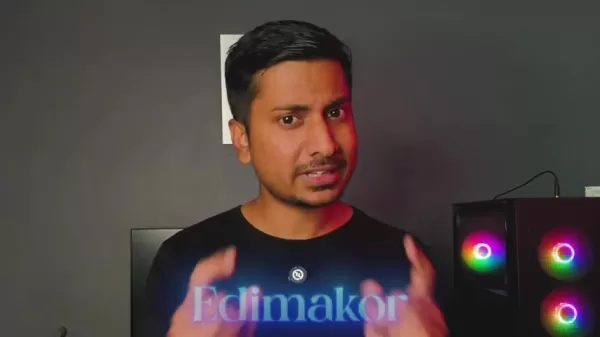
With Edimakor, creators can leave behind the tedious work of manual subtitling and adopt a smooth, AI-driven process. By automating subtitle generation, translation, and dubbing, Edimakor lets creators concentrate on their strengths: developing compelling stories and engaging visuals. The outcome? Videos that connect with audiences around the world, increasing reach and influence.
Key Features of Edimakor
Edimakor includes a powerful set of features designed to improve your video editing and take your content to the next level. From automated subtitling to seamless translation and AI dubbing, here are the main functions that make Edimakor stand out:
- AI-Powered Subtitle Generation: Edimakor uses advanced AI to automatically create highly accurate subtitles.

No more manual transcription and timing adjustments—Edimakor does it all, saving you time and energy.
- Multi-Language Translation: Overcome language obstacles and reach global audiences with Edimakor’s multi-language translation. Translate your videos into more than 35 languages to expand your influence worldwide.
- AI Dubbing with Lip-Sync: Improve your videos with Edimakor’s AI dubbing, which includes realistic lip-sync technology. Select from over 400 AI voices to produce immersive audio in various languages.
- User-Friendly Interface: Edit videos easily with Edimakor’s intuitive interface. Whether you’re a professional or a beginner, the streamlined design ensures a smooth editing experience.
- Comprehensive Editing Tools: Enhance your videos with various editing tools like filters, transitions, and effects. From minor tweaks to major changes, Edimakor gives you everything to refine your content.
Harnessing Edimakor: A Step-by-Step Guide
Ready to use Edimakor? Follow this simple guide to begin:
Step 1: Download and Install Edimakor
Start by downloading Edimakor from the official website.

Follow the setup instructions to install the software on your computer.
Step 2: Import Your Video
Open Edimakor and import the video you want to edit. You can drag and drop the file or use the 'Import Files' option.
Step 3: Generate Auto Subtitles
Choose the 'Auto Subtitle and Translation' feature. Pick the original language of your video and the target language for translation (if needed). Click 'Auto Subtitling' to create subtitles automatically.
Step 4: Customize Subtitle Style
Personalize your subtitles by selecting from different styles, fonts, and colors. Adjust the size, position, and timing to fit your needs.
Step 5: Translate and Dub Your Video (Optional)
If you want, translate your video into multiple languages using Edimakor’s translation tool. You can also add AI dubbing for engaging audio.
Step 6: Fine-Tune and Enhance
Use Edimakor’s editing tools to further improve your video. Add filters, transitions, effects, and other enhancements to perfect your video.
Step 7: Export Your Final Video
Once you’re happy with your edits, export the final video in your preferred format and resolution. Share your creation and watch your audience expand!
What are the advantages of AI-powered videos?
Creating videos is made simple with these AI tools:
Integrating AI into video editing software like Edimakor is changing the industry by empowering creators and simplifying workflows. Here are the key benefits:
- Time Efficiency: AI-powered tools automate jobs like transcription, subtitle creation, and audio improvement, saving creators considerable time and work.
- Cost Savings: By automating labor-intensive tasks, AI tools lower production costs related to manual editing, freeing up resources for other creative areas.
- Accessibility: AI-driven translation and dubbing help creators reach broader audiences across language and cultural divides, improving video accessibility for diverse viewers.
- Creative Enhancement: AI tools provide features like style transfer and automatic scene detection that expand creative options, allowing creators to try new ideas and methods.
- Data-Driven Insights: AI can analyze video content to offer insights on viewer engagement, performance, and preferences, helping creators make informed decisions to optimize their content.
- Quality Enhancement: AI tools can improve video and audio quality through noise reduction, color correction, and image stabilization, leading to more professional and polished results.
- Consistency: AI maintains consistency in video elements like subtitle timing, audio levels, and visual effects, ensuring a unified and professional viewing experience.
- Scalability: AI tools let creators increase video output without losing quality, making it easier to meet rising demand and deliver content regularly.
Together, these benefits revolutionize video editing, enabling creators and businesses to improve production quality, streamline workflows, and grow their audience.
Optimizing Subtitle Appearance in Edimakor
Selecting a Suitable Style
Your subtitle style greatly affects readability and visual appeal. Edimakor provides several pre-designed styles to match different looks. Keep these points in mind:
- Font: Pick a clear, easy-to-read font that fits your video’s style. Sans-serif fonts like Arial or Helvetica are often chosen for their clarity.
- Color: Choose a color that stands out against the background. White or light text with a dark background or soft shadow typically works well.
- Size: Make sure the font size is large enough to read easily on different devices, including phones and tablets.
Adjusting Text Settings
Refine text settings to improve subtitle readability and attractiveness:
Boldness: Use bold text carefully to highlight important words or phrases. Overusing bold can make subtitles look messy.
Background: A slightly transparent background behind the text can improve readability, especially when video visuals are detailed.
Text Color: Try different text colors to see which ones stand out best against your video.
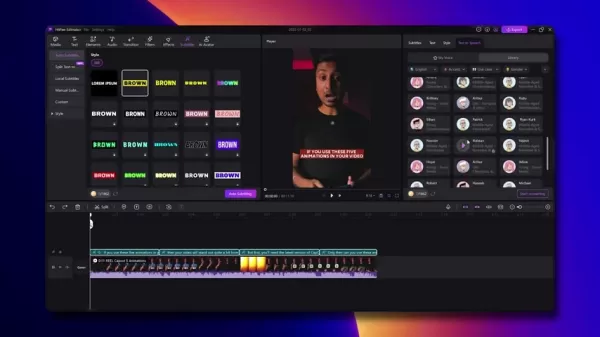
Presets: Edimakor has various style presets you can leverage.
Customizing Placement and Timing
The position and timing of your subtitles greatly influence the viewer’s experience:
- Position: Place subtitles where they won’t cover important visuals. The bottom of the screen is a popular and effective spot.
- Timing: Make sure subtitles match the audio, appearing and disappearing at the right moments.
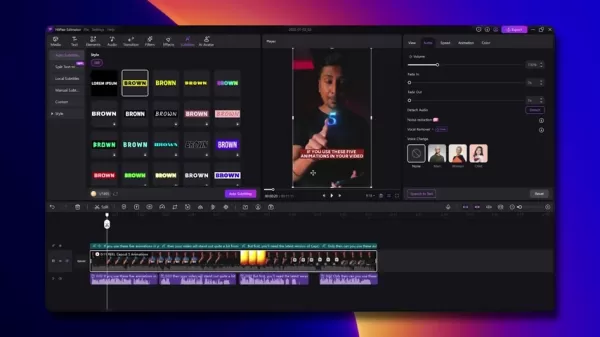
Avoid leaving subtitles on screen too long or removing them too soon.
Edimakor Pricing
Free vs. Paid Features
Edimakor offers a free version and paid subscription plans. The free version includes basic features, allowing you to create subtitles and perform simple edits. However, it may have limitations like watermarks or restricted access to certain tools.

Paid subscriptions unlock Edimakor’s full potential, providing premium features, watermark removal, and priority support. These plans are usually available monthly or annually.
Creators looking to produce high-quality content consistently should look into the multiple plans that the service provides.
Weighing the Advantages and Disadvantages of Edimakor
Pros
AI-powered automation for time-saving efficiency
Multi-language translation for global audience reach
Realistic AI dubbing with lip-sync technology
User-friendly interface suitable for all skill levels
Comprehensive editing tools for enhancing video quality
Cons
Free version may have limitations like watermarks
Subscription plans are required for full feature access
AI dubbing may not perfectly capture nuances of human speech
Deep Dive into Edimakor's Core Features
AI-Driven Efficiency
Edimakor’s core strength is its artificial intelligence. The AI automatically manages time-intensive tasks like subtitle generation and audio dubbing, allowing creators to focus on creativity and strategy.
The video highlights how you can automatically generate subtitles and then make fine-tune adjustments.
The AI quickly creates subtitles based on the spoken words in your project. If there are some nuances it didn't pick up you can quickly adjust these in the Video Editor.
Global Reach Through Translation
With support for over 35 languages, Edimakor helps creators engage diverse audiences around the globe.
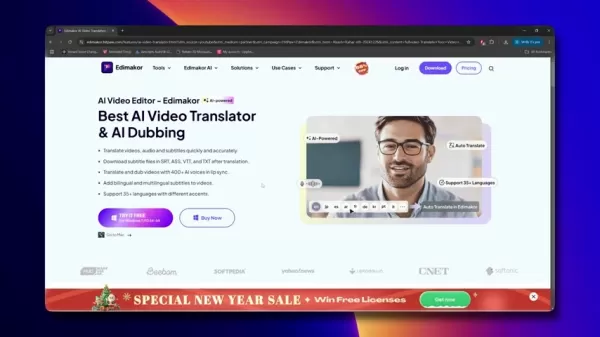
Translating content into multiple languages is key to expanding your viewership and connecting with potential followers or customers in different areas. The translation feature simplifies this process, making it available to everyone, no matter their language skills.
Realistic Audio Dubbing
AI dubbing technology has improved greatly, and Edimakor uses this to provide realistic and compelling audio. The platform offers a large collection of AI voices, so users can find the right voice to fit their video’s tone and style. With lip-sync, the AI-generated audio matches the speaker’s mouth movements naturally, adding realism that boosts viewer engagement.
Use Cases for Edimakor AI Video Editor
YouTube Content Creation
Create engaging content for YouTube. With automatic subtitles and translations, you can easily optimize your videos for various audiences, boost viewer engagement, and grow your Channel.It offers a suite of tools that streamline the video creation process from start to finish.
Marketing and Advertising
Create engaging marketing campaigns. Expand your brand’s reach to new markets and connect with international customers by translating Advertising materials and promotional videos, enhance brand recognition, and drive sales growth.
Educational Content Production
Craft and translate educational videos to accommodate a diverse student base.Make educational content accessible to students from all linguistic backgrounds, improve learning outcomes, and expand the reach of educational resources by integrating subtitle creation.
Social Media Marketing
Boost your social media presence by creating viral-worthy videos with translated Captions. The platform supports a wide range of social media platforms, making it easy to adapt video content for various channels, engage followers and attract potential customers.
Frequently Asked Questions about Edimakor
Is Edimakor suitable for beginner video editors?
Yes, Edimakor has a user-friendly interface that works for both new and experienced video editors. The software includes intuitive tools and step-by-step guidance to help beginners start quickly.
Can I customize the style of subtitles generated by Edimakor?
Definitely! Edimakor lets you customize many parts of your subtitles, such as font, color, size, and placement. You can also add background styles and shadows to improve readability.
How many languages does Edimakor support for translation?
Edimakor supports translation into more than 35 languages, helping you reach a global audience with your videos.
Is the AI dubbing feature in Edimakor realistic?
Yes, Edimakor’s AI dubbing includes lip-sync technology, producing realistic and engaging audio in multiple languages. The software offers over 400 AI voices to choose from.
Does Edimakor offer other video editing tools besides subtitling and translation?
Yes, Edimakor includes a full set of video editing tools, including filters, transitions, effects, and more. These tools help you enhance and perfect your videos.
Related Questions
What other AI tools are available in HitPaw Edimakor?
There are several AI tools available, which can be located in the toolbox tab. The video goes through each, which can be seen below:
Related article
 Ctrip Business Travel Unveils AI Ecosystem with 7 Industry Agents and 17 Core Capabilities
Ctrip Business Travel has officially unveiled the "Ctrip Business Travel AI Ecosystem," leveraging large language models to fundamentally restructure corporate travel management. This comprehensive ecosystem addresses four core scenarios: travel arra
Stripe to Acquire OpenRouter as AI Model Routing Gains Momentum
Stripe has agreed to acquire OpenRouter, an AI model-routing platform that gives developers access to hundreds of models through a single interface. The deal adds model selection and routing to Stripe’s existing work around AI usage and token-based b
Former OpenAI Researcher Barrett Zoph Returns to Google to Support Gemini Development
Barret Zoph, who previously abruptly left and joined OpenAI due to a disagreement with Thinking Machines Lab CEO Miriam Mularati, has once again changed employers. Alphabet's Google announced that Zoph will return as Vice President of Research, bring
Related Special Topic Recommendations
Design & Art
Ctrip Business Travel Unveils AI Ecosystem with 7 Industry Agents and 17 Core Capabilities
Ctrip Business Travel has officially unveiled the "Ctrip Business Travel AI Ecosystem," leveraging large language models to fundamentally restructure corporate travel management. This comprehensive ecosystem addresses four core scenarios: travel arra
Stripe to Acquire OpenRouter as AI Model Routing Gains Momentum
Stripe has agreed to acquire OpenRouter, an AI model-routing platform that gives developers access to hundreds of models through a single interface. The deal adds model selection and routing to Stripe’s existing work around AI usage and token-based b
Former OpenAI Researcher Barrett Zoph Returns to Google to Support Gemini Development
Barret Zoph, who previously abruptly left and joined OpenAI due to a disagreement with Thinking Machines Lab CEO Miriam Mularati, has once again changed employers. Alphabet's Google announced that Zoph will return as Vice President of Research, bring
Related Special Topic Recommendations
Design & Art
 Top AI Illustration Tools: Create Editorial Scenes and Cover Art Faster
2026 Latest Top-rated AI Illustration Tools: Our curated list features the best powerfully designed tools for creating stunning editorial scenes and eye-catching cover art quickly. Each option has gone through rigorous real-world tests, offering a free vs paid comparison to help you find the perfect match for your workflow. Try these must-try solutions today to unlock your AI edge and boost your creative productivity. Explore now at XIX.AI.
 10 tools
 xix.ai
Education and Learning
Top AI Tutors for Exam Prep: Practice Math, Science, and English
xix.ai
Education and Learning
Top AI Tutors for Exam Prep: Practice Math, Science, and English
2026 Latest Top-Rated Best AI Tutors for Exam Prep are here on XIX.AI! Our curated list features powerful game-changing tools that offer free vs paid comparison, real-world tests, and weekly updated rankings. They help boost your writing efficiency, simplify complex topic learning, and unlock your academic potential. Explore now to Discover your perfect exam prep tool and Start creating today to Unlock your AI edge!
10 tools
xix.ai
Finance
AI Budget Planning Tools for Personal Money Management
2026 Latest Best Top-Rated AI Budget Planning Tools for Personal Money Management are here on XIX.AI! This curated collection features powerful, game-changing solutions that help you conduct real-world tests, understand spending habits, and create personalized plans to boost productivity. Enjoy a free vs paid comparison along with detailed rankings. Must-try tools designed to simplify money management and unlock your AI edge. Explore now!
11 tools
xix.ai
Health & Wellness
AI Sleep Tracking Assistants: Improve Recovery with Better Bedtime Habits
2026 Latest Best Top-Rated AI Sleep Tracking Assistants curated for ultimate recovery. This fully updated weekly guide features powerful tools that deliver real-world tests, free vs paid comparison, and detailed rankings to help you find the must-try solution that boosts sleep quality and supports better bedtime habits. Explore now at XIX.AI to Unlock your AI edge.
10 tools
xix.ai
Data Analysis
AI SQL Copilots for Product and Revenue Analytics
2026 Latest Best Top-Rated AI SQL Copilots for Product and Revenue Analytics! XIX.AI has curated a powerful, game-changing collection of must-try tools that undergo real-world tests through weekly updated rankings. These tools help users boost productivity significantly by accelerating data analysis, streamlining complex queries, and generating accurate insights to drive smarter business decisions. Explore now to Discover your perfect tool for unlocking your AI edge!
14 tools
xix.ai
Education and Learning
Best AI Homework Helpers That Teach: Learn Concepts, Not Just Answers
2026 Latest Best Top-Rated AI Homework Helpers That Teach Core Concepts Not Just Answers Powerful Tools for Students Must-Try Curated List Weekly Updated Free vs Paid Comparison Real-World Tests Accurate Rankings to Help You Unlock Your Full Learning Potential Explore now to Discover your perfect tool for smarter studying.
10 tools
xix.ai

 Comments (0)
0/500
Comments (0)
0/500
Video content dominates today's fast-paced digital world, but producing compelling and inclusive videos can be a lengthy process, particularly when adding subtitles or translating dialogue. Edimakor is an AI-driven video editor built to simplify your workflow and support the creation of content with viral potential. This article examines Edimakor's features, benefits, and how it can transform your video production. Discover how to captivate viewers and effortlessly grow your audience!
Key Points
Edimakor is an AI video editor that automatically generates subtitles, translates content into over 35 languages, and provides AI dubbing.
Creating subtitles manually is a slow process, while Edimakor speeds it up dramatically.
Edimakor features lip-synced AI dubbing with more than 400 voice options, delivering authentic audio-visual alignment.
The software has an intuitive interface, making it easy for both new and experienced video editors to use.
Edimakor includes a wide range of video editing tools to improve the overall quality and appeal of your videos.
By translating videos into multiple languages, Edimakor helps creators connect with a worldwide audience.
The software is highly efficient, saving creators time and resources during video production.
Unlocking Viral Potential with AI Video Editing
The Challenge of Manual Subtitling
In content creation, subtitles are essential. They make videos accessible to a wider audience, including those who are deaf or hard of hearing, or viewers who prefer to watch without sound. However, manually creating subtitles is a demanding and time-consuming task. Traditionally, creators must carefully transcribe dialogue, align text with audio, and format subtitles—a process that is often prone to mistakes and inconsistencies.
This manual work takes valuable time away from other important parts of video production, such as planning, filming, and editing. As a result, content creators look for effective ways to simplify subtitling without sacrificing accuracy or quality. Edimakor directly addresses this challenge, but first, let’s consider who can benefit from such a tool.
- Content Creators: They can optimize their workflow, cut down production time, and make their content more accessible, reaching more viewers and increasing engagement through advanced video editing.
- Businesses: They can grow their global presence by translating marketing and training videos, improve internal communication, and strengthen their brand image.
- Educators: They can offer accessible learning materials to students from various language backgrounds, leading to better educational results.
- Anyone: Making content for TikTok, Instagram Reels, YouTube Shorts and more.
Introducing Edimakor: Your AI-Powered Video Editing Solution
Edimakor is a transformative tool in video editing, using artificial intelligence to change how subtitles are made, videos are translated, and content is dubbed. This innovative platform helps creators overcome language barriers and effortlessly connect with international viewers. Edimakor includes a set of features that speed up video creation, delivering high-quality outcomes much faster than traditional approaches.
With Edimakor, creators can leave behind the tedious work of manual subtitling and adopt a smooth, AI-driven process. By automating subtitle generation, translation, and dubbing, Edimakor lets creators concentrate on their strengths: developing compelling stories and engaging visuals. The outcome? Videos that connect with audiences around the world, increasing reach and influence.
Key Features of Edimakor
Edimakor includes a powerful set of features designed to improve your video editing and take your content to the next level. From automated subtitling to seamless translation and AI dubbing, here are the main functions that make Edimakor stand out:
- AI-Powered Subtitle Generation: Edimakor uses advanced AI to automatically create highly accurate subtitles.
No more manual transcription and timing adjustments—Edimakor does it all, saving you time and energy.
- Multi-Language Translation: Overcome language obstacles and reach global audiences with Edimakor’s multi-language translation. Translate your videos into more than 35 languages to expand your influence worldwide.
- AI Dubbing with Lip-Sync: Improve your videos with Edimakor’s AI dubbing, which includes realistic lip-sync technology. Select from over 400 AI voices to produce immersive audio in various languages.
- User-Friendly Interface: Edit videos easily with Edimakor’s intuitive interface. Whether you’re a professional or a beginner, the streamlined design ensures a smooth editing experience.
- Comprehensive Editing Tools: Enhance your videos with various editing tools like filters, transitions, and effects. From minor tweaks to major changes, Edimakor gives you everything to refine your content.
Harnessing Edimakor: A Step-by-Step Guide
Ready to use Edimakor? Follow this simple guide to begin:
Step 1: Download and Install Edimakor
Start by downloading Edimakor from the official website.
Follow the setup instructions to install the software on your computer.
Step 2: Import Your Video
Open Edimakor and import the video you want to edit. You can drag and drop the file or use the 'Import Files' option.
Step 3: Generate Auto Subtitles
Choose the 'Auto Subtitle and Translation' feature. Pick the original language of your video and the target language for translation (if needed). Click 'Auto Subtitling' to create subtitles automatically.
Step 4: Customize Subtitle Style
Personalize your subtitles by selecting from different styles, fonts, and colors. Adjust the size, position, and timing to fit your needs.
Step 5: Translate and Dub Your Video (Optional)
If you want, translate your video into multiple languages using Edimakor’s translation tool. You can also add AI dubbing for engaging audio.
Step 6: Fine-Tune and Enhance
Use Edimakor’s editing tools to further improve your video. Add filters, transitions, effects, and other enhancements to perfect your video.
Step 7: Export Your Final Video
Once you’re happy with your edits, export the final video in your preferred format and resolution. Share your creation and watch your audience expand!
What are the advantages of AI-powered videos?
Creating videos is made simple with these AI tools:
Integrating AI into video editing software like Edimakor is changing the industry by empowering creators and simplifying workflows. Here are the key benefits:
- Time Efficiency: AI-powered tools automate jobs like transcription, subtitle creation, and audio improvement, saving creators considerable time and work.
- Cost Savings: By automating labor-intensive tasks, AI tools lower production costs related to manual editing, freeing up resources for other creative areas.
- Accessibility: AI-driven translation and dubbing help creators reach broader audiences across language and cultural divides, improving video accessibility for diverse viewers.
- Creative Enhancement: AI tools provide features like style transfer and automatic scene detection that expand creative options, allowing creators to try new ideas and methods.
- Data-Driven Insights: AI can analyze video content to offer insights on viewer engagement, performance, and preferences, helping creators make informed decisions to optimize their content.
- Quality Enhancement: AI tools can improve video and audio quality through noise reduction, color correction, and image stabilization, leading to more professional and polished results.
- Consistency: AI maintains consistency in video elements like subtitle timing, audio levels, and visual effects, ensuring a unified and professional viewing experience.
- Scalability: AI tools let creators increase video output without losing quality, making it easier to meet rising demand and deliver content regularly.
Together, these benefits revolutionize video editing, enabling creators and businesses to improve production quality, streamline workflows, and grow their audience.
Optimizing Subtitle Appearance in Edimakor
Selecting a Suitable Style
Your subtitle style greatly affects readability and visual appeal. Edimakor provides several pre-designed styles to match different looks. Keep these points in mind:
- Font: Pick a clear, easy-to-read font that fits your video’s style. Sans-serif fonts like Arial or Helvetica are often chosen for their clarity.
- Color: Choose a color that stands out against the background. White or light text with a dark background or soft shadow typically works well.
- Size: Make sure the font size is large enough to read easily on different devices, including phones and tablets.
Adjusting Text Settings
Refine text settings to improve subtitle readability and attractiveness:
Boldness: Use bold text carefully to highlight important words or phrases. Overusing bold can make subtitles look messy.
Background: A slightly transparent background behind the text can improve readability, especially when video visuals are detailed.
Text Color: Try different text colors to see which ones stand out best against your video.
Presets: Edimakor has various style presets you can leverage.
Customizing Placement and Timing
The position and timing of your subtitles greatly influence the viewer’s experience:
- Position: Place subtitles where they won’t cover important visuals. The bottom of the screen is a popular and effective spot.
- Timing: Make sure subtitles match the audio, appearing and disappearing at the right moments.
Avoid leaving subtitles on screen too long or removing them too soon.
Edimakor Pricing
Free vs. Paid Features
Edimakor offers a free version and paid subscription plans. The free version includes basic features, allowing you to create subtitles and perform simple edits. However, it may have limitations like watermarks or restricted access to certain tools.
Paid subscriptions unlock Edimakor’s full potential, providing premium features, watermark removal, and priority support. These plans are usually available monthly or annually.
Creators looking to produce high-quality content consistently should look into the multiple plans that the service provides.
Weighing the Advantages and Disadvantages of Edimakor
Pros
AI-powered automation for time-saving efficiency
Multi-language translation for global audience reach
Realistic AI dubbing with lip-sync technology
User-friendly interface suitable for all skill levels
Comprehensive editing tools for enhancing video quality
Cons
Free version may have limitations like watermarks
Subscription plans are required for full feature access
AI dubbing may not perfectly capture nuances of human speech
Deep Dive into Edimakor's Core Features
AI-Driven Efficiency
Edimakor’s core strength is its artificial intelligence. The AI automatically manages time-intensive tasks like subtitle generation and audio dubbing, allowing creators to focus on creativity and strategy.
The video highlights how you can automatically generate subtitles and then make fine-tune adjustments.
The AI quickly creates subtitles based on the spoken words in your project. If there are some nuances it didn't pick up you can quickly adjust these in the Video Editor.
Global Reach Through Translation
With support for over 35 languages, Edimakor helps creators engage diverse audiences around the globe.
Translating content into multiple languages is key to expanding your viewership and connecting with potential followers or customers in different areas. The translation feature simplifies this process, making it available to everyone, no matter their language skills.
Realistic Audio Dubbing
AI dubbing technology has improved greatly, and Edimakor uses this to provide realistic and compelling audio. The platform offers a large collection of AI voices, so users can find the right voice to fit their video’s tone and style. With lip-sync, the AI-generated audio matches the speaker’s mouth movements naturally, adding realism that boosts viewer engagement.
Use Cases for Edimakor AI Video Editor
YouTube Content Creation
Create engaging content for YouTube. With automatic subtitles and translations, you can easily optimize your videos for various audiences, boost viewer engagement, and grow your Channel.It offers a suite of tools that streamline the video creation process from start to finish.
Marketing and Advertising
Create engaging marketing campaigns. Expand your brand’s reach to new markets and connect with international customers by translating Advertising materials and promotional videos, enhance brand recognition, and drive sales growth.
Educational Content Production
Craft and translate educational videos to accommodate a diverse student base.Make educational content accessible to students from all linguistic backgrounds, improve learning outcomes, and expand the reach of educational resources by integrating subtitle creation.
Social Media Marketing
Boost your social media presence by creating viral-worthy videos with translated Captions. The platform supports a wide range of social media platforms, making it easy to adapt video content for various channels, engage followers and attract potential customers.
Frequently Asked Questions about Edimakor
Is Edimakor suitable for beginner video editors?
Yes, Edimakor has a user-friendly interface that works for both new and experienced video editors. The software includes intuitive tools and step-by-step guidance to help beginners start quickly.
Can I customize the style of subtitles generated by Edimakor?
Definitely! Edimakor lets you customize many parts of your subtitles, such as font, color, size, and placement. You can also add background styles and shadows to improve readability.
How many languages does Edimakor support for translation?
Edimakor supports translation into more than 35 languages, helping you reach a global audience with your videos.
Is the AI dubbing feature in Edimakor realistic?
Yes, Edimakor’s AI dubbing includes lip-sync technology, producing realistic and engaging audio in multiple languages. The software offers over 400 AI voices to choose from.
Does Edimakor offer other video editing tools besides subtitling and translation?
Yes, Edimakor includes a full set of video editing tools, including filters, transitions, effects, and more. These tools help you enhance and perfect your videos.
Related Questions
What other AI tools are available in HitPaw Edimakor?
There are several AI tools available, which can be located in the toolbox tab. The video goes through each, which can be seen below:








 Ctrip Business Travel Unveils AI Ecosystem with 7 Industry Agents and 17 Core Capabilities
Ctrip Business Travel has officially unveiled the "Ctrip Business Travel AI Ecosystem," leveraging large language models to fundamentally restructure corporate travel management. This comprehensive ecosystem addresses four core scenarios: travel arra
Ctrip Business Travel Unveils AI Ecosystem with 7 Industry Agents and 17 Core Capabilities
Ctrip Business Travel has officially unveiled the "Ctrip Business Travel AI Ecosystem," leveraging large language models to fundamentally restructure corporate travel management. This comprehensive ecosystem addresses four core scenarios: travel arra
 Stripe to Acquire OpenRouter as AI Model Routing Gains Momentum
Stripe has agreed to acquire OpenRouter, an AI model-routing platform that gives developers access to hundreds of models through a single interface. The deal adds model selection and routing to Stripe’s existing work around AI usage and token-based b
Stripe to Acquire OpenRouter as AI Model Routing Gains Momentum
Stripe has agreed to acquire OpenRouter, an AI model-routing platform that gives developers access to hundreds of models through a single interface. The deal adds model selection and routing to Stripe’s existing work around AI usage and token-based b
 Former OpenAI Researcher Barrett Zoph Returns to Google to Support Gemini Development
Barret Zoph, who previously abruptly left and joined OpenAI due to a disagreement with Thinking Machines Lab CEO Miriam Mularati, has once again changed employers. Alphabet's Google announced that Zoph will return as Vice President of Research, bring
Former OpenAI Researcher Barrett Zoph Returns to Google to Support Gemini Development
Barret Zoph, who previously abruptly left and joined OpenAI due to a disagreement with Thinking Machines Lab CEO Miriam Mularati, has once again changed employers. Alphabet's Google announced that Zoph will return as Vice President of Research, bring

2026 Latest Top-rated AI Illustration Tools: Our curated list features the best powerfully designed tools for creating stunning editorial scenes and eye-catching cover art quickly. Each option has gone through rigorous real-world tests, offering a free vs paid comparison to help you find the perfect match for your workflow. Try these must-try solutions today to unlock your AI edge and boost your creative productivity. Explore now at XIX.AI.
10 tools
xix.ai

2026 Latest Top-Rated Best AI Tutors for Exam Prep are here on XIX.AI! Our curated list features powerful game-changing tools that offer free vs paid comparison, real-world tests, and weekly updated rankings. They help boost your writing efficiency, simplify complex topic learning, and unlock your academic potential. Explore now to Discover your perfect exam prep tool and Start creating today to Unlock your AI edge!
10 tools
xix.ai

2026 Latest Best Top-Rated AI Budget Planning Tools for Personal Money Management are here on XIX.AI! This curated collection features powerful, game-changing solutions that help you conduct real-world tests, understand spending habits, and create personalized plans to boost productivity. Enjoy a free vs paid comparison along with detailed rankings. Must-try tools designed to simplify money management and unlock your AI edge. Explore now!
11 tools
xix.ai

2026 Latest Best Top-Rated AI Sleep Tracking Assistants curated for ultimate recovery. This fully updated weekly guide features powerful tools that deliver real-world tests, free vs paid comparison, and detailed rankings to help you find the must-try solution that boosts sleep quality and supports better bedtime habits. Explore now at XIX.AI to Unlock your AI edge.
10 tools
xix.ai

2026 Latest Best Top-Rated AI SQL Copilots for Product and Revenue Analytics! XIX.AI has curated a powerful, game-changing collection of must-try tools that undergo real-world tests through weekly updated rankings. These tools help users boost productivity significantly by accelerating data analysis, streamlining complex queries, and generating accurate insights to drive smarter business decisions. Explore now to Discover your perfect tool for unlocking your AI edge!
14 tools
xix.ai

2026 Latest Best Top-Rated AI Homework Helpers That Teach Core Concepts Not Just Answers Powerful Tools for Students Must-Try Curated List Weekly Updated Free vs Paid Comparison Real-World Tests Accurate Rankings to Help You Unlock Your Full Learning Potential Explore now to Discover your perfect tool for smarter studying.
10 tools
xix.ai












