


 Home
HomeD-zine AI Tools Review 2026: Are They Safe for Professional Design?
In the fast-paced world of architectural design, Artificial Intelligence (AI) is becoming a game-changing influence. D-zine AI presents itself as a comprehensive platform that uses AI to streamline and improve various design tasks. This versatile tool helps architects, designers, and creatives generate initial concepts, refine existing images, and produce engaging videos. Let's explore its features and how it can transform your design process.
Key Points
D-zine AI provides a collection of AI-driven tools for creating and editing visuals.
It enables text-to-image, image-to-image, and image-to-video conversions.
The platform includes features like object insertion, background removal, and image upscaling.
D-zine AI comes with multiple style presets to quickly produce a variety of design ideas.
Users can modify existing images by adding or removing elements and expanding scenes.
The platform is available through several subscription tiers, including a free version.
D-zine AI: A Deep Dive into AI-Powered Design
What is D-zine AI?
D-zine AI is a subscription-based platform that equips users with a suite of AI-powered tools for visual content creation and enhancement. Targeting creative professionals and architects, it covers everything from basic image improvements to advanced video generation, all driven by artificial intelligence. Accessible via subscription, the website offers a broad set of tools aimed at making sophisticated design capabilities more accessible.
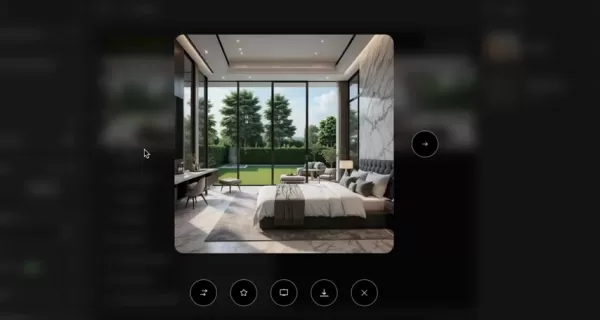
Whether you're an architect looking for inspiration, a designer polishing a concept, or a creative professional aiming to optimize your rendering process, D-zine AI provides a versatile toolkit to support your projects.
The platform addresses the challenges of contemporary design by offering a centralized workspace for handling diverse tasks without switching between multiple costly applications. This all-in-one strategy can save considerable time and money, potentially changing how design projects are managed and completed. By combining features like Image-to-Image, Text-to-Image, and
Cons
istent Character generation, D-zine AI strives to be a comprehensive resource for AI-assisted visual solutions.Exploring the AI Tool Suite
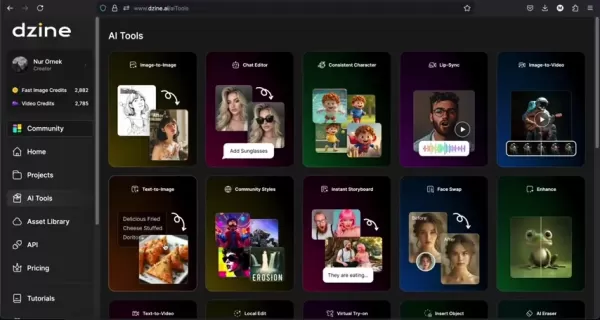
D-zine AI features an extensive range of AI Tools, each designed to support specific stages of the design workflow. Here are some of the key capabilities:
- **Image to Image
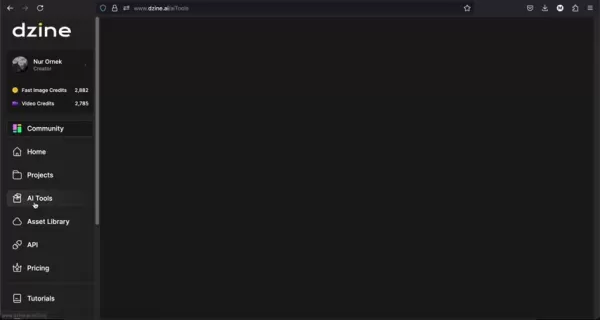
:** Modify existing visuals by applying new styles and adjustments.
- Image to Video : Bring static images to life by converting them into dynamic videos for presentations or social media.
- Text to Image : Create images from written descriptions, perfect for exploring initial concepts.
- Text to Video : Describe your idea and let D-zine AI generate a video based on your text.
- Object Insertion : Smoothly integrate new objects into existing images.
- AI Expand : Widen your image boundaries to create more expansive scenes.
- AI Upscale : Improve image resolution for greater clarity and detail.
These tools demonstrate D-zine AI's focus on a multifaceted design approach, allowing users to develop and realize their ideas with increased ease and adaptability. The platform also includes AI-powered editing functions for fine-tuning visuals with precision.
AI Tools and Architectural Design Integration
D-zine AI and Architectural Workflow Enhancement
D-zine AI offers notable features for improving Architectural Workflows. The platform simplifies processes with tools that enhance images:
-The AI-powered tools can improve, restore, and alter existing images, saving time and delivering better results.-The wide selection of art style presets and custom style options adds flexibility to the design process.
AI Image, AI Editor, Premium Style Access, Watermark Removal, and 3D Model Export are some features that enhance image and video workflows.
It's important to remember that while AI tools can increase productivity and creativity, they are not fully automated solutions. Users should familiarize themselves with the AI models to maximize their benefits.
Unlocking the Power: A Practical Guide to Using D-zine AI
Generating Images from Text with D-zine AI's Text-to-Image Tool
The Text-to-Image tool is one of D-zine AI's most powerful features, allowing users to create images from written descriptions. Here's how it works:
Access the Text-to-Image Tool: Go to the AI Tools section and choose 'Text-to-Image.'
Compose Your Prompt :Write a detailed description of the image you want. Include specifics about objects, settings, and artistic styles. For example, “A contemporary house with large windows set in a garden beside a lake.”
Select an Art Style : Pick from a wide selection of artistic styles. D-zine AI offers options like realistic, illustrative, 3D, and more. Choose a style that fits your vision. Available art styles include: D-zine General, D-zine 3D Render v2, D-zine Realistic v3, Realistic, Illustration, and Cartoon.
Configure Advanced Options : Adjust settings such as image size, color matching, and negative prompts to fine-tune the output. Select generation modes like normal or HQ for better image quality.
Generate Your Image : Click 'Generate' and let D-zine AI create your image.
Explore and Refine : Review the generated images and pick the best one. You can then refine it further, create variations, or transfer it to the AI Editor for more adjustments.
The Text-to-Image tool offers a fast and effective way to visualize ideas, brainstorm concepts, and explore different design directions, saving significant time.
Elevate Architectural Visions: Refining Existing Images with D-zine AI’s Editing Tools
Beyond creating new images, D-zine AI excels at enhancing existing visuals. Here's how to improve your architectural designs:
- **Access the AI Editor
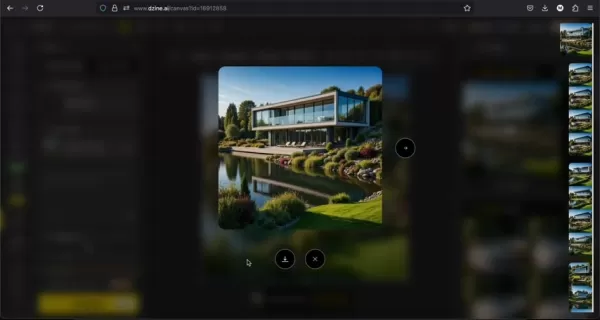
:** Pick an image from your library or generate a new one, then select the AI Editor tool.
- Select an Editing Tool : The AI Editor includes several tools, such as:
- AI Eraser: Remove unwanted elements. The hand repair function helps adjust details, and the AI background removal tool is useful for deleting backgrounds.
- Local Edit : Add objects to specific areas of the image.
- Insert Object: Place new objects into images.
- Generative Expand: Enlarge the image to address scale issues.
- Apply Edits : Use your chosen tool to make changes. For instance, use the AI Eraser to delete distractions or Generative Expand to extend the scene.
- Review and Save : Check the edited image and save your work. You can revert to earlier versions if necessary.
These editing features help designers perfect their visuals, making D-zine AI a valuable resource for presentations, client reviews, and final design outputs.
D-zine AI Pricing: Plans Tailored to Every Creator
Understanding D-zine AI's Subscription Options
D-zine AI uses a tiered subscription model to suit different needs and budgets:
- Free Plan: Provides 32 Regular Image Credits per day, ideal for testing D-zine AI's capabilities and determining if it meets your requirements.
- **Beginner Plan: Priced at $8.99 per month, this plan includes 900 Fast Image Credits monthly. It offers all Free plan features, plus watermark removal and 2x High Resolution Exports (2LPO).
- **Creator Plan: For $19.99 per month, this plan provides 3,000 Fast Image Credits and 3,000 Video Credits monthly. It includes the AI editor and 4x High Resolution Exports (JPG & PNG).
- **Master Plan: At $59.99 per month, this plan includes UNLIMITED Fast Image Credits. It also offers 9,000 video credits and 60 Pro Style Storage Slots.
D-zine AI: Weighing the Pros
and Cons
Pros
All-in-one AI visual tool that saves both money and time
Includes a free plan to test the AI Tools
Supports high-resolution exports
Cons
Subscription costs may be high for users on a tight budget.
New users might need time to learn the interface.
AI-generated content accuracy depends heavily on prompt quality.
Frequently Asked Questions About D-zine AI
Is D-zine AI suitable for beginners?
Yes, D-zine AI features a user-friendly interface and provides tutorials to help beginners. However, mastering the platform may involve some trial and error.
Can D-zine AI replace traditional design software?
No, D-zine AI is designed to work alongside traditional design software, not replace it. It aids in brainstorming, quick visualization, and efficient editing, but complex designs still need professional applications.
What image formats are supported by D-zine AI?
D-zine AI supports standard image formats like JPG, PNG, and WEBP. It also handles 3D formats such as GLTF, OBJ, DAE, KMF, FZX, and STL.
Can I use D-zine AI for commercial projects?
Yes, you can use D-zine AI for commercial work, but always check the terms of service and licensing agreements to ensure proper usage.
Related Questions About AI in Architectural Design
What other AI tools are beneficial for architectural design?
In addition to D-zine AI, several other AI tools are making an impact in architectural design: Midjourney and DALL-E 2: AI image generators for conceptual visuals. TestFit: AI-powered software for real estate development planning. Autodesk Forma (formerly Spacemaker): AI-driven tool for urban planning and design. ArchiStar: AI assistant that automates various design tasks. These tools provide different functions, from initial concept development to detailed planning, and can greatly improve architectural workflows.
Related article
 Ctrip Business Travel Unveils AI Ecosystem with 7 Industry Agents and 17 Core Capabilities
Ctrip Business Travel has officially unveiled the "Ctrip Business Travel AI Ecosystem," leveraging large language models to fundamentally restructure corporate travel management. This comprehensive ecosystem addresses four core scenarios: travel arra
Stripe to Acquire OpenRouter as AI Model Routing Gains Momentum
Stripe has agreed to acquire OpenRouter, an AI model-routing platform that gives developers access to hundreds of models through a single interface. The deal adds model selection and routing to Stripe’s existing work around AI usage and token-based b
Former OpenAI Researcher Barrett Zoph Returns to Google to Support Gemini Development
Barret Zoph, who previously abruptly left and joined OpenAI due to a disagreement with Thinking Machines Lab CEO Miriam Mularati, has once again changed employers. Alphabet's Google announced that Zoph will return as Vice President of Research, bring
Related Special Topic Recommendations
Design & Art
Ctrip Business Travel Unveils AI Ecosystem with 7 Industry Agents and 17 Core Capabilities
Ctrip Business Travel has officially unveiled the "Ctrip Business Travel AI Ecosystem," leveraging large language models to fundamentally restructure corporate travel management. This comprehensive ecosystem addresses four core scenarios: travel arra
Stripe to Acquire OpenRouter as AI Model Routing Gains Momentum
Stripe has agreed to acquire OpenRouter, an AI model-routing platform that gives developers access to hundreds of models through a single interface. The deal adds model selection and routing to Stripe’s existing work around AI usage and token-based b
Former OpenAI Researcher Barrett Zoph Returns to Google to Support Gemini Development
Barret Zoph, who previously abruptly left and joined OpenAI due to a disagreement with Thinking Machines Lab CEO Miriam Mularati, has once again changed employers. Alphabet's Google announced that Zoph will return as Vice President of Research, bring
Related Special Topic Recommendations
Design & Art
 Top AI Illustration Tools: Create Editorial Scenes and Cover Art Faster
2026 Latest Top-rated AI Illustration Tools: Our curated list features the best powerfully designed tools for creating stunning editorial scenes and eye-catching cover art quickly. Each option has gone through rigorous real-world tests, offering a free vs paid comparison to help you find the perfect match for your workflow. Try these must-try solutions today to unlock your AI edge and boost your creative productivity. Explore now at XIX.AI.
 10 tools
 xix.ai
Education and Learning
Top AI Tutors for Exam Prep: Practice Math, Science, and English
xix.ai
Education and Learning
Top AI Tutors for Exam Prep: Practice Math, Science, and English
2026 Latest Top-Rated Best AI Tutors for Exam Prep are here on XIX.AI! Our curated list features powerful game-changing tools that offer free vs paid comparison, real-world tests, and weekly updated rankings. They help boost your writing efficiency, simplify complex topic learning, and unlock your academic potential. Explore now to Discover your perfect exam prep tool and Start creating today to Unlock your AI edge!
10 tools
xix.ai
Finance
AI Budget Planning Tools for Personal Money Management
2026 Latest Best Top-Rated AI Budget Planning Tools for Personal Money Management are here on XIX.AI! This curated collection features powerful, game-changing solutions that help you conduct real-world tests, understand spending habits, and create personalized plans to boost productivity. Enjoy a free vs paid comparison along with detailed rankings. Must-try tools designed to simplify money management and unlock your AI edge. Explore now!
11 tools
xix.ai
Health & Wellness
AI Sleep Tracking Assistants: Improve Recovery with Better Bedtime Habits
2026 Latest Best Top-Rated AI Sleep Tracking Assistants curated for ultimate recovery. This fully updated weekly guide features powerful tools that deliver real-world tests, free vs paid comparison, and detailed rankings to help you find the must-try solution that boosts sleep quality and supports better bedtime habits. Explore now at XIX.AI to Unlock your AI edge.
10 tools
xix.ai
Data Analysis
AI SQL Copilots for Product and Revenue Analytics
2026 Latest Best Top-Rated AI SQL Copilots for Product and Revenue Analytics! XIX.AI has curated a powerful, game-changing collection of must-try tools that undergo real-world tests through weekly updated rankings. These tools help users boost productivity significantly by accelerating data analysis, streamlining complex queries, and generating accurate insights to drive smarter business decisions. Explore now to Discover your perfect tool for unlocking your AI edge!
14 tools
xix.ai
Education and Learning
Best AI Homework Helpers That Teach: Learn Concepts, Not Just Answers
2026 Latest Best Top-Rated AI Homework Helpers That Teach Core Concepts Not Just Answers Powerful Tools for Students Must-Try Curated List Weekly Updated Free vs Paid Comparison Real-World Tests Accurate Rankings to Help You Unlock Your Full Learning Potential Explore now to Discover your perfect tool for smarter studying.
10 tools
xix.ai

 Comments (0)
0/500
Comments (0)
0/500
In the fast-paced world of architectural design, Artificial Intelligence (AI) is becoming a game-changing influence. D-zine AI presents itself as a comprehensive platform that uses AI to streamline and improve various design tasks. This versatile tool helps architects, designers, and creatives generate initial concepts, refine existing images, and produce engaging videos. Let's explore its features and how it can transform your design process.
Key Points
D-zine AI provides a collection of AI-driven tools for creating and editing visuals.
It enables text-to-image, image-to-image, and image-to-video conversions.
The platform includes features like object insertion, background removal, and image upscaling.
D-zine AI comes with multiple style presets to quickly produce a variety of design ideas.
Users can modify existing images by adding or removing elements and expanding scenes.
The platform is available through several subscription tiers, including a free version.
D-zine AI: A Deep Dive into AI-Powered Design
What is D-zine AI?
D-zine AI is a subscription-based platform that equips users with a suite of AI-powered tools for visual content creation and enhancement. Targeting creative professionals and architects, it covers everything from basic image improvements to advanced video generation, all driven by artificial intelligence. Accessible via subscription, the website offers a broad set of tools aimed at making sophisticated design capabilities more accessible.
Whether you're an architect looking for inspiration, a designer polishing a concept, or a creative professional aiming to optimize your rendering process, D-zine AI provides a versatile toolkit to support your projects.
The platform addresses the challenges of contemporary design by offering a centralized workspace for handling diverse tasks without switching between multiple costly applications. This all-in-one strategy can save considerable time and money, potentially changing how design projects are managed and completed. By combining features like Image-to-Image, Text-to-Image, and
Cons
istent Character generation, D-zine AI strives to be a comprehensive resource for AI-assisted visual solutions.Exploring the AI Tool Suite
D-zine AI features an extensive range of AI Tools, each designed to support specific stages of the design workflow. Here are some of the key capabilities:
- **Image to Image
:** Modify existing visuals by applying new styles and adjustments.
- Image to Video : Bring static images to life by converting them into dynamic videos for presentations or social media.
- Text to Image : Create images from written descriptions, perfect for exploring initial concepts.
- Text to Video : Describe your idea and let D-zine AI generate a video based on your text.
- Object Insertion : Smoothly integrate new objects into existing images.
- AI Expand : Widen your image boundaries to create more expansive scenes.
- AI Upscale : Improve image resolution for greater clarity and detail.
These tools demonstrate D-zine AI's focus on a multifaceted design approach, allowing users to develop and realize their ideas with increased ease and adaptability. The platform also includes AI-powered editing functions for fine-tuning visuals with precision.
AI Tools and Architectural Design Integration
D-zine AI and Architectural Workflow Enhancement
D-zine AI offers notable features for improving Architectural Workflows. The platform simplifies processes with tools that enhance images:
-The AI-powered tools can improve, restore, and alter existing images, saving time and delivering better results.-The wide selection of art style presets and custom style options adds flexibility to the design process.
AI Image, AI Editor, Premium Style Access, Watermark Removal, and 3D Model Export are some features that enhance image and video workflows.
It's important to remember that while AI tools can increase productivity and creativity, they are not fully automated solutions. Users should familiarize themselves with the AI models to maximize their benefits.
Unlocking the Power: A Practical Guide to Using D-zine AI
Generating Images from Text with D-zine AI's Text-to-Image Tool
The Text-to-Image tool is one of D-zine AI's most powerful features, allowing users to create images from written descriptions. Here's how it works:
Access the Text-to-Image Tool: Go to the AI Tools section and choose 'Text-to-Image.'
Compose Your Prompt :Write a detailed description of the image you want. Include specifics about objects, settings, and artistic styles. For example, “A contemporary house with large windows set in a garden beside a lake.”
Select an Art Style : Pick from a wide selection of artistic styles. D-zine AI offers options like realistic, illustrative, 3D, and more. Choose a style that fits your vision. Available art styles include: D-zine General, D-zine 3D Render v2, D-zine Realistic v3, Realistic, Illustration, and Cartoon.
Configure Advanced Options : Adjust settings such as image size, color matching, and negative prompts to fine-tune the output. Select generation modes like normal or HQ for better image quality.
Generate Your Image : Click 'Generate' and let D-zine AI create your image.
Explore and Refine : Review the generated images and pick the best one. You can then refine it further, create variations, or transfer it to the AI Editor for more adjustments.
The Text-to-Image tool offers a fast and effective way to visualize ideas, brainstorm concepts, and explore different design directions, saving significant time.
Elevate Architectural Visions: Refining Existing Images with D-zine AI’s Editing Tools
Beyond creating new images, D-zine AI excels at enhancing existing visuals. Here's how to improve your architectural designs:
- **Access the AI Editor
:** Pick an image from your library or generate a new one, then select the AI Editor tool.
- Select an Editing Tool : The AI Editor includes several tools, such as:
- AI Eraser: Remove unwanted elements. The hand repair function helps adjust details, and the AI background removal tool is useful for deleting backgrounds.
- Local Edit : Add objects to specific areas of the image.
- Insert Object: Place new objects into images.
- Generative Expand: Enlarge the image to address scale issues.
- Apply Edits : Use your chosen tool to make changes. For instance, use the AI Eraser to delete distractions or Generative Expand to extend the scene.
- Review and Save : Check the edited image and save your work. You can revert to earlier versions if necessary.
These editing features help designers perfect their visuals, making D-zine AI a valuable resource for presentations, client reviews, and final design outputs.
D-zine AI Pricing: Plans Tailored to Every Creator
Understanding D-zine AI's Subscription Options
D-zine AI uses a tiered subscription model to suit different needs and budgets:
- Free Plan: Provides 32 Regular Image Credits per day, ideal for testing D-zine AI's capabilities and determining if it meets your requirements.
- **Beginner Plan: Priced at $8.99 per month, this plan includes 900 Fast Image Credits monthly. It offers all Free plan features, plus watermark removal and 2x High Resolution Exports (2LPO).
- **Creator Plan: For $19.99 per month, this plan provides 3,000 Fast Image Credits and 3,000 Video Credits monthly. It includes the AI editor and 4x High Resolution Exports (JPG & PNG).
- **Master Plan: At $59.99 per month, this plan includes UNLIMITED Fast Image Credits. It also offers 9,000 video credits and 60 Pro Style Storage Slots.
D-zine AI: Weighing the Pros
and Cons
Pros
All-in-one AI visual tool that saves both money and time
Includes a free plan to test the AI Tools
Supports high-resolution exports
Cons
Subscription costs may be high for users on a tight budget.
New users might need time to learn the interface.
AI-generated content accuracy depends heavily on prompt quality.
Frequently Asked Questions About D-zine AI
Is D-zine AI suitable for beginners?
Yes, D-zine AI features a user-friendly interface and provides tutorials to help beginners. However, mastering the platform may involve some trial and error.
Can D-zine AI replace traditional design software?
No, D-zine AI is designed to work alongside traditional design software, not replace it. It aids in brainstorming, quick visualization, and efficient editing, but complex designs still need professional applications.
What image formats are supported by D-zine AI?
D-zine AI supports standard image formats like JPG, PNG, and WEBP. It also handles 3D formats such as GLTF, OBJ, DAE, KMF, FZX, and STL.
Can I use D-zine AI for commercial projects?
Yes, you can use D-zine AI for commercial work, but always check the terms of service and licensing agreements to ensure proper usage.
Related Questions About AI in Architectural Design
What other AI tools are beneficial for architectural design?
In addition to D-zine AI, several other AI tools are making an impact in architectural design: Midjourney and DALL-E 2: AI image generators for conceptual visuals. TestFit: AI-powered software for real estate development planning. Autodesk Forma (formerly Spacemaker): AI-driven tool for urban planning and design. ArchiStar: AI assistant that automates various design tasks. These tools provide different functions, from initial concept development to detailed planning, and can greatly improve architectural workflows.








 Ctrip Business Travel Unveils AI Ecosystem with 7 Industry Agents and 17 Core Capabilities
Ctrip Business Travel has officially unveiled the "Ctrip Business Travel AI Ecosystem," leveraging large language models to fundamentally restructure corporate travel management. This comprehensive ecosystem addresses four core scenarios: travel arra
Ctrip Business Travel Unveils AI Ecosystem with 7 Industry Agents and 17 Core Capabilities
Ctrip Business Travel has officially unveiled the "Ctrip Business Travel AI Ecosystem," leveraging large language models to fundamentally restructure corporate travel management. This comprehensive ecosystem addresses four core scenarios: travel arra
 Stripe to Acquire OpenRouter as AI Model Routing Gains Momentum
Stripe has agreed to acquire OpenRouter, an AI model-routing platform that gives developers access to hundreds of models through a single interface. The deal adds model selection and routing to Stripe’s existing work around AI usage and token-based b
Stripe to Acquire OpenRouter as AI Model Routing Gains Momentum
Stripe has agreed to acquire OpenRouter, an AI model-routing platform that gives developers access to hundreds of models through a single interface. The deal adds model selection and routing to Stripe’s existing work around AI usage and token-based b
 Former OpenAI Researcher Barrett Zoph Returns to Google to Support Gemini Development
Barret Zoph, who previously abruptly left and joined OpenAI due to a disagreement with Thinking Machines Lab CEO Miriam Mularati, has once again changed employers. Alphabet's Google announced that Zoph will return as Vice President of Research, bring
Former OpenAI Researcher Barrett Zoph Returns to Google to Support Gemini Development
Barret Zoph, who previously abruptly left and joined OpenAI due to a disagreement with Thinking Machines Lab CEO Miriam Mularati, has once again changed employers. Alphabet's Google announced that Zoph will return as Vice President of Research, bring

2026 Latest Top-rated AI Illustration Tools: Our curated list features the best powerfully designed tools for creating stunning editorial scenes and eye-catching cover art quickly. Each option has gone through rigorous real-world tests, offering a free vs paid comparison to help you find the perfect match for your workflow. Try these must-try solutions today to unlock your AI edge and boost your creative productivity. Explore now at XIX.AI.
10 tools
xix.ai

2026 Latest Top-Rated Best AI Tutors for Exam Prep are here on XIX.AI! Our curated list features powerful game-changing tools that offer free vs paid comparison, real-world tests, and weekly updated rankings. They help boost your writing efficiency, simplify complex topic learning, and unlock your academic potential. Explore now to Discover your perfect exam prep tool and Start creating today to Unlock your AI edge!
10 tools
xix.ai

2026 Latest Best Top-Rated AI Budget Planning Tools for Personal Money Management are here on XIX.AI! This curated collection features powerful, game-changing solutions that help you conduct real-world tests, understand spending habits, and create personalized plans to boost productivity. Enjoy a free vs paid comparison along with detailed rankings. Must-try tools designed to simplify money management and unlock your AI edge. Explore now!
11 tools
xix.ai

2026 Latest Best Top-Rated AI Sleep Tracking Assistants curated for ultimate recovery. This fully updated weekly guide features powerful tools that deliver real-world tests, free vs paid comparison, and detailed rankings to help you find the must-try solution that boosts sleep quality and supports better bedtime habits. Explore now at XIX.AI to Unlock your AI edge.
10 tools
xix.ai

2026 Latest Best Top-Rated AI SQL Copilots for Product and Revenue Analytics! XIX.AI has curated a powerful, game-changing collection of must-try tools that undergo real-world tests through weekly updated rankings. These tools help users boost productivity significantly by accelerating data analysis, streamlining complex queries, and generating accurate insights to drive smarter business decisions. Explore now to Discover your perfect tool for unlocking your AI edge!
14 tools
xix.ai

2026 Latest Best Top-Rated AI Homework Helpers That Teach Core Concepts Not Just Answers Powerful Tools for Students Must-Try Curated List Weekly Updated Free vs Paid Comparison Real-World Tests Accurate Rankings to Help You Unlock Your Full Learning Potential Explore now to Discover your perfect tool for smarter studying.
10 tools
xix.ai












