


 Home
HomeWhat is Dizine AI and how does it revolutionize multi-character animation in 2025?
Creating animations with multiple characters in a single scene has long been a complex task for creators. Conventional techniques require meticulous, manual work and frequently produce animations that seem rigid and unnatural. Dizine AI is reshaping this process with its multi-character animation capability, which automates and streamlines the workflow to deliver a new standard of realism and expressiveness. This tool empowers users to craft dynamic, engaging animations where multiple characters interact with natural lip-synchronization and fluid body language.
Key Points
Dizine AI's multi-character animation feature represents a significant leap forward.
It provides automated lip-sync alongside realistic character movements.
The platform is versatile, supporting both human and non-human characters.
Users can produce high-quality animations without intensive manual labor.
Advanced features like Seedream 3.0 elevate the quality of Pixar-style image generation.
The Challenges of Traditional Multi-Character Animation
The Annoyance of Stiff, Lifeless Characters
Historically, animating several characters at once has been a tricky and restrictive process. While some tools offer basic lip-syncing, they often fall short in creating believable body language, leading to animations that feel awkward and fail to captivate the audience.
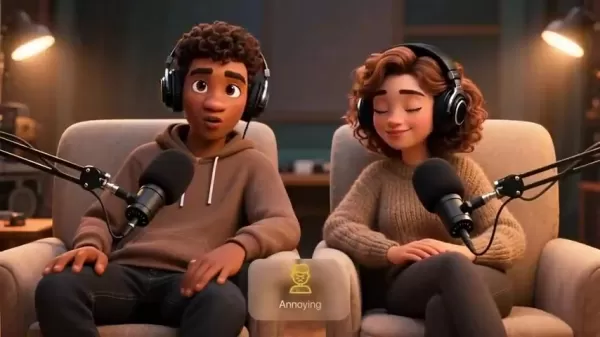
The result is often characters that appear robotic or frozen, which undermines the overall production quality. The inability to simulate genuine interactions between characters compounds this issue, making it hard to build compelling stories.
Manual Animation: A Time-Cons
uming Endeavor
For animators seeking truly authentic interactions, manual keyframing is often the only solution. This method, however, is incredibly time-consuming and demands a high level of skill. Animators must painstakingly craft each character's movements individually, synchronize dialogue, and then composite everything in editing software like CapCut. Producing just one satisfactory scene can take hours, making this approach impractical for creators with limited time or technical expertise. This labor-intensive process often deters attempts at multi-character scenes, ultimately restricting creative ambition. Manual animation is time consuming and skill-intensive
Step-by-Step Guide: Creating Multi-Character Animations with Dizine AI
Step 1: Setting Up Your Project
Follow these steps to start your multi-character animation project in Dizine AI:
- Sign in to Your Dizine Account:
New users can sign up using the link provided in the description to get started.
- Create a New Project: Click 'New Project' and choose your video's aspect ratio. For YouTube, the 16:9 ratio is recommended.
- Name Your Project: Assign a clear, descriptive name like 'Multi-Character Lip Sync' to keep your work organized.
Your project is now set up, and you can begin crafting your animated scene with Dizine AI.
Step 2: Generating the Base Image
Next, generate the foundational image for your animation:
- Access Text-to-Image Tool: Click the 'Text to Image' icon located in the top-right corner of the interface.
- Select Seedream 3.0 Model: Opt for the Seedream 3.0 model to produce high-quality 3D images in a Pixar-inspired style. This advanced model ensures superior output.
- Enter Your Prompt: Paste a detailed and clear description of your desired scene and characters into the text box.
- Configure Imagination Settings: Use the 'Imagination' slider to balance creativity and adherence to your prompt. A moderately creative setting often yields the best results.
- Generate the Image: Click 'Generate' to create your base image based on the specified parameters.
Step 3: Adding Lip-Sync and Voiceovers
With your base image ready, proceed to add lip-sync and audio:
- Select Lip Sync: At the bottom of the image preview, click 'Lip Sync' to open the character assignment dialog.
- Assign Faces: Designate which characters will speak, and choose the order of speech if applicable.
- Add Voiceovers: You can add dialogue in two ways:
- Text-to-Speech: Select a voice, type the dialogue, and click 'Generate and Play Audio' to create and attach the voiceover automatically.
- Upload Audio: Alternatively, upload your own pre-recorded audio files. Dizine AI supports clips up to 30 seconds long.
- Adjust Timeline: Drag the audio clips on the timeline to perfectly synchronize the character's mouth movements with the voiceover.
- Confirm and Generate: Once everything is aligned, click 'Confirm', select 'Pro mode' for enhanced lip-sync and body motion, and then click 'Generate' to finalize your animation.
Easy Guide on Using Dizine AI
Signing Up and Creating a Project
- Visit the Dizine AI Website: Navigate to the official Dizine AI website to begin.
- Create an Account: Register for a new account by providing your email and creating a password. Existing users can simply log in.
- Navigate to the Dashboard: After logging in, you'll arrive at the main dashboard, your hub for managing projects and accessing AI tools.
Generating Images with Text-to-Image
Select Text-to-Image: On the dashboard, find and click the 'Text-to-Image' tool to open the generation interface.
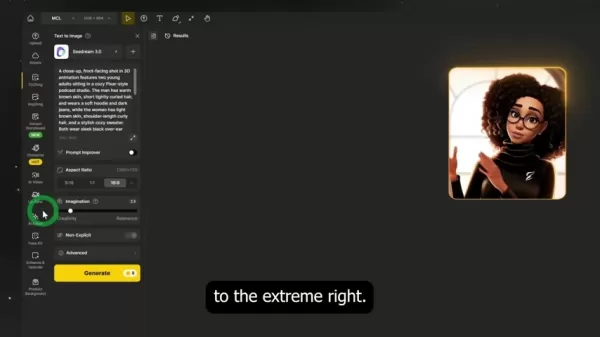
Enter Your Prompt: Type a detailed and specific description of the image you wish to create. Clarity in your prompt leads to better results.
Adjust Settings: Configure the following parameters:
- Model Selection: Choose your preferred AI model (e.g., Seedream 3.0) from the menu.
- Aspect Ratio: Select an aspect ratio suitable for your platform (e.g., 16:9 for YouTube).
- Imagination Level: Adjust the creativity slider; lower values stick closely to your prompt, while higher values introduce more AI interpretation.
Generate the Image: Click the 'Generate' button and wait for the AI to create your image, which will appear in the preview window.
Animating Characters with Lip-Sync
- Select Lip-Sync Tool: After generating your base image, find and click the 'Lip-Sync' tool.
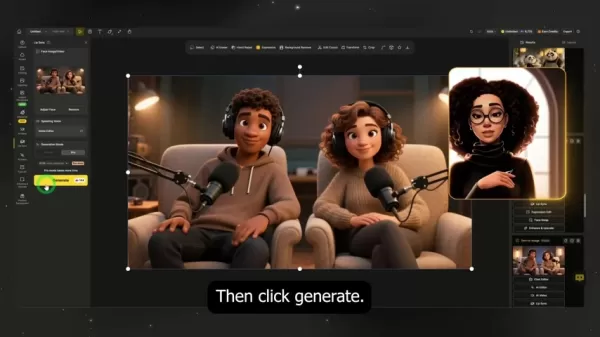
This opens the interface for adding voiceovers and animating character speech.
- Assign Faces: The AI will automatically detect faces. If needed, manually select the specific characters you want to animate to ensure lip movements are applied correctly.
- Add Voiceovers: Choose one of two methods:
- Text-to-Speech (TTS): Type the dialogue for each character and select a voice from the library. Click 'Generate' to create the audio.
- Upload Audio: Upload your own audio files, making sure they are correctly named and matched to the corresponding characters.
- Adjust the Timeline: Use the video editor to drag and align audio clips so they synchronize perfectly with each character's speech. Precise timing is crucial for a natural-looking animation.
- Generate Final Video: Once all edits are complete, click 'Generate' to render your final video, combining the image, animations, and audio into a cohesive scene.
Dizine AI Pricing and Subscription Options
Understanding Dizine AI's Flexible Plans
Dizine AI provides a variety of subscription plans designed to meet the needs of different users, from solo creators to large organizations. These plans typically include credits for generating images and videos, access to the full suite of AI tools, and different levels of customer support. A clear understanding of the pricing and features will help you select the plan that best fits your creative goals and budget.
Here is an overview of the primary plans offered by Dizine AI:
- Free Plan: A introductory plan with basic feature access, allowing newcomers to explore the platform's capabilities.
- Starter Plan: An affordable option ideal for hobbyists or beginners, offering a limited number of credits and core features.
- Pro Plan: A comprehensive plan for professional users, featuring unlimited credits, access to Seedream 3.0, a custom asset library, and 4K resolution output.
- Enterprise Plan: A top-tier plan offering unlimited projects, maximum customizability, and dedicated support for large-scale operations.
Evaluating Long-Term Value
To maximize your return on investment, consider how Dizine AI's capabilities will impact your content creation over the long term. Evaluate its potential to save time, boost creative output, and improve the quality of your final products. Weigh these factors carefully against the cost of each plan to choose the option that aligns with your strategic objectives.
What are the advantages and disadvantages of using AI to produce videos?
Pros
AI tools can generate images with accurate lip-sync and body movements for impressive results.
Users have access to a wide array of features designed to optimize the final output.
It is well-suited for both educational and commercial applications.
It provides a fast and user-friendly solution for creating animated videos in minutes.
The output is highly customizable, catering to a broad spectrum of user needs.
Cons
The creative output may sometimes fall short of expectations.
Results can vary depending on the quality of the description provided.
Some advanced features may have a learning curve for new users.
Dizine AI’s Core Features and Functionality
Key Functionalities of Dizine AI
Dizine AI is equipped with a powerful suite of features aimed at simplifying the creative workflow and expanding your animation potential:
- AI-Powered Image Generation: Leveraging advanced algorithms, Dizine AI produces highly detailed and accurate images.
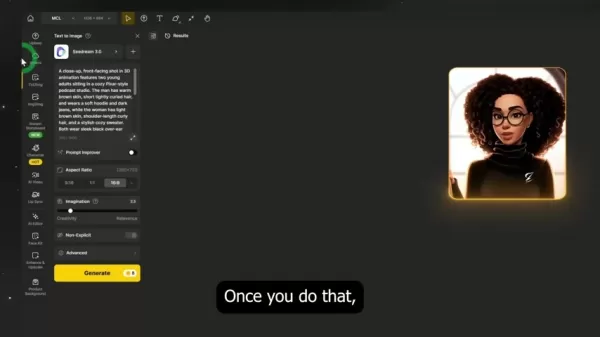
This enables creators to generate bespoke visual assets, including characters, objects, and settings, tailored precisely to their project requirements.
- Instant Storyboard: The Instant Storyboard feature is ideal for visualizing narratives before full-scale production begins. It creates detailed storyboards that help plan the visual flow of a story, ensuring coherence from start to finish.
Cons
istent Character Generation: Maintaining visual consistency is crucial for serialized content. The Cons
istent Character Generation feature ensures that a character's appearance remains uniform across different scenes and projects, fostering viewer familiarity and narrative continuity.
Unique Applications of Dizine AI
AI-Generated Video
Dizine AI can produce complete videos effortlessly with a well-crafted prompt. It is exceptionally useful for creating explainer videos, educational content, and engaging social media clips. Creators can now produce professional-quality, captivating videos that would traditionally demand significant resources and time.
AI Animation
Dizine AI democratizes animation, making it accessible regardless of skill level or budget. It opens up possibilities for creating animations that were once beyond the reach of individuals or small teams, adding a new dimension to the creative landscape.
Frequently Asked Questions
Can Dizine AI animate non-human characters?
Absolutely. Dizine AI is capable of animating non-human characters, enabling creators to bring a diverse array of creatures and personalities to life with realistic movements and expressions.
What if I'm not satisfied with the image that has been generated?
If the generated image doesn't meet your expectations, you can simply click the generate button again to create a new variation until you achieve a satisfactory result.
Does Pro mode provide better images?
Pro mode enhances the final animation with superior lip-sync quality. Select Pro mode and then click generate to begin the advanced processing, which you can monitor on the left-hand side of the interface.
Related Questions
What can Dizine AI do?
The AI Video Generator features an intuitive interface for creating animated films, compelling explainers, engaging social media content, and educational videos from scratch. Additional features include advanced scene generation for adding narrative depth and consistent character creation to maintain uniformity across a story.
How does the tool help create videos?
Dizine AI leverages artificial intelligence to streamline the entire video production pipeline. It assists with tasks ranging from initial script ideas and character design to final animation and voiceover integration, allowing users to produce high-quality videos without needing advanced technical skills or expensive equipment.
Is Dizine AI friendly to users?
Dizine AI is designed with a user-friendly interface that caters to both beginners and experienced professionals. Clear controls and guided tutorials walk you through each step of the video creation process, making it accessible and less intimidating.
Related article
 Ctrip Business Travel Unveils AI Ecosystem with 7 Industry Agents and 17 Core Capabilities
Ctrip Business Travel has officially unveiled the "Ctrip Business Travel AI Ecosystem," leveraging large language models to fundamentally restructure corporate travel management. This comprehensive ecosystem addresses four core scenarios: travel arra
Stripe to Acquire OpenRouter as AI Model Routing Gains Momentum
Stripe has agreed to acquire OpenRouter, an AI model-routing platform that gives developers access to hundreds of models through a single interface. The deal adds model selection and routing to Stripe’s existing work around AI usage and token-based b
Former OpenAI Researcher Barrett Zoph Returns to Google to Support Gemini Development
Barret Zoph, who previously abruptly left and joined OpenAI due to a disagreement with Thinking Machines Lab CEO Miriam Mularati, has once again changed employers. Alphabet's Google announced that Zoph will return as Vice President of Research, bring
Related Special Topic Recommendations
Design & Art
Ctrip Business Travel Unveils AI Ecosystem with 7 Industry Agents and 17 Core Capabilities
Ctrip Business Travel has officially unveiled the "Ctrip Business Travel AI Ecosystem," leveraging large language models to fundamentally restructure corporate travel management. This comprehensive ecosystem addresses four core scenarios: travel arra
Stripe to Acquire OpenRouter as AI Model Routing Gains Momentum
Stripe has agreed to acquire OpenRouter, an AI model-routing platform that gives developers access to hundreds of models through a single interface. The deal adds model selection and routing to Stripe’s existing work around AI usage and token-based b
Former OpenAI Researcher Barrett Zoph Returns to Google to Support Gemini Development
Barret Zoph, who previously abruptly left and joined OpenAI due to a disagreement with Thinking Machines Lab CEO Miriam Mularati, has once again changed employers. Alphabet's Google announced that Zoph will return as Vice President of Research, bring
Related Special Topic Recommendations
Design & Art
 Top AI Illustration Tools: Create Editorial Scenes and Cover Art Faster
2026 Latest Top-rated AI Illustration Tools: Our curated list features the best powerfully designed tools for creating stunning editorial scenes and eye-catching cover art quickly. Each option has gone through rigorous real-world tests, offering a free vs paid comparison to help you find the perfect match for your workflow. Try these must-try solutions today to unlock your AI edge and boost your creative productivity. Explore now at XIX.AI.
 10 tools
 xix.ai
Education and Learning
Top AI Tutors for Exam Prep: Practice Math, Science, and English
xix.ai
Education and Learning
Top AI Tutors for Exam Prep: Practice Math, Science, and English
2026 Latest Top-Rated Best AI Tutors for Exam Prep are here on XIX.AI! Our curated list features powerful game-changing tools that offer free vs paid comparison, real-world tests, and weekly updated rankings. They help boost your writing efficiency, simplify complex topic learning, and unlock your academic potential. Explore now to Discover your perfect exam prep tool and Start creating today to Unlock your AI edge!
10 tools
xix.ai
Finance
AI Budget Planning Tools for Personal Money Management
2026 Latest Best Top-Rated AI Budget Planning Tools for Personal Money Management are here on XIX.AI! This curated collection features powerful, game-changing solutions that help you conduct real-world tests, understand spending habits, and create personalized plans to boost productivity. Enjoy a free vs paid comparison along with detailed rankings. Must-try tools designed to simplify money management and unlock your AI edge. Explore now!
11 tools
xix.ai
Health & Wellness
AI Sleep Tracking Assistants: Improve Recovery with Better Bedtime Habits
2026 Latest Best Top-Rated AI Sleep Tracking Assistants curated for ultimate recovery. This fully updated weekly guide features powerful tools that deliver real-world tests, free vs paid comparison, and detailed rankings to help you find the must-try solution that boosts sleep quality and supports better bedtime habits. Explore now at XIX.AI to Unlock your AI edge.
10 tools
xix.ai
Data Analysis
AI SQL Copilots for Product and Revenue Analytics
2026 Latest Best Top-Rated AI SQL Copilots for Product and Revenue Analytics! XIX.AI has curated a powerful, game-changing collection of must-try tools that undergo real-world tests through weekly updated rankings. These tools help users boost productivity significantly by accelerating data analysis, streamlining complex queries, and generating accurate insights to drive smarter business decisions. Explore now to Discover your perfect tool for unlocking your AI edge!
14 tools
xix.ai
Education and Learning
Best AI Homework Helpers That Teach: Learn Concepts, Not Just Answers
2026 Latest Best Top-Rated AI Homework Helpers That Teach Core Concepts Not Just Answers Powerful Tools for Students Must-Try Curated List Weekly Updated Free vs Paid Comparison Real-World Tests Accurate Rankings to Help You Unlock Your Full Learning Potential Explore now to Discover your perfect tool for smarter studying.
10 tools
xix.ai

 Comments (4)
0/500
Comments (4)
0/500
![DavidCarter]()
Dizine AI's approach to multi-character animation in 2025 looks promising, especially for cutting down manual rigging time. I'm curious if it handles complex interactions between characters seamlessly or if they still feel a bit detached from each other. The potential for independent creators to produce high-quality scenes without a huge team is exciting, though pricing might be a barrier for some.
![EvelynHarris]()
Finally, a tool that understands multi-character dynamics! I used to spend hours fixing awkward overlaps in Blender, but this looks like a game-changer for indie devs. Can't wait to test the physics engine.
![WalterWhite]()
このAIが2025年にどう進化するか気になりますね。個人的にはキャラクター同士の自然なインタラクションが実現できるかどうかが鍵だと思うんです。今のアニメってどうしても動きがぎこちないことが多いから…🤔 もし本当に自然な動きを実現できたら、インディー開発者にもチャンスが広がりそう!
![RobertMartin]()
Dizine AIっぽい自動化で、マルチキャラクターの動きを自然に仕上げられるならすごいな。今まで苦労していた制作時間を大幅に短縮できそう。でも、これ広がったらアニメ作りのハードルが下がりすぎて、クリエイターの仕事が減っちゃわないか?楽しみだけど不安も💭
Creating animations with multiple characters in a single scene has long been a complex task for creators. Conventional techniques require meticulous, manual work and frequently produce animations that seem rigid and unnatural. Dizine AI is reshaping this process with its multi-character animation capability, which automates and streamlines the workflow to deliver a new standard of realism and expressiveness. This tool empowers users to craft dynamic, engaging animations where multiple characters interact with natural lip-synchronization and fluid body language.
Key Points
Dizine AI's multi-character animation feature represents a significant leap forward.
It provides automated lip-sync alongside realistic character movements.
The platform is versatile, supporting both human and non-human characters.
Users can produce high-quality animations without intensive manual labor.
Advanced features like Seedream 3.0 elevate the quality of Pixar-style image generation.
The Challenges of Traditional Multi-Character Animation
The Annoyance of Stiff, Lifeless Characters
Historically, animating several characters at once has been a tricky and restrictive process. While some tools offer basic lip-syncing, they often fall short in creating believable body language, leading to animations that feel awkward and fail to captivate the audience.
The result is often characters that appear robotic or frozen, which undermines the overall production quality. The inability to simulate genuine interactions between characters compounds this issue, making it hard to build compelling stories.
Manual Animation: A Time-Cons
uming Endeavor
For animators seeking truly authentic interactions, manual keyframing is often the only solution. This method, however, is incredibly time-consuming and demands a high level of skill. Animators must painstakingly craft each character's movements individually, synchronize dialogue, and then composite everything in editing software like CapCut. Producing just one satisfactory scene can take hours, making this approach impractical for creators with limited time or technical expertise. This labor-intensive process often deters attempts at multi-character scenes, ultimately restricting creative ambition. Manual animation is time consuming and skill-intensive
Step-by-Step Guide: Creating Multi-Character Animations with Dizine AI
Step 1: Setting Up Your Project
Follow these steps to start your multi-character animation project in Dizine AI:
- Sign in to Your Dizine Account:
New users can sign up using the link provided in the description to get started.
- Create a New Project: Click 'New Project' and choose your video's aspect ratio. For YouTube, the 16:9 ratio is recommended.
- Name Your Project: Assign a clear, descriptive name like 'Multi-Character Lip Sync' to keep your work organized.
Your project is now set up, and you can begin crafting your animated scene with Dizine AI.
Step 2: Generating the Base Image
Next, generate the foundational image for your animation:
- Access Text-to-Image Tool: Click the 'Text to Image' icon located in the top-right corner of the interface.
- Select Seedream 3.0 Model: Opt for the Seedream 3.0 model to produce high-quality 3D images in a Pixar-inspired style. This advanced model ensures superior output.
- Enter Your Prompt: Paste a detailed and clear description of your desired scene and characters into the text box.
- Configure Imagination Settings: Use the 'Imagination' slider to balance creativity and adherence to your prompt. A moderately creative setting often yields the best results.
- Generate the Image: Click 'Generate' to create your base image based on the specified parameters.
Step 3: Adding Lip-Sync and Voiceovers
With your base image ready, proceed to add lip-sync and audio:
- Select Lip Sync: At the bottom of the image preview, click 'Lip Sync' to open the character assignment dialog.
- Assign Faces: Designate which characters will speak, and choose the order of speech if applicable.
- Add Voiceovers: You can add dialogue in two ways:
- Text-to-Speech: Select a voice, type the dialogue, and click 'Generate and Play Audio' to create and attach the voiceover automatically.
- Upload Audio: Alternatively, upload your own pre-recorded audio files. Dizine AI supports clips up to 30 seconds long.
- Adjust Timeline: Drag the audio clips on the timeline to perfectly synchronize the character's mouth movements with the voiceover.
- Confirm and Generate: Once everything is aligned, click 'Confirm', select 'Pro mode' for enhanced lip-sync and body motion, and then click 'Generate' to finalize your animation.
Easy Guide on Using Dizine AI
Signing Up and Creating a Project
- Visit the Dizine AI Website: Navigate to the official Dizine AI website to begin.
- Create an Account: Register for a new account by providing your email and creating a password. Existing users can simply log in.
- Navigate to the Dashboard: After logging in, you'll arrive at the main dashboard, your hub for managing projects and accessing AI tools.
Generating Images with Text-to-Image
Select Text-to-Image: On the dashboard, find and click the 'Text-to-Image' tool to open the generation interface.
Enter Your Prompt: Type a detailed and specific description of the image you wish to create. Clarity in your prompt leads to better results.
Adjust Settings: Configure the following parameters:
- Model Selection: Choose your preferred AI model (e.g., Seedream 3.0) from the menu.
- Aspect Ratio: Select an aspect ratio suitable for your platform (e.g., 16:9 for YouTube).
- Imagination Level: Adjust the creativity slider; lower values stick closely to your prompt, while higher values introduce more AI interpretation.
Generate the Image: Click the 'Generate' button and wait for the AI to create your image, which will appear in the preview window.
Animating Characters with Lip-Sync
- Select Lip-Sync Tool: After generating your base image, find and click the 'Lip-Sync' tool.
This opens the interface for adding voiceovers and animating character speech.
- Assign Faces: The AI will automatically detect faces. If needed, manually select the specific characters you want to animate to ensure lip movements are applied correctly.
- Add Voiceovers: Choose one of two methods:
- Text-to-Speech (TTS): Type the dialogue for each character and select a voice from the library. Click 'Generate' to create the audio.
- Upload Audio: Upload your own audio files, making sure they are correctly named and matched to the corresponding characters.
- Adjust the Timeline: Use the video editor to drag and align audio clips so they synchronize perfectly with each character's speech. Precise timing is crucial for a natural-looking animation.
- Generate Final Video: Once all edits are complete, click 'Generate' to render your final video, combining the image, animations, and audio into a cohesive scene.
Dizine AI Pricing and Subscription Options
Understanding Dizine AI's Flexible Plans
Dizine AI provides a variety of subscription plans designed to meet the needs of different users, from solo creators to large organizations. These plans typically include credits for generating images and videos, access to the full suite of AI tools, and different levels of customer support. A clear understanding of the pricing and features will help you select the plan that best fits your creative goals and budget.
Here is an overview of the primary plans offered by Dizine AI:
- Free Plan: A introductory plan with basic feature access, allowing newcomers to explore the platform's capabilities.
- Starter Plan: An affordable option ideal for hobbyists or beginners, offering a limited number of credits and core features.
- Pro Plan: A comprehensive plan for professional users, featuring unlimited credits, access to Seedream 3.0, a custom asset library, and 4K resolution output.
- Enterprise Plan: A top-tier plan offering unlimited projects, maximum customizability, and dedicated support for large-scale operations.
Evaluating Long-Term Value
To maximize your return on investment, consider how Dizine AI's capabilities will impact your content creation over the long term. Evaluate its potential to save time, boost creative output, and improve the quality of your final products. Weigh these factors carefully against the cost of each plan to choose the option that aligns with your strategic objectives.
What are the advantages and disadvantages of using AI to produce videos?
Pros
AI tools can generate images with accurate lip-sync and body movements for impressive results.
Users have access to a wide array of features designed to optimize the final output.
It is well-suited for both educational and commercial applications.
It provides a fast and user-friendly solution for creating animated videos in minutes.
The output is highly customizable, catering to a broad spectrum of user needs.
Cons
The creative output may sometimes fall short of expectations.
Results can vary depending on the quality of the description provided.
Some advanced features may have a learning curve for new users.
Dizine AI’s Core Features and Functionality
Key Functionalities of Dizine AI
Dizine AI is equipped with a powerful suite of features aimed at simplifying the creative workflow and expanding your animation potential:
- AI-Powered Image Generation: Leveraging advanced algorithms, Dizine AI produces highly detailed and accurate images.
This enables creators to generate bespoke visual assets, including characters, objects, and settings, tailored precisely to their project requirements.
- Instant Storyboard: The Instant Storyboard feature is ideal for visualizing narratives before full-scale production begins. It creates detailed storyboards that help plan the visual flow of a story, ensuring coherence from start to finish.
Cons
istent Character Generation: Maintaining visual consistency is crucial for serialized content. TheCons
istent Character Generation feature ensures that a character's appearance remains uniform across different scenes and projects, fostering viewer familiarity and narrative continuity.
Unique Applications of Dizine AI
AI-Generated Video
Dizine AI can produce complete videos effortlessly with a well-crafted prompt. It is exceptionally useful for creating explainer videos, educational content, and engaging social media clips. Creators can now produce professional-quality, captivating videos that would traditionally demand significant resources and time.
AI Animation
Dizine AI democratizes animation, making it accessible regardless of skill level or budget. It opens up possibilities for creating animations that were once beyond the reach of individuals or small teams, adding a new dimension to the creative landscape.
Frequently Asked Questions
Can Dizine AI animate non-human characters?
Absolutely. Dizine AI is capable of animating non-human characters, enabling creators to bring a diverse array of creatures and personalities to life with realistic movements and expressions.
What if I'm not satisfied with the image that has been generated?
If the generated image doesn't meet your expectations, you can simply click the generate button again to create a new variation until you achieve a satisfactory result.
Does Pro mode provide better images?
Pro mode enhances the final animation with superior lip-sync quality. Select Pro mode and then click generate to begin the advanced processing, which you can monitor on the left-hand side of the interface.
Related Questions
What can Dizine AI do?
The AI Video Generator features an intuitive interface for creating animated films, compelling explainers, engaging social media content, and educational videos from scratch. Additional features include advanced scene generation for adding narrative depth and consistent character creation to maintain uniformity across a story.
How does the tool help create videos?
Dizine AI leverages artificial intelligence to streamline the entire video production pipeline. It assists with tasks ranging from initial script ideas and character design to final animation and voiceover integration, allowing users to produce high-quality videos without needing advanced technical skills or expensive equipment.
Is Dizine AI friendly to users?
Dizine AI is designed with a user-friendly interface that caters to both beginners and experienced professionals. Clear controls and guided tutorials walk you through each step of the video creation process, making it accessible and less intimidating.








 Ctrip Business Travel Unveils AI Ecosystem with 7 Industry Agents and 17 Core Capabilities
Ctrip Business Travel has officially unveiled the "Ctrip Business Travel AI Ecosystem," leveraging large language models to fundamentally restructure corporate travel management. This comprehensive ecosystem addresses four core scenarios: travel arra
Ctrip Business Travel Unveils AI Ecosystem with 7 Industry Agents and 17 Core Capabilities
Ctrip Business Travel has officially unveiled the "Ctrip Business Travel AI Ecosystem," leveraging large language models to fundamentally restructure corporate travel management. This comprehensive ecosystem addresses four core scenarios: travel arra
 Stripe to Acquire OpenRouter as AI Model Routing Gains Momentum
Stripe has agreed to acquire OpenRouter, an AI model-routing platform that gives developers access to hundreds of models through a single interface. The deal adds model selection and routing to Stripe’s existing work around AI usage and token-based b
Stripe to Acquire OpenRouter as AI Model Routing Gains Momentum
Stripe has agreed to acquire OpenRouter, an AI model-routing platform that gives developers access to hundreds of models through a single interface. The deal adds model selection and routing to Stripe’s existing work around AI usage and token-based b
 Former OpenAI Researcher Barrett Zoph Returns to Google to Support Gemini Development
Barret Zoph, who previously abruptly left and joined OpenAI due to a disagreement with Thinking Machines Lab CEO Miriam Mularati, has once again changed employers. Alphabet's Google announced that Zoph will return as Vice President of Research, bring
Former OpenAI Researcher Barrett Zoph Returns to Google to Support Gemini Development
Barret Zoph, who previously abruptly left and joined OpenAI due to a disagreement with Thinking Machines Lab CEO Miriam Mularati, has once again changed employers. Alphabet's Google announced that Zoph will return as Vice President of Research, bring

2026 Latest Top-rated AI Illustration Tools: Our curated list features the best powerfully designed tools for creating stunning editorial scenes and eye-catching cover art quickly. Each option has gone through rigorous real-world tests, offering a free vs paid comparison to help you find the perfect match for your workflow. Try these must-try solutions today to unlock your AI edge and boost your creative productivity. Explore now at XIX.AI.
10 tools
xix.ai

2026 Latest Top-Rated Best AI Tutors for Exam Prep are here on XIX.AI! Our curated list features powerful game-changing tools that offer free vs paid comparison, real-world tests, and weekly updated rankings. They help boost your writing efficiency, simplify complex topic learning, and unlock your academic potential. Explore now to Discover your perfect exam prep tool and Start creating today to Unlock your AI edge!
10 tools
xix.ai

2026 Latest Best Top-Rated AI Budget Planning Tools for Personal Money Management are here on XIX.AI! This curated collection features powerful, game-changing solutions that help you conduct real-world tests, understand spending habits, and create personalized plans to boost productivity. Enjoy a free vs paid comparison along with detailed rankings. Must-try tools designed to simplify money management and unlock your AI edge. Explore now!
11 tools
xix.ai

2026 Latest Best Top-Rated AI Sleep Tracking Assistants curated for ultimate recovery. This fully updated weekly guide features powerful tools that deliver real-world tests, free vs paid comparison, and detailed rankings to help you find the must-try solution that boosts sleep quality and supports better bedtime habits. Explore now at XIX.AI to Unlock your AI edge.
10 tools
xix.ai

2026 Latest Best Top-Rated AI SQL Copilots for Product and Revenue Analytics! XIX.AI has curated a powerful, game-changing collection of must-try tools that undergo real-world tests through weekly updated rankings. These tools help users boost productivity significantly by accelerating data analysis, streamlining complex queries, and generating accurate insights to drive smarter business decisions. Explore now to Discover your perfect tool for unlocking your AI edge!
14 tools
xix.ai

2026 Latest Best Top-Rated AI Homework Helpers That Teach Core Concepts Not Just Answers Powerful Tools for Students Must-Try Curated List Weekly Updated Free vs Paid Comparison Real-World Tests Accurate Rankings to Help You Unlock Your Full Learning Potential Explore now to Discover your perfect tool for smarter studying.
10 tools
xix.ai

Dizine AI's approach to multi-character animation in 2025 looks promising, especially for cutting down manual rigging time. I'm curious if it handles complex interactions between characters seamlessly or if they still feel a bit detached from each other. The potential for independent creators to produce high-quality scenes without a huge team is exciting, though pricing might be a barrier for some.
Finally, a tool that understands multi-character dynamics! I used to spend hours fixing awkward overlaps in Blender, but this looks like a game-changer for indie devs. Can't wait to test the physics engine.
このAIが2025年にどう進化するか気になりますね。個人的にはキャラクター同士の自然なインタラクションが実現できるかどうかが鍵だと思うんです。今のアニメってどうしても動きがぎこちないことが多いから…🤔 もし本当に自然な動きを実現できたら、インディー開発者にもチャンスが広がりそう!
Dizine AIっぽい自動化で、マルチキャラクターの動きを自然に仕上げられるならすごいな。今まで苦労していた制作時間を大幅に短縮できそう。でも、これ広がったらアニメ作りのハードルが下がりすぎて、クリエイターの仕事が減っちゃわないか?楽しみだけど不安も💭












