


 Home
HomeIndependence Day AI Image Creation Guide: Design Striking Visuals
With Independence Day 2025 on the horizon, expressing your national pride becomes more personal and creative through custom AI-generated images. This guide provides clear, step-by-step instructions for using artificial intelligence to design impressive visuals, ideal for your social media posts or as personalized wallpapers. Let's explore the process of AI image creation and learn to produce captivating graphics tailored for this significant celebration!
Key Points
Introducing the Bing Image Creator: a robust AI tool for producing custom images.
Master the art of writing effective text prompts to guide the AI toward your envisioned results.
Generate images suitable for both boys and girls by adjusting your prompt details.
Add names to images for a personalized touch.
Learn the exact prompts needed to produce your desired image style.
How to download and securely save your finished creations.
Getting Started with AI Image Creation
What is Bing Image Creator?
The Bing Image Creator
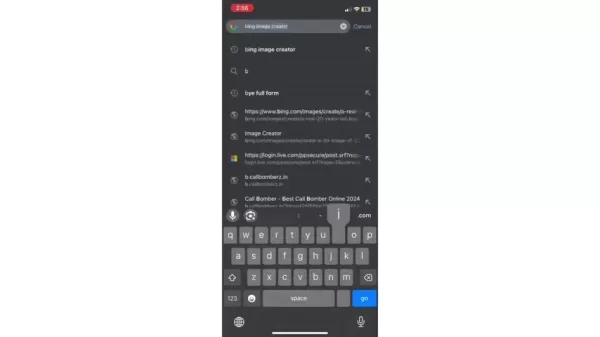
is an AI-driven tool developed by Microsoft that transforms text descriptions into images. Accessible via any standard web browser, it's a fantastic option for crafting unique visuals for Independence Day. The technology uses sophisticated algorithms to interpret your written instructions, generating one-of-a-kind images that align with your description. Its easy access enables anyone, regardless of artistic ability, to design custom Independence Day 2025 images.
Accessing Bing Image Creator
Begin by launching your web browser and visiting the Bing Image Creator website. You can locate it quickly via a search for 'Bing Image Creator' on any search engine. Upon arrival, sign in using a Microsoft account. Don't have one? Registration is free and straightforward. Signing in is necessary to save your generated images and maintain a history of your creations. Once logged in, you can immediately start designing your Independence Day AI images.
Crafting Effective Prompts for Independence Day Images
Understanding the Basics of AI Prompts
An AI prompt is a text-based instruction that directs an AI model to generate a specific image. Greater detail and specificity in your prompt typically lead to better comprehension by the AI and results that more closely match your vision. For Independence Day themes, consider incorporating elements like the Indian flag, historical landmarks, traditional dress, and festive decor. Effective prompts provide enough descriptive detail for the Bing Image Creator to return a suitable, high-quality image.
Keywords Are Crucial: Identify the core components of your desired image and integrate those keywords into your text prompt. This helps the AI better grasp the intended outcome. Write your description in natural, conversational language, as if you were explaining the image to another person.
Example keywords:
- Indian flag
- Red Fort
- Independence Day
- Tricolor
- Patriotic
- Indian attire
- Festive decorations
- Saluting
- Celebrating
Creating Prompts for Boys and Girls
A standout feature of the Bing Image Creator is its adaptability for different subjects. Below are sample prompts designed for boys and girls, which you can modify to suit your taste. Feel free to adjust these examples to reflect your individual style and requirements.
Prompt for Boys: 'A photorealistic 20-year-old boy wearing an orange T-shirt with the name 'MOHIT' printed on it, blue jeans, and sneakers. He stands on a road holding the Indian national flag, with the Red Fort in Delhi visible behind him. The sky features the text 'Independence Day.' Generate a high-quality, realistic image.'
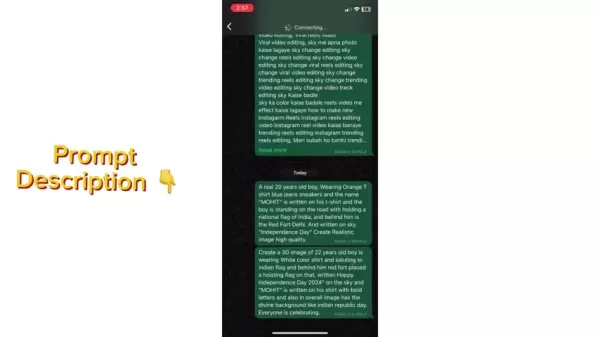
.
Prompt for Girls: 'A photorealistic 20-year-old girl wearing an orange T-shirt with the name 'Riya' printed on it, blue jeans, and sneakers. She stands on a road holding the Indian national flag, with the Red Fort in Delhi visible behind her. The sky features the text 'Independence Day.' Generate a high-quality, realistic image.'
Customizing Images with Names
Including names in your Independence Day images adds a meaningful, personal element. To do this, simply specify the name within your prompt. Clearly indicate where the name should appear, such as on a T-shirt or in the background, to achieve your intended effect. For example, the prompts above are pre-configured to display a custom name on the T-shirt, but you can easily alter this detail.
Sample prompts for custom names: 'A photorealistic 20-year-old boy wearing an orange T-shirt... with the name 'YOUR_NAME' printed on it...' or 'Create a 3D render of a 22-year-old girl wearing... with 'YOUR_NAME' displayed in bold letters on her shirt...' Simply replace the 'YOUR_NAME' placeholder in these examples with your desired name.
Fine-Tuning Your Prompts for Desired Results
Creating images with AI often involves some experimentation to perfect the outcome. If your first attempts don't match your expectations, don't worry. Improve your results by adding more descriptive detail or rephrasing parts of your prompt. Test various keyword combinations and adjust descriptions until you find what works. With practice, you'll develop a skill for writing prompts that reliably produce stunning Independence Day visuals. Remember, proficiency with AI tools comes with time and patience. Compare your prompt details to the generated image, and make adjustments as necessary. You can edit and resubmit your prompt as many times as needed. The AI might not interpret your request perfectly on the first try, so multiple iterations are often part of the process.
Step-by-Step Guide to Creating Your AI Images
Step 1: Access the Bing Image Creator
As mentioned previously, open your web browser and go to the Bing Image Creator website. Confirm you are signed in with your Microsoft account to enable saving your images.
Step 2: Enter Your Prompt
Copy your selected prompt carefully and paste it into the text input box. Verify that you have personalized the name if you want a custom image.
Step 3: Generate the Image
Select the 'Create' button and allow the AI a moment to process your request. Generation time can vary based on your prompt's complexity and current demand on the service.
Step 4: Review and Refine (If Necessary)
Inspect the generated images. If they look good, move on to downloading them. If not, adjust your prompt and generate new images until you are pleased with the outcome.
Step 5: Download and Share
When you find an image you like, click on it to view the full-size version. Then, click the 'Download' button to save it to your computer or device. Share your distinctive Independence Day AI images on social media with friends, family, and followers to spread patriotic spirit!
Pricing of Bing Image Creator
Cost of using Bing Image Creator
Bing Image Creator operates on a boost token system. New users typically receive an allocation of 15 boost tokens each week. These tokens prioritize your requests for faster generation, but you can continue creating images for free after they are used, albeit at a slower speed. Your boost tokens refresh weekly. Occasionally, you can earn additional tokens by participating in Microsoft Rewards activities.
Feature Cost Image Generation Free Boost Tokens 15 free per week Additional Boost Tokens Possible through Microsoft Rewards
Advantages and Disadvantages of Bing Image Creator
Pros
User-Friendly: Bing Image Creator features an intuitive interface that makes AI image creation straightforward for everyone.
Budget-Friendly: This tool provides free access to its core functionality, letting you create high-quality AI images without upfront investment.
Highly Adaptable: The platform supports extensive customization by simply editing the text prompt.
Broad Application: It is capable of generating a vast array of image styles and subjects.
Cons
Token Limitations: The token system can restrict the speed or number of images you can generate quickly, sometimes necessitating extra steps to maintain performance.
Variable Outcomes: AI-generated results may not always align perfectly with user expectations.
Unclear Copyright Status: The legal copyright ownership of AI-created images can be ambiguous and is still evolving.
Core Features of Bing Image Creator
What makes Bing Image Creator special
- AI-Powered Generation: Utilizes advanced artificial intelligence to produce images from written descriptions.
- User-Friendly Interface: Designed for simplicity and ease of use.
- Customizable Prompts: Enables users to refine their text inputs for precise outcomes.
- Personalization: Offers the ability to incorporate names and other custom details.
- Free to Use: Core image generation is free, with optional boost tokens for faster processing.
- Integration: Works seamlessly within the Bing search ecosystem.
Use Cases for Independence Day AI Images
Using Your AI Image
- Social Media Posts: Post your unique Independence Day creations on platforms like Facebook, Instagram, and X (formerly Twitter) to join the national celebration.
- Wallpapers: Use your AI-generated image as a desktop or phone wallpaper to show your patriotic pride.
- Greeting Cards: Embed your images into digital greeting cards for friends and family.
- Event Invitations: Design custom invites for Independence Day get-togethers or community events.
- Personal Projects: Apply these images to various personal endeavors, including digital scrapbooks and art projects.
Frequently Asked Questions
Is Bing Image Creator really free?
Yes, the core functionality of Bing Image Creator is free. It uses a boost token system that may require some management or participation in rewards programs for sustained high-speed generation, as detailed earlier.
Can I use these images for commercial purposes?
You should consult the Bing Image Creator's terms of service to understand any limitations on using generated images for commercial gain. Restrictions may apply to monetizing AI-created content.
What if the images are low quality?
For low-quality images, try improving your prompts with more descriptive language and generate them again. Experimentation with different terms often yields better results.
What if I don't have a Microsoft account?
A Microsoft account is mandatory to use the Bing Image Creator. You must register for a free account if you don't already have one; logging in is required to generate images.
Related Questions
How can I use AI to create videos for Independence Day?
AI can assist in producing video scripts, animated figures, and soundtracks. Platforms like Lumen5, Synthesia, and Pictory are excellent for creating AI-powered video content.
What are some other ways to celebrate Independence Day creatively?
Beyond AI imagery, consider making traditional patriotic art, planning local events, or posting historical narratives about freedom fighters online.
Related article
 Ctrip Business Travel Unveils AI Ecosystem with 7 Industry Agents and 17 Core Capabilities
Ctrip Business Travel has officially unveiled the "Ctrip Business Travel AI Ecosystem," leveraging large language models to fundamentally restructure corporate travel management. This comprehensive ecosystem addresses four core scenarios: travel arra
Stripe to Acquire OpenRouter as AI Model Routing Gains Momentum
Stripe has agreed to acquire OpenRouter, an AI model-routing platform that gives developers access to hundreds of models through a single interface. The deal adds model selection and routing to Stripe’s existing work around AI usage and token-based b
Former OpenAI Researcher Barrett Zoph Returns to Google to Support Gemini Development
Barret Zoph, who previously abruptly left and joined OpenAI due to a disagreement with Thinking Machines Lab CEO Miriam Mularati, has once again changed employers. Alphabet's Google announced that Zoph will return as Vice President of Research, bring
Related Special Topic Recommendations
Design & Art
Ctrip Business Travel Unveils AI Ecosystem with 7 Industry Agents and 17 Core Capabilities
Ctrip Business Travel has officially unveiled the "Ctrip Business Travel AI Ecosystem," leveraging large language models to fundamentally restructure corporate travel management. This comprehensive ecosystem addresses four core scenarios: travel arra
Stripe to Acquire OpenRouter as AI Model Routing Gains Momentum
Stripe has agreed to acquire OpenRouter, an AI model-routing platform that gives developers access to hundreds of models through a single interface. The deal adds model selection and routing to Stripe’s existing work around AI usage and token-based b
Former OpenAI Researcher Barrett Zoph Returns to Google to Support Gemini Development
Barret Zoph, who previously abruptly left and joined OpenAI due to a disagreement with Thinking Machines Lab CEO Miriam Mularati, has once again changed employers. Alphabet's Google announced that Zoph will return as Vice President of Research, bring
Related Special Topic Recommendations
Design & Art
 Top AI Illustration Tools: Create Editorial Scenes and Cover Art Faster
2026 Latest Top-rated AI Illustration Tools: Our curated list features the best powerfully designed tools for creating stunning editorial scenes and eye-catching cover art quickly. Each option has gone through rigorous real-world tests, offering a free vs paid comparison to help you find the perfect match for your workflow. Try these must-try solutions today to unlock your AI edge and boost your creative productivity. Explore now at XIX.AI.
 10 tools
 xix.ai
Education and Learning
Top AI Tutors for Exam Prep: Practice Math, Science, and English
xix.ai
Education and Learning
Top AI Tutors for Exam Prep: Practice Math, Science, and English
2026 Latest Top-Rated Best AI Tutors for Exam Prep are here on XIX.AI! Our curated list features powerful game-changing tools that offer free vs paid comparison, real-world tests, and weekly updated rankings. They help boost your writing efficiency, simplify complex topic learning, and unlock your academic potential. Explore now to Discover your perfect exam prep tool and Start creating today to Unlock your AI edge!
10 tools
xix.ai
Finance
AI Budget Planning Tools for Personal Money Management
2026 Latest Best Top-Rated AI Budget Planning Tools for Personal Money Management are here on XIX.AI! This curated collection features powerful, game-changing solutions that help you conduct real-world tests, understand spending habits, and create personalized plans to boost productivity. Enjoy a free vs paid comparison along with detailed rankings. Must-try tools designed to simplify money management and unlock your AI edge. Explore now!
11 tools
xix.ai
Health & Wellness
AI Sleep Tracking Assistants: Improve Recovery with Better Bedtime Habits
2026 Latest Best Top-Rated AI Sleep Tracking Assistants curated for ultimate recovery. This fully updated weekly guide features powerful tools that deliver real-world tests, free vs paid comparison, and detailed rankings to help you find the must-try solution that boosts sleep quality and supports better bedtime habits. Explore now at XIX.AI to Unlock your AI edge.
10 tools
xix.ai
Data Analysis
AI SQL Copilots for Product and Revenue Analytics
2026 Latest Best Top-Rated AI SQL Copilots for Product and Revenue Analytics! XIX.AI has curated a powerful, game-changing collection of must-try tools that undergo real-world tests through weekly updated rankings. These tools help users boost productivity significantly by accelerating data analysis, streamlining complex queries, and generating accurate insights to drive smarter business decisions. Explore now to Discover your perfect tool for unlocking your AI edge!
14 tools
xix.ai
Education and Learning
Best AI Homework Helpers That Teach: Learn Concepts, Not Just Answers
2026 Latest Best Top-Rated AI Homework Helpers That Teach Core Concepts Not Just Answers Powerful Tools for Students Must-Try Curated List Weekly Updated Free vs Paid Comparison Real-World Tests Accurate Rankings to Help You Unlock Your Full Learning Potential Explore now to Discover your perfect tool for smarter studying.
10 tools
xix.ai

 Comments (1)
0/500
Comments (1)
0/500
![RaymondGreen]()
Independence DayのAI画像作成ガイド、面白いですね!🇺🇸 自分でデザインできるなんて、今年の祝日はもっと特別になりそうです。技術の進歩で、誰でも簡単に国旗や象徴的なイメージを生成できるのは素晴らしいですね。ただし、著作権や文化の尊重についても少し考える必要がありますね。ぜひ試してみたいと思います!✨ #AIart #IndependenceDay
With Independence Day 2025 on the horizon, expressing your national pride becomes more personal and creative through custom AI-generated images. This guide provides clear, step-by-step instructions for using artificial intelligence to design impressive visuals, ideal for your social media posts or as personalized wallpapers. Let's explore the process of AI image creation and learn to produce captivating graphics tailored for this significant celebration!
Key Points
Introducing the Bing Image Creator: a robust AI tool for producing custom images.
Master the art of writing effective text prompts to guide the AI toward your envisioned results.
Generate images suitable for both boys and girls by adjusting your prompt details.
Add names to images for a personalized touch.
Learn the exact prompts needed to produce your desired image style.
How to download and securely save your finished creations.
Getting Started with AI Image Creation
What is Bing Image Creator?
The Bing Image Creator
is an AI-driven tool developed by Microsoft that transforms text descriptions into images. Accessible via any standard web browser, it's a fantastic option for crafting unique visuals for Independence Day. The technology uses sophisticated algorithms to interpret your written instructions, generating one-of-a-kind images that align with your description. Its easy access enables anyone, regardless of artistic ability, to design custom Independence Day 2025 images.
Accessing Bing Image Creator
Begin by launching your web browser and visiting the Bing Image Creator website. You can locate it quickly via a search for 'Bing Image Creator' on any search engine. Upon arrival, sign in using a Microsoft account. Don't have one? Registration is free and straightforward. Signing in is necessary to save your generated images and maintain a history of your creations. Once logged in, you can immediately start designing your Independence Day AI images.
Crafting Effective Prompts for Independence Day Images
Understanding the Basics of AI Prompts
An AI prompt is a text-based instruction that directs an AI model to generate a specific image. Greater detail and specificity in your prompt typically lead to better comprehension by the AI and results that more closely match your vision. For Independence Day themes, consider incorporating elements like the Indian flag, historical landmarks, traditional dress, and festive decor. Effective prompts provide enough descriptive detail for the Bing Image Creator to return a suitable, high-quality image.
Keywords Are Crucial: Identify the core components of your desired image and integrate those keywords into your text prompt. This helps the AI better grasp the intended outcome. Write your description in natural, conversational language, as if you were explaining the image to another person.
Example keywords:
- Indian flag
- Red Fort
- Independence Day
- Tricolor
- Patriotic
- Indian attire
- Festive decorations
- Saluting
- Celebrating
Creating Prompts for Boys and Girls
A standout feature of the Bing Image Creator is its adaptability for different subjects. Below are sample prompts designed for boys and girls, which you can modify to suit your taste. Feel free to adjust these examples to reflect your individual style and requirements.
Prompt for Boys: 'A photorealistic 20-year-old boy wearing an orange T-shirt with the name 'MOHIT' printed on it, blue jeans, and sneakers. He stands on a road holding the Indian national flag, with the Red Fort in Delhi visible behind him. The sky features the text 'Independence Day.' Generate a high-quality, realistic image.'
.
Prompt for Girls: 'A photorealistic 20-year-old girl wearing an orange T-shirt with the name 'Riya' printed on it, blue jeans, and sneakers. She stands on a road holding the Indian national flag, with the Red Fort in Delhi visible behind her. The sky features the text 'Independence Day.' Generate a high-quality, realistic image.'
Customizing Images with Names
Including names in your Independence Day images adds a meaningful, personal element. To do this, simply specify the name within your prompt. Clearly indicate where the name should appear, such as on a T-shirt or in the background, to achieve your intended effect. For example, the prompts above are pre-configured to display a custom name on the T-shirt, but you can easily alter this detail.
Sample prompts for custom names: 'A photorealistic 20-year-old boy wearing an orange T-shirt... with the name 'YOUR_NAME' printed on it...' or 'Create a 3D render of a 22-year-old girl wearing... with 'YOUR_NAME' displayed in bold letters on her shirt...' Simply replace the 'YOUR_NAME' placeholder in these examples with your desired name.
Fine-Tuning Your Prompts for Desired Results
Creating images with AI often involves some experimentation to perfect the outcome. If your first attempts don't match your expectations, don't worry. Improve your results by adding more descriptive detail or rephrasing parts of your prompt. Test various keyword combinations and adjust descriptions until you find what works. With practice, you'll develop a skill for writing prompts that reliably produce stunning Independence Day visuals. Remember, proficiency with AI tools comes with time and patience. Compare your prompt details to the generated image, and make adjustments as necessary. You can edit and resubmit your prompt as many times as needed. The AI might not interpret your request perfectly on the first try, so multiple iterations are often part of the process.
Step-by-Step Guide to Creating Your AI Images
Step 1: Access the Bing Image Creator
As mentioned previously, open your web browser and go to the Bing Image Creator website. Confirm you are signed in with your Microsoft account to enable saving your images.
Step 2: Enter Your Prompt
Copy your selected prompt carefully and paste it into the text input box. Verify that you have personalized the name if you want a custom image.
Step 3: Generate the Image
Select the 'Create' button and allow the AI a moment to process your request. Generation time can vary based on your prompt's complexity and current demand on the service.
Step 4: Review and Refine (If Necessary)
Inspect the generated images. If they look good, move on to downloading them. If not, adjust your prompt and generate new images until you are pleased with the outcome.
Step 5: Download and Share
When you find an image you like, click on it to view the full-size version. Then, click the 'Download' button to save it to your computer or device. Share your distinctive Independence Day AI images on social media with friends, family, and followers to spread patriotic spirit!
Pricing of Bing Image Creator
Cost of using Bing Image Creator
Bing Image Creator operates on a boost token system. New users typically receive an allocation of 15 boost tokens each week. These tokens prioritize your requests for faster generation, but you can continue creating images for free after they are used, albeit at a slower speed. Your boost tokens refresh weekly. Occasionally, you can earn additional tokens by participating in Microsoft Rewards activities.
| Feature | Cost |
|---|---|
| Image Generation | Free |
| Boost Tokens | 15 free per week |
| Additional Boost Tokens | Possible through Microsoft Rewards |
Advantages and Disadvantages of Bing Image Creator
Pros
User-Friendly: Bing Image Creator features an intuitive interface that makes AI image creation straightforward for everyone.
Budget-Friendly: This tool provides free access to its core functionality, letting you create high-quality AI images without upfront investment.
Highly Adaptable: The platform supports extensive customization by simply editing the text prompt.
Broad Application: It is capable of generating a vast array of image styles and subjects.
Cons
Token Limitations: The token system can restrict the speed or number of images you can generate quickly, sometimes necessitating extra steps to maintain performance.
Variable Outcomes: AI-generated results may not always align perfectly with user expectations.
Unclear Copyright Status: The legal copyright ownership of AI-created images can be ambiguous and is still evolving.
Core Features of Bing Image Creator
What makes Bing Image Creator special
- AI-Powered Generation: Utilizes advanced artificial intelligence to produce images from written descriptions.
- User-Friendly Interface: Designed for simplicity and ease of use.
- Customizable Prompts: Enables users to refine their text inputs for precise outcomes.
- Personalization: Offers the ability to incorporate names and other custom details.
- Free to Use: Core image generation is free, with optional boost tokens for faster processing.
- Integration: Works seamlessly within the Bing search ecosystem.
Use Cases for Independence Day AI Images
Using Your AI Image
- Social Media Posts: Post your unique Independence Day creations on platforms like Facebook, Instagram, and X (formerly Twitter) to join the national celebration.
- Wallpapers: Use your AI-generated image as a desktop or phone wallpaper to show your patriotic pride.
- Greeting Cards: Embed your images into digital greeting cards for friends and family.
- Event Invitations: Design custom invites for Independence Day get-togethers or community events.
- Personal Projects: Apply these images to various personal endeavors, including digital scrapbooks and art projects.
Frequently Asked Questions
Is Bing Image Creator really free?
Yes, the core functionality of Bing Image Creator is free. It uses a boost token system that may require some management or participation in rewards programs for sustained high-speed generation, as detailed earlier.
Can I use these images for commercial purposes?
You should consult the Bing Image Creator's terms of service to understand any limitations on using generated images for commercial gain. Restrictions may apply to monetizing AI-created content.
What if the images are low quality?
For low-quality images, try improving your prompts with more descriptive language and generate them again. Experimentation with different terms often yields better results.
What if I don't have a Microsoft account?
A Microsoft account is mandatory to use the Bing Image Creator. You must register for a free account if you don't already have one; logging in is required to generate images.
Related Questions
How can I use AI to create videos for Independence Day?
AI can assist in producing video scripts, animated figures, and soundtracks. Platforms like Lumen5, Synthesia, and Pictory are excellent for creating AI-powered video content.
What are some other ways to celebrate Independence Day creatively?
Beyond AI imagery, consider making traditional patriotic art, planning local events, or posting historical narratives about freedom fighters online.








 Ctrip Business Travel Unveils AI Ecosystem with 7 Industry Agents and 17 Core Capabilities
Ctrip Business Travel has officially unveiled the "Ctrip Business Travel AI Ecosystem," leveraging large language models to fundamentally restructure corporate travel management. This comprehensive ecosystem addresses four core scenarios: travel arra
Ctrip Business Travel Unveils AI Ecosystem with 7 Industry Agents and 17 Core Capabilities
Ctrip Business Travel has officially unveiled the "Ctrip Business Travel AI Ecosystem," leveraging large language models to fundamentally restructure corporate travel management. This comprehensive ecosystem addresses four core scenarios: travel arra
 Stripe to Acquire OpenRouter as AI Model Routing Gains Momentum
Stripe has agreed to acquire OpenRouter, an AI model-routing platform that gives developers access to hundreds of models through a single interface. The deal adds model selection and routing to Stripe’s existing work around AI usage and token-based b
Stripe to Acquire OpenRouter as AI Model Routing Gains Momentum
Stripe has agreed to acquire OpenRouter, an AI model-routing platform that gives developers access to hundreds of models through a single interface. The deal adds model selection and routing to Stripe’s existing work around AI usage and token-based b
 Former OpenAI Researcher Barrett Zoph Returns to Google to Support Gemini Development
Barret Zoph, who previously abruptly left and joined OpenAI due to a disagreement with Thinking Machines Lab CEO Miriam Mularati, has once again changed employers. Alphabet's Google announced that Zoph will return as Vice President of Research, bring
Former OpenAI Researcher Barrett Zoph Returns to Google to Support Gemini Development
Barret Zoph, who previously abruptly left and joined OpenAI due to a disagreement with Thinking Machines Lab CEO Miriam Mularati, has once again changed employers. Alphabet's Google announced that Zoph will return as Vice President of Research, bring

2026 Latest Top-rated AI Illustration Tools: Our curated list features the best powerfully designed tools for creating stunning editorial scenes and eye-catching cover art quickly. Each option has gone through rigorous real-world tests, offering a free vs paid comparison to help you find the perfect match for your workflow. Try these must-try solutions today to unlock your AI edge and boost your creative productivity. Explore now at XIX.AI.
10 tools
xix.ai

2026 Latest Top-Rated Best AI Tutors for Exam Prep are here on XIX.AI! Our curated list features powerful game-changing tools that offer free vs paid comparison, real-world tests, and weekly updated rankings. They help boost your writing efficiency, simplify complex topic learning, and unlock your academic potential. Explore now to Discover your perfect exam prep tool and Start creating today to Unlock your AI edge!
10 tools
xix.ai

2026 Latest Best Top-Rated AI Budget Planning Tools for Personal Money Management are here on XIX.AI! This curated collection features powerful, game-changing solutions that help you conduct real-world tests, understand spending habits, and create personalized plans to boost productivity. Enjoy a free vs paid comparison along with detailed rankings. Must-try tools designed to simplify money management and unlock your AI edge. Explore now!
11 tools
xix.ai

2026 Latest Best Top-Rated AI Sleep Tracking Assistants curated for ultimate recovery. This fully updated weekly guide features powerful tools that deliver real-world tests, free vs paid comparison, and detailed rankings to help you find the must-try solution that boosts sleep quality and supports better bedtime habits. Explore now at XIX.AI to Unlock your AI edge.
10 tools
xix.ai

2026 Latest Best Top-Rated AI SQL Copilots for Product and Revenue Analytics! XIX.AI has curated a powerful, game-changing collection of must-try tools that undergo real-world tests through weekly updated rankings. These tools help users boost productivity significantly by accelerating data analysis, streamlining complex queries, and generating accurate insights to drive smarter business decisions. Explore now to Discover your perfect tool for unlocking your AI edge!
14 tools
xix.ai

2026 Latest Best Top-Rated AI Homework Helpers That Teach Core Concepts Not Just Answers Powerful Tools for Students Must-Try Curated List Weekly Updated Free vs Paid Comparison Real-World Tests Accurate Rankings to Help You Unlock Your Full Learning Potential Explore now to Discover your perfect tool for smarter studying.
10 tools
xix.ai

Independence DayのAI画像作成ガイド、面白いですね!🇺🇸 自分でデザインできるなんて、今年の祝日はもっと特別になりそうです。技術の進歩で、誰でも簡単に国旗や象徴的なイメージを生成できるのは素晴らしいですね。ただし、著作権や文化の尊重についても少し考える必要がありますね。ぜひ試してみたいと思います!✨ #AIart #IndependenceDay












