


 Home
HomeMastering AI Avatars: Your Complete Guide to Boosting YouTube Engagement
AI avatars are revolutionizing YouTube by providing creators with innovative ways to produce engaging content and interact with their audience. This detailed guide walks you through the entire process of building your own AI avatar, covering everything from the initial setup to advanced personalization, helping your channel capture attention. Learn how to harness artificial intelligence to craft a distinctive virtual identity that enthralls viewers and strengthens your brand's online presence.
Key Points
Learn to create AI avatars directly from your phone.
Use ChatGPT and Canva to build and customize your avatar.
Design avatars with realistic lip-syncing and facial expressions to boost engagement.
Elevate your YouTube channel by integrating AI-powered virtual personas.
Understand how to regenerate images and refine your avatar’s appearance.
Unveiling the Power of AI Avatars on YouTube
The Rise of AI Avatars in Content Creation
In the modern digital landscape, capturing attention on platforms like YouTube demands creative approaches. AI avatars provide a unique solution, allowing creators to establish a virtual presence that truly connects with viewers.
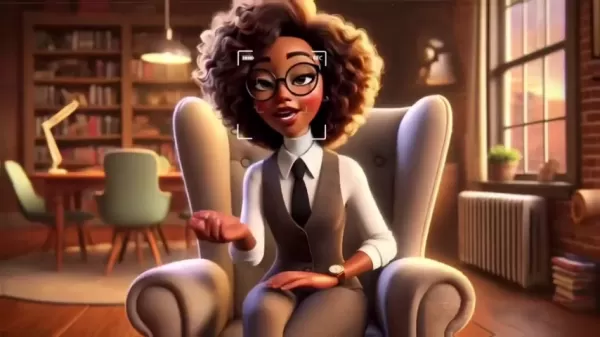
These digital personas can deliver content, interact with the audience, and consistently represent your brand in a compelling way.
Why AI Avatars are Gaining Traction:
- Enhanced Engagement: AI avatars can perform actions and convey messages beyond the capability of traditional videos, creating a more immersive viewing experience.
- Brand Consistency: Avatars ensure a uniform brand image is maintained across all your content.
- Creative Freedom: Explore limitless possibilities in character design, enabling you to create unique personas that grab attention.
- Cost-Effectiveness: Leverage AI to reduce production costs for various content needs.
- Global Appeal: Avatars can be adapted to different languages and cultures, broadening your potential audience.
Getting Started: Essential Tools and Platforms
Creating a compelling AI Avatar involves utilizing a few key tools and platforms. Here’s a breakdown of what you’ll need:
ChatGPT: A powerful language model used to generate scripts, character descriptions, and prompts for avatar creation. Its versatility makes it an essential tool for shaping your avatar's personality and content.
Canva: A user-friendly design platform for customizing your avatar’s appearance and background. Its intuitive interface lets you create professional visuals without needing advanced design skills.
Microsoft Bing Image Creator: A free and reliable alternative when facing limitations with other platforms, useful for regenerating images and refining your avatar's look.
Step-by-Step Tutorial: Crafting Your AI Avatar
Step 1: Generating Your Avatar with ChatGPT
Begin your AI avatar journey with ChatGPT, where you'll define your character’s core attributes. By using the Consistent Character GPT feature, you can specify the gender you wish your avatar to present. By further defining details like a name—such as "Lola" chosen in the example—and physical traits, you provide the AI with a solid foundation to build upon.
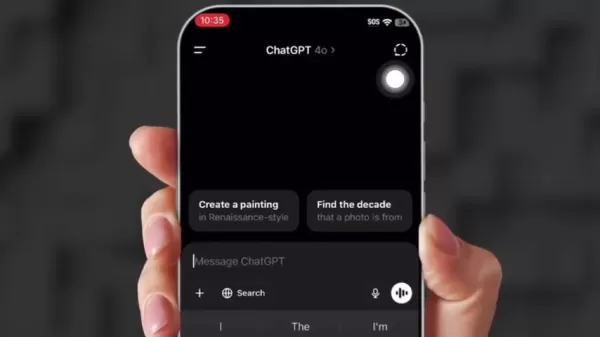
- Navigating ChatGPT: Log into your ChatGPT account (the free plan works for this process). Explore the tools by clicking on 'Explore GPTs'.
- Search for Consistent Character: Use the search bar to find the 'Consistent Character GPT'. This tool is designed for generating characters with consistent features.
- Define Your Character: Start by specifying the gender of your avatar. In our example, we chose 'Female'.
- Name Your Avatar: Give your AI persona a name, like 'Lola'.
- Describe Your Character: Provide a detailed description of your avatar’s appearance, including age, style, hair, and accessories. For instance, 'Black woman in her mid-30s, 3D style, long curly red Afro hair, shoulder length, wearing glasses, with dimples, dressed in boho-style clothing'.
Step 2: Enhancing Your Avatar's Visuals with Canva
Once your initial avatar is created, refine its visuals using Canva. This platform allows you to customize the background, add visual elements, and ensure the overall design aligns with your brand aesthetic.
- Creating a 16:9 Canvas: Set up a new canvas with a 16:9 aspect ratio to match YouTube’s standard video format.
- Importing Your Avatar: Upload your generated avatar image to the canvas.
- Stretching the Image: Expand the image to fill the canvas, ensuring it fits perfectly within the frame.
After setting up the canvas, expand the image using the Magic Expand function found in the edit tab.
- Adding Background Elements: Enhance your avatar’s setting by adding relevant decorative elements like lamps, plants, or laptops. Search Canva’s extensive library and incorporate these into your design.
- Adjusting Shadows and Effects: Use Canva’s effects tools to add shadows and adjust their intensity, creating a more realistic and visually polished look for your avatar. Once elements are in place, you can add a blur to the background to ensure all components blend seamlessly.
Step 3: Alternative Avatar Generation with Bing Image Creator
If you face limitations with ChatGPT, Bing Image Creator offers a viable alternative for regenerating your avatar. This tool allows for continuous refinement without the restrictions sometimes found on other platforms.
- Accessing Bing Image Creator: Go to Microsoft Bing Image Creator, a free tool for AI-driven image generation.
- Copying the Prompt: Take the prompt generated by ChatGPT and paste it into Bing Image Creator.
- Creating Images: Click 'Create' to generate a series of images based on your prompt.
- Selecting and Downloading: Browse the generated images and select the one that best matches your vision. Download the chosen image for use in your YouTube content.
How to Maximize Your AI Avatar’s Impact
Creating Engaging YouTube Content
To get the most from your AI avatar, focus on crafting content that resonates with your target audience. Whether it's educational tutorials, product reviews, or entertaining skits, let your avatar’s personality shine through.
- Educational Videos: Use your avatar to explain complex topics in an accessible and captivating way.
- Product Reviews: Allow your avatar to deliver unbiased reviews, offering viewers a trusted perspective.
- Interactive Sessions: Host Q&A sessions where your avatar answers viewer questions in real-time.
- Promotional Content: Feature your avatar in promotional videos to highlight the unique features and benefits of your products or services.
Enhancing Viewer Interaction
Fostering viewer interaction is key to building a strong community on YouTube. Encourage your audience to engage with your AI avatar through comments, polls, and live interactive sessions.
- Responding to Comments: Have your avatar reply to viewer comments, creating a more personalized and interactive experience.
- Conducting Polls: Use polls to gather feedback and better understand your audience’s preferences.
- Hosting Live Sessions: Organize live streams where viewers can interact with your avatar in real-time, fostering a genuine sense of connection.
- Creating Challenges: Develop interactive challenges featuring your avatar to encourage audience participation and sharing.
Understanding the Costs: ChatGPT and Canva Pricing
ChatGPT and Canva Pricing Overview
While creating AI avatars can be cost-effective, understanding the pricing for ChatGPT and Canva is important for planning your content creation budget.
ChatGPT Pricing:
- Free Plan: Offers basic access suitable for initial avatar creation and script writing.
- Plus Plan: Provides faster response times and priority access to new features, ideal for frequent users.
- Enterprise Plan: Delivers advanced capabilities and dedicated support, tailored for large-scale content production.
Canva Pricing:
- Free Plan: Includes access to a wide range of design templates and elements, perfect for basic avatar customization.
- Pro Plan: Unlocks premium templates, advanced editing tools, and team collaboration features, ideal for professional-quality designs.
- Enterprise Plan: Offers enterprise-grade security, unlimited storage, and dedicated support, designed for large teams and organizations.
Benefits of Using AI Avatars
Pros
Enhanced audience engagement
Cost-effective production
Greater creative freedom
Maintained brand consistency
Broad global appeal
Cons
Complex initial setup process
Risk of seeming impersonal
Reliance on stable technology
Limitations in complex interactions
Need for ongoing updates and customization
Core Features: ChatGPT and Canva Capabilities
ChatGPT and Canva Capabilities
ChatGPT and Canva offer a suite of features that streamline and enhance the AI avatar creation process:
ChatGPT Core Features:
- Text Generation: Generate scripts, character descriptions, and creative prompts for avatar design.
- Natural Language Processing: Understand and respond to user input with human-like accuracy.
- Customizable Responses: Tailor the AI's responses to match your avatar’s unique personality and tone.
- Multilingual Support: Create content in multiple languages to expand your global reach.
Canva Core Features:
- Drag-and-Drop Interface: Easily create and customize designs using an intuitive, user-friendly interface.
- Extensive Template Library: Access a vast collection of templates for backgrounds, design elements, and layouts.
- Advanced Editing Tools: Refine your avatar’s appearance with tools for adjusting colors, shadows, and visual effects.
- Team Collaboration: Collaborate with team members on designs in real-time, streamlining the content creation workflow.
Diverse Use Cases for AI Avatars on YouTube
Diverse Use Cases for AI Avatars
AI avatars offer versatile applications for YouTube creators across various niches:
- Virtual Instructors: Create educational content with avatars that explain complex subjects clearly.
- Product Reviewers: Have avatars provide honest and unbiased reviews of products and services.
- Brand Ambassadors: Use avatars as consistent brand representatives across all marketing content.
- Entertainment Characters: Develop unique personalities for animated skits, storytelling, and interactive narratives.
Frequently Asked Questions
Is a free account sufficient for ChatGPT and Canva?
Yes, the free account tier provides enough functionality for basic avatar creation and customization. Paid plans offer extra features and resources but are not essential to begin with.
How do I ensure my AI avatar aligns with my brand?
Maintain consistency in your avatar’s visual design and communication tone. Use your brand's colors, logos, and key messaging to reinforce your identity.
What steps should I take if ChatGPT has upload issues?
Consider using Microsoft Bing Image Creator as an alternative. This free tool offers similar image generation capabilities without the upload limitations.
Related Questions
How can I improve my AI avatar’s lip-syncing?
Use advanced AI tools and software specifically designed for accurate lip-syncing. These applications analyze audio input and synchronize your avatar’s mouth movements for a realistic effect. Look for software that offers precise control over phoneme-viseme mapping and allows for real-time adjustments to ensure perfect synchronization. To enhance realism, pay close attention to detail. Utilize AI-driven tools that provide fine control over facial dynamics and expressions. Software with advanced algorithms that mimic natural human behavior will yield the best results. Continuously test your avatar's performance and gather viewer feedback. Use comments and suggestions to fine-tune movements and expressions, ensuring maximum engagement.
What are the best practices for creating facial expressions?
Creating believable facial expressions is crucial for helping your AI avatar connect with viewers. Authentic expressions make a strong first impression and foster audience rapport. Study Real Human Expressions: Analyze facial expressions in videos and photos of real people. Pay attention to subtle muscle movements and micro-gestures. Incorporate Microexpressions: These brief, involuntary facial expressions reveal genuine emotions. Adding them can significantly boost the realism of your avatar. Avoid Over-Exaggeration: While it can be tempting to amplify expressions for emphasis, overdoing it can make your avatar seem unnatural. Aim for a balanced and believable range of motion.
Related article
 Ctrip Business Travel Unveils AI Ecosystem with 7 Industry Agents and 17 Core Capabilities
Ctrip Business Travel has officially unveiled the "Ctrip Business Travel AI Ecosystem," leveraging large language models to fundamentally restructure corporate travel management. This comprehensive ecosystem addresses four core scenarios: travel arra
Stripe to Acquire OpenRouter as AI Model Routing Gains Momentum
Stripe has agreed to acquire OpenRouter, an AI model-routing platform that gives developers access to hundreds of models through a single interface. The deal adds model selection and routing to Stripe’s existing work around AI usage and token-based b
Former OpenAI Researcher Barrett Zoph Returns to Google to Support Gemini Development
Barret Zoph, who previously abruptly left and joined OpenAI due to a disagreement with Thinking Machines Lab CEO Miriam Mularati, has once again changed employers. Alphabet's Google announced that Zoph will return as Vice President of Research, bring
Related Special Topic Recommendations
Design & Art
Ctrip Business Travel Unveils AI Ecosystem with 7 Industry Agents and 17 Core Capabilities
Ctrip Business Travel has officially unveiled the "Ctrip Business Travel AI Ecosystem," leveraging large language models to fundamentally restructure corporate travel management. This comprehensive ecosystem addresses four core scenarios: travel arra
Stripe to Acquire OpenRouter as AI Model Routing Gains Momentum
Stripe has agreed to acquire OpenRouter, an AI model-routing platform that gives developers access to hundreds of models through a single interface. The deal adds model selection and routing to Stripe’s existing work around AI usage and token-based b
Former OpenAI Researcher Barrett Zoph Returns to Google to Support Gemini Development
Barret Zoph, who previously abruptly left and joined OpenAI due to a disagreement with Thinking Machines Lab CEO Miriam Mularati, has once again changed employers. Alphabet's Google announced that Zoph will return as Vice President of Research, bring
Related Special Topic Recommendations
Design & Art
 Top AI Illustration Tools: Create Editorial Scenes and Cover Art Faster
2026 Latest Top-rated AI Illustration Tools: Our curated list features the best powerfully designed tools for creating stunning editorial scenes and eye-catching cover art quickly. Each option has gone through rigorous real-world tests, offering a free vs paid comparison to help you find the perfect match for your workflow. Try these must-try solutions today to unlock your AI edge and boost your creative productivity. Explore now at XIX.AI.
 10 tools
 xix.ai
Education and Learning
Top AI Tutors for Exam Prep: Practice Math, Science, and English
xix.ai
Education and Learning
Top AI Tutors for Exam Prep: Practice Math, Science, and English
2026 Latest Top-Rated Best AI Tutors for Exam Prep are here on XIX.AI! Our curated list features powerful game-changing tools that offer free vs paid comparison, real-world tests, and weekly updated rankings. They help boost your writing efficiency, simplify complex topic learning, and unlock your academic potential. Explore now to Discover your perfect exam prep tool and Start creating today to Unlock your AI edge!
10 tools
xix.ai
Finance
AI Budget Planning Tools for Personal Money Management
2026 Latest Best Top-Rated AI Budget Planning Tools for Personal Money Management are here on XIX.AI! This curated collection features powerful, game-changing solutions that help you conduct real-world tests, understand spending habits, and create personalized plans to boost productivity. Enjoy a free vs paid comparison along with detailed rankings. Must-try tools designed to simplify money management and unlock your AI edge. Explore now!
11 tools
xix.ai
Health & Wellness
AI Sleep Tracking Assistants: Improve Recovery with Better Bedtime Habits
2026 Latest Best Top-Rated AI Sleep Tracking Assistants curated for ultimate recovery. This fully updated weekly guide features powerful tools that deliver real-world tests, free vs paid comparison, and detailed rankings to help you find the must-try solution that boosts sleep quality and supports better bedtime habits. Explore now at XIX.AI to Unlock your AI edge.
10 tools
xix.ai
Data Analysis
AI SQL Copilots for Product and Revenue Analytics
2026 Latest Best Top-Rated AI SQL Copilots for Product and Revenue Analytics! XIX.AI has curated a powerful, game-changing collection of must-try tools that undergo real-world tests through weekly updated rankings. These tools help users boost productivity significantly by accelerating data analysis, streamlining complex queries, and generating accurate insights to drive smarter business decisions. Explore now to Discover your perfect tool for unlocking your AI edge!
14 tools
xix.ai
Education and Learning
Best AI Homework Helpers That Teach: Learn Concepts, Not Just Answers
2026 Latest Best Top-Rated AI Homework Helpers That Teach Core Concepts Not Just Answers Powerful Tools for Students Must-Try Curated List Weekly Updated Free vs Paid Comparison Real-World Tests Accurate Rankings to Help You Unlock Your Full Learning Potential Explore now to Discover your perfect tool for smarter studying.
10 tools
xix.ai

 Comments (0)
0/500
Comments (0)
0/500
AI avatars are revolutionizing YouTube by providing creators with innovative ways to produce engaging content and interact with their audience. This detailed guide walks you through the entire process of building your own AI avatar, covering everything from the initial setup to advanced personalization, helping your channel capture attention. Learn how to harness artificial intelligence to craft a distinctive virtual identity that enthralls viewers and strengthens your brand's online presence.
Key Points
Learn to create AI avatars directly from your phone.
Use ChatGPT and Canva to build and customize your avatar.
Design avatars with realistic lip-syncing and facial expressions to boost engagement.
Elevate your YouTube channel by integrating AI-powered virtual personas.
Understand how to regenerate images and refine your avatar’s appearance.
Unveiling the Power of AI Avatars on YouTube
The Rise of AI Avatars in Content Creation
In the modern digital landscape, capturing attention on platforms like YouTube demands creative approaches. AI avatars provide a unique solution, allowing creators to establish a virtual presence that truly connects with viewers.
These digital personas can deliver content, interact with the audience, and consistently represent your brand in a compelling way.
Why AI Avatars are Gaining Traction:
- Enhanced Engagement: AI avatars can perform actions and convey messages beyond the capability of traditional videos, creating a more immersive viewing experience.
- Brand Consistency: Avatars ensure a uniform brand image is maintained across all your content.
- Creative Freedom: Explore limitless possibilities in character design, enabling you to create unique personas that grab attention.
- Cost-Effectiveness: Leverage AI to reduce production costs for various content needs.
- Global Appeal: Avatars can be adapted to different languages and cultures, broadening your potential audience.
Getting Started: Essential Tools and Platforms
Creating a compelling AI Avatar involves utilizing a few key tools and platforms. Here’s a breakdown of what you’ll need:
ChatGPT: A powerful language model used to generate scripts, character descriptions, and prompts for avatar creation. Its versatility makes it an essential tool for shaping your avatar's personality and content.
Canva: A user-friendly design platform for customizing your avatar’s appearance and background. Its intuitive interface lets you create professional visuals without needing advanced design skills.
Microsoft Bing Image Creator: A free and reliable alternative when facing limitations with other platforms, useful for regenerating images and refining your avatar's look.
Step-by-Step Tutorial: Crafting Your AI Avatar
Step 1: Generating Your Avatar with ChatGPT
Begin your AI avatar journey with ChatGPT, where you'll define your character’s core attributes. By using the Consistent Character GPT feature, you can specify the gender you wish your avatar to present. By further defining details like a name—such as "Lola" chosen in the example—and physical traits, you provide the AI with a solid foundation to build upon.
- Navigating ChatGPT: Log into your ChatGPT account (the free plan works for this process). Explore the tools by clicking on 'Explore GPTs'.
- Search for Consistent Character: Use the search bar to find the 'Consistent Character GPT'. This tool is designed for generating characters with consistent features.
- Define Your Character: Start by specifying the gender of your avatar. In our example, we chose 'Female'.
- Name Your Avatar: Give your AI persona a name, like 'Lola'.
- Describe Your Character: Provide a detailed description of your avatar’s appearance, including age, style, hair, and accessories. For instance, 'Black woman in her mid-30s, 3D style, long curly red Afro hair, shoulder length, wearing glasses, with dimples, dressed in boho-style clothing'.
Step 2: Enhancing Your Avatar's Visuals with Canva
Once your initial avatar is created, refine its visuals using Canva. This platform allows you to customize the background, add visual elements, and ensure the overall design aligns with your brand aesthetic.
- Creating a 16:9 Canvas: Set up a new canvas with a 16:9 aspect ratio to match YouTube’s standard video format.
- Importing Your Avatar: Upload your generated avatar image to the canvas.
- Stretching the Image: Expand the image to fill the canvas, ensuring it fits perfectly within the frame.
After setting up the canvas, expand the image using the Magic Expand function found in the edit tab.
- Adding Background Elements: Enhance your avatar’s setting by adding relevant decorative elements like lamps, plants, or laptops. Search Canva’s extensive library and incorporate these into your design.
- Adjusting Shadows and Effects: Use Canva’s effects tools to add shadows and adjust their intensity, creating a more realistic and visually polished look for your avatar. Once elements are in place, you can add a blur to the background to ensure all components blend seamlessly.
Step 3: Alternative Avatar Generation with Bing Image Creator
If you face limitations with ChatGPT, Bing Image Creator offers a viable alternative for regenerating your avatar. This tool allows for continuous refinement without the restrictions sometimes found on other platforms.
- Accessing Bing Image Creator: Go to Microsoft Bing Image Creator, a free tool for AI-driven image generation.
- Copying the Prompt: Take the prompt generated by ChatGPT and paste it into Bing Image Creator.
- Creating Images: Click 'Create' to generate a series of images based on your prompt.
- Selecting and Downloading: Browse the generated images and select the one that best matches your vision. Download the chosen image for use in your YouTube content.
How to Maximize Your AI Avatar’s Impact
Creating Engaging YouTube Content
To get the most from your AI avatar, focus on crafting content that resonates with your target audience. Whether it's educational tutorials, product reviews, or entertaining skits, let your avatar’s personality shine through.
- Educational Videos: Use your avatar to explain complex topics in an accessible and captivating way.
- Product Reviews: Allow your avatar to deliver unbiased reviews, offering viewers a trusted perspective.
- Interactive Sessions: Host Q&A sessions where your avatar answers viewer questions in real-time.
- Promotional Content: Feature your avatar in promotional videos to highlight the unique features and benefits of your products or services.
Enhancing Viewer Interaction
Fostering viewer interaction is key to building a strong community on YouTube. Encourage your audience to engage with your AI avatar through comments, polls, and live interactive sessions.
- Responding to Comments: Have your avatar reply to viewer comments, creating a more personalized and interactive experience.
- Conducting Polls: Use polls to gather feedback and better understand your audience’s preferences.
- Hosting Live Sessions: Organize live streams where viewers can interact with your avatar in real-time, fostering a genuine sense of connection.
- Creating Challenges: Develop interactive challenges featuring your avatar to encourage audience participation and sharing.
Understanding the Costs: ChatGPT and Canva Pricing
ChatGPT and Canva Pricing Overview
While creating AI avatars can be cost-effective, understanding the pricing for ChatGPT and Canva is important for planning your content creation budget.
ChatGPT Pricing:
- Free Plan: Offers basic access suitable for initial avatar creation and script writing.
- Plus Plan: Provides faster response times and priority access to new features, ideal for frequent users.
- Enterprise Plan: Delivers advanced capabilities and dedicated support, tailored for large-scale content production.
Canva Pricing:
- Free Plan: Includes access to a wide range of design templates and elements, perfect for basic avatar customization.
- Pro Plan: Unlocks premium templates, advanced editing tools, and team collaboration features, ideal for professional-quality designs.
- Enterprise Plan: Offers enterprise-grade security, unlimited storage, and dedicated support, designed for large teams and organizations.
Benefits of Using AI Avatars
Pros
Enhanced audience engagement
Cost-effective production
Greater creative freedom
Maintained brand consistency
Broad global appeal
Cons
Complex initial setup process
Risk of seeming impersonal
Reliance on stable technology
Limitations in complex interactions
Need for ongoing updates and customization
Core Features: ChatGPT and Canva Capabilities
ChatGPT and Canva Capabilities
ChatGPT and Canva offer a suite of features that streamline and enhance the AI avatar creation process:
ChatGPT Core Features:
- Text Generation: Generate scripts, character descriptions, and creative prompts for avatar design.
- Natural Language Processing: Understand and respond to user input with human-like accuracy.
- Customizable Responses: Tailor the AI's responses to match your avatar’s unique personality and tone.
- Multilingual Support: Create content in multiple languages to expand your global reach.
Canva Core Features:
- Drag-and-Drop Interface: Easily create and customize designs using an intuitive, user-friendly interface.
- Extensive Template Library: Access a vast collection of templates for backgrounds, design elements, and layouts.
- Advanced Editing Tools: Refine your avatar’s appearance with tools for adjusting colors, shadows, and visual effects.
- Team Collaboration: Collaborate with team members on designs in real-time, streamlining the content creation workflow.
Diverse Use Cases for AI Avatars on YouTube
Diverse Use Cases for AI Avatars
AI avatars offer versatile applications for YouTube creators across various niches:
- Virtual Instructors: Create educational content with avatars that explain complex subjects clearly.
- Product Reviewers: Have avatars provide honest and unbiased reviews of products and services.
- Brand Ambassadors: Use avatars as consistent brand representatives across all marketing content.
- Entertainment Characters: Develop unique personalities for animated skits, storytelling, and interactive narratives.
Frequently Asked Questions
Is a free account sufficient for ChatGPT and Canva?
Yes, the free account tier provides enough functionality for basic avatar creation and customization. Paid plans offer extra features and resources but are not essential to begin with.
How do I ensure my AI avatar aligns with my brand?
Maintain consistency in your avatar’s visual design and communication tone. Use your brand's colors, logos, and key messaging to reinforce your identity.
What steps should I take if ChatGPT has upload issues?
Consider using Microsoft Bing Image Creator as an alternative. This free tool offers similar image generation capabilities without the upload limitations.
Related Questions
How can I improve my AI avatar’s lip-syncing?
Use advanced AI tools and software specifically designed for accurate lip-syncing. These applications analyze audio input and synchronize your avatar’s mouth movements for a realistic effect. Look for software that offers precise control over phoneme-viseme mapping and allows for real-time adjustments to ensure perfect synchronization. To enhance realism, pay close attention to detail. Utilize AI-driven tools that provide fine control over facial dynamics and expressions. Software with advanced algorithms that mimic natural human behavior will yield the best results. Continuously test your avatar's performance and gather viewer feedback. Use comments and suggestions to fine-tune movements and expressions, ensuring maximum engagement.
What are the best practices for creating facial expressions?
Creating believable facial expressions is crucial for helping your AI avatar connect with viewers. Authentic expressions make a strong first impression and foster audience rapport. Study Real Human Expressions: Analyze facial expressions in videos and photos of real people. Pay attention to subtle muscle movements and micro-gestures. Incorporate Microexpressions: These brief, involuntary facial expressions reveal genuine emotions. Adding them can significantly boost the realism of your avatar. Avoid Over-Exaggeration: While it can be tempting to amplify expressions for emphasis, overdoing it can make your avatar seem unnatural. Aim for a balanced and believable range of motion.








 Ctrip Business Travel Unveils AI Ecosystem with 7 Industry Agents and 17 Core Capabilities
Ctrip Business Travel has officially unveiled the "Ctrip Business Travel AI Ecosystem," leveraging large language models to fundamentally restructure corporate travel management. This comprehensive ecosystem addresses four core scenarios: travel arra
Ctrip Business Travel Unveils AI Ecosystem with 7 Industry Agents and 17 Core Capabilities
Ctrip Business Travel has officially unveiled the "Ctrip Business Travel AI Ecosystem," leveraging large language models to fundamentally restructure corporate travel management. This comprehensive ecosystem addresses four core scenarios: travel arra
 Stripe to Acquire OpenRouter as AI Model Routing Gains Momentum
Stripe has agreed to acquire OpenRouter, an AI model-routing platform that gives developers access to hundreds of models through a single interface. The deal adds model selection and routing to Stripe’s existing work around AI usage and token-based b
Stripe to Acquire OpenRouter as AI Model Routing Gains Momentum
Stripe has agreed to acquire OpenRouter, an AI model-routing platform that gives developers access to hundreds of models through a single interface. The deal adds model selection and routing to Stripe’s existing work around AI usage and token-based b
 Former OpenAI Researcher Barrett Zoph Returns to Google to Support Gemini Development
Barret Zoph, who previously abruptly left and joined OpenAI due to a disagreement with Thinking Machines Lab CEO Miriam Mularati, has once again changed employers. Alphabet's Google announced that Zoph will return as Vice President of Research, bring
Former OpenAI Researcher Barrett Zoph Returns to Google to Support Gemini Development
Barret Zoph, who previously abruptly left and joined OpenAI due to a disagreement with Thinking Machines Lab CEO Miriam Mularati, has once again changed employers. Alphabet's Google announced that Zoph will return as Vice President of Research, bring

2026 Latest Top-rated AI Illustration Tools: Our curated list features the best powerfully designed tools for creating stunning editorial scenes and eye-catching cover art quickly. Each option has gone through rigorous real-world tests, offering a free vs paid comparison to help you find the perfect match for your workflow. Try these must-try solutions today to unlock your AI edge and boost your creative productivity. Explore now at XIX.AI.
10 tools
xix.ai

2026 Latest Top-Rated Best AI Tutors for Exam Prep are here on XIX.AI! Our curated list features powerful game-changing tools that offer free vs paid comparison, real-world tests, and weekly updated rankings. They help boost your writing efficiency, simplify complex topic learning, and unlock your academic potential. Explore now to Discover your perfect exam prep tool and Start creating today to Unlock your AI edge!
10 tools
xix.ai

2026 Latest Best Top-Rated AI Budget Planning Tools for Personal Money Management are here on XIX.AI! This curated collection features powerful, game-changing solutions that help you conduct real-world tests, understand spending habits, and create personalized plans to boost productivity. Enjoy a free vs paid comparison along with detailed rankings. Must-try tools designed to simplify money management and unlock your AI edge. Explore now!
11 tools
xix.ai

2026 Latest Best Top-Rated AI Sleep Tracking Assistants curated for ultimate recovery. This fully updated weekly guide features powerful tools that deliver real-world tests, free vs paid comparison, and detailed rankings to help you find the must-try solution that boosts sleep quality and supports better bedtime habits. Explore now at XIX.AI to Unlock your AI edge.
10 tools
xix.ai

2026 Latest Best Top-Rated AI SQL Copilots for Product and Revenue Analytics! XIX.AI has curated a powerful, game-changing collection of must-try tools that undergo real-world tests through weekly updated rankings. These tools help users boost productivity significantly by accelerating data analysis, streamlining complex queries, and generating accurate insights to drive smarter business decisions. Explore now to Discover your perfect tool for unlocking your AI edge!
14 tools
xix.ai

2026 Latest Best Top-Rated AI Homework Helpers That Teach Core Concepts Not Just Answers Powerful Tools for Students Must-Try Curated List Weekly Updated Free vs Paid Comparison Real-World Tests Accurate Rankings to Help You Unlock Your Full Learning Potential Explore now to Discover your perfect tool for smarter studying.
10 tools
xix.ai












