


 Home
HomeAI-Powered Airtable Integration Automates LinkedIn Data Analysis and Gains Insights
Imagine having a personal assistant who provides detailed insights on anyone you're about to meet. While this level of service was once reserved for the affluent, today's AI tools like ChatGPT and Perplexity, combined with platforms like Make and Airtable, make it accessible to everyone. Learn how to leverage this technology for effective LinkedIn research and more meaningful professional interactions.
Key Points
Automate your LinkedIn research using AI, Make, and Airtable.
Gain in-depth knowledge about potential contacts' backgrounds and areas of expertise.
Store all collected information in Airtable for easy access and future reference.
Generate relevant talking points to improve your networking and meeting outcomes.
Reduce time spent on manual research and enhance overall efficiency.
Revolutionize Your LinkedIn Research with AI Automation
The Power of AI-Driven LinkedIn Research
In today's fast-paced business environment, securing a competitive advantage is crucial. Picture yourself equipped with detailed insights about anyone you plan to meet, whether for business, networking, or personal curiosity. Previously, such comprehensive information was only available to those who could afford personal assistants. Thanks to artificial intelligence, this powerful capability is now available to everyone.

This guide explains how to utilize AI technologies like ChatGPT and Perplexity, along with platforms such as Make and Airtable, to establish an efficient LinkedIn research workflow. This system enables you to collect essential information, create insightful summaries, and develop relevant conversation starters, fundamentally improving how you connect and interact with other professionals.
Introducing Airtable and Make: Your Automation Allies
To build an automated LinkedIn research system, we primarily use two powerful platforms: Airtable and Make. Airtable serves as our central database, where we store, organize, and manage information gathered from LinkedIn profiles. Its flexible hybrid design, combining spreadsheet and database features, makes it ideal for structuring complex data.

Make functions as our automation engine, connecting various services and managing the flow of data between them. We'll use Make to create a scenario that monitors Airtable for updates, triggers AI-powered research, and automatically updates Airtable with the new findings.
By integrating these platforms, you can automate the LinkedIn research process, saving significant time while ensuring a consistent and thorough approach. The best part? This solution is accessible to most business users without requiring advanced coding skills.
The Core Components of Your Automated LinkedIn Research System
This automated system operates through a series of integrated steps designed to deliver comprehensive insights:

- Airtable Watch Trigger: The process begins with Make monitoring your Airtable base for new or modified LinkedIn profile URLs.
- Executive Summary: When a new profile URL is detected, a chat completion generates a high-level overview of the individual.
- In Progress Update: Airtable is updated to indicate that research is underway.
- Further Research: An enhanced chat completion delves deeper into the profile, extracting personal background, expertise, and accomplishments.
- URL Extraction: The system identifies relevant URLs for additional information.
- Array Aggregation: Data from multiple sources is consolidated for consistency.
- Iteration: The system processes each of the extracted URLs.
- Information Aggregation: Data collected from various URLs is combined.
- AI-Powered Formatting: ChatGPT refines the information into digestible conversation points, additional qualities, and a comprehensive summary.
- Airtable Update: Finally, Airtable is updated with all the extracted and AI-processed information, ready for your review and use.
This streamlined process converts raw LinkedIn data into actionable intelligence, giving you a significant advantage in understanding and engaging with your connections.
Step-by-Step Blueprint Import Guide: Access the Automated LinkedIn Research System
Importing the Blueprint
To begin, you'll need to import a pre-configured 'blueprint' into Make. This blueprint contains the complete automation workflow described above, allowing you to start with a fully functional system rather than building from scratch.
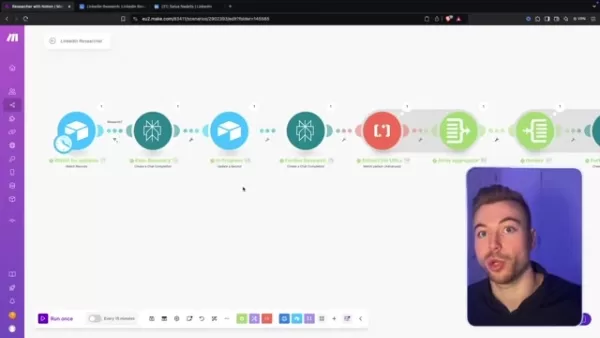
All necessary resources and the blueprint for this integration are provided via the link. Follow these steps to import the blueprint:
- Click the 'Import Blueprint' button.
- Select the file you downloaded from the provided link.
- Upload the JSON file.
- Click 'Save' to complete the process. You'll then have access to the full automation, including pre-defined prompts.
Configuring the Automated LinkedIn Researcher
Step 1: Adding LinkedIn URLs to Airtable
After importing the blueprint into Make, the next step is to provide the system with LinkedIn profiles by adding their URLs to your Airtable base.
- Open your Airtable base.
- Navigate to the LinkedIn URL field.
- Paste the LinkedIn URL of the profile you want to research.

Step 2: Setting the Research Status to Investigate
To initiate the automation for a specific profile, set its research status to 'Investigate.'

- Locate the 'Status' column in your Airtable base.
- Click the dropdown menu for the profile you wish to investigate.
- Select the 'Investigate' option.
This action signals Make to begin gathering information about that particular profile.
Step 3: Monitoring the Automation's Progress
Once you set the status to 'Investigate,' Make automatically starts the research process. You can monitor progress in two ways:

- Airtable Status Updates: The 'Status' column in your Airtable base updates automatically to show the current research stage (e.g., 'In Progress,' 'Done').
- Make Scenario Execution: Within Make, you can view the scenario execution history to see the steps being performed in real-time.
This visibility keeps you informed about the progress and helps ensure everything runs smoothly.
Step 4: Retrieving Insights from Airtable
Once the automation completes, the new data is available within Airtable:
- The automation automatically adds profile overviews, education details, and personal background information, enabling you to develop potential conversation topics and other professional insights.
- Check columns like 'Skills & Expertise,' 'Accomplishments,' and 'Conversation Topics' for actionable information.
- Use the generated insights to prepare for meetings, personalize your networking efforts, and identify new opportunities.
Understanding the Costs: Make, Airtable, ChatGPT, and Perplexity
Cost Considerations
While this automation can greatly enhance your productivity, it's important to understand the potential costs associated with each platform.
- Make: This platform hosts the automation and typically requires a paid account. Check their online pricing page for specific costs.
- Airtable: Airtable charges fees based on your usage requirements. Visit their online pricing page for exact details.
- Perplexity and ChatGPT: Both services charge based on token usage, generally around $0.10 per request. Costs may vary depending on data volume, so monitor your usage carefully.
Weighing the Options: Pros and Cons of AI-Powered LinkedIn Automation
Pros
Time Savings: Automates data collection, eliminating hours of manual research.
Comprehensive Insights: Provides a complete view of potential contacts' backgrounds and expertise.
Consistent Process: Ensures a standardized approach to LinkedIn research.
Improved Engagement: Generates relevant conversation topics to enhance networking and meeting effectiveness.
Accessibility: Makes AI-powered research available to everyone, regardless of technical skill level.
Cons
Cost Considerations: Requires subscriptions to Make, Airtable, and potentially AI platforms.
Data Accuracy: Depends on the accuracy of information available on LinkedIn and other online sources.
Customization Required: May need adjustments to prompts and data extraction methods for specific use cases.
Token Limitations: Constrained by token allowances, and low token counts may limit the amount of information available for future conversations.
Frequently Asked Questions
Can I use other AI platforms besides ChatGPT and Perplexity?
Yes, the Make scenario can be modified to incorporate other AI platforms. However, you'll need to adjust the prompts and data extraction methods accordingly.
How often should I run the automation?
The frequency depends on your specific needs. You can configure the scenario to run at regular intervals (e.g., every 15 minutes) or trigger it manually as required.
Do I need coding experience to use this system?
No, this system is designed for user-friendliness and requires no coding experience. The blueprint provides a ready-to-use workflow that you can customize as needed.
What if I don't have an Airtable or Make account?
You'll need to create accounts on both platforms to use this automation. Free plans are available, but you may need to upgrade to paid plans depending on your usage volume.
Related Questions
What other automations can I create with Make and Airtable?
Make and Airtable are highly versatile platforms suitable for automating various tasks, including: Lead generation: Automatically capture leads from multiple sources and add them to Airtable. Project management: Automate task creation, assignment, and progress tracking. Customer relationship management: Streamline customer communication and data management. E-commerce operations: Automate order fulfillment, inventory management, and customer support. The possibilities are nearly endless, limited only by your imagination. If you can envision a process, you can likely automate it.
Related article
 Stripe to Acquire OpenRouter as AI Model Routing Gains Momentum
Stripe has agreed to acquire OpenRouter, an AI model-routing platform that gives developers access to hundreds of models through a single interface. The deal adds model selection and routing to Stripe’s existing work around AI usage and token-based b
Former OpenAI Researcher Barrett Zoph Returns to Google to Support Gemini Development
Barret Zoph, who previously abruptly left and joined OpenAI due to a disagreement with Thinking Machines Lab CEO Miriam Mularati, has once again changed employers. Alphabet's Google announced that Zoph will return as Vice President of Research, bring
How Recursive Intelligence Raised $335M at $4B Valuation in 4 Months
The co-founders of startup Ricursive Intelligence seemed destined to be co-founders.Anna Goldie, CEO, and Azalia Mirhoseini, CTO, are so well-known in the AI community that they were among those AI engineers who “got those weird emails from Zuckerber
Related Special Topic Recommendations
Design & Art
Stripe to Acquire OpenRouter as AI Model Routing Gains Momentum
Stripe has agreed to acquire OpenRouter, an AI model-routing platform that gives developers access to hundreds of models through a single interface. The deal adds model selection and routing to Stripe’s existing work around AI usage and token-based b
Former OpenAI Researcher Barrett Zoph Returns to Google to Support Gemini Development
Barret Zoph, who previously abruptly left and joined OpenAI due to a disagreement with Thinking Machines Lab CEO Miriam Mularati, has once again changed employers. Alphabet's Google announced that Zoph will return as Vice President of Research, bring
How Recursive Intelligence Raised $335M at $4B Valuation in 4 Months
The co-founders of startup Ricursive Intelligence seemed destined to be co-founders.Anna Goldie, CEO, and Azalia Mirhoseini, CTO, are so well-known in the AI community that they were among those AI engineers who “got those weird emails from Zuckerber
Related Special Topic Recommendations
Design & Art
 Top AI Illustration Tools: Create Editorial Scenes and Cover Art Faster
2026 Latest Top-rated AI Illustration Tools: Our curated list features the best powerfully designed tools for creating stunning editorial scenes and eye-catching cover art quickly. Each option has gone through rigorous real-world tests, offering a free vs paid comparison to help you find the perfect match for your workflow. Try these must-try solutions today to unlock your AI edge and boost your creative productivity. Explore now at XIX.AI.
 10 tools
 xix.ai
Education and Learning
Top AI Tutors for Exam Prep: Practice Math, Science, and English
xix.ai
Education and Learning
Top AI Tutors for Exam Prep: Practice Math, Science, and English
2026 Latest Top-Rated Best AI Tutors for Exam Prep are here on XIX.AI! Our curated list features powerful game-changing tools that offer free vs paid comparison, real-world tests, and weekly updated rankings. They help boost your writing efficiency, simplify complex topic learning, and unlock your academic potential. Explore now to Discover your perfect exam prep tool and Start creating today to Unlock your AI edge!
10 tools
xix.ai
Finance
AI Budget Planning Tools for Personal Money Management
2026 Latest Best Top-Rated AI Budget Planning Tools for Personal Money Management are here on XIX.AI! This curated collection features powerful, game-changing solutions that help you conduct real-world tests, understand spending habits, and create personalized plans to boost productivity. Enjoy a free vs paid comparison along with detailed rankings. Must-try tools designed to simplify money management and unlock your AI edge. Explore now!
11 tools
xix.ai
Health & Wellness
AI Sleep Tracking Assistants: Improve Recovery with Better Bedtime Habits
2026 Latest Best Top-Rated AI Sleep Tracking Assistants curated for ultimate recovery. This fully updated weekly guide features powerful tools that deliver real-world tests, free vs paid comparison, and detailed rankings to help you find the must-try solution that boosts sleep quality and supports better bedtime habits. Explore now at XIX.AI to Unlock your AI edge.
10 tools
xix.ai
Data Analysis
AI SQL Copilots for Product and Revenue Analytics
2026 Latest Best Top-Rated AI SQL Copilots for Product and Revenue Analytics! XIX.AI has curated a powerful, game-changing collection of must-try tools that undergo real-world tests through weekly updated rankings. These tools help users boost productivity significantly by accelerating data analysis, streamlining complex queries, and generating accurate insights to drive smarter business decisions. Explore now to Discover your perfect tool for unlocking your AI edge!
14 tools
xix.ai
Education and Learning
Best AI Homework Helpers That Teach: Learn Concepts, Not Just Answers
2026 Latest Best Top-Rated AI Homework Helpers That Teach Core Concepts Not Just Answers Powerful Tools for Students Must-Try Curated List Weekly Updated Free vs Paid Comparison Real-World Tests Accurate Rankings to Help You Unlock Your Full Learning Potential Explore now to Discover your perfect tool for smarter studying.
10 tools
xix.ai

 Comments (1)
0/500
Comments (1)
0/500
![DouglasMartinez]()
This integration sounds like a game-changer for networking! I've been manually scraping LinkedIn data for my sales leads, and it's such a time sink. The idea of automating analysis with AI and feeding it into Airtable is brilliant. Makes me wonder though, where's the line between smart prep and feeling a bit... invasive? 🤔 Still, the efficiency gains are undeniable. Can't wait to try setting up a similar workflow for my team.
Imagine having a personal assistant who provides detailed insights on anyone you're about to meet. While this level of service was once reserved for the affluent, today's AI tools like ChatGPT and Perplexity, combined with platforms like Make and Airtable, make it accessible to everyone. Learn how to leverage this technology for effective LinkedIn research and more meaningful professional interactions.
Key Points
Automate your LinkedIn research using AI, Make, and Airtable.
Gain in-depth knowledge about potential contacts' backgrounds and areas of expertise.
Store all collected information in Airtable for easy access and future reference.
Generate relevant talking points to improve your networking and meeting outcomes.
Reduce time spent on manual research and enhance overall efficiency.
Revolutionize Your LinkedIn Research with AI Automation
The Power of AI-Driven LinkedIn Research
In today's fast-paced business environment, securing a competitive advantage is crucial. Picture yourself equipped with detailed insights about anyone you plan to meet, whether for business, networking, or personal curiosity. Previously, such comprehensive information was only available to those who could afford personal assistants. Thanks to artificial intelligence, this powerful capability is now available to everyone.
This guide explains how to utilize AI technologies like ChatGPT and Perplexity, along with platforms such as Make and Airtable, to establish an efficient LinkedIn research workflow. This system enables you to collect essential information, create insightful summaries, and develop relevant conversation starters, fundamentally improving how you connect and interact with other professionals.
Introducing Airtable and Make: Your Automation Allies
To build an automated LinkedIn research system, we primarily use two powerful platforms: Airtable and Make. Airtable serves as our central database, where we store, organize, and manage information gathered from LinkedIn profiles. Its flexible hybrid design, combining spreadsheet and database features, makes it ideal for structuring complex data.
Make functions as our automation engine, connecting various services and managing the flow of data between them. We'll use Make to create a scenario that monitors Airtable for updates, triggers AI-powered research, and automatically updates Airtable with the new findings.
By integrating these platforms, you can automate the LinkedIn research process, saving significant time while ensuring a consistent and thorough approach. The best part? This solution is accessible to most business users without requiring advanced coding skills.
The Core Components of Your Automated LinkedIn Research System
This automated system operates through a series of integrated steps designed to deliver comprehensive insights:
- Airtable Watch Trigger: The process begins with Make monitoring your Airtable base for new or modified LinkedIn profile URLs.
- Executive Summary: When a new profile URL is detected, a chat completion generates a high-level overview of the individual.
- In Progress Update: Airtable is updated to indicate that research is underway.
- Further Research: An enhanced chat completion delves deeper into the profile, extracting personal background, expertise, and accomplishments.
- URL Extraction: The system identifies relevant URLs for additional information.
- Array Aggregation: Data from multiple sources is consolidated for consistency.
- Iteration: The system processes each of the extracted URLs.
- Information Aggregation: Data collected from various URLs is combined.
- AI-Powered Formatting: ChatGPT refines the information into digestible conversation points, additional qualities, and a comprehensive summary.
- Airtable Update: Finally, Airtable is updated with all the extracted and AI-processed information, ready for your review and use.
This streamlined process converts raw LinkedIn data into actionable intelligence, giving you a significant advantage in understanding and engaging with your connections.
Step-by-Step Blueprint Import Guide: Access the Automated LinkedIn Research System
Importing the Blueprint
To begin, you'll need to import a pre-configured 'blueprint' into Make. This blueprint contains the complete automation workflow described above, allowing you to start with a fully functional system rather than building from scratch.
All necessary resources and the blueprint for this integration are provided via the link. Follow these steps to import the blueprint:
- Click the 'Import Blueprint' button.
- Select the file you downloaded from the provided link.
- Upload the JSON file.
- Click 'Save' to complete the process. You'll then have access to the full automation, including pre-defined prompts.
Configuring the Automated LinkedIn Researcher
Step 1: Adding LinkedIn URLs to Airtable
After importing the blueprint into Make, the next step is to provide the system with LinkedIn profiles by adding their URLs to your Airtable base.
- Open your Airtable base.
- Navigate to the LinkedIn URL field.
- Paste the LinkedIn URL of the profile you want to research.
Step 2: Setting the Research Status to Investigate
To initiate the automation for a specific profile, set its research status to 'Investigate.'
- Locate the 'Status' column in your Airtable base.
- Click the dropdown menu for the profile you wish to investigate.
- Select the 'Investigate' option.
This action signals Make to begin gathering information about that particular profile.
Step 3: Monitoring the Automation's Progress
Once you set the status to 'Investigate,' Make automatically starts the research process. You can monitor progress in two ways:
- Airtable Status Updates: The 'Status' column in your Airtable base updates automatically to show the current research stage (e.g., 'In Progress,' 'Done').
- Make Scenario Execution: Within Make, you can view the scenario execution history to see the steps being performed in real-time.
This visibility keeps you informed about the progress and helps ensure everything runs smoothly.
Step 4: Retrieving Insights from Airtable
Once the automation completes, the new data is available within Airtable:
- The automation automatically adds profile overviews, education details, and personal background information, enabling you to develop potential conversation topics and other professional insights.
- Check columns like 'Skills & Expertise,' 'Accomplishments,' and 'Conversation Topics' for actionable information.
- Use the generated insights to prepare for meetings, personalize your networking efforts, and identify new opportunities.
Understanding the Costs: Make, Airtable, ChatGPT, and Perplexity
Cost Considerations
While this automation can greatly enhance your productivity, it's important to understand the potential costs associated with each platform.
- Make: This platform hosts the automation and typically requires a paid account. Check their online pricing page for specific costs.
- Airtable: Airtable charges fees based on your usage requirements. Visit their online pricing page for exact details.
- Perplexity and ChatGPT: Both services charge based on token usage, generally around $0.10 per request. Costs may vary depending on data volume, so monitor your usage carefully.
Weighing the Options: Pros and Cons of AI-Powered LinkedIn Automation
Pros
Time Savings: Automates data collection, eliminating hours of manual research.
Comprehensive Insights: Provides a complete view of potential contacts' backgrounds and expertise.
Consistent Process: Ensures a standardized approach to LinkedIn research.
Improved Engagement: Generates relevant conversation topics to enhance networking and meeting effectiveness.
Accessibility: Makes AI-powered research available to everyone, regardless of technical skill level.
Cons
Cost Considerations: Requires subscriptions to Make, Airtable, and potentially AI platforms.
Data Accuracy: Depends on the accuracy of information available on LinkedIn and other online sources.
Customization Required: May need adjustments to prompts and data extraction methods for specific use cases.
Token Limitations: Constrained by token allowances, and low token counts may limit the amount of information available for future conversations.
Frequently Asked Questions
Can I use other AI platforms besides ChatGPT and Perplexity?
Yes, the Make scenario can be modified to incorporate other AI platforms. However, you'll need to adjust the prompts and data extraction methods accordingly.
How often should I run the automation?
The frequency depends on your specific needs. You can configure the scenario to run at regular intervals (e.g., every 15 minutes) or trigger it manually as required.
Do I need coding experience to use this system?
No, this system is designed for user-friendliness and requires no coding experience. The blueprint provides a ready-to-use workflow that you can customize as needed.
What if I don't have an Airtable or Make account?
You'll need to create accounts on both platforms to use this automation. Free plans are available, but you may need to upgrade to paid plans depending on your usage volume.
Related Questions
What other automations can I create with Make and Airtable?
Make and Airtable are highly versatile platforms suitable for automating various tasks, including: Lead generation: Automatically capture leads from multiple sources and add them to Airtable. Project management: Automate task creation, assignment, and progress tracking. Customer relationship management: Streamline customer communication and data management. E-commerce operations: Automate order fulfillment, inventory management, and customer support. The possibilities are nearly endless, limited only by your imagination. If you can envision a process, you can likely automate it.








 Stripe to Acquire OpenRouter as AI Model Routing Gains Momentum
Stripe has agreed to acquire OpenRouter, an AI model-routing platform that gives developers access to hundreds of models through a single interface. The deal adds model selection and routing to Stripe’s existing work around AI usage and token-based b
Stripe to Acquire OpenRouter as AI Model Routing Gains Momentum
Stripe has agreed to acquire OpenRouter, an AI model-routing platform that gives developers access to hundreds of models through a single interface. The deal adds model selection and routing to Stripe’s existing work around AI usage and token-based b
 Former OpenAI Researcher Barrett Zoph Returns to Google to Support Gemini Development
Barret Zoph, who previously abruptly left and joined OpenAI due to a disagreement with Thinking Machines Lab CEO Miriam Mularati, has once again changed employers. Alphabet's Google announced that Zoph will return as Vice President of Research, bring
Former OpenAI Researcher Barrett Zoph Returns to Google to Support Gemini Development
Barret Zoph, who previously abruptly left and joined OpenAI due to a disagreement with Thinking Machines Lab CEO Miriam Mularati, has once again changed employers. Alphabet's Google announced that Zoph will return as Vice President of Research, bring
 How Recursive Intelligence Raised $335M at $4B Valuation in 4 Months
The co-founders of startup Ricursive Intelligence seemed destined to be co-founders.Anna Goldie, CEO, and Azalia Mirhoseini, CTO, are so well-known in the AI community that they were among those AI engineers who “got those weird emails from Zuckerber
How Recursive Intelligence Raised $335M at $4B Valuation in 4 Months
The co-founders of startup Ricursive Intelligence seemed destined to be co-founders.Anna Goldie, CEO, and Azalia Mirhoseini, CTO, are so well-known in the AI community that they were among those AI engineers who “got those weird emails from Zuckerber

2026 Latest Top-rated AI Illustration Tools: Our curated list features the best powerfully designed tools for creating stunning editorial scenes and eye-catching cover art quickly. Each option has gone through rigorous real-world tests, offering a free vs paid comparison to help you find the perfect match for your workflow. Try these must-try solutions today to unlock your AI edge and boost your creative productivity. Explore now at XIX.AI.
10 tools
xix.ai

2026 Latest Top-Rated Best AI Tutors for Exam Prep are here on XIX.AI! Our curated list features powerful game-changing tools that offer free vs paid comparison, real-world tests, and weekly updated rankings. They help boost your writing efficiency, simplify complex topic learning, and unlock your academic potential. Explore now to Discover your perfect exam prep tool and Start creating today to Unlock your AI edge!
10 tools
xix.ai

2026 Latest Best Top-Rated AI Budget Planning Tools for Personal Money Management are here on XIX.AI! This curated collection features powerful, game-changing solutions that help you conduct real-world tests, understand spending habits, and create personalized plans to boost productivity. Enjoy a free vs paid comparison along with detailed rankings. Must-try tools designed to simplify money management and unlock your AI edge. Explore now!
11 tools
xix.ai

2026 Latest Best Top-Rated AI Sleep Tracking Assistants curated for ultimate recovery. This fully updated weekly guide features powerful tools that deliver real-world tests, free vs paid comparison, and detailed rankings to help you find the must-try solution that boosts sleep quality and supports better bedtime habits. Explore now at XIX.AI to Unlock your AI edge.
10 tools
xix.ai

2026 Latest Best Top-Rated AI SQL Copilots for Product and Revenue Analytics! XIX.AI has curated a powerful, game-changing collection of must-try tools that undergo real-world tests through weekly updated rankings. These tools help users boost productivity significantly by accelerating data analysis, streamlining complex queries, and generating accurate insights to drive smarter business decisions. Explore now to Discover your perfect tool for unlocking your AI edge!
14 tools
xix.ai

2026 Latest Best Top-Rated AI Homework Helpers That Teach Core Concepts Not Just Answers Powerful Tools for Students Must-Try Curated List Weekly Updated Free vs Paid Comparison Real-World Tests Accurate Rankings to Help You Unlock Your Full Learning Potential Explore now to Discover your perfect tool for smarter studying.
10 tools
xix.ai

This integration sounds like a game-changer for networking! I've been manually scraping LinkedIn data for my sales leads, and it's such a time sink. The idea of automating analysis with AI and feeding it into Airtable is brilliant. Makes me wonder though, where's the line between smart prep and feeling a bit... invasive? 🤔 Still, the efficiency gains are undeniable. Can't wait to try setting up a similar workflow for my team.












