


 Home
HomeAI Tool Crafts Amusing Coffee Mug Designs for Automated Entertainment
Unlock your creative potential and step into the world of automated design with AI-powered joke generators and workflow automation. This guide offers an in-depth look at crafting hilarious and original coffee mug designs using artificial intelligence, covering joke creation, image generation, and seamless workflow integration. It’s an ideal resource for entrepreneurs, designers, or anyone wanting to infuse humor into their product offerings.
Key Points
Learn how to use AI joke generators to craft unique and amusing content for coffee mugs.
Discover how workflow automation tools like Make.com can streamline the entire design process.
Explore AI image creation platforms to produce attractive graphics that pair perfectly with your jokes.
Gain an understanding of integrating joke generation, image creation, and product design into a single, automated workflow.
Find inspiration and actionable steps to create and sell funny coffee mugs by leveraging AI and automation.
The Rise of AI in Creative Design
AI: A Creative Partner?
Artificial Intelligence is rapidly reshaping industries, and the creative field is no exception. Modern AI tools go beyond simple tasks, now aiding in generating innovative ideas, crafting visually stunning graphics, and optimizing complex workflows. This fusion of AI with human creativity unlocks new possibilities for artists, designers, and business owners. By adopting AI, professionals can enhance productivity, discover new creative avenues, and develop personalized products that truly connect with their audience.
The era of automated creativity is reshaping the market. From generating marketing copy to designing entire product lines, AI-powered tools offer a substantial edge in a competitive environment. This shift allows businesses to scale their creative output and concentrate on strategic decisions while AI manages repetitive and time-intensive tasks.
Keywords: AI, creative design, automation, innovation, artificial intelligence.
Why Funny Coffee Mugs?
The market for humorous coffee mugs is strong and consistently popular. People enjoy expressing their personality, sense of humor, and interests through everyday items like mugs. A clever, well-designed mug can spark conversation, brighten someone's day, or serve as a perfect gift. This demand for customized, unique items has driven significant growth in the print-on-demand (POD) sector, making it an appealing niche for online entrepreneurs.
Print-on-demand coffee mugs offer a low-risk entry point into e-commerce. Since items are only produced after an order is placed, there's no need for large inventory investments or complex logistics. The POD model, combined with AI automation, dramatically lowers the barrier to entry, making it accessible for individuals with great ideas but limited capital.
Keywords: coffee mugs, print-on-demand, e-commerce, customization, POD.
Building Your Automated Funny Coffee Mug Design Workflow
Step 1: Setting Up Your Make.com Account
Your first step is to create an account with Make.com, a powerful workflow automation platform.
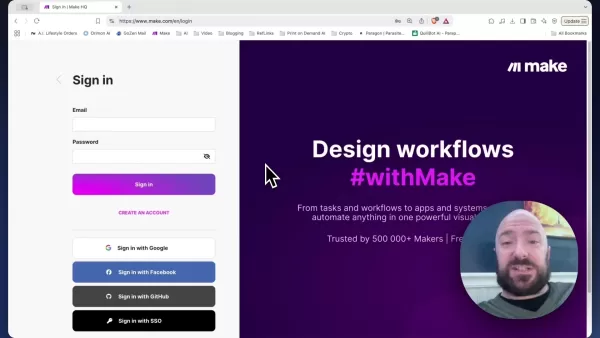
Make.com lets you visually design and automate tasks between different apps and services, requiring no coding knowledge. Think of it as a digital assistant that links your AI tools, joke generators, and design platforms, creating a smooth journey from concept to final product.
- Visit Make.com: Go to the Make.com website.
- Sign Up: Create an account using your email, Google, Facebook, GitHub, or SSO. The platform offers several plans, including a free tier suitable for testing and small projects.
- Familiarize Yourself with the Interface: After signing up, spend some time exploring the Make.com dashboard. Learn the layout, key terms (like scenarios, modules, connections), and available features. This will build a solid foundation for constructing your automated workflow.
Keywords: Make.com, workflow automation, account setup, dashboard, scenarios.
Step 2: Importing the Joke Generator Blueprint
Once your Make.com account is ready, the next step is to import a pre-built blueprint designed for joke generation. This blueprint contains a ready-made workflow that connects to an AI joke generator, saving you the effort of building the scenario from the ground up.
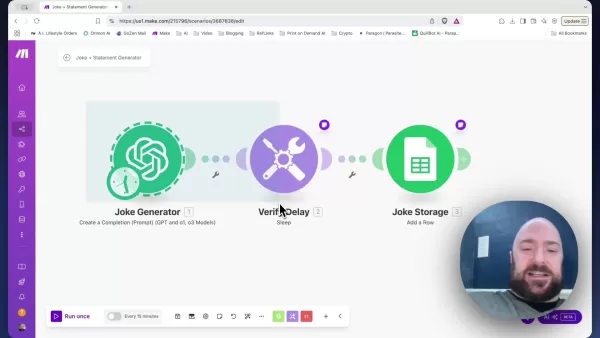
Importing a blueprint establishes the basic structure and modules you need for generating and storing jokes.
- Create a New Scenario: In your Make.com dashboard, click the 'Create a new scenario' button.
- Import Blueprint: At the bottom of the scenario designer, you'll see several icons. Click on the three dots (More) and select 'Import blueprint'.
- Choose File: A dialog box will appear, asking you to select a JSON file. Locate the 'Joke Statement Generator Segment.json' file on your computer.
- Save: After choosing the file, click 'Save'. This will import the blueprint into your scenario designer.
Keywords: Make.com, blueprint, import, JSON, scenario designer, joke generator.
Step 3: Adding the Coffee Mug Generator Blueprint
To automate the coffee mug design process, you need to integrate an AI image generation module with your joke generator. This involves importing another blueprint that connects to an AI image service like Ideogram.
This blueprint takes the generated joke and creates a visually appealing design suitable for printing on a coffee mug.
- Create a New Scenario: In your Make.com dashboard, click the 'Create a new scenario' button.
- Import Blueprint: At the bottom of the scenario designer, click the three dots (More) and select 'Import blueprint'.
- Choose File: A dialog box will appear, prompting you to choose a JSON file. Locate the 'Coffee Mug Generator (Ideogram).json' file on your computer.
- Save: After selecting the file, click 'Save'. This will import the coffee mug generator blueprint into your scenario designer.
Keywords: Make.com, blueprint, import, JSON, scenario designer, coffee mug generator, Ideogram.
Step 4: Connecting Joke Generator with Ideogram for Visual Designs
To bring your funny coffee mug ideas to life, you must connect your joke generator to an AI image platform like Ideogram.
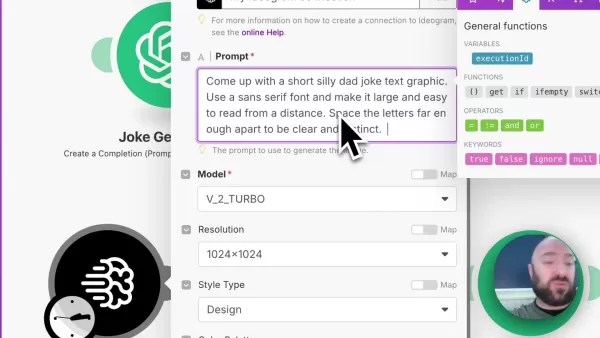
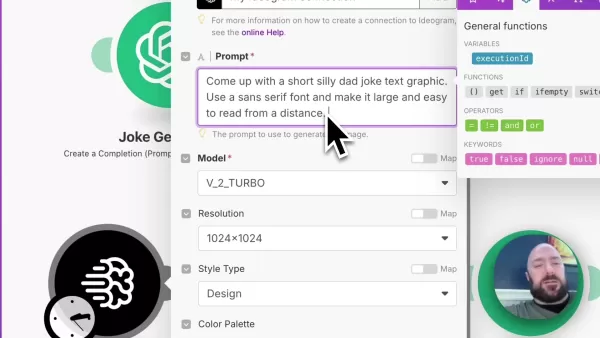
This step involves configuring Ideogram to produce attractive images that complement your jokes effectively.
- Create an Ideogram Connection: Set up your connection to Ideogram.
- Configure the Ideogram Module: Within the Ideogram module settings, define the parameters for image creation. This includes specifying the model, resolution, style, color palette, and advanced prompt options. Ensure these settings match the aesthetic you desire for your mugs.
- Craft the Prompt: The most critical element is the prompt. To make image generation relevant, construct a prompt that uses the output from your joke generator. Employ the required syntax in the prompt field. Additionally, specify that the image should use a sans serif font, be large and legible from a distance, with well-spaced letters for clarity. You can also include other descriptive terms to guide the image generation effectively.
Keywords: Ideogram, AI image generation, connection, prompt, model, resolution, style, color palette.
How to Use The Automated Workflow
Activating and Running Your Scenario
With your workflow fully set up and integrated, the next step is to activate and run the scenario. This will start the automated process, generating jokes, creating matching images, and preparing your coffee mug designs.
- Save Your Scenario: Click the Save icon to store all your configurations.
- Run Once: Click the 'Run once' button at the bottom left of the screen. This will manually trigger the scenario to execute.
Keywords: Make.com, scenario, activate, run, trigger, execute, automated process.
Pricing
Make.com Pricing
Make.com provides a variety of plans to meet different needs, from individual users to large companies. Here’s a quick summary:
- Free Plan: Ideal for beginners, offering a limited number of operations per month.
- Core Plan: Starts at $10.59 monthly, providing more operations and extra features.
- Pro Plan: Offers advanced capabilities and higher operation limits, suitable for growing businesses.
- Enterprise Plan: Custom solutions with dedicated support and scalability for large organizations.
For detailed pricing, please visit the Make.com pricing page.
Ideogram Pricing
Ideogram's pricing depends on the number of images you want to generate and the level of detail required. Free plans with limited usage are often available, while subscription plans offer more image generations and advanced features. Check the Ideogram website for current pricing details.
Pros and Cons
Pros
Significant boost in efficiency and productivity
Reduced design costs
Easily scalable design output
Access to a broad library of unique designs
Cons
Risk of generic or repetitive designs
Reliance on the accuracy of AI tools
Requires human oversight to ensure quality and appropriateness
Initial setup and integration can be complex
Core Features
Make.com Key Features
- Visual Scenario Builder: Design automated workflows using an intuitive drag-and-drop interface.
- Multi-App Integration: Connects with thousands of applications and services for versatile automation.
- Real-Time Monitoring: Track scenario executions and identify potential issues as they happen.
- Customizable Modules: Build custom modules to tailor the platform to your specific needs.
Ideogram Key Features
- AI-Powered Image Generation: Produces high-quality images from text descriptions.
- Customizable Styles: Creates images in various styles, from realistic to artistic.
- Text Integration: Seamlessly incorporates text into images for dynamic designs.
- High Resolution Output: Delivers images ready for both print and digital use.
Use Cases
Who Can Benefit from This Workflow?
- E-commerce Entrepreneurs: Quickly and efficiently create unique product designs.
- Print-on-Demand Businesses: Automate the design process for mugs and other customizable items.
- Marketing Professionals: Generate engaging visual content for social media and advertising campaigns.
- Creative Designers: Explore new creative possibilities and optimize their design workflow.
FAQ
Is coding experience required to use Make.com?
No, Make.com uses a visual, no-code interface, making it accessible to users without any programming background.
Can I use other AI image generators besides Ideogram?
Yes, Make.com supports integration with various AI image platforms. You can modify the workflow to use alternatives like DALL-E, Midjourney, or Stable Diffusion.
What if the joke generated is not appropriate?
AI joke generators can sometimes produce inappropriate content. It's crucial to implement content filters and review steps in your workflow to ensure the jokes are suitable for your intended audience.
Related Questions
How can I ensure the coffee mug designs are unique?
To maintain uniqueness, experiment with different prompts, styles, and settings in your AI image generation. Regularly refresh your joke sources and keep an eye on trends. Adding your own creative input to the AI-generated content is another great way to create distinctive designs.
Related article
 Ctrip Business Travel Unveils AI Ecosystem with 7 Industry Agents and 17 Core Capabilities
Ctrip Business Travel has officially unveiled the "Ctrip Business Travel AI Ecosystem," leveraging large language models to fundamentally restructure corporate travel management. This comprehensive ecosystem addresses four core scenarios: travel arra
Stripe to Acquire OpenRouter as AI Model Routing Gains Momentum
Stripe has agreed to acquire OpenRouter, an AI model-routing platform that gives developers access to hundreds of models through a single interface. The deal adds model selection and routing to Stripe’s existing work around AI usage and token-based b
Former OpenAI Researcher Barrett Zoph Returns to Google to Support Gemini Development
Barret Zoph, who previously abruptly left and joined OpenAI due to a disagreement with Thinking Machines Lab CEO Miriam Mularati, has once again changed employers. Alphabet's Google announced that Zoph will return as Vice President of Research, bring
Related Special Topic Recommendations
Design & Art
Ctrip Business Travel Unveils AI Ecosystem with 7 Industry Agents and 17 Core Capabilities
Ctrip Business Travel has officially unveiled the "Ctrip Business Travel AI Ecosystem," leveraging large language models to fundamentally restructure corporate travel management. This comprehensive ecosystem addresses four core scenarios: travel arra
Stripe to Acquire OpenRouter as AI Model Routing Gains Momentum
Stripe has agreed to acquire OpenRouter, an AI model-routing platform that gives developers access to hundreds of models through a single interface. The deal adds model selection and routing to Stripe’s existing work around AI usage and token-based b
Former OpenAI Researcher Barrett Zoph Returns to Google to Support Gemini Development
Barret Zoph, who previously abruptly left and joined OpenAI due to a disagreement with Thinking Machines Lab CEO Miriam Mularati, has once again changed employers. Alphabet's Google announced that Zoph will return as Vice President of Research, bring
Related Special Topic Recommendations
Design & Art
 Top AI Illustration Tools: Create Editorial Scenes and Cover Art Faster
2026 Latest Top-rated AI Illustration Tools: Our curated list features the best powerfully designed tools for creating stunning editorial scenes and eye-catching cover art quickly. Each option has gone through rigorous real-world tests, offering a free vs paid comparison to help you find the perfect match for your workflow. Try these must-try solutions today to unlock your AI edge and boost your creative productivity. Explore now at XIX.AI.
 10 tools
 xix.ai
Education and Learning
Top AI Tutors for Exam Prep: Practice Math, Science, and English
xix.ai
Education and Learning
Top AI Tutors for Exam Prep: Practice Math, Science, and English
2026 Latest Top-Rated Best AI Tutors for Exam Prep are here on XIX.AI! Our curated list features powerful game-changing tools that offer free vs paid comparison, real-world tests, and weekly updated rankings. They help boost your writing efficiency, simplify complex topic learning, and unlock your academic potential. Explore now to Discover your perfect exam prep tool and Start creating today to Unlock your AI edge!
10 tools
xix.ai
Finance
AI Budget Planning Tools for Personal Money Management
2026 Latest Best Top-Rated AI Budget Planning Tools for Personal Money Management are here on XIX.AI! This curated collection features powerful, game-changing solutions that help you conduct real-world tests, understand spending habits, and create personalized plans to boost productivity. Enjoy a free vs paid comparison along with detailed rankings. Must-try tools designed to simplify money management and unlock your AI edge. Explore now!
11 tools
xix.ai
Health & Wellness
AI Sleep Tracking Assistants: Improve Recovery with Better Bedtime Habits
2026 Latest Best Top-Rated AI Sleep Tracking Assistants curated for ultimate recovery. This fully updated weekly guide features powerful tools that deliver real-world tests, free vs paid comparison, and detailed rankings to help you find the must-try solution that boosts sleep quality and supports better bedtime habits. Explore now at XIX.AI to Unlock your AI edge.
10 tools
xix.ai
Data Analysis
AI SQL Copilots for Product and Revenue Analytics
2026 Latest Best Top-Rated AI SQL Copilots for Product and Revenue Analytics! XIX.AI has curated a powerful, game-changing collection of must-try tools that undergo real-world tests through weekly updated rankings. These tools help users boost productivity significantly by accelerating data analysis, streamlining complex queries, and generating accurate insights to drive smarter business decisions. Explore now to Discover your perfect tool for unlocking your AI edge!
14 tools
xix.ai
Education and Learning
Best AI Homework Helpers That Teach: Learn Concepts, Not Just Answers
2026 Latest Best Top-Rated AI Homework Helpers That Teach Core Concepts Not Just Answers Powerful Tools for Students Must-Try Curated List Weekly Updated Free vs Paid Comparison Real-World Tests Accurate Rankings to Help You Unlock Your Full Learning Potential Explore now to Discover your perfect tool for smarter studying.
10 tools
xix.ai

 Comments (2)
0/500
Comments (2)
0/500
![LiamWalker]()
The idea of generating mug designs via AI sounds like a cool side project! 😂 Might be a neat way to design gifts for tech-savvy friends. I'm curious though - could this type of tool eventually oversaturate the creative market? Makes you wonder if we'll all be using AI for random novelty items in a few years.
![BruceWilliams]()
Haha, this is such a fun and weird use of AI! 😂 Who knew we'd be using machine learning to design joke mugs? It does make me wonder though... is this the creative freedom of tomorrow, or are we just automating silliness? Still, I'd probably buy one for my desk!
Unlock your creative potential and step into the world of automated design with AI-powered joke generators and workflow automation. This guide offers an in-depth look at crafting hilarious and original coffee mug designs using artificial intelligence, covering joke creation, image generation, and seamless workflow integration. It’s an ideal resource for entrepreneurs, designers, or anyone wanting to infuse humor into their product offerings.
Key Points
Learn how to use AI joke generators to craft unique and amusing content for coffee mugs.
Discover how workflow automation tools like Make.com can streamline the entire design process.
Explore AI image creation platforms to produce attractive graphics that pair perfectly with your jokes.
Gain an understanding of integrating joke generation, image creation, and product design into a single, automated workflow.
Find inspiration and actionable steps to create and sell funny coffee mugs by leveraging AI and automation.
The Rise of AI in Creative Design
AI: A Creative Partner?
Artificial Intelligence is rapidly reshaping industries, and the creative field is no exception. Modern AI tools go beyond simple tasks, now aiding in generating innovative ideas, crafting visually stunning graphics, and optimizing complex workflows. This fusion of AI with human creativity unlocks new possibilities for artists, designers, and business owners. By adopting AI, professionals can enhance productivity, discover new creative avenues, and develop personalized products that truly connect with their audience.
The era of automated creativity is reshaping the market. From generating marketing copy to designing entire product lines, AI-powered tools offer a substantial edge in a competitive environment. This shift allows businesses to scale their creative output and concentrate on strategic decisions while AI manages repetitive and time-intensive tasks.
Keywords: AI, creative design, automation, innovation, artificial intelligence.
Why Funny Coffee Mugs?
The market for humorous coffee mugs is strong and consistently popular. People enjoy expressing their personality, sense of humor, and interests through everyday items like mugs. A clever, well-designed mug can spark conversation, brighten someone's day, or serve as a perfect gift. This demand for customized, unique items has driven significant growth in the print-on-demand (POD) sector, making it an appealing niche for online entrepreneurs.
Print-on-demand coffee mugs offer a low-risk entry point into e-commerce. Since items are only produced after an order is placed, there's no need for large inventory investments or complex logistics. The POD model, combined with AI automation, dramatically lowers the barrier to entry, making it accessible for individuals with great ideas but limited capital.
Keywords: coffee mugs, print-on-demand, e-commerce, customization, POD.
Building Your Automated Funny Coffee Mug Design Workflow
Step 1: Setting Up Your Make.com Account
Your first step is to create an account with Make.com, a powerful workflow automation platform.
Make.com lets you visually design and automate tasks between different apps and services, requiring no coding knowledge. Think of it as a digital assistant that links your AI tools, joke generators, and design platforms, creating a smooth journey from concept to final product.
- Visit Make.com: Go to the Make.com website.
- Sign Up: Create an account using your email, Google, Facebook, GitHub, or SSO. The platform offers several plans, including a free tier suitable for testing and small projects.
- Familiarize Yourself with the Interface: After signing up, spend some time exploring the Make.com dashboard. Learn the layout, key terms (like scenarios, modules, connections), and available features. This will build a solid foundation for constructing your automated workflow.
Keywords: Make.com, workflow automation, account setup, dashboard, scenarios.
Step 2: Importing the Joke Generator Blueprint
Once your Make.com account is ready, the next step is to import a pre-built blueprint designed for joke generation. This blueprint contains a ready-made workflow that connects to an AI joke generator, saving you the effort of building the scenario from the ground up.
Importing a blueprint establishes the basic structure and modules you need for generating and storing jokes.
- Create a New Scenario: In your Make.com dashboard, click the 'Create a new scenario' button.
- Import Blueprint: At the bottom of the scenario designer, you'll see several icons. Click on the three dots (More) and select 'Import blueprint'.
- Choose File: A dialog box will appear, asking you to select a JSON file. Locate the 'Joke Statement Generator Segment.json' file on your computer.
- Save: After choosing the file, click 'Save'. This will import the blueprint into your scenario designer.
Keywords: Make.com, blueprint, import, JSON, scenario designer, joke generator.
Step 3: Adding the Coffee Mug Generator Blueprint
To automate the coffee mug design process, you need to integrate an AI image generation module with your joke generator. This involves importing another blueprint that connects to an AI image service like Ideogram.
This blueprint takes the generated joke and creates a visually appealing design suitable for printing on a coffee mug.
- Create a New Scenario: In your Make.com dashboard, click the 'Create a new scenario' button.
- Import Blueprint: At the bottom of the scenario designer, click the three dots (More) and select 'Import blueprint'.
- Choose File: A dialog box will appear, prompting you to choose a JSON file. Locate the 'Coffee Mug Generator (Ideogram).json' file on your computer.
- Save: After selecting the file, click 'Save'. This will import the coffee mug generator blueprint into your scenario designer.
Keywords: Make.com, blueprint, import, JSON, scenario designer, coffee mug generator, Ideogram.
Step 4: Connecting Joke Generator with Ideogram for Visual Designs
To bring your funny coffee mug ideas to life, you must connect your joke generator to an AI image platform like Ideogram.
This step involves configuring Ideogram to produce attractive images that complement your jokes effectively.
- Create an Ideogram Connection: Set up your connection to Ideogram.
- Configure the Ideogram Module: Within the Ideogram module settings, define the parameters for image creation. This includes specifying the model, resolution, style, color palette, and advanced prompt options. Ensure these settings match the aesthetic you desire for your mugs.
- Craft the Prompt: The most critical element is the prompt. To make image generation relevant, construct a prompt that uses the output from your joke generator. Employ the required syntax in the prompt field. Additionally, specify that the image should use a sans serif font, be large and legible from a distance, with well-spaced letters for clarity. You can also include other descriptive terms to guide the image generation effectively.
Keywords: Ideogram, AI image generation, connection, prompt, model, resolution, style, color palette.
How to Use The Automated Workflow
Activating and Running Your Scenario
With your workflow fully set up and integrated, the next step is to activate and run the scenario. This will start the automated process, generating jokes, creating matching images, and preparing your coffee mug designs.
- Save Your Scenario: Click the Save icon to store all your configurations.
- Run Once: Click the 'Run once' button at the bottom left of the screen. This will manually trigger the scenario to execute.
Keywords: Make.com, scenario, activate, run, trigger, execute, automated process.
Pricing
Make.com Pricing
Make.com provides a variety of plans to meet different needs, from individual users to large companies. Here’s a quick summary:
- Free Plan: Ideal for beginners, offering a limited number of operations per month.
- Core Plan: Starts at $10.59 monthly, providing more operations and extra features.
- Pro Plan: Offers advanced capabilities and higher operation limits, suitable for growing businesses.
- Enterprise Plan: Custom solutions with dedicated support and scalability for large organizations.
For detailed pricing, please visit the Make.com pricing page.
Ideogram Pricing
Ideogram's pricing depends on the number of images you want to generate and the level of detail required. Free plans with limited usage are often available, while subscription plans offer more image generations and advanced features. Check the Ideogram website for current pricing details.
Pros and Cons
Pros
Significant boost in efficiency and productivity
Reduced design costs
Easily scalable design output
Access to a broad library of unique designs
Cons
Risk of generic or repetitive designs
Reliance on the accuracy of AI tools
Requires human oversight to ensure quality and appropriateness
Initial setup and integration can be complex
Core Features
Make.com Key Features
- Visual Scenario Builder: Design automated workflows using an intuitive drag-and-drop interface.
- Multi-App Integration: Connects with thousands of applications and services for versatile automation.
- Real-Time Monitoring: Track scenario executions and identify potential issues as they happen.
- Customizable Modules: Build custom modules to tailor the platform to your specific needs.
Ideogram Key Features
- AI-Powered Image Generation: Produces high-quality images from text descriptions.
- Customizable Styles: Creates images in various styles, from realistic to artistic.
- Text Integration: Seamlessly incorporates text into images for dynamic designs.
- High Resolution Output: Delivers images ready for both print and digital use.
Use Cases
Who Can Benefit from This Workflow?
- E-commerce Entrepreneurs: Quickly and efficiently create unique product designs.
- Print-on-Demand Businesses: Automate the design process for mugs and other customizable items.
- Marketing Professionals: Generate engaging visual content for social media and advertising campaigns.
- Creative Designers: Explore new creative possibilities and optimize their design workflow.
FAQ
Is coding experience required to use Make.com?
No, Make.com uses a visual, no-code interface, making it accessible to users without any programming background.
Can I use other AI image generators besides Ideogram?
Yes, Make.com supports integration with various AI image platforms. You can modify the workflow to use alternatives like DALL-E, Midjourney, or Stable Diffusion.
What if the joke generated is not appropriate?
AI joke generators can sometimes produce inappropriate content. It's crucial to implement content filters and review steps in your workflow to ensure the jokes are suitable for your intended audience.
Related Questions
How can I ensure the coffee mug designs are unique?
To maintain uniqueness, experiment with different prompts, styles, and settings in your AI image generation. Regularly refresh your joke sources and keep an eye on trends. Adding your own creative input to the AI-generated content is another great way to create distinctive designs.








 Ctrip Business Travel Unveils AI Ecosystem with 7 Industry Agents and 17 Core Capabilities
Ctrip Business Travel has officially unveiled the "Ctrip Business Travel AI Ecosystem," leveraging large language models to fundamentally restructure corporate travel management. This comprehensive ecosystem addresses four core scenarios: travel arra
Ctrip Business Travel Unveils AI Ecosystem with 7 Industry Agents and 17 Core Capabilities
Ctrip Business Travel has officially unveiled the "Ctrip Business Travel AI Ecosystem," leveraging large language models to fundamentally restructure corporate travel management. This comprehensive ecosystem addresses four core scenarios: travel arra
 Stripe to Acquire OpenRouter as AI Model Routing Gains Momentum
Stripe has agreed to acquire OpenRouter, an AI model-routing platform that gives developers access to hundreds of models through a single interface. The deal adds model selection and routing to Stripe’s existing work around AI usage and token-based b
Stripe to Acquire OpenRouter as AI Model Routing Gains Momentum
Stripe has agreed to acquire OpenRouter, an AI model-routing platform that gives developers access to hundreds of models through a single interface. The deal adds model selection and routing to Stripe’s existing work around AI usage and token-based b
 Former OpenAI Researcher Barrett Zoph Returns to Google to Support Gemini Development
Barret Zoph, who previously abruptly left and joined OpenAI due to a disagreement with Thinking Machines Lab CEO Miriam Mularati, has once again changed employers. Alphabet's Google announced that Zoph will return as Vice President of Research, bring
Former OpenAI Researcher Barrett Zoph Returns to Google to Support Gemini Development
Barret Zoph, who previously abruptly left and joined OpenAI due to a disagreement with Thinking Machines Lab CEO Miriam Mularati, has once again changed employers. Alphabet's Google announced that Zoph will return as Vice President of Research, bring

2026 Latest Top-rated AI Illustration Tools: Our curated list features the best powerfully designed tools for creating stunning editorial scenes and eye-catching cover art quickly. Each option has gone through rigorous real-world tests, offering a free vs paid comparison to help you find the perfect match for your workflow. Try these must-try solutions today to unlock your AI edge and boost your creative productivity. Explore now at XIX.AI.
10 tools
xix.ai

2026 Latest Top-Rated Best AI Tutors for Exam Prep are here on XIX.AI! Our curated list features powerful game-changing tools that offer free vs paid comparison, real-world tests, and weekly updated rankings. They help boost your writing efficiency, simplify complex topic learning, and unlock your academic potential. Explore now to Discover your perfect exam prep tool and Start creating today to Unlock your AI edge!
10 tools
xix.ai

2026 Latest Best Top-Rated AI Budget Planning Tools for Personal Money Management are here on XIX.AI! This curated collection features powerful, game-changing solutions that help you conduct real-world tests, understand spending habits, and create personalized plans to boost productivity. Enjoy a free vs paid comparison along with detailed rankings. Must-try tools designed to simplify money management and unlock your AI edge. Explore now!
11 tools
xix.ai

2026 Latest Best Top-Rated AI Sleep Tracking Assistants curated for ultimate recovery. This fully updated weekly guide features powerful tools that deliver real-world tests, free vs paid comparison, and detailed rankings to help you find the must-try solution that boosts sleep quality and supports better bedtime habits. Explore now at XIX.AI to Unlock your AI edge.
10 tools
xix.ai

2026 Latest Best Top-Rated AI SQL Copilots for Product and Revenue Analytics! XIX.AI has curated a powerful, game-changing collection of must-try tools that undergo real-world tests through weekly updated rankings. These tools help users boost productivity significantly by accelerating data analysis, streamlining complex queries, and generating accurate insights to drive smarter business decisions. Explore now to Discover your perfect tool for unlocking your AI edge!
14 tools
xix.ai

2026 Latest Best Top-Rated AI Homework Helpers That Teach Core Concepts Not Just Answers Powerful Tools for Students Must-Try Curated List Weekly Updated Free vs Paid Comparison Real-World Tests Accurate Rankings to Help You Unlock Your Full Learning Potential Explore now to Discover your perfect tool for smarter studying.
10 tools
xix.ai

The idea of generating mug designs via AI sounds like a cool side project! 😂 Might be a neat way to design gifts for tech-savvy friends. I'm curious though - could this type of tool eventually oversaturate the creative market? Makes you wonder if we'll all be using AI for random novelty items in a few years.
Haha, this is such a fun and weird use of AI! 😂 Who knew we'd be using machine learning to design joke mugs? It does make me wonder though... is this the creative freedom of tomorrow, or are we just automating silliness? Still, I'd probably buy one for my desk!












