


 Home
HomeAI-Powered 3D Motion Capture: The Complete Guide
Artificial intelligence is fundamentally transforming 3D animation and game development, especially in the realm of motion capture. AI-powered tools now empower animators and developers to produce realistic, expressive character movements with unprecedented efficiency. This article explores the application of AI for capturing both body motion and facial expressions, detailing various software solutions and production workflows. Discover how AI is ushering in a new era for 3D animation.
Key Points
AI makes 3D motion capture for body and facial movements highly accessible and efficient.
Software such as Character Creator 4, Blender, Maya, and iClone 8 incorporate advanced AI motion capture capabilities.
Standard webcams and MP4 video files can serve as input sources for AI-driven motion capture.
AI significantly accelerates animation workflows, simplifying the process of converting motion data into ready-to-use animations.
The Freedom Arts 3D website provides tutorials and resources dedicated to AI-driven 3D modeling, animation, and game development.
The Rise of AI in 3D Motion Capture
What is 3D Motion Capture?
3D motion capture, or mocap, involves recording the movement of objects or people and applying that data to animate digital characters. Historically, this process demanded expensive specialized suits and camera systems. AI is revolutionizing this field by making motion capture more affordable and widely available. It drastically reduces reliance on bulky equipment or dedicated studio setups, enabling capture sessions in flexible environments. These innovations allow independent creators and smaller studios to achieve high-quality animations that once required substantial budgets and resources. As AI models evolve, we can anticipate even more realistic and detailed motion capture results.
Why Use AI for Motion Capture?
Adopting AI for motion capture brings several key benefits. Its improved accessibility stands out, as AI tools often work with common hardware like webcams, opening the technology to a broader audience. Efficiency is another major advantage; AI algorithms can automatically clean and refine motion data, minimizing the manual cleanup animators traditionally perform. Furthermore, the realism of animations is enhanced because AI models are trained on extensive datasets of human movement, yielding more natural and believable character motions. For studios seeking to produce superior animation quickly and cost-effectively, AI motion capture offers a powerful solution. Its streamlined processes and reduced manual input are crucial for optimizing production timelines and creative results.
Benefits of AI in Motion Capture:
- Reduced Cost: Lowering initial investment and operational expenses.
- Faster Turnaround: Accelerating animation projects with efficient processing.
- Enhanced Accuracy: Creating more believable and natural character movements.
- Simplified Workflow: Making motion capture accessible to more creators.
Software and Tools for AI-Powered Motion Capture
Character Creator 4: A Comprehensive Character Design and Animation Tool
Character Creator 4 is a robust character design and animation application developed by Reallusion
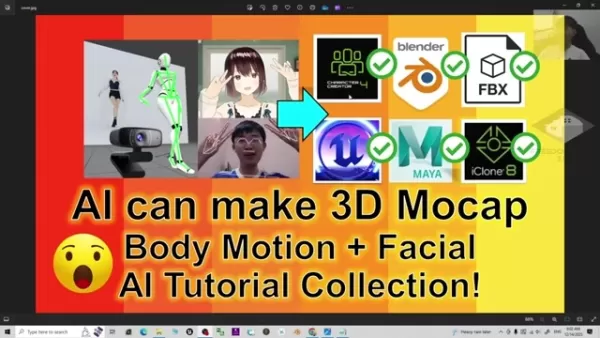
. It enables users to craft realistic and stylized 3D characters, customize their looks, and animate them effortlessly. The software integrates smoothly with industry standards like Unreal Engine, Blender, Maya, and iClone 8, proving its versatility across different animation pipelines. With its extensive asset library, user-friendly interface, and advanced animation tools, it suits both novices and seasoned professionals. Character Creator 4 includes powerful AI-driven features for facial and body motion capture, enabling animation creation directly from webcam feeds or MP4 videos.
Key features of Character Creator 4:
- Character Generation: Customizable character models with diverse appearances.
- AI Motion Capture: Real-time facial and body mocap using standard webcams.
- Integration: Seamless compatibility with Unreal Engine, Blender, Maya, and iClone 8.
- Asset Library: Extensive collection of clothing, accessories, and motions.
- Facial Animation: Detailed facial expression editing and lip-syncing capabilities.
- Body Animation: Advanced skeletal editing and motion layering tools.
iClone 8: Real-Time 3D Animation and Motion Capture
iClone 8 is a real-time 3D animation platform from Reallusion, specializing in character animation, scene design, and cinematic production
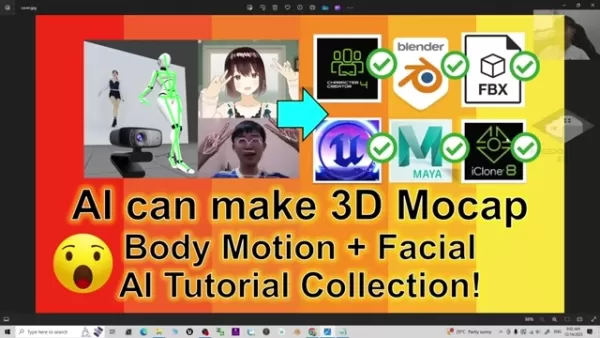
. It integrates perfectly with Character Creator 4, allowing for easy import and animation of custom characters. Its sophisticated animation tools, real-time rendering, and vast content library make it a top choice for producing professional-grade animations and films. Like Character Creator 4, iClone 8 supports AI-powered motion capture, letting animators record and apply facial and body movements via webcams or video files. The real-time rendering provides instant feedback, which speeds up the animation process considerably.
Key features of iClone 8:
- Real-Time Animation: Instant feedback and rendering for efficient animation.
- AI Motion Capture: Webcam and MP4 video support for facial and body mocap.
- Integration: Seamless workflow with Character Creator 4 for character design.
- Scene Design: Extensive tools for creating detailed and immersive environments.
- Cinematic Storytelling: Camera controls, lighting effects, and post-processing tools.
- Content Library: Vast collection of characters, motions, props, and scenes.
Blender: A Free and Open-Source 3D Creation Suite
Blender is a free, open-source 3D creation suite that supports modeling, animation, rendering, and compositing. Its versatility and powerful features have made it a favorite among artists and developers in various sectors
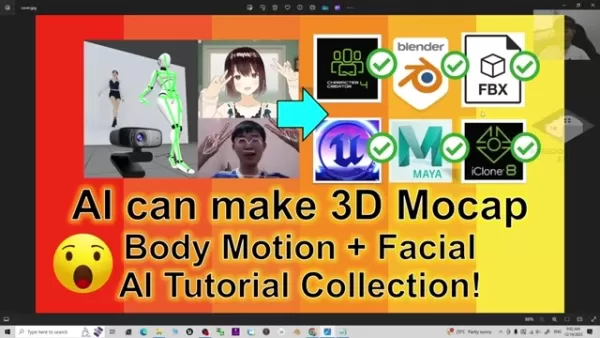
. Blender provides strong motion capture and animation capabilities, including integration with AI-powered tools and plugins. Users can import motion data from external sources, apply it to character models, and refine it using Blender's animation toolkit. Recent enhancements have strengthened its mocap features, positioning it as a solid option for professional animators. The software's vibrant community also guarantees ongoing development and extensive support.
Key features of Blender:
- Free and Open-Source: Accessible to all users with no licensing fees.
- Modeling and Sculpting: Advanced tools for creating detailed 3D models.
- Animation and Rigging: Robust animation tools for character and object animation.
- Rendering: High-quality rendering capabilities with support for various rendering engines.
- AI Integration: Support for AI-powered tools and plugins for motion capture.
- Active Community: Thriving community providing resources, tutorials, and support.
Maya: Industry-Standard 3D Animation Software
Maya, developed by Autodesk, is a professional-grade application for 3D animation, modeling, simulation, and rendering. As a staple in film, television, and game development, it offers a comprehensive toolkit for producing high-quality 3D content
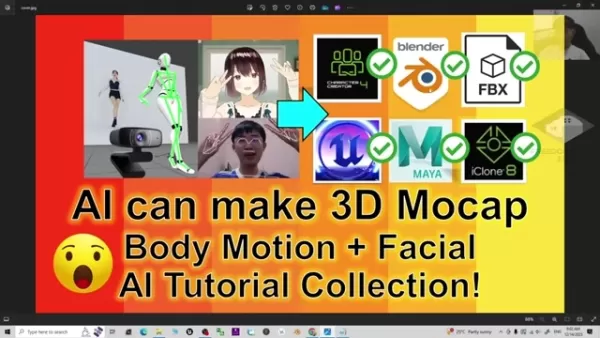
. It excels in advanced character animation, rigging, and visual effects. Maya's motion capture functionality is augmented through plugins and integrations with AI-powered tools. This allows artists to refine motion data, generate realistic animations, and optimize their workflows. Given its powerful features and extensive ecosystem, Maya remains a cornerstone of professional animation pipelines.
Key features of Maya:
- Professional Animation Tools: Advanced tools for character animation and rigging.
- Modeling and Sculpting: Comprehensive set of modeling tools for creating detailed 3D assets.
- Simulation and Effects: Tools for creating realistic simulations and visual effects.
- AI Integration: Support for AI-driven plugins for motion capture refinement.
- Industry Standard: Widely used in film, television, and game development.
- Extensive Ecosystem: Large collection of plugins, scripts, and resources.
Unreal Engine: A Leading Real-Time 3D Creation Tool
Unreal Engine is a premier real-time 3D creation platform developed by Epic Games
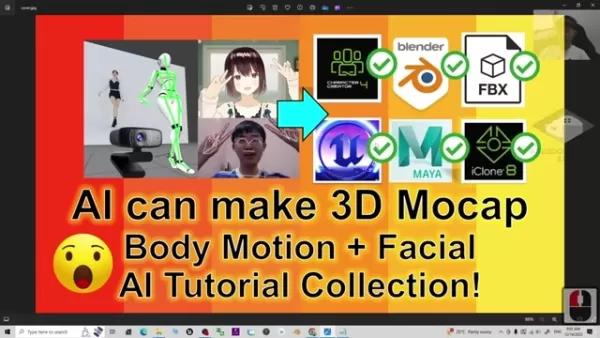
. It is extensively used for game development, architectural visualization, film production, and more. Unreal Engine delivers advanced rendering, physics simulations, and animation tools. Its integration with motion capture technologies helps developers build realistic, interactive experiences. By leveraging AI-powered tools, Unreal Engine enhances motion capture data, simplifies animation workflows, and boosts character realism. Its real-time capabilities make it an exceptional platform for crafting immersive, interactive content.
Key features of Unreal Engine:
- Real-Time Rendering: High-quality rendering for interactive and cinematic experiences.
- Physics Simulations: Realistic physics simulations for dynamic environments.
- Animation Tools: Comprehensive animation tools for character and object animation.
- AI Integration: Support for AI-driven tools to enhance motion capture and animation.
- Cross-Platform Support: Deployment to various platforms, including PC, consoles, and mobile devices.
- Extensive Marketplace: Large collection of assets, plugins, and resources.
Step-by-Step Guide: AI-Powered Motion Capture Workflow
Step 1: Capture Motion Data with Webcam or Video
Begin by recording motion data using a standard webcam or a pre-recorded video file. Ensure the subject is well-lit and clearly visible. This initial recording provides the raw data for subsequent AI processing.
Step 2: Import and Process Data in Character Creator 4 or iClone 8
Import the captured motion data into Character Creator 4 or iClone 8. These applications utilize AI algorithms to analyze and clean the motion data, generating a preliminary animation.
Step 3: Refine Animation with AI Tools
Leverage the built-in AI tools in Character Creator 4 or iClone 8 to polish the animation. Adjust facial expressions, smooth out body movements, and correct any inaccuracies for a more refined outcome.
Step 4: Export and Integrate with Other Software
Export the finalized animation in FBX format for use in other 3D software like Blender, Maya, or Unreal Engine. This ensures broad compatibility across different platforms and tools.
Step 5: Finalize Animation in Target Software
Import the animation into your primary software and perform any final tweaks to align with your project's requirements. Adjust lighting, camera angles, and other elements to achieve a professional finish.
Pricing Overview for Motion Capture Software
Cost Considerations for AI Motion Capture Tools
The cost of AI motion capture tools varies based on the software and its feature set. Some applications, like Blender, are free and open-source, while others, including Character Creator 4 and iClone 8, provide various licensing models.
- Character Creator 4: Pricing depends on the edition and included content, with options for perpetual licenses or subscription plans.
- iClone 8: Offers licensing similar to Character Creator 4, with additional content packs available for purchase.
- Blender: Completely free and open-source, with no licensing costs, offering a wide array of features and community add-ons.
- Maya: Operates on a subscription model with monthly or annual plans; pricing varies by feature set and support level.
- Unreal Engine: Free to use, with a royalty-based system for commercial projects; a percentage of revenue is payable after exceeding a specific earnings threshold.
Pros and Cons of Using AI in 3D Motion Capture
Pros
Accessibility
Efficiency
Cost-effectiveness
Realism
Simplified workflow
Cons
Initial setup
Learning curve
Dependence on AI algorithms
Potential for errors
Data privacy
Key Features of AI Motion Capture Tools
Exploring the Core Capabilities
AI motion capture tools are equipped with features that streamline and enhance animation workflows. They employ sophisticated AI algorithms to process and refine motion data, resulting in more realistic and dynamic animations. Key features commonly found in these tools include:
- Real-Time Motion Capture: Record facial and body movements in real-time using standard webcams.
- AI-Driven Refinement: Utilize AI to clean and enhance motion data, minimizing manual correction.
- Facial Expression Editing: Precisely adjust facial expressions and lip-syncing with dedicated editing tools.
- Body Animation Tools: Advanced capabilities for skeletal editing and motion layering.
- Seamless Integration: Full compatibility with other industry-standard software like Unreal Engine, Blender, and Maya.
- Extensive Asset Library: Access a large repository of characters, motions, props, and scenes to enrich your projects.
Use Cases for AI-Powered Motion Capture
Applications Across Industries
AI-powered motion capture finds applications in numerous industries. From game development to film production, these tools are changing how animations are made.
- Game Development: Generate realistic, engaging character animations for video games.
- Film Production: Create high-quality animations for movies and television series.
- Virtual Reality (VR): Develop immersive VR experiences featuring lifelike character interactions.
- Architectural Visualization: Animate architectural walkthroughs to bring designs to life.
- Education and Training: Produce interactive educational content with realistic character simulations.
- Marketing and Advertising: Craft compelling marketing campaigns using animated characters.
Frequently Asked Questions
What is AI motion capture?
AI motion capture employs artificial intelligence to record and interpret movements for animating digital characters. It frequently uses accessible equipment like webcams and standard video files.
What software is best for AI motion capture?
Leading choices include Character Creator 4, iClone 8, Blender, Maya, and Unreal Engine. Each offers distinct advantages, so selection should be based on specific project requirements and budget.
Can I use a webcam for AI motion capture?
Yes, many AI motion capture tools are compatible with webcams, enabling motion capture without the need for specialized hardware.
Is AI motion capture expensive?
Costs vary. Some tools are free, like Blender, while others require subscriptions or licenses. Overall, AI reduces expenses by minimizing equipment and manual labor needs.
What file format is used for exporting motion capture data?
FBX is a widely used format for exporting motion capture data, ensuring it works with a range of 3D software applications.
How do I refine motion capture data?
Utilize AI-driven refinement tools in software such as Character Creator 4 and iClone 8. These tools smooth movements, fine-tune facial expressions, and correct imperfections.
Related Questions
How does AI improve facial expression capture?
AI facial expression capture uses algorithms to detect and replicate subtle facial movements, resulting in more realistic and expressive animations. The AI analyzes video from webcams or files to map expressions onto 3D characters. This enhances animation quality and reduces the need for manual tweaking, simplifying the creation of engaging, believable characters.
What are the benefits of using AI in 3D modeling for game development?
AI is revolutionizing 3D modeling in game development by automating tasks, optimizing assets, and generating content. AI algorithms streamline model creation, refine textures, and reduce polygon counts for better performance. This speeds up development and facilitates the efficient production of high-quality 3D assets.
Related article
 How to fix Core Web Vitals for better SEO rankings?
Turn PDFs into Audio: Free Urdu Text-to-Speech SolutionTable of Contents:IntroductionWhat is PD2Audio?The Benefits of PD2AudioHow to Convert a PDF into AudioStep 1: Visit the PD2Audio websiteStep 2: Choose your languageStep 3: Customize the settingsS
ZTE Partners With Tencent to Launch AI Cloud PC Featuring Native Hunyuan Large Model Integration
China’s "AI + PC" and cloud infrastructure sectors are undergoing a major cross-industry integration. At the AI Cloud Computer Experience Day event on June 3rd, ZTE officially announced a deep strategic partnership with Tencent. The two companies wil
Google Tests Gemini-Powered Accessibility Tools for Pixel 11
Google is rolling out a new experimental tool for the Pixel 11 lineup, dubbed "Device Help," which leverages Gemini to streamline troubleshooting. This feature is designed to make resolving common phone issues more intuitive and intelligent for every
Related Special Topic Recommendations
Design & Art
How to fix Core Web Vitals for better SEO rankings?
Turn PDFs into Audio: Free Urdu Text-to-Speech SolutionTable of Contents:IntroductionWhat is PD2Audio?The Benefits of PD2AudioHow to Convert a PDF into AudioStep 1: Visit the PD2Audio websiteStep 2: Choose your languageStep 3: Customize the settingsS
ZTE Partners With Tencent to Launch AI Cloud PC Featuring Native Hunyuan Large Model Integration
China’s "AI + PC" and cloud infrastructure sectors are undergoing a major cross-industry integration. At the AI Cloud Computer Experience Day event on June 3rd, ZTE officially announced a deep strategic partnership with Tencent. The two companies wil
Google Tests Gemini-Powered Accessibility Tools for Pixel 11
Google is rolling out a new experimental tool for the Pixel 11 lineup, dubbed "Device Help," which leverages Gemini to streamline troubleshooting. This feature is designed to make resolving common phone issues more intuitive and intelligent for every
Related Special Topic Recommendations
Design & Art
 Top AI Illustration Tools: Create Editorial Scenes and Cover Art Faster
2026 Latest Top-rated AI Illustration Tools: Our curated list features the best powerfully designed tools for creating stunning editorial scenes and eye-catching cover art quickly. Each option has gone through rigorous real-world tests, offering a free vs paid comparison to help you find the perfect match for your workflow. Try these must-try solutions today to unlock your AI edge and boost your creative productivity. Explore now at XIX.AI.
 10 tools
 xix.ai
Education and Learning
Top AI Tutors for Exam Prep: Practice Math, Science, and English
xix.ai
Education and Learning
Top AI Tutors for Exam Prep: Practice Math, Science, and English
2026 Latest Top-Rated Best AI Tutors for Exam Prep are here on XIX.AI! Our curated list features powerful game-changing tools that offer free vs paid comparison, real-world tests, and weekly updated rankings. They help boost your writing efficiency, simplify complex topic learning, and unlock your academic potential. Explore now to Discover your perfect exam prep tool and Start creating today to Unlock your AI edge!
10 tools
xix.ai
Finance
AI Budget Planning Tools for Personal Money Management
2026 Latest Best Top-Rated AI Budget Planning Tools for Personal Money Management are here on XIX.AI! This curated collection features powerful, game-changing solutions that help you conduct real-world tests, understand spending habits, and create personalized plans to boost productivity. Enjoy a free vs paid comparison along with detailed rankings. Must-try tools designed to simplify money management and unlock your AI edge. Explore now!
11 tools
xix.ai
Health & Wellness
AI Sleep Tracking Assistants: Improve Recovery with Better Bedtime Habits
2026 Latest Best Top-Rated AI Sleep Tracking Assistants curated for ultimate recovery. This fully updated weekly guide features powerful tools that deliver real-world tests, free vs paid comparison, and detailed rankings to help you find the must-try solution that boosts sleep quality and supports better bedtime habits. Explore now at XIX.AI to Unlock your AI edge.
10 tools
xix.ai
Data Analysis
AI SQL Copilots for Product and Revenue Analytics
2026 Latest Best Top-Rated AI SQL Copilots for Product and Revenue Analytics! XIX.AI has curated a powerful, game-changing collection of must-try tools that undergo real-world tests through weekly updated rankings. These tools help users boost productivity significantly by accelerating data analysis, streamlining complex queries, and generating accurate insights to drive smarter business decisions. Explore now to Discover your perfect tool for unlocking your AI edge!
14 tools
xix.ai
Education and Learning
Best AI Homework Helpers That Teach: Learn Concepts, Not Just Answers
2026 Latest Best Top-Rated AI Homework Helpers That Teach Core Concepts Not Just Answers Powerful Tools for Students Must-Try Curated List Weekly Updated Free vs Paid Comparison Real-World Tests Accurate Rankings to Help You Unlock Your Full Learning Potential Explore now to Discover your perfect tool for smarter studying.
10 tools
xix.ai

 Comments (0)
0/500
Comments (0)
0/500
Artificial intelligence is fundamentally transforming 3D animation and game development, especially in the realm of motion capture. AI-powered tools now empower animators and developers to produce realistic, expressive character movements with unprecedented efficiency. This article explores the application of AI for capturing both body motion and facial expressions, detailing various software solutions and production workflows. Discover how AI is ushering in a new era for 3D animation.
Key Points
AI makes 3D motion capture for body and facial movements highly accessible and efficient.
Software such as Character Creator 4, Blender, Maya, and iClone 8 incorporate advanced AI motion capture capabilities.
Standard webcams and MP4 video files can serve as input sources for AI-driven motion capture.
AI significantly accelerates animation workflows, simplifying the process of converting motion data into ready-to-use animations.
The Freedom Arts 3D website provides tutorials and resources dedicated to AI-driven 3D modeling, animation, and game development.
The Rise of AI in 3D Motion Capture
What is 3D Motion Capture?
3D motion capture, or mocap, involves recording the movement of objects or people and applying that data to animate digital characters. Historically, this process demanded expensive specialized suits and camera systems. AI is revolutionizing this field by making motion capture more affordable and widely available. It drastically reduces reliance on bulky equipment or dedicated studio setups, enabling capture sessions in flexible environments. These innovations allow independent creators and smaller studios to achieve high-quality animations that once required substantial budgets and resources. As AI models evolve, we can anticipate even more realistic and detailed motion capture results.
Why Use AI for Motion Capture?
Adopting AI for motion capture brings several key benefits. Its improved accessibility stands out, as AI tools often work with common hardware like webcams, opening the technology to a broader audience. Efficiency is another major advantage; AI algorithms can automatically clean and refine motion data, minimizing the manual cleanup animators traditionally perform. Furthermore, the realism of animations is enhanced because AI models are trained on extensive datasets of human movement, yielding more natural and believable character motions. For studios seeking to produce superior animation quickly and cost-effectively, AI motion capture offers a powerful solution. Its streamlined processes and reduced manual input are crucial for optimizing production timelines and creative results.
Benefits of AI in Motion Capture:
- Reduced Cost: Lowering initial investment and operational expenses.
- Faster Turnaround: Accelerating animation projects with efficient processing.
- Enhanced Accuracy: Creating more believable and natural character movements.
- Simplified Workflow: Making motion capture accessible to more creators.
Software and Tools for AI-Powered Motion Capture
Character Creator 4: A Comprehensive Character Design and Animation Tool
Character Creator 4 is a robust character design and animation application developed by Reallusion
. It enables users to craft realistic and stylized 3D characters, customize their looks, and animate them effortlessly. The software integrates smoothly with industry standards like Unreal Engine, Blender, Maya, and iClone 8, proving its versatility across different animation pipelines. With its extensive asset library, user-friendly interface, and advanced animation tools, it suits both novices and seasoned professionals. Character Creator 4 includes powerful AI-driven features for facial and body motion capture, enabling animation creation directly from webcam feeds or MP4 videos.
Key features of Character Creator 4:
- Character Generation: Customizable character models with diverse appearances.
- AI Motion Capture: Real-time facial and body mocap using standard webcams.
- Integration: Seamless compatibility with Unreal Engine, Blender, Maya, and iClone 8.
- Asset Library: Extensive collection of clothing, accessories, and motions.
- Facial Animation: Detailed facial expression editing and lip-syncing capabilities.
- Body Animation: Advanced skeletal editing and motion layering tools.
iClone 8: Real-Time 3D Animation and Motion Capture
iClone 8 is a real-time 3D animation platform from Reallusion, specializing in character animation, scene design, and cinematic production
. It integrates perfectly with Character Creator 4, allowing for easy import and animation of custom characters. Its sophisticated animation tools, real-time rendering, and vast content library make it a top choice for producing professional-grade animations and films. Like Character Creator 4, iClone 8 supports AI-powered motion capture, letting animators record and apply facial and body movements via webcams or video files. The real-time rendering provides instant feedback, which speeds up the animation process considerably.
Key features of iClone 8:
- Real-Time Animation: Instant feedback and rendering for efficient animation.
- AI Motion Capture: Webcam and MP4 video support for facial and body mocap.
- Integration: Seamless workflow with Character Creator 4 for character design.
- Scene Design: Extensive tools for creating detailed and immersive environments.
- Cinematic Storytelling: Camera controls, lighting effects, and post-processing tools.
- Content Library: Vast collection of characters, motions, props, and scenes.
Blender: A Free and Open-Source 3D Creation Suite
Blender is a free, open-source 3D creation suite that supports modeling, animation, rendering, and compositing. Its versatility and powerful features have made it a favorite among artists and developers in various sectors
. Blender provides strong motion capture and animation capabilities, including integration with AI-powered tools and plugins. Users can import motion data from external sources, apply it to character models, and refine it using Blender's animation toolkit. Recent enhancements have strengthened its mocap features, positioning it as a solid option for professional animators. The software's vibrant community also guarantees ongoing development and extensive support.
Key features of Blender:
- Free and Open-Source: Accessible to all users with no licensing fees.
- Modeling and Sculpting: Advanced tools for creating detailed 3D models.
- Animation and Rigging: Robust animation tools for character and object animation.
- Rendering: High-quality rendering capabilities with support for various rendering engines.
- AI Integration: Support for AI-powered tools and plugins for motion capture.
- Active Community: Thriving community providing resources, tutorials, and support.
Maya: Industry-Standard 3D Animation Software
Maya, developed by Autodesk, is a professional-grade application for 3D animation, modeling, simulation, and rendering. As a staple in film, television, and game development, it offers a comprehensive toolkit for producing high-quality 3D content
. It excels in advanced character animation, rigging, and visual effects. Maya's motion capture functionality is augmented through plugins and integrations with AI-powered tools. This allows artists to refine motion data, generate realistic animations, and optimize their workflows. Given its powerful features and extensive ecosystem, Maya remains a cornerstone of professional animation pipelines.
Key features of Maya:
- Professional Animation Tools: Advanced tools for character animation and rigging.
- Modeling and Sculpting: Comprehensive set of modeling tools for creating detailed 3D assets.
- Simulation and Effects: Tools for creating realistic simulations and visual effects.
- AI Integration: Support for AI-driven plugins for motion capture refinement.
- Industry Standard: Widely used in film, television, and game development.
- Extensive Ecosystem: Large collection of plugins, scripts, and resources.
Unreal Engine: A Leading Real-Time 3D Creation Tool
Unreal Engine is a premier real-time 3D creation platform developed by Epic Games
. It is extensively used for game development, architectural visualization, film production, and more. Unreal Engine delivers advanced rendering, physics simulations, and animation tools. Its integration with motion capture technologies helps developers build realistic, interactive experiences. By leveraging AI-powered tools, Unreal Engine enhances motion capture data, simplifies animation workflows, and boosts character realism. Its real-time capabilities make it an exceptional platform for crafting immersive, interactive content.
Key features of Unreal Engine:
- Real-Time Rendering: High-quality rendering for interactive and cinematic experiences.
- Physics Simulations: Realistic physics simulations for dynamic environments.
- Animation Tools: Comprehensive animation tools for character and object animation.
- AI Integration: Support for AI-driven tools to enhance motion capture and animation.
- Cross-Platform Support: Deployment to various platforms, including PC, consoles, and mobile devices.
- Extensive Marketplace: Large collection of assets, plugins, and resources.
Step-by-Step Guide: AI-Powered Motion Capture Workflow
Step 1: Capture Motion Data with Webcam or Video
Begin by recording motion data using a standard webcam or a pre-recorded video file. Ensure the subject is well-lit and clearly visible. This initial recording provides the raw data for subsequent AI processing.
Step 2: Import and Process Data in Character Creator 4 or iClone 8
Import the captured motion data into Character Creator 4 or iClone 8. These applications utilize AI algorithms to analyze and clean the motion data, generating a preliminary animation.
Step 3: Refine Animation with AI Tools
Leverage the built-in AI tools in Character Creator 4 or iClone 8 to polish the animation. Adjust facial expressions, smooth out body movements, and correct any inaccuracies for a more refined outcome.
Step 4: Export and Integrate with Other Software
Export the finalized animation in FBX format for use in other 3D software like Blender, Maya, or Unreal Engine. This ensures broad compatibility across different platforms and tools.
Step 5: Finalize Animation in Target Software
Import the animation into your primary software and perform any final tweaks to align with your project's requirements. Adjust lighting, camera angles, and other elements to achieve a professional finish.
Pricing Overview for Motion Capture Software
Cost Considerations for AI Motion Capture Tools
The cost of AI motion capture tools varies based on the software and its feature set. Some applications, like Blender, are free and open-source, while others, including Character Creator 4 and iClone 8, provide various licensing models.
- Character Creator 4: Pricing depends on the edition and included content, with options for perpetual licenses or subscription plans.
- iClone 8: Offers licensing similar to Character Creator 4, with additional content packs available for purchase.
- Blender: Completely free and open-source, with no licensing costs, offering a wide array of features and community add-ons.
- Maya: Operates on a subscription model with monthly or annual plans; pricing varies by feature set and support level.
- Unreal Engine: Free to use, with a royalty-based system for commercial projects; a percentage of revenue is payable after exceeding a specific earnings threshold.
Pros and Cons of Using AI in 3D Motion Capture
Pros
Accessibility
Efficiency
Cost-effectiveness
Realism
Simplified workflow
Cons
Initial setup
Learning curve
Dependence on AI algorithms
Potential for errors
Data privacy
Key Features of AI Motion Capture Tools
Exploring the Core Capabilities
AI motion capture tools are equipped with features that streamline and enhance animation workflows. They employ sophisticated AI algorithms to process and refine motion data, resulting in more realistic and dynamic animations. Key features commonly found in these tools include:
- Real-Time Motion Capture: Record facial and body movements in real-time using standard webcams.
- AI-Driven Refinement: Utilize AI to clean and enhance motion data, minimizing manual correction.
- Facial Expression Editing: Precisely adjust facial expressions and lip-syncing with dedicated editing tools.
- Body Animation Tools: Advanced capabilities for skeletal editing and motion layering.
- Seamless Integration: Full compatibility with other industry-standard software like Unreal Engine, Blender, and Maya.
- Extensive Asset Library: Access a large repository of characters, motions, props, and scenes to enrich your projects.
Use Cases for AI-Powered Motion Capture
Applications Across Industries
AI-powered motion capture finds applications in numerous industries. From game development to film production, these tools are changing how animations are made.
- Game Development: Generate realistic, engaging character animations for video games.
- Film Production: Create high-quality animations for movies and television series.
- Virtual Reality (VR): Develop immersive VR experiences featuring lifelike character interactions.
- Architectural Visualization: Animate architectural walkthroughs to bring designs to life.
- Education and Training: Produce interactive educational content with realistic character simulations.
- Marketing and Advertising: Craft compelling marketing campaigns using animated characters.
Frequently Asked Questions
What is AI motion capture?
AI motion capture employs artificial intelligence to record and interpret movements for animating digital characters. It frequently uses accessible equipment like webcams and standard video files.
What software is best for AI motion capture?
Leading choices include Character Creator 4, iClone 8, Blender, Maya, and Unreal Engine. Each offers distinct advantages, so selection should be based on specific project requirements and budget.
Can I use a webcam for AI motion capture?
Yes, many AI motion capture tools are compatible with webcams, enabling motion capture without the need for specialized hardware.
Is AI motion capture expensive?
Costs vary. Some tools are free, like Blender, while others require subscriptions or licenses. Overall, AI reduces expenses by minimizing equipment and manual labor needs.
What file format is used for exporting motion capture data?
FBX is a widely used format for exporting motion capture data, ensuring it works with a range of 3D software applications.
How do I refine motion capture data?
Utilize AI-driven refinement tools in software such as Character Creator 4 and iClone 8. These tools smooth movements, fine-tune facial expressions, and correct imperfections.
Related Questions
How does AI improve facial expression capture?
AI facial expression capture uses algorithms to detect and replicate subtle facial movements, resulting in more realistic and expressive animations. The AI analyzes video from webcams or files to map expressions onto 3D characters. This enhances animation quality and reduces the need for manual tweaking, simplifying the creation of engaging, believable characters.
What are the benefits of using AI in 3D modeling for game development?
AI is revolutionizing 3D modeling in game development by automating tasks, optimizing assets, and generating content. AI algorithms streamline model creation, refine textures, and reduce polygon counts for better performance. This speeds up development and facilitates the efficient production of high-quality 3D assets.








 How to fix Core Web Vitals for better SEO rankings?
Turn PDFs into Audio: Free Urdu Text-to-Speech SolutionTable of Contents:IntroductionWhat is PD2Audio?The Benefits of PD2AudioHow to Convert a PDF into AudioStep 1: Visit the PD2Audio websiteStep 2: Choose your languageStep 3: Customize the settingsS
How to fix Core Web Vitals for better SEO rankings?
Turn PDFs into Audio: Free Urdu Text-to-Speech SolutionTable of Contents:IntroductionWhat is PD2Audio?The Benefits of PD2AudioHow to Convert a PDF into AudioStep 1: Visit the PD2Audio websiteStep 2: Choose your languageStep 3: Customize the settingsS
 ZTE Partners With Tencent to Launch AI Cloud PC Featuring Native Hunyuan Large Model Integration
China’s "AI + PC" and cloud infrastructure sectors are undergoing a major cross-industry integration. At the AI Cloud Computer Experience Day event on June 3rd, ZTE officially announced a deep strategic partnership with Tencent. The two companies wil
ZTE Partners With Tencent to Launch AI Cloud PC Featuring Native Hunyuan Large Model Integration
China’s "AI + PC" and cloud infrastructure sectors are undergoing a major cross-industry integration. At the AI Cloud Computer Experience Day event on June 3rd, ZTE officially announced a deep strategic partnership with Tencent. The two companies wil
 Google Tests Gemini-Powered Accessibility Tools for Pixel 11
Google is rolling out a new experimental tool for the Pixel 11 lineup, dubbed "Device Help," which leverages Gemini to streamline troubleshooting. This feature is designed to make resolving common phone issues more intuitive and intelligent for every
Google Tests Gemini-Powered Accessibility Tools for Pixel 11
Google is rolling out a new experimental tool for the Pixel 11 lineup, dubbed "Device Help," which leverages Gemini to streamline troubleshooting. This feature is designed to make resolving common phone issues more intuitive and intelligent for every

2026 Latest Top-rated AI Illustration Tools: Our curated list features the best powerfully designed tools for creating stunning editorial scenes and eye-catching cover art quickly. Each option has gone through rigorous real-world tests, offering a free vs paid comparison to help you find the perfect match for your workflow. Try these must-try solutions today to unlock your AI edge and boost your creative productivity. Explore now at XIX.AI.
10 tools
xix.ai

2026 Latest Top-Rated Best AI Tutors for Exam Prep are here on XIX.AI! Our curated list features powerful game-changing tools that offer free vs paid comparison, real-world tests, and weekly updated rankings. They help boost your writing efficiency, simplify complex topic learning, and unlock your academic potential. Explore now to Discover your perfect exam prep tool and Start creating today to Unlock your AI edge!
10 tools
xix.ai

2026 Latest Best Top-Rated AI Budget Planning Tools for Personal Money Management are here on XIX.AI! This curated collection features powerful, game-changing solutions that help you conduct real-world tests, understand spending habits, and create personalized plans to boost productivity. Enjoy a free vs paid comparison along with detailed rankings. Must-try tools designed to simplify money management and unlock your AI edge. Explore now!
11 tools
xix.ai

2026 Latest Best Top-Rated AI Sleep Tracking Assistants curated for ultimate recovery. This fully updated weekly guide features powerful tools that deliver real-world tests, free vs paid comparison, and detailed rankings to help you find the must-try solution that boosts sleep quality and supports better bedtime habits. Explore now at XIX.AI to Unlock your AI edge.
10 tools
xix.ai

2026 Latest Best Top-Rated AI SQL Copilots for Product and Revenue Analytics! XIX.AI has curated a powerful, game-changing collection of must-try tools that undergo real-world tests through weekly updated rankings. These tools help users boost productivity significantly by accelerating data analysis, streamlining complex queries, and generating accurate insights to drive smarter business decisions. Explore now to Discover your perfect tool for unlocking your AI edge!
14 tools
xix.ai

2026 Latest Best Top-Rated AI Homework Helpers That Teach Core Concepts Not Just Answers Powerful Tools for Students Must-Try Curated List Weekly Updated Free vs Paid Comparison Real-World Tests Accurate Rankings to Help You Unlock Your Full Learning Potential Explore now to Discover your perfect tool for smarter studying.
10 tools
xix.ai












