


 Home
HomePro Headshots from Selfies: AI Redefines Professional Portraits
In today's digital-first world, a polished online image is essential. From LinkedIn and dating apps to Instagram, a high-quality headshot can significantly impact your personal brand. But what if you don't have a professional photographer on hand? The answer lies in artificial intelligence, which can elevate your casual selfies to professional-grade portraits. This guide will walk you through creating compelling headshots using three powerful websites, all on a budget.
Key Points
Transform selfies into professional photos with GetAvatars.ai.
Easily remove watermarks from generated images using DeWatermark.ai.
Boost photo clarity and resolution with Canva's image upscaling tool.
Craft professional headshots for LinkedIn, dating apps, and Instagram.
Achieve premium results with free or low-cost AI tools.
Transforming Selfies into Professional Headshots with AI
The Power of AI in Photo Enhancement
In today's visually driven world, a professional photograph can make you stand out. Artificial intelligence is reshaping photo editing, allowing anyone to turn simple selfies into high-quality headshots for various professional and personal uses. This article details how to accomplish this transformation using three distinct AI-powered platforms.
The objective is straightforward: create a headshot that appears professionally taken, without the associated expense or effort. This involves achieving good lighting, a neutral background, and an image that genuinely represents your personal brand. With AI, these results are just a few clicks away.
Website 1: GetAvatars.ai – Your Personal AI Photographer
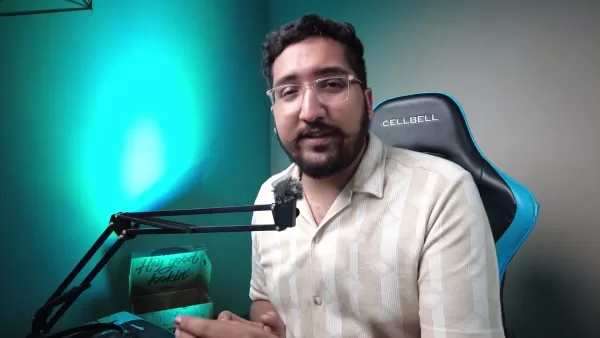
The first step in your transformation is GetAvatars.ai. This platform specializes in converting ordinary selfies into hyper-realistic, professional-looking photos. Here's how it works:
Getting Started
- Access the Website: Visit GetAvatars.ai using the link provided in the description. This site is designed to turn selfies into professional photos.
- Initial Impression: You'll immediately notice the tagline: "Turn Your Selfies Into Professional Photos." The interface is straightforward and user-friendly.
- Create Your Avatars: Click the "Create yours in under 1 minute" button to proceed to the image generation page.
Navigating GetAvatars.ai
- Choose a Style: Select from a variety of styles like Casual Light Suit, CEO, Consultant, Formal, or Beach to match your desired professional look.
- Select Type: Specify if you are generating images for a man, woman, or a unisex profile.
- Upload Your Selfie: Upload a clear, well-lit close-up of your face. For optimal results, ensure the photo contains only one person. You can drag and drop the image directly onto the page.
- Generate Images: Click "Generate Images." Each generation uses one credit and produces four unique images. New accounts typically receive three complimentary credits.
Pricing and Credits
- New accounts start with approximately three credits. Each credit generates four unique images.
- Each generation consumes 1 credit and yields 4 images.
To generate more images, you can purchase additional credits:
Credits Price Images Features 12 $7 48 No Watermarks, Full Resolution 40 $19 160 No Watermarks, Full Resolution 100 $42 400 No Watermarks, Full Resolution
Remember: Each credit produces four distinct images, giving you plenty of options. The pricing is competitive, offering great value for high-quality AI-generated photos.
Website 2: DeWatermark.ai – Removing Watermarks with Ease
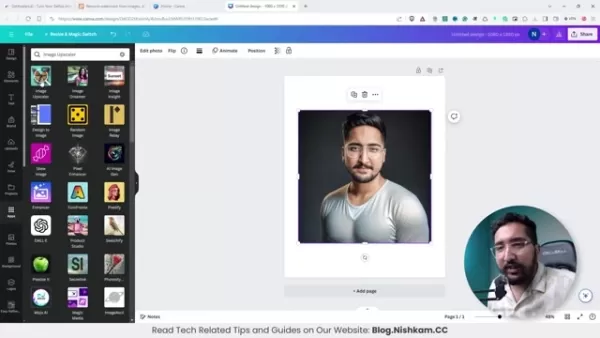
After generating your headshots with GetAvatars.ai, you might find a watermark on the images, especially if you're using the free tier. DeWatermark.ai is an AI-powered tool designed to remove these watermarks quickly and efficiently.
How to Remove Watermarks:
- Access DeWatermark.ai: Navigate to DeWatermark.ai using the link in the description.
- Upload Your Image: Upload the watermarked image by dragging and dropping it onto the page.
- Automatic Removal: The AI automatically identifies and removes the watermark, typically within seconds.
- Download the Cleaned Image: Once processed, download the clean image. The site offers download options in HD or original size.
Efficiency and Convenience
DeWatermark.ai offers a seamless experience, eliminating watermarks without any manual editing skills required. It's an indispensable tool for using AI-generated images professionally.
Website 3: Canva – Enhancing and Finalizing Your Headshot
Once you have a watermark-free image, the final step is to enhance its quality and resolution. Canva, a versatile design platform, includes an AI-powered image upscaler ideal for improving clarity and sharpness.
Enhancing Your Image with Canva:
- Access Canva: Go to Canva.com and sign in or create a free account.
- Create a Design: Start a new design with custom dimensions suitable for your needs, such as an Instagram Post (portrait) for social media.
- Upload Your Image: Upload the cleaned image from DeWatermark.ai by dragging it into your Canva design.
- Use Image Upscaler: In the Apps section, search for and select “Image Upscaler.”
- Apply Upscaling: Choose your desired upscaling level (2x, 3x, or 4x). For maximum quality, select the 4x option.
- Replace Image: Apply the upscaling to replace the lower-resolution image with the enhanced version within your design.
- Download Your Enhanced Headshot: Download the final image, selecting a high-quality file type like PNG.
Why Canva?
Canva's image upscaler not only improves photo quality but also provides a full suite of design tools for final adjustments. A free account is sufficient to access the upscaling feature and enhance your photo.
Final Thoughts: Enhancing Your Digital Presence Responsibly
The Future of AI in Digital Identity
As AI technology evolves, its influence on our digital identities will expand. The ability to create and refine professional headshots with AI is a powerful asset for presenting a confident and professional image online. However, it's vital to use this technology responsibly, maintaining transparency and authenticity. By leveraging AI wisely, you can enhance your digital presence, unlock new opportunities, and make a positive impact. The goal is to complement your real-world self with a digital image that reflects your best qualities, not to create a false representation. This balanced approach ensures you navigate the digital landscape with integrity.
Step-by-Step Guide: Creating Your Professional Headshot
Step 1: Generating AI Images with GetAvatars.ai
- Visit GetAvatars.ai: Start by going to the GetAvatars.ai website.
- Create Your Account: Sign up for an account. Note that new accounts come with a limited number of credits.
- Upload a Selfie: Upload a clear, well-lit selfie that adheres to the site's guidelines for best results.
- Choose a Style: Select a style that aligns with the professional image you want to project.
- Generate Images: Use your credits to generate multiple AI images in your chosen style.
Step 2: Removing Watermarks with DeWatermark.ai
- Download Your Image: Download the watermarked AI-generated image from GetAvatars.ai.
- Visit DeWatermark.ai: Go to the DeWatermark.ai website.
- Upload Image: Upload the watermarked image to the platform.
- Automatic Removal: Allow the AI to automatically detect and remove the watermark.
- Download Clean Image: Download the resulting watermark-free image.
Step 3: Enhancing Image Quality with Canva
- Visit Canva.com: Log in or create a free account on Canva.
- Create a Design: Start a new design, choosing dimensions appropriate for your intended use (e.g., an Instagram post).
- Upload Clean Image: Upload the watermark-free image to your Canva design.
- Use Image Upscaler: Locate the Image Upscaler tool in the Apps section.
- Upscale Image: Apply the 4x upscaling option to significantly enhance the image quality.
- Replace and Download: Replace the original image with the upscaled version in your design, then download your final, enhanced headshot.
Pricing Details for Enhanced Features
Understanding the Costs
While the core methods in this guide use free tools, enhanced features or greater usage may involve costs. GetAvatars.ai requires purchasing credits for generating more images, and Canva Pro offers advanced design capabilities.
Service Free Tier Paid Tier GetAvatars.ai Limited credits for generating a few images Credit packages for generating more images (e.g., $7 for 12 credits) DeWatermark.ai Free, fast watermark removal Canva Free access to basic design tools and image upscaling Canva Pro for advanced editing tools, Background Remover, and more features
Advantages and Disadvantages of Using AI for Headshots
Pros
Cost-Effective: Avoids the high cost of professional photography sessions.
Convenient: Accessible from anywhere with an internet connection.
Time-Saving: Delivers results much faster than traditional photo shoots.
Multiple Options: Generates a variety of images and styles to choose from.
Cons
May Lack Authenticity: AI-generated images might not perfectly capture your unique personality.
Reliance on Technology: The final quality depends on the AI algorithm's performance.
Potential Watermarks: Free versions often include watermarks that require removal.
Ethical Considerations: Transparency is important when using AI-generated images for professional purposes.
Core Features of Each Platform
GetAvatars.ai
AI-Powered Image Generation: Converts selfies into professional-quality headshots.
Multiple Styles: Provides various styles to suit different professional needs.
User-Friendly Interface: Intuitive and easy to use for all skill levels.
DeWatermark.ai
Automatic Watermark Removal: Efficiently removes watermarks from images.
AI-Driven: Utilizes AI to accurately identify and erase watermarks automatically.
High Efficiency: Processes images quickly, saving valuable time.
Canva
Image Upscaling: Enhances image resolution and clarity using AI.
Versatile Design Tools: Offers a comprehensive set of editing tools for refining your headshot.
User-Friendly Platform: Easy to navigate, with numerous templates and design options.
Diverse Use Cases for Professional Headshots
Professional Networking
Use polished headshots on LinkedIn to make a strong impression on potential employers and professional contacts. A professional photo can lead to more profile views and networking opportunities.
Online Dating Profiles
Increase your chances on dating apps with a high-quality, authentic headshot. A great photo can effectively showcase your personality and attract more suitable matches.
Social Media Presence
Strengthen your personal brand on Instagram and other platforms with professional headshots. Use these images for profile pictures, portfolios, and content to maintain a consistent and polished online image.
Frequently Asked Questions
Is it really possible to create professional-grade headshots using just AI?
Absolutely. Thanks to significant advancements in AI, it is now possible to transform basic selfies into polished, professional headshots suitable for various platforms using a combination of AI tools.
Are these websites really free to use?
Each website offers a free tier with basic features. For more advanced capabilities, such as unlimited image generation or watermark removal, paid plans are available.
How much do I have to spend to get a good-looking professional photo?
The cost varies based on your needs. At the most affordable tier, spending $7 USD can generate up to 48 images.
Related Questions
What are the key elements of a professional headshot?
A professional headshot typically features even lighting, a neutral background, a sharp focus on the face, and a natural expression that conveys confidence and approachability.
Can I use these AI-generated headshots for commercial purposes?
Always review the terms of service for each platform to understand permitted uses. Some platforms may have specific requirements regarding the disclosure of AI-generated content.
Related article
 Ctrip Business Travel Unveils AI Ecosystem with 7 Industry Agents and 17 Core Capabilities
Ctrip Business Travel has officially unveiled the "Ctrip Business Travel AI Ecosystem," leveraging large language models to fundamentally restructure corporate travel management. This comprehensive ecosystem addresses four core scenarios: travel arra
Stripe to Acquire OpenRouter as AI Model Routing Gains Momentum
Stripe has agreed to acquire OpenRouter, an AI model-routing platform that gives developers access to hundreds of models through a single interface. The deal adds model selection and routing to Stripe’s existing work around AI usage and token-based b
Former OpenAI Researcher Barrett Zoph Returns to Google to Support Gemini Development
Barret Zoph, who previously abruptly left and joined OpenAI due to a disagreement with Thinking Machines Lab CEO Miriam Mularati, has once again changed employers. Alphabet's Google announced that Zoph will return as Vice President of Research, bring
Related Special Topic Recommendations
Design & Art
Ctrip Business Travel Unveils AI Ecosystem with 7 Industry Agents and 17 Core Capabilities
Ctrip Business Travel has officially unveiled the "Ctrip Business Travel AI Ecosystem," leveraging large language models to fundamentally restructure corporate travel management. This comprehensive ecosystem addresses four core scenarios: travel arra
Stripe to Acquire OpenRouter as AI Model Routing Gains Momentum
Stripe has agreed to acquire OpenRouter, an AI model-routing platform that gives developers access to hundreds of models through a single interface. The deal adds model selection and routing to Stripe’s existing work around AI usage and token-based b
Former OpenAI Researcher Barrett Zoph Returns to Google to Support Gemini Development
Barret Zoph, who previously abruptly left and joined OpenAI due to a disagreement with Thinking Machines Lab CEO Miriam Mularati, has once again changed employers. Alphabet's Google announced that Zoph will return as Vice President of Research, bring
Related Special Topic Recommendations
Design & Art
 Top AI Illustration Tools: Create Editorial Scenes and Cover Art Faster
2026 Latest Top-rated AI Illustration Tools: Our curated list features the best powerfully designed tools for creating stunning editorial scenes and eye-catching cover art quickly. Each option has gone through rigorous real-world tests, offering a free vs paid comparison to help you find the perfect match for your workflow. Try these must-try solutions today to unlock your AI edge and boost your creative productivity. Explore now at XIX.AI.
 10 tools
 xix.ai
Education and Learning
Top AI Tutors for Exam Prep: Practice Math, Science, and English
xix.ai
Education and Learning
Top AI Tutors for Exam Prep: Practice Math, Science, and English
2026 Latest Top-Rated Best AI Tutors for Exam Prep are here on XIX.AI! Our curated list features powerful game-changing tools that offer free vs paid comparison, real-world tests, and weekly updated rankings. They help boost your writing efficiency, simplify complex topic learning, and unlock your academic potential. Explore now to Discover your perfect exam prep tool and Start creating today to Unlock your AI edge!
10 tools
xix.ai
Finance
AI Budget Planning Tools for Personal Money Management
2026 Latest Best Top-Rated AI Budget Planning Tools for Personal Money Management are here on XIX.AI! This curated collection features powerful, game-changing solutions that help you conduct real-world tests, understand spending habits, and create personalized plans to boost productivity. Enjoy a free vs paid comparison along with detailed rankings. Must-try tools designed to simplify money management and unlock your AI edge. Explore now!
11 tools
xix.ai
Health & Wellness
AI Sleep Tracking Assistants: Improve Recovery with Better Bedtime Habits
2026 Latest Best Top-Rated AI Sleep Tracking Assistants curated for ultimate recovery. This fully updated weekly guide features powerful tools that deliver real-world tests, free vs paid comparison, and detailed rankings to help you find the must-try solution that boosts sleep quality and supports better bedtime habits. Explore now at XIX.AI to Unlock your AI edge.
10 tools
xix.ai
Data Analysis
AI SQL Copilots for Product and Revenue Analytics
2026 Latest Best Top-Rated AI SQL Copilots for Product and Revenue Analytics! XIX.AI has curated a powerful, game-changing collection of must-try tools that undergo real-world tests through weekly updated rankings. These tools help users boost productivity significantly by accelerating data analysis, streamlining complex queries, and generating accurate insights to drive smarter business decisions. Explore now to Discover your perfect tool for unlocking your AI edge!
14 tools
xix.ai
Education and Learning
Best AI Homework Helpers That Teach: Learn Concepts, Not Just Answers
2026 Latest Best Top-Rated AI Homework Helpers That Teach Core Concepts Not Just Answers Powerful Tools for Students Must-Try Curated List Weekly Updated Free vs Paid Comparison Real-World Tests Accurate Rankings to Help You Unlock Your Full Learning Potential Explore now to Discover your perfect tool for smarter studying.
10 tools
xix.ai

 Comments (1)
0/500
Comments (1)
0/500
![GregoryRamirez]()
Also ich finde die Idee ja ganz praktisch, aber irgendwie auch ein bisschen gruselig. 😅 Mein letztes Bewerbungsfoto hat mein Kumpel mit dem Handy gemacht, und jetzt soll das eine KI besser können? Ich frage mich, ob das am Ende nicht total unpersönlich wirkt. Andererseits... wenn's hilft, den Traumjob zu kriegen, warum nicht?
In today's digital-first world, a polished online image is essential. From LinkedIn and dating apps to Instagram, a high-quality headshot can significantly impact your personal brand. But what if you don't have a professional photographer on hand? The answer lies in artificial intelligence, which can elevate your casual selfies to professional-grade portraits. This guide will walk you through creating compelling headshots using three powerful websites, all on a budget.
Key Points
Transform selfies into professional photos with GetAvatars.ai.
Easily remove watermarks from generated images using DeWatermark.ai.
Boost photo clarity and resolution with Canva's image upscaling tool.
Craft professional headshots for LinkedIn, dating apps, and Instagram.
Achieve premium results with free or low-cost AI tools.
Transforming Selfies into Professional Headshots with AI
The Power of AI in Photo Enhancement
In today's visually driven world, a professional photograph can make you stand out. Artificial intelligence is reshaping photo editing, allowing anyone to turn simple selfies into high-quality headshots for various professional and personal uses. This article details how to accomplish this transformation using three distinct AI-powered platforms.
The objective is straightforward: create a headshot that appears professionally taken, without the associated expense or effort. This involves achieving good lighting, a neutral background, and an image that genuinely represents your personal brand. With AI, these results are just a few clicks away.
Website 1: GetAvatars.ai – Your Personal AI Photographer
The first step in your transformation is GetAvatars.ai. This platform specializes in converting ordinary selfies into hyper-realistic, professional-looking photos. Here's how it works:
Getting Started
- Access the Website: Visit GetAvatars.ai using the link provided in the description. This site is designed to turn selfies into professional photos.
- Initial Impression: You'll immediately notice the tagline: "Turn Your Selfies Into Professional Photos." The interface is straightforward and user-friendly.
- Create Your Avatars: Click the "Create yours in under 1 minute" button to proceed to the image generation page.
Navigating GetAvatars.ai
- Choose a Style: Select from a variety of styles like Casual Light Suit, CEO, Consultant, Formal, or Beach to match your desired professional look.
- Select Type: Specify if you are generating images for a man, woman, or a unisex profile.
- Upload Your Selfie: Upload a clear, well-lit close-up of your face. For optimal results, ensure the photo contains only one person. You can drag and drop the image directly onto the page.
- Generate Images: Click "Generate Images." Each generation uses one credit and produces four unique images. New accounts typically receive three complimentary credits.
Pricing and Credits
- New accounts start with approximately three credits. Each credit generates four unique images.
- Each generation consumes 1 credit and yields 4 images.
To generate more images, you can purchase additional credits:
| Credits | Price | Images | Features |
|---|---|---|---|
| 12 | $7 | 48 | No Watermarks, Full Resolution |
| 40 | $19 | 160 | No Watermarks, Full Resolution |
| 100 | $42 | 400 | No Watermarks, Full Resolution |
Remember: Each credit produces four distinct images, giving you plenty of options. The pricing is competitive, offering great value for high-quality AI-generated photos.
Website 2: DeWatermark.ai – Removing Watermarks with Ease
After generating your headshots with GetAvatars.ai, you might find a watermark on the images, especially if you're using the free tier. DeWatermark.ai is an AI-powered tool designed to remove these watermarks quickly and efficiently.
How to Remove Watermarks:
- Access DeWatermark.ai: Navigate to DeWatermark.ai using the link in the description.
- Upload Your Image: Upload the watermarked image by dragging and dropping it onto the page.
- Automatic Removal: The AI automatically identifies and removes the watermark, typically within seconds.
- Download the Cleaned Image: Once processed, download the clean image. The site offers download options in HD or original size.
Efficiency and Convenience
DeWatermark.ai offers a seamless experience, eliminating watermarks without any manual editing skills required. It's an indispensable tool for using AI-generated images professionally.
Website 3: Canva – Enhancing and Finalizing Your Headshot
Once you have a watermark-free image, the final step is to enhance its quality and resolution. Canva, a versatile design platform, includes an AI-powered image upscaler ideal for improving clarity and sharpness.
Enhancing Your Image with Canva:
- Access Canva: Go to Canva.com and sign in or create a free account.
- Create a Design: Start a new design with custom dimensions suitable for your needs, such as an Instagram Post (portrait) for social media.
- Upload Your Image: Upload the cleaned image from DeWatermark.ai by dragging it into your Canva design.
- Use Image Upscaler: In the Apps section, search for and select “Image Upscaler.”
- Apply Upscaling: Choose your desired upscaling level (2x, 3x, or 4x). For maximum quality, select the 4x option.
- Replace Image: Apply the upscaling to replace the lower-resolution image with the enhanced version within your design.
- Download Your Enhanced Headshot: Download the final image, selecting a high-quality file type like PNG.
Why Canva?
Canva's image upscaler not only improves photo quality but also provides a full suite of design tools for final adjustments. A free account is sufficient to access the upscaling feature and enhance your photo.
Final Thoughts: Enhancing Your Digital Presence Responsibly
The Future of AI in Digital Identity
As AI technology evolves, its influence on our digital identities will expand. The ability to create and refine professional headshots with AI is a powerful asset for presenting a confident and professional image online. However, it's vital to use this technology responsibly, maintaining transparency and authenticity. By leveraging AI wisely, you can enhance your digital presence, unlock new opportunities, and make a positive impact. The goal is to complement your real-world self with a digital image that reflects your best qualities, not to create a false representation. This balanced approach ensures you navigate the digital landscape with integrity.
Step-by-Step Guide: Creating Your Professional Headshot
Step 1: Generating AI Images with GetAvatars.ai
- Visit GetAvatars.ai: Start by going to the GetAvatars.ai website.
- Create Your Account: Sign up for an account. Note that new accounts come with a limited number of credits.
- Upload a Selfie: Upload a clear, well-lit selfie that adheres to the site's guidelines for best results.
- Choose a Style: Select a style that aligns with the professional image you want to project.
- Generate Images: Use your credits to generate multiple AI images in your chosen style.
Step 2: Removing Watermarks with DeWatermark.ai
- Download Your Image: Download the watermarked AI-generated image from GetAvatars.ai.
- Visit DeWatermark.ai: Go to the DeWatermark.ai website.
- Upload Image: Upload the watermarked image to the platform.
- Automatic Removal: Allow the AI to automatically detect and remove the watermark.
- Download Clean Image: Download the resulting watermark-free image.
Step 3: Enhancing Image Quality with Canva
- Visit Canva.com: Log in or create a free account on Canva.
- Create a Design: Start a new design, choosing dimensions appropriate for your intended use (e.g., an Instagram post).
- Upload Clean Image: Upload the watermark-free image to your Canva design.
- Use Image Upscaler: Locate the Image Upscaler tool in the Apps section.
- Upscale Image: Apply the 4x upscaling option to significantly enhance the image quality.
- Replace and Download: Replace the original image with the upscaled version in your design, then download your final, enhanced headshot.
Pricing Details for Enhanced Features
Understanding the Costs
While the core methods in this guide use free tools, enhanced features or greater usage may involve costs. GetAvatars.ai requires purchasing credits for generating more images, and Canva Pro offers advanced design capabilities.
| Service | Free Tier | Paid Tier |
|---|---|---|
| GetAvatars.ai | Limited credits for generating a few images | Credit packages for generating more images (e.g., $7 for 12 credits) |
| DeWatermark.ai | Free, fast watermark removal | |
| Canva | Free access to basic design tools and image upscaling | Canva Pro for advanced editing tools, Background Remover, and more features |
Advantages and Disadvantages of Using AI for Headshots
Pros
Cost-Effective: Avoids the high cost of professional photography sessions.
Convenient: Accessible from anywhere with an internet connection.
Time-Saving: Delivers results much faster than traditional photo shoots.
Multiple Options: Generates a variety of images and styles to choose from.
Cons
May Lack Authenticity: AI-generated images might not perfectly capture your unique personality.
Reliance on Technology: The final quality depends on the AI algorithm's performance.
Potential Watermarks: Free versions often include watermarks that require removal.
Ethical Considerations: Transparency is important when using AI-generated images for professional purposes.
Core Features of Each Platform
GetAvatars.ai
AI-Powered Image Generation: Converts selfies into professional-quality headshots.
Multiple Styles: Provides various styles to suit different professional needs.
User-Friendly Interface: Intuitive and easy to use for all skill levels.
DeWatermark.ai
Automatic Watermark Removal: Efficiently removes watermarks from images.
AI-Driven: Utilizes AI to accurately identify and erase watermarks automatically.
High Efficiency: Processes images quickly, saving valuable time.
Canva
Image Upscaling: Enhances image resolution and clarity using AI.
Versatile Design Tools: Offers a comprehensive set of editing tools for refining your headshot.
User-Friendly Platform: Easy to navigate, with numerous templates and design options.
Diverse Use Cases for Professional Headshots
Professional Networking
Use polished headshots on LinkedIn to make a strong impression on potential employers and professional contacts. A professional photo can lead to more profile views and networking opportunities.
Online Dating Profiles
Increase your chances on dating apps with a high-quality, authentic headshot. A great photo can effectively showcase your personality and attract more suitable matches.
Social Media Presence
Strengthen your personal brand on Instagram and other platforms with professional headshots. Use these images for profile pictures, portfolios, and content to maintain a consistent and polished online image.
Frequently Asked Questions
Is it really possible to create professional-grade headshots using just AI?
Absolutely. Thanks to significant advancements in AI, it is now possible to transform basic selfies into polished, professional headshots suitable for various platforms using a combination of AI tools.
Are these websites really free to use?
Each website offers a free tier with basic features. For more advanced capabilities, such as unlimited image generation or watermark removal, paid plans are available.
How much do I have to spend to get a good-looking professional photo?
The cost varies based on your needs. At the most affordable tier, spending $7 USD can generate up to 48 images.
Related Questions
What are the key elements of a professional headshot?
A professional headshot typically features even lighting, a neutral background, a sharp focus on the face, and a natural expression that conveys confidence and approachability.
Can I use these AI-generated headshots for commercial purposes?
Always review the terms of service for each platform to understand permitted uses. Some platforms may have specific requirements regarding the disclosure of AI-generated content.








 Ctrip Business Travel Unveils AI Ecosystem with 7 Industry Agents and 17 Core Capabilities
Ctrip Business Travel has officially unveiled the "Ctrip Business Travel AI Ecosystem," leveraging large language models to fundamentally restructure corporate travel management. This comprehensive ecosystem addresses four core scenarios: travel arra
Ctrip Business Travel Unveils AI Ecosystem with 7 Industry Agents and 17 Core Capabilities
Ctrip Business Travel has officially unveiled the "Ctrip Business Travel AI Ecosystem," leveraging large language models to fundamentally restructure corporate travel management. This comprehensive ecosystem addresses four core scenarios: travel arra
 Stripe to Acquire OpenRouter as AI Model Routing Gains Momentum
Stripe has agreed to acquire OpenRouter, an AI model-routing platform that gives developers access to hundreds of models through a single interface. The deal adds model selection and routing to Stripe’s existing work around AI usage and token-based b
Stripe to Acquire OpenRouter as AI Model Routing Gains Momentum
Stripe has agreed to acquire OpenRouter, an AI model-routing platform that gives developers access to hundreds of models through a single interface. The deal adds model selection and routing to Stripe’s existing work around AI usage and token-based b
 Former OpenAI Researcher Barrett Zoph Returns to Google to Support Gemini Development
Barret Zoph, who previously abruptly left and joined OpenAI due to a disagreement with Thinking Machines Lab CEO Miriam Mularati, has once again changed employers. Alphabet's Google announced that Zoph will return as Vice President of Research, bring
Former OpenAI Researcher Barrett Zoph Returns to Google to Support Gemini Development
Barret Zoph, who previously abruptly left and joined OpenAI due to a disagreement with Thinking Machines Lab CEO Miriam Mularati, has once again changed employers. Alphabet's Google announced that Zoph will return as Vice President of Research, bring

2026 Latest Top-rated AI Illustration Tools: Our curated list features the best powerfully designed tools for creating stunning editorial scenes and eye-catching cover art quickly. Each option has gone through rigorous real-world tests, offering a free vs paid comparison to help you find the perfect match for your workflow. Try these must-try solutions today to unlock your AI edge and boost your creative productivity. Explore now at XIX.AI.
10 tools
xix.ai

2026 Latest Top-Rated Best AI Tutors for Exam Prep are here on XIX.AI! Our curated list features powerful game-changing tools that offer free vs paid comparison, real-world tests, and weekly updated rankings. They help boost your writing efficiency, simplify complex topic learning, and unlock your academic potential. Explore now to Discover your perfect exam prep tool and Start creating today to Unlock your AI edge!
10 tools
xix.ai

2026 Latest Best Top-Rated AI Budget Planning Tools for Personal Money Management are here on XIX.AI! This curated collection features powerful, game-changing solutions that help you conduct real-world tests, understand spending habits, and create personalized plans to boost productivity. Enjoy a free vs paid comparison along with detailed rankings. Must-try tools designed to simplify money management and unlock your AI edge. Explore now!
11 tools
xix.ai

2026 Latest Best Top-Rated AI Sleep Tracking Assistants curated for ultimate recovery. This fully updated weekly guide features powerful tools that deliver real-world tests, free vs paid comparison, and detailed rankings to help you find the must-try solution that boosts sleep quality and supports better bedtime habits. Explore now at XIX.AI to Unlock your AI edge.
10 tools
xix.ai

2026 Latest Best Top-Rated AI SQL Copilots for Product and Revenue Analytics! XIX.AI has curated a powerful, game-changing collection of must-try tools that undergo real-world tests through weekly updated rankings. These tools help users boost productivity significantly by accelerating data analysis, streamlining complex queries, and generating accurate insights to drive smarter business decisions. Explore now to Discover your perfect tool for unlocking your AI edge!
14 tools
xix.ai

2026 Latest Best Top-Rated AI Homework Helpers That Teach Core Concepts Not Just Answers Powerful Tools for Students Must-Try Curated List Weekly Updated Free vs Paid Comparison Real-World Tests Accurate Rankings to Help You Unlock Your Full Learning Potential Explore now to Discover your perfect tool for smarter studying.
10 tools
xix.ai

Also ich finde die Idee ja ganz praktisch, aber irgendwie auch ein bisschen gruselig. 😅 Mein letztes Bewerbungsfoto hat mein Kumpel mit dem Handy gemacht, und jetzt soll das eine KI besser können? Ich frage mich, ob das am Ende nicht total unpersönlich wirkt. Andererseits... wenn's hilft, den Traumjob zu kriegen, warum nicht?












