


 Home
HomeDrake and Kendrick Lamar Exchange Diss Tracks Featuring AI Voice Cloning
Artificial intelligence has unlocked new creative pathways for musicians and enthusiasts. This article explores the dynamic, and sometimes contentious, world of AI-generated diss tracks, imagining a lyrical showdown between hip-hop titans Drake and Kendrick Lamar. We’ll demonstrate how to use CleeAI alongside CapCut for music production and voice conversion to craft AI music. Get ready to dive into the intersection of technology and artistic expression.
Key Points
Use CleeAI to craft diss track lyrics from user input.
Find royalty-free beats on platforms like YouTube Creator Studio.
Edit video and integrate audio using CapCut.
Apply AI voice conversion tools like Vocs.ai to mimic popular artists.
Consider the ethical implications of AI-generated content, particularly artist impersonation.
Learn effective techniques to improve your music production and create compelling content.
Generating a Diss Track with AI: A Step-by-Step Guide
Leveraging AI for Lyric Generation with CleeAI
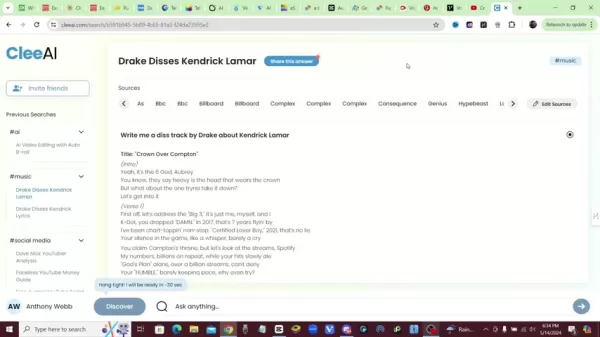
Begin creating your AI diss track by using CleeAI, a powerful tool that produces lyrics based on your prompts. For example, input a request like, "Write a diss track from Drake targeting Kendrick Lamar." CleeAI then composes lyrics by drawing from sources such as BBC, Billboard, Complex, Consequence, Genius, and Hypebeast, building a structured song. This rapid process gives you a solid creative foundation with verses and hooks that reflect the chosen artist’s style.
Why CleeAI?
- Quick Lyric Generation: Instantly produce song content.
- Multiple Source Integration: Pulls from leading media outlets.
- Customizable Results: Tailor lyrics to specific artists and topics.
Generating lyrics efficiently lets you focus on refining the content and blending it into your musical composition.
Sourcing Royalty-Free Beats
The next essential step
is choosing the right instrumental beat. Platforms like YouTube Creator Studio provide extensive libraries of royalty-free music, free from copyright concerns. Search for hip-hop or trap instrumentals that match the tone of your lyrics. Download your chosen beat for use in your audio editing software.
Finding the Right Beat:
- Go to YouTube Creator Studio and open the Audio Library.
- Apply Search Filters: Narrow results by genre, mood, or instrument to match your lyrical theme.
- Preview Options: Listen to several tracks to ensure the beat suits your diss track’s energy.
- Download Your Pick: Once you’ve found the ideal beat, download it in a high-quality format.
Your selected beat should amplify the lyrics' impact, creating a cohesive and engaging track.
Video Editing and Audio Integration with CapCut
CapCut
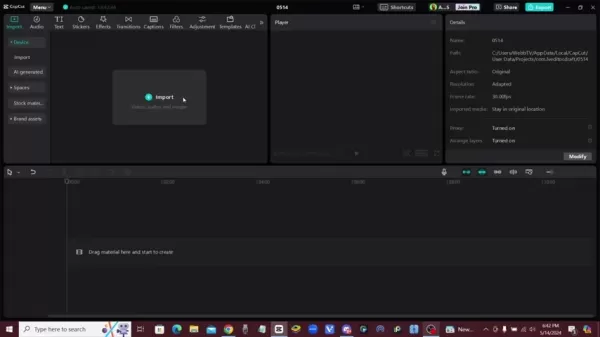
is a great tool for video editing and merging audio, offering an intuitive interface ideal for combining lyrics with your beat. Import the audio track and any visuals you want for your video. Sync the lyrics with the beat by aligning them on the timeline, tweaking timing to match rhythm and flow.
Integrating Audio and Video Elements:
- Import Media: Upload the instrumental beat and the AI-converted vocals into CapCut.
- Align Audio Tracks: Position the vocal track over the instrumental and adjust for perfect synchronization.
- Include Visuals: Add relevant video clips or images to enhance the track's presentation.
- Edit and Polish: Use CapCut’s tools to adjust audio levels, add transitions, and enhance visual effects.
CapCut’s editing features help you produce a refined and professional final video.
AI Voice Conversion: Impersonating Drake
A fascinating aspect of AI diss tracks is using voice conversion to replicate famous artists. Sites like Vocs.ai

let you upload a vocal recording and transform it to match a selected artist's voice. By choosing Drake’s vocal model, you can generate audio that closely resembles his style, adding authenticity to your diss track. Remember to weigh the ethical and copyright issues tied to impersonation.
Using Vocs.ai for Voice Conversion:
- Record Your Vocals: Capture a clean take of your vocal performance.
- Upload to Vocs.ai: Transfer your vocal file to the Vocs.ai platform.
- Choose Drake’s Voice: Select the AI model that emulates Drake's vocal tone.
- Convert and Download: Process the audio and download the converted file.
This technology offers exciting creative potential but demands careful ethical consideration.
Advanced Music Production Tips for AI Tracks
Enhancing Audio Quality
Boosting the audio quality of your AI-generated diss track is key to a professional result. Consider these mixing techniques:
- Equalization (EQ): Adjust frequency levels in the vocal and instrumental tracks to reduce muddiness and enhance clarity.
- Compression: Apply compression to balance the vocal dynamics, ensuring consistency and presence in the mix.
- Reverb and Delay: Add subtle reverb and delay to create dimension and atmosphere, similar to studio recordings.
- Noise Reduction: Remove unwanted background noise from your vocal recordings.
Experiment with these methods to achieve a polished and powerful mix.
Additional Resources:
- Mixing Tutorials: Watch online guides for audio mixing techniques.
- Sound Design Tools: Explore tools to introduce unique sonic elements.
Addressing Ethical Concerns
Creating AI diss tracks that mimic artists involves ethical responsibilities. Understand and respect copyright laws, artist rights, and the risk of misuse. Keep these points in mind:
- Copyright Infringement: Avoid infringing on existing copyrights by mimicking protected works.
- Artist Impersonation: Be open about using AI for voice imitation. Clearly label content as AI-generated, not the artist’s own work.
- Misinformation: Avoid producing content that could spread false claims about the artists.
Following ethical guidelines allows you to explore AI music creation responsibly.
Step-by-Step Tutorial: Creating a Diss Track
Step 1: Generate Initial Lyrics with CleeAI
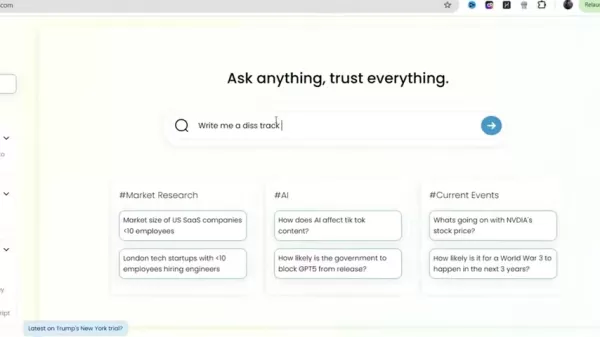
Start by visiting the CleeAI website and entering a specific prompt, such as "Write a diss track by Drake about Kendrick Lamar." After submission, CleeAI generates lyrics sourced from various online platforms. These lyrics are your starting point, which you can later refine to align with your creative direction.
Step 2: Source a Royalty-Free Beat from YouTube Creator Studio
Next, go to YouTube Creator Studio and open the Audio Library. Search for royalty-free hip-hop or trap beats that fit your diss track’s mood. Preview multiple options before selecting. Download your chosen beat in high quality for editing.
Step 3: Integrate Audio and Lyrics in CapCut
Open CapCut and import both the instrumental beat and your lyrics. Align the lyrics with the beat on the timeline, adjusting their timing to match the rhythm. CapCut provides tools to help synchronize these elements smoothly.
Step 4: Convert Vocals Using Vocs.ai
Record yourself performing the lyrics. Upload this recording to Vocs.ai. Pick the AI voice model that replicates Drake’s style to convert your vocals. Download the resulting audio file.
Step 5: Combine the Elements and Edit Your Track
Return to CapCut and import the converted vocal track and the instrumental
. Sync the vocal track with the beat, making any needed timing corrections. Add visuals, transitions, and effects to create an engaging music video. Balance the audio mix so vocals and instruments blend well. Export the finished video.
Pros and Cons of Using AI to Create Diss Tracks
Pros
Fast content creation
Access to varied vocal styles
Experiment with new musical formats
Low-cost entry into music production
Emerging AI music opportunities
Cons
Ethical issues with artist impersonation
Possible copyright complications
Potential for misuse
Over-reliance on AI may limit creativity
Output quality depends on AI algorithms
FAQ
Is it legal to create AI music using an artist's voice?
Legality is complex and depends on copyright law and artist rights. Always check the terms of service for AI voice tools and disclose AI use in your content.
What are the best AI tools for music creation?
In addition to CleeAI and Vocs.ai, other popular tools include Amper Music, OpenAI's Jukebox, and AIVA. Each offers distinct features for music generation.
How can I improve the quality of AI-generated vocals?
Use quality recording gear, apply audio editing like EQ and compression, and test different AI voice models for the best match.
How do I avoid copyright issues when using AI-generated music?
Use royalty-free beats from reliable sources, be transparent about AI use, and avoid directly copying existing songs. Credit original creators where possible.
Related Questions
What are the ethical considerations of using AI for creating diss tracks?
Using AI to imitate artists in diss tracks raises ethical questions about rights, copyright, and misinformation. Creators should prioritize transparency and avoid content that damages an artist's reputation or income. Ethics are crucial in AI content creation, balancing innovation with accountability. Implementing safeguards helps AI empower creativity while protecting artists' rights. Ongoing assessment of ethical impacts is vital as AI evolves. Education on copyright, fair use, and responsible AI practices can reduce risks. AI integration in music offers creative expansion but requires clear ethical boundaries and a commitment to protecting everyone's interests.
What role does creativity play when generating content with AI tools?
Although AI automates parts of creation, human creativity is essential for shaping the final output. AI can generate initial lyrics and musical structures, but the artist's creative input adds emotion, depth, and originality. Creativity drives the refinement of AI content to reflect the creator's unique perspective. It involves artistic decisions—editing lyrics, tweaking melodies, adding personal touches—that AI alone cannot achieve. The collaboration between AI and human creativity can yield groundbreaking work that expands artistic expression. Artists can partner with AI to explore new inspirations while keeping creative control. This fusion of technology and ingenuity redefines creation, opening paths for innovation. Creativity ensures AI is a tool for empowerment, helping artists realize their visions in meaningful ways.
Related article
 Ctrip Business Travel Unveils AI Ecosystem with 7 Industry Agents and 17 Core Capabilities
Ctrip Business Travel has officially unveiled the "Ctrip Business Travel AI Ecosystem," leveraging large language models to fundamentally restructure corporate travel management. This comprehensive ecosystem addresses four core scenarios: travel arra
Stripe to Acquire OpenRouter as AI Model Routing Gains Momentum
Stripe has agreed to acquire OpenRouter, an AI model-routing platform that gives developers access to hundreds of models through a single interface. The deal adds model selection and routing to Stripe’s existing work around AI usage and token-based b
Former OpenAI Researcher Barrett Zoph Returns to Google to Support Gemini Development
Barret Zoph, who previously abruptly left and joined OpenAI due to a disagreement with Thinking Machines Lab CEO Miriam Mularati, has once again changed employers. Alphabet's Google announced that Zoph will return as Vice President of Research, bring
Related Special Topic Recommendations
Design & Art
Ctrip Business Travel Unveils AI Ecosystem with 7 Industry Agents and 17 Core Capabilities
Ctrip Business Travel has officially unveiled the "Ctrip Business Travel AI Ecosystem," leveraging large language models to fundamentally restructure corporate travel management. This comprehensive ecosystem addresses four core scenarios: travel arra
Stripe to Acquire OpenRouter as AI Model Routing Gains Momentum
Stripe has agreed to acquire OpenRouter, an AI model-routing platform that gives developers access to hundreds of models through a single interface. The deal adds model selection and routing to Stripe’s existing work around AI usage and token-based b
Former OpenAI Researcher Barrett Zoph Returns to Google to Support Gemini Development
Barret Zoph, who previously abruptly left and joined OpenAI due to a disagreement with Thinking Machines Lab CEO Miriam Mularati, has once again changed employers. Alphabet's Google announced that Zoph will return as Vice President of Research, bring
Related Special Topic Recommendations
Design & Art
 Top AI Illustration Tools: Create Editorial Scenes and Cover Art Faster
2026 Latest Top-rated AI Illustration Tools: Our curated list features the best powerfully designed tools for creating stunning editorial scenes and eye-catching cover art quickly. Each option has gone through rigorous real-world tests, offering a free vs paid comparison to help you find the perfect match for your workflow. Try these must-try solutions today to unlock your AI edge and boost your creative productivity. Explore now at XIX.AI.
 10 tools
 xix.ai
Education and Learning
Top AI Tutors for Exam Prep: Practice Math, Science, and English
xix.ai
Education and Learning
Top AI Tutors for Exam Prep: Practice Math, Science, and English
2026 Latest Top-Rated Best AI Tutors for Exam Prep are here on XIX.AI! Our curated list features powerful game-changing tools that offer free vs paid comparison, real-world tests, and weekly updated rankings. They help boost your writing efficiency, simplify complex topic learning, and unlock your academic potential. Explore now to Discover your perfect exam prep tool and Start creating today to Unlock your AI edge!
10 tools
xix.ai
Finance
AI Budget Planning Tools for Personal Money Management
2026 Latest Best Top-Rated AI Budget Planning Tools for Personal Money Management are here on XIX.AI! This curated collection features powerful, game-changing solutions that help you conduct real-world tests, understand spending habits, and create personalized plans to boost productivity. Enjoy a free vs paid comparison along with detailed rankings. Must-try tools designed to simplify money management and unlock your AI edge. Explore now!
11 tools
xix.ai
Health & Wellness
AI Sleep Tracking Assistants: Improve Recovery with Better Bedtime Habits
2026 Latest Best Top-Rated AI Sleep Tracking Assistants curated for ultimate recovery. This fully updated weekly guide features powerful tools that deliver real-world tests, free vs paid comparison, and detailed rankings to help you find the must-try solution that boosts sleep quality and supports better bedtime habits. Explore now at XIX.AI to Unlock your AI edge.
10 tools
xix.ai
Data Analysis
AI SQL Copilots for Product and Revenue Analytics
2026 Latest Best Top-Rated AI SQL Copilots for Product and Revenue Analytics! XIX.AI has curated a powerful, game-changing collection of must-try tools that undergo real-world tests through weekly updated rankings. These tools help users boost productivity significantly by accelerating data analysis, streamlining complex queries, and generating accurate insights to drive smarter business decisions. Explore now to Discover your perfect tool for unlocking your AI edge!
14 tools
xix.ai
Education and Learning
Best AI Homework Helpers That Teach: Learn Concepts, Not Just Answers
2026 Latest Best Top-Rated AI Homework Helpers That Teach Core Concepts Not Just Answers Powerful Tools for Students Must-Try Curated List Weekly Updated Free vs Paid Comparison Real-World Tests Accurate Rankings to Help You Unlock Your Full Learning Potential Explore now to Discover your perfect tool for smarter studying.
10 tools
xix.ai

 Comments (2)
0/500
Comments (2)
0/500
![KennethRoberts]()
Die Vorstellung, dass KI jetzt auch in Beefs zwischen Rappern eingesetzt wird, ist irgendwie gruselig und faszinierend zugleich. Wo hört die Kunst auf und fängt Betrug an? Einerseits ein kreatives Tool, andererseits könnte es echte Künstler komplett ersetzen... macht mir schon etwas Angst um die Zukunft der Musik. 🎤🤖
![LarryWilliams]()
Ces diss tracks avec des voix IA, c'est vraiment le futur des beefs dans le rap ou juste une mode passagère ? J'adore l'idée mais ça pourrait devenir problématique si n'importe qui peut créer des clashes fictifs 😅
Artificial intelligence has unlocked new creative pathways for musicians and enthusiasts. This article explores the dynamic, and sometimes contentious, world of AI-generated diss tracks, imagining a lyrical showdown between hip-hop titans Drake and Kendrick Lamar. We’ll demonstrate how to use CleeAI alongside CapCut for music production and voice conversion to craft AI music. Get ready to dive into the intersection of technology and artistic expression.
Key Points
Use CleeAI to craft diss track lyrics from user input.
Find royalty-free beats on platforms like YouTube Creator Studio.
Edit video and integrate audio using CapCut.
Apply AI voice conversion tools like Vocs.ai to mimic popular artists.
Consider the ethical implications of AI-generated content, particularly artist impersonation.
Learn effective techniques to improve your music production and create compelling content.
Generating a Diss Track with AI: A Step-by-Step Guide
Leveraging AI for Lyric Generation with CleeAI
Begin creating your AI diss track by using CleeAI, a powerful tool that produces lyrics based on your prompts. For example, input a request like, "Write a diss track from Drake targeting Kendrick Lamar." CleeAI then composes lyrics by drawing from sources such as BBC, Billboard, Complex, Consequence, Genius, and Hypebeast, building a structured song. This rapid process gives you a solid creative foundation with verses and hooks that reflect the chosen artist’s style.
Why CleeAI?
- Quick Lyric Generation: Instantly produce song content.
- Multiple Source Integration: Pulls from leading media outlets.
- Customizable Results: Tailor lyrics to specific artists and topics.
Generating lyrics efficiently lets you focus on refining the content and blending it into your musical composition.
Sourcing Royalty-Free Beats
The next essential step
is choosing the right instrumental beat. Platforms like YouTube Creator Studio provide extensive libraries of royalty-free music, free from copyright concerns. Search for hip-hop or trap instrumentals that match the tone of your lyrics. Download your chosen beat for use in your audio editing software.
Finding the Right Beat:
- Go to YouTube Creator Studio and open the Audio Library.
- Apply Search Filters: Narrow results by genre, mood, or instrument to match your lyrical theme.
- Preview Options: Listen to several tracks to ensure the beat suits your diss track’s energy.
- Download Your Pick: Once you’ve found the ideal beat, download it in a high-quality format.
Your selected beat should amplify the lyrics' impact, creating a cohesive and engaging track.
Video Editing and Audio Integration with CapCut
CapCut
is a great tool for video editing and merging audio, offering an intuitive interface ideal for combining lyrics with your beat. Import the audio track and any visuals you want for your video. Sync the lyrics with the beat by aligning them on the timeline, tweaking timing to match rhythm and flow.
Integrating Audio and Video Elements:
- Import Media: Upload the instrumental beat and the AI-converted vocals into CapCut.
- Align Audio Tracks: Position the vocal track over the instrumental and adjust for perfect synchronization.
- Include Visuals: Add relevant video clips or images to enhance the track's presentation.
- Edit and Polish: Use CapCut’s tools to adjust audio levels, add transitions, and enhance visual effects.
CapCut’s editing features help you produce a refined and professional final video.
AI Voice Conversion: Impersonating Drake
A fascinating aspect of AI diss tracks is using voice conversion to replicate famous artists. Sites like Vocs.ai
let you upload a vocal recording and transform it to match a selected artist's voice. By choosing Drake’s vocal model, you can generate audio that closely resembles his style, adding authenticity to your diss track. Remember to weigh the ethical and copyright issues tied to impersonation.
Using Vocs.ai for Voice Conversion:
- Record Your Vocals: Capture a clean take of your vocal performance.
- Upload to Vocs.ai: Transfer your vocal file to the Vocs.ai platform.
- Choose Drake’s Voice: Select the AI model that emulates Drake's vocal tone.
- Convert and Download: Process the audio and download the converted file.
This technology offers exciting creative potential but demands careful ethical consideration.
Advanced Music Production Tips for AI Tracks
Enhancing Audio Quality
Boosting the audio quality of your AI-generated diss track is key to a professional result. Consider these mixing techniques:
- Equalization (EQ): Adjust frequency levels in the vocal and instrumental tracks to reduce muddiness and enhance clarity.
- Compression: Apply compression to balance the vocal dynamics, ensuring consistency and presence in the mix.
- Reverb and Delay: Add subtle reverb and delay to create dimension and atmosphere, similar to studio recordings.
- Noise Reduction: Remove unwanted background noise from your vocal recordings.
Experiment with these methods to achieve a polished and powerful mix.
Additional Resources:
- Mixing Tutorials: Watch online guides for audio mixing techniques.
- Sound Design Tools: Explore tools to introduce unique sonic elements.
Addressing Ethical Concerns
Creating AI diss tracks that mimic artists involves ethical responsibilities. Understand and respect copyright laws, artist rights, and the risk of misuse. Keep these points in mind:
- Copyright Infringement: Avoid infringing on existing copyrights by mimicking protected works.
- Artist Impersonation: Be open about using AI for voice imitation. Clearly label content as AI-generated, not the artist’s own work.
- Misinformation: Avoid producing content that could spread false claims about the artists.
Following ethical guidelines allows you to explore AI music creation responsibly.
Step-by-Step Tutorial: Creating a Diss Track
Step 1: Generate Initial Lyrics with CleeAI
Start by visiting the CleeAI website and entering a specific prompt, such as "Write a diss track by Drake about Kendrick Lamar." After submission, CleeAI generates lyrics sourced from various online platforms. These lyrics are your starting point, which you can later refine to align with your creative direction.
Step 2: Source a Royalty-Free Beat from YouTube Creator Studio
Next, go to YouTube Creator Studio and open the Audio Library. Search for royalty-free hip-hop or trap beats that fit your diss track’s mood. Preview multiple options before selecting. Download your chosen beat in high quality for editing.
Step 3: Integrate Audio and Lyrics in CapCut
Open CapCut and import both the instrumental beat and your lyrics. Align the lyrics with the beat on the timeline, adjusting their timing to match the rhythm. CapCut provides tools to help synchronize these elements smoothly.
Step 4: Convert Vocals Using Vocs.ai
Record yourself performing the lyrics. Upload this recording to Vocs.ai. Pick the AI voice model that replicates Drake’s style to convert your vocals. Download the resulting audio file.
Step 5: Combine the Elements and Edit Your Track
Return to CapCut and import the converted vocal track and the instrumental
. Sync the vocal track with the beat, making any needed timing corrections. Add visuals, transitions, and effects to create an engaging music video. Balance the audio mix so vocals and instruments blend well. Export the finished video.
Pros and Cons of Using AI to Create Diss Tracks
Pros
Fast content creation
Access to varied vocal styles
Experiment with new musical formats
Low-cost entry into music production
Emerging AI music opportunities
Cons
Ethical issues with artist impersonation
Possible copyright complications
Potential for misuse
Over-reliance on AI may limit creativity
Output quality depends on AI algorithms
FAQ
Is it legal to create AI music using an artist's voice?
Legality is complex and depends on copyright law and artist rights. Always check the terms of service for AI voice tools and disclose AI use in your content.
What are the best AI tools for music creation?
In addition to CleeAI and Vocs.ai, other popular tools include Amper Music, OpenAI's Jukebox, and AIVA. Each offers distinct features for music generation.
How can I improve the quality of AI-generated vocals?
Use quality recording gear, apply audio editing like EQ and compression, and test different AI voice models for the best match.
How do I avoid copyright issues when using AI-generated music?
Use royalty-free beats from reliable sources, be transparent about AI use, and avoid directly copying existing songs. Credit original creators where possible.
Related Questions
What are the ethical considerations of using AI for creating diss tracks?
Using AI to imitate artists in diss tracks raises ethical questions about rights, copyright, and misinformation. Creators should prioritize transparency and avoid content that damages an artist's reputation or income. Ethics are crucial in AI content creation, balancing innovation with accountability. Implementing safeguards helps AI empower creativity while protecting artists' rights. Ongoing assessment of ethical impacts is vital as AI evolves. Education on copyright, fair use, and responsible AI practices can reduce risks. AI integration in music offers creative expansion but requires clear ethical boundaries and a commitment to protecting everyone's interests.
What role does creativity play when generating content with AI tools?
Although AI automates parts of creation, human creativity is essential for shaping the final output. AI can generate initial lyrics and musical structures, but the artist's creative input adds emotion, depth, and originality. Creativity drives the refinement of AI content to reflect the creator's unique perspective. It involves artistic decisions—editing lyrics, tweaking melodies, adding personal touches—that AI alone cannot achieve. The collaboration between AI and human creativity can yield groundbreaking work that expands artistic expression. Artists can partner with AI to explore new inspirations while keeping creative control. This fusion of technology and ingenuity redefines creation, opening paths for innovation. Creativity ensures AI is a tool for empowerment, helping artists realize their visions in meaningful ways.








 Ctrip Business Travel Unveils AI Ecosystem with 7 Industry Agents and 17 Core Capabilities
Ctrip Business Travel has officially unveiled the "Ctrip Business Travel AI Ecosystem," leveraging large language models to fundamentally restructure corporate travel management. This comprehensive ecosystem addresses four core scenarios: travel arra
Ctrip Business Travel Unveils AI Ecosystem with 7 Industry Agents and 17 Core Capabilities
Ctrip Business Travel has officially unveiled the "Ctrip Business Travel AI Ecosystem," leveraging large language models to fundamentally restructure corporate travel management. This comprehensive ecosystem addresses four core scenarios: travel arra
 Stripe to Acquire OpenRouter as AI Model Routing Gains Momentum
Stripe has agreed to acquire OpenRouter, an AI model-routing platform that gives developers access to hundreds of models through a single interface. The deal adds model selection and routing to Stripe’s existing work around AI usage and token-based b
Stripe to Acquire OpenRouter as AI Model Routing Gains Momentum
Stripe has agreed to acquire OpenRouter, an AI model-routing platform that gives developers access to hundreds of models through a single interface. The deal adds model selection and routing to Stripe’s existing work around AI usage and token-based b
 Former OpenAI Researcher Barrett Zoph Returns to Google to Support Gemini Development
Barret Zoph, who previously abruptly left and joined OpenAI due to a disagreement with Thinking Machines Lab CEO Miriam Mularati, has once again changed employers. Alphabet's Google announced that Zoph will return as Vice President of Research, bring
Former OpenAI Researcher Barrett Zoph Returns to Google to Support Gemini Development
Barret Zoph, who previously abruptly left and joined OpenAI due to a disagreement with Thinking Machines Lab CEO Miriam Mularati, has once again changed employers. Alphabet's Google announced that Zoph will return as Vice President of Research, bring

2026 Latest Top-rated AI Illustration Tools: Our curated list features the best powerfully designed tools for creating stunning editorial scenes and eye-catching cover art quickly. Each option has gone through rigorous real-world tests, offering a free vs paid comparison to help you find the perfect match for your workflow. Try these must-try solutions today to unlock your AI edge and boost your creative productivity. Explore now at XIX.AI.
10 tools
xix.ai

2026 Latest Top-Rated Best AI Tutors for Exam Prep are here on XIX.AI! Our curated list features powerful game-changing tools that offer free vs paid comparison, real-world tests, and weekly updated rankings. They help boost your writing efficiency, simplify complex topic learning, and unlock your academic potential. Explore now to Discover your perfect exam prep tool and Start creating today to Unlock your AI edge!
10 tools
xix.ai

2026 Latest Best Top-Rated AI Budget Planning Tools for Personal Money Management are here on XIX.AI! This curated collection features powerful, game-changing solutions that help you conduct real-world tests, understand spending habits, and create personalized plans to boost productivity. Enjoy a free vs paid comparison along with detailed rankings. Must-try tools designed to simplify money management and unlock your AI edge. Explore now!
11 tools
xix.ai

2026 Latest Best Top-Rated AI Sleep Tracking Assistants curated for ultimate recovery. This fully updated weekly guide features powerful tools that deliver real-world tests, free vs paid comparison, and detailed rankings to help you find the must-try solution that boosts sleep quality and supports better bedtime habits. Explore now at XIX.AI to Unlock your AI edge.
10 tools
xix.ai

2026 Latest Best Top-Rated AI SQL Copilots for Product and Revenue Analytics! XIX.AI has curated a powerful, game-changing collection of must-try tools that undergo real-world tests through weekly updated rankings. These tools help users boost productivity significantly by accelerating data analysis, streamlining complex queries, and generating accurate insights to drive smarter business decisions. Explore now to Discover your perfect tool for unlocking your AI edge!
14 tools
xix.ai

2026 Latest Best Top-Rated AI Homework Helpers That Teach Core Concepts Not Just Answers Powerful Tools for Students Must-Try Curated List Weekly Updated Free vs Paid Comparison Real-World Tests Accurate Rankings to Help You Unlock Your Full Learning Potential Explore now to Discover your perfect tool for smarter studying.
10 tools
xix.ai

Die Vorstellung, dass KI jetzt auch in Beefs zwischen Rappern eingesetzt wird, ist irgendwie gruselig und faszinierend zugleich. Wo hört die Kunst auf und fängt Betrug an? Einerseits ein kreatives Tool, andererseits könnte es echte Künstler komplett ersetzen... macht mir schon etwas Angst um die Zukunft der Musik. 🎤🤖
Ces diss tracks avec des voix IA, c'est vraiment le futur des beefs dans le rap ou juste une mode passagère ? J'adore l'idée mais ça pourrait devenir problématique si n'importe qui peut créer des clashes fictifs 😅












