


 Home
HomeVoCut
AI Video Editing Assistant: Simplify Your Edits



Helps TikTok sellers, brands, MCNs, and TAPs discover winning products and find creators.

HelpLook is an AI-powered all-in-one knowledge base tool that helps businesses quickly build knowledge bases, help centers, and...

Your AI Workspace

302.AI is an enterprise-grade AI resource platform with pay-as-you-go pricing, API access to a full range of AI models, and ready-to-use online applications.

剧火AI — AI Screenwriter + Director, a One-Person Short Drama Studio In one sentence, what is it?

Ever heard of Grok? It's this nifty AI assistant from xAI that's all about giving you the straight scoop. And the best part? It's totally free! Grok isn't just your average AI; it's packed with cool features like real-time search, image generation, and tr

Ever wondered what Qwen AI is all about? Well, let me introduce you to this gem from Alibaba Cloud. Qwen AI is not your average language model; it's a powerhouse designed to be your go-to buddy for everything from whipping up text to coding, and even reco

Discover Plume AI: Your Ultimate Academic Writing AssistantAre you tired of struggling with your academic writing? Well, say hello to Plume AI, the innovative AI assistant that's here to revolutionize the way you write! Designed with students in mind, Plume AI harnesses the power of cutting-edge art

Ever wished for a trusty sidekick to help you navigate the digital world with ease? Enter Sider, your personal AI companion designed to seamlessly blend into your daily routine. Starting off as a handy Chrome/Edge extension, Sider transforms your browsing
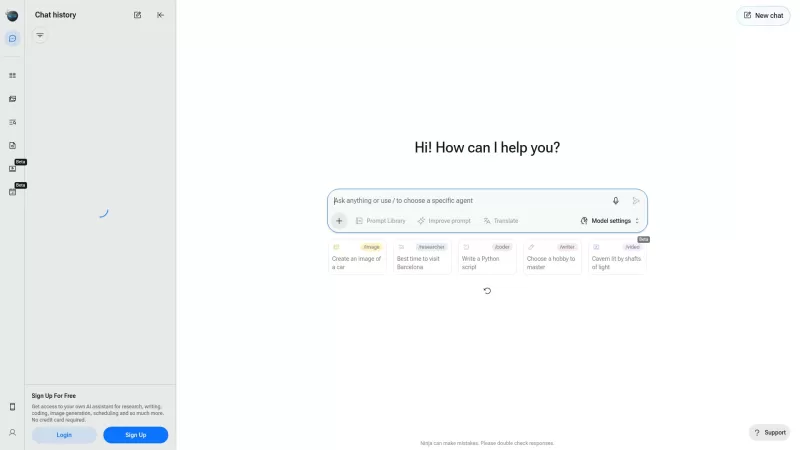
Ever wondered what Ninja AI is all about? Well, let me tell you, it's like having a Swiss Army knife for your digital needs! Ninja AI isn't just another AI tool; it's a powerhouse that brings together over 24 top-notch Large Language Models (LLMs) to help
VoCut Product Information
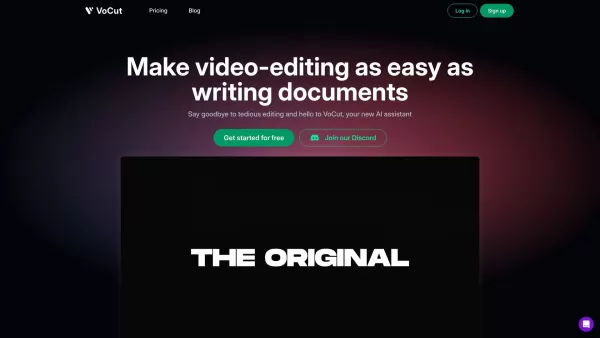
Ever wondered what it would be like if you could edit videos as effortlessly as you jot down notes? Enter VoCut, the AI-powered video editing assistant that's here to revolutionize your editing experience. It's not just another tool; it's like having a seasoned editor by your side, thanks to its use of LLM and deep learning technologies. VoCut learns from a vast pool of creators and editors, enabling it to spot and snip out those silent clips, retakes, and pesky filler words with just one click. It's like magic!
How to Dive into VoCut?
Getting started with VoCut is a breeze. First, you'll need to sign up for an account and log in. Once you're in, import your video footage and let VoCut's AI work its charm. It'll analyze and process your video, making it easy for you to remove those unwanted silent parts, retakes, and filler words with a single click. But that's not all! VoCut also offers nifty features like instant alignment, auto voice fitting, and even rough cut generation. These tools are designed to save you heaps of time and make the whole video editing process feel like a walk in the park.
What Makes VoCut Stand Out?
AI-Powered Video Editing Assistant
VoCut isn't just about cutting clips; it's an intelligent assistant that learns and adapts to make your editing smoother.
One-Click Wonders
With VoCut, you can detect and delete silent clips, retakes, and filler words in a snap. It's all about efficiency and ease.
Advanced Tech at Your Fingertips
Thanks to LLM and deep learning, VoCut brings the experience of many to your fingertips, making your edits smarter.
Instant Alignment
Align your clips instantly to keep your video flowing smoothly without the hassle.
Auto Voice Fitting
Let VoCut adjust your voice to fit perfectly within your video, enhancing the overall quality.
Rough Cut Generation
Get a rough cut of your video generated automatically, giving you a head start on your final edit.
Who Can Benefit from VoCut?
- Content Creators: Streamline your video production and focus on creating content that resonates.
- Video Editors: Save time on the mundane tasks and dive into the creative aspects of editing.
- Filmmakers: Enhance your storytelling by effortlessly refining your footage.
- Social Media Influencers: Keep your audience engaged with polished, professional-looking videos.
- Online Course Creators: Make your educational content more engaging and easier to produce.
Frequently Asked Questions
- How does VoCut save time for creators?
- VoCut automates tedious editing tasks like removing silent clips, retakes, and filler words, allowing creators to focus more on content creation.
- What features does VoCut offer?
- VoCut offers AI-powered editing, one-click detection and deletion of unwanted parts, instant alignment, auto voice fitting, and rough cut generation.
- Who can benefit from using VoCut?
- Content creators, video editors, filmmakers, social media influencers, and online course creators can all benefit from VoCut's features.
- Is VoCut free to use?
- For detailed pricing information, please visit the VoCut Pricing page.
Join the conversation and get support on the VoCut Discord. For more messages, click here.
Ready to log in? Head over to the VoCut Login page.
New to VoCut? Sign up at VoCut Sign Up.
Check out the latest updates and tutorials on VoCut's YouTube channel.
Follow VoCut on Twitter for the latest news and insights.
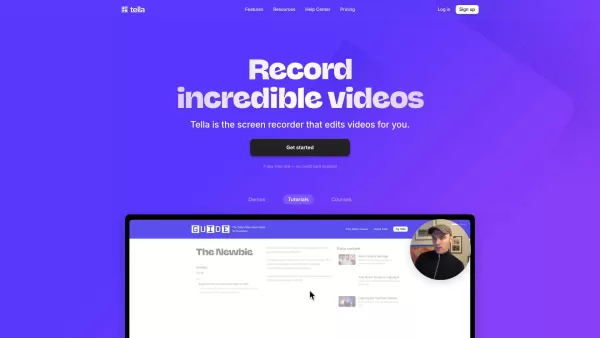
VoCut Screenshot


2026 Latest Top-rated AI Illustration Tools: Our curated list features the best powerfully designed tools for creating stunning editorial scenes and eye-catching cover art quickly. Each option has gone through rigorous real-world tests, offering a free vs paid comparison to help you find the perfect match for your workflow. Try these must-try solutions today to unlock your AI edge and boost your creative productivity. Explore now at XIX.AI.
 10 tools
 xix.ai

2026 Latest Top-Rated Best AI Tutors for Exam Prep are here on XIX.AI! Our curated list features powerful game-changing tools that offer free vs paid comparison, real-world tests, and weekly updated rankings. They help boost your writing efficiency, simplify complex topic learning, and unlock your academic potential. Explore now to Discover your perfect exam prep tool and Start creating today to Unlock your AI edge!
10 tools
xix.ai

2026 Latest Best Top-Rated AI Budget Planning Tools for Personal Money Management are here on XIX.AI! This curated collection features powerful, game-changing solutions that help you conduct real-world tests, understand spending habits, and create personalized plans to boost productivity. Enjoy a free vs paid comparison along with detailed rankings. Must-try tools designed to simplify money management and unlock your AI edge. Explore now!
11 tools
xix.ai

2026 Latest Best Top-Rated AI Sleep Tracking Assistants curated for ultimate recovery. This fully updated weekly guide features powerful tools that deliver real-world tests, free vs paid comparison, and detailed rankings to help you find the must-try solution that boosts sleep quality and supports better bedtime habits. Explore now at XIX.AI to Unlock your AI edge.
10 tools
xix.ai

2026 Latest Best Top-Rated AI SQL Copilots for Product and Revenue Analytics! XIX.AI has curated a powerful, game-changing collection of must-try tools that undergo real-world tests through weekly updated rankings. These tools help users boost productivity significantly by accelerating data analysis, streamlining complex queries, and generating accurate insights to drive smarter business decisions. Explore now to Discover your perfect tool for unlocking your AI edge!
14 tools
xix.ai

2026 Latest Best Top-Rated AI Homework Helpers That Teach Core Concepts Not Just Answers Powerful Tools for Students Must-Try Curated List Weekly Updated Free vs Paid Comparison Real-World Tests Accurate Rankings to Help You Unlock Your Full Learning Potential Explore now to Discover your perfect tool for smarter studying.
10 tools
xix.ai


