


 Home
HomeHiFun AI



Helps TikTok sellers, brands, MCNs, and TAPs discover winning products and find creators.

HelpLook is an AI-powered all-in-one knowledge base tool that helps businesses quickly build knowledge bases, help centers, and...

Your AI Workspace

302.AI is an enterprise-grade AI resource platform with pay-as-you-go pricing, API access to a full range of AI models, and ready-to-use online applications.

剧火AI — AI Screenwriter + Director, a One-Person Short Drama Studio In one sentence, what is it?

What is Banana AI - Free AI Photo Editor?Banana AI is a free, AI-driven photo editor that uses Google's Nano Banana technology (Gemini 2.5 Flash Image) to transform your pictures with simple text commands. Easily remove unwanted objects, swap backgro

What is Nano Banana | Nanana AI? Nanana AI is the leading AI image generator and AI image editor on the market. It taps into the full potential of Google's revolutionary Nano Banana model to offer unmatched image creation and editing power. As an ear

What is Line Art Maker?Line Art Maker is an intuitive application that effortlessly transforms your photos into stunning line drawings. Powered by sophisticated algorithms, it precisely identifies outlines and turns your images into detailed sketches

What is TranslateImages?AI Image Translator is an advanced tool that precisely translates text embedded in images, keeping the original layout and format intact. It supports over a dozen languages, such as English, Hindi, Arabic, Chinese, Japanese, K

What is Deepfake Maker Nano Banana AI? Nano Banana AI is an advanced artificial intelligence platform that generates stunning images from text descriptions and facilitates seamless image-to-image transformations. This cutting-edge AI model revolution
HiFun AI Product Information
What is HiFun AI?
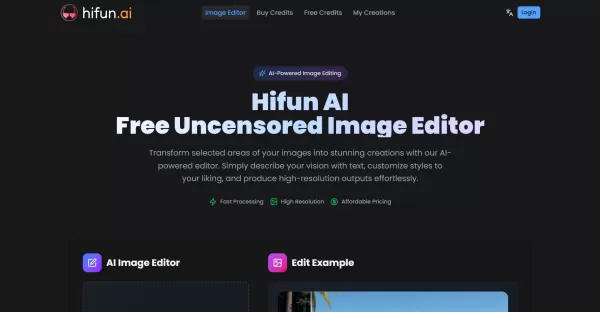
HiFun AI Image Editor leverages advanced artificial intelligence to automatically mask and edit parts of an image according to user text prompts. You can upload images in formats like JPEG, PNG, GIF, or WebP, then simply describe the changes you want. The system intelligently refines your prompts for optimal outcomes and processes images swiftly in the cloud, delivering high-quality edits perfect for both professionals and hobbyists.
Who will use HiFun AI?
- Graphic designers
- Digital artists
- Content creators
- Photographers
- Marketing professionals
- Casual users looking for creative image edits
How to use the HiFun AI?
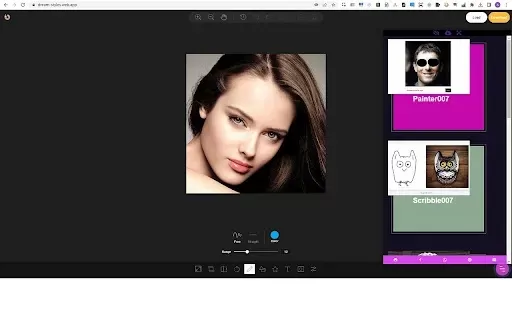
- Step 1: Upload your image and use the masking tool to select the area you wish to modify.
- Step 2: Enter a detailed text description of the image effect or changes you desire.
- Step 3: Click 'Create' to begin the AI editing process, then download your high-resolution result when it's ready.
Platform
- Web
HiFun AI's Core Features & Benefits
The Core Features
- AI-powered automatic masking for selected image areas
- Smart prompt enhancement using advanced language models
- Rapid cloud-based image processing
- Support for multiple image formats (JPEG, PNG, GIF, WebP)
- High-quality, high-resolution image output
The Benefits
- Eliminates manual masking, saving valuable editing time
- Simple to use with straightforward text prompts
- Fast processing that doesn't strain your local hardware
- Delivers professional-grade image edits
- Affordable, flexible pricing model
HiFun AI's Main Use Cases & Applications
- Removing or altering background elements
- Enhancing or restyling specific parts of photographs
- Creating artistic variations of existing images
- Modifying images for marketing and advertising
- Personal creative projects and experimentation
HiFun AI's Pros & Cons
The Pros
Free and user-friendly
No censorship on edits
Automatic AI masking and prompt enhancement
High-resolution, professional-quality results
Cloud-based for fast processing
The Cons
Requires an internet connection for cloud processing
Credit system per edit may limit free usage
Limited to supported image formats
Available only as a web platform, with no dedicated desktop or mobile app
HiFun AI's Pricing
Has free plan | YES |
|---|---|
Free trial details | |
Pricing model | Freemium |
Is credit card required | No |
Paid from | 9.99 USD |
Has lifetime plan | No |
Billing frequency | Monthly |
Details of Pricing Plan
Free
0 USD
- 20 Credits
- Up to 2 images
- ~2 Generations
- Local storage
- No watermark
Basic
9.99 USD
- 200 Credits
- Image transfer: Up to 20 images
- Access to all styles & tools
- Private generation
- Priority generation
- No watermark
- No ads
Pro
29.99 USD
- 1000 Credits
- Image transfer: Up to 100 images
- Access to all styles & tools
- Private generation
- Priority generation
- No watermark
- No ads
VIP
99.99 USD
- 5000 Credits
- Image transfer: Up to 500 images
- Access to all styles & tools
- Private generation
- Priority generation
- No watermark
- No ads
For the latest prices, please visit: https://hifun.ai/pricing
FAQs of HiFun AI
What is Hifun AI Image Editor?
It is an AI-powered, uncensored image editing tool that transforms pictures based on your text descriptions.
What unique features does Hifun AI Image Editor offer?
Automatic masking, intelligent prompt enhancement, fast cloud processing, and high-resolution output.
How do I use Hifun AI to edit images?
Upload an image, mask the area to edit, describe the desired effect, then generate and download the result.
What image formats does Hifun AI Image Editor support?
It supports JPEG, PNG, GIF, and WebP formats.
How long does the image editing process take?
Processing is typically completed within a few seconds.
How does Hifun AI handle user data and privacy?
User images are processed securely in the cloud, in accordance with our privacy policies.
What subscription plans are available for Hifun AI Image Editor?
Affordable, credit-based pricing plans are detailed on our pricing page.
Can I use the edited images for commercial purposes?
Yes, edited images can be used for commercial purposes.
Are there limitations on the types of images I can create?
Some restrictions apply; please refer to the terms of use for specific details.
How can I get help if I encounter technical issues?
Support contact information is available on the website.
HiFun AI Company Information
HiFun AI Launch embedsUse website badges to drive support from your community for your Creati.ai Launch. They're easy to embed on your homepage or footer.
How to install?
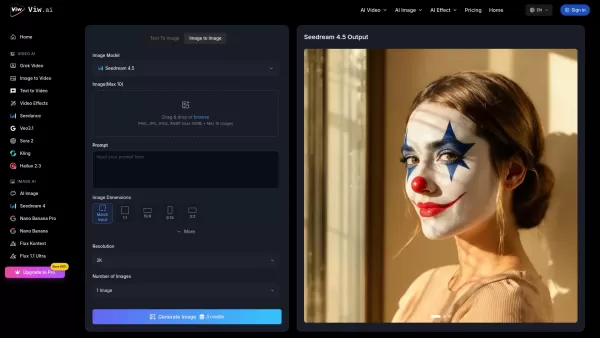
HiFun AI Screenshot

2026 Latest Top-rated AI Illustration Tools: Our curated list features the best powerfully designed tools for creating stunning editorial scenes and eye-catching cover art quickly. Each option has gone through rigorous real-world tests, offering a free vs paid comparison to help you find the perfect match for your workflow. Try these must-try solutions today to unlock your AI edge and boost your creative productivity. Explore now at XIX.AI.
 10 tools
 xix.ai

2026 Latest Top-Rated Best AI Tutors for Exam Prep are here on XIX.AI! Our curated list features powerful game-changing tools that offer free vs paid comparison, real-world tests, and weekly updated rankings. They help boost your writing efficiency, simplify complex topic learning, and unlock your academic potential. Explore now to Discover your perfect exam prep tool and Start creating today to Unlock your AI edge!
10 tools
xix.ai

2026 Latest Best Top-Rated AI Budget Planning Tools for Personal Money Management are here on XIX.AI! This curated collection features powerful, game-changing solutions that help you conduct real-world tests, understand spending habits, and create personalized plans to boost productivity. Enjoy a free vs paid comparison along with detailed rankings. Must-try tools designed to simplify money management and unlock your AI edge. Explore now!
11 tools
xix.ai

2026 Latest Best Top-Rated AI Sleep Tracking Assistants curated for ultimate recovery. This fully updated weekly guide features powerful tools that deliver real-world tests, free vs paid comparison, and detailed rankings to help you find the must-try solution that boosts sleep quality and supports better bedtime habits. Explore now at XIX.AI to Unlock your AI edge.
10 tools
xix.ai

2026 Latest Best Top-Rated AI SQL Copilots for Product and Revenue Analytics! XIX.AI has curated a powerful, game-changing collection of must-try tools that undergo real-world tests through weekly updated rankings. These tools help users boost productivity significantly by accelerating data analysis, streamlining complex queries, and generating accurate insights to drive smarter business decisions. Explore now to Discover your perfect tool for unlocking your AI edge!
14 tools
xix.ai

2026 Latest Best Top-Rated AI Homework Helpers That Teach Core Concepts Not Just Answers Powerful Tools for Students Must-Try Curated List Weekly Updated Free vs Paid Comparison Real-World Tests Accurate Rankings to Help You Unlock Your Full Learning Potential Explore now to Discover your perfect tool for smarter studying.
10 tools
xix.ai


