


 Home
HomeBaxter - Email Organizer & Unsubscriber



Helps TikTok sellers, brands, MCNs, and TAPs discover winning products and find creators.

HelpLook is an AI-powered all-in-one knowledge base tool that helps businesses quickly build knowledge bases, help centers, and...

Your AI Workspace

302.AI is an enterprise-grade AI resource platform with pay-as-you-go pricing, API access to a full range of AI models, and ready-to-use online applications.

剧火AI — AI Screenwriter + Director, a One-Person Short Drama Studio In one sentence, what is it?

Ever wondered how to get a leg up in *Call of Duty: Mobile*? Well, redeem codes are your golden ticket to a whole bunch of in-game goodies. These codes can give you a sweet boost to your Weapon XP or Battle Pass XP, making it a breeze to level up your arsenal and unlock those coveted new weapons, at
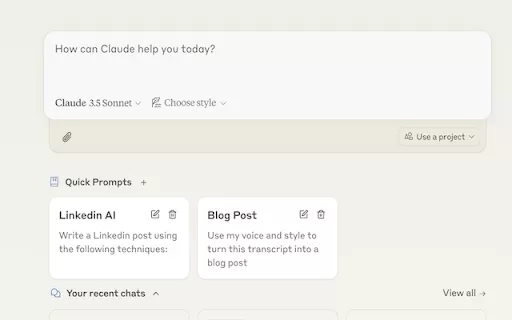
Ever find yourself stuck in a loop, typing the same prompts over and over? Enter Claude, the AI-powered Chrome extension that's here to save your sanity. This nifty tool is all about managing and saving your prompts, so you can keep your creative juices flowing without the frustration of repetition.

If you're looking to level up your typing game, the AI Typing Assistant is your go-to tool. It's like having a personal coach that tailors its advice just for you, based on how you type. Ever wish you could type faster and with fewer mistakes? This a

What is Giststack? Giststack is an AI-driven platform that assists users, especially solopreneurs and marketers, in tackling the hurdles of social media content creation. It gathers content from your preferred websites and newsletters, spots trending

Pixelcode is a revolutionary tool that transforms screenshots of code into editable text, saving you from the tedious task of typing out code manually. Imagine snapping a picture of a code snippet and instantly having it ready to edit in your preferred co
Baxter - Email Organizer & Unsubscriber Product Information
What Is Baxter - Email Organizer & Unsubscriber?
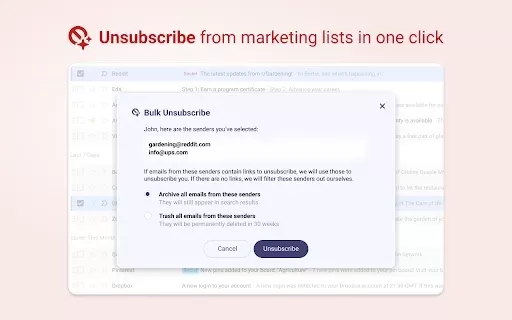
Baxter is an innovative tool built specifically for Gmail users to manage their email effectively. It lets you unsubscribe from spam, delete unwanted emails, and organize your inbox into folders like Finance, Health, Travel, and E-Commerce. Powered by AI, it streamlines email management, saving you time and reducing clutter. Whether you're overwhelmed by subscriptions or just want to keep your personal emails organized, Baxter provides a simple, seamless solution.
Who Will Use Baxter - Email Organizer & Unsubscriber?
- Gmail users
- Professionals
- Students
- Frequent online shoppers
- Anyone seeking to declutter their inbox
How to Use Baxter - Email Organizer & Unsubscriber?
- Step 1: Install the Baxter extension from the Chrome Web Store.
- Step 2: Connect it to your Gmail account.
- Step 3: Use the unsubscribe feature to remove unwanted subscriptions.
- Step 4: Organize emails into categories with a single click.
- Step 5: Regularly check for new spam and manage your inbox accordingly.
Platforms
- Web
- Chrome
Baxter - Email Organizer & Unsubscriber's Core Features and Benefits
Core Features
- Unsubscribe from unwanted emails
- Automatically categorize emails
- Delete emails in bulk
- AI-powered organization
Benefits
- Saves time
- Reduces email clutter
- Enhances productivity
- Simplifies email management
Baxter - Email Organizer & Unsubscriber's Main Use Cases and Applications
- Managing personal emails
- Reducing spam subscriptions
- Organizing work-related emails
- Maintaining a tidy inbox
FAQs About Baxter - Email Organizer & Unsubscriber
What Does Baxter Do?
Baxter helps you organize and unsubscribe from unwanted emails in Gmail.
Is Baxter Free to Use?
Yes, Baxter is a free Chrome extension.
Can Baxter Organize My Emails Automatically?
Yes, Baxter uses AI to automatically categorize your emails.
How Do I Uninstall Baxter?
You can uninstall Baxter from the Chrome extensions menu.
Does Baxter Work with Other Email Services?
Currently, Baxter is compatible only with Gmail.
Is My Data Safe with Baxter?
Baxter prioritizes user privacy and handles your data securely.
How Often Should I Use Baxter?
Use Baxter regularly to keep your inbox organized and clutter-free.
What Happens to Unsubscribed Emails?
Unsubscribed emails are removed from your inbox based on your preferences.
How Do I Provide Feedback About Baxter?
You can send feedback through the support email listed on our website.
Can I Restore Deleted Emails?
Once deleted, emails cannot be recovered, so please exercise caution.
Baxter - Email Organizer & Unsubscriber Company Information
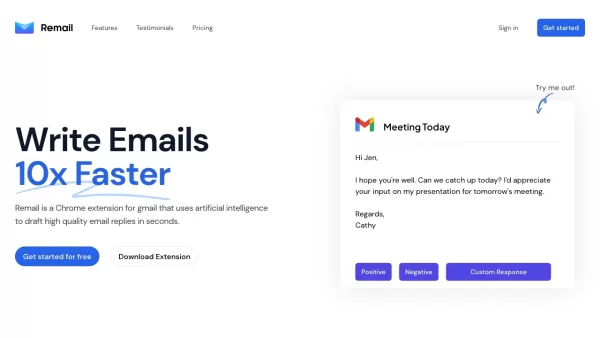
Baxter - Email Organizer & Unsubscriber Screenshot

2026 Latest Best AI TikTok Hook Generators for Short-Form Creators! XIX.AI has curated a top-rated list of powerful, game-changing tools that go through real-world tests to deliver must-try hooks every week. You’ll find easy free vs paid comparison options along with detailed rankings to help you find the perfect solution for boosting your content creation efficiency. Explore now to Unlock your AI edge!
 16 tools
 xix.ai
2026 Latest Best Top-Rated AI Email Triage Tools for Team Productivity! XIX.AI curates a powerful, game-changing collection of must-try tools that help teams quickly sort through massive email volumes, boost writing efficiency, and save countless hours each week. Our rigorous real-world tests and updated rankings ensure you find the perfect fit for your workflow. Explore now to unlock your AI edge!
10 tools
xix.ai

2026 Latest Top-Rated Best AI Songwriting Assistants are here on XIX.AI! This curated list features powerfully efficient tools that go through real-world tests to deliver high-quality lyrics, chords, and melodies effortlessly. Get a free vs paid comparison to find the perfect fit for your creative needs. Explore now to unlock your AI edge in music creation!
12 tools
xix.ai

2026 Latest Top-Rated Best AI Agent Builders for Creating Multi-Step Business Automations. This curated list features powerful, game-changing tools that go through rigorous real-world tests. You’ll find detailed free vs paid comparisons, comprehensive rankings, and weekly updated insights to help you choose the perfect solution that boosts your productivity significantly. Explore now at XIX.AI to unlock your AI edge!
11 tools
xix.ai

2026 Latest Best Top-rated AI Task Planning Tools for Busy Professionals! XIX.AI has curated a powerful, game-changing collection of highly efficient tools that help users streamline workflows, boost productivity, and overcome daily scheduling challenges. Each option goes through rigorous real-world tests to ensure reliability. Get a free vs paid comparison and discover the perfect tool to unlock your AI edge. Explore now!
15 tools
xix.ai

2026 Latest Top-rated AI Customer Chatbots featured on this curated list are the best solutions for answering customer FAQs instantly and qualifying leads around the clock. XIX.AI has conducted rigorous real-world tests to deliver a detailed free vs paid comparison along with up-to-date rankings, helping you find a powerful game-changing tool that boosts productivity significantly. Explore now to Discover your perfect AI chatbot solution!
9 tools
xix.ai


