


 Home
HomeAxiom



Helps TikTok sellers, brands, MCNs, and TAPs discover winning products and find creators.

HelpLook is an AI-powered all-in-one knowledge base tool that helps businesses quickly build knowledge bases, help centers, and...

Your AI Workspace

302.AI is an enterprise-grade AI resource platform with pay-as-you-go pricing, API access to a full range of AI models, and ready-to-use online applications.

剧火AI — AI Screenwriter + Director, a One-Person Short Drama Studio In one sentence, what is it?

Ever wondered how to get a leg up in *Call of Duty: Mobile*? Well, redeem codes are your golden ticket to a whole bunch of in-game goodies. These codes can give you a sweet boost to your Weapon XP or Battle Pass XP, making it a breeze to level up your arsenal and unlock those coveted new weapons, at
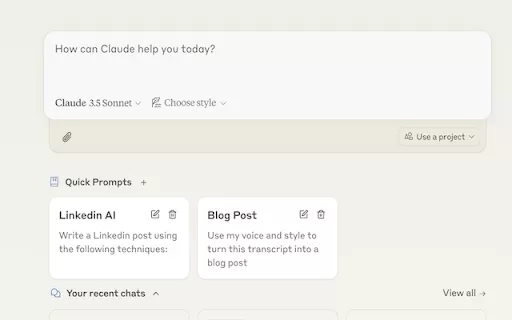
Ever find yourself stuck in a loop, typing the same prompts over and over? Enter Claude, the AI-powered Chrome extension that's here to save your sanity. This nifty tool is all about managing and saving your prompts, so you can keep your creative juices flowing without the frustration of repetition.

If you're looking to level up your typing game, the AI Typing Assistant is your go-to tool. It's like having a personal coach that tailors its advice just for you, based on how you type. Ever wish you could type faster and with fewer mistakes? This a

Pixelcode is a revolutionary tool that transforms screenshots of code into editable text, saving you from the tedious task of typing out code manually. Imagine snapping a picture of a code snippet and instantly having it ready to edit in your preferred co

What is Giststack? Giststack is an AI-driven platform that assists users, especially solopreneurs and marketers, in tackling the hurdles of social media content creation. It gathers content from your preferred websites and newsletters, spots trending
Axiom Product Information
What Is Axiom?
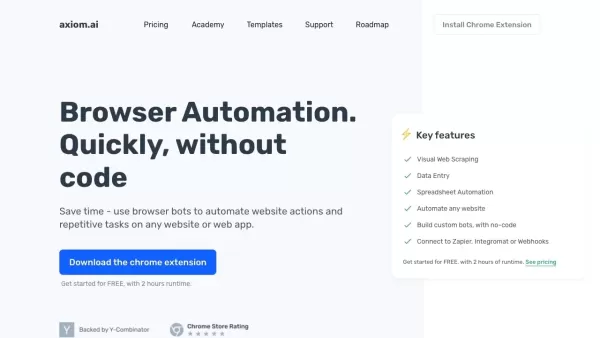
Axiom.ai is a no-code browser automation platform that enables users to create custom bots to handle repetitive online tasks. It offers smooth integration with numerous web applications, helping users eliminate manual work and save valuable time. Thanks to its intuitive drag-and-drop interface, anyone—ranging from business professionals to tech-savvy individuals—can leverage this tool without needing any prior programming experience.
Who Will Use Axiom?
- Business professionals
- Tech enthusiasts
- Marketers
- Data analysts
- Customer support teams
- E-commerce managers
How to Use Axiom?
- Step 1: Sign up and create an account on Axiom.ai.
- Step 2: Select the browser actions you want to automate.
- Step 3: Build your custom bot using the drag-and-drop interface.
- Step 4: Test the bot to confirm it functions as intended.
- Step 5: Deploy the bot and keep an eye on its performance.
- Step 6: Make any necessary adjustments based on how well the bot performs.
Platform Support
- Web browsers
- Chrome
Axiom’s Core Features & Benefits
The Core Features
- No-code automation capabilities
- User-friendly drag-and-drop interface
- Customizable browser bots
- Integration with various web applications
The Benefits
- Cuts down on time spent on repetitive tasks
- Boosts efficiency and overall productivity
- Easy to use even for people without programming skills
- Gives users flexible options for customization
Axiom’s Main Use Cases & Applications
- Automating data entry
- Scraping web data
- Handling login processes automatically
- Filling out forms
- Conducting online research
- Managing e-commerce operations
Axiom’s Pros & Cons
The Pros
Its no-code design makes browser automation accessible to users who aren’t developers.
It can handle complex automation tasks such as web scraping and data entry.
It integrates smoothly with popular services like ChatGPT, Zapier, and Google Sheets.
Users can quickly create workflows and highly customized bots.
Many users praise it for its flexibility, excellent customer support, and frequent feature updates.
All operations run entirely within the user’s browser, ensuring data and automation results stay private.
The Cons
It isn’t open source, which limits customization options and transparency.
It’s only available as a Chrome extension, so it’s not usable outside of Chrome browsers.
There is no mobile app version available on either the Google Play Store or Apple App Store.
Axiom’s Pricing
Is there a free plan? | YES |
|---|---|
Details about the free trial | 2 hours of free usage, no credit card required |
Pricing model | Paid subscription required |
Is a credit card necessary? | No |
Starting price | 15 USD |
Is there a lifetime plan? | No |
Billing frequency | Monthly |
Details of Pricing Plans
Axiom Starter
15 USD
- 5 hours of monthly runtime
- Cloud single-run limit: 1 hour
- Email and community support
Axiom Pro
50 USD
- 30 hours of monthly runtime
- Schedule bots: daily (cloud), every minute (desktop)
- Zapier + Make integration
- Webhooks & API access
- Cloud single-run limit: 2 hours
- Email support
Axiom Pro Max
150 USD
- 100 hours of monthly runtime
- Schedule bots: hourly (cloud), every minute (desktop)
- Ability to run 2 bots simultaneously
- Zapier + Make integration
- Webhooks & API access
- Cloud single-run limit: 3 hours
- Slack and email support
Axiom Ultimate
250 USD
- 250 hours of monthly runtime
- Schedule bots: 15 minutes (cloud), every minute (desktop)
- Ability to run 3 bots simultaneously
- Zapier + Make integration
- Webhooks & API access
- Cloud single-run limit: 12 hours
- Priority Slack and email support
To see the most up-to-date pricing information, please visit: https://axiom.ai/pricing
Axiom FAQs
What Is Axiom.ai?
Axiom.ai is a no-code browser automation tool designed to automate repetitive online tasks.
Is Coding Required to Use Axiom.ai?
No, Axiom.ai relies on a user-friendly drag-and-drop interface that eliminates the need for coding skills.
Which Platforms Does Axiom.ai Support?
Axiom.ai works with web browsers and Chrome specifically.
What Types of Tasks Can Axiom.ai Automate?
It can automate tasks such as data entry, web scraping, login processes, form filling, and online research.
Who Can Benefit from Axiom.ai?
Business professionals, tech enthusiasts, marketers, data analysts, customer support teams, and e-commerce managers all stand to benefit.
How Do I Start Using Axiom.ai?
Start by signing up, selecting the tasks you want automated, building a custom bot, testing it, and then deploying it.
Is Axiom.ai User-Friendly for Non-Programmers?
Yes, its intuitive drag-and-drop interface is specifically designed to be easy to use without any programming background.
What Are the Key Features of Axiom.ai?
Its key features include no-code automation, a drag-and-drop interface, customizable browser bots, and integration with web applications.
How Can Axiom.ai Improve My Productivity?
By automating repetitive tasks, it helps save time and increase overall efficiency.
Can I Integrate Axiom.ai With Other Web Applications?
Yes, Axiom.ai supports integration with a wide range of web applications.
Axiom Company Information
Website:
https://axiom.aiCompany Name:
Axiom AI LimitedSupport Email:
Not availableFacebook:
Not availableX(Twitter):
Not availableYouTube:
Not availableInstagram:
Not availableTiktok:
Not availableLinkedIn:
https://www.linkedin.com/company/axiom-cgl
Axiom Screenshot

2026 Latest Best Top-Rated AI Wireframe Tools for Product Designers! XIX.AI has curated a powerful, game-changing collection of must-try tools that go through rigorous real-world tests. You’ll find detailed weekly updated rankings, free vs paid comparison insights, and all the key info you need to choose the perfect tool to boost your design efficiency and unlock your AI edge. Explore now!
 8 tools
 xix.ai

2026 Latest Best Top-Rated AI SEO Tools for Keyword Research are here on XIX.AI! This curated list features powerful, game-changing tools that go through rigorous real-world tests to deliver accurate data. Get a free vs paid comparison, see detailed rankings, and discover must-try options to boost your content strategy and improve search visibility. Explore now to find your perfect tool!
8 tools
xix.ai

2026 Latest Best Top-rated AI Quiz Builders for Course Creators and Tutors! XIX.AI has curated a powerful, game-changing collection of must-try tools that go through real-world tests for unmatched accuracy. You’ll find detailed free vs paid comparison insights, updated weekly rankings, and practical tips to boost content creation efficiency and deliver engaging learning experiences. Explore now to Discover your perfect tool and Unlock your AI edge!
9 tools
xix.ai

2026 Latest Best Top-rated AI Subtitle and Video Editing Tools for Creators are here on XIX.AI! This curated list features powerful game-changing tools that help creators boost productivity significantly, whether you need to add subtitles fast or refine video content. We conduct real-world tests and provide a free vs paid comparison along with weekly updated rankings. Must-try options are clearly highlighted to help you unlock your AI edge. Explore now to discover your perfect tool!
9 tools
xix.ai

2026 Latest Best Top-rated AI Content Calendar Tools for Short Video Planning are here on XIX.AI! This curated collection features powerful, game-changing solutions that help creators boost writing efficiency, streamline content planning, and save valuable time. We conduct real-world tests and provide a free vs paid comparison along with weekly updated rankings to show you the must-try options. Explore now to discover your perfect tool and unlock your AI edge!
11 tools
xix.ai

2026 Latest Best Top-rated AI Research Tools for Literature Review are featured on this curated page, offering powerful game-changing solutions to streamline your research process. You’ll find detailed free vs paid comparison insights, real-world tests, and expert rankings to help you choose the most efficient option. XIX.AI supports this comprehensive guide to help you unlock your AI edge. Explore now to discover your perfect tool!
16 tools
xix.ai


