


 Home
HomeWooask S01 AI Voice Recorder Transcribes Across 134 Languages With Ease
In our interconnected world, clear communication is essential. The Wooask S01 AI Voice Recorder is a groundbreaking device that delivers real-time transcription and translation across 134 languages. This compact tool is built for professionals, students, and anyone requiring accurate speech-to-text conversion. Discover the features, capabilities, and applications that establish the Wooask S01 as an indispensable accessory.
Key Points
With transcription for up to 134 languages, the Wooask S01 is a highly adaptable tool for global communication.
It boasts 32GB of storage, accommodating extensive recordings without frequent data transfers.
The device is remarkably small and lightweight, designed for easy portability.
Its AI-powered transcription provides real-time translation, boosting productivity.
Integrated cloud storage allows users to save and retrieve recordings from any location.
Unveiling the Wooask S01: A Pocket-Sized Language Solution
What is the Wooask S01?
The Wooask S01 AI Voice Recorder is a state-of-the-art device engineered to transcribe and translate voice recordings into text across 134 languages
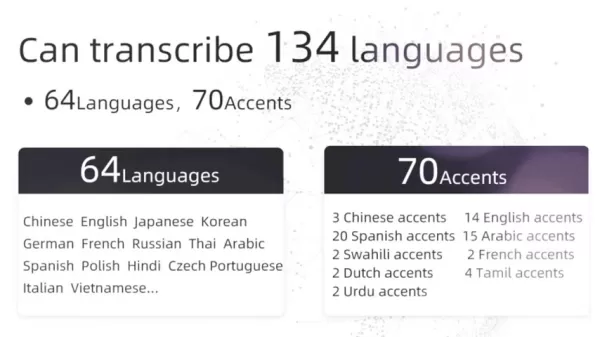
. It distinguishes itself with a compact form factor, sophisticated AI, and an intuitive interface. Ideal for anyone needing fast speech-to-text conversion, especially in multilingual settings, the S01 streamlines communication for documenting meetings, interviews, lectures, and more. Its purpose is to overcome language barriers and improve efficiency with features designed for a global audience. The recorder offers 360° HD sound capture and professional noise suppression. Its sleek design serves as a stylish accessory, while its robust functionality guarantees practical value.
Core features encompass real-time transcription, generous storage, and cloud integration, all packed into a pocket-sized device. The aim is not just to record audio, but to effortlessly transform it into editable, usable text. Capable of processing numerous languages and accents, the Wooask S01 is set to become a vital tool for anyone navigating linguistic diversity.
Design and Portability of the S01 Recorder
The Wooask S01 excels in portability. Measuring roughly 2.4 inches and weighing a mere 17 grams

, it is crafted for maximum convenience. Its sleek, minimalist aesthetic makes it an appealing addition to any professional environment. The compact size lets you carry it in a pocket, clip it to a notebook, or attach it to a bag without adding bulk.
The S01 prioritizes durability alongside style. Its sturdy build withstands everyday use, ensuring reliability on the move. An intuitive button layout and clear indicators guarantee ease of operation, even in dynamic situations. Whether you're a student, journalist, or international business professional, the Wooask S01’s design integrates seamlessly into your daily routine, offering transcription and translation support wherever it's needed.
The Brain Behind the Recorder: Understanding AI Transcription Technology
The core of the Wooask S01 is its AI-driven transcription technology. This advanced system recognizes and transcribes 134 languages with support for up to 70 accents, delivering high accuracy and dependability
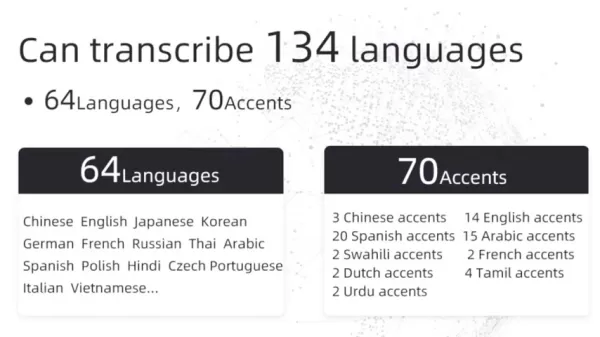
. The device's AI algorithms adapt to various speech patterns, dialects, and background noise to produce clear, precise transcriptions.
The AI transcription technology also learns and improves continuously, enhancing its precision with each use. This ongoing learning process keeps the Wooask S01 at the cutting edge of voice-to-text conversion.
Key advantages of this AI-powered system include:
- Real-time Transcription: Instantly converts speech to text, enabling you to follow along live.
- High Accuracy: AI algorithms reduce errors, ensuring reliable transcriptions even in noisy settings.
- Language Versatility: Supports 134 languages and multiple accents, perfect for international applications.
- Continuous Learning: Transcription accuracy improves over time as the AI adapts to your voice and surroundings.
Advanced Features for Enhanced Productivity
Cloud Storage and Data Management
The Wooask S01 supports cloud storage, offering a secure and convenient method for managing recordings. With 500 hours of cloud storage
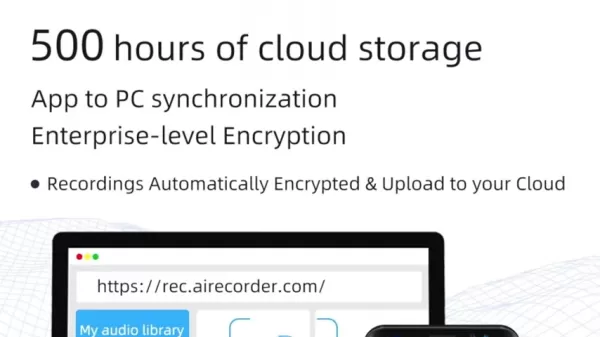
, you can save and access files from any device, keeping your data always available. The cloud service employs enterprise-grade encryption to protect sensitive information from unauthorized access. App-to-PC synchronization enables seamless file transfers between your recorder, smartphone, and computer.
Features include:
- Automatic Uploads: Recordings are automatically encrypted and uploaded to your cloud account.
- Secure Storage: Enterprise-level encryption safeguards your data.
- Multi-Device Access: Retrieve your files from any internet-connected device.
- Easy Sharing: Effortlessly share transcriptions and recordings with colleagues, classmates, or clients.
Simultaneous Interpretation for Multilingual Interactions
The Wooask S01 provides simultaneous interpretation, enabling real-time translation during conversations. This feature supports 134 languages, facilitating effective communication across language barriers
. Whether attending an international conference, conducting a multilingual interview, or collaborating with global teams, the simultaneous interpretation feature ensures smooth, accurate dialogue.
The simultaneous interpretation function is especially useful in these scenarios:
- International Meetings: Translate discussions in real time so all participants can understand.
- Multilingual Interviews: Conduct interviews in different languages and receive instant translations.
- Global Collaboration: Facilitate communication among team members from different countries.
Getting Started with Your Wooask S01 AI Voice Recorder
Initial Setup and Charging
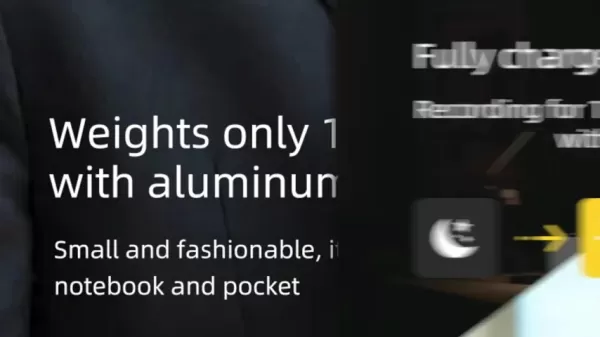
Before using your Wooask S01, proper setup is essential. The device achieves a full charge within one hour and provides up to 12 hours of continuous recording
. Connect the recorder to a power source using the included USB-C cable. Once fully charged, you are ready to begin. Turn on the device by pressing the power button; the LED indicator will light up, signaling the recorder is active.
Connecting to the AI Recorder App
To unlock the Wooask S01's full potential, connect it to the AI Recorder app via Bluetooth. The app is available for iOS and Android. Follow these steps to pair your device:
- Download the App: Search for "AI Recorder" on the App Store or Google Play Store and install it.
- Enable Bluetooth: Turn on Bluetooth on your smartphone or tablet.
- Open the App: Launch the AI Recorder app.
- Pair the Device: Follow the in-app instructions to pair with your Wooask S01. The app will search for available devices and prompt you to connect

.
- Connect: Once paired, the app will show the device as connected, and you can start recording and transcribing.
Recording and Transcribing
With your Wooask S01 ready, you can begin recording and transcribing audio. Here's how:
- Start Recording: Press the record button on the device to begin

. The LED indicator will turn green, showing recording is in progress.
- Speak Clearly: Place the recorder near the speaker for optimal audio input. The Wooask S01 features 360° HD sound pickup, but clear speech yields the best results.
- Stop Recording: Press the record button again to stop. The LED will return to blue.
- Transcribe Audio: Open the AI Recorder app; it will automatically sync recordings. Select the desired recording, and the AI will convert it to text.
- Edit Transcription: Review the transcript and make any necessary corrections for accuracy.
- Save and Share: Save the text and share it as a Word file, PDF, or text document.
Utilizing Real-Time Translation
To use the real-time translation feature:
- Select Languages: In the AI Recorder app, choose the input and output languages for translation

.
- Enable Translation: Activate the simultaneous interpretation mode within the app.
- Start Recording: Begin recording audio. The app will provide real-time translations as you speak.
- Review and Save: Review the translated text and save it for later use. Edit the transcription as needed.
Pricing and Availability
Where to Buy the Wooask S01
The Wooask S01 AI Voice Recorder is primarily available through crowdfunding platforms. Interested buyers can check the link in the description for more details.

Evaluating the Wooask S01
Pros
Supports 134 languages
Delivers real-time translation
Offers ample storage with cloud support
Features excellent noise cancellation
Compact and lightweight design
Includes an easy-to-use mobile app
Cons
Transcription accuracy depends on AI performance
Real-time translation may require an internet connection
Battery life may be limiting for extended sessions
Key Features of the Wooask S01 AI Voice Recorder
A Deep Dive into Functionality
The Wooask S01 AI Voice Recorder is equipped with features engineered for seamless voice recording and transcription. Here is a breakdown of its core functionalities:
- 134 Languages Transcription: The device transcribes 134 languages
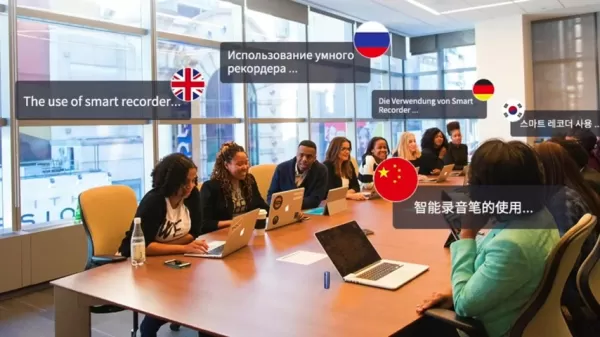
, serving a global user base.
- AI-Powered Real-Time Translation: Provides instant translation, ideal for multilingual meetings and interviews.
- 32GB Internal Storage: Offers generous space for storing recordings without constant data transfer.
- Cloud Storage Support: Enables users to save and access recordings from any device, with enterprise-level encryption.
- 360° HD Sound Pickup: Captures high-quality audio from all directions.
- Professional Noise Cancellation: Reduces background noise for clear, precise transcriptions.
- Compact and Lightweight Design: Built for portability and convenience, easy to carry anywhere.
- Long Battery Life: Charges in one hour and supports up to 12 hours of continuous recording.
These combined features make the Wooask S01 a versatile tool for professionals, students, and anyone seeking efficient, accurate speech-to-text conversion.
Versatile Use Cases for the Wooask S01
Real-World Applications
The Wooask S01 AI Voice Recorder is a versatile tool applicable in numerous scenarios. It delivers high-quality transcriptions, seamless translation, and cloud services. Specific use cases include:
- Business Meetings: Accurately record and transcribe meetings, providing a clear record of discussions and decisions for all attendees.
- Interviews: Conduct interviews in multiple languages with real-time translations, streamlining the process and improving communication.
- Lectures and Seminars: Record educational sessions for easy review and study later.
- Journalism: Quickly transcribe interviews and press conferences, saving time and boosting productivity.
- Legal Proceedings: Document court proceedings and depositions with high accuracy.
- Language Learning: Practice language skills and get instant feedback on pronunciation.
- Personal Note-Taking: Record personal notes and to-do lists for easy reference.
Frequently Asked Questions
How many languages does the Wooask S01 support?
The Wooask S01 supports transcription and translation for 134 languages, making it exceptionally versatile for international communication. The system also accommodates up to 70 different accents.
What is the storage capacity of the Wooask S01?
The device includes 32GB of internal storage, offering ample space for numerous recordings without frequent data transfers. It also provides an additional 500 hours of cloud storage.
How long does the battery last on the Wooask S01?
A full charge takes just one hour and supports up to 12 hours of continuous recording, ensuring it lasts through lengthy meetings or lectures.
Can I access my recordings on multiple devices?
Yes, the Wooask S01 supports cloud storage and app-to-PC synchronization, allowing you to access your files from any internet-connected device.
Is the Wooask S01 easy to use?
Yes, the device features a user-friendly interface with intuitive controls. The AI Recorder app is also designed to be straightforward and easy to navigate for a seamless experience.
Related Questions
What types of audio formats does the Wooask S01 support?
While supported formats may vary, the Wooask S01 typically works with common audio formats like MP3 and WAV. These ensure compatibility with a wide range of devices and software for easy playback and editing. MP3 offers compressed files that are easier to save and share, while WAV provides uncompressed, high-quality audio with larger file sizes. Consult the device manual for confirmed compatible formats. You can also convert audio into other formats for further customization.
How does the noise cancellation feature work?
The Wooask S01 employs advanced noise cancellation technology to minimize background noise and improve audio clarity. This function works by identifying and filtering out ambient sounds like traffic, chatter, and other distractions. It uses digital signal processing (DSP) algorithms to analyze incoming audio, distinguishing between speech and noise. The algorithms then suppress the noise components, resulting in clearer recordings. The device's dual-microphone array also aids noise reduction by capturing audio from multiple directions and focusing on the primary sound source. This real-time noise cancellation makes the Wooask S01 particularly effective in noisy environments such as crowded cafes, busy offices, or outdoor settings.
Related article
 Anthropic Expands Claude AI Coding Tools to Japan in Push for Overseas Growth
Anthropic, a prominent U.S. artificial intelligence firm, is intensifying its global outreach. On Wednesday, the company hosted a major developer gathering, "Code with Claude," in Tokyo, drawing close to 500 software engineers. This initiative seeks
India’s Software Giant Cuts Hiring, Promises No Layoffs as AI Agents Scale Up
As artificial intelligence reshapes traditional labor-intensive business models, Tata Consultancy Services (TCS), a premier Indian software outsourcing firm, has unveiled its strategic response. During Tuesday’s annual general meeting, the chairman o
China Locks AI Models During Gaokam to Block Instant Homework Help
With the 2026 Gaokao fast approaching, rumors regarding the suspension of AI tools during the exam period have ignited intense online debate. In response to public concern, major AI platforms and educational apps have clarified their stance: rather t
Related Special Topic Recommendations
Design & Art
Anthropic Expands Claude AI Coding Tools to Japan in Push for Overseas Growth
Anthropic, a prominent U.S. artificial intelligence firm, is intensifying its global outreach. On Wednesday, the company hosted a major developer gathering, "Code with Claude," in Tokyo, drawing close to 500 software engineers. This initiative seeks
India’s Software Giant Cuts Hiring, Promises No Layoffs as AI Agents Scale Up
As artificial intelligence reshapes traditional labor-intensive business models, Tata Consultancy Services (TCS), a premier Indian software outsourcing firm, has unveiled its strategic response. During Tuesday’s annual general meeting, the chairman o
China Locks AI Models During Gaokam to Block Instant Homework Help
With the 2026 Gaokao fast approaching, rumors regarding the suspension of AI tools during the exam period have ignited intense online debate. In response to public concern, major AI platforms and educational apps have clarified their stance: rather t
Related Special Topic Recommendations
Design & Art
 Best AI Style Transfer Tools for Creative Experiments
2026 Latest Best Top-rated AI Style Transfer Tools for Creative Experiments! XIX.AI has curated a powerful, game-changing collection of must-try tools that deliver exceptional results through real-world tests and rigorous rankings. These top solutions help creatives boost productivity significantly by accelerating content creation and unlocking endless creative possibilities. Explore now to discover your perfect tool and start creating today!
 9 tools
 xix.ai
Comic Creation
Best AI Dialogue Bubble Tools for Visual Storytelling
xix.ai
Comic Creation
Best AI Dialogue Bubble Tools for Visual Storytelling
2026 Latest Best Top-Rated AI Dialogue Bubble Tools for Visual Storytelling are here on XIX.AI! This curated collection features powerful, game-changing tools that help creators boost productivity and overcome creative bottlenecks. Get a free vs paid comparison, see real-world tests, and check the latest rankings to find the must-try solutions perfect for crafting engaging visual narratives. Explore now to discover your ideal tool!
10 tools
xix.ai
Meeting Assistant
Top AI Meeting Summary Tools: Track Decisions and Follow-Ups Clearly
2026 Latest Top-Rated Best AI Meeting Summary Tools for Clear Decision Tracking and Effortless Follow-Ups. This curated list showcases powerful, game-changing solutions that boost productivity dramatically by automating meeting notes, identifying key action items, and streamlining team coordination across all projects. Get a free vs paid comparison along with real-world tests and weekly updated rankings to help you find the perfect tool. Explore now to unlock your AI edge!
9 tools
xix.ai
Data Analysis
Best AI Data Cleaning Tools: Fix Missing Values and Duplicates Fast
2026 Latest Best Top-rated AI Data Cleaning Tools for quick fixing of missing values and duplicates. This curated list showcases powerful, game-changing solutions that boost productivity significantly. Each option has undergone rigorous real-world tests to ensure reliability. Get a free vs paid comparison and discover the must-try tool that fits your needs best. Explore now at XIX.AI to Unlock your AI edge.
11 tools
xix.ai
Design & Art
Best AI Creative Ideation Tools for Artists: Break Through Visual Blocks
2026 Latest Best Top-Rated AI Creative Ideation Tools for Artists are curated by XIX.AI to help creators break through visual blocks and boost creativity instantly. These powerful game-changing tools offer real-world tests, detailed free vs paid comparison, and weekly updated rankings. Discover your perfect tool to accelerate content creation and unlock your AI edge today. Explore now!
14 tools
xix.ai
Music composition
AI Beat Makers for TikTok Background Tracks, Reels Audio, and Creator Promo Music
2026 Latest Best AI Beat Makers for TikTok Background Tracks, Reels Audio, and Creator Promo Music! XIX.AI has curated a top-rated list of powerful game-changing tools that go through real-world tests to deliver flawless music for every content need. You’ll find detailed free vs paid comparison data, weekly updated rankings, and must-try options to help you boost creativity and productivity. Explore now to discover your perfect tool!
11 tools
xix.ai

 Comments (0)
0/500
Comments (0)
0/500
In our interconnected world, clear communication is essential. The Wooask S01 AI Voice Recorder is a groundbreaking device that delivers real-time transcription and translation across 134 languages. This compact tool is built for professionals, students, and anyone requiring accurate speech-to-text conversion. Discover the features, capabilities, and applications that establish the Wooask S01 as an indispensable accessory.
Key Points
With transcription for up to 134 languages, the Wooask S01 is a highly adaptable tool for global communication.
It boasts 32GB of storage, accommodating extensive recordings without frequent data transfers.
The device is remarkably small and lightweight, designed for easy portability.
Its AI-powered transcription provides real-time translation, boosting productivity.
Integrated cloud storage allows users to save and retrieve recordings from any location.
Unveiling the Wooask S01: A Pocket-Sized Language Solution
What is the Wooask S01?
The Wooask S01 AI Voice Recorder is a state-of-the-art device engineered to transcribe and translate voice recordings into text across 134 languages
. It distinguishes itself with a compact form factor, sophisticated AI, and an intuitive interface. Ideal for anyone needing fast speech-to-text conversion, especially in multilingual settings, the S01 streamlines communication for documenting meetings, interviews, lectures, and more. Its purpose is to overcome language barriers and improve efficiency with features designed for a global audience. The recorder offers 360° HD sound capture and professional noise suppression. Its sleek design serves as a stylish accessory, while its robust functionality guarantees practical value.
Core features encompass real-time transcription, generous storage, and cloud integration, all packed into a pocket-sized device. The aim is not just to record audio, but to effortlessly transform it into editable, usable text. Capable of processing numerous languages and accents, the Wooask S01 is set to become a vital tool for anyone navigating linguistic diversity.
Design and Portability of the S01 Recorder
The Wooask S01 excels in portability. Measuring roughly 2.4 inches and weighing a mere 17 grams
, it is crafted for maximum convenience. Its sleek, minimalist aesthetic makes it an appealing addition to any professional environment. The compact size lets you carry it in a pocket, clip it to a notebook, or attach it to a bag without adding bulk.
The S01 prioritizes durability alongside style. Its sturdy build withstands everyday use, ensuring reliability on the move. An intuitive button layout and clear indicators guarantee ease of operation, even in dynamic situations. Whether you're a student, journalist, or international business professional, the Wooask S01’s design integrates seamlessly into your daily routine, offering transcription and translation support wherever it's needed.
The Brain Behind the Recorder: Understanding AI Transcription Technology
The core of the Wooask S01 is its AI-driven transcription technology. This advanced system recognizes and transcribes 134 languages with support for up to 70 accents, delivering high accuracy and dependability
. The device's AI algorithms adapt to various speech patterns, dialects, and background noise to produce clear, precise transcriptions.
The AI transcription technology also learns and improves continuously, enhancing its precision with each use. This ongoing learning process keeps the Wooask S01 at the cutting edge of voice-to-text conversion.
Key advantages of this AI-powered system include:
- Real-time Transcription: Instantly converts speech to text, enabling you to follow along live.
- High Accuracy: AI algorithms reduce errors, ensuring reliable transcriptions even in noisy settings.
- Language Versatility: Supports 134 languages and multiple accents, perfect for international applications.
- Continuous Learning: Transcription accuracy improves over time as the AI adapts to your voice and surroundings.
Advanced Features for Enhanced Productivity
Cloud Storage and Data Management
The Wooask S01 supports cloud storage, offering a secure and convenient method for managing recordings. With 500 hours of cloud storage
, you can save and access files from any device, keeping your data always available. The cloud service employs enterprise-grade encryption to protect sensitive information from unauthorized access. App-to-PC synchronization enables seamless file transfers between your recorder, smartphone, and computer.
Features include:
- Automatic Uploads: Recordings are automatically encrypted and uploaded to your cloud account.
- Secure Storage: Enterprise-level encryption safeguards your data.
- Multi-Device Access: Retrieve your files from any internet-connected device.
- Easy Sharing: Effortlessly share transcriptions and recordings with colleagues, classmates, or clients.
Simultaneous Interpretation for Multilingual Interactions
The Wooask S01 provides simultaneous interpretation, enabling real-time translation during conversations. This feature supports 134 languages, facilitating effective communication across language barriers
. Whether attending an international conference, conducting a multilingual interview, or collaborating with global teams, the simultaneous interpretation feature ensures smooth, accurate dialogue.
The simultaneous interpretation function is especially useful in these scenarios:
- International Meetings: Translate discussions in real time so all participants can understand.
- Multilingual Interviews: Conduct interviews in different languages and receive instant translations.
- Global Collaboration: Facilitate communication among team members from different countries.
Getting Started with Your Wooask S01 AI Voice Recorder
Initial Setup and Charging
Before using your Wooask S01, proper setup is essential. The device achieves a full charge within one hour and provides up to 12 hours of continuous recording
. Connect the recorder to a power source using the included USB-C cable. Once fully charged, you are ready to begin. Turn on the device by pressing the power button; the LED indicator will light up, signaling the recorder is active.
Connecting to the AI Recorder App
To unlock the Wooask S01's full potential, connect it to the AI Recorder app via Bluetooth. The app is available for iOS and Android. Follow these steps to pair your device:
- Download the App: Search for "AI Recorder" on the App Store or Google Play Store and install it.
- Enable Bluetooth: Turn on Bluetooth on your smartphone or tablet.
- Open the App: Launch the AI Recorder app.
- Pair the Device: Follow the in-app instructions to pair with your Wooask S01. The app will search for available devices and prompt you to connect
.
- Connect: Once paired, the app will show the device as connected, and you can start recording and transcribing.
Recording and Transcribing
With your Wooask S01 ready, you can begin recording and transcribing audio. Here's how:
- Start Recording: Press the record button on the device to begin
. The LED indicator will turn green, showing recording is in progress.
- Speak Clearly: Place the recorder near the speaker for optimal audio input. The Wooask S01 features 360° HD sound pickup, but clear speech yields the best results.
- Stop Recording: Press the record button again to stop. The LED will return to blue.
- Transcribe Audio: Open the AI Recorder app; it will automatically sync recordings. Select the desired recording, and the AI will convert it to text.
- Edit Transcription: Review the transcript and make any necessary corrections for accuracy.
- Save and Share: Save the text and share it as a Word file, PDF, or text document.
Utilizing Real-Time Translation
To use the real-time translation feature:
- Select Languages: In the AI Recorder app, choose the input and output languages for translation
.
- Enable Translation: Activate the simultaneous interpretation mode within the app.
- Start Recording: Begin recording audio. The app will provide real-time translations as you speak.
- Review and Save: Review the translated text and save it for later use. Edit the transcription as needed.
Pricing and Availability
Where to Buy the Wooask S01
The Wooask S01 AI Voice Recorder is primarily available through crowdfunding platforms. Interested buyers can check the link in the description for more details.
Evaluating the Wooask S01
Pros
Supports 134 languages
Delivers real-time translation
Offers ample storage with cloud support
Features excellent noise cancellation
Compact and lightweight design
Includes an easy-to-use mobile app
Cons
Transcription accuracy depends on AI performance
Real-time translation may require an internet connection
Battery life may be limiting for extended sessions
Key Features of the Wooask S01 AI Voice Recorder
A Deep Dive into Functionality
The Wooask S01 AI Voice Recorder is equipped with features engineered for seamless voice recording and transcription. Here is a breakdown of its core functionalities:
- 134 Languages Transcription: The device transcribes 134 languages
, serving a global user base.
- AI-Powered Real-Time Translation: Provides instant translation, ideal for multilingual meetings and interviews.
- 32GB Internal Storage: Offers generous space for storing recordings without constant data transfer.
- Cloud Storage Support: Enables users to save and access recordings from any device, with enterprise-level encryption.
- 360° HD Sound Pickup: Captures high-quality audio from all directions.
- Professional Noise Cancellation: Reduces background noise for clear, precise transcriptions.
- Compact and Lightweight Design: Built for portability and convenience, easy to carry anywhere.
- Long Battery Life: Charges in one hour and supports up to 12 hours of continuous recording.
These combined features make the Wooask S01 a versatile tool for professionals, students, and anyone seeking efficient, accurate speech-to-text conversion.
Versatile Use Cases for the Wooask S01
Real-World Applications
The Wooask S01 AI Voice Recorder is a versatile tool applicable in numerous scenarios. It delivers high-quality transcriptions, seamless translation, and cloud services. Specific use cases include:
- Business Meetings: Accurately record and transcribe meetings, providing a clear record of discussions and decisions for all attendees.
- Interviews: Conduct interviews in multiple languages with real-time translations, streamlining the process and improving communication.
- Lectures and Seminars: Record educational sessions for easy review and study later.
- Journalism: Quickly transcribe interviews and press conferences, saving time and boosting productivity.
- Legal Proceedings: Document court proceedings and depositions with high accuracy.
- Language Learning: Practice language skills and get instant feedback on pronunciation.
- Personal Note-Taking: Record personal notes and to-do lists for easy reference.
Frequently Asked Questions
How many languages does the Wooask S01 support?
The Wooask S01 supports transcription and translation for 134 languages, making it exceptionally versatile for international communication. The system also accommodates up to 70 different accents.
What is the storage capacity of the Wooask S01?
The device includes 32GB of internal storage, offering ample space for numerous recordings without frequent data transfers. It also provides an additional 500 hours of cloud storage.
How long does the battery last on the Wooask S01?
A full charge takes just one hour and supports up to 12 hours of continuous recording, ensuring it lasts through lengthy meetings or lectures.
Can I access my recordings on multiple devices?
Yes, the Wooask S01 supports cloud storage and app-to-PC synchronization, allowing you to access your files from any internet-connected device.
Is the Wooask S01 easy to use?
Yes, the device features a user-friendly interface with intuitive controls. The AI Recorder app is also designed to be straightforward and easy to navigate for a seamless experience.
Related Questions
What types of audio formats does the Wooask S01 support?
While supported formats may vary, the Wooask S01 typically works with common audio formats like MP3 and WAV. These ensure compatibility with a wide range of devices and software for easy playback and editing. MP3 offers compressed files that are easier to save and share, while WAV provides uncompressed, high-quality audio with larger file sizes. Consult the device manual for confirmed compatible formats. You can also convert audio into other formats for further customization.
How does the noise cancellation feature work?
The Wooask S01 employs advanced noise cancellation technology to minimize background noise and improve audio clarity. This function works by identifying and filtering out ambient sounds like traffic, chatter, and other distractions. It uses digital signal processing (DSP) algorithms to analyze incoming audio, distinguishing between speech and noise. The algorithms then suppress the noise components, resulting in clearer recordings. The device's dual-microphone array also aids noise reduction by capturing audio from multiple directions and focusing on the primary sound source. This real-time noise cancellation makes the Wooask S01 particularly effective in noisy environments such as crowded cafes, busy offices, or outdoor settings.








 Anthropic Expands Claude AI Coding Tools to Japan in Push for Overseas Growth
Anthropic, a prominent U.S. artificial intelligence firm, is intensifying its global outreach. On Wednesday, the company hosted a major developer gathering, "Code with Claude," in Tokyo, drawing close to 500 software engineers. This initiative seeks
Anthropic Expands Claude AI Coding Tools to Japan in Push for Overseas Growth
Anthropic, a prominent U.S. artificial intelligence firm, is intensifying its global outreach. On Wednesday, the company hosted a major developer gathering, "Code with Claude," in Tokyo, drawing close to 500 software engineers. This initiative seeks
 India’s Software Giant Cuts Hiring, Promises No Layoffs as AI Agents Scale Up
As artificial intelligence reshapes traditional labor-intensive business models, Tata Consultancy Services (TCS), a premier Indian software outsourcing firm, has unveiled its strategic response. During Tuesday’s annual general meeting, the chairman o
India’s Software Giant Cuts Hiring, Promises No Layoffs as AI Agents Scale Up
As artificial intelligence reshapes traditional labor-intensive business models, Tata Consultancy Services (TCS), a premier Indian software outsourcing firm, has unveiled its strategic response. During Tuesday’s annual general meeting, the chairman o
 China Locks AI Models During Gaokam to Block Instant Homework Help
With the 2026 Gaokao fast approaching, rumors regarding the suspension of AI tools during the exam period have ignited intense online debate. In response to public concern, major AI platforms and educational apps have clarified their stance: rather t
China Locks AI Models During Gaokam to Block Instant Homework Help
With the 2026 Gaokao fast approaching, rumors regarding the suspension of AI tools during the exam period have ignited intense online debate. In response to public concern, major AI platforms and educational apps have clarified their stance: rather t

2026 Latest Best Top-rated AI Style Transfer Tools for Creative Experiments! XIX.AI has curated a powerful, game-changing collection of must-try tools that deliver exceptional results through real-world tests and rigorous rankings. These top solutions help creatives boost productivity significantly by accelerating content creation and unlocking endless creative possibilities. Explore now to discover your perfect tool and start creating today!
9 tools
xix.ai

2026 Latest Best Top-Rated AI Dialogue Bubble Tools for Visual Storytelling are here on XIX.AI! This curated collection features powerful, game-changing tools that help creators boost productivity and overcome creative bottlenecks. Get a free vs paid comparison, see real-world tests, and check the latest rankings to find the must-try solutions perfect for crafting engaging visual narratives. Explore now to discover your ideal tool!
10 tools
xix.ai

2026 Latest Top-Rated Best AI Meeting Summary Tools for Clear Decision Tracking and Effortless Follow-Ups. This curated list showcases powerful, game-changing solutions that boost productivity dramatically by automating meeting notes, identifying key action items, and streamlining team coordination across all projects. Get a free vs paid comparison along with real-world tests and weekly updated rankings to help you find the perfect tool. Explore now to unlock your AI edge!
9 tools
xix.ai

2026 Latest Best Top-rated AI Data Cleaning Tools for quick fixing of missing values and duplicates. This curated list showcases powerful, game-changing solutions that boost productivity significantly. Each option has undergone rigorous real-world tests to ensure reliability. Get a free vs paid comparison and discover the must-try tool that fits your needs best. Explore now at XIX.AI to Unlock your AI edge.
11 tools
xix.ai

2026 Latest Best Top-Rated AI Creative Ideation Tools for Artists are curated by XIX.AI to help creators break through visual blocks and boost creativity instantly. These powerful game-changing tools offer real-world tests, detailed free vs paid comparison, and weekly updated rankings. Discover your perfect tool to accelerate content creation and unlock your AI edge today. Explore now!
14 tools
xix.ai

2026 Latest Best AI Beat Makers for TikTok Background Tracks, Reels Audio, and Creator Promo Music! XIX.AI has curated a top-rated list of powerful game-changing tools that go through real-world tests to deliver flawless music for every content need. You’ll find detailed free vs paid comparison data, weekly updated rankings, and must-try options to help you boost creativity and productivity. Explore now to discover your perfect tool!
11 tools
xix.ai












