


 Home
HomeHow to Use Instagram's Undocumented AI Sticker Generator
Instagram is always introducing new ways to connect and share. One of its latest innovations is an AI-powered sticker generator, a creative tool hidden within the messaging feature. This guide will walk you through how to find, access, and use this tool to create custom stickers for your chats, unlocking a new level of personal expression.
Key Points
Find the new AI sticker feature in Instagram's updated Direct Messages.
Learn to access the AI sticker creator via the '+' button in any chat.
Use text prompts to generate custom stickers tailored to your ideas.
Try the dice icon for random, inspiring prompt suggestions.
Send your unique AI-generated stickers directly in Instagram chats.
Understand how AI sticker content can enhance SEO and keyword relevance.
Personalize your Instagram interactions with stickers you design.
Discovering Instagram's New AI Sticker Update
Unlocking The AI Sticker Feature on Instagram
Instagram has introduced a new AI-powered sticker maker, seamlessly added to your messaging tools. If you've updated the app recently, you might already have it. Here's how to find and start using it.
First, open Instagram and go to your Direct Messages, usually found in the top right corner. Open any conversation. Look for the plus icon ('+') next to where you type your message. Tapping it reveals options like 'Location,' 'Imagine,' and 'Stickers.' Choose 'Stickers.'
Inside the sticker menu, look for a new option called 'AI Stickers.' This is your entry point to creating custom stickers with artificial intelligence. If you don't see it, check that your app is fully updated, as the feature is rolling out gradually. Finding it is your first step toward a more creative way to chat.
Navigating to the Instagram Message Section
Let’s make sure you can easily find your messages.
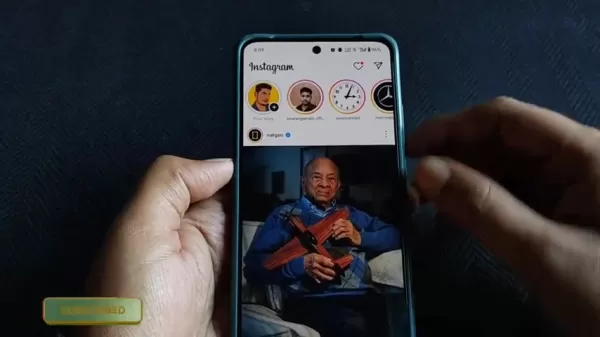
Open the Instagram app. In the top right corner of your screen, look for the paper airplane or speech bubble icon. This is your gateway to Direct Messages.
Tap this icon to enter your message inbox, where all your individual and group chats are listed. Once there, you're ready to try the new AI sticker tool. If you haven't updated Instagram lately, do so now to ensure you have all the latest features, including the AI sticker generator.
Step-by-Step Guide: Creating AI Stickers on Instagram
Generating Custom Stickers with AI Prompts
Now that you've found the feature, here's how to create your own stickers.
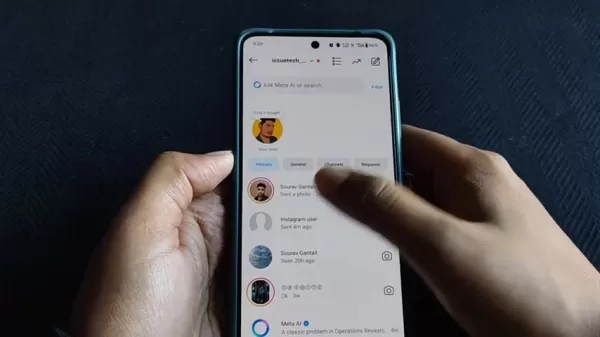
The secret to great AI stickers is writing effective prompts—text descriptions that guide the AI.
- Access AI Stickers: Open a chat, tap '+', choose 'Stickers,' then select 'AI Stickers.'
- Enter Your Prompt: Type a description of the sticker you want. Be specific or imaginative. For example, "a panda riding a bicycle" or "a happy taco wearing a party hat."
- Explore Suggestions: Tap the dice icon for random prompt ideas if you need inspiration.
- Generate Stickers: Hit the arrow or 'Generate' button. The AI will create several sticker options based on your prompt.
- Select and Send: Browse the results, tap your favorite, and it will be sent instantly.
Following these steps lets you create a limitless variety of personalized AI stickers for any conversation.
Tips for Effective AI Sticker Prompts
To get the best stickers from Instagram's AI, remember these tips:
- Be Specific: Clear, detailed prompts yield better results. Instead of "dog," try "a fluffy golden retriever puppy playing in a meadow."
- Get Creative: Experiment with fun, unusual ideas. The AI can be surprisingly inventive.
- Use Descriptive Words: Adjectives help refine the image. Think "a majestic, glowing unicorn" or "a tiny, determined astronaut."
- Combine Concepts: Merge different ideas for unique stickers, like "a samurai cat meditating on a mountaintop."
- Try Again: If your first result isn't perfect, adjust your prompt and generate again. Practice improves your results.
Using the Dice Icon for Random Prompt Ideas
If you're stuck for ideas, use the dice icon in the AI Sticker tool.
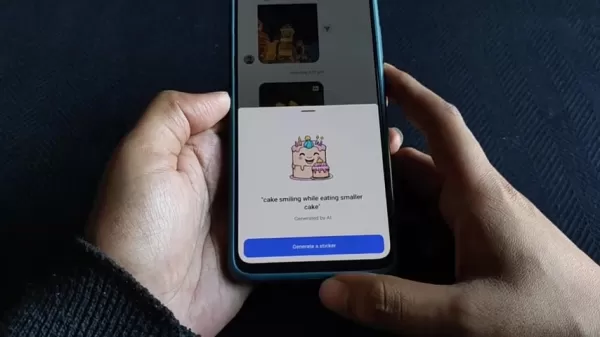
This feature provides random prompts to spark your creativity.
Tapping the dice icon fills the text field with a suggested prompt. If you like it, generate stickers from it. If not, tap again for a new suggestion. It's perfect for overcoming creative blocks and discovering fun, unexpected sticker concepts. These random ideas often lead to quirky and entertaining results you might not have considered, making the creative process more spontaneous and enjoyable.
Step-by-Step Guide: Accessing and Using AI Stickers on Instagram
Step 1: Open Instagram Direct Messages
Start by opening the Instagram app on your phone. Look for the Direct Message icon in the top-right corner and tap it.
Step 2: Select a Chat
In your message inbox, browse your conversations and tap on the one where you want to use an AI sticker.
Step 3: Access the Sticker Menu
Inside the chat, find the '+' (plus) icon next to the message box.
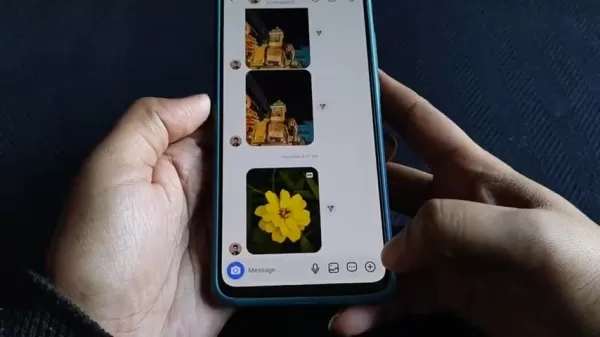
Tap it to see additional options like sending your location or photos.
Step 4: Choose the 'Stickers' Option
From the menu that appears, select 'Stickers' to open Instagram's library of stickers and GIFs.
Step 5: Find and Tap 'AI Stickers'
Look through the sticker options for the 'AI Stickers' icon.
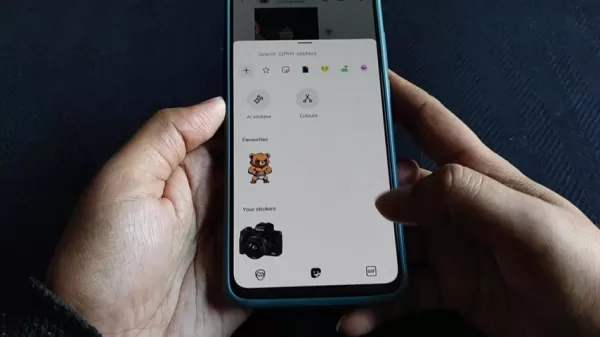
Tap it to open the AI creation tool.
Step 6: Enter Your Prompt
Type a description of the sticker you want into the provided text field. Be creative and specific, then tap the arrow or 'Generate' button.
Step 7: Select and Send Your AI Sticker
Browse the AI-generated sticker options.
Choose your favorite and tap it to send it in the chat. It's that easy!
Pricing
Is the Instagram AI Sticker Feature Free?
Currently, the AI sticker feature is completely free as part of Instagram's standard service. This fits Instagram's approach of enhancing the app without charging for core features. You can create and send as many custom stickers as you like without any cost, so feel free to explore and express yourself creatively.
Pros and Cons of Using Instagram's AI Sticker Feature
Pros
Boosts Creativity
Allows Personalized Expression
Increases Chat Engagement
Simple to Use
Completely Free
Cons
Potential for Inappropriate Use
Relies Heavily on User Prompts
Output Quality Can Vary
Raises Privacy Questions for Some
Customization Options Are Somewhat Limited
Core Features of Instagram's AI Sticker Generator
Text-Based Sticker Generation
The main feature is creating visual stickers from text descriptions. You describe what you want, and the AI brings it to life as a sticker. The better and clearer your description, the more accurate the result. This allows for highly personalized and creative communication.
Random Prompt Suggestions
For times when you need inspiration, the dice icon offers random prompt ideas. Each tap suggests a new creative direction, helping you discover fun and unexpected sticker concepts you might not have thought of yourself.
Seamless Integration with Instagram Chats
The feature is built directly into the chat interface. You can generate and send stickers instantly without leaving your conversation, making the process smooth and keeping the focus on your chat.
AI Learning and Improvement
The AI system learns from use. The more people create stickers, the better it becomes at understanding prompts and generating high-quality, relevant images. This means the tool should continue to improve and offer more accurate creations over time.
Creative Use Cases for Instagram AI Stickers
Personalized Greetings
Go beyond a simple "hi" by creating a custom greeting sticker. A "Good morning!" message on a bright sun or coffee cup sticker adds a personal, cheerful touch to start any conversation.
Expressing Emotions and Reactions
Use AI stickers to show exactly how you feel. Create a sticker that captures laughter, excitement, or sarcasm more vividly than text can. A personalized laughing emoji or eye-roll graphic can make reactions more fun and expressive.
Celebrating Special Occasions
Design unique stickers for birthdays, holidays, or anniversaries. A custom "Happy Birthday!" sticker with themed graphics adds a heartfelt, unique element to your celebration messages.
Enhancing Group Chats
Bring group chats to life with stickers that reference inside jokes or shared experiences. A well-timed, custom sticker can become a group meme and make conversations more lively and connected.
Visual Storytelling
Use a sequence of AI stickers to tell a short story or illustrate a point. For instance, use stickers showing stages of making coffee to describe your morning routine, turning an everyday update into a fun visual narrative.
Frequently Asked Questions About Instagram AI Stickers
How do I update Instagram to get the AI sticker feature?
To get the latest features like AI stickers, update your Instagram app. Go to the App Store (for iPhone) or Google Play Store (for Android), search for Instagram, and tap 'Update' if available. If your app is already current, the button will say 'Open'. Regular updates ensure you have new features and security improvements.
Is the AI sticker feature available in all regions?
The AI sticker feature's availability can vary by region due to staggered rollouts and local factors. While Instagram aims for a global release, some areas may get it later. Follow Instagram's official channels for announcements about availability in your location.
Can I use AI stickers in Instagram Stories or Reels?
Currently, AI stickers are designed for use in Direct Messages. Instagram often expands features over time, so it's possible AI stickers could come to Stories or Reels in the future. Watch for app updates and share your feedback if you'd like to see the feature elsewhere.
Are there any limitations to the prompts I can use to generate AI stickers?
Yes, Instagram has community guidelines. Prompts that are offensive, harmful, or violate these rules will likely be blocked. The AI is designed to avoid creating content that promotes hate, violence, or inappropriate material. Sticking to respectful and creative prompts ensures a good experience.
How does Instagram ensure the privacy of AI sticker prompts and generated stickers?
Instagram is designed to protect user privacy. The prompts you enter are processed by AI systems but are typically anonymized and not stored in a way that identifies you. For full details on data handling, please refer to Instagram's official privacy policy.
Related Questions on Instagram's AI Integration
What other AI-powered features does Instagram offer?
Instagram uses AI in several areas to improve the app:Content Discovery: AI analyzes your activity to recommend posts and accounts in the Explore tab and feed.Spam and Bot Control: AI helps identify and remove fake accounts and spammy behavior to keep the community authentic.Content Analysis: AI understands images and videos to suggest tags, improve search, and generate descriptions for accessibility.Targeted Advertising: AI helps match ads with users most likely to be interested, making ads more relevant.Content Moderation: AI helps detect and flag posts that break community rules, assisting in keeping the platform safe. These AI applications aim to create a better, safer, and more personalized user experience.
How does AI improve the overall user experience on Instagram?
AI enhances Instagram in key ways:Personalized Feeds: AI curates your feed and Explore page based on what you like, making content more relevant.Better Search: AI understands your search intent, even with vague terms, helping you find exactly what you want.Accessibility Features: AI automatically generates captions for videos and descriptions for images, making the platform more inclusive.Safer Environment: AI proactively detects harmful content, helping to reduce bullying, hate speech, and misinformation.Relevant Ads: AI shows you ads aligned with your interests, improving the advertising experience.Creative Tools: Features like the AI sticker generator give users new, fun ways to express themselves. Together, these AI-driven improvements make Instagram more engaging, accessible, and secure.
What are the potential future developments of AI on Instagram?
The future of AI on Instagram could include:Advanced Creative Tools: More powerful AI for editing photos and videos, potentially offering professional-grade effects easily.Real-Time Moderation: AI that can detect and act on harmful content as it's posted, creating a safer space in real time.AI Shopping Assistants: Personalized shopping with virtual try-ons and AI-driven product recommendations.Instant Translation: Real-time translation of comments and captions to connect users across languages globally.In-App AI Guides: An AI helper that offers tips, answers questions, and helps users navigate the app's features. These potential developments could make Instagram an even more dynamic, creative, and user-friendly platform.
Related article
 Stripe to Acquire OpenRouter as AI Model Routing Gains Momentum
Stripe has agreed to acquire OpenRouter, an AI model-routing platform that gives developers access to hundreds of models through a single interface. The deal adds model selection and routing to Stripe’s existing work around AI usage and token-based b
Former OpenAI Researcher Barrett Zoph Returns to Google to Support Gemini Development
Barret Zoph, who previously abruptly left and joined OpenAI due to a disagreement with Thinking Machines Lab CEO Miriam Mularati, has once again changed employers. Alphabet's Google announced that Zoph will return as Vice President of Research, bring
How Recursive Intelligence Raised $335M at $4B Valuation in 4 Months
The co-founders of startup Ricursive Intelligence seemed destined to be co-founders.Anna Goldie, CEO, and Azalia Mirhoseini, CTO, are so well-known in the AI community that they were among those AI engineers who “got those weird emails from Zuckerber
Related Special Topic Recommendations
Design & Art
Stripe to Acquire OpenRouter as AI Model Routing Gains Momentum
Stripe has agreed to acquire OpenRouter, an AI model-routing platform that gives developers access to hundreds of models through a single interface. The deal adds model selection and routing to Stripe’s existing work around AI usage and token-based b
Former OpenAI Researcher Barrett Zoph Returns to Google to Support Gemini Development
Barret Zoph, who previously abruptly left and joined OpenAI due to a disagreement with Thinking Machines Lab CEO Miriam Mularati, has once again changed employers. Alphabet's Google announced that Zoph will return as Vice President of Research, bring
How Recursive Intelligence Raised $335M at $4B Valuation in 4 Months
The co-founders of startup Ricursive Intelligence seemed destined to be co-founders.Anna Goldie, CEO, and Azalia Mirhoseini, CTO, are so well-known in the AI community that they were among those AI engineers who “got those weird emails from Zuckerber
Related Special Topic Recommendations
Design & Art
 Top AI Illustration Tools: Create Editorial Scenes and Cover Art Faster
2026 Latest Top-rated AI Illustration Tools: Our curated list features the best powerfully designed tools for creating stunning editorial scenes and eye-catching cover art quickly. Each option has gone through rigorous real-world tests, offering a free vs paid comparison to help you find the perfect match for your workflow. Try these must-try solutions today to unlock your AI edge and boost your creative productivity. Explore now at XIX.AI.
 10 tools
 xix.ai
Education and Learning
Top AI Tutors for Exam Prep: Practice Math, Science, and English
xix.ai
Education and Learning
Top AI Tutors for Exam Prep: Practice Math, Science, and English
2026 Latest Top-Rated Best AI Tutors for Exam Prep are here on XIX.AI! Our curated list features powerful game-changing tools that offer free vs paid comparison, real-world tests, and weekly updated rankings. They help boost your writing efficiency, simplify complex topic learning, and unlock your academic potential. Explore now to Discover your perfect exam prep tool and Start creating today to Unlock your AI edge!
10 tools
xix.ai
Finance
AI Budget Planning Tools for Personal Money Management
2026 Latest Best Top-Rated AI Budget Planning Tools for Personal Money Management are here on XIX.AI! This curated collection features powerful, game-changing solutions that help you conduct real-world tests, understand spending habits, and create personalized plans to boost productivity. Enjoy a free vs paid comparison along with detailed rankings. Must-try tools designed to simplify money management and unlock your AI edge. Explore now!
11 tools
xix.ai
Health & Wellness
AI Sleep Tracking Assistants: Improve Recovery with Better Bedtime Habits
2026 Latest Best Top-Rated AI Sleep Tracking Assistants curated for ultimate recovery. This fully updated weekly guide features powerful tools that deliver real-world tests, free vs paid comparison, and detailed rankings to help you find the must-try solution that boosts sleep quality and supports better bedtime habits. Explore now at XIX.AI to Unlock your AI edge.
10 tools
xix.ai
Data Analysis
AI SQL Copilots for Product and Revenue Analytics
2026 Latest Best Top-Rated AI SQL Copilots for Product and Revenue Analytics! XIX.AI has curated a powerful, game-changing collection of must-try tools that undergo real-world tests through weekly updated rankings. These tools help users boost productivity significantly by accelerating data analysis, streamlining complex queries, and generating accurate insights to drive smarter business decisions. Explore now to Discover your perfect tool for unlocking your AI edge!
14 tools
xix.ai
Education and Learning
Best AI Homework Helpers That Teach: Learn Concepts, Not Just Answers
2026 Latest Best Top-Rated AI Homework Helpers That Teach Core Concepts Not Just Answers Powerful Tools for Students Must-Try Curated List Weekly Updated Free vs Paid Comparison Real-World Tests Accurate Rankings to Help You Unlock Your Full Learning Potential Explore now to Discover your perfect tool for smarter studying.
10 tools
xix.ai

 Comments (1)
0/500
Comments (1)
0/500
![JamesGreen]()
Das ist ja mal wieder typisch Meta, neue KI-Funktionen einfach so zu verstecken 😅 Hab's gerade in den DMs ausprobiert – die Sticker sind echt witzig, aber irgendwie gruselig, wie gut die Prompts verstanden werden. Finde es spannend, wie Social Media jetzt alle heimlich KI-Tools einbauen, ohne groß was zu verkünden. Hoffentlich bleibt das ein kreatives Spielzeug und wird nicht zu sehr kommerzialisiert.
Instagram is always introducing new ways to connect and share. One of its latest innovations is an AI-powered sticker generator, a creative tool hidden within the messaging feature. This guide will walk you through how to find, access, and use this tool to create custom stickers for your chats, unlocking a new level of personal expression.
Key Points
Find the new AI sticker feature in Instagram's updated Direct Messages.
Learn to access the AI sticker creator via the '+' button in any chat.
Use text prompts to generate custom stickers tailored to your ideas.
Try the dice icon for random, inspiring prompt suggestions.
Send your unique AI-generated stickers directly in Instagram chats.
Understand how AI sticker content can enhance SEO and keyword relevance.
Personalize your Instagram interactions with stickers you design.
Discovering Instagram's New AI Sticker Update
Unlocking The AI Sticker Feature on Instagram
Instagram has introduced a new AI-powered sticker maker, seamlessly added to your messaging tools. If you've updated the app recently, you might already have it. Here's how to find and start using it.
First, open Instagram and go to your Direct Messages, usually found in the top right corner. Open any conversation. Look for the plus icon ('+') next to where you type your message. Tapping it reveals options like 'Location,' 'Imagine,' and 'Stickers.' Choose 'Stickers.'
Inside the sticker menu, look for a new option called 'AI Stickers.' This is your entry point to creating custom stickers with artificial intelligence. If you don't see it, check that your app is fully updated, as the feature is rolling out gradually. Finding it is your first step toward a more creative way to chat.
Navigating to the Instagram Message Section
Let’s make sure you can easily find your messages.
Open the Instagram app. In the top right corner of your screen, look for the paper airplane or speech bubble icon. This is your gateway to Direct Messages.
Tap this icon to enter your message inbox, where all your individual and group chats are listed. Once there, you're ready to try the new AI sticker tool. If you haven't updated Instagram lately, do so now to ensure you have all the latest features, including the AI sticker generator.
Step-by-Step Guide: Creating AI Stickers on Instagram
Generating Custom Stickers with AI Prompts
Now that you've found the feature, here's how to create your own stickers.
The secret to great AI stickers is writing effective prompts—text descriptions that guide the AI.
- Access AI Stickers: Open a chat, tap '+', choose 'Stickers,' then select 'AI Stickers.'
- Enter Your Prompt: Type a description of the sticker you want. Be specific or imaginative. For example, "a panda riding a bicycle" or "a happy taco wearing a party hat."
- Explore Suggestions: Tap the dice icon for random prompt ideas if you need inspiration.
- Generate Stickers: Hit the arrow or 'Generate' button. The AI will create several sticker options based on your prompt.
- Select and Send: Browse the results, tap your favorite, and it will be sent instantly.
Following these steps lets you create a limitless variety of personalized AI stickers for any conversation.
Tips for Effective AI Sticker Prompts
To get the best stickers from Instagram's AI, remember these tips:
- Be Specific: Clear, detailed prompts yield better results. Instead of "dog," try "a fluffy golden retriever puppy playing in a meadow."
- Get Creative: Experiment with fun, unusual ideas. The AI can be surprisingly inventive.
- Use Descriptive Words: Adjectives help refine the image. Think "a majestic, glowing unicorn" or "a tiny, determined astronaut."
- Combine Concepts: Merge different ideas for unique stickers, like "a samurai cat meditating on a mountaintop."
- Try Again: If your first result isn't perfect, adjust your prompt and generate again. Practice improves your results.
Using the Dice Icon for Random Prompt Ideas
If you're stuck for ideas, use the dice icon in the AI Sticker tool.
This feature provides random prompts to spark your creativity.
Tapping the dice icon fills the text field with a suggested prompt. If you like it, generate stickers from it. If not, tap again for a new suggestion. It's perfect for overcoming creative blocks and discovering fun, unexpected sticker concepts. These random ideas often lead to quirky and entertaining results you might not have considered, making the creative process more spontaneous and enjoyable.
Step-by-Step Guide: Accessing and Using AI Stickers on Instagram
Step 1: Open Instagram Direct Messages
Start by opening the Instagram app on your phone. Look for the Direct Message icon in the top-right corner and tap it.
Step 2: Select a Chat
In your message inbox, browse your conversations and tap on the one where you want to use an AI sticker.
Step 3: Access the Sticker Menu
Inside the chat, find the '+' (plus) icon next to the message box.
Tap it to see additional options like sending your location or photos.
Step 4: Choose the 'Stickers' Option
From the menu that appears, select 'Stickers' to open Instagram's library of stickers and GIFs.
Step 5: Find and Tap 'AI Stickers'
Look through the sticker options for the 'AI Stickers' icon.
Tap it to open the AI creation tool.
Step 6: Enter Your Prompt
Type a description of the sticker you want into the provided text field. Be creative and specific, then tap the arrow or 'Generate' button.
Step 7: Select and Send Your AI Sticker
Browse the AI-generated sticker options.
Choose your favorite and tap it to send it in the chat. It's that easy!
Pricing
Is the Instagram AI Sticker Feature Free?
Currently, the AI sticker feature is completely free as part of Instagram's standard service. This fits Instagram's approach of enhancing the app without charging for core features. You can create and send as many custom stickers as you like without any cost, so feel free to explore and express yourself creatively.
Pros and Cons of Using Instagram's AI Sticker Feature
Pros
Boosts Creativity
Allows Personalized Expression
Increases Chat Engagement
Simple to Use
Completely Free
Cons
Potential for Inappropriate Use
Relies Heavily on User Prompts
Output Quality Can Vary
Raises Privacy Questions for Some
Customization Options Are Somewhat Limited
Core Features of Instagram's AI Sticker Generator
Text-Based Sticker Generation
The main feature is creating visual stickers from text descriptions. You describe what you want, and the AI brings it to life as a sticker. The better and clearer your description, the more accurate the result. This allows for highly personalized and creative communication.
Random Prompt Suggestions
For times when you need inspiration, the dice icon offers random prompt ideas. Each tap suggests a new creative direction, helping you discover fun and unexpected sticker concepts you might not have thought of yourself.
Seamless Integration with Instagram Chats
The feature is built directly into the chat interface. You can generate and send stickers instantly without leaving your conversation, making the process smooth and keeping the focus on your chat.
AI Learning and Improvement
The AI system learns from use. The more people create stickers, the better it becomes at understanding prompts and generating high-quality, relevant images. This means the tool should continue to improve and offer more accurate creations over time.
Creative Use Cases for Instagram AI Stickers
Personalized Greetings
Go beyond a simple "hi" by creating a custom greeting sticker. A "Good morning!" message on a bright sun or coffee cup sticker adds a personal, cheerful touch to start any conversation.
Expressing Emotions and Reactions
Use AI stickers to show exactly how you feel. Create a sticker that captures laughter, excitement, or sarcasm more vividly than text can. A personalized laughing emoji or eye-roll graphic can make reactions more fun and expressive.
Celebrating Special Occasions
Design unique stickers for birthdays, holidays, or anniversaries. A custom "Happy Birthday!" sticker with themed graphics adds a heartfelt, unique element to your celebration messages.
Enhancing Group Chats
Bring group chats to life with stickers that reference inside jokes or shared experiences. A well-timed, custom sticker can become a group meme and make conversations more lively and connected.
Visual Storytelling
Use a sequence of AI stickers to tell a short story or illustrate a point. For instance, use stickers showing stages of making coffee to describe your morning routine, turning an everyday update into a fun visual narrative.
Frequently Asked Questions About Instagram AI Stickers
How do I update Instagram to get the AI sticker feature?
To get the latest features like AI stickers, update your Instagram app. Go to the App Store (for iPhone) or Google Play Store (for Android), search for Instagram, and tap 'Update' if available. If your app is already current, the button will say 'Open'. Regular updates ensure you have new features and security improvements.
Is the AI sticker feature available in all regions?
The AI sticker feature's availability can vary by region due to staggered rollouts and local factors. While Instagram aims for a global release, some areas may get it later. Follow Instagram's official channels for announcements about availability in your location.
Can I use AI stickers in Instagram Stories or Reels?
Currently, AI stickers are designed for use in Direct Messages. Instagram often expands features over time, so it's possible AI stickers could come to Stories or Reels in the future. Watch for app updates and share your feedback if you'd like to see the feature elsewhere.
Are there any limitations to the prompts I can use to generate AI stickers?
Yes, Instagram has community guidelines. Prompts that are offensive, harmful, or violate these rules will likely be blocked. The AI is designed to avoid creating content that promotes hate, violence, or inappropriate material. Sticking to respectful and creative prompts ensures a good experience.
How does Instagram ensure the privacy of AI sticker prompts and generated stickers?
Instagram is designed to protect user privacy. The prompts you enter are processed by AI systems but are typically anonymized and not stored in a way that identifies you. For full details on data handling, please refer to Instagram's official privacy policy.
Related Questions on Instagram's AI Integration
What other AI-powered features does Instagram offer?
Instagram uses AI in several areas to improve the app:Content Discovery: AI analyzes your activity to recommend posts and accounts in the Explore tab and feed.Spam and Bot Control: AI helps identify and remove fake accounts and spammy behavior to keep the community authentic.Content Analysis: AI understands images and videos to suggest tags, improve search, and generate descriptions for accessibility.Targeted Advertising: AI helps match ads with users most likely to be interested, making ads more relevant.Content Moderation: AI helps detect and flag posts that break community rules, assisting in keeping the platform safe. These AI applications aim to create a better, safer, and more personalized user experience.
How does AI improve the overall user experience on Instagram?
AI enhances Instagram in key ways:Personalized Feeds: AI curates your feed and Explore page based on what you like, making content more relevant.Better Search: AI understands your search intent, even with vague terms, helping you find exactly what you want.Accessibility Features: AI automatically generates captions for videos and descriptions for images, making the platform more inclusive.Safer Environment: AI proactively detects harmful content, helping to reduce bullying, hate speech, and misinformation.Relevant Ads: AI shows you ads aligned with your interests, improving the advertising experience.Creative Tools: Features like the AI sticker generator give users new, fun ways to express themselves. Together, these AI-driven improvements make Instagram more engaging, accessible, and secure.
What are the potential future developments of AI on Instagram?
The future of AI on Instagram could include:Advanced Creative Tools: More powerful AI for editing photos and videos, potentially offering professional-grade effects easily.Real-Time Moderation: AI that can detect and act on harmful content as it's posted, creating a safer space in real time.AI Shopping Assistants: Personalized shopping with virtual try-ons and AI-driven product recommendations.Instant Translation: Real-time translation of comments and captions to connect users across languages globally.In-App AI Guides: An AI helper that offers tips, answers questions, and helps users navigate the app's features. These potential developments could make Instagram an even more dynamic, creative, and user-friendly platform.








 Stripe to Acquire OpenRouter as AI Model Routing Gains Momentum
Stripe has agreed to acquire OpenRouter, an AI model-routing platform that gives developers access to hundreds of models through a single interface. The deal adds model selection and routing to Stripe’s existing work around AI usage and token-based b
Stripe to Acquire OpenRouter as AI Model Routing Gains Momentum
Stripe has agreed to acquire OpenRouter, an AI model-routing platform that gives developers access to hundreds of models through a single interface. The deal adds model selection and routing to Stripe’s existing work around AI usage and token-based b
 Former OpenAI Researcher Barrett Zoph Returns to Google to Support Gemini Development
Barret Zoph, who previously abruptly left and joined OpenAI due to a disagreement with Thinking Machines Lab CEO Miriam Mularati, has once again changed employers. Alphabet's Google announced that Zoph will return as Vice President of Research, bring
Former OpenAI Researcher Barrett Zoph Returns to Google to Support Gemini Development
Barret Zoph, who previously abruptly left and joined OpenAI due to a disagreement with Thinking Machines Lab CEO Miriam Mularati, has once again changed employers. Alphabet's Google announced that Zoph will return as Vice President of Research, bring
 How Recursive Intelligence Raised $335M at $4B Valuation in 4 Months
The co-founders of startup Ricursive Intelligence seemed destined to be co-founders.Anna Goldie, CEO, and Azalia Mirhoseini, CTO, are so well-known in the AI community that they were among those AI engineers who “got those weird emails from Zuckerber
How Recursive Intelligence Raised $335M at $4B Valuation in 4 Months
The co-founders of startup Ricursive Intelligence seemed destined to be co-founders.Anna Goldie, CEO, and Azalia Mirhoseini, CTO, are so well-known in the AI community that they were among those AI engineers who “got those weird emails from Zuckerber

2026 Latest Top-rated AI Illustration Tools: Our curated list features the best powerfully designed tools for creating stunning editorial scenes and eye-catching cover art quickly. Each option has gone through rigorous real-world tests, offering a free vs paid comparison to help you find the perfect match for your workflow. Try these must-try solutions today to unlock your AI edge and boost your creative productivity. Explore now at XIX.AI.
10 tools
xix.ai

2026 Latest Top-Rated Best AI Tutors for Exam Prep are here on XIX.AI! Our curated list features powerful game-changing tools that offer free vs paid comparison, real-world tests, and weekly updated rankings. They help boost your writing efficiency, simplify complex topic learning, and unlock your academic potential. Explore now to Discover your perfect exam prep tool and Start creating today to Unlock your AI edge!
10 tools
xix.ai

2026 Latest Best Top-Rated AI Budget Planning Tools for Personal Money Management are here on XIX.AI! This curated collection features powerful, game-changing solutions that help you conduct real-world tests, understand spending habits, and create personalized plans to boost productivity. Enjoy a free vs paid comparison along with detailed rankings. Must-try tools designed to simplify money management and unlock your AI edge. Explore now!
11 tools
xix.ai

2026 Latest Best Top-Rated AI Sleep Tracking Assistants curated for ultimate recovery. This fully updated weekly guide features powerful tools that deliver real-world tests, free vs paid comparison, and detailed rankings to help you find the must-try solution that boosts sleep quality and supports better bedtime habits. Explore now at XIX.AI to Unlock your AI edge.
10 tools
xix.ai

2026 Latest Best Top-Rated AI SQL Copilots for Product and Revenue Analytics! XIX.AI has curated a powerful, game-changing collection of must-try tools that undergo real-world tests through weekly updated rankings. These tools help users boost productivity significantly by accelerating data analysis, streamlining complex queries, and generating accurate insights to drive smarter business decisions. Explore now to Discover your perfect tool for unlocking your AI edge!
14 tools
xix.ai

2026 Latest Best Top-Rated AI Homework Helpers That Teach Core Concepts Not Just Answers Powerful Tools for Students Must-Try Curated List Weekly Updated Free vs Paid Comparison Real-World Tests Accurate Rankings to Help You Unlock Your Full Learning Potential Explore now to Discover your perfect tool for smarter studying.
10 tools
xix.ai

Das ist ja mal wieder typisch Meta, neue KI-Funktionen einfach so zu verstecken 😅 Hab's gerade in den DMs ausprobiert – die Sticker sind echt witzig, aber irgendwie gruselig, wie gut die Prompts verstanden werden. Finde es spannend, wie Social Media jetzt alle heimlich KI-Tools einbauen, ohne groß was zu verkünden. Hoffentlich bleibt das ein kreatives Spielzeug und wird nicht zu sehr kommerzialisiert.












