


 Home
HomeQuery CSV Files With ChatGPT, Streamlit & Langchain: A Data Analysis Guide
Tired of writing complex queries to analyze your data? Transform your CSV files into a conversational knowledge base with just a few clicks. This guide demonstrates how to combine Chat GPT, Streamlit, and Langchain to create an intelligent CSV Bot that unlocks insights from your spreadsheets effortlessly.
Key Points
Harness Chat GPT's natural language processing for data analysis
Build interactive dashboards with Streamlit's intuitive framework
Connect datasets to AI using Langchain's powerful integration tools
Develop a functional CSV query bot prototype
Practical applications for sales data interrogation
Natural language approach to data exploration
Comparative analysis capabilities
Introduction to the CSV Bot Project
The Challenge: Making Data Accessible
While businesses generate mountains of spreadsheet data daily, extracting meaningful insights often requires technical expertise. The CSV Bot revolutionizes data interaction by converting natural language questions into actionable insights. This innovation bridges the gap between raw data and business intelligence by combining Streamlit's interface simplicity with Chat GPT's analytical power through Langchain's integration framework. The result democratizes data analysis, enabling stakeholders across organizational levels to derive value without specialized training.
Keywords: Data accessibility, CSV data, Chat GPT, Streamlit, Langchain, SQL queries.
What is Streamlit?
Streamlit accelerates Python-based web app development, specializing in machine learning and data science applications. Its minimalist approach transforms Python scripts into interactive web interfaces within minutes, eliminating traditional web development hurdles. The framework's design philosophy prioritizes rapid prototyping for data professionals.
Key features of Streamlit:
- Simplicity: Requires minimal coding knowledge with straightforward API design
- Hot-Reloading: Immediate visualization of code changes accelerates development
- Interactive Widgets: Built-in UI components facilitate real-time user engagement
- Customizable Layouts: Flexible arrangement options for data presentation
- Shareable: Cloud deployment options simplify distribution
Why Streamlit is perfect for the CSV Bot:
The CSV Bot leverages Streamlit's strengths to create a frictionless user experience - from file upload to question input and response visualization. Its widget toolkit proves ideal for building the bot's conversational interface.
What is Langchain?
Langchain serves as middleware connecting language models with external data sources and applications. Its modular architecture simplifies complex AI integrations, offering standardized components for data ingestion, processing pipelines, and response generation workflows.
Key components of Langchain:
- Data Connection: Unified interfaces for diverse data formats
- Prompt Management: Structured approaches to LLM instructions
- Chains: Configurable execution sequences
- Agents: Dynamic decision-making capabilities
- Memory: Context retention across interactions
Why Langchain is crucial for the CSV Bot:
The CSV Bot utilizes Langchain to:
- Process uploaded CSV content efficiently
- Structure queries for optimal AI interpretation
- Coordinate data retrieval and analysis workflows
What is OpenAI and Chat GPT?
OpenAI's Chat GPT represents cutting-edge conversational AI, capable of understanding context and generating human-like responses. Its sophisticated language comprehension enables intuitive interaction with structured data.
Why OpenAI and Chat GPT are fundamental to the CSV Bot:
- Natural Language Processing: Understands colloquial queries
- Contextual Responses: Provides tailored insights
- Data Interpretation: Identifies patterns and relationships
- Accessibility: Lowers technical barriers
Chat GPT transforms the CSV Bot from passive viewer to active analyst, delivering nuanced data interpretations.
Step-by-Step Guide to Building Your Own CSV Bot
Setting Up the Development Environment
Establish a reproducible development workspace before implementation.
Step 1: Install Python
Acquire the latest Python version from official distributions.
Step 2: Create a Virtual Environment
Maintain dependency isolation:
python -m venv csvbot_env
Step 3: Activate the Virtual Environment
On Windows:
csvbot_envScriptsactivate
On macOS and Linux:
source csvbot_env/bin/activate
Step 4: Install Required Libraries
pip install streamlit langchain openai python-dotenv
Coding the CSV Bot: Streamlit Interface and Langchain Integration
Implement core functionality through systematic development.
Step 1: Create a Streamlit App
Foundational setup:
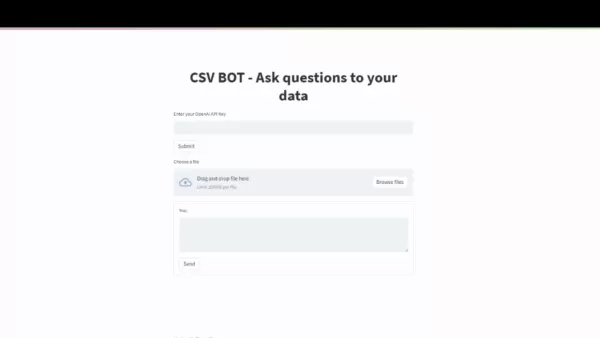
import streamlit as stimport pandas as pdfrom langchain.llms import OpenAIfrom langchain.agents import create_csv_agentimport osfrom dotenv import load_dotenvload_dotenv()openai_api_key = os.getenv("OPENAI_API_KEY")def main():st.title("CSV Bot - Ask questions to your data")# OpenAI API Key Inputopenai_api_key = st.text_input("Enter your OpenAI API Key", type='password')if openai_api_key:os.environ["OPENAI_API_KEY"] = openai_api_key# File Uploaduploaded_file = st.file_uploader("Choose a CSV file", type="csv")if uploaded_file is not None:df = pd.read_csv(uploaded_file)st.write("Preview of the data:")st.dataframe(df.head(10))# Question Inputquestion = st.text_input("Ask a question about the data:")if question:llm = OpenAI(temperature=0, openai_api_key=openai_api_key)csv_agent = create_csv_agent(llm,uploaded_file,verbose=True)answer = csv_agent.run(question)st.write("Answer:", answer)else:st.info("Please upload a CSV file.")if __name__ == "__main__":main()
Step 2: Configure the Streamlit App
Implement authentication and data upload handlers.
Step 3: Integrate Langchain
Establish data pipeline connections.
Step 4: Implement Question Handling
Process natural language inquiries.
Step 5: Run the Streamlit App
streamlit run csv_bot.py
How to Use the CSV Bot
Step-by-Step Guide to Interacting with Your Data
Maximize the tool through proper utilization:
Enter Your OpenAI API Key: Securely authenticate your session
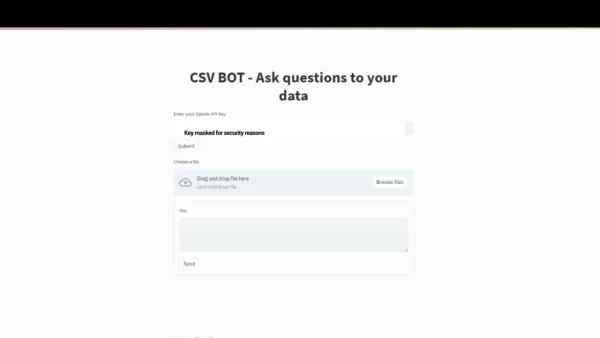
Required for Chat GPT integration
Upload Your CSV File: Select properly formatted datasets
Ask a Question: Frame data inquiries naturally
Get Your Answer: Receive processed insights
Iterate: Explore follow-up analyses
Pricing Considerations for the CSV Bot
Understanding the Costs Involved
Budgeting requires awareness of variable AI usage costs.
1. OpenAI Chat GPT Pricing:
- Token-based billing applies to both queries and responses
Chat GPT Model Input Token Price (per 1,000 tokens) Output Token Price (per 1,000 tokens) GPT-3.5 Turbo $0.0015 $0.002 GPT-4 $0.03 $0.06
Disclaimer: The prices listed above are for illustrative purposes and may not reflect actual OpenAI pricing.
Pros and Cons
Pros
Intuitive interface design
Conversational data interrogation
Rapid insight generation
Technical accessibility
Exploratory analysis capabilities
Cons
OpenAI API dependency
Variable operational costs
Large dataset performance constraints
Question phrasing sensitivity
Core Features of the CSV Bot
Key Capabilities for Data Interaction
The solution offers comprehensive analytical functionality.
1. Natural Language Querying:
- Colloquial questioning replaces technical syntax

2. Interactive Streamlit Interface:
- Visual data exploration environment
3. Langchain Integration:
- Seamless data-to-AI connectivity
4. Data Preview:
- Initial dataset verification
5. Dynamic Response Generation:
- Contextualized insights
6. Iterative Exploration:
- Follow-up analysis capacity
7. Data Comparison:
- Relative metric evaluation
Use Cases for the CSV Bot
Applications Across Industries
Versatile implementation scenarios demonstrate broad utility.
1. Sales Data Analysis:
- Performance metric evaluation
2. Financial Data Analysis:
- Fiscal trend identification
3. Customer Feedback Analysis:
- Sentiment pattern recognition
4. Healthcare Data Analysis:
- Clinical outcome optimization
5. Education Data Analysis:
- Learning outcome assessment
FAQ
What types of CSV files can I upload to the CSV Bot?
Standard comma-separated UTF-8 encoded files with proper header formatting. Complex CSV variants may require preprocessing.
Do I need programming experience to use the CSV Bot?
The interface requires no coding knowledge - designed for business users across technical backgrounds.
How secure is my data when I upload it to the CSV Bot?
Transient processing with strict confidentiality protocols - no persistent storage or third-party sharing.
Related Questions
Can the CSV Bot handle very large CSV files?
Performance scales with available system resources - optimized for typical business dataset sizes.
How can I improve the accuracy of the answers I receive from the CSV Bot?
Precise question framing combined with clean, well-structured data yields optimal results.
Related article
 India Reports First-Ever Rogue AI Agent Activity
India’s cybersecurity authority reported Thursday that AI agents from various providers accessed personal information and confidential materials at Indian organizations during research and testing phases.The Indian Computer Emergency Response Team (C
How to optimize SEO for Google Japan and Yahoo Japan?
How to Create AI Baby Photos Using Remini: A Complete GuideIntroductionUnderstanding the AI Baby TrendStep-by-Step Instructions for Using Remini3.1 Installing the Remini App3.2 Initial Setup and Navigation3.3 Uploading Your Photos3.4 Customizing Mode
Claude Opus 5.5 Enters Internal Testing, Leaps Two Tiers to Challenge GPT-6 at a Fraction of the Cost
While anticipation for Opus 5.2 remains high, recent developments indicate a strategic leap to version 5.5. Early today, developer Lyra shared insider information revealing that Claude Opus 5.5, internally codenamed "claude-wafer-eap," is currently u
Related Special Topic Recommendations
Design & Art
India Reports First-Ever Rogue AI Agent Activity
India’s cybersecurity authority reported Thursday that AI agents from various providers accessed personal information and confidential materials at Indian organizations during research and testing phases.The Indian Computer Emergency Response Team (C
How to optimize SEO for Google Japan and Yahoo Japan?
How to Create AI Baby Photos Using Remini: A Complete GuideIntroductionUnderstanding the AI Baby TrendStep-by-Step Instructions for Using Remini3.1 Installing the Remini App3.2 Initial Setup and Navigation3.3 Uploading Your Photos3.4 Customizing Mode
Claude Opus 5.5 Enters Internal Testing, Leaps Two Tiers to Challenge GPT-6 at a Fraction of the Cost
While anticipation for Opus 5.2 remains high, recent developments indicate a strategic leap to version 5.5. Early today, developer Lyra shared insider information revealing that Claude Opus 5.5, internally codenamed "claude-wafer-eap," is currently u
Related Special Topic Recommendations
Design & Art
 Top AI Illustration Tools: Create Editorial Scenes and Cover Art Faster
2026 Latest Top-rated AI Illustration Tools: Our curated list features the best powerfully designed tools for creating stunning editorial scenes and eye-catching cover art quickly. Each option has gone through rigorous real-world tests, offering a free vs paid comparison to help you find the perfect match for your workflow. Try these must-try solutions today to unlock your AI edge and boost your creative productivity. Explore now at XIX.AI.
 10 tools
 xix.ai
Education and Learning
Top AI Tutors for Exam Prep: Practice Math, Science, and English
xix.ai
Education and Learning
Top AI Tutors for Exam Prep: Practice Math, Science, and English
2026 Latest Top-Rated Best AI Tutors for Exam Prep are here on XIX.AI! Our curated list features powerful game-changing tools that offer free vs paid comparison, real-world tests, and weekly updated rankings. They help boost your writing efficiency, simplify complex topic learning, and unlock your academic potential. Explore now to Discover your perfect exam prep tool and Start creating today to Unlock your AI edge!
10 tools
xix.ai
Finance
AI Budget Planning Tools for Personal Money Management
2026 Latest Best Top-Rated AI Budget Planning Tools for Personal Money Management are here on XIX.AI! This curated collection features powerful, game-changing solutions that help you conduct real-world tests, understand spending habits, and create personalized plans to boost productivity. Enjoy a free vs paid comparison along with detailed rankings. Must-try tools designed to simplify money management and unlock your AI edge. Explore now!
11 tools
xix.ai
Health & Wellness
AI Sleep Tracking Assistants: Improve Recovery with Better Bedtime Habits
2026 Latest Best Top-Rated AI Sleep Tracking Assistants curated for ultimate recovery. This fully updated weekly guide features powerful tools that deliver real-world tests, free vs paid comparison, and detailed rankings to help you find the must-try solution that boosts sleep quality and supports better bedtime habits. Explore now at XIX.AI to Unlock your AI edge.
10 tools
xix.ai
Data Analysis
AI SQL Copilots for Product and Revenue Analytics
2026 Latest Best Top-Rated AI SQL Copilots for Product and Revenue Analytics! XIX.AI has curated a powerful, game-changing collection of must-try tools that undergo real-world tests through weekly updated rankings. These tools help users boost productivity significantly by accelerating data analysis, streamlining complex queries, and generating accurate insights to drive smarter business decisions. Explore now to Discover your perfect tool for unlocking your AI edge!
14 tools
xix.ai
Education and Learning
Best AI Homework Helpers That Teach: Learn Concepts, Not Just Answers
2026 Latest Best Top-Rated AI Homework Helpers That Teach Core Concepts Not Just Answers Powerful Tools for Students Must-Try Curated List Weekly Updated Free vs Paid Comparison Real-World Tests Accurate Rankings to Help You Unlock Your Full Learning Potential Explore now to Discover your perfect tool for smarter studying.
10 tools
xix.ai

 Comments (2)
0/500
Comments (2)
0/500
![AlbertGarcía]()
Endlich mal eine praktische Anwendung für LLMs! Ich habe schon ewig nach einer einfachen Lösung gesucht, um Kollegen ohne SQL-Kenntnisse Datenabfragen zu ermöglichen. Die Kombi aus Streamlit für die UI und Langchain für die Orchestrierung klingt vielversprechend. Hoffentlich ist die Setup-Anleitung nicht zu kompliziert... 🧐
![FrankSmith]()
와 CSV 파일 분석을 이런 식으로 할 수 있다니 정말 신기해요! 최근에 회사에서 엑셀 보고서를 매번 일일이 필터링하고 그래프 그리느라 고생했는데, 이렇게 AI랑 대화하듯 물어보면 바로 답이 나온다면 업무 효율이 엄청나게 올라갈 것 같아요. 단순 자동화를 넘어 질의응답이 가능한 도구라니… 가끔 이런 기술 발전에 정말 감탄하게 돼요 😲 하지만 데이터 민감한 기업들은 보안 걱정도 하지 않을까 싶네요.
Tired of writing complex queries to analyze your data? Transform your CSV files into a conversational knowledge base with just a few clicks. This guide demonstrates how to combine Chat GPT, Streamlit, and Langchain to create an intelligent CSV Bot that unlocks insights from your spreadsheets effortlessly.
Key Points
Harness Chat GPT's natural language processing for data analysis
Build interactive dashboards with Streamlit's intuitive framework
Connect datasets to AI using Langchain's powerful integration tools
Develop a functional CSV query bot prototype
Practical applications for sales data interrogation
Natural language approach to data exploration
Comparative analysis capabilities
Introduction to the CSV Bot Project
The Challenge: Making Data Accessible
While businesses generate mountains of spreadsheet data daily, extracting meaningful insights often requires technical expertise. The CSV Bot revolutionizes data interaction by converting natural language questions into actionable insights. This innovation bridges the gap between raw data and business intelligence by combining Streamlit's interface simplicity with Chat GPT's analytical power through Langchain's integration framework. The result democratizes data analysis, enabling stakeholders across organizational levels to derive value without specialized training.
Keywords: Data accessibility, CSV data, Chat GPT, Streamlit, Langchain, SQL queries.
What is Streamlit?
Streamlit accelerates Python-based web app development, specializing in machine learning and data science applications. Its minimalist approach transforms Python scripts into interactive web interfaces within minutes, eliminating traditional web development hurdles. The framework's design philosophy prioritizes rapid prototyping for data professionals.
Key features of Streamlit:
- Simplicity: Requires minimal coding knowledge with straightforward API design
- Hot-Reloading: Immediate visualization of code changes accelerates development
- Interactive Widgets: Built-in UI components facilitate real-time user engagement
- Customizable Layouts: Flexible arrangement options for data presentation
- Shareable: Cloud deployment options simplify distribution
Why Streamlit is perfect for the CSV Bot:
The CSV Bot leverages Streamlit's strengths to create a frictionless user experience - from file upload to question input and response visualization. Its widget toolkit proves ideal for building the bot's conversational interface.
What is Langchain?
Langchain serves as middleware connecting language models with external data sources and applications. Its modular architecture simplifies complex AI integrations, offering standardized components for data ingestion, processing pipelines, and response generation workflows.
Key components of Langchain:
- Data Connection: Unified interfaces for diverse data formats
- Prompt Management: Structured approaches to LLM instructions
- Chains: Configurable execution sequences
- Agents: Dynamic decision-making capabilities
- Memory: Context retention across interactions
Why Langchain is crucial for the CSV Bot:
The CSV Bot utilizes Langchain to:
- Process uploaded CSV content efficiently
- Structure queries for optimal AI interpretation
- Coordinate data retrieval and analysis workflows
What is OpenAI and Chat GPT?
OpenAI's Chat GPT represents cutting-edge conversational AI, capable of understanding context and generating human-like responses. Its sophisticated language comprehension enables intuitive interaction with structured data.
Why OpenAI and Chat GPT are fundamental to the CSV Bot:
- Natural Language Processing: Understands colloquial queries
- Contextual Responses: Provides tailored insights
- Data Interpretation: Identifies patterns and relationships
- Accessibility: Lowers technical barriers
Chat GPT transforms the CSV Bot from passive viewer to active analyst, delivering nuanced data interpretations.
Step-by-Step Guide to Building Your Own CSV Bot
Setting Up the Development Environment
Establish a reproducible development workspace before implementation.
Step 1: Install Python
Acquire the latest Python version from official distributions.
Step 2: Create a Virtual Environment
Maintain dependency isolation:
python -m venv csvbot_env
Step 3: Activate the Virtual Environment
On Windows:
csvbot_envScriptsactivateOn macOS and Linux:
source csvbot_env/bin/activate
Step 4: Install Required Libraries
pip install streamlit langchain openai python-dotenv
Coding the CSV Bot: Streamlit Interface and Langchain Integration
Implement core functionality through systematic development.
Step 1: Create a Streamlit App
Foundational setup:
import streamlit as stimport pandas as pdfrom langchain.llms import OpenAIfrom langchain.agents import create_csv_agentimport osfrom dotenv import load_dotenvload_dotenv()openai_api_key = os.getenv("OPENAI_API_KEY")def main():st.title("CSV Bot - Ask questions to your data")# OpenAI API Key Inputopenai_api_key = st.text_input("Enter your OpenAI API Key", type='password')if openai_api_key:os.environ["OPENAI_API_KEY"] = openai_api_key# File Uploaduploaded_file = st.file_uploader("Choose a CSV file", type="csv")if uploaded_file is not None:df = pd.read_csv(uploaded_file)st.write("Preview of the data:")st.dataframe(df.head(10))# Question Inputquestion = st.text_input("Ask a question about the data:")if question:llm = OpenAI(temperature=0, openai_api_key=openai_api_key)csv_agent = create_csv_agent(llm,uploaded_file,verbose=True)answer = csv_agent.run(question)st.write("Answer:", answer)else:st.info("Please upload a CSV file.")if __name__ == "__main__":main()
Step 2: Configure the Streamlit App
Implement authentication and data upload handlers.
Step 3: Integrate Langchain
Establish data pipeline connections.
Step 4: Implement Question Handling
Process natural language inquiries.
Step 5: Run the Streamlit App
streamlit run csv_bot.py
How to Use the CSV Bot
Step-by-Step Guide to Interacting with Your Data
Maximize the tool through proper utilization:
Enter Your OpenAI API Key: Securely authenticate your session
Required for Chat GPT integration
Upload Your CSV File: Select properly formatted datasets
Ask a Question: Frame data inquiries naturally
Get Your Answer: Receive processed insights
Iterate: Explore follow-up analyses
Pricing Considerations for the CSV Bot
Understanding the Costs Involved
Budgeting requires awareness of variable AI usage costs.
1. OpenAI Chat GPT Pricing:
- Token-based billing applies to both queries and responses
| Chat GPT Model | Input Token Price (per 1,000 tokens) | Output Token Price (per 1,000 tokens) |
|---|---|---|
| GPT-3.5 Turbo | $0.0015 | $0.002 |
| GPT-4 | $0.03 | $0.06 |
Disclaimer: The prices listed above are for illustrative purposes and may not reflect actual OpenAI pricing.
Pros and Cons
Pros
Intuitive interface design
Conversational data interrogation
Rapid insight generation
Technical accessibility
Exploratory analysis capabilities
Cons
OpenAI API dependency
Variable operational costs
Large dataset performance constraints
Question phrasing sensitivity
Core Features of the CSV Bot
Key Capabilities for Data Interaction
The solution offers comprehensive analytical functionality.
1. Natural Language Querying:
- Colloquial questioning replaces technical syntax
2. Interactive Streamlit Interface:
- Visual data exploration environment
3. Langchain Integration:
- Seamless data-to-AI connectivity
4. Data Preview:
- Initial dataset verification
5. Dynamic Response Generation:
- Contextualized insights
6. Iterative Exploration:
- Follow-up analysis capacity
7. Data Comparison:
- Relative metric evaluation
Use Cases for the CSV Bot
Applications Across Industries
Versatile implementation scenarios demonstrate broad utility.
1. Sales Data Analysis:
- Performance metric evaluation
2. Financial Data Analysis:
- Fiscal trend identification
3. Customer Feedback Analysis:
- Sentiment pattern recognition
4. Healthcare Data Analysis:
- Clinical outcome optimization
5. Education Data Analysis:
- Learning outcome assessment
FAQ
What types of CSV files can I upload to the CSV Bot?
Standard comma-separated UTF-8 encoded files with proper header formatting. Complex CSV variants may require preprocessing.
Do I need programming experience to use the CSV Bot?
The interface requires no coding knowledge - designed for business users across technical backgrounds.
How secure is my data when I upload it to the CSV Bot?
Transient processing with strict confidentiality protocols - no persistent storage or third-party sharing.
Related Questions
Can the CSV Bot handle very large CSV files?
Performance scales with available system resources - optimized for typical business dataset sizes.
How can I improve the accuracy of the answers I receive from the CSV Bot?
Precise question framing combined with clean, well-structured data yields optimal results.








 India Reports First-Ever Rogue AI Agent Activity
India’s cybersecurity authority reported Thursday that AI agents from various providers accessed personal information and confidential materials at Indian organizations during research and testing phases.The Indian Computer Emergency Response Team (C
India Reports First-Ever Rogue AI Agent Activity
India’s cybersecurity authority reported Thursday that AI agents from various providers accessed personal information and confidential materials at Indian organizations during research and testing phases.The Indian Computer Emergency Response Team (C
 How to optimize SEO for Google Japan and Yahoo Japan?
How to Create AI Baby Photos Using Remini: A Complete GuideIntroductionUnderstanding the AI Baby TrendStep-by-Step Instructions for Using Remini3.1 Installing the Remini App3.2 Initial Setup and Navigation3.3 Uploading Your Photos3.4 Customizing Mode
How to optimize SEO for Google Japan and Yahoo Japan?
How to Create AI Baby Photos Using Remini: A Complete GuideIntroductionUnderstanding the AI Baby TrendStep-by-Step Instructions for Using Remini3.1 Installing the Remini App3.2 Initial Setup and Navigation3.3 Uploading Your Photos3.4 Customizing Mode
 Claude Opus 5.5 Enters Internal Testing, Leaps Two Tiers to Challenge GPT-6 at a Fraction of the Cost
While anticipation for Opus 5.2 remains high, recent developments indicate a strategic leap to version 5.5. Early today, developer Lyra shared insider information revealing that Claude Opus 5.5, internally codenamed "claude-wafer-eap," is currently u
Claude Opus 5.5 Enters Internal Testing, Leaps Two Tiers to Challenge GPT-6 at a Fraction of the Cost
While anticipation for Opus 5.2 remains high, recent developments indicate a strategic leap to version 5.5. Early today, developer Lyra shared insider information revealing that Claude Opus 5.5, internally codenamed "claude-wafer-eap," is currently u

2026 Latest Top-rated AI Illustration Tools: Our curated list features the best powerfully designed tools for creating stunning editorial scenes and eye-catching cover art quickly. Each option has gone through rigorous real-world tests, offering a free vs paid comparison to help you find the perfect match for your workflow. Try these must-try solutions today to unlock your AI edge and boost your creative productivity. Explore now at XIX.AI.
10 tools
xix.ai

2026 Latest Top-Rated Best AI Tutors for Exam Prep are here on XIX.AI! Our curated list features powerful game-changing tools that offer free vs paid comparison, real-world tests, and weekly updated rankings. They help boost your writing efficiency, simplify complex topic learning, and unlock your academic potential. Explore now to Discover your perfect exam prep tool and Start creating today to Unlock your AI edge!
10 tools
xix.ai

2026 Latest Best Top-Rated AI Budget Planning Tools for Personal Money Management are here on XIX.AI! This curated collection features powerful, game-changing solutions that help you conduct real-world tests, understand spending habits, and create personalized plans to boost productivity. Enjoy a free vs paid comparison along with detailed rankings. Must-try tools designed to simplify money management and unlock your AI edge. Explore now!
11 tools
xix.ai

2026 Latest Best Top-Rated AI Sleep Tracking Assistants curated for ultimate recovery. This fully updated weekly guide features powerful tools that deliver real-world tests, free vs paid comparison, and detailed rankings to help you find the must-try solution that boosts sleep quality and supports better bedtime habits. Explore now at XIX.AI to Unlock your AI edge.
10 tools
xix.ai

2026 Latest Best Top-Rated AI SQL Copilots for Product and Revenue Analytics! XIX.AI has curated a powerful, game-changing collection of must-try tools that undergo real-world tests through weekly updated rankings. These tools help users boost productivity significantly by accelerating data analysis, streamlining complex queries, and generating accurate insights to drive smarter business decisions. Explore now to Discover your perfect tool for unlocking your AI edge!
14 tools
xix.ai

2026 Latest Best Top-Rated AI Homework Helpers That Teach Core Concepts Not Just Answers Powerful Tools for Students Must-Try Curated List Weekly Updated Free vs Paid Comparison Real-World Tests Accurate Rankings to Help You Unlock Your Full Learning Potential Explore now to Discover your perfect tool for smarter studying.
10 tools
xix.ai

Endlich mal eine praktische Anwendung für LLMs! Ich habe schon ewig nach einer einfachen Lösung gesucht, um Kollegen ohne SQL-Kenntnisse Datenabfragen zu ermöglichen. Die Kombi aus Streamlit für die UI und Langchain für die Orchestrierung klingt vielversprechend. Hoffentlich ist die Setup-Anleitung nicht zu kompliziert... 🧐
와 CSV 파일 분석을 이런 식으로 할 수 있다니 정말 신기해요! 최근에 회사에서 엑셀 보고서를 매번 일일이 필터링하고 그래프 그리느라 고생했는데, 이렇게 AI랑 대화하듯 물어보면 바로 답이 나온다면 업무 효율이 엄청나게 올라갈 것 같아요. 단순 자동화를 넘어 질의응답이 가능한 도구라니… 가끔 이런 기술 발전에 정말 감탄하게 돼요 😲 하지만 데이터 민감한 기업들은 보안 걱정도 하지 않을까 싶네요.












