


 Home
HomeHow to use AI Generative Fill for photo editing in 2026? Free guide & tools.
AI is transforming creative workflows in our digital world. This guide explores how AI-powered photo editing, using tools like Adobe Photoshop's Generative Fill and creative techniques such as repetitive Google Translation, unlocks new avenues for artistic expression. We'll examine how to use these tools for expanding images, removing content, and generating surreal art. Prepare to unleash your creative potential with AI and turn ordinary photos into compelling visual narratives.
Key Points
Use Google Translate to craft unique and unexpected text prompts for AI image generation.
Adobe Photoshop's Generative Fill is a powerful solution for expanding images and manipulating content.
Experiment with descriptive language to achieve your desired outcomes in AI image editing.
Cons
ider the ethical implications of using AI to modify and generate images.Explore AI video tools for automated editing and creative content production.
Transforming Images with AI Photo Editing
The Power of Adobe Photoshop's Generative Fill
Adobe Photoshop's Generative Fill represents a breakthrough in image editing, enabling users to extend images beyond their original borders and seamlessly remove unwanted elements. By harnessing AI, this feature analyzes surrounding pixels and generates content that blends naturally with the existing image, creating flawless extensions or removals.
This capability creates new opportunities for photographers, graphic designers, and digital artists, allowing them to reshape and reimagine their work with unprecedented ease. With modern solutions like an AI photo editor, creatives can now enhance images more quickly and flexibly than ever before.
Adobe Generative Fill and similar AI tools provide functionality for:
- Image Expansion: Enlarge photos and correct aspect ratio problems
- Content Removal: Eliminate distracting or unwanted objects
- Creative Generation: Add new elements from your imagination
This technology goes beyond being just a tool; it serves as an intelligent assistant that understands image context and provides smart suggestions, speeding up the creative process and letting artists concentrate on their overall vision. The ability to expand images, remove distractions, and generate new content offers greater creative control, enabling visual artists to achieve effects that were previously time-intensive or impossible.
Unleashing Unpredictability: Google Translate as a Creative Prompt Generator
While Generative Fill offers control over the AI photo editing process, incorporating Google Translate introduces an element of creative chaos. By repeatedly translating a simple prompt, the resulting text can become distorted and unpredictable, leading to surprising and unexpected image generations.
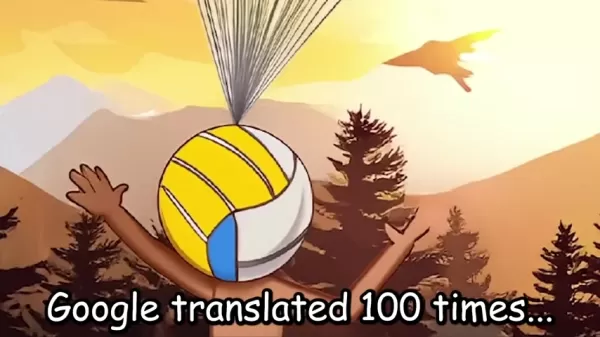
This technique can transform ordinary prompts into bizarre and captivating concepts, pushing the boundaries of what AI can create.
The appeal of this method lies in its accessibility; anyone with Google Translate can experiment and explore AI's potential as a source of unpredictable artistic inspiration. AI photo editing isn't just about precision and control; it's also about embracing the unexpected and letting AI guide the creative process in new and unforeseen directions.
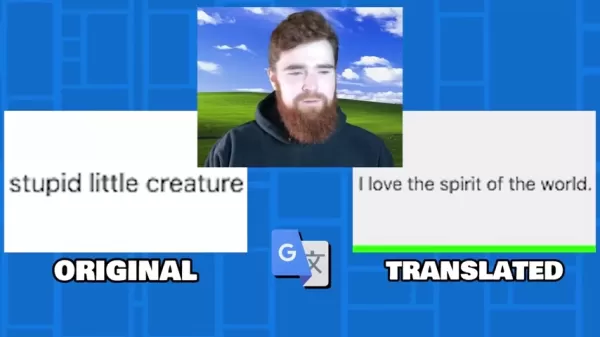
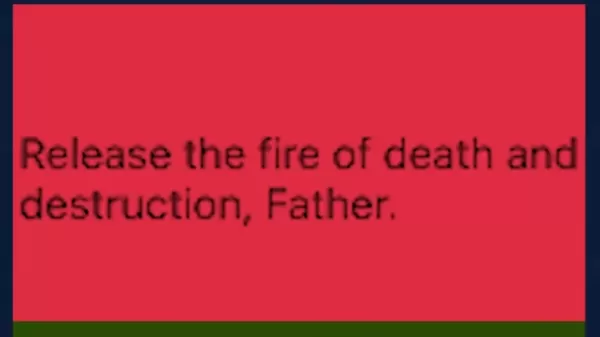
Using this technique the presenter created prompts such as:
- Stupid little creature --> I love the spirit of the world
- giant meteor heading towards them --> Release the fire of death and destruction, Father
- baby yoda with no hair --> Young Yoda had no hair
Repeated translations can take an ordinary concept and transform it into something dark and abstract.
Combining AI Tools for Unique Visual Storytelling
The real magic occurs when these two techniques combine. Imagine using Google Translate to generate a bizarre prompt and then feeding that prompt into Generative Fill.
The AI interprets the nonsensical text and attempts to create an image matching its understanding, resulting in visuals that are both fascinating and surreal. This synergistic approach can produce truly unique and memorable visual stories, pushing the limits of AI photo editing and challenging our perceptions of art and creativity. It also enables you to connect multiple images that individually have little meaning but collectively form one large, cohesive image.
This method has been used to create:
- Yoda with large lipstick and no hair with children growing from his head
- A gremlin with long legs and a porkchop for a torso
- Cartoon landscape under attack by a flaming bird
Ethical Cons
iderations in AI-Generated Art
The Responsibility of the Artist
As AI grows more sophisticated, it's crucial to consider the ethical implications of using these tools. While AI can enhance creativity and open new artistic pathways, it's important to recognize that AI doesn't 'create' in the same way human artists do. AI photo editing systems are trained on existing datasets, meaning the resulting images reflect the biases and perspectives present in those datasets.
Artists using these tools have a responsibility to remain aware of these biases and to use AI in ways that promote inclusivity, diversity, and responsible representation. This includes carefully considering the language used in prompts, along with the cultural and social context of generated images. Responsible AI use can help challenge harmful stereotypes and foster a more equitable and representative visual landscape.
The Future of Creativity and AI
Integrating AI into creative workflows represents a significant shift in the art world. As AI continues to evolve, we'll likely see even more sophisticated tools and techniques emerge, further blurring the lines between human and artificial creativity.
![Ethical <h3]() Considerations in AI-Generated Art" src="https://img.xix.ai/uploads/25/691fe548da3c6.webp">
Considerations in AI-Generated Art" src="https://img.xix.ai/uploads/25/691fe548da3c6.webp">It's important to view AI photo editing as a collaborative partnership where human artists and AI work together to create something truly unique and impactful.
This collaboration holds potential for unlocking new forms of expression, breaking down barriers to entry, and democratizing the creative process. The key is embracing AI as a tool for exploration and innovation while remaining mindful of its limitations and ethical implications. By doing so, we can harness AI's power to create a more vibrant and inclusive art world.
Creating with Generative AI, Step-by-Step
Expanding an Image with Photoshop's Generative Fill
This is an extremely popular feature for content creators who need to enlarge small images to fit new frames or correct aspect ratios after cropping. Here's a step-by-step process:
- Open the Image: Start by opening your target image in Adobe Photoshop.
- Select the Crop Tool: Choose the 'Crop Tool' from the toolbar.
- Expand the Canvas: Use the Crop Tool to drag the canvas edges outward, creating additional space around your image.
- Generate: Click Generate Fill and watch as it creates and fills the empty areas.
- Export: Export your finished image for content use!
Content Removal with Photoshop's Generative Fill
This feature excels at removing unwanted or distracting elements from images. Follow this step-by-step process:
- Open the Image: Begin by opening your target image in Adobe Photoshop.
- Select Tool: Choose your preferred selection tool from the toolbar, such as the lasso or rectangle tool.
- Select the unwanted object: Create a selection around the item you want to remove.
- Generate: Click Generate Fill and observe as it fills the created gap based on surrounding imagery.
- Export: Export your cleaned image for content use!
How to use google translate and image editing AI
With AI generative fill, virtually anything becomes possible. Why not create images using prompts you generate by running text through Google Translate numerous times? This approach can produce unique artwork:
- Develop an initial concept
- Write a short sentence describing that idea
- Run that sentence through Google Translate 100 times
- Copy and paste the translated sentence into a generative fill tool
- Use this sentence to generate an image based on the description
- Continue this process with your new images.
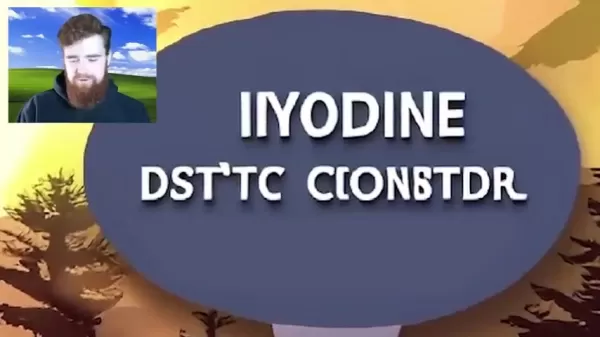
This technique can yield all sorts of creative madness while enabling completely original imagery and art!
Pricing
Adobe Photoshop's Pricing
Photoshop offers several subscription tiers:
- The standalone version costs $22.99/month or $263.88/year
- The photography bundle provides better value at $119.88/year, including additional applications
- The Adobe All Apps subscription includes Photoshop for $59.99/month
Adobe Photoshop's Generative Fill: Pros
and Cons
Pros
Seamless integration with Photoshop
AI generates novel images for various effects
Intuitive text prompt-based interface
Extends images with seamless edges
Cons
Requires an Adobe Photoshop subscription
Image quality varies depending on prompt complexity and source images
May unintentionally incorporate stereotypes or tropes in generated imagery
Can be time-consuming with poorly conceived ideas
Core Features
AI
Photoshop's AI integration is its most discussed feature. It enables AI image generation from text prompts and makes quick changes, removals, and alterations to image sections with ease.
Layers
Photoshop derives its power from layer integration. Layers allow stacking and control of individual image elements. Different tools can be applied to separate layers, making it simple to work on specific elements without affecting the entire image.
Masking
Masking isolates portions of an image, enabling controlled editing and effect application.
Retouching
Healing brushes and clone stamp tools seamlessly remove imperfections.
Selection
Photoshop provides powerful selection tools including: object selection, quick selection, and magic wand. These selections can be combined to remove specific photo sections.
Use Cases
Graphic Design
Creating logos, brochures, posters, and other marketing materials.
Photography Editing
Enhancing portraits, landscapes, and various photograph types.
Web Design
Designing website layouts, banners, and graphics.
Digital Painting
Creating digital illustrations and artwork.
Video Editing
Limited video editing capabilities, such as creating small GIFs
FAQ
What is AI photo editing?
AI photo editing involves using artificial intelligence algorithms to enhance, modify, or generate images. It includes features like content-aware fill, automatic color correction, and AI-powered filters.
What is generative fill?
Generative Fill is an AI feature in Adobe Photoshop that lets users add, remove, or replace image content using text prompts. It intelligently generates new content that blends seamlessly with existing imagery.
Can AI replace human artists?
While AI can automate certain tasks and provide creative assistance, it's unlikely to completely replace human artists. AI tools can augment creativity, but human vision and artistic expression remain fundamental.
Related Questions
What is a 'happy mouth' in the context of AI photo editing?
This presents an interesting question, though the presenter didn't particularly favor it. After running a 'Baby Yoda with no hair' image through AI with horrifying results, the presenter consulted a colleague who suggested to 'give him a happy mouth' - essentially meaning a smile. The presenter found this wording unusual for a prompt. Additionally, Google Translate converted 'baby yoda has a happy mouth' to 'Yoda's face lit up with joy,' clarifying that 'happy mouth' refers to smiling or is associated with smiling expressions.
Should I use AI to remove my kids from an old picture?
This nuanced question involves multiple considerations with no definitive answer, as the decision ultimately rests with you. Here are points to help guide your decision:Ethics: If sharing the image, consider whether it's fair to create fabricated memories they didn't experience. Should you be concerned about the impact of creating artificial stories if they're unaware?Bias: AI often carries biases - does the generated imagery accurately represent the time, place, and people, or does it rely on stereotypes?Practicality: Even if desired, the technology might not properly understand context. What if AI-generated people bear no resemblance to the original time and place?Your final decision remains personal, but considering these points helps ensure ethical practices that respect individuals and historical accuracy.
Related article
 Stripe to Acquire OpenRouter as AI Model Routing Gains Momentum
Stripe has agreed to acquire OpenRouter, an AI model-routing platform that gives developers access to hundreds of models through a single interface. The deal adds model selection and routing to Stripe’s existing work around AI usage and token-based b
Former OpenAI Researcher Barrett Zoph Returns to Google to Support Gemini Development
Barret Zoph, who previously abruptly left and joined OpenAI due to a disagreement with Thinking Machines Lab CEO Miriam Mularati, has once again changed employers. Alphabet's Google announced that Zoph will return as Vice President of Research, bring
How Recursive Intelligence Raised $335M at $4B Valuation in 4 Months
The co-founders of startup Ricursive Intelligence seemed destined to be co-founders.Anna Goldie, CEO, and Azalia Mirhoseini, CTO, are so well-known in the AI community that they were among those AI engineers who “got those weird emails from Zuckerber
Related Special Topic Recommendations
Design & Art
Stripe to Acquire OpenRouter as AI Model Routing Gains Momentum
Stripe has agreed to acquire OpenRouter, an AI model-routing platform that gives developers access to hundreds of models through a single interface. The deal adds model selection and routing to Stripe’s existing work around AI usage and token-based b
Former OpenAI Researcher Barrett Zoph Returns to Google to Support Gemini Development
Barret Zoph, who previously abruptly left and joined OpenAI due to a disagreement with Thinking Machines Lab CEO Miriam Mularati, has once again changed employers. Alphabet's Google announced that Zoph will return as Vice President of Research, bring
How Recursive Intelligence Raised $335M at $4B Valuation in 4 Months
The co-founders of startup Ricursive Intelligence seemed destined to be co-founders.Anna Goldie, CEO, and Azalia Mirhoseini, CTO, are so well-known in the AI community that they were among those AI engineers who “got those weird emails from Zuckerber
Related Special Topic Recommendations
Design & Art
 Top AI Illustration Tools: Create Editorial Scenes and Cover Art Faster
2026 Latest Top-rated AI Illustration Tools: Our curated list features the best powerfully designed tools for creating stunning editorial scenes and eye-catching cover art quickly. Each option has gone through rigorous real-world tests, offering a free vs paid comparison to help you find the perfect match for your workflow. Try these must-try solutions today to unlock your AI edge and boost your creative productivity. Explore now at XIX.AI.
 10 tools
 xix.ai
Education and Learning
Top AI Tutors for Exam Prep: Practice Math, Science, and English
xix.ai
Education and Learning
Top AI Tutors for Exam Prep: Practice Math, Science, and English
2026 Latest Top-Rated Best AI Tutors for Exam Prep are here on XIX.AI! Our curated list features powerful game-changing tools that offer free vs paid comparison, real-world tests, and weekly updated rankings. They help boost your writing efficiency, simplify complex topic learning, and unlock your academic potential. Explore now to Discover your perfect exam prep tool and Start creating today to Unlock your AI edge!
10 tools
xix.ai
Finance
AI Budget Planning Tools for Personal Money Management
2026 Latest Best Top-Rated AI Budget Planning Tools for Personal Money Management are here on XIX.AI! This curated collection features powerful, game-changing solutions that help you conduct real-world tests, understand spending habits, and create personalized plans to boost productivity. Enjoy a free vs paid comparison along with detailed rankings. Must-try tools designed to simplify money management and unlock your AI edge. Explore now!
11 tools
xix.ai
Health & Wellness
AI Sleep Tracking Assistants: Improve Recovery with Better Bedtime Habits
2026 Latest Best Top-Rated AI Sleep Tracking Assistants curated for ultimate recovery. This fully updated weekly guide features powerful tools that deliver real-world tests, free vs paid comparison, and detailed rankings to help you find the must-try solution that boosts sleep quality and supports better bedtime habits. Explore now at XIX.AI to Unlock your AI edge.
10 tools
xix.ai
Data Analysis
AI SQL Copilots for Product and Revenue Analytics
2026 Latest Best Top-Rated AI SQL Copilots for Product and Revenue Analytics! XIX.AI has curated a powerful, game-changing collection of must-try tools that undergo real-world tests through weekly updated rankings. These tools help users boost productivity significantly by accelerating data analysis, streamlining complex queries, and generating accurate insights to drive smarter business decisions. Explore now to Discover your perfect tool for unlocking your AI edge!
14 tools
xix.ai
Education and Learning
Best AI Homework Helpers That Teach: Learn Concepts, Not Just Answers
2026 Latest Best Top-Rated AI Homework Helpers That Teach Core Concepts Not Just Answers Powerful Tools for Students Must-Try Curated List Weekly Updated Free vs Paid Comparison Real-World Tests Accurate Rankings to Help You Unlock Your Full Learning Potential Explore now to Discover your perfect tool for smarter studying.
10 tools
xix.ai

 Comments (1)
0/500
Comments (1)
0/500
![OliverPhillips]()
Honestly, 2026 guides feel like yesterday's news when AI moves this fast. I tried Generative Fill last week and it hallucinated three extra fingers on my cat. 😹 Still, the free tools are a lifesaver for beginners who can't afford Adobe. Anyone else struggling with the 'repetitive translation' trick mentioned? It sounds like a hack that might break soon. #AIart #PhotoEdit
AI is transforming creative workflows in our digital world. This guide explores how AI-powered photo editing, using tools like Adobe Photoshop's Generative Fill and creative techniques such as repetitive Google Translation, unlocks new avenues for artistic expression. We'll examine how to use these tools for expanding images, removing content, and generating surreal art. Prepare to unleash your creative potential with AI and turn ordinary photos into compelling visual narratives.
Key Points
Use Google Translate to craft unique and unexpected text prompts for AI image generation.
Adobe Photoshop's Generative Fill is a powerful solution for expanding images and manipulating content.
Experiment with descriptive language to achieve your desired outcomes in AI image editing.
Cons
ider the ethical implications of using AI to modify and generate images.Explore AI video tools for automated editing and creative content production.
Transforming Images with AI Photo Editing
The Power of Adobe Photoshop's Generative Fill
Adobe Photoshop's Generative Fill represents a breakthrough in image editing, enabling users to extend images beyond their original borders and seamlessly remove unwanted elements. By harnessing AI, this feature analyzes surrounding pixels and generates content that blends naturally with the existing image, creating flawless extensions or removals.
This capability creates new opportunities for photographers, graphic designers, and digital artists, allowing them to reshape and reimagine their work with unprecedented ease. With modern solutions like an AI photo editor, creatives can now enhance images more quickly and flexibly than ever before.
Adobe Generative Fill and similar AI tools provide functionality for:
- Image Expansion: Enlarge photos and correct aspect ratio problems
- Content Removal: Eliminate distracting or unwanted objects
- Creative Generation: Add new elements from your imagination
This technology goes beyond being just a tool; it serves as an intelligent assistant that understands image context and provides smart suggestions, speeding up the creative process and letting artists concentrate on their overall vision. The ability to expand images, remove distractions, and generate new content offers greater creative control, enabling visual artists to achieve effects that were previously time-intensive or impossible.
Unleashing Unpredictability: Google Translate as a Creative Prompt Generator
While Generative Fill offers control over the AI photo editing process, incorporating Google Translate introduces an element of creative chaos. By repeatedly translating a simple prompt, the resulting text can become distorted and unpredictable, leading to surprising and unexpected image generations.
This technique can transform ordinary prompts into bizarre and captivating concepts, pushing the boundaries of what AI can create.
The appeal of this method lies in its accessibility; anyone with Google Translate can experiment and explore AI's potential as a source of unpredictable artistic inspiration. AI photo editing isn't just about precision and control; it's also about embracing the unexpected and letting AI guide the creative process in new and unforeseen directions.
Using this technique the presenter created prompts such as:
- Stupid little creature --> I love the spirit of the world
- giant meteor heading towards them --> Release the fire of death and destruction, Father
- baby yoda with no hair --> Young Yoda had no hair
Repeated translations can take an ordinary concept and transform it into something dark and abstract.
Combining AI Tools for Unique Visual Storytelling
The real magic occurs when these two techniques combine. Imagine using Google Translate to generate a bizarre prompt and then feeding that prompt into Generative Fill.
The AI interprets the nonsensical text and attempts to create an image matching its understanding, resulting in visuals that are both fascinating and surreal. This synergistic approach can produce truly unique and memorable visual stories, pushing the limits of AI photo editing and challenging our perceptions of art and creativity. It also enables you to connect multiple images that individually have little meaning but collectively form one large, cohesive image.
This method has been used to create:
- Yoda with large lipstick and no hair with children growing from his head
- A gremlin with long legs and a porkchop for a torso
- Cartoon landscape under attack by a flaming bird
Ethical Cons
iderations in AI-Generated Art
The Responsibility of the Artist
As AI grows more sophisticated, it's crucial to consider the ethical implications of using these tools. While AI can enhance creativity and open new artistic pathways, it's important to recognize that AI doesn't 'create' in the same way human artists do. AI photo editing systems are trained on existing datasets, meaning the resulting images reflect the biases and perspectives present in those datasets.
Artists using these tools have a responsibility to remain aware of these biases and to use AI in ways that promote inclusivity, diversity, and responsible representation. This includes carefully considering the language used in prompts, along with the cultural and social context of generated images. Responsible AI use can help challenge harmful stereotypes and foster a more equitable and representative visual landscape.
The Future of Creativity and AI
Integrating AI into creative workflows represents a significant shift in the art world. As AI continues to evolve, we'll likely see even more sophisticated tools and techniques emerge, further blurring the lines between human and artificial creativity.
It's important to view AI photo editing as a collaborative partnership where human artists and AI work together to create something truly unique and impactful.
This collaboration holds potential for unlocking new forms of expression, breaking down barriers to entry, and democratizing the creative process. The key is embracing AI as a tool for exploration and innovation while remaining mindful of its limitations and ethical implications. By doing so, we can harness AI's power to create a more vibrant and inclusive art world.
Creating with Generative AI, Step-by-Step
Expanding an Image with Photoshop's Generative Fill
This is an extremely popular feature for content creators who need to enlarge small images to fit new frames or correct aspect ratios after cropping. Here's a step-by-step process:
- Open the Image: Start by opening your target image in Adobe Photoshop.
- Select the Crop Tool: Choose the 'Crop Tool' from the toolbar.
- Expand the Canvas: Use the Crop Tool to drag the canvas edges outward, creating additional space around your image.
- Generate: Click Generate Fill and watch as it creates and fills the empty areas.
- Export: Export your finished image for content use!
Content Removal with Photoshop's Generative Fill
This feature excels at removing unwanted or distracting elements from images. Follow this step-by-step process:
- Open the Image: Begin by opening your target image in Adobe Photoshop.
- Select Tool: Choose your preferred selection tool from the toolbar, such as the lasso or rectangle tool.
- Select the unwanted object: Create a selection around the item you want to remove.
- Generate: Click Generate Fill and observe as it fills the created gap based on surrounding imagery.
- Export: Export your cleaned image for content use!
How to use google translate and image editing AI
With AI generative fill, virtually anything becomes possible. Why not create images using prompts you generate by running text through Google Translate numerous times? This approach can produce unique artwork:
- Develop an initial concept
- Write a short sentence describing that idea
- Run that sentence through Google Translate 100 times
- Copy and paste the translated sentence into a generative fill tool
- Use this sentence to generate an image based on the description
- Continue this process with your new images.
This technique can yield all sorts of creative madness while enabling completely original imagery and art!
Pricing
Adobe Photoshop's Pricing
Photoshop offers several subscription tiers:
- The standalone version costs $22.99/month or $263.88/year
- The photography bundle provides better value at $119.88/year, including additional applications
- The Adobe All Apps subscription includes Photoshop for $59.99/month
Adobe Photoshop's Generative Fill: Pros
and Cons
Pros
Seamless integration with Photoshop
AI generates novel images for various effects
Intuitive text prompt-based interface
Extends images with seamless edges
Cons
Requires an Adobe Photoshop subscription
Image quality varies depending on prompt complexity and source images
May unintentionally incorporate stereotypes or tropes in generated imagery
Can be time-consuming with poorly conceived ideas
Core Features
AI
Photoshop's AI integration is its most discussed feature. It enables AI image generation from text prompts and makes quick changes, removals, and alterations to image sections with ease.
Layers
Photoshop derives its power from layer integration. Layers allow stacking and control of individual image elements. Different tools can be applied to separate layers, making it simple to work on specific elements without affecting the entire image.
Masking
Masking isolates portions of an image, enabling controlled editing and effect application.
Retouching
Healing brushes and clone stamp tools seamlessly remove imperfections.
Selection
Photoshop provides powerful selection tools including: object selection, quick selection, and magic wand. These selections can be combined to remove specific photo sections.
Use Cases
Graphic Design
Creating logos, brochures, posters, and other marketing materials.
Photography Editing
Enhancing portraits, landscapes, and various photograph types.
Web Design
Designing website layouts, banners, and graphics.
Digital Painting
Creating digital illustrations and artwork.
Video Editing
Limited video editing capabilities, such as creating small GIFs
FAQ
What is AI photo editing?
AI photo editing involves using artificial intelligence algorithms to enhance, modify, or generate images. It includes features like content-aware fill, automatic color correction, and AI-powered filters.
What is generative fill?
Generative Fill is an AI feature in Adobe Photoshop that lets users add, remove, or replace image content using text prompts. It intelligently generates new content that blends seamlessly with existing imagery.
Can AI replace human artists?
While AI can automate certain tasks and provide creative assistance, it's unlikely to completely replace human artists. AI tools can augment creativity, but human vision and artistic expression remain fundamental.
Related Questions
What is a 'happy mouth' in the context of AI photo editing?
This presents an interesting question, though the presenter didn't particularly favor it. After running a 'Baby Yoda with no hair' image through AI with horrifying results, the presenter consulted a colleague who suggested to 'give him a happy mouth' - essentially meaning a smile. The presenter found this wording unusual for a prompt. Additionally, Google Translate converted 'baby yoda has a happy mouth' to 'Yoda's face lit up with joy,' clarifying that 'happy mouth' refers to smiling or is associated with smiling expressions.
Should I use AI to remove my kids from an old picture?
This nuanced question involves multiple considerations with no definitive answer, as the decision ultimately rests with you. Here are points to help guide your decision:Ethics: If sharing the image, consider whether it's fair to create fabricated memories they didn't experience. Should you be concerned about the impact of creating artificial stories if they're unaware?Bias: AI often carries biases - does the generated imagery accurately represent the time, place, and people, or does it rely on stereotypes?Practicality: Even if desired, the technology might not properly understand context. What if AI-generated people bear no resemblance to the original time and place?Your final decision remains personal, but considering these points helps ensure ethical practices that respect individuals and historical accuracy.








 Stripe to Acquire OpenRouter as AI Model Routing Gains Momentum
Stripe has agreed to acquire OpenRouter, an AI model-routing platform that gives developers access to hundreds of models through a single interface. The deal adds model selection and routing to Stripe’s existing work around AI usage and token-based b
Stripe to Acquire OpenRouter as AI Model Routing Gains Momentum
Stripe has agreed to acquire OpenRouter, an AI model-routing platform that gives developers access to hundreds of models through a single interface. The deal adds model selection and routing to Stripe’s existing work around AI usage and token-based b
 Former OpenAI Researcher Barrett Zoph Returns to Google to Support Gemini Development
Barret Zoph, who previously abruptly left and joined OpenAI due to a disagreement with Thinking Machines Lab CEO Miriam Mularati, has once again changed employers. Alphabet's Google announced that Zoph will return as Vice President of Research, bring
Former OpenAI Researcher Barrett Zoph Returns to Google to Support Gemini Development
Barret Zoph, who previously abruptly left and joined OpenAI due to a disagreement with Thinking Machines Lab CEO Miriam Mularati, has once again changed employers. Alphabet's Google announced that Zoph will return as Vice President of Research, bring
 How Recursive Intelligence Raised $335M at $4B Valuation in 4 Months
The co-founders of startup Ricursive Intelligence seemed destined to be co-founders.Anna Goldie, CEO, and Azalia Mirhoseini, CTO, are so well-known in the AI community that they were among those AI engineers who “got those weird emails from Zuckerber
How Recursive Intelligence Raised $335M at $4B Valuation in 4 Months
The co-founders of startup Ricursive Intelligence seemed destined to be co-founders.Anna Goldie, CEO, and Azalia Mirhoseini, CTO, are so well-known in the AI community that they were among those AI engineers who “got those weird emails from Zuckerber

2026 Latest Top-rated AI Illustration Tools: Our curated list features the best powerfully designed tools for creating stunning editorial scenes and eye-catching cover art quickly. Each option has gone through rigorous real-world tests, offering a free vs paid comparison to help you find the perfect match for your workflow. Try these must-try solutions today to unlock your AI edge and boost your creative productivity. Explore now at XIX.AI.
10 tools
xix.ai

2026 Latest Top-Rated Best AI Tutors for Exam Prep are here on XIX.AI! Our curated list features powerful game-changing tools that offer free vs paid comparison, real-world tests, and weekly updated rankings. They help boost your writing efficiency, simplify complex topic learning, and unlock your academic potential. Explore now to Discover your perfect exam prep tool and Start creating today to Unlock your AI edge!
10 tools
xix.ai

2026 Latest Best Top-Rated AI Budget Planning Tools for Personal Money Management are here on XIX.AI! This curated collection features powerful, game-changing solutions that help you conduct real-world tests, understand spending habits, and create personalized plans to boost productivity. Enjoy a free vs paid comparison along with detailed rankings. Must-try tools designed to simplify money management and unlock your AI edge. Explore now!
11 tools
xix.ai

2026 Latest Best Top-Rated AI Sleep Tracking Assistants curated for ultimate recovery. This fully updated weekly guide features powerful tools that deliver real-world tests, free vs paid comparison, and detailed rankings to help you find the must-try solution that boosts sleep quality and supports better bedtime habits. Explore now at XIX.AI to Unlock your AI edge.
10 tools
xix.ai

2026 Latest Best Top-Rated AI SQL Copilots for Product and Revenue Analytics! XIX.AI has curated a powerful, game-changing collection of must-try tools that undergo real-world tests through weekly updated rankings. These tools help users boost productivity significantly by accelerating data analysis, streamlining complex queries, and generating accurate insights to drive smarter business decisions. Explore now to Discover your perfect tool for unlocking your AI edge!
14 tools
xix.ai

2026 Latest Best Top-Rated AI Homework Helpers That Teach Core Concepts Not Just Answers Powerful Tools for Students Must-Try Curated List Weekly Updated Free vs Paid Comparison Real-World Tests Accurate Rankings to Help You Unlock Your Full Learning Potential Explore now to Discover your perfect tool for smarter studying.
10 tools
xix.ai

Honestly, 2026 guides feel like yesterday's news when AI moves this fast. I tried Generative Fill last week and it hallucinated three extra fingers on my cat. 😹 Still, the free tools are a lifesaver for beginners who can't afford Adobe. Anyone else struggling with the 'repetitive translation' trick mentioned? It sounds like a hack that might break soon. #AIart #PhotoEdit












