


 Home
HomeWhat are the top 3 free AI voice generators in 2025 for realistic, unlimited use?
Searching for the top free AI voice generator? Frustrated by ElevenLabs' restrictions? This article introduces three outstanding AI voice tools that enable you to generate unlimited, high-quality, and realistic voices without requiring a login. These platforms deliver professional-grade voice generation, perfect for diverse content creation projects.
Key Points
Explore three leading free AI voice generators.
Produce unlimited voices without any login.
Create realistic, high-fidelity AI voices.
Discover the unique features of each AI voice generator.
Learn how to edit AI voices professionally for monetization.
Unveiling the Best Free AI Voice Generators
Speecheactors: Your First AI Voice Generator
Speecheactors distinguishes itself as an exceptional free AI voice generator. To access it, open Google and paste the link provided below.
This link is available in our Telegram channel, which you can find in the description. Ensure you access the website via our specific link to avoid any login prompts.
How to use Speecheactors:
- Select Your Language: Choose "Hindi (India)" or your preferred language from the menu. My language is pre-selected.
- Choose a Voice Name: Click on "Voice Name" to browse various voice actors. I am selecting Aarav's voice, as I personally prefer it the most.
- Enter Your Script: Input your text into the next box.
- Generate Voice: Click the “generate” button to create your AI voice.
- Download: Click 'download file' to save the audio to your device.
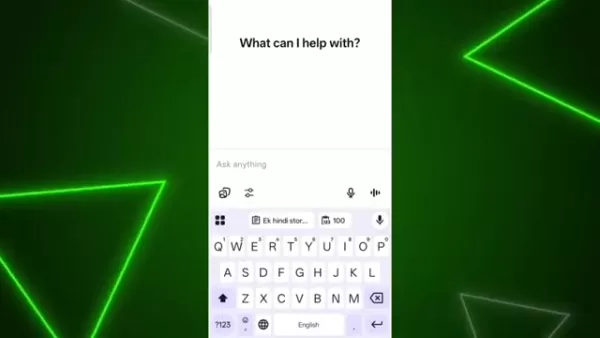
After selecting your voice, paste your script into the text box. Speecheactors allows generation of up to 1500 characters at once. You can create your script using ChatGPT.
Steps to Creating the Script Via ChatGPT
- Open ChatGPT on your device.
- Type “Ek hindi story likho 1000 character ka” into the search bar and send it.
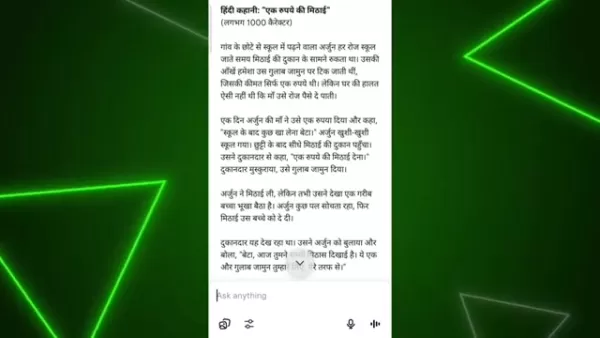
- Copy the entire generated script.
- Paste it into Speecheactors' text box.
Note: The process is straightforward, similar to most AI tools. However, remember to edit and personalize the content before uploading your video to YouTube!
Open AI FM: A Different Approach to AI Voice Generation
Open AI FM provides a distinct approach to AI voice generation, offering a slightly different yet equally intuitive and powerful experience. To access it, search for "Open AI FM" on Google and click the first website link.
How to Use Open AI FM:
- Choose a Voice Character: This differs from Speecheactors! The page displays numerous voice characters to choose from.
- Select a Vibe Next, scroll to the "Vibe" section to further refine your voice's tone and style.
- Add the Script to Generate: Copy and paste your script, and the website will generate the AI voiceover.
- Generate Press the orange, video-shaped button at the bottom to create your audio.You can scroll up to select a different vibe to find a sound you prefer.
Filmora: Ultra Realistic Voice Generation in Seconds
Filmora enables you to generate ultra-realistic voices in seconds. Begin by downloading the Filmora app from our Telegram channel.
How to use Filmora:
- Cancel: When the app starts, you may see a prompt screen; simply press cancel.
- New Project: Select 'new project' to start a video or ad.
- Import Select a photo to import from your gallery.
- Select Text Tap the text option at the bottom, then choose "add text".
- Add Script: Input the script you want to convert into an AI voice.
- Text to Speech Option: At the bottom, you will find a text-to-speech option to generate the AI voice.
Within the trending options, you'll discover a wide variety of voice characters. Before using these tools for YouTube content, it's crucial to understand the steps needed to keep your channel eligible for monetization
. Therefore, maintaining uniqueness and an organic feel is vital.
Editing AI Voice for YouTube Monetization
Professional Editing is a Must
If you use an AI-generated voice without editing, your YouTube channel may not be monetized. To monetize, you must edit the AI voice professionally. This step is critical.
Want to Know how to edit AI Voice?
Learn more in our videos. The link is in the description.
While AI voice generators offer great convenience, YouTube's monetization policies stress the importance of original content. By professionally editing your AI-generated voices, you add a necessary layer of originality, boosting your chances of successful monetization. Editing allows you to add your own creative flair.
Step-by-Step Guides for AI Voice Generation
Generating AI Voice with Speecheactors
- Access Speecheactors: Paste the provided link into Google and open the site.
- Select Language and Voice: Pick your language and preferred voice actor.
- Enter Script: Input your script into the text box (max 1500 characters).
- Generate and Download: Click "Generate" and then download the file.
Using Speecheactors is all about quick and convenient generation
.
Creating AI Voice with Open AI FM
- Access Open AI FM: Search for "Open AI FM" on Google and click the first result.
- Choose Voice and Vibe: Select a voice character and customize it with a vibe.
- Enter Script: Copy and paste your script into the designated area.
- Generate: Press the orange video-shaped button to create your AI voice.
Open AI FM offers greater customization to generate high-quality AI voice actors.
Generating AI Voice with Filmora
- Install and Open Filmora: Download the app from our Telegram channel and launch it.
- New Project and Import: Start a new project and import a photo.
- Add Text: Click the text option and add your script.
- Text to Speech: Select the "Text to Speech" feature to generate the AI voice.
Using Filmora is that straightforward!
Pricing
Pricing of the Different AI Voice Actors
Here's the best part: all three AI voice generators are completely FREE! You just need a device and some creativity to start producing amazing AI voices.
Evaluating the AI Voice Generators: Pros
and Cons
Pros
Completely free to use
No login required
User-friendly interface
High-quality output
Multiple language support
Cons
Requires professional audio editing for monetization
Voice quality varies; Filmora offers the most realistic options.
A ChatGPT account may be helpful for quickly generating scripts.
Core Features
Features of the AI Voice Actors
Speecheactors:
- Ease of Use: Quick and convenient voice generation.
- Multiple language options: Offers a multitude of languages for AI voice creation.
- Free link: Use our link in the description to skip login and start creating immediately.
Open AI FM:
- Customization: Extensive customization and 'vibe' options to tailor the AI voice.
- High Quality Audio: Delivers professional-sounding audio for a free tool.
Filmora:
- Ultra Realistic Audio: Produces highly realistic audio suitable for various needs.
- High Definition Voice Quality: Ensures clear, high-quality sound for your videos.
Utilize these features to create compelling videos that attract a wide audience.
Unlock Limitless Potential: Use Cases for Free AI Voice Generators
Content Creation Versatility
Free AI voice generators unlock a world of possibilities for enhancing your content. From engaging YouTube videos and compelling audiobooks to educational resources and innovative marketing campaigns, these tools make professional voiceovers accessible to everyone
. Ideal uses include:
- Video Marketing
- Product Tutorials
- Educational Materials
- Audiobooks
- Social Media Content
Frequently Asked Questions
Can I really use these AI voice generators for free?
Yes! All three AI voice generators are completely free. Just follow the provided links and instructions to bypass any login requirements.
Will using AI-generated voices impact my YouTube monetization?
Using an unedited AI voice may prevent monetization. It's essential to edit the audio track to meet YouTube's community standards for monetization. Editing is a crucial step.
How can I ensure my AI-generated voice sounds unique and professional?
To ensure originality, always edit the videos and audio created by the AI voice generator. This increases your chances of successful channel monetization.
Dive Deeper: Related Questions Answered
What kind of projects are these AI voice generators best suited for?
Free AI voice generators are versatile tools suitable for numerous projects. They are excellent for marketing, video, and audio content. Speecheactors is great for quick voice generation, educational projects, or audio articles. Open AI FM excels when you need extra character and tonal variety. Filmora is ideally geared for video projects and advertisements.
Related article
 Stripe to Acquire OpenRouter as AI Model Routing Gains Momentum
Stripe has agreed to acquire OpenRouter, an AI model-routing platform that gives developers access to hundreds of models through a single interface. The deal adds model selection and routing to Stripe’s existing work around AI usage and token-based b
Former OpenAI Researcher Barrett Zoph Returns to Google to Support Gemini Development
Barret Zoph, who previously abruptly left and joined OpenAI due to a disagreement with Thinking Machines Lab CEO Miriam Mularati, has once again changed employers. Alphabet's Google announced that Zoph will return as Vice President of Research, bring
How Recursive Intelligence Raised $335M at $4B Valuation in 4 Months
The co-founders of startup Ricursive Intelligence seemed destined to be co-founders.Anna Goldie, CEO, and Azalia Mirhoseini, CTO, are so well-known in the AI community that they were among those AI engineers who “got those weird emails from Zuckerber
Related Special Topic Recommendations
Design & Art
Stripe to Acquire OpenRouter as AI Model Routing Gains Momentum
Stripe has agreed to acquire OpenRouter, an AI model-routing platform that gives developers access to hundreds of models through a single interface. The deal adds model selection and routing to Stripe’s existing work around AI usage and token-based b
Former OpenAI Researcher Barrett Zoph Returns to Google to Support Gemini Development
Barret Zoph, who previously abruptly left and joined OpenAI due to a disagreement with Thinking Machines Lab CEO Miriam Mularati, has once again changed employers. Alphabet's Google announced that Zoph will return as Vice President of Research, bring
How Recursive Intelligence Raised $335M at $4B Valuation in 4 Months
The co-founders of startup Ricursive Intelligence seemed destined to be co-founders.Anna Goldie, CEO, and Azalia Mirhoseini, CTO, are so well-known in the AI community that they were among those AI engineers who “got those weird emails from Zuckerber
Related Special Topic Recommendations
Design & Art
 Top AI Illustration Tools: Create Editorial Scenes and Cover Art Faster
2026 Latest Top-rated AI Illustration Tools: Our curated list features the best powerfully designed tools for creating stunning editorial scenes and eye-catching cover art quickly. Each option has gone through rigorous real-world tests, offering a free vs paid comparison to help you find the perfect match for your workflow. Try these must-try solutions today to unlock your AI edge and boost your creative productivity. Explore now at XIX.AI.
 10 tools
 xix.ai
Education and Learning
Top AI Tutors for Exam Prep: Practice Math, Science, and English
xix.ai
Education and Learning
Top AI Tutors for Exam Prep: Practice Math, Science, and English
2026 Latest Top-Rated Best AI Tutors for Exam Prep are here on XIX.AI! Our curated list features powerful game-changing tools that offer free vs paid comparison, real-world tests, and weekly updated rankings. They help boost your writing efficiency, simplify complex topic learning, and unlock your academic potential. Explore now to Discover your perfect exam prep tool and Start creating today to Unlock your AI edge!
10 tools
xix.ai
Finance
AI Budget Planning Tools for Personal Money Management
2026 Latest Best Top-Rated AI Budget Planning Tools for Personal Money Management are here on XIX.AI! This curated collection features powerful, game-changing solutions that help you conduct real-world tests, understand spending habits, and create personalized plans to boost productivity. Enjoy a free vs paid comparison along with detailed rankings. Must-try tools designed to simplify money management and unlock your AI edge. Explore now!
11 tools
xix.ai
Health & Wellness
AI Sleep Tracking Assistants: Improve Recovery with Better Bedtime Habits
2026 Latest Best Top-Rated AI Sleep Tracking Assistants curated for ultimate recovery. This fully updated weekly guide features powerful tools that deliver real-world tests, free vs paid comparison, and detailed rankings to help you find the must-try solution that boosts sleep quality and supports better bedtime habits. Explore now at XIX.AI to Unlock your AI edge.
10 tools
xix.ai
Data Analysis
AI SQL Copilots for Product and Revenue Analytics
2026 Latest Best Top-Rated AI SQL Copilots for Product and Revenue Analytics! XIX.AI has curated a powerful, game-changing collection of must-try tools that undergo real-world tests through weekly updated rankings. These tools help users boost productivity significantly by accelerating data analysis, streamlining complex queries, and generating accurate insights to drive smarter business decisions. Explore now to Discover your perfect tool for unlocking your AI edge!
14 tools
xix.ai
Education and Learning
Best AI Homework Helpers That Teach: Learn Concepts, Not Just Answers
2026 Latest Best Top-Rated AI Homework Helpers That Teach Core Concepts Not Just Answers Powerful Tools for Students Must-Try Curated List Weekly Updated Free vs Paid Comparison Real-World Tests Accurate Rankings to Help You Unlock Your Full Learning Potential Explore now to Discover your perfect tool for smarter studying.
10 tools
xix.ai

 Comments (1)
0/500
Comments (1)
0/500
![WilliamAnderson]()
Finally, some decent free options! I've been stuck with ElevenLabs' limits for too long. The fact that these tools don't even require login is a game-changer. Gonna try them out immediately. 🎉
Searching for the top free AI voice generator? Frustrated by ElevenLabs' restrictions? This article introduces three outstanding AI voice tools that enable you to generate unlimited, high-quality, and realistic voices without requiring a login. These platforms deliver professional-grade voice generation, perfect for diverse content creation projects.
Key Points
Explore three leading free AI voice generators.
Produce unlimited voices without any login.
Create realistic, high-fidelity AI voices.
Discover the unique features of each AI voice generator.
Learn how to edit AI voices professionally for monetization.
Unveiling the Best Free AI Voice Generators
Speecheactors: Your First AI Voice Generator
Speecheactors distinguishes itself as an exceptional free AI voice generator. To access it, open Google and paste the link provided below.
This link is available in our Telegram channel, which you can find in the description. Ensure you access the website via our specific link to avoid any login prompts.
How to use Speecheactors:
- Select Your Language: Choose "Hindi (India)" or your preferred language from the menu. My language is pre-selected.
- Choose a Voice Name: Click on "Voice Name" to browse various voice actors. I am selecting Aarav's voice, as I personally prefer it the most.
- Enter Your Script: Input your text into the next box.
- Generate Voice: Click the “generate” button to create your AI voice.
- Download: Click 'download file' to save the audio to your device.
After selecting your voice, paste your script into the text box. Speecheactors allows generation of up to 1500 characters at once. You can create your script using ChatGPT.
Steps to Creating the Script Via ChatGPT
- Open ChatGPT on your device.
- Type “Ek hindi story likho 1000 character ka” into the search bar and send it.
- Copy the entire generated script.
- Paste it into Speecheactors' text box.
Note: The process is straightforward, similar to most AI tools. However, remember to edit and personalize the content before uploading your video to YouTube!
Open AI FM: A Different Approach to AI Voice Generation
Open AI FM provides a distinct approach to AI voice generation, offering a slightly different yet equally intuitive and powerful experience. To access it, search for "Open AI FM" on Google and click the first website link.
How to Use Open AI FM:
- Choose a Voice Character: This differs from Speecheactors! The page displays numerous voice characters to choose from.
- Select a Vibe Next, scroll to the "Vibe" section to further refine your voice's tone and style.
- Add the Script to Generate: Copy and paste your script, and the website will generate the AI voiceover.
- Generate Press the orange, video-shaped button at the bottom to create your audio.You can scroll up to select a different vibe to find a sound you prefer.
Filmora: Ultra Realistic Voice Generation in Seconds
Filmora enables you to generate ultra-realistic voices in seconds. Begin by downloading the Filmora app from our Telegram channel.
How to use Filmora:
- Cancel: When the app starts, you may see a prompt screen; simply press cancel.
- New Project: Select 'new project' to start a video or ad.
- Import Select a photo to import from your gallery.
- Select Text Tap the text option at the bottom, then choose "add text".
- Add Script: Input the script you want to convert into an AI voice.
- Text to Speech Option: At the bottom, you will find a text-to-speech option to generate the AI voice.
Within the trending options, you'll discover a wide variety of voice characters. Before using these tools for YouTube content, it's crucial to understand the steps needed to keep your channel eligible for monetization
. Therefore, maintaining uniqueness and an organic feel is vital.
Editing AI Voice for YouTube Monetization
Professional Editing is a Must
If you use an AI-generated voice without editing, your YouTube channel may not be monetized. To monetize, you must edit the AI voice professionally. This step is critical.
Want to Know how to edit AI Voice?
Learn more in our videos. The link is in the description.
While AI voice generators offer great convenience, YouTube's monetization policies stress the importance of original content. By professionally editing your AI-generated voices, you add a necessary layer of originality, boosting your chances of successful monetization. Editing allows you to add your own creative flair.
Step-by-Step Guides for AI Voice Generation
Generating AI Voice with Speecheactors
- Access Speecheactors: Paste the provided link into Google and open the site.
- Select Language and Voice: Pick your language and preferred voice actor.
- Enter Script: Input your script into the text box (max 1500 characters).
- Generate and Download: Click "Generate" and then download the file.
Using Speecheactors is all about quick and convenient generation
.
Creating AI Voice with Open AI FM
- Access Open AI FM: Search for "Open AI FM" on Google and click the first result.
- Choose Voice and Vibe: Select a voice character and customize it with a vibe.
- Enter Script: Copy and paste your script into the designated area.
- Generate: Press the orange video-shaped button to create your AI voice.
Open AI FM offers greater customization to generate high-quality AI voice actors.
Generating AI Voice with Filmora
- Install and Open Filmora: Download the app from our Telegram channel and launch it.
- New Project and Import: Start a new project and import a photo.
- Add Text: Click the text option and add your script.
- Text to Speech: Select the "Text to Speech" feature to generate the AI voice.
Using Filmora is that straightforward!
Pricing
Pricing of the Different AI Voice Actors
Here's the best part: all three AI voice generators are completely FREE! You just need a device and some creativity to start producing amazing AI voices.
Evaluating the AI Voice Generators: Pros
and Cons
Pros
Completely free to use
No login required
User-friendly interface
High-quality output
Multiple language support
Cons
Requires professional audio editing for monetization
Voice quality varies; Filmora offers the most realistic options.
A ChatGPT account may be helpful for quickly generating scripts.
Core Features
Features of the AI Voice Actors
Speecheactors:
- Ease of Use: Quick and convenient voice generation.
- Multiple language options: Offers a multitude of languages for AI voice creation.
- Free link: Use our link in the description to skip login and start creating immediately.
Open AI FM:
- Customization: Extensive customization and 'vibe' options to tailor the AI voice.
- High Quality Audio: Delivers professional-sounding audio for a free tool.
Filmora:
- Ultra Realistic Audio: Produces highly realistic audio suitable for various needs.
- High Definition Voice Quality: Ensures clear, high-quality sound for your videos.
Utilize these features to create compelling videos that attract a wide audience.
Unlock Limitless Potential: Use Cases for Free AI Voice Generators
Content Creation Versatility
Free AI voice generators unlock a world of possibilities for enhancing your content. From engaging YouTube videos and compelling audiobooks to educational resources and innovative marketing campaigns, these tools make professional voiceovers accessible to everyone
. Ideal uses include:
- Video Marketing
- Product Tutorials
- Educational Materials
- Audiobooks
- Social Media Content
Frequently Asked Questions
Can I really use these AI voice generators for free?
Yes! All three AI voice generators are completely free. Just follow the provided links and instructions to bypass any login requirements.
Will using AI-generated voices impact my YouTube monetization?
Using an unedited AI voice may prevent monetization. It's essential to edit the audio track to meet YouTube's community standards for monetization. Editing is a crucial step.
How can I ensure my AI-generated voice sounds unique and professional?
To ensure originality, always edit the videos and audio created by the AI voice generator. This increases your chances of successful channel monetization.
Dive Deeper: Related Questions Answered
What kind of projects are these AI voice generators best suited for?
Free AI voice generators are versatile tools suitable for numerous projects. They are excellent for marketing, video, and audio content. Speecheactors is great for quick voice generation, educational projects, or audio articles. Open AI FM excels when you need extra character and tonal variety. Filmora is ideally geared for video projects and advertisements.








 Stripe to Acquire OpenRouter as AI Model Routing Gains Momentum
Stripe has agreed to acquire OpenRouter, an AI model-routing platform that gives developers access to hundreds of models through a single interface. The deal adds model selection and routing to Stripe’s existing work around AI usage and token-based b
Stripe to Acquire OpenRouter as AI Model Routing Gains Momentum
Stripe has agreed to acquire OpenRouter, an AI model-routing platform that gives developers access to hundreds of models through a single interface. The deal adds model selection and routing to Stripe’s existing work around AI usage and token-based b
 Former OpenAI Researcher Barrett Zoph Returns to Google to Support Gemini Development
Barret Zoph, who previously abruptly left and joined OpenAI due to a disagreement with Thinking Machines Lab CEO Miriam Mularati, has once again changed employers. Alphabet's Google announced that Zoph will return as Vice President of Research, bring
Former OpenAI Researcher Barrett Zoph Returns to Google to Support Gemini Development
Barret Zoph, who previously abruptly left and joined OpenAI due to a disagreement with Thinking Machines Lab CEO Miriam Mularati, has once again changed employers. Alphabet's Google announced that Zoph will return as Vice President of Research, bring
 How Recursive Intelligence Raised $335M at $4B Valuation in 4 Months
The co-founders of startup Ricursive Intelligence seemed destined to be co-founders.Anna Goldie, CEO, and Azalia Mirhoseini, CTO, are so well-known in the AI community that they were among those AI engineers who “got those weird emails from Zuckerber
How Recursive Intelligence Raised $335M at $4B Valuation in 4 Months
The co-founders of startup Ricursive Intelligence seemed destined to be co-founders.Anna Goldie, CEO, and Azalia Mirhoseini, CTO, are so well-known in the AI community that they were among those AI engineers who “got those weird emails from Zuckerber

2026 Latest Top-rated AI Illustration Tools: Our curated list features the best powerfully designed tools for creating stunning editorial scenes and eye-catching cover art quickly. Each option has gone through rigorous real-world tests, offering a free vs paid comparison to help you find the perfect match for your workflow. Try these must-try solutions today to unlock your AI edge and boost your creative productivity. Explore now at XIX.AI.
10 tools
xix.ai

2026 Latest Top-Rated Best AI Tutors for Exam Prep are here on XIX.AI! Our curated list features powerful game-changing tools that offer free vs paid comparison, real-world tests, and weekly updated rankings. They help boost your writing efficiency, simplify complex topic learning, and unlock your academic potential. Explore now to Discover your perfect exam prep tool and Start creating today to Unlock your AI edge!
10 tools
xix.ai

2026 Latest Best Top-Rated AI Budget Planning Tools for Personal Money Management are here on XIX.AI! This curated collection features powerful, game-changing solutions that help you conduct real-world tests, understand spending habits, and create personalized plans to boost productivity. Enjoy a free vs paid comparison along with detailed rankings. Must-try tools designed to simplify money management and unlock your AI edge. Explore now!
11 tools
xix.ai

2026 Latest Best Top-Rated AI Sleep Tracking Assistants curated for ultimate recovery. This fully updated weekly guide features powerful tools that deliver real-world tests, free vs paid comparison, and detailed rankings to help you find the must-try solution that boosts sleep quality and supports better bedtime habits. Explore now at XIX.AI to Unlock your AI edge.
10 tools
xix.ai

2026 Latest Best Top-Rated AI SQL Copilots for Product and Revenue Analytics! XIX.AI has curated a powerful, game-changing collection of must-try tools that undergo real-world tests through weekly updated rankings. These tools help users boost productivity significantly by accelerating data analysis, streamlining complex queries, and generating accurate insights to drive smarter business decisions. Explore now to Discover your perfect tool for unlocking your AI edge!
14 tools
xix.ai

2026 Latest Best Top-Rated AI Homework Helpers That Teach Core Concepts Not Just Answers Powerful Tools for Students Must-Try Curated List Weekly Updated Free vs Paid Comparison Real-World Tests Accurate Rankings to Help You Unlock Your Full Learning Potential Explore now to Discover your perfect tool for smarter studying.
10 tools
xix.ai

Finally, some decent free options! I've been stuck with ElevenLabs' limits for too long. The fact that these tools don't even require login is a game-changer. Gonna try them out immediately. 🎉












