


 Home
HomeTempolor: Generate Royalty-Free Music with AI
In today's digital era, the need for high-quality, royalty-free music is greater than ever. Content creators, artists, and music producers often struggle to find the perfect soundtrack for their work. AI music generators such as Tempolor address this challenge by providing an innovative platform to produce distinctive, copyright-free music. Discover how Tempolor AI can elevate your creative endeavors with its cutting-edge, AI-driven technology.
Key Points
Tempolor is an AI-driven platform that creates royalty-free music from multiple input sources.
It composes original music based on text prompts, images, and videos, offering flexible solutions for creative projects.
The service includes a large, regularly updated library of pre-made tracks.
Tempolor supplies copyright-safe music suitable for YouTube content and other commercial applications.
It is designed for content creators, artists, and music producers looking for unique and affordable musical options.
Understanding the Capabilities of Tempolor AI Music Generator
What is Tempolor?
Tempolor
is a groundbreaking AI music generator that supplies users with royalty-free music for various purposes. This advanced tool utilizes artificial intelligence to produce unique musical compositions from text, images, and video inputs, delivering exceptional versatility and creative potential. With the growing demand for high-quality, legally-safe music, Tempolor meets this need through its intuitive interface and powerful AI technology.
Whether you produce YouTube content, are a music producer seeking fresh ideas, or an artist requiring background scores, Tempolor offers a complete solution. Its AI comprehends the subtleties of different inputs, generating music that aligns with the mood and tone of your projects. The platform is frequently updated with new tracks, ensuring you always have access to the latest AI-composed music.
Tempolor stands out by making music creation accessible to all, regardless of musical background. With straightforward prompts and uploads, anyone can create professional-sounding tracks in moments. This democratization of music production is reshaping the industry, enabling creators to produce original and compelling content without the usual expenses and complications of music licensing.
The Key Features of Tempolor
Tempolor includes a suite of features that establish it as a leading AI Music Generator
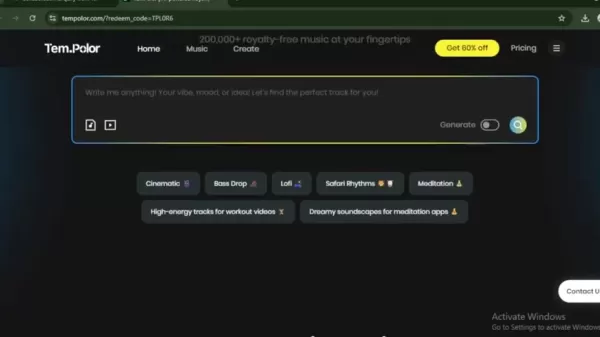
. These features are crafted to simplify music creation and give users extensive flexibility and control.
- AI-Powered Music Generation: At its foundation, Tempolor employs sophisticated AI algorithms to compose music from text, images, and videos. This functionality lets users input their creative concepts and receive tailor-made tracks that perfectly match their content.
- Royalty-Free Music Library: Tempolor provides an extensive collection of royalty-free music, guaranteeing users can utilize tracks without copyright worries. The library is refreshed weekly, offering a steady supply of new and varied musical choices.
- Versatile Input Options: Users can generate music from diverse inputs, including text descriptions, images, and videos. This adaptability makes Tempolor appropriate for a wide array of creative endeavors.
- User-Friendly Interface: Tempolor's interface is built to be intuitive and easy to use, making it approachable for individuals of all experience levels. The platform delivers a smooth experience from input to output, ensuring an efficient music creation process.
- Customization Options: Although Tempolor's AI generates music automatically, users can adjust the output to better suit their needs. This includes modifying the mood, theme, genre, and beats per minute (BPM) of the music.
By incorporating these features, Tempolor enables users to produce high-quality music swiftly and effortlessly. This innovative method is changing how content creators and artists incorporate music into their creative workflows.
Who Can Benefit from Using Tempolor?
Tempolor AI serves a diverse user base, each deriving distinct value from its music generation capabilities. Identifying the primary beneficiaries can help you determine if Tempolor is the right tool for you

.
- Content Creators: YouTube vloggers, social media influencers, and video producers can use Tempolor to craft original background music for their content. The royalty-free nature of Tempolor's music ensures creators can monetize their videos without copyright issues.
- Artists and Musicians: Tempolor can act as a source of inspiration for artists and musicians, offering starting points for new compositions or helping to break through creative blocks. The platform's AI can generate unique melodies and harmonies for further development.
- Music Producers: Music producers can use Tempolor to create custom tracks for projects like film scores, advertisements, and video games. The platform's customization options allow for fine-tuning to meet specific requirements.
- Small Businesses: Small businesses can employ Tempolor to produce professional-sounding music for promotional videos and ads. This helps enhance their brand presence without the high costs of traditional music licensing.
- Educators: Teachers and educators can utilize Tempolor to create background music for educational videos and presentations. The platform's royalty-free music library offers a budget-friendly way to enrich educational materials.
Tempolor is a versatile tool that delivers value to many users. Whether you are a professional or an enthusiast, Tempolor can help you create unique and engaging music for your projects.
Comparing Tempolor to Traditional Music Licensing
The Advantages of AI-Generated Music over Traditional Methods
When sourcing music for your projects, Tempolor presents a strong alternative to conventional music licensing. Traditional licensing entails negotiating rights and fees with copyright holders, which can be expensive and time-consuming. Here is a detailed comparison:
Feature Tempolor AI Music Generator Traditional Music Licensing Cost More affordable, with subscription tiers and a free option High licensing fees, often dependent on usage scope Speed Instant music generation, delivering tracks in seconds Lengthy negotiation and approval procedures Uniqueness AI produces unique tracks, minimizing the chance of content overlap Restricted selection of pre-existing tracks Copyright Royalty-free music, eliminating copyright concerns Requires securing and managing licenses, with infringement risks Customization Customizable tracks to fit specific project needs Limited customization possibilities Accessibility User-friendly interface, suitable for all skill levels Demands legal knowledge and understanding of copyright law Scalability Easily scalable, with unlimited downloads on subscription plans Licensing costs may rise with project scale Creative Control Greater creative control, with music generation from text, images, and videos Limited creative input, confined to available tracks Support Often includes priority support for subscribers May involve dealing with complex legal teams Ease of Use Straightforward and simple music creation process Complex licensing agreements and administrative work
By using Tempolor AI, users can circumvent the drawbacks of traditional music licensing and obtain high-quality music quickly and easily. This makes it an excellent choice for content creators, artists, and businesses aiming to enhance their projects with captivating soundtracks.
How to Generate Music with Tempolor: A Step-by-Step Guide
Step 1: Access the Tempolor Platform
Begin by visiting the Tempolor website. You will encounter a user-friendly interface inviting you to "Sound Your Vision." The site is designed for straightforward navigation, allowing you to start your music creation process quickly.
Step 2: Choose Your Input Method
Tempolor provides three main input methods:
- Text Description: Enter a text description of the music you wish to generate. For instance, "An upbeat Afrobeat track inspired by a joyful celebration"
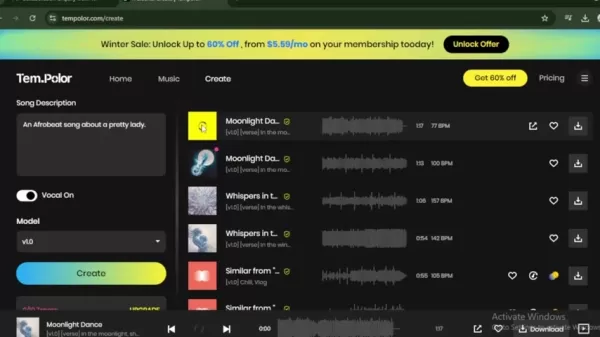
.
- Image Upload: Upload an image, and Tempolor will analyze it to create a fitting soundtrack.
- Video Upload: Upload a video, and Tempolor will generate music that complements the video's mood and content.
Select the method that best aligns with your creative idea.
Step 3: Generate Your Music
After selecting your input method and providing the necessary details, click the "Generate" button. Tempolor's AI will analyze your input and begin composing music. This process typically takes a few seconds to a minute, depending on the complexity of your input
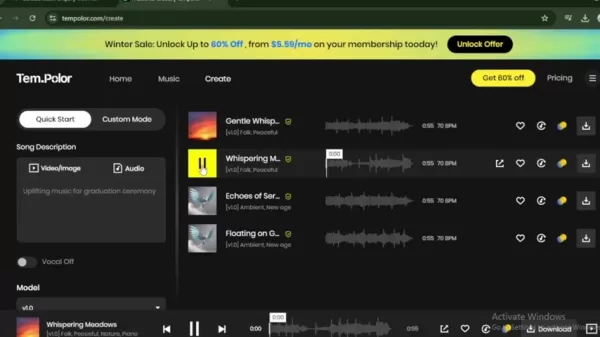
.
Step 4: Review and Customize Your Music
Once Tempolor generates the music, you will usually receive two audio options
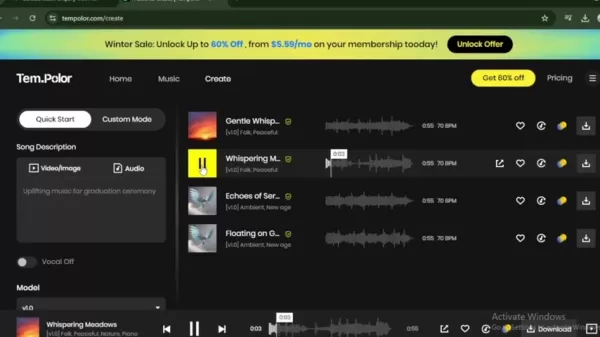
. Listen to each track to determine which one best fits your vision.
If necessary, Tempolor offers customization options to adjust the mood, theme, genre, and BPM of the music. This ensures the final output meets your specific requirements.
Step 5: Download Your Royalty-Free Music
When you are satisfied with your music, click the "Download" icon
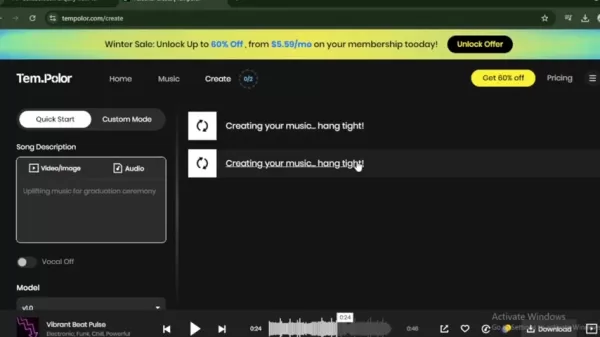
. Tempolor provides royalty-free music, making it safe for use in your YouTube videos and other commercial projects. Always check the terms and conditions to ensure proper usage rights.
Tempolor Pricing: Find the Best Plan for Your Needs
Overview of Tempolor Pricing Plans
Tempolor offers a range of pricing plans to suit different user needs and budgets. These include a free option and more comprehensive paid subscriptions, ensuring a suitable choice for everyone. Here is a detailed breakdown of the available pricing tiers:
- Free Plan: Tempolor provides a free plan that lets users explore the platform and generate a limited number of tracks. This plan is ideal for those wanting to test the AI music generator before opting for a paid subscription.
- Subscription Plans: Tempolor also offers several subscription plans with varying features and usage limits. These plans typically include unlimited downloads, enhanced customization options, and priority support. Pricing and features may change, so consult the Tempolor website for the most current information.
Benefits of Paid Subscription Plans
While the free plan offers a good introduction to Tempolor, a paid subscription unlocks additional benefits that can greatly improve your music creation experience:
- Unlimited Downloads: Paid subscriptions allow you to download an unlimited number of tracks, providing full access to Tempolor's royalty-free music library.
- Advanced Customization Options: Paid plans often include more advanced customization features, enabling you to refine the music to your exact specifications.
- Priority Support: Subscribers receive priority support, ensuring quick and efficient resolution of any questions or issues.
- Commercial Use Rights: Paid plans typically grant full commercial use rights, allowing you to use the music in business projects without copyright concerns.
Evaluating Tempolor: Weighing the Pros and Cons
Pros
Affordable Pricing: Tempolor provides a range of pricing options, including a free plan, making it accessible to users with different budgets.
AI-Powered Music Generation: The AI algorithms produce unique and high-quality music tracks from various inputs.
User-Friendly Interface: The intuitive interface simplifies music creation for users of all skill levels.
Versatile Input Options: Tempolor accepts text, images, and videos as inputs, offering flexibility for diverse creative projects.
Royalty-Free Music Library: The extensive library of royalty-free music ensures safety for commercial use.
Cons
Limited Customization: While Tempolor offers some customization, it may not match the depth of traditional music composition tools.
Dependence on AI: The AI-generated music might not always meet specific creative demands, potentially requiring additional adjustments.
Potential Lack of Originality: AI-generated music may sometimes lack the unique character and emotional depth found in human-composed music.
Tempolor's Core Features
Detailed Explanation of Core Functionalities
Tempolor distinguishes itself with a multi-faceted approach to music creation, offering functionalities that address various user needs

. Let's examine the core features that make Tempolor a powerful tool for AI-generated music.
- AI Music Generation from Text: Tempolor's Text-to-Music feature lets users describe their desired music in words. The AI interprets the input to create a track that matches the described mood, genre, and style. This is ideal for quickly generating music based on specific themes or requirements.
- AI Music Generation from Images: By uploading an image, Tempolor analyzes visual elements, colors, and overall atmosphere to compose a corresponding piece of music. This feature is excellent for creating soundtracks that enhance visual content, deepening the viewer's emotional engagement.
- AI Music Generation from Videos: Tempolor can analyze video content to generate music that aligns with the video's pacing, mood, and scene changes. This ensures a harmonious blend of visual and auditory elements, creating a more immersive experience for the audience.
- Extensive Royalty-Free Library: Tempolor offers a vast library of pre-existing royalty-free music tracks, updated weekly, providing a broad selection for users. This library ensures users can find the perfect track for their projects without copyright issues.
- Customization Tools: Tempolor provides various tools to fine-tune generated music. Users can adjust parameters like tempo, key, instrumentation, and arrangement to ensure the final product matches their artistic vision.
- User-Friendly Interface: Tempolor features an intuitive and easy-to-navigate interface that streamlines the music creation process. This allows users of all skill levels to generate high-quality music without technical expertise.
Diverse Use Cases for Tempolor's AI Music Generation
Exploring Various Applications of Tempolor AI
Tempolor's versatility makes it useful across multiple industries and creative fields. Its AI music generation capabilities can enhance various types of content, providing tailored musical solutions. Here are some key use cases:
- YouTube Content Creation: Tempolor supplies royalty-free music for YouTube videos, ensuring content creators can monetize their channels without copyright problems. This includes background music for vlogs, tutorials, reviews, and more.
- Social Media Marketing: Small businesses and marketers can use Tempolor to create engaging music for social media campaigns, product demonstrations, and advertisements. AI-generated tracks can strengthen brand storytelling and capture audience attention.
- Film and Video Production: Tempolor can assist filmmakers and video producers in creating custom soundtracks for independent films, short videos, documentaries, and animations. The AI ensures seamless integration between visual and auditory elements.
- Podcast Intros and Outros: Podcasters can use Tempolor to generate distinctive and memorable intro and outro music, helping to establish a unique brand identity and engage listeners from the outset.
- Educational Content: Educators can use Tempolor to create background music for online courses, presentations, and educational videos, enhancing the learning experience for students.
- Meditation and Relaxation Apps: Tempolor's AI can generate calming and ambient music for meditation and relaxation apps, aiding users in unwinding and reducing stress. Custom tracks can be tailored to create specific moods and atmospheres.
- Video Game Development: Indie game developers can use Tempolor to create unique and immersive soundtracks for their games, enhancing the overall gameplay experience and setting the tone for different scenes.
- Live Performances: Tempolor can serve as an inspiration source for artists and musicians, providing starting points for new compositions or helping overcome creative blocks. The AI can generate unique melodies and harmonies for further development in live performances.
Frequently Asked Questions about Tempolor
What types of inputs does Tempolor support for music generation?
Tempolor supports various inputs for music generation, including text descriptions, images, and videos. Users can describe their desired music in words, upload an image for analysis, or provide a video for Tempolor to create a matching soundtrack. This versatility makes Tempolor suitable for many creative projects.
How often is the royalty-free music library updated?
Tempolor’s royalty-free music library is updated weekly, ensuring users always have access to new and diverse musical options. This constant influx of fresh tracks helps content creators and artists keep their projects engaging and current.
Can I use Tempolor's music for commercial projects?
Yes, Tempolor provides royalty-free music that can be used in commercial projects. However, it is important to review the specific terms and conditions of your plan to ensure compliance with usage rights. Paid plans typically include full commercial use rights, allowing users to incorporate the music into business projects without copyright concerns.
What customization options does Tempolor offer?
Tempolor offers various customization options to fine-tune generated music. Users can adjust parameters such as tempo, key, instrumentation, and arrangement to ensure the final product aligns with their artistic vision. The available customization features may vary by pricing plan.
Is Tempolor easy to use for non-musicians?
Related article
 Stripe to Acquire OpenRouter as AI Model Routing Gains Momentum
Stripe has agreed to acquire OpenRouter, an AI model-routing platform that gives developers access to hundreds of models through a single interface. The deal adds model selection and routing to Stripe’s existing work around AI usage and token-based b
Former OpenAI Researcher Barrett Zoph Returns to Google to Support Gemini Development
Barret Zoph, who previously abruptly left and joined OpenAI due to a disagreement with Thinking Machines Lab CEO Miriam Mularati, has once again changed employers. Alphabet's Google announced that Zoph will return as Vice President of Research, bring
How Recursive Intelligence Raised $335M at $4B Valuation in 4 Months
The co-founders of startup Ricursive Intelligence seemed destined to be co-founders.Anna Goldie, CEO, and Azalia Mirhoseini, CTO, are so well-known in the AI community that they were among those AI engineers who “got those weird emails from Zuckerber
Related Special Topic Recommendations
Design & Art
Stripe to Acquire OpenRouter as AI Model Routing Gains Momentum
Stripe has agreed to acquire OpenRouter, an AI model-routing platform that gives developers access to hundreds of models through a single interface. The deal adds model selection and routing to Stripe’s existing work around AI usage and token-based b
Former OpenAI Researcher Barrett Zoph Returns to Google to Support Gemini Development
Barret Zoph, who previously abruptly left and joined OpenAI due to a disagreement with Thinking Machines Lab CEO Miriam Mularati, has once again changed employers. Alphabet's Google announced that Zoph will return as Vice President of Research, bring
How Recursive Intelligence Raised $335M at $4B Valuation in 4 Months
The co-founders of startup Ricursive Intelligence seemed destined to be co-founders.Anna Goldie, CEO, and Azalia Mirhoseini, CTO, are so well-known in the AI community that they were among those AI engineers who “got those weird emails from Zuckerber
Related Special Topic Recommendations
Design & Art
 Top AI Illustration Tools: Create Editorial Scenes and Cover Art Faster
2026 Latest Top-rated AI Illustration Tools: Our curated list features the best powerfully designed tools for creating stunning editorial scenes and eye-catching cover art quickly. Each option has gone through rigorous real-world tests, offering a free vs paid comparison to help you find the perfect match for your workflow. Try these must-try solutions today to unlock your AI edge and boost your creative productivity. Explore now at XIX.AI.
 10 tools
 xix.ai
Education and Learning
Top AI Tutors for Exam Prep: Practice Math, Science, and English
xix.ai
Education and Learning
Top AI Tutors for Exam Prep: Practice Math, Science, and English
2026 Latest Top-Rated Best AI Tutors for Exam Prep are here on XIX.AI! Our curated list features powerful game-changing tools that offer free vs paid comparison, real-world tests, and weekly updated rankings. They help boost your writing efficiency, simplify complex topic learning, and unlock your academic potential. Explore now to Discover your perfect exam prep tool and Start creating today to Unlock your AI edge!
10 tools
xix.ai
Finance
AI Budget Planning Tools for Personal Money Management
2026 Latest Best Top-Rated AI Budget Planning Tools for Personal Money Management are here on XIX.AI! This curated collection features powerful, game-changing solutions that help you conduct real-world tests, understand spending habits, and create personalized plans to boost productivity. Enjoy a free vs paid comparison along with detailed rankings. Must-try tools designed to simplify money management and unlock your AI edge. Explore now!
11 tools
xix.ai
Health & Wellness
AI Sleep Tracking Assistants: Improve Recovery with Better Bedtime Habits
2026 Latest Best Top-Rated AI Sleep Tracking Assistants curated for ultimate recovery. This fully updated weekly guide features powerful tools that deliver real-world tests, free vs paid comparison, and detailed rankings to help you find the must-try solution that boosts sleep quality and supports better bedtime habits. Explore now at XIX.AI to Unlock your AI edge.
10 tools
xix.ai
Data Analysis
AI SQL Copilots for Product and Revenue Analytics
2026 Latest Best Top-Rated AI SQL Copilots for Product and Revenue Analytics! XIX.AI has curated a powerful, game-changing collection of must-try tools that undergo real-world tests through weekly updated rankings. These tools help users boost productivity significantly by accelerating data analysis, streamlining complex queries, and generating accurate insights to drive smarter business decisions. Explore now to Discover your perfect tool for unlocking your AI edge!
14 tools
xix.ai
Education and Learning
Best AI Homework Helpers That Teach: Learn Concepts, Not Just Answers
2026 Latest Best Top-Rated AI Homework Helpers That Teach Core Concepts Not Just Answers Powerful Tools for Students Must-Try Curated List Weekly Updated Free vs Paid Comparison Real-World Tests Accurate Rankings to Help You Unlock Your Full Learning Potential Explore now to Discover your perfect tool for smarter studying.
10 tools
xix.ai

 Comments (1)
0/500
Comments (1)
0/500
![ArthurBaker]()
这个工具解决了不少创作者的燃眉之急呢!之前找配乐既怕侵权又怕质量不行,现在有AI来帮忙真是解放生产力了~不过好奇不同风格的音乐都能生成得像样吗?比如中国风或者实验电子这种比较特殊的类型?🤔 要是能支持用户上传片段来训练专属风格就更酷了!
Top News
AI Hosts of NotebookLM Podcast Now Available for Interviews
Corporate AI Adoption Plateaus, Ramp Data Reveals
Microsoft Unveils Business-Focused Copilot+ Surface Devices Powered by Intel
AI Builder and Power Automate Revolutionize Document Summarization
China unveils national humanoid robot and embodied intelligence standards
Bing Image Creator Tutorial: AI Art Generation Guide
iMyFone MagicMic: In-Depth Review and Tutorial on Real-Time AI Voice Changer
Learn to Create AI Music Using Your Voice: A Step-by-Step Suno Tutorial
Embodied Intelligence Unveils First Industry Standard to Curb Unregulated Growth
Apple WWDC 2026 to Spotlight Major AI Advances and Siri Overhaul
More
Featured
LingoDesk
Discover how LingoDesk turns Telegram in
Claude
Meet Claude: Your AI Assistant for Smart
Cici AI
Ever wondered what Cici AI is all about?
Gemini
Ever wondered what the buzz about Gemini
Grok
Ever heard of Grok? It's this nifty AI a
ChatGPT
Ever wondered what ChatGPT is all about?
OpenAI's GPT and Codex
OpenAI's GPT and Codex models are fascin
OpenAI
Ever wondered what the buzz around OpenA
Tencent Hunyuan
Tencent Hunyuan-Large, huh? It's like th
Qwen AI
Ever wondered what Qwen AI is all about?
More
In today's digital era, the need for high-quality, royalty-free music is greater than ever. Content creators, artists, and music producers often struggle to find the perfect soundtrack for their work. AI music generators such as Tempolor address this challenge by providing an innovative platform to produce distinctive, copyright-free music. Discover how Tempolor AI can elevate your creative endeavors with its cutting-edge, AI-driven technology.
Key Points
Tempolor is an AI-driven platform that creates royalty-free music from multiple input sources.
It composes original music based on text prompts, images, and videos, offering flexible solutions for creative projects.
The service includes a large, regularly updated library of pre-made tracks.
Tempolor supplies copyright-safe music suitable for YouTube content and other commercial applications.
It is designed for content creators, artists, and music producers looking for unique and affordable musical options.
Understanding the Capabilities of Tempolor AI Music Generator
What is Tempolor?
Tempolor
is a groundbreaking AI music generator that supplies users with royalty-free music for various purposes. This advanced tool utilizes artificial intelligence to produce unique musical compositions from text, images, and video inputs, delivering exceptional versatility and creative potential. With the growing demand for high-quality, legally-safe music, Tempolor meets this need through its intuitive interface and powerful AI technology.
Whether you produce YouTube content, are a music producer seeking fresh ideas, or an artist requiring background scores, Tempolor offers a complete solution. Its AI comprehends the subtleties of different inputs, generating music that aligns with the mood and tone of your projects. The platform is frequently updated with new tracks, ensuring you always have access to the latest AI-composed music.
Tempolor stands out by making music creation accessible to all, regardless of musical background. With straightforward prompts and uploads, anyone can create professional-sounding tracks in moments. This democratization of music production is reshaping the industry, enabling creators to produce original and compelling content without the usual expenses and complications of music licensing.
The Key Features of Tempolor
Tempolor includes a suite of features that establish it as a leading AI Music Generator
. These features are crafted to simplify music creation and give users extensive flexibility and control.
- AI-Powered Music Generation: At its foundation, Tempolor employs sophisticated AI algorithms to compose music from text, images, and videos. This functionality lets users input their creative concepts and receive tailor-made tracks that perfectly match their content.
- Royalty-Free Music Library: Tempolor provides an extensive collection of royalty-free music, guaranteeing users can utilize tracks without copyright worries. The library is refreshed weekly, offering a steady supply of new and varied musical choices.
- Versatile Input Options: Users can generate music from diverse inputs, including text descriptions, images, and videos. This adaptability makes Tempolor appropriate for a wide array of creative endeavors.
- User-Friendly Interface: Tempolor's interface is built to be intuitive and easy to use, making it approachable for individuals of all experience levels. The platform delivers a smooth experience from input to output, ensuring an efficient music creation process.
- Customization Options: Although Tempolor's AI generates music automatically, users can adjust the output to better suit their needs. This includes modifying the mood, theme, genre, and beats per minute (BPM) of the music.
By incorporating these features, Tempolor enables users to produce high-quality music swiftly and effortlessly. This innovative method is changing how content creators and artists incorporate music into their creative workflows.
Who Can Benefit from Using Tempolor?
Tempolor AI serves a diverse user base, each deriving distinct value from its music generation capabilities. Identifying the primary beneficiaries can help you determine if Tempolor is the right tool for you
.
- Content Creators: YouTube vloggers, social media influencers, and video producers can use Tempolor to craft original background music for their content. The royalty-free nature of Tempolor's music ensures creators can monetize their videos without copyright issues.
- Artists and Musicians: Tempolor can act as a source of inspiration for artists and musicians, offering starting points for new compositions or helping to break through creative blocks. The platform's AI can generate unique melodies and harmonies for further development.
- Music Producers: Music producers can use Tempolor to create custom tracks for projects like film scores, advertisements, and video games. The platform's customization options allow for fine-tuning to meet specific requirements.
- Small Businesses: Small businesses can employ Tempolor to produce professional-sounding music for promotional videos and ads. This helps enhance their brand presence without the high costs of traditional music licensing.
- Educators: Teachers and educators can utilize Tempolor to create background music for educational videos and presentations. The platform's royalty-free music library offers a budget-friendly way to enrich educational materials.
Tempolor is a versatile tool that delivers value to many users. Whether you are a professional or an enthusiast, Tempolor can help you create unique and engaging music for your projects.
Comparing Tempolor to Traditional Music Licensing
The Advantages of AI-Generated Music over Traditional Methods
When sourcing music for your projects, Tempolor presents a strong alternative to conventional music licensing. Traditional licensing entails negotiating rights and fees with copyright holders, which can be expensive and time-consuming. Here is a detailed comparison:
| Feature | Tempolor AI Music Generator | Traditional Music Licensing |
|---|---|---|
| Cost | More affordable, with subscription tiers and a free option | High licensing fees, often dependent on usage scope |
| Speed | Instant music generation, delivering tracks in seconds | Lengthy negotiation and approval procedures |
| Uniqueness | AI produces unique tracks, minimizing the chance of content overlap | Restricted selection of pre-existing tracks |
| Copyright | Royalty-free music, eliminating copyright concerns | Requires securing and managing licenses, with infringement risks |
| Customization | Customizable tracks to fit specific project needs | Limited customization possibilities |
| Accessibility | User-friendly interface, suitable for all skill levels | Demands legal knowledge and understanding of copyright law |
| Scalability | Easily scalable, with unlimited downloads on subscription plans | Licensing costs may rise with project scale |
| Creative Control | Greater creative control, with music generation from text, images, and videos | Limited creative input, confined to available tracks |
| Support | Often includes priority support for subscribers | May involve dealing with complex legal teams |
| Ease of Use | Straightforward and simple music creation process | Complex licensing agreements and administrative work |
By using Tempolor AI, users can circumvent the drawbacks of traditional music licensing and obtain high-quality music quickly and easily. This makes it an excellent choice for content creators, artists, and businesses aiming to enhance their projects with captivating soundtracks.
How to Generate Music with Tempolor: A Step-by-Step Guide
Step 1: Access the Tempolor Platform
Begin by visiting the Tempolor website. You will encounter a user-friendly interface inviting you to "Sound Your Vision." The site is designed for straightforward navigation, allowing you to start your music creation process quickly.
Step 2: Choose Your Input Method
Tempolor provides three main input methods:
- Text Description: Enter a text description of the music you wish to generate. For instance, "An upbeat Afrobeat track inspired by a joyful celebration"
.
- Image Upload: Upload an image, and Tempolor will analyze it to create a fitting soundtrack.
- Video Upload: Upload a video, and Tempolor will generate music that complements the video's mood and content.
Select the method that best aligns with your creative idea.
Step 3: Generate Your Music
After selecting your input method and providing the necessary details, click the "Generate" button. Tempolor's AI will analyze your input and begin composing music. This process typically takes a few seconds to a minute, depending on the complexity of your input
.
Step 4: Review and Customize Your Music
Once Tempolor generates the music, you will usually receive two audio options
. Listen to each track to determine which one best fits your vision.
If necessary, Tempolor offers customization options to adjust the mood, theme, genre, and BPM of the music. This ensures the final output meets your specific requirements.
Step 5: Download Your Royalty-Free Music
When you are satisfied with your music, click the "Download" icon
. Tempolor provides royalty-free music, making it safe for use in your YouTube videos and other commercial projects. Always check the terms and conditions to ensure proper usage rights.
Tempolor Pricing: Find the Best Plan for Your Needs
Overview of Tempolor Pricing Plans
Tempolor offers a range of pricing plans to suit different user needs and budgets. These include a free option and more comprehensive paid subscriptions, ensuring a suitable choice for everyone. Here is a detailed breakdown of the available pricing tiers:
- Free Plan: Tempolor provides a free plan that lets users explore the platform and generate a limited number of tracks. This plan is ideal for those wanting to test the AI music generator before opting for a paid subscription.
- Subscription Plans: Tempolor also offers several subscription plans with varying features and usage limits. These plans typically include unlimited downloads, enhanced customization options, and priority support. Pricing and features may change, so consult the Tempolor website for the most current information.
Benefits of Paid Subscription Plans
While the free plan offers a good introduction to Tempolor, a paid subscription unlocks additional benefits that can greatly improve your music creation experience:
- Unlimited Downloads: Paid subscriptions allow you to download an unlimited number of tracks, providing full access to Tempolor's royalty-free music library.
- Advanced Customization Options: Paid plans often include more advanced customization features, enabling you to refine the music to your exact specifications.
- Priority Support: Subscribers receive priority support, ensuring quick and efficient resolution of any questions or issues.
- Commercial Use Rights: Paid plans typically grant full commercial use rights, allowing you to use the music in business projects without copyright concerns.
Evaluating Tempolor: Weighing the Pros and Cons
Pros
Affordable Pricing: Tempolor provides a range of pricing options, including a free plan, making it accessible to users with different budgets.
AI-Powered Music Generation: The AI algorithms produce unique and high-quality music tracks from various inputs.
User-Friendly Interface: The intuitive interface simplifies music creation for users of all skill levels.
Versatile Input Options: Tempolor accepts text, images, and videos as inputs, offering flexibility for diverse creative projects.
Royalty-Free Music Library: The extensive library of royalty-free music ensures safety for commercial use.
Cons
Limited Customization: While Tempolor offers some customization, it may not match the depth of traditional music composition tools.
Dependence on AI: The AI-generated music might not always meet specific creative demands, potentially requiring additional adjustments.
Potential Lack of Originality: AI-generated music may sometimes lack the unique character and emotional depth found in human-composed music.
Tempolor's Core Features
Detailed Explanation of Core Functionalities
Tempolor distinguishes itself with a multi-faceted approach to music creation, offering functionalities that address various user needs
. Let's examine the core features that make Tempolor a powerful tool for AI-generated music.
- AI Music Generation from Text: Tempolor's Text-to-Music feature lets users describe their desired music in words. The AI interprets the input to create a track that matches the described mood, genre, and style. This is ideal for quickly generating music based on specific themes or requirements.
- AI Music Generation from Images: By uploading an image, Tempolor analyzes visual elements, colors, and overall atmosphere to compose a corresponding piece of music. This feature is excellent for creating soundtracks that enhance visual content, deepening the viewer's emotional engagement.
- AI Music Generation from Videos: Tempolor can analyze video content to generate music that aligns with the video's pacing, mood, and scene changes. This ensures a harmonious blend of visual and auditory elements, creating a more immersive experience for the audience.
- Extensive Royalty-Free Library: Tempolor offers a vast library of pre-existing royalty-free music tracks, updated weekly, providing a broad selection for users. This library ensures users can find the perfect track for their projects without copyright issues.
- Customization Tools: Tempolor provides various tools to fine-tune generated music. Users can adjust parameters like tempo, key, instrumentation, and arrangement to ensure the final product matches their artistic vision.
- User-Friendly Interface: Tempolor features an intuitive and easy-to-navigate interface that streamlines the music creation process. This allows users of all skill levels to generate high-quality music without technical expertise.
Diverse Use Cases for Tempolor's AI Music Generation
Exploring Various Applications of Tempolor AI
Tempolor's versatility makes it useful across multiple industries and creative fields. Its AI music generation capabilities can enhance various types of content, providing tailored musical solutions. Here are some key use cases:
- YouTube Content Creation: Tempolor supplies royalty-free music for YouTube videos, ensuring content creators can monetize their channels without copyright problems. This includes background music for vlogs, tutorials, reviews, and more.
- Social Media Marketing: Small businesses and marketers can use Tempolor to create engaging music for social media campaigns, product demonstrations, and advertisements. AI-generated tracks can strengthen brand storytelling and capture audience attention.
- Film and Video Production: Tempolor can assist filmmakers and video producers in creating custom soundtracks for independent films, short videos, documentaries, and animations. The AI ensures seamless integration between visual and auditory elements.
- Podcast Intros and Outros: Podcasters can use Tempolor to generate distinctive and memorable intro and outro music, helping to establish a unique brand identity and engage listeners from the outset.
- Educational Content: Educators can use Tempolor to create background music for online courses, presentations, and educational videos, enhancing the learning experience for students.
- Meditation and Relaxation Apps: Tempolor's AI can generate calming and ambient music for meditation and relaxation apps, aiding users in unwinding and reducing stress. Custom tracks can be tailored to create specific moods and atmospheres.
- Video Game Development: Indie game developers can use Tempolor to create unique and immersive soundtracks for their games, enhancing the overall gameplay experience and setting the tone for different scenes.
- Live Performances: Tempolor can serve as an inspiration source for artists and musicians, providing starting points for new compositions or helping overcome creative blocks. The AI can generate unique melodies and harmonies for further development in live performances.
Frequently Asked Questions about Tempolor
What types of inputs does Tempolor support for music generation?
Tempolor supports various inputs for music generation, including text descriptions, images, and videos. Users can describe their desired music in words, upload an image for analysis, or provide a video for Tempolor to create a matching soundtrack. This versatility makes Tempolor suitable for many creative projects.
How often is the royalty-free music library updated?
Tempolor’s royalty-free music library is updated weekly, ensuring users always have access to new and diverse musical options. This constant influx of fresh tracks helps content creators and artists keep their projects engaging and current.
Can I use Tempolor's music for commercial projects?
Yes, Tempolor provides royalty-free music that can be used in commercial projects. However, it is important to review the specific terms and conditions of your plan to ensure compliance with usage rights. Paid plans typically include full commercial use rights, allowing users to incorporate the music into business projects without copyright concerns.
What customization options does Tempolor offer?
Tempolor offers various customization options to fine-tune generated music. Users can adjust parameters such as tempo, key, instrumentation, and arrangement to ensure the final product aligns with their artistic vision. The available customization features may vary by pricing plan.
Is Tempolor easy to use for non-musicians?








 Stripe to Acquire OpenRouter as AI Model Routing Gains Momentum
Stripe has agreed to acquire OpenRouter, an AI model-routing platform that gives developers access to hundreds of models through a single interface. The deal adds model selection and routing to Stripe’s existing work around AI usage and token-based b
Stripe to Acquire OpenRouter as AI Model Routing Gains Momentum
Stripe has agreed to acquire OpenRouter, an AI model-routing platform that gives developers access to hundreds of models through a single interface. The deal adds model selection and routing to Stripe’s existing work around AI usage and token-based b
 Former OpenAI Researcher Barrett Zoph Returns to Google to Support Gemini Development
Barret Zoph, who previously abruptly left and joined OpenAI due to a disagreement with Thinking Machines Lab CEO Miriam Mularati, has once again changed employers. Alphabet's Google announced that Zoph will return as Vice President of Research, bring
Former OpenAI Researcher Barrett Zoph Returns to Google to Support Gemini Development
Barret Zoph, who previously abruptly left and joined OpenAI due to a disagreement with Thinking Machines Lab CEO Miriam Mularati, has once again changed employers. Alphabet's Google announced that Zoph will return as Vice President of Research, bring
 How Recursive Intelligence Raised $335M at $4B Valuation in 4 Months
The co-founders of startup Ricursive Intelligence seemed destined to be co-founders.Anna Goldie, CEO, and Azalia Mirhoseini, CTO, are so well-known in the AI community that they were among those AI engineers who “got those weird emails from Zuckerber
How Recursive Intelligence Raised $335M at $4B Valuation in 4 Months
The co-founders of startup Ricursive Intelligence seemed destined to be co-founders.Anna Goldie, CEO, and Azalia Mirhoseini, CTO, are so well-known in the AI community that they were among those AI engineers who “got those weird emails from Zuckerber

2026 Latest Top-rated AI Illustration Tools: Our curated list features the best powerfully designed tools for creating stunning editorial scenes and eye-catching cover art quickly. Each option has gone through rigorous real-world tests, offering a free vs paid comparison to help you find the perfect match for your workflow. Try these must-try solutions today to unlock your AI edge and boost your creative productivity. Explore now at XIX.AI.
10 tools
xix.ai

2026 Latest Top-Rated Best AI Tutors for Exam Prep are here on XIX.AI! Our curated list features powerful game-changing tools that offer free vs paid comparison, real-world tests, and weekly updated rankings. They help boost your writing efficiency, simplify complex topic learning, and unlock your academic potential. Explore now to Discover your perfect exam prep tool and Start creating today to Unlock your AI edge!
10 tools
xix.ai

2026 Latest Best Top-Rated AI Budget Planning Tools for Personal Money Management are here on XIX.AI! This curated collection features powerful, game-changing solutions that help you conduct real-world tests, understand spending habits, and create personalized plans to boost productivity. Enjoy a free vs paid comparison along with detailed rankings. Must-try tools designed to simplify money management and unlock your AI edge. Explore now!
11 tools
xix.ai

2026 Latest Best Top-Rated AI Sleep Tracking Assistants curated for ultimate recovery. This fully updated weekly guide features powerful tools that deliver real-world tests, free vs paid comparison, and detailed rankings to help you find the must-try solution that boosts sleep quality and supports better bedtime habits. Explore now at XIX.AI to Unlock your AI edge.
10 tools
xix.ai

2026 Latest Best Top-Rated AI SQL Copilots for Product and Revenue Analytics! XIX.AI has curated a powerful, game-changing collection of must-try tools that undergo real-world tests through weekly updated rankings. These tools help users boost productivity significantly by accelerating data analysis, streamlining complex queries, and generating accurate insights to drive smarter business decisions. Explore now to Discover your perfect tool for unlocking your AI edge!
14 tools
xix.ai

2026 Latest Best Top-Rated AI Homework Helpers That Teach Core Concepts Not Just Answers Powerful Tools for Students Must-Try Curated List Weekly Updated Free vs Paid Comparison Real-World Tests Accurate Rankings to Help You Unlock Your Full Learning Potential Explore now to Discover your perfect tool for smarter studying.
10 tools
xix.ai

这个工具解决了不少创作者的燃眉之急呢!之前找配乐既怕侵权又怕质量不行,现在有AI来帮忙真是解放生产力了~不过好奇不同风格的音乐都能生成得像样吗?比如中国风或者实验电子这种比较特殊的类型?🤔 要是能支持用户上传片段来训练专属风格就更酷了!












