


 Home
HomeHow to master content creation with Simplified AI Writer templates in 2025?
In today’s digital world, content is essential. However, producing high-quality, engaging material on a consistent basis can be quite demanding. Simplified AI Writer provides a collection of powerful tools to streamline content creation, from social media captions to full-length articles and blog posts. Whether you're an experienced marketer or just starting out, Simplified AI Writer can help you unlock creativity and enhance your content strategy. This in-depth guide explores the platform's features and shows how to use its AI capabilities to effortlessly create compelling content.
Key Points
Explore the diverse range of AI templates available for creating short-form content.
Learn to use the long-form AI document editor for articles, blogs, and books.
Discover how to customize content by adjusting tone, language, and creativity settings.
See how Grammarly integration helps improve writing quality.
Learn to efficiently organize your documents and saved content within the Simplified platform.
Unlocking the Power of AI Templates with Simplified AI Writer
Exploring Short-Form AI Writing Templates
A key strength of Simplified AI Writer is its versatile AI templates, which are designed to assist with various writing tasks. These templates act as structured formats that guide the AI to produce specific types of content. The AI is trained to understand the requirements of different formats—such as emails, social media updates, or product descriptions—ensuring the output is both relevant and high-quality.
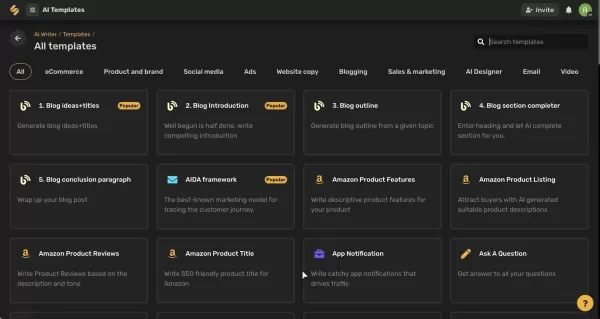
Each template provides a clear framework so the AI knows exactly how to approach your request. This variety means you'll always have a solid starting point, no matter what you need to write.
Let's take a closer look at the types of short-form templates you can use:
- E-commerce Templates: For crafting product and brand descriptions.
- Social Media Templates: For creating engaging social media captions.
- Ad Templates: For writing advertisements of all kinds.
- Website Copy Templates: For producing compelling website content.
- Blogging Templates: To assist with blog writing tasks.
- Sales and Marketing Templates: For various sales and marketing materials.
- Email Templates: To simplify email creation.
Navigating the AI Template Interface
Simplified AI Writer features an intuitive interface that makes it easy to browse and select the perfect template for your project.
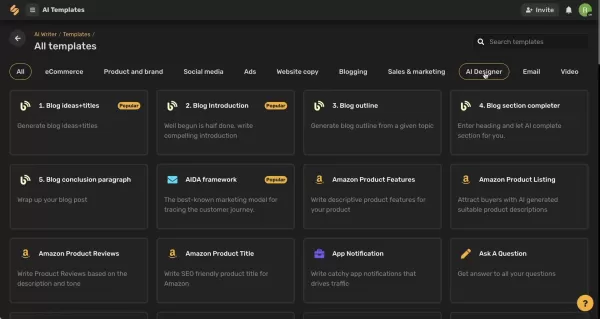
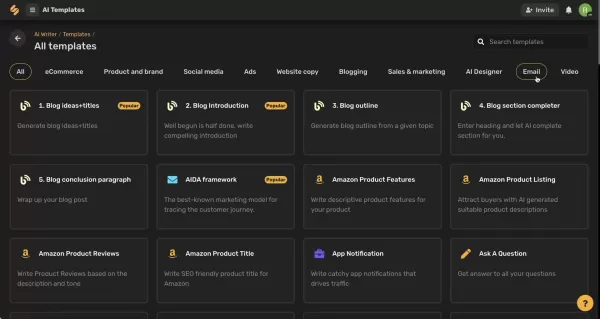
Categories are clearly labeled, helping you quickly find templates for social media, ads, website copy, blogging, sales, and more.
- Category Browsing: Filter templates by category to find what you need fast.
- Template Selection: Clicking a template opens a customized form ready for your input.
- Language Options: Select from multiple languages to create content for a global audience.
- Advanced Settings: Fine-tune your output by setting the number of results and the creativity level. These settings significantly impact the tone and originality of the generated content.
Crafting Long-Form Content with the AI Document Editor
Unleashing the Power of the AI Document Editor
Beyond short-form content, Simplified AI Writer offers a robust AI Document Editor for longer projects like articles, blog posts, outlines, and books. This tool provides a focused workspace where you can use AI to build comprehensive content.
Here’s how you can use the AI Document Editor to create powerful long-form content.
- Launching the Document Editor: Access the editor directly from the main dashboard with one click.
- Template Integration: Use the same AI templates within the document editor for consistent content generation.
- AI-Powered Writing Commands: Utilize AI commands to expand text, rephrase sentences, or run plagiarism checks.
Here are the available commands:
Command Category Description Write SectionGenerates additional content based on a highlighted section.RephraseRewords selected text for better clarity or a new tone.ContinueExtends the writing from the point of your highlighted text.ExpandProvides a more detailed version of the selected content.Plagiarism CheckVerifies the text is original and free from copyright issues—ideal for students and professionals.- Seamless Integration with Grammarly: Benefit from real-time grammar and spelling suggestions.
By highlighting text, you can instruct the AI to write a section, rephrase, continue, expand, or run a plagiarism check. This suite of commands saves time and helps maintain high writing standards.
All your work is saved automatically to Simplified's cloud storage, so you never have to worry about losing progress.
Step-by-Step Guide: Creating a Social Media Caption
Selecting a Template
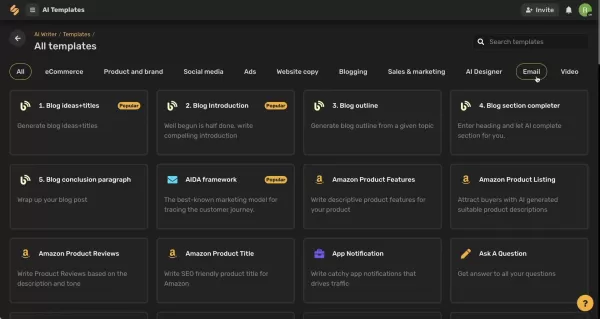
From the main dashboard, click 'Explore' under the '50+ Templates' section. On the 'All templates' screen, use the categories to find 'Social media' templates, then select the 'Photo captions' template.
Providing Input
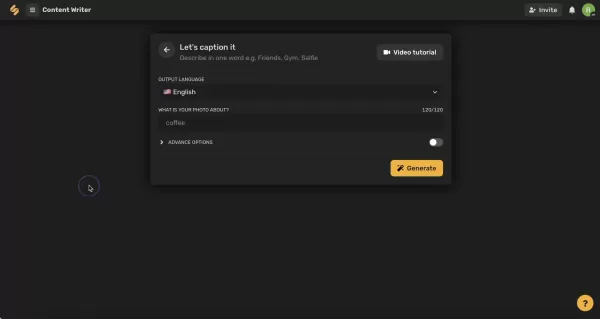
A writing space will appear. Describe your photo in one word (e.g., Friends, Gym, Selfie) and add a brief description. You can also adjust the output language if needed.
Advanced Options
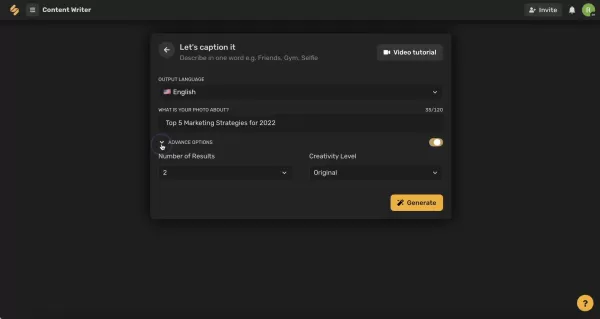
Use the advanced options to select how many results you want to generate and set your preferred creativity level.
Generating Content
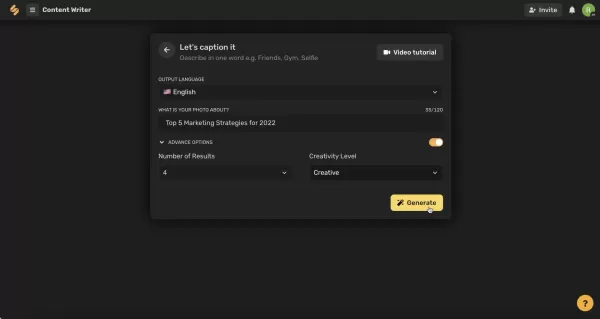
After filling in the fields, click 'Generate'. The AI will start creating content, and the results will appear on the right side of the screen.
Reviewing and Editing
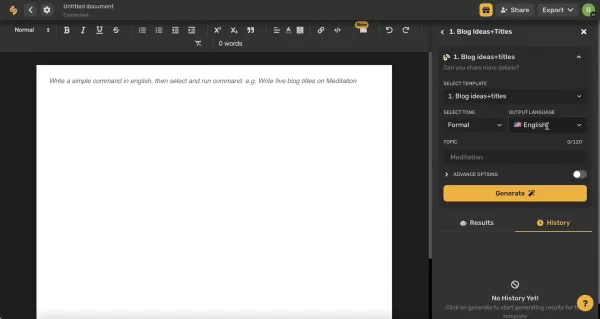
You can use the icons to favorite, copy, delete, edit, or flag different results. You can also open any result in an editor for further refinement.
Simplified AI Writer: Pros
and Cons
Pros
Versatile AI Templates: A broad selection of templates for various content types meets diverse writing needs.
Grammarly Integration: Enhances writing quality with real-time grammar and spelling corrections.
AI-Powered Commands: Tools to expand, rephrase, and check plagiarism streamline the content creation workflow.
Organized Content Management: Easy-to-use folders and saved results help keep your work organized.
Automatic Saving: All work is saved automatically, eliminating the risk of data loss.
Cons
Reliance on AI: Output quality depends on AI algorithms and often requires human review and editing for best results.
Limited Originality: AI-generated content can sometimes lack a unique perspective, potentially feeling formulaic.
Subscription Dependency: Full access to features requires a paid subscription, which may not suit users on a tight budget.
Template Limitations: While versatile, the templates may not cover every niche or highly specific writing style, sometimes necessitating extra customization.
FAQ
Can I use Simplified AI Writer for free?
Yes, Simplified AI Writer offers a free plan with access to basic features. Paid plans provide more advanced functionalities and higher usage limits.
Is Grammarly integration available in all Simplified AI Writer plans?
Grammarly integration is included in most plans, including the free version, though specific features may vary by subscription tier.
What type of content can I generate with Simplified AI Writer?
You can generate a wide variety of content, including social media captions, articles, blog posts, ad copy, and website content. The tool adapts to both short-form and long-form writing needs.
How accurate is the AI writing?
Simplified AI Writer is designed to produce high-quality, relevant content. However, it's always a good practice to review and edit the output to ensure it meets your specific standards for accuracy and originality. Using the built-in plagiarism check is also recommended.
How can I organize my content within Simplified AI Writer?
The platform provides folders and a saved results section to help you stay organized. You can create folders to categorize documents and save your preferred generated content for future use.
Related Questions
What are the best AI writing tools for content marketing?
When selecting an AI writing tool for content marketing, consider content types, pricing, output quality, features, and ease of use. Top options include Jasper for general content, Rytr for budget-friendly plans, Copy.ai for product descriptions, Scalenut for SEO-focused content, and Simplified AI Writer for teams wanting an all-in-one platform that combines AI writing, design, and video creation.
Related article
 Anthropic Expands Claude AI Coding Tools to Japan in Push for Overseas Growth
Anthropic, a prominent U.S. artificial intelligence firm, is intensifying its global outreach. On Wednesday, the company hosted a major developer gathering, "Code with Claude," in Tokyo, drawing close to 500 software engineers. This initiative seeks
India’s Software Giant Cuts Hiring, Promises No Layoffs as AI Agents Scale Up
As artificial intelligence reshapes traditional labor-intensive business models, Tata Consultancy Services (TCS), a premier Indian software outsourcing firm, has unveiled its strategic response. During Tuesday’s annual general meeting, the chairman o
China Locks AI Models During Gaokam to Block Instant Homework Help
With the 2026 Gaokao fast approaching, rumors regarding the suspension of AI tools during the exam period have ignited intense online debate. In response to public concern, major AI platforms and educational apps have clarified their stance: rather t
Related Special Topic Recommendations
Design & Art
Anthropic Expands Claude AI Coding Tools to Japan in Push for Overseas Growth
Anthropic, a prominent U.S. artificial intelligence firm, is intensifying its global outreach. On Wednesday, the company hosted a major developer gathering, "Code with Claude," in Tokyo, drawing close to 500 software engineers. This initiative seeks
India’s Software Giant Cuts Hiring, Promises No Layoffs as AI Agents Scale Up
As artificial intelligence reshapes traditional labor-intensive business models, Tata Consultancy Services (TCS), a premier Indian software outsourcing firm, has unveiled its strategic response. During Tuesday’s annual general meeting, the chairman o
China Locks AI Models During Gaokam to Block Instant Homework Help
With the 2026 Gaokao fast approaching, rumors regarding the suspension of AI tools during the exam period have ignited intense online debate. In response to public concern, major AI platforms and educational apps have clarified their stance: rather t
Related Special Topic Recommendations
Design & Art
 Best AI Style Transfer Tools for Creative Experiments
2026 Latest Best Top-rated AI Style Transfer Tools for Creative Experiments! XIX.AI has curated a powerful, game-changing collection of must-try tools that deliver exceptional results through real-world tests and rigorous rankings. These top solutions help creatives boost productivity significantly by accelerating content creation and unlocking endless creative possibilities. Explore now to discover your perfect tool and start creating today!
 9 tools
 xix.ai
Comic Creation
Best AI Dialogue Bubble Tools for Visual Storytelling
xix.ai
Comic Creation
Best AI Dialogue Bubble Tools for Visual Storytelling
2026 Latest Best Top-Rated AI Dialogue Bubble Tools for Visual Storytelling are here on XIX.AI! This curated collection features powerful, game-changing tools that help creators boost productivity and overcome creative bottlenecks. Get a free vs paid comparison, see real-world tests, and check the latest rankings to find the must-try solutions perfect for crafting engaging visual narratives. Explore now to discover your ideal tool!
10 tools
xix.ai
Meeting Assistant
Top AI Meeting Summary Tools: Track Decisions and Follow-Ups Clearly
2026 Latest Top-Rated Best AI Meeting Summary Tools for Clear Decision Tracking and Effortless Follow-Ups. This curated list showcases powerful, game-changing solutions that boost productivity dramatically by automating meeting notes, identifying key action items, and streamlining team coordination across all projects. Get a free vs paid comparison along with real-world tests and weekly updated rankings to help you find the perfect tool. Explore now to unlock your AI edge!
9 tools
xix.ai
Data Analysis
Best AI Data Cleaning Tools: Fix Missing Values and Duplicates Fast
2026 Latest Best Top-rated AI Data Cleaning Tools for quick fixing of missing values and duplicates. This curated list showcases powerful, game-changing solutions that boost productivity significantly. Each option has undergone rigorous real-world tests to ensure reliability. Get a free vs paid comparison and discover the must-try tool that fits your needs best. Explore now at XIX.AI to Unlock your AI edge.
11 tools
xix.ai
Design & Art
Best AI Creative Ideation Tools for Artists: Break Through Visual Blocks
2026 Latest Best Top-Rated AI Creative Ideation Tools for Artists are curated by XIX.AI to help creators break through visual blocks and boost creativity instantly. These powerful game-changing tools offer real-world tests, detailed free vs paid comparison, and weekly updated rankings. Discover your perfect tool to accelerate content creation and unlock your AI edge today. Explore now!
14 tools
xix.ai
Music composition
AI Beat Makers for TikTok Background Tracks, Reels Audio, and Creator Promo Music
2026 Latest Best AI Beat Makers for TikTok Background Tracks, Reels Audio, and Creator Promo Music! XIX.AI has curated a top-rated list of powerful game-changing tools that go through real-world tests to deliver flawless music for every content need. You’ll find detailed free vs paid comparison data, weekly updated rankings, and must-try options to help you boost creativity and productivity. Explore now to discover your perfect tool!
11 tools
xix.ai

 Comments (2)
0/500
Comments (2)
0/500
![ScottWalker]()
Honestly, I've tried a bunch of AI writing tools and most of them produce the same bland stuff. This one claims to have 'templates' for 2025 – but isn't that just putting lipstick on a pig? If everyone uses the same templates, won't the internet become a giant echo chamber? 🤔
![KevinMartínez]()
Nicht schlecht, aber irgendwie wirken die KI-Vorlagen alle gleich. Ich finde es schade, dass die meisten Tools immer nur auf Effizienz getrimmt sind und kaum wirklich originelle Ideen liefern. Es braucht mehr als nur Templates, um wirklich überzeugende Inhalte zu erstellen. Wer macht sich eigentlich Gedanken über die Qualität der generierten Texte, wenn alle dasselbe Tool verwenden? 🤔
In today’s digital world, content is essential. However, producing high-quality, engaging material on a consistent basis can be quite demanding. Simplified AI Writer provides a collection of powerful tools to streamline content creation, from social media captions to full-length articles and blog posts. Whether you're an experienced marketer or just starting out, Simplified AI Writer can help you unlock creativity and enhance your content strategy. This in-depth guide explores the platform's features and shows how to use its AI capabilities to effortlessly create compelling content.
Key Points
Explore the diverse range of AI templates available for creating short-form content.
Learn to use the long-form AI document editor for articles, blogs, and books.
Discover how to customize content by adjusting tone, language, and creativity settings.
See how Grammarly integration helps improve writing quality.
Learn to efficiently organize your documents and saved content within the Simplified platform.
Unlocking the Power of AI Templates with Simplified AI Writer
Exploring Short-Form AI Writing Templates
A key strength of Simplified AI Writer is its versatile AI templates, which are designed to assist with various writing tasks. These templates act as structured formats that guide the AI to produce specific types of content. The AI is trained to understand the requirements of different formats—such as emails, social media updates, or product descriptions—ensuring the output is both relevant and high-quality.
Each template provides a clear framework so the AI knows exactly how to approach your request. This variety means you'll always have a solid starting point, no matter what you need to write.
Let's take a closer look at the types of short-form templates you can use:
- E-commerce Templates: For crafting product and brand descriptions.
- Social Media Templates: For creating engaging social media captions.
- Ad Templates: For writing advertisements of all kinds.
- Website Copy Templates: For producing compelling website content.
- Blogging Templates: To assist with blog writing tasks.
- Sales and Marketing Templates: For various sales and marketing materials.
- Email Templates: To simplify email creation.
Navigating the AI Template Interface
Simplified AI Writer features an intuitive interface that makes it easy to browse and select the perfect template for your project.
Categories are clearly labeled, helping you quickly find templates for social media, ads, website copy, blogging, sales, and more.
- Category Browsing: Filter templates by category to find what you need fast.
- Template Selection: Clicking a template opens a customized form ready for your input.
- Language Options: Select from multiple languages to create content for a global audience.
- Advanced Settings: Fine-tune your output by setting the number of results and the creativity level. These settings significantly impact the tone and originality of the generated content.
Crafting Long-Form Content with the AI Document Editor
Unleashing the Power of the AI Document Editor
Beyond short-form content, Simplified AI Writer offers a robust AI Document Editor for longer projects like articles, blog posts, outlines, and books. This tool provides a focused workspace where you can use AI to build comprehensive content.
Here’s how you can use the AI Document Editor to create powerful long-form content.
- Launching the Document Editor: Access the editor directly from the main dashboard with one click.
- Template Integration: Use the same AI templates within the document editor for consistent content generation.
- AI-Powered Writing Commands: Utilize AI commands to expand text, rephrase sentences, or run plagiarism checks.
Here are the available commands:
- Seamless Integration with Grammarly: Benefit from real-time grammar and spelling suggestions.
By highlighting text, you can instruct the AI to write a section, rephrase, continue, expand, or run a plagiarism check. This suite of commands saves time and helps maintain high writing standards.
All your work is saved automatically to Simplified's cloud storage, so you never have to worry about losing progress.
Step-by-Step Guide: Creating a Social Media Caption
Selecting a Template
From the main dashboard, click 'Explore' under the '50+ Templates' section. On the 'All templates' screen, use the categories to find 'Social media' templates, then select the 'Photo captions' template.
Providing Input
A writing space will appear. Describe your photo in one word (e.g., Friends, Gym, Selfie) and add a brief description. You can also adjust the output language if needed.
Advanced Options
Use the advanced options to select how many results you want to generate and set your preferred creativity level.
Generating Content
After filling in the fields, click 'Generate'. The AI will start creating content, and the results will appear on the right side of the screen.
Reviewing and Editing
You can use the icons to favorite, copy, delete, edit, or flag different results. You can also open any result in an editor for further refinement.
Simplified AI Writer: Pros
and Cons
Pros
Versatile AI Templates: A broad selection of templates for various content types meets diverse writing needs.
Grammarly Integration: Enhances writing quality with real-time grammar and spelling corrections.
AI-Powered Commands: Tools to expand, rephrase, and check plagiarism streamline the content creation workflow.
Organized Content Management: Easy-to-use folders and saved results help keep your work organized.
Automatic Saving: All work is saved automatically, eliminating the risk of data loss.
Cons
Reliance on AI: Output quality depends on AI algorithms and often requires human review and editing for best results.
Limited Originality: AI-generated content can sometimes lack a unique perspective, potentially feeling formulaic.
Subscription Dependency: Full access to features requires a paid subscription, which may not suit users on a tight budget.
Template Limitations: While versatile, the templates may not cover every niche or highly specific writing style, sometimes necessitating extra customization.
FAQ
Can I use Simplified AI Writer for free?
Yes, Simplified AI Writer offers a free plan with access to basic features. Paid plans provide more advanced functionalities and higher usage limits.
Is Grammarly integration available in all Simplified AI Writer plans?
Grammarly integration is included in most plans, including the free version, though specific features may vary by subscription tier.
What type of content can I generate with Simplified AI Writer?
You can generate a wide variety of content, including social media captions, articles, blog posts, ad copy, and website content. The tool adapts to both short-form and long-form writing needs.
How accurate is the AI writing?
Simplified AI Writer is designed to produce high-quality, relevant content. However, it's always a good practice to review and edit the output to ensure it meets your specific standards for accuracy and originality. Using the built-in plagiarism check is also recommended.
How can I organize my content within Simplified AI Writer?
The platform provides folders and a saved results section to help you stay organized. You can create folders to categorize documents and save your preferred generated content for future use.
Related Questions
What are the best AI writing tools for content marketing?
When selecting an AI writing tool for content marketing, consider content types, pricing, output quality, features, and ease of use. Top options include Jasper for general content, Rytr for budget-friendly plans, Copy.ai for product descriptions, Scalenut for SEO-focused content, and Simplified AI Writer for teams wanting an all-in-one platform that combines AI writing, design, and video creation.








 Anthropic Expands Claude AI Coding Tools to Japan in Push for Overseas Growth
Anthropic, a prominent U.S. artificial intelligence firm, is intensifying its global outreach. On Wednesday, the company hosted a major developer gathering, "Code with Claude," in Tokyo, drawing close to 500 software engineers. This initiative seeks
Anthropic Expands Claude AI Coding Tools to Japan in Push for Overseas Growth
Anthropic, a prominent U.S. artificial intelligence firm, is intensifying its global outreach. On Wednesday, the company hosted a major developer gathering, "Code with Claude," in Tokyo, drawing close to 500 software engineers. This initiative seeks
 India’s Software Giant Cuts Hiring, Promises No Layoffs as AI Agents Scale Up
As artificial intelligence reshapes traditional labor-intensive business models, Tata Consultancy Services (TCS), a premier Indian software outsourcing firm, has unveiled its strategic response. During Tuesday’s annual general meeting, the chairman o
India’s Software Giant Cuts Hiring, Promises No Layoffs as AI Agents Scale Up
As artificial intelligence reshapes traditional labor-intensive business models, Tata Consultancy Services (TCS), a premier Indian software outsourcing firm, has unveiled its strategic response. During Tuesday’s annual general meeting, the chairman o
 China Locks AI Models During Gaokam to Block Instant Homework Help
With the 2026 Gaokao fast approaching, rumors regarding the suspension of AI tools during the exam period have ignited intense online debate. In response to public concern, major AI platforms and educational apps have clarified their stance: rather t
China Locks AI Models During Gaokam to Block Instant Homework Help
With the 2026 Gaokao fast approaching, rumors regarding the suspension of AI tools during the exam period have ignited intense online debate. In response to public concern, major AI platforms and educational apps have clarified their stance: rather t

2026 Latest Best Top-rated AI Style Transfer Tools for Creative Experiments! XIX.AI has curated a powerful, game-changing collection of must-try tools that deliver exceptional results through real-world tests and rigorous rankings. These top solutions help creatives boost productivity significantly by accelerating content creation and unlocking endless creative possibilities. Explore now to discover your perfect tool and start creating today!
9 tools
xix.ai

2026 Latest Best Top-Rated AI Dialogue Bubble Tools for Visual Storytelling are here on XIX.AI! This curated collection features powerful, game-changing tools that help creators boost productivity and overcome creative bottlenecks. Get a free vs paid comparison, see real-world tests, and check the latest rankings to find the must-try solutions perfect for crafting engaging visual narratives. Explore now to discover your ideal tool!
10 tools
xix.ai

2026 Latest Top-Rated Best AI Meeting Summary Tools for Clear Decision Tracking and Effortless Follow-Ups. This curated list showcases powerful, game-changing solutions that boost productivity dramatically by automating meeting notes, identifying key action items, and streamlining team coordination across all projects. Get a free vs paid comparison along with real-world tests and weekly updated rankings to help you find the perfect tool. Explore now to unlock your AI edge!
9 tools
xix.ai

2026 Latest Best Top-rated AI Data Cleaning Tools for quick fixing of missing values and duplicates. This curated list showcases powerful, game-changing solutions that boost productivity significantly. Each option has undergone rigorous real-world tests to ensure reliability. Get a free vs paid comparison and discover the must-try tool that fits your needs best. Explore now at XIX.AI to Unlock your AI edge.
11 tools
xix.ai

2026 Latest Best Top-Rated AI Creative Ideation Tools for Artists are curated by XIX.AI to help creators break through visual blocks and boost creativity instantly. These powerful game-changing tools offer real-world tests, detailed free vs paid comparison, and weekly updated rankings. Discover your perfect tool to accelerate content creation and unlock your AI edge today. Explore now!
14 tools
xix.ai

2026 Latest Best AI Beat Makers for TikTok Background Tracks, Reels Audio, and Creator Promo Music! XIX.AI has curated a top-rated list of powerful game-changing tools that go through real-world tests to deliver flawless music for every content need. You’ll find detailed free vs paid comparison data, weekly updated rankings, and must-try options to help you boost creativity and productivity. Explore now to discover your perfect tool!
11 tools
xix.ai

Honestly, I've tried a bunch of AI writing tools and most of them produce the same bland stuff. This one claims to have 'templates' for 2025 – but isn't that just putting lipstick on a pig? If everyone uses the same templates, won't the internet become a giant echo chamber? 🤔
Nicht schlecht, aber irgendwie wirken die KI-Vorlagen alle gleich. Ich finde es schade, dass die meisten Tools immer nur auf Effizienz getrimmt sind und kaum wirklich originelle Ideen liefern. Es braucht mehr als nur Templates, um wirklich überzeugende Inhalte zu erstellen. Wer macht sich eigentlich Gedanken über die Qualität der generierten Texte, wenn alle dasselbe Tool verwenden? 🤔












