


 Home
HomeHow to register for SBI Internet Banking in 2025? Complete online activation guide.
Signing up for State Bank of India (SBI) internet banking streamlines your finances, allowing you to handle transactions from anywhere. This guide details the online registration process for creating your user ID and password, equipping you to manage your account with full transaction capabilities securely. Follow these instructions to enjoy the flexibility of SBI's digital banking services.
Key Points
Complete your SBI net banking registration entirely online, without needing to visit a branch.
Generate your unique user ID and password via the official online portal.
Activate full transaction rights for comprehensive online account management.
Verify your identity during sign-up using details from your SBI ATM or debit card.
Establish a distinct profile password for enhanced account security.
Ensure your email address is current for smooth communication and easy account recovery.
Upgrade your access level to unlock complete transaction functionality.
Registering for SBI Internet Banking Online
Step-by-Step Registration Process
You can enroll in SBI internet banking remotely. Here is the detailed procedure to get started:
Access the SBI Online Portal:
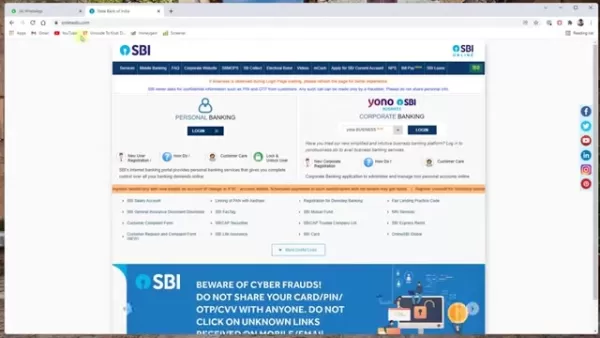
Navigate to the official website, onlineSBI.com, to initiate registration.
New User Registration: Select the “New User Registration/Activation” link to proceed to the registration page.
Select Registration Type: Choose 'New User Registration' from the menu and click 'Next'.
Enter Account Details: Provide your account number, CIF number, branch code, country, registered mobile number, and select the required facility. Locate your CIF number and branch code in your passbook.Opt for 'Full Transaction Rights' to perform all transactions online.
Submit and Verify: Enter the captcha text and click 'Submit'. An OTP will be sent to your mobile; enter it and click 'Confirm'.
ATM Card Verification: Choose “I have my ATM card” and click 'Submit' to finalize registration online. If you don't possess an ATM card, branch activation is mandatory.
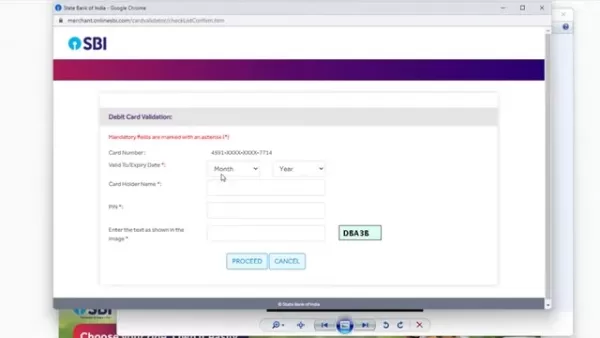
Select Debit Card: Pick your active debit card from the list and click 'Confirm'. Input the card's expiry date, holder name, and PIN.
Set Username and Password: Create a unique username and a robust password. Verify the username's availability and accept the terms and conditions.
Submit and Complete: Click 'Submit' to finish. A confirmation message will indicate successful registration.
After completing these steps, you will have full access to SBI internet banking, enabling efficient online financial management.
Essential Information Needed for Registration
Before starting, gather the following details for a smooth registration experience:
- Account Number: Your unique bank account identifier.
- CIF Number: Your Customer Information File number, found on your passbook or statement.
- Branch Code: The code for your specific SBI branch.
- Registered Mobile Number: The mobile number linked to your account.
- ATM Card Details: Information from your active card, including the expiry date and PIN.
Having these items ready will expedite the process.
Creating a Strong and Secure Password
A strong password is vital for protecting your SBI net banking account. An effective password should be:
- Unique: Not reused for other accounts.
- Complex: A mix of uppercase and lowercase letters, numbers, and symbols.
- Lengthy: A minimum of 8 characters.
- Unpredictable: Avoids personal information like names or birthdays.
Consider these tips for enhanced security:
- Utilize a password manager to generate and store secure passwords.
- Change your password regularly.
- Never share or write down your password.
Adhering to these practices significantly boosts your account's security.
Troubleshooting Common Registration Issues
Resolving Common Problems During SBI Internet Banking Registration
If you encounter problems during registration, here are solutions to frequent issues:
OTP Not Received: Check your mobile network and use the 'Resend OTP' option if needed.
Confirm your mobile number is correctly registered with SBI.
Invalid Details: Re-enter all details like account number and CIF number, ensuring they match your passbook exactly.
ATM Card Issues: Verify your card is active and not blocked. Double-check the expiry date and PIN.
Username Availability: If your chosen username is taken, try variations with letters and numbers.
Technical Glitches: Clear your browser's cache and cookies, or attempt registration later.
Addressing these concerns will help you complete registration without interruption.
Navigating SBI Internet Banking
Logging In and Exploring the Dashboard
After successful registration, access your account as follows:
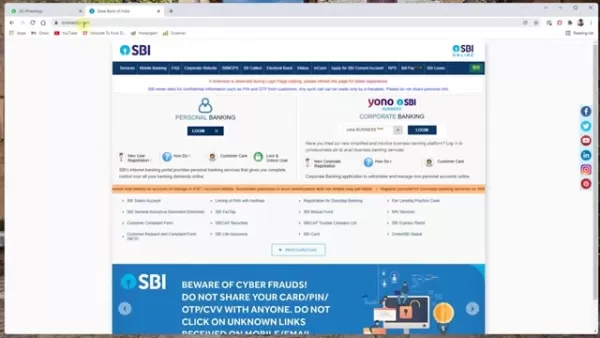
Login steps:
Visit SBI Online: Go to onlineSBI.com.
Login: Click 'Login' under 'Personal Banking'.
Continue to Login: Select 'Continue to Login'.
Enter Credentials: Input your username, password, and the captcha code.
OTP Verification: Enter the OTP sent to your mobile and click 'Submit'.
The main dashboard provides access to various services, typically including:
- Account Summary: Overview of balances and recent transactions.
- Payments/Transfers: Options for fund transfers.
- Bill Payments: Utility and credit card bill payment facility.
- Fixed Deposits: Tools to manage fixed deposits.
- e-Services: Online services like updating PAN or email ID.
Familiarize yourself with the dashboard to navigate SBI internet banking effectively.
Updating Your Email ID
Keeping your email address updated is crucial for notifications. Update it by:
Logging into your SBI internet banking account.
Navigating to the profile section, often under 'My Accounts & Profile'.
Entering your profile password when prompted.
Submitting your new email address.
Completing any OTP verification sent to your mobile.
An updated email ensures you receive important bank communications.
Enabling Full Transaction Rights
If your account has only view access, enable full transaction rights by:
Logging into your SBI net banking account.
Going to 'Request & Enquiries' and selecting 'More'.
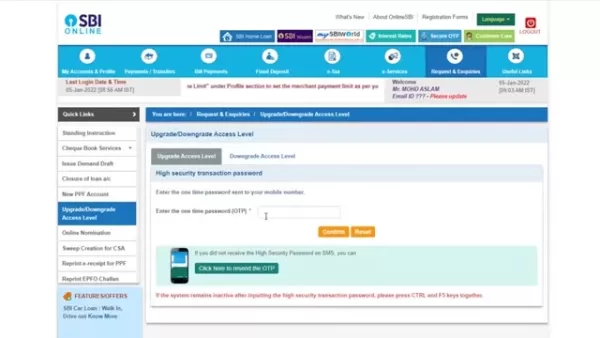
Choosing 'Upgrade/Downgrade Access Level'.
Selecting your account.
Choosing 'Full Transaction Rights' from the dropdown and clicking 'Submit'.
Entering the OTP sent to your mobile and confirming.
This grants you complete online transaction capabilities.
Understanding SBI Internet Banking Charges
Transaction Fees and Other Charges
While many services are free, certain transactions may attract fees, such as:
- NEFT/RTGS Transfers: Fees may apply, particularly for larger amounts.
- IMPS Transfers: Charges for Immediate Payment Service transfers.
- SMS Alerts: Premium alert services might have quarterly charges.
- Debit Card Charges: Annual maintenance fees.
Consult the SBI website or your branch for the latest fee schedule.
Approximate charges for SBI Internet Banking services:
Service Charges (Approximate) NEFT Transfers₹1 to ₹25 + GSTRTGS Transfers₹5 to ₹50 + GSTIMPS Transfers₹5 to ₹15 + GSTSMS Alerts₹15 to ₹25 per quarterDebit Card Annual Fee₹125 to ₹500 + GSTNote: Fees are subject to change. Confirm current charges with SBI.
Advantages and Disadvantages of SBI Internet Banking
Pros
Convenience: 24/7 account access from any location.
Efficiency: Quick transactions without branch visits.
Accessibility: Manage finances while traveling or at home.
Comprehensive Services: Wide array of online banking features.
Cost-Effective: Often lower fees than in-branch transactions.
Cons
Security Risks: Potential threats like phishing.
Technical Issues: Reliance on stable internet and website uptime.
Learning Curve: Requires comfort with digital platforms.
Limited Assistance: Less immediate help than at a branch.
Exploring Key Features of SBI Internet Banking
Features That Enhance Your Banking Experience
SBI internet banking offers numerous features for efficient financial management:
- Account Summary: View balances, history, and statements.
- Fund Transfers: Send money via NEFT, RTGS, or IMPS.
- Bill Payments: Pay utilities and other bills online.
- Fixed Deposits: Open and manage fixed deposits.
- Recurring Deposits: Manage recurring deposit accounts.
- Cheque Book Services: Order cheque books or stop payments.
- e-Statements: Download PDF account statements.
- UPI Services: Handle UPI transactions.
- Tax Payments: Pay direct taxes online.
- Online Shopping: Secure online purchases.
- Profile Management: Update personal details.
These tools provide a full-service online banking experience.
Real-World Use Cases for SBI Internet Banking
How SBI Internet Banking Simplifies Your Life
Practical applications of SBI net banking include:
- Paying Bills on Time: Set up automatic payments to avoid penalties.
- Transferring Money to Family: Swiftly send funds to relatives anywhere.
- Managing Investments: Grow savings with fixed and recurring deposits.
- Tracking Expenses: Monitor transactions to manage budgets.
- Paying Taxes Online: Fulfill tax obligations conveniently from home.
These examples show how SBI internet banking makes financial management more efficient.
Frequently Asked Questions (FAQ)
Is SBI internet banking free to use?
Basic services are generally free, but fees may apply for specific transactions like NEFT/RTGS transfers.
What do I do if I forget my internet banking password?
Use the 'Forgot Password' link on the login page. Reset it by answering security questions or using your ATM card for verification.
How can I update my mobile number with SBI internet banking?
Visit an SBI branch, use an ATM, or utilize online channels after identity verification to update your mobile number.
Is it safe to use SBI internet banking?
Yes, SBI uses encryption, OTPs, and security audits. Always access the official website and never share login details.
Can I access my account statement online?
Yes, you can download PDF statements from the 'Account Statement' section after logging in.
Related Questions
What are the security measures I should take while using online banking?
To safeguard your online banking, follow these precautions:Use a Strong Password: Create a complex, unique password.Avoid Public Wi-Fi: Conduct banking on secure, private networks.Keep Software Updated: Regularly update your OS, browser, and antivirus.Be Wary of Phishing: Ignore suspicious emails or links asking for personal data. Always type the SBI URL directly into your browser.Monitor Accounts Frequently: Review statements for unauthorized activity.Enable Two-Factor Authentication: Use OTP verification for an extra security layer.These steps help reduce fraud risk and protect your account.
Related article
 Stripe to Acquire OpenRouter as AI Model Routing Gains Momentum
Stripe has agreed to acquire OpenRouter, an AI model-routing platform that gives developers access to hundreds of models through a single interface. The deal adds model selection and routing to Stripe’s existing work around AI usage and token-based b
Former OpenAI Researcher Barrett Zoph Returns to Google to Support Gemini Development
Barret Zoph, who previously abruptly left and joined OpenAI due to a disagreement with Thinking Machines Lab CEO Miriam Mularati, has once again changed employers. Alphabet's Google announced that Zoph will return as Vice President of Research, bring
How Recursive Intelligence Raised $335M at $4B Valuation in 4 Months
The co-founders of startup Ricursive Intelligence seemed destined to be co-founders.Anna Goldie, CEO, and Azalia Mirhoseini, CTO, are so well-known in the AI community that they were among those AI engineers who “got those weird emails from Zuckerber
Related Special Topic Recommendations
Design & Art
Stripe to Acquire OpenRouter as AI Model Routing Gains Momentum
Stripe has agreed to acquire OpenRouter, an AI model-routing platform that gives developers access to hundreds of models through a single interface. The deal adds model selection and routing to Stripe’s existing work around AI usage and token-based b
Former OpenAI Researcher Barrett Zoph Returns to Google to Support Gemini Development
Barret Zoph, who previously abruptly left and joined OpenAI due to a disagreement with Thinking Machines Lab CEO Miriam Mularati, has once again changed employers. Alphabet's Google announced that Zoph will return as Vice President of Research, bring
How Recursive Intelligence Raised $335M at $4B Valuation in 4 Months
The co-founders of startup Ricursive Intelligence seemed destined to be co-founders.Anna Goldie, CEO, and Azalia Mirhoseini, CTO, are so well-known in the AI community that they were among those AI engineers who “got those weird emails from Zuckerber
Related Special Topic Recommendations
Design & Art
 Top AI Illustration Tools: Create Editorial Scenes and Cover Art Faster
2026 Latest Top-rated AI Illustration Tools: Our curated list features the best powerfully designed tools for creating stunning editorial scenes and eye-catching cover art quickly. Each option has gone through rigorous real-world tests, offering a free vs paid comparison to help you find the perfect match for your workflow. Try these must-try solutions today to unlock your AI edge and boost your creative productivity. Explore now at XIX.AI.
 10 tools
 xix.ai
Education and Learning
Top AI Tutors for Exam Prep: Practice Math, Science, and English
xix.ai
Education and Learning
Top AI Tutors for Exam Prep: Practice Math, Science, and English
2026 Latest Top-Rated Best AI Tutors for Exam Prep are here on XIX.AI! Our curated list features powerful game-changing tools that offer free vs paid comparison, real-world tests, and weekly updated rankings. They help boost your writing efficiency, simplify complex topic learning, and unlock your academic potential. Explore now to Discover your perfect exam prep tool and Start creating today to Unlock your AI edge!
10 tools
xix.ai
Finance
AI Budget Planning Tools for Personal Money Management
2026 Latest Best Top-Rated AI Budget Planning Tools for Personal Money Management are here on XIX.AI! This curated collection features powerful, game-changing solutions that help you conduct real-world tests, understand spending habits, and create personalized plans to boost productivity. Enjoy a free vs paid comparison along with detailed rankings. Must-try tools designed to simplify money management and unlock your AI edge. Explore now!
11 tools
xix.ai
Health & Wellness
AI Sleep Tracking Assistants: Improve Recovery with Better Bedtime Habits
2026 Latest Best Top-Rated AI Sleep Tracking Assistants curated for ultimate recovery. This fully updated weekly guide features powerful tools that deliver real-world tests, free vs paid comparison, and detailed rankings to help you find the must-try solution that boosts sleep quality and supports better bedtime habits. Explore now at XIX.AI to Unlock your AI edge.
10 tools
xix.ai
Data Analysis
AI SQL Copilots for Product and Revenue Analytics
2026 Latest Best Top-Rated AI SQL Copilots for Product and Revenue Analytics! XIX.AI has curated a powerful, game-changing collection of must-try tools that undergo real-world tests through weekly updated rankings. These tools help users boost productivity significantly by accelerating data analysis, streamlining complex queries, and generating accurate insights to drive smarter business decisions. Explore now to Discover your perfect tool for unlocking your AI edge!
14 tools
xix.ai
Education and Learning
Best AI Homework Helpers That Teach: Learn Concepts, Not Just Answers
2026 Latest Best Top-Rated AI Homework Helpers That Teach Core Concepts Not Just Answers Powerful Tools for Students Must-Try Curated List Weekly Updated Free vs Paid Comparison Real-World Tests Accurate Rankings to Help You Unlock Your Full Learning Potential Explore now to Discover your perfect tool for smarter studying.
10 tools
xix.ai

 Comments (0)
0/500
Comments (0)
0/500
Signing up for State Bank of India (SBI) internet banking streamlines your finances, allowing you to handle transactions from anywhere. This guide details the online registration process for creating your user ID and password, equipping you to manage your account with full transaction capabilities securely. Follow these instructions to enjoy the flexibility of SBI's digital banking services.
Key Points
Complete your SBI net banking registration entirely online, without needing to visit a branch.
Generate your unique user ID and password via the official online portal.
Activate full transaction rights for comprehensive online account management.
Verify your identity during sign-up using details from your SBI ATM or debit card.
Establish a distinct profile password for enhanced account security.
Ensure your email address is current for smooth communication and easy account recovery.
Upgrade your access level to unlock complete transaction functionality.
Registering for SBI Internet Banking Online
Step-by-Step Registration Process
You can enroll in SBI internet banking remotely. Here is the detailed procedure to get started:
Access the SBI Online Portal:
Navigate to the official website, onlineSBI.com, to initiate registration.
New User Registration: Select the “New User Registration/Activation” link to proceed to the registration page.
Select Registration Type: Choose 'New User Registration' from the menu and click 'Next'.
Enter Account Details: Provide your account number, CIF number, branch code, country, registered mobile number, and select the required facility. Locate your CIF number and branch code in your passbook.Opt for 'Full Transaction Rights' to perform all transactions online.
Submit and Verify: Enter the captcha text and click 'Submit'. An OTP will be sent to your mobile; enter it and click 'Confirm'.
ATM Card Verification: Choose “I have my ATM card” and click 'Submit' to finalize registration online. If you don't possess an ATM card, branch activation is mandatory.
Select Debit Card: Pick your active debit card from the list and click 'Confirm'. Input the card's expiry date, holder name, and PIN.
Set Username and Password: Create a unique username and a robust password. Verify the username's availability and accept the terms and conditions.
Submit and Complete: Click 'Submit' to finish. A confirmation message will indicate successful registration.
After completing these steps, you will have full access to SBI internet banking, enabling efficient online financial management.
Essential Information Needed for Registration
Before starting, gather the following details for a smooth registration experience:
- Account Number: Your unique bank account identifier.
- CIF Number: Your Customer Information File number, found on your passbook or statement.
- Branch Code: The code for your specific SBI branch.
- Registered Mobile Number: The mobile number linked to your account.
- ATM Card Details: Information from your active card, including the expiry date and PIN.
Having these items ready will expedite the process.
Creating a Strong and Secure Password
A strong password is vital for protecting your SBI net banking account. An effective password should be:
- Unique: Not reused for other accounts.
- Complex: A mix of uppercase and lowercase letters, numbers, and symbols.
- Lengthy: A minimum of 8 characters.
- Unpredictable: Avoids personal information like names or birthdays.
Consider these tips for enhanced security:
- Utilize a password manager to generate and store secure passwords.
- Change your password regularly.
- Never share or write down your password.
Adhering to these practices significantly boosts your account's security.
Troubleshooting Common Registration Issues
Resolving Common Problems During SBI Internet Banking Registration
If you encounter problems during registration, here are solutions to frequent issues:
OTP Not Received: Check your mobile network and use the 'Resend OTP' option if needed.
Confirm your mobile number is correctly registered with SBI.
Invalid Details: Re-enter all details like account number and CIF number, ensuring they match your passbook exactly.
ATM Card Issues: Verify your card is active and not blocked. Double-check the expiry date and PIN.
Username Availability: If your chosen username is taken, try variations with letters and numbers.
Technical Glitches: Clear your browser's cache and cookies, or attempt registration later.
Addressing these concerns will help you complete registration without interruption.
Navigating SBI Internet Banking
Logging In and Exploring the Dashboard
After successful registration, access your account as follows:
Login steps:
Visit SBI Online: Go to onlineSBI.com.
Login: Click 'Login' under 'Personal Banking'.
Continue to Login: Select 'Continue to Login'.
Enter Credentials: Input your username, password, and the captcha code.
OTP Verification: Enter the OTP sent to your mobile and click 'Submit'.
The main dashboard provides access to various services, typically including:
- Account Summary: Overview of balances and recent transactions.
- Payments/Transfers: Options for fund transfers.
- Bill Payments: Utility and credit card bill payment facility.
- Fixed Deposits: Tools to manage fixed deposits.
- e-Services: Online services like updating PAN or email ID.
Familiarize yourself with the dashboard to navigate SBI internet banking effectively.
Updating Your Email ID
Keeping your email address updated is crucial for notifications. Update it by:
Logging into your SBI internet banking account.
Navigating to the profile section, often under 'My Accounts & Profile'.
Entering your profile password when prompted.
Submitting your new email address.
Completing any OTP verification sent to your mobile.
An updated email ensures you receive important bank communications.
Enabling Full Transaction Rights
If your account has only view access, enable full transaction rights by:
Logging into your SBI net banking account.
Going to 'Request & Enquiries' and selecting 'More'.
Choosing 'Upgrade/Downgrade Access Level'.
Selecting your account.
Choosing 'Full Transaction Rights' from the dropdown and clicking 'Submit'.
Entering the OTP sent to your mobile and confirming.
This grants you complete online transaction capabilities.
Understanding SBI Internet Banking Charges
Transaction Fees and Other Charges
While many services are free, certain transactions may attract fees, such as:
- NEFT/RTGS Transfers: Fees may apply, particularly for larger amounts.
- IMPS Transfers: Charges for Immediate Payment Service transfers.
- SMS Alerts: Premium alert services might have quarterly charges.
- Debit Card Charges: Annual maintenance fees.
Consult the SBI website or your branch for the latest fee schedule.
Approximate charges for SBI Internet Banking services:
Note: Fees are subject to change. Confirm current charges with SBI.
Advantages and Disadvantages of SBI Internet Banking
Pros
Convenience: 24/7 account access from any location.
Efficiency: Quick transactions without branch visits.
Accessibility: Manage finances while traveling or at home.
Comprehensive Services: Wide array of online banking features.
Cost-Effective: Often lower fees than in-branch transactions.
Cons
Security Risks: Potential threats like phishing.
Technical Issues: Reliance on stable internet and website uptime.
Learning Curve: Requires comfort with digital platforms.
Limited Assistance: Less immediate help than at a branch.
Exploring Key Features of SBI Internet Banking
Features That Enhance Your Banking Experience
SBI internet banking offers numerous features for efficient financial management:
- Account Summary: View balances, history, and statements.
- Fund Transfers: Send money via NEFT, RTGS, or IMPS.
- Bill Payments: Pay utilities and other bills online.
- Fixed Deposits: Open and manage fixed deposits.
- Recurring Deposits: Manage recurring deposit accounts.
- Cheque Book Services: Order cheque books or stop payments.
- e-Statements: Download PDF account statements.
- UPI Services: Handle UPI transactions.
- Tax Payments: Pay direct taxes online.
- Online Shopping: Secure online purchases.
- Profile Management: Update personal details.
These tools provide a full-service online banking experience.
Real-World Use Cases for SBI Internet Banking
How SBI Internet Banking Simplifies Your Life
Practical applications of SBI net banking include:
- Paying Bills on Time: Set up automatic payments to avoid penalties.
- Transferring Money to Family: Swiftly send funds to relatives anywhere.
- Managing Investments: Grow savings with fixed and recurring deposits.
- Tracking Expenses: Monitor transactions to manage budgets.
- Paying Taxes Online: Fulfill tax obligations conveniently from home.
These examples show how SBI internet banking makes financial management more efficient.
Frequently Asked Questions (FAQ)
Is SBI internet banking free to use?
Basic services are generally free, but fees may apply for specific transactions like NEFT/RTGS transfers.
What do I do if I forget my internet banking password?
Use the 'Forgot Password' link on the login page. Reset it by answering security questions or using your ATM card for verification.
How can I update my mobile number with SBI internet banking?
Visit an SBI branch, use an ATM, or utilize online channels after identity verification to update your mobile number.
Is it safe to use SBI internet banking?
Yes, SBI uses encryption, OTPs, and security audits. Always access the official website and never share login details.
Can I access my account statement online?
Yes, you can download PDF statements from the 'Account Statement' section after logging in.
Related Questions
What are the security measures I should take while using online banking?
To safeguard your online banking, follow these precautions:Use a Strong Password: Create a complex, unique password.Avoid Public Wi-Fi: Conduct banking on secure, private networks.Keep Software Updated: Regularly update your OS, browser, and antivirus.Be Wary of Phishing: Ignore suspicious emails or links asking for personal data. Always type the SBI URL directly into your browser.Monitor Accounts Frequently: Review statements for unauthorized activity.Enable Two-Factor Authentication: Use OTP verification for an extra security layer.These steps help reduce fraud risk and protect your account.








 Stripe to Acquire OpenRouter as AI Model Routing Gains Momentum
Stripe has agreed to acquire OpenRouter, an AI model-routing platform that gives developers access to hundreds of models through a single interface. The deal adds model selection and routing to Stripe’s existing work around AI usage and token-based b
Stripe to Acquire OpenRouter as AI Model Routing Gains Momentum
Stripe has agreed to acquire OpenRouter, an AI model-routing platform that gives developers access to hundreds of models through a single interface. The deal adds model selection and routing to Stripe’s existing work around AI usage and token-based b
 Former OpenAI Researcher Barrett Zoph Returns to Google to Support Gemini Development
Barret Zoph, who previously abruptly left and joined OpenAI due to a disagreement with Thinking Machines Lab CEO Miriam Mularati, has once again changed employers. Alphabet's Google announced that Zoph will return as Vice President of Research, bring
Former OpenAI Researcher Barrett Zoph Returns to Google to Support Gemini Development
Barret Zoph, who previously abruptly left and joined OpenAI due to a disagreement with Thinking Machines Lab CEO Miriam Mularati, has once again changed employers. Alphabet's Google announced that Zoph will return as Vice President of Research, bring
 How Recursive Intelligence Raised $335M at $4B Valuation in 4 Months
The co-founders of startup Ricursive Intelligence seemed destined to be co-founders.Anna Goldie, CEO, and Azalia Mirhoseini, CTO, are so well-known in the AI community that they were among those AI engineers who “got those weird emails from Zuckerber
How Recursive Intelligence Raised $335M at $4B Valuation in 4 Months
The co-founders of startup Ricursive Intelligence seemed destined to be co-founders.Anna Goldie, CEO, and Azalia Mirhoseini, CTO, are so well-known in the AI community that they were among those AI engineers who “got those weird emails from Zuckerber

2026 Latest Top-rated AI Illustration Tools: Our curated list features the best powerfully designed tools for creating stunning editorial scenes and eye-catching cover art quickly. Each option has gone through rigorous real-world tests, offering a free vs paid comparison to help you find the perfect match for your workflow. Try these must-try solutions today to unlock your AI edge and boost your creative productivity. Explore now at XIX.AI.
10 tools
xix.ai

2026 Latest Top-Rated Best AI Tutors for Exam Prep are here on XIX.AI! Our curated list features powerful game-changing tools that offer free vs paid comparison, real-world tests, and weekly updated rankings. They help boost your writing efficiency, simplify complex topic learning, and unlock your academic potential. Explore now to Discover your perfect exam prep tool and Start creating today to Unlock your AI edge!
10 tools
xix.ai

2026 Latest Best Top-Rated AI Budget Planning Tools for Personal Money Management are here on XIX.AI! This curated collection features powerful, game-changing solutions that help you conduct real-world tests, understand spending habits, and create personalized plans to boost productivity. Enjoy a free vs paid comparison along with detailed rankings. Must-try tools designed to simplify money management and unlock your AI edge. Explore now!
11 tools
xix.ai

2026 Latest Best Top-Rated AI Sleep Tracking Assistants curated for ultimate recovery. This fully updated weekly guide features powerful tools that deliver real-world tests, free vs paid comparison, and detailed rankings to help you find the must-try solution that boosts sleep quality and supports better bedtime habits. Explore now at XIX.AI to Unlock your AI edge.
10 tools
xix.ai

2026 Latest Best Top-Rated AI SQL Copilots for Product and Revenue Analytics! XIX.AI has curated a powerful, game-changing collection of must-try tools that undergo real-world tests through weekly updated rankings. These tools help users boost productivity significantly by accelerating data analysis, streamlining complex queries, and generating accurate insights to drive smarter business decisions. Explore now to Discover your perfect tool for unlocking your AI edge!
14 tools
xix.ai

2026 Latest Best Top-Rated AI Homework Helpers That Teach Core Concepts Not Just Answers Powerful Tools for Students Must-Try Curated List Weekly Updated Free vs Paid Comparison Real-World Tests Accurate Rankings to Help You Unlock Your Full Learning Potential Explore now to Discover your perfect tool for smarter studying.
10 tools
xix.ai












