


 Home
HomeArchiLab's AI Models Transform Exterior and Interior Design
ArchiLab is redefining architectural and interior design with cutting-edge AI technology. Their innovative LORA models streamline the visualization and creation of spaces, blending creativity, efficiency, and customization. These tools set a new benchmark for design processes, empowering architects and homeowners alike. Explore how these AI-driven solutions can elevate your creative workflow, delivering stunning, realistic results with unmatched speed. From designing modern villas to reimagining living spaces, ArchiLab’s AI models help turn visions into reality.
Key Highlights
ArchiLab unveils advanced AI LORA models for exterior and interior design.
The exterior model creates striking, modern residential designs effortlessly.
The interior model crafts vivid, appealing indoor environments.
Download these models from Civitai.com or HuggingFace.com.
They enhance design processes with rapid results and tailored options.
Suitable for professional architects and homeowners seeking creative solutions.
LORA models deliver unique styles, enabling fast realization of design ideas.
ArchiLab's AI-Driven Design Innovation
Revolutionizing Exterior Design with ArchiLab’s AI LORA Model
ArchiLab introduces a transformative AI LORA model tailored for crafting modern exterior designs for villas, bungalows, and homes.
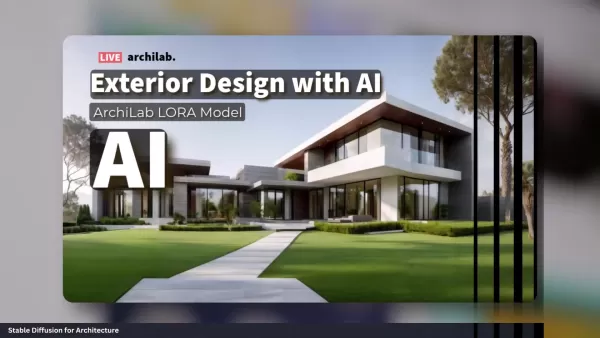
This model generates high-quality, visually captivating exteriors with remarkable speed and simplicity. Trained to capture contemporary architectural nuances, it allows users to explore diverse design possibilities without traditional time or resource limitations. Visualize your dream home’s exterior in minutes, making this tool invaluable for architects, designers, and homeowners.
Key Features of the Exterior Design LORA Model:
- Superior Visuals: Produces detailed, lifelike renderings of modern home exteriors.
- Flexible Styles: Offers a variety of architectural designs and customization options.
- Time-Saving: Drastically cuts down design visualization time.
- Accessible Interface: User-friendly for both professionals and beginners.
The ArchiLab LORA model excels at creating realistic, eye-catching exterior designs, ideal for rapid concept visualization and client presentations. Its ability to deliver high-quality renderings quickly streamlines workflows and supports iterative design cycles. It also provides a cost-effective alternative to expensive design software or professional rendering services. Available on Civitai.com, the model is easily accessible for creative exploration and design refinement, with download links provided in the video description.
For architects pitching a modern villa, this LORA model enables rapid generation of multiple design variations, incorporating client feedback in real time. This boosts client engagement and ensures the final design aligns with their vision. Homeowners planning renovations or new builds can experiment with styles and materials, making informed choices before construction begins. By offering fast, high-quality renderings, ArchiLab democratizes architectural visualization, empowering a wider audience to shape their design process.
Transforming Interiors with ArchiLab’s AI LORA Model
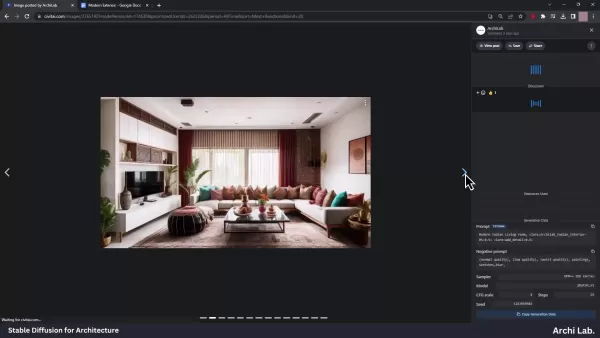
ArchiLab’s interior design AI LORA model complements its exterior solution, creating stunning, realistic indoor spaces.
It focuses on diverse design elements, furniture layouts, and lighting schemes, ideal for refreshing living rooms, bedrooms, or kitchens. This model offers a broad range of creative options tailored to individual tastes and styles.
Key Features of the Interior Design LORA Model:
- Lifelike Renderings: Creates detailed, realistic images of interior spaces.
- Varied Styles: Supports modern to traditional design aesthetics.
- Tailored Options: Allows customization of furniture, colors, and lighting.
- Streamlined Visualization: Simplifies the process of envisioning interior concepts.
ArchiLab’s interior design LORA model enables users to explore and visualize their ideal indoor spaces. With customizable elements and diverse styles, it suits various design needs, fostering creativity and experimentation. Available on Civitai.com, it integrates seamlessly into design workflows, saving time and resources.
For homeowners planning a living room refresh, this model allows experimentation with furniture layouts, color schemes, and lighting to find the perfect fit. This informed approach saves time and money before purchasing furniture or hiring designers. Interior designers can quickly generate tailored proposals, incorporating client feedback in real time. ArchiLab’s high-quality, rapid renderings make interior design visualization accessible, empowering users to shape their spaces with confidence.
Accessing and Leveraging ArchiLab’s LORA Models
Downloading and Setting Up the LORA Models
ArchiLab’s exterior and interior LORA models are available on Civitai.com and HuggingFace.com.
These platforms provide straightforward access and clear instructions for integrating the models into your workflow. Visit either site, search for “ArchiLab,” locate the desired model, and follow the download and installation steps provided.
Step-by-Step Guide to Downloading and Installing:
- Go to Civitai.com or HuggingFace.com: Open your browser and navigate to either website.
- Search for “ArchiLab”: Use the search bar to find ArchiLab’s models.
- Find the Model: Browse results to select the exterior or interior LORA model.
- Download the Model: Click the download button for the chosen model.
- Install the Model: Follow the provided instructions to integrate it into your workflow.
After downloading, place the LORA model in the appropriate folder for your design software to recognize it, typically a dedicated “Lora” folder. Check your software’s documentation for specific guidance.
By hosting these models on Civitai.com and HuggingFace.com, ArchiLab ensures easy access, enabling designers and homeowners to harness AI-driven design tools, boosting creativity and efficiency.
Integrating LORA Models into Your Workflow
Incorporating ArchiLab’s LORA models into your design process enhances creativity and efficiency. Designed for seamless integration with popular design software, these models complement existing workflows without disruption.
Benefits of Integration:
- Rapid Visualization: Quickly produce realistic renderings of design concepts.
- Creative Exploration: Experiment with diverse styles and options.
- Enhanced Collaboration: Share ideas effortlessly with clients and stakeholders.
- Cost Efficiency: Minimize reliance on costly design software or services.
For architects, the exterior LORA model streamlines proposal creation, allowing rapid generation of design variations and real-time client feedback integration. This ensures designs align with client visions. Interior designers can use the interior model to craft compelling visualizations, experimenting with layouts and styles to meet client needs efficiently.
Whether designing villas or planning renovations, ArchiLab’s LORA models unlock new levels of creativity and efficiency, empowering users to realize their visions with precision and speed.
Pros and Cons of AI in Design
Advantages
Boosted Efficiency: AI speeds up design processes, cutting visualization and iteration time.
Enhanced Creativity: AI enables exploration of diverse styles, sparking innovation.
Cost Reduction: AI minimizes reliance on expensive software or professional services.
Greater Precision: AI tools improve design accuracy and reduce errors.
Data-Driven Insights: AI optimizes designs and personalizes experiences through data analysis.
Challenges
Data Reliance: AI models need large, accurate datasets, which may not always be available.
Limited Creative Depth: AI may lack the nuanced creativity of human designers.
Ethical Concerns: AI decision-making raises questions about bias and fairness.
Job Impacts: Automation may reduce roles for some design professionals.
Upfront Costs: Implementing AI tools may require significant initial investment.
Frequently Asked Questions
What are LORA models, and how do they function?
LORA models are AI tools that generate images from text prompts. Trained on extensive image and text datasets, they replicate various design styles. Users input a text description, and the model produces a matching image, simplifying design refinement.
Where can I access ArchiLab’s LORA models?
ArchiLab’s exterior and interior LORA models are available on Civitai.com and HuggingFace.com. Search for “ArchiLab” on either platform to locate and download them.
Are ArchiLab’s LORA models user-friendly?
Yes, these models are designed for ease of use, accessible to both professionals and beginners. They integrate smoothly with design software and include clear installation instructions.
Can I customize designs from ArchiLab’s LORA models?
Absolutely, the models offer extensive customization, allowing users to tweak styles, elements, and colors to create unique designs tailored to their preferences.
What design types can ArchiLab’s LORA models create?
These models support designs for modern villas, bungalows, homes, and interior spaces like living rooms, bedrooms, and kitchens, offering versatile creative options.
Related Questions
How is AI reshaping architecture and design?
AI is revolutionizing architecture and design by automating tasks, enhancing precision, and improving visualization. AI tools analyze data to optimize designs, predict performance, and personalize experiences, enabling innovative and functional outcomes. They generate realistic renderings and videos, offering virtual walkthroughs that aid decision-making. AI also automates repetitive tasks like drafting and compliance checks, freeing designers for creative work. Challenges include data availability, model transparency, and ethical concerns, requiring responsible use as AI evolves in these fields.
Related article
 Stripe to Acquire OpenRouter as AI Model Routing Gains Momentum
Stripe has agreed to acquire OpenRouter, an AI model-routing platform that gives developers access to hundreds of models through a single interface. The deal adds model selection and routing to Stripe’s existing work around AI usage and token-based b
Former OpenAI Researcher Barrett Zoph Returns to Google to Support Gemini Development
Barret Zoph, who previously abruptly left and joined OpenAI due to a disagreement with Thinking Machines Lab CEO Miriam Mularati, has once again changed employers. Alphabet's Google announced that Zoph will return as Vice President of Research, bring
How Recursive Intelligence Raised $335M at $4B Valuation in 4 Months
The co-founders of startup Ricursive Intelligence seemed destined to be co-founders.Anna Goldie, CEO, and Azalia Mirhoseini, CTO, are so well-known in the AI community that they were among those AI engineers who “got those weird emails from Zuckerber
Related Special Topic Recommendations
Design & Art
Stripe to Acquire OpenRouter as AI Model Routing Gains Momentum
Stripe has agreed to acquire OpenRouter, an AI model-routing platform that gives developers access to hundreds of models through a single interface. The deal adds model selection and routing to Stripe’s existing work around AI usage and token-based b
Former OpenAI Researcher Barrett Zoph Returns to Google to Support Gemini Development
Barret Zoph, who previously abruptly left and joined OpenAI due to a disagreement with Thinking Machines Lab CEO Miriam Mularati, has once again changed employers. Alphabet's Google announced that Zoph will return as Vice President of Research, bring
How Recursive Intelligence Raised $335M at $4B Valuation in 4 Months
The co-founders of startup Ricursive Intelligence seemed destined to be co-founders.Anna Goldie, CEO, and Azalia Mirhoseini, CTO, are so well-known in the AI community that they were among those AI engineers who “got those weird emails from Zuckerber
Related Special Topic Recommendations
Design & Art
 Top AI Illustration Tools: Create Editorial Scenes and Cover Art Faster
2026 Latest Top-rated AI Illustration Tools: Our curated list features the best powerfully designed tools for creating stunning editorial scenes and eye-catching cover art quickly. Each option has gone through rigorous real-world tests, offering a free vs paid comparison to help you find the perfect match for your workflow. Try these must-try solutions today to unlock your AI edge and boost your creative productivity. Explore now at XIX.AI.
 10 tools
 xix.ai
Education and Learning
Top AI Tutors for Exam Prep: Practice Math, Science, and English
xix.ai
Education and Learning
Top AI Tutors for Exam Prep: Practice Math, Science, and English
2026 Latest Top-Rated Best AI Tutors for Exam Prep are here on XIX.AI! Our curated list features powerful game-changing tools that offer free vs paid comparison, real-world tests, and weekly updated rankings. They help boost your writing efficiency, simplify complex topic learning, and unlock your academic potential. Explore now to Discover your perfect exam prep tool and Start creating today to Unlock your AI edge!
10 tools
xix.ai
Finance
AI Budget Planning Tools for Personal Money Management
2026 Latest Best Top-Rated AI Budget Planning Tools for Personal Money Management are here on XIX.AI! This curated collection features powerful, game-changing solutions that help you conduct real-world tests, understand spending habits, and create personalized plans to boost productivity. Enjoy a free vs paid comparison along with detailed rankings. Must-try tools designed to simplify money management and unlock your AI edge. Explore now!
11 tools
xix.ai
Health & Wellness
AI Sleep Tracking Assistants: Improve Recovery with Better Bedtime Habits
2026 Latest Best Top-Rated AI Sleep Tracking Assistants curated for ultimate recovery. This fully updated weekly guide features powerful tools that deliver real-world tests, free vs paid comparison, and detailed rankings to help you find the must-try solution that boosts sleep quality and supports better bedtime habits. Explore now at XIX.AI to Unlock your AI edge.
10 tools
xix.ai
Data Analysis
AI SQL Copilots for Product and Revenue Analytics
2026 Latest Best Top-Rated AI SQL Copilots for Product and Revenue Analytics! XIX.AI has curated a powerful, game-changing collection of must-try tools that undergo real-world tests through weekly updated rankings. These tools help users boost productivity significantly by accelerating data analysis, streamlining complex queries, and generating accurate insights to drive smarter business decisions. Explore now to Discover your perfect tool for unlocking your AI edge!
14 tools
xix.ai
Education and Learning
Best AI Homework Helpers That Teach: Learn Concepts, Not Just Answers
2026 Latest Best Top-Rated AI Homework Helpers That Teach Core Concepts Not Just Answers Powerful Tools for Students Must-Try Curated List Weekly Updated Free vs Paid Comparison Real-World Tests Accurate Rankings to Help You Unlock Your Full Learning Potential Explore now to Discover your perfect tool for smarter studying.
10 tools
xix.ai

 Comments (1)
0/500
Comments (1)
0/500
![DonaldGonzález]()
このAIモデル、建築デザインの効率化に革命をもたらしそうですね。でも、AIがすべてのデザインを均質化してしまわないか心配。個性ある建築が消える時代が来るのかな?🏗️
ArchiLab is redefining architectural and interior design with cutting-edge AI technology. Their innovative LORA models streamline the visualization and creation of spaces, blending creativity, efficiency, and customization. These tools set a new benchmark for design processes, empowering architects and homeowners alike. Explore how these AI-driven solutions can elevate your creative workflow, delivering stunning, realistic results with unmatched speed. From designing modern villas to reimagining living spaces, ArchiLab’s AI models help turn visions into reality.
Key Highlights
ArchiLab unveils advanced AI LORA models for exterior and interior design.
The exterior model creates striking, modern residential designs effortlessly.
The interior model crafts vivid, appealing indoor environments.
Download these models from Civitai.com or HuggingFace.com.
They enhance design processes with rapid results and tailored options.
Suitable for professional architects and homeowners seeking creative solutions.
LORA models deliver unique styles, enabling fast realization of design ideas.
ArchiLab's AI-Driven Design Innovation
Revolutionizing Exterior Design with ArchiLab’s AI LORA Model
ArchiLab introduces a transformative AI LORA model tailored for crafting modern exterior designs for villas, bungalows, and homes.
This model generates high-quality, visually captivating exteriors with remarkable speed and simplicity. Trained to capture contemporary architectural nuances, it allows users to explore diverse design possibilities without traditional time or resource limitations. Visualize your dream home’s exterior in minutes, making this tool invaluable for architects, designers, and homeowners.
Key Features of the Exterior Design LORA Model:
- Superior Visuals: Produces detailed, lifelike renderings of modern home exteriors.
- Flexible Styles: Offers a variety of architectural designs and customization options.
- Time-Saving: Drastically cuts down design visualization time.
- Accessible Interface: User-friendly for both professionals and beginners.
The ArchiLab LORA model excels at creating realistic, eye-catching exterior designs, ideal for rapid concept visualization and client presentations. Its ability to deliver high-quality renderings quickly streamlines workflows and supports iterative design cycles. It also provides a cost-effective alternative to expensive design software or professional rendering services. Available on Civitai.com, the model is easily accessible for creative exploration and design refinement, with download links provided in the video description.
For architects pitching a modern villa, this LORA model enables rapid generation of multiple design variations, incorporating client feedback in real time. This boosts client engagement and ensures the final design aligns with their vision. Homeowners planning renovations or new builds can experiment with styles and materials, making informed choices before construction begins. By offering fast, high-quality renderings, ArchiLab democratizes architectural visualization, empowering a wider audience to shape their design process.
Transforming Interiors with ArchiLab’s AI LORA Model
ArchiLab’s interior design AI LORA model complements its exterior solution, creating stunning, realistic indoor spaces.
It focuses on diverse design elements, furniture layouts, and lighting schemes, ideal for refreshing living rooms, bedrooms, or kitchens. This model offers a broad range of creative options tailored to individual tastes and styles.
Key Features of the Interior Design LORA Model:
- Lifelike Renderings: Creates detailed, realistic images of interior spaces.
- Varied Styles: Supports modern to traditional design aesthetics.
- Tailored Options: Allows customization of furniture, colors, and lighting.
- Streamlined Visualization: Simplifies the process of envisioning interior concepts.
ArchiLab’s interior design LORA model enables users to explore and visualize their ideal indoor spaces. With customizable elements and diverse styles, it suits various design needs, fostering creativity and experimentation. Available on Civitai.com, it integrates seamlessly into design workflows, saving time and resources.
For homeowners planning a living room refresh, this model allows experimentation with furniture layouts, color schemes, and lighting to find the perfect fit. This informed approach saves time and money before purchasing furniture or hiring designers. Interior designers can quickly generate tailored proposals, incorporating client feedback in real time. ArchiLab’s high-quality, rapid renderings make interior design visualization accessible, empowering users to shape their spaces with confidence.
Accessing and Leveraging ArchiLab’s LORA Models
Downloading and Setting Up the LORA Models
ArchiLab’s exterior and interior LORA models are available on Civitai.com and HuggingFace.com.
These platforms provide straightforward access and clear instructions for integrating the models into your workflow. Visit either site, search for “ArchiLab,” locate the desired model, and follow the download and installation steps provided.
Step-by-Step Guide to Downloading and Installing:
- Go to Civitai.com or HuggingFace.com: Open your browser and navigate to either website.
- Search for “ArchiLab”: Use the search bar to find ArchiLab’s models.
- Find the Model: Browse results to select the exterior or interior LORA model.
- Download the Model: Click the download button for the chosen model.
- Install the Model: Follow the provided instructions to integrate it into your workflow.
After downloading, place the LORA model in the appropriate folder for your design software to recognize it, typically a dedicated “Lora” folder. Check your software’s documentation for specific guidance.
By hosting these models on Civitai.com and HuggingFace.com, ArchiLab ensures easy access, enabling designers and homeowners to harness AI-driven design tools, boosting creativity and efficiency.
Integrating LORA Models into Your Workflow
Incorporating ArchiLab’s LORA models into your design process enhances creativity and efficiency. Designed for seamless integration with popular design software, these models complement existing workflows without disruption.
Benefits of Integration:
- Rapid Visualization: Quickly produce realistic renderings of design concepts.
- Creative Exploration: Experiment with diverse styles and options.
- Enhanced Collaboration: Share ideas effortlessly with clients and stakeholders.
- Cost Efficiency: Minimize reliance on costly design software or services.
For architects, the exterior LORA model streamlines proposal creation, allowing rapid generation of design variations and real-time client feedback integration. This ensures designs align with client visions. Interior designers can use the interior model to craft compelling visualizations, experimenting with layouts and styles to meet client needs efficiently.
Whether designing villas or planning renovations, ArchiLab’s LORA models unlock new levels of creativity and efficiency, empowering users to realize their visions with precision and speed.
Pros and Cons of AI in Design
Advantages
Boosted Efficiency: AI speeds up design processes, cutting visualization and iteration time.
Enhanced Creativity: AI enables exploration of diverse styles, sparking innovation.
Cost Reduction: AI minimizes reliance on expensive software or professional services.
Greater Precision: AI tools improve design accuracy and reduce errors.
Data-Driven Insights: AI optimizes designs and personalizes experiences through data analysis.
Challenges
Data Reliance: AI models need large, accurate datasets, which may not always be available.
Limited Creative Depth: AI may lack the nuanced creativity of human designers.
Ethical Concerns: AI decision-making raises questions about bias and fairness.
Job Impacts: Automation may reduce roles for some design professionals.
Upfront Costs: Implementing AI tools may require significant initial investment.
Frequently Asked Questions
What are LORA models, and how do they function?
LORA models are AI tools that generate images from text prompts. Trained on extensive image and text datasets, they replicate various design styles. Users input a text description, and the model produces a matching image, simplifying design refinement.
Where can I access ArchiLab’s LORA models?
ArchiLab’s exterior and interior LORA models are available on Civitai.com and HuggingFace.com. Search for “ArchiLab” on either platform to locate and download them.
Are ArchiLab’s LORA models user-friendly?
Yes, these models are designed for ease of use, accessible to both professionals and beginners. They integrate smoothly with design software and include clear installation instructions.
Can I customize designs from ArchiLab’s LORA models?
Absolutely, the models offer extensive customization, allowing users to tweak styles, elements, and colors to create unique designs tailored to their preferences.
What design types can ArchiLab’s LORA models create?
These models support designs for modern villas, bungalows, homes, and interior spaces like living rooms, bedrooms, and kitchens, offering versatile creative options.
Related Questions
How is AI reshaping architecture and design?
AI is revolutionizing architecture and design by automating tasks, enhancing precision, and improving visualization. AI tools analyze data to optimize designs, predict performance, and personalize experiences, enabling innovative and functional outcomes. They generate realistic renderings and videos, offering virtual walkthroughs that aid decision-making. AI also automates repetitive tasks like drafting and compliance checks, freeing designers for creative work. Challenges include data availability, model transparency, and ethical concerns, requiring responsible use as AI evolves in these fields.








 Stripe to Acquire OpenRouter as AI Model Routing Gains Momentum
Stripe has agreed to acquire OpenRouter, an AI model-routing platform that gives developers access to hundreds of models through a single interface. The deal adds model selection and routing to Stripe’s existing work around AI usage and token-based b
Stripe to Acquire OpenRouter as AI Model Routing Gains Momentum
Stripe has agreed to acquire OpenRouter, an AI model-routing platform that gives developers access to hundreds of models through a single interface. The deal adds model selection and routing to Stripe’s existing work around AI usage and token-based b
 Former OpenAI Researcher Barrett Zoph Returns to Google to Support Gemini Development
Barret Zoph, who previously abruptly left and joined OpenAI due to a disagreement with Thinking Machines Lab CEO Miriam Mularati, has once again changed employers. Alphabet's Google announced that Zoph will return as Vice President of Research, bring
Former OpenAI Researcher Barrett Zoph Returns to Google to Support Gemini Development
Barret Zoph, who previously abruptly left and joined OpenAI due to a disagreement with Thinking Machines Lab CEO Miriam Mularati, has once again changed employers. Alphabet's Google announced that Zoph will return as Vice President of Research, bring
 How Recursive Intelligence Raised $335M at $4B Valuation in 4 Months
The co-founders of startup Ricursive Intelligence seemed destined to be co-founders.Anna Goldie, CEO, and Azalia Mirhoseini, CTO, are so well-known in the AI community that they were among those AI engineers who “got those weird emails from Zuckerber
How Recursive Intelligence Raised $335M at $4B Valuation in 4 Months
The co-founders of startup Ricursive Intelligence seemed destined to be co-founders.Anna Goldie, CEO, and Azalia Mirhoseini, CTO, are so well-known in the AI community that they were among those AI engineers who “got those weird emails from Zuckerber

2026 Latest Top-rated AI Illustration Tools: Our curated list features the best powerfully designed tools for creating stunning editorial scenes and eye-catching cover art quickly. Each option has gone through rigorous real-world tests, offering a free vs paid comparison to help you find the perfect match for your workflow. Try these must-try solutions today to unlock your AI edge and boost your creative productivity. Explore now at XIX.AI.
10 tools
xix.ai

2026 Latest Top-Rated Best AI Tutors for Exam Prep are here on XIX.AI! Our curated list features powerful game-changing tools that offer free vs paid comparison, real-world tests, and weekly updated rankings. They help boost your writing efficiency, simplify complex topic learning, and unlock your academic potential. Explore now to Discover your perfect exam prep tool and Start creating today to Unlock your AI edge!
10 tools
xix.ai

2026 Latest Best Top-Rated AI Budget Planning Tools for Personal Money Management are here on XIX.AI! This curated collection features powerful, game-changing solutions that help you conduct real-world tests, understand spending habits, and create personalized plans to boost productivity. Enjoy a free vs paid comparison along with detailed rankings. Must-try tools designed to simplify money management and unlock your AI edge. Explore now!
11 tools
xix.ai

2026 Latest Best Top-Rated AI Sleep Tracking Assistants curated for ultimate recovery. This fully updated weekly guide features powerful tools that deliver real-world tests, free vs paid comparison, and detailed rankings to help you find the must-try solution that boosts sleep quality and supports better bedtime habits. Explore now at XIX.AI to Unlock your AI edge.
10 tools
xix.ai

2026 Latest Best Top-Rated AI SQL Copilots for Product and Revenue Analytics! XIX.AI has curated a powerful, game-changing collection of must-try tools that undergo real-world tests through weekly updated rankings. These tools help users boost productivity significantly by accelerating data analysis, streamlining complex queries, and generating accurate insights to drive smarter business decisions. Explore now to Discover your perfect tool for unlocking your AI edge!
14 tools
xix.ai

2026 Latest Best Top-Rated AI Homework Helpers That Teach Core Concepts Not Just Answers Powerful Tools for Students Must-Try Curated List Weekly Updated Free vs Paid Comparison Real-World Tests Accurate Rankings to Help You Unlock Your Full Learning Potential Explore now to Discover your perfect tool for smarter studying.
10 tools
xix.ai

このAIモデル、建築デザインの効率化に革命をもたらしそうですね。でも、AIがすべてのデザインを均質化してしまわないか心配。個性ある建築が消える時代が来るのかな?🏗️












