


 Home
HomeLOVO AI Voice Generator: A Complete Tutorial and Review
In today's digital landscape, the need for professional voiceovers is surging, yet traditional production is often slow and expensive. AI voice generators like LOVO AI present a powerful solution, delivering realistic and customizable voices for countless projects. This guide delves into LOVO AI's capabilities, providing a complete tutorial on creating lifelike AI voices and a detailed look at its features, pricing, and applications. For marketers, content creators, and educators alike, LOVO AI enables the efficient and affordable production of compelling audio content.
Key Points
LOVO AI is a hyper-realistic voice generator that creates captivating voiceovers.
The platform provides extensive customization for voice features like emotion, speed, and emphasis.
LOVO AI supports diverse applications, from marketing and training to social media and beyond.
Creating AI voices with LOVO AI is simple: sign up, select a voice, input text, and generate.
The platform includes tools to enhance generated audio, though some advanced features require a paid subscription.
Introduction to LOVO AI
What is LOVO AI?
LOVO AI is an AI-powered platform specializing in voice generation, offering a suite of tools to create realistic and customizable voices. It serves various professional needs, including marketing videos, training materials, social media clips, and audiobooks. LOVO AI distinguishes itself by focusing on emotional expression and voice customization, enabling users to produce voices that truly connect with listeners. The platform's technology makes voiceover creation simple, affordable, and scalable.
LOVO AI features an intuitive interface where users input text and convert it to speech using a wide array of adjustable settings. Users can choose from an extensive voice library and fine-tune elements like emotional tone, speaking speed, word emphasis, and pauses. This degree of control allows creators to precisely tailor the audio output to their project's requirements.
LOVO AI boasts a library of over 500 voices in 100 languages, making it a compelling choice in the AI voice generation space.
Key Benefits of Using LOVO AI
LOVO AI offers significant advantages for content creators, marketers, and educators:
- Time Efficiency: Produce voiceovers in minutes, drastically cutting down production time.
- Cost-Effectiveness: Remove the expense of hiring voice actors and booking studio sessions.
- Customization: Adapt voices to align with your brand identity and project needs.
- Scalability: Generate voiceovers for numerous projects without facing resource limitations.
- Versatility: Apply AI voices to various uses, including marketing, training, social media, and more.
Tutorial: Generating Realistic AI Voices with LOVO AI
Step-by-Step Guide to Creating AI Voices
Generating realistic AI voices with LOVO AI is a straightforward process. Follow this detailed step-by-step guide:
Access the LOVO AI Website: Begin by visiting the LOVO AI website.
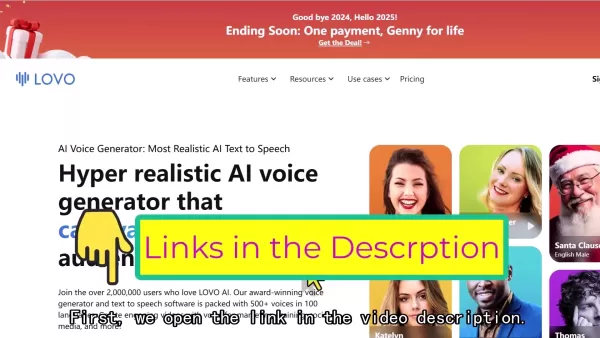
A direct link is often available in video descriptions for quick access to the platform.
Sign In or Sign Up: Click the 'Sign in' button in the website's upper right corner. New users can sign up using a Google, Microsoft, or Slack account, or with an email address.
Complete the Onboarding Process: After logging in, LOVO AI will ask a few questions to personalize your experience. Select the options that best describe your work and content creation goals. This helps the platform tailor its features and suggestions to your needs.
Create a Project: After onboarding, you'll be directed to your workspace. Click the 'AI Voice and Video' button to start your first project, which opens the AI voice editor.
Enter the Editor Interface: This is where you craft your voiceover. The editor allows you to customize the voice by selecting options, adjusting speed, adding emphasis, and inserting pauses.
Select an AI Voice: LOVO AI provides three default AI voices to begin. To choose a different one, click 'Change Voice'. The voice library can be filtered by language, gender, age, and speaking style.
Customize the Voice: Within the editor, you can adjust these settings:
- Emotion: Set the voice's tone using options like 'Narrative', 'Furious', 'Grief', and others.
- Speed: Increase or decrease the speaking rate.
- Emphasis: Highlight specific words or phrases for impact.
- Pause: Insert natural breaks in the speech.
- Fade In/Out: Apply audio fade effects at the clip's start or end.
Input Your Text: Paste your script into the text box. LOVO AI allows generation of up to 500 characters at once.
Generate the Voiceover: Click the 'Generate' button to convert your text into speech using your chosen AI voice and settings.
Review and Refine: Listen to the generated audio and make any needed adjustments to the text or voice settings. You can regenerate the clip as many times as needed for the perfect result.
Download the Voiceover: Once satisfied, you can download the voiceover for your projects. Note that downloading and access to the voice enhancer feature require a paid subscription.
Fine-Tuning Your AI Voice for Maximum Realism
Leveraging Emotions
Choosing the right emotion is key to conveying your intended message. LOVO AI offers various emotional settings like happy, sad, angry, and excited. Experiment with different options to see how they influence the voiceover's overall tone and delivery.
Adjusting Speed and Emphasis
Fine-tuning speed and emphasis can significantly enhance your AI voice's realism. If the voice sounds robotic, try slowing the speaking rate and adding emphasis to key words. This creates a more natural and engaging delivery.
Adding Pauses for Impact
Strategic pauses are powerful tools for adding impact to your voiceover. Inserting short breaks at key points can build anticipation and help listeners digest the information.
LOVO AI Pricing Plans
Overview of Subscription Options
LOVO AI offers several pricing plans for different user needs. These typically include a free tier with basic features and paid subscriptions offering advanced capabilities and higher usage limits. Many premium features, such as voice enhancement, are available only with paid plans.
Features Included in Each Tier
Features vary by pricing tier. Generally, higher-priced plans offer more voice options, greater generation credits, and access to premium tools like Voice Cloning and AI scriptwriting assistance. For the most accurate details, always check the official LOVO AI website.
Pros and Cons of LOVO AI
Pros
Highly realistic AI voices
Extensive customizable voice features
User-friendly, intuitive interface
Adaptable to a wide range of use cases
Cons
Downloading outputs requires a paid plan
Voice enhancer tool needs a subscription upgrade
Restrictions apply to the free plan
Character limits on generation
Core Features of LOVO AI
Key Features for AI Voice Generation
LOVO AI is built with core features designed to streamline voice generation:
- Diverse Voice Library: Access a broad selection of AI voices in multiple languages and styles.
- Emotional Expression: Infuse emotions into voiceovers for more engaging content.
- Customization: Fine-tune settings like speed, emphasis, and pauses.
- User-Friendly Interface: Navigate the platform and generate voiceovers with ease.
- Integration: Connect LOVO AI seamlessly with other content creation tools and platforms.
Use Cases for LOVO AI
Applications of AI Voice Generation
LOVO AI is applicable across numerous fields and industries:
- Marketing: Craft compelling voiceovers for ads, explainer videos, and promotional content.
- Training: Develop engaging training materials with realistic AI narration.
- E-learning: Produce high-quality audio for online courses and educational videos.
- Social Media: Boost social media posts with unique and attention-grabbing voiceovers.
- Audiobooks: Narrate audiobooks using AI voices that match the story's tone and style.
Frequently Asked Questions (FAQ)
Is LOVO AI free to use?
LOVO AI provides a free plan with limited features and usage. Access to more advanced capabilities and higher allowances requires a paid subscription.
Can I use LOVO AI for commercial purposes?
Yes, commercial use is permitted, but specific terms depend on your subscription plan. Always review the licensing agreement for your chosen tier.
How realistic are the AI voices generated by LOVO AI?
LOVO AI is known for its hyper-realistic AI voices. While not always indistinguishable from human speech, the technology consistently evolves to improve naturalness and authenticity.
Related Questions
What are the alternatives to LOVO AI?
The market offers several other AI voice generators. Notable alternatives include Murf.ai, Synthesia, Descript, and WellSaid Labs. Each platform has unique strengths, so exploring a few options is wise to find the best fit for your needs.Murf.ai: Renowned for high-quality AI voices and extensive customization, Murf.ai is a strong choice for professional voiceovers.Synthesia: While focused on AI video generation, Synthesia also offers robust AI voice features, ideal for combined video and audio projects.Descript: A versatile audio/video editing tool with integrated AI voice technology, particularly useful for podcasters and editors.WellSaid Labs: Specializes in enterprise-grade AI voices, offering premium quality and exceptionally realistic delivery for professional applications.
Related article
 Stripe to Acquire OpenRouter as AI Model Routing Gains Momentum
Stripe has agreed to acquire OpenRouter, an AI model-routing platform that gives developers access to hundreds of models through a single interface. The deal adds model selection and routing to Stripe’s existing work around AI usage and token-based b
Former OpenAI Researcher Barrett Zoph Returns to Google to Support Gemini Development
Barret Zoph, who previously abruptly left and joined OpenAI due to a disagreement with Thinking Machines Lab CEO Miriam Mularati, has once again changed employers. Alphabet's Google announced that Zoph will return as Vice President of Research, bring
How Recursive Intelligence Raised $335M at $4B Valuation in 4 Months
The co-founders of startup Ricursive Intelligence seemed destined to be co-founders.Anna Goldie, CEO, and Azalia Mirhoseini, CTO, are so well-known in the AI community that they were among those AI engineers who “got those weird emails from Zuckerber
Related Special Topic Recommendations
Design & Art
Stripe to Acquire OpenRouter as AI Model Routing Gains Momentum
Stripe has agreed to acquire OpenRouter, an AI model-routing platform that gives developers access to hundreds of models through a single interface. The deal adds model selection and routing to Stripe’s existing work around AI usage and token-based b
Former OpenAI Researcher Barrett Zoph Returns to Google to Support Gemini Development
Barret Zoph, who previously abruptly left and joined OpenAI due to a disagreement with Thinking Machines Lab CEO Miriam Mularati, has once again changed employers. Alphabet's Google announced that Zoph will return as Vice President of Research, bring
How Recursive Intelligence Raised $335M at $4B Valuation in 4 Months
The co-founders of startup Ricursive Intelligence seemed destined to be co-founders.Anna Goldie, CEO, and Azalia Mirhoseini, CTO, are so well-known in the AI community that they were among those AI engineers who “got those weird emails from Zuckerber
Related Special Topic Recommendations
Design & Art
 Top AI Illustration Tools: Create Editorial Scenes and Cover Art Faster
2026 Latest Top-rated AI Illustration Tools: Our curated list features the best powerfully designed tools for creating stunning editorial scenes and eye-catching cover art quickly. Each option has gone through rigorous real-world tests, offering a free vs paid comparison to help you find the perfect match for your workflow. Try these must-try solutions today to unlock your AI edge and boost your creative productivity. Explore now at XIX.AI.
 10 tools
 xix.ai
Education and Learning
Top AI Tutors for Exam Prep: Practice Math, Science, and English
xix.ai
Education and Learning
Top AI Tutors for Exam Prep: Practice Math, Science, and English
2026 Latest Top-Rated Best AI Tutors for Exam Prep are here on XIX.AI! Our curated list features powerful game-changing tools that offer free vs paid comparison, real-world tests, and weekly updated rankings. They help boost your writing efficiency, simplify complex topic learning, and unlock your academic potential. Explore now to Discover your perfect exam prep tool and Start creating today to Unlock your AI edge!
10 tools
xix.ai
Finance
AI Budget Planning Tools for Personal Money Management
2026 Latest Best Top-Rated AI Budget Planning Tools for Personal Money Management are here on XIX.AI! This curated collection features powerful, game-changing solutions that help you conduct real-world tests, understand spending habits, and create personalized plans to boost productivity. Enjoy a free vs paid comparison along with detailed rankings. Must-try tools designed to simplify money management and unlock your AI edge. Explore now!
11 tools
xix.ai
Health & Wellness
AI Sleep Tracking Assistants: Improve Recovery with Better Bedtime Habits
2026 Latest Best Top-Rated AI Sleep Tracking Assistants curated for ultimate recovery. This fully updated weekly guide features powerful tools that deliver real-world tests, free vs paid comparison, and detailed rankings to help you find the must-try solution that boosts sleep quality and supports better bedtime habits. Explore now at XIX.AI to Unlock your AI edge.
10 tools
xix.ai
Data Analysis
AI SQL Copilots for Product and Revenue Analytics
2026 Latest Best Top-Rated AI SQL Copilots for Product and Revenue Analytics! XIX.AI has curated a powerful, game-changing collection of must-try tools that undergo real-world tests through weekly updated rankings. These tools help users boost productivity significantly by accelerating data analysis, streamlining complex queries, and generating accurate insights to drive smarter business decisions. Explore now to Discover your perfect tool for unlocking your AI edge!
14 tools
xix.ai
Education and Learning
Best AI Homework Helpers That Teach: Learn Concepts, Not Just Answers
2026 Latest Best Top-Rated AI Homework Helpers That Teach Core Concepts Not Just Answers Powerful Tools for Students Must-Try Curated List Weekly Updated Free vs Paid Comparison Real-World Tests Accurate Rankings to Help You Unlock Your Full Learning Potential Explore now to Discover your perfect tool for smarter studying.
10 tools
xix.ai

 Comments (2)
0/500
Comments (2)
0/500
![WillieHernández]()
LOVO AIの音声生成、便利そうだけど倫理面が心配だな。Deepfakeと区別つかない未来が来るかも。
![PaulThomas]()
Любопытно, как ИИ-озвучка уже заменяет живых дикторов в рекламе. У LOVO звучит естественно, но слышал, что нейросети иногда 'проглатывают' сложные термины. Интересно, есть ли у них ограничения по эмоциональным оттенкам? 🤔 Кстати, в России подобные сервисы пока слабо развиты.
In today's digital landscape, the need for professional voiceovers is surging, yet traditional production is often slow and expensive. AI voice generators like LOVO AI present a powerful solution, delivering realistic and customizable voices for countless projects. This guide delves into LOVO AI's capabilities, providing a complete tutorial on creating lifelike AI voices and a detailed look at its features, pricing, and applications. For marketers, content creators, and educators alike, LOVO AI enables the efficient and affordable production of compelling audio content.
Key Points
LOVO AI is a hyper-realistic voice generator that creates captivating voiceovers.
The platform provides extensive customization for voice features like emotion, speed, and emphasis.
LOVO AI supports diverse applications, from marketing and training to social media and beyond.
Creating AI voices with LOVO AI is simple: sign up, select a voice, input text, and generate.
The platform includes tools to enhance generated audio, though some advanced features require a paid subscription.
Introduction to LOVO AI
What is LOVO AI?
LOVO AI is an AI-powered platform specializing in voice generation, offering a suite of tools to create realistic and customizable voices. It serves various professional needs, including marketing videos, training materials, social media clips, and audiobooks. LOVO AI distinguishes itself by focusing on emotional expression and voice customization, enabling users to produce voices that truly connect with listeners. The platform's technology makes voiceover creation simple, affordable, and scalable.
LOVO AI features an intuitive interface where users input text and convert it to speech using a wide array of adjustable settings. Users can choose from an extensive voice library and fine-tune elements like emotional tone, speaking speed, word emphasis, and pauses. This degree of control allows creators to precisely tailor the audio output to their project's requirements.
LOVO AI boasts a library of over 500 voices in 100 languages, making it a compelling choice in the AI voice generation space.
Key Benefits of Using LOVO AI
LOVO AI offers significant advantages for content creators, marketers, and educators:
- Time Efficiency: Produce voiceovers in minutes, drastically cutting down production time.
- Cost-Effectiveness: Remove the expense of hiring voice actors and booking studio sessions.
- Customization: Adapt voices to align with your brand identity and project needs.
- Scalability: Generate voiceovers for numerous projects without facing resource limitations.
- Versatility: Apply AI voices to various uses, including marketing, training, social media, and more.
Tutorial: Generating Realistic AI Voices with LOVO AI
Step-by-Step Guide to Creating AI Voices
Generating realistic AI voices with LOVO AI is a straightforward process. Follow this detailed step-by-step guide:
Access the LOVO AI Website: Begin by visiting the LOVO AI website.
A direct link is often available in video descriptions for quick access to the platform.
Sign In or Sign Up: Click the 'Sign in' button in the website's upper right corner. New users can sign up using a Google, Microsoft, or Slack account, or with an email address.
Complete the Onboarding Process: After logging in, LOVO AI will ask a few questions to personalize your experience. Select the options that best describe your work and content creation goals. This helps the platform tailor its features and suggestions to your needs.
Create a Project: After onboarding, you'll be directed to your workspace. Click the 'AI Voice and Video' button to start your first project, which opens the AI voice editor.
Enter the Editor Interface: This is where you craft your voiceover. The editor allows you to customize the voice by selecting options, adjusting speed, adding emphasis, and inserting pauses.
Select an AI Voice: LOVO AI provides three default AI voices to begin. To choose a different one, click 'Change Voice'. The voice library can be filtered by language, gender, age, and speaking style.
Customize the Voice: Within the editor, you can adjust these settings:
- Emotion: Set the voice's tone using options like 'Narrative', 'Furious', 'Grief', and others.
- Speed: Increase or decrease the speaking rate.
- Emphasis: Highlight specific words or phrases for impact.
- Pause: Insert natural breaks in the speech.
- Fade In/Out: Apply audio fade effects at the clip's start or end.
Input Your Text: Paste your script into the text box. LOVO AI allows generation of up to 500 characters at once.
Generate the Voiceover: Click the 'Generate' button to convert your text into speech using your chosen AI voice and settings.
Review and Refine: Listen to the generated audio and make any needed adjustments to the text or voice settings. You can regenerate the clip as many times as needed for the perfect result.
Download the Voiceover: Once satisfied, you can download the voiceover for your projects. Note that downloading and access to the voice enhancer feature require a paid subscription.
Fine-Tuning Your AI Voice for Maximum Realism
Leveraging Emotions
Choosing the right emotion is key to conveying your intended message. LOVO AI offers various emotional settings like happy, sad, angry, and excited. Experiment with different options to see how they influence the voiceover's overall tone and delivery.
Adjusting Speed and Emphasis
Fine-tuning speed and emphasis can significantly enhance your AI voice's realism. If the voice sounds robotic, try slowing the speaking rate and adding emphasis to key words. This creates a more natural and engaging delivery.
Adding Pauses for Impact
Strategic pauses are powerful tools for adding impact to your voiceover. Inserting short breaks at key points can build anticipation and help listeners digest the information.
LOVO AI Pricing Plans
Overview of Subscription Options
LOVO AI offers several pricing plans for different user needs. These typically include a free tier with basic features and paid subscriptions offering advanced capabilities and higher usage limits. Many premium features, such as voice enhancement, are available only with paid plans.
Features Included in Each Tier
Features vary by pricing tier. Generally, higher-priced plans offer more voice options, greater generation credits, and access to premium tools like Voice Cloning and AI scriptwriting assistance. For the most accurate details, always check the official LOVO AI website.
Pros and Cons of LOVO AI
Pros
Highly realistic AI voices
Extensive customizable voice features
User-friendly, intuitive interface
Adaptable to a wide range of use cases
Cons
Downloading outputs requires a paid plan
Voice enhancer tool needs a subscription upgrade
Restrictions apply to the free plan
Character limits on generation
Core Features of LOVO AI
Key Features for AI Voice Generation
LOVO AI is built with core features designed to streamline voice generation:
- Diverse Voice Library: Access a broad selection of AI voices in multiple languages and styles.
- Emotional Expression: Infuse emotions into voiceovers for more engaging content.
- Customization: Fine-tune settings like speed, emphasis, and pauses.
- User-Friendly Interface: Navigate the platform and generate voiceovers with ease.
- Integration: Connect LOVO AI seamlessly with other content creation tools and platforms.
Use Cases for LOVO AI
Applications of AI Voice Generation
LOVO AI is applicable across numerous fields and industries:
- Marketing: Craft compelling voiceovers for ads, explainer videos, and promotional content.
- Training: Develop engaging training materials with realistic AI narration.
- E-learning: Produce high-quality audio for online courses and educational videos.
- Social Media: Boost social media posts with unique and attention-grabbing voiceovers.
- Audiobooks: Narrate audiobooks using AI voices that match the story's tone and style.
Frequently Asked Questions (FAQ)
Is LOVO AI free to use?
LOVO AI provides a free plan with limited features and usage. Access to more advanced capabilities and higher allowances requires a paid subscription.
Can I use LOVO AI for commercial purposes?
Yes, commercial use is permitted, but specific terms depend on your subscription plan. Always review the licensing agreement for your chosen tier.
How realistic are the AI voices generated by LOVO AI?
LOVO AI is known for its hyper-realistic AI voices. While not always indistinguishable from human speech, the technology consistently evolves to improve naturalness and authenticity.
Related Questions
What are the alternatives to LOVO AI?
The market offers several other AI voice generators. Notable alternatives include Murf.ai, Synthesia, Descript, and WellSaid Labs. Each platform has unique strengths, so exploring a few options is wise to find the best fit for your needs.Murf.ai: Renowned for high-quality AI voices and extensive customization, Murf.ai is a strong choice for professional voiceovers.Synthesia: While focused on AI video generation, Synthesia also offers robust AI voice features, ideal for combined video and audio projects.Descript: A versatile audio/video editing tool with integrated AI voice technology, particularly useful for podcasters and editors.WellSaid Labs: Specializes in enterprise-grade AI voices, offering premium quality and exceptionally realistic delivery for professional applications.








 Stripe to Acquire OpenRouter as AI Model Routing Gains Momentum
Stripe has agreed to acquire OpenRouter, an AI model-routing platform that gives developers access to hundreds of models through a single interface. The deal adds model selection and routing to Stripe’s existing work around AI usage and token-based b
Stripe to Acquire OpenRouter as AI Model Routing Gains Momentum
Stripe has agreed to acquire OpenRouter, an AI model-routing platform that gives developers access to hundreds of models through a single interface. The deal adds model selection and routing to Stripe’s existing work around AI usage and token-based b
 Former OpenAI Researcher Barrett Zoph Returns to Google to Support Gemini Development
Barret Zoph, who previously abruptly left and joined OpenAI due to a disagreement with Thinking Machines Lab CEO Miriam Mularati, has once again changed employers. Alphabet's Google announced that Zoph will return as Vice President of Research, bring
Former OpenAI Researcher Barrett Zoph Returns to Google to Support Gemini Development
Barret Zoph, who previously abruptly left and joined OpenAI due to a disagreement with Thinking Machines Lab CEO Miriam Mularati, has once again changed employers. Alphabet's Google announced that Zoph will return as Vice President of Research, bring
 How Recursive Intelligence Raised $335M at $4B Valuation in 4 Months
The co-founders of startup Ricursive Intelligence seemed destined to be co-founders.Anna Goldie, CEO, and Azalia Mirhoseini, CTO, are so well-known in the AI community that they were among those AI engineers who “got those weird emails from Zuckerber
How Recursive Intelligence Raised $335M at $4B Valuation in 4 Months
The co-founders of startup Ricursive Intelligence seemed destined to be co-founders.Anna Goldie, CEO, and Azalia Mirhoseini, CTO, are so well-known in the AI community that they were among those AI engineers who “got those weird emails from Zuckerber

2026 Latest Top-rated AI Illustration Tools: Our curated list features the best powerfully designed tools for creating stunning editorial scenes and eye-catching cover art quickly. Each option has gone through rigorous real-world tests, offering a free vs paid comparison to help you find the perfect match for your workflow. Try these must-try solutions today to unlock your AI edge and boost your creative productivity. Explore now at XIX.AI.
10 tools
xix.ai

2026 Latest Top-Rated Best AI Tutors for Exam Prep are here on XIX.AI! Our curated list features powerful game-changing tools that offer free vs paid comparison, real-world tests, and weekly updated rankings. They help boost your writing efficiency, simplify complex topic learning, and unlock your academic potential. Explore now to Discover your perfect exam prep tool and Start creating today to Unlock your AI edge!
10 tools
xix.ai

2026 Latest Best Top-Rated AI Budget Planning Tools for Personal Money Management are here on XIX.AI! This curated collection features powerful, game-changing solutions that help you conduct real-world tests, understand spending habits, and create personalized plans to boost productivity. Enjoy a free vs paid comparison along with detailed rankings. Must-try tools designed to simplify money management and unlock your AI edge. Explore now!
11 tools
xix.ai

2026 Latest Best Top-Rated AI Sleep Tracking Assistants curated for ultimate recovery. This fully updated weekly guide features powerful tools that deliver real-world tests, free vs paid comparison, and detailed rankings to help you find the must-try solution that boosts sleep quality and supports better bedtime habits. Explore now at XIX.AI to Unlock your AI edge.
10 tools
xix.ai

2026 Latest Best Top-Rated AI SQL Copilots for Product and Revenue Analytics! XIX.AI has curated a powerful, game-changing collection of must-try tools that undergo real-world tests through weekly updated rankings. These tools help users boost productivity significantly by accelerating data analysis, streamlining complex queries, and generating accurate insights to drive smarter business decisions. Explore now to Discover your perfect tool for unlocking your AI edge!
14 tools
xix.ai

2026 Latest Best Top-Rated AI Homework Helpers That Teach Core Concepts Not Just Answers Powerful Tools for Students Must-Try Curated List Weekly Updated Free vs Paid Comparison Real-World Tests Accurate Rankings to Help You Unlock Your Full Learning Potential Explore now to Discover your perfect tool for smarter studying.
10 tools
xix.ai

LOVO AIの音声生成、便利そうだけど倫理面が心配だな。Deepfakeと区別つかない未来が来るかも。
Любопытно, как ИИ-озвучка уже заменяет живых дикторов в рекламе. У LOVO звучит естественно, но слышал, что нейросети иногда 'проглатывают' сложные термины. Интересно, есть ли у них ограничения по эмоциональным оттенкам? 🤔 Кстати, в России подобные сервисы пока слабо развиты.












