


 Home
HomePopPop.ai Review: A Free Online Tool for AI-Generated Sound Effects
In today's digital world, sound effects play a vital role in video editing, game development, and various multimedia projects. Manually creating these audio elements is often time-consuming and demands specialized equipment. Fortunately, AI sound effect generators provide a fast and efficient alternative. This article takes a closer look at PopPop.ai, a free web-based AI sound effect generator, exploring its features and how it can be used for different creative projects. Learn how to produce distinctive and realistic audio landscapes for your work without spending a fortune.
Key Points
PopPop.ai provides a free tool for AI-generated sound effects.
This tool converts text prompts into varied and lifelike audio effects.
It also features an AI vocal remover, karaoke creator, and instrumental tools.
PopPop.ai delivers high-fidelity audio in WAV format.
It works with multiple languages, including English, French, Japanese, and Korean.
The resulting sounds are suitable for video production, game development, music creation, and virtual reality applications.
Introduction to PopPop.ai
What is PopPop.ai?
PopPop.ai is a website that offers a collection of free, AI-powered online audio tools.
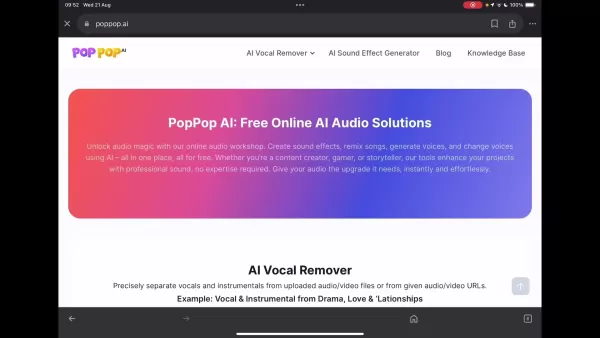
These utilities let users produce sound effects, remix tracks, synthesize voices, and alter vocal characteristics. This article centers on its AI Sound Effect Generator—a feature that turns text prompts into one-of-a-kind, realistic soundscapes for diverse video and audio projects. Created by Nabia Mind, an AI tool developer, PopPop.ai aims to deliver accessible audio enhancement solutions for creators at every skill level. In this detailed overview, we explore the platform's features, benefits, and possible limitations to help you decide if it fits your sound design needs.
Features and Tools Offered
Beyond sound effect generation, PopPop.ai includes several other utilities.
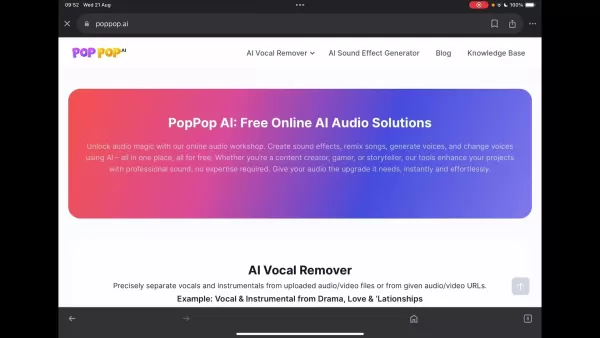
Here’s a brief overview of some additional features:
- AI Vocal Remover: Accurately separates vocals and instrumentals from uploaded audio or video files, or from provided URLs.
- Karaoke Maker: Produces karaoke tracks by removing vocals from songs, letting users sing along to the backing music.
- Acapella Extractor: Isolates vocal tracks from songs for acapella arrangements or remixing.
- Instrumental Maker: Creates instrumental versions of tracks by eliminating the vocal parts.
- Instrumental Remover: Strips away the instrumental components, preserving the vocals for other creative uses. These features address a broad spectrum of audio editing requirements, establishing PopPop.ai as a flexible platform for audio manipulation. The AI Sound Effect Generator stands out for its ability to produce custom audio environments from written descriptions.
Getting Started with the AI Sound Effect Generator
To begin using the AI Sound Effect Generator, navigate to the PopPop.AI website.
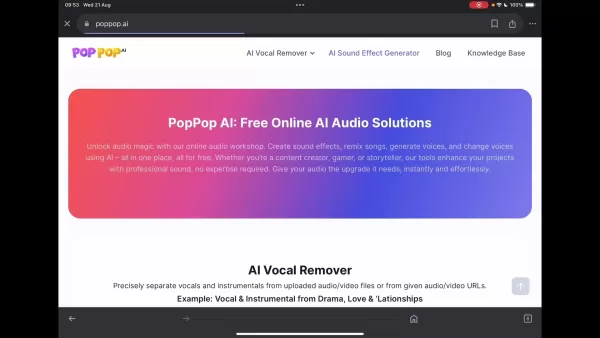
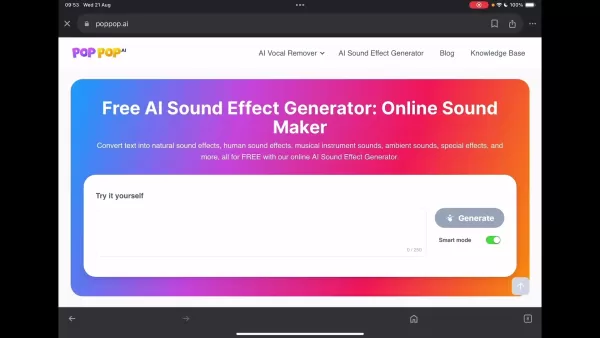
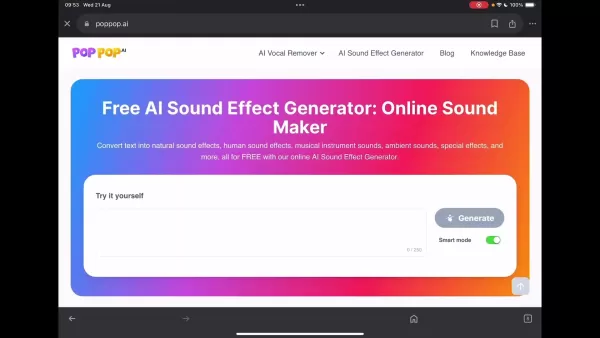
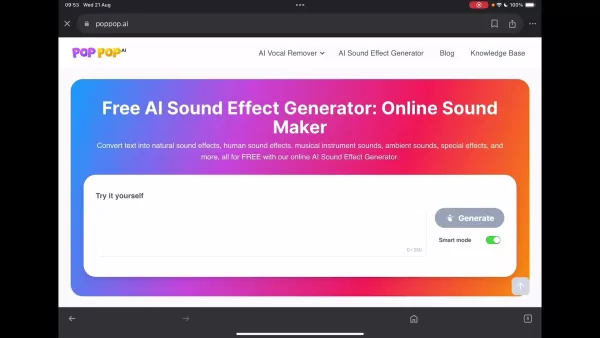
The tool is free and doesn't require registration or software installation, ensuring quick and easy access. The generator’s interface includes a text input box where you can describe your desired sound effect, with a 250-character limit. An optional "Smart mode" enhances and refines your sound descriptions automatically. Below the prompt area, the site shows available sound categories and selected examples. A download icon appears once the generation is finished, letting you save the audio as a WAV file.
Using PopPop.ai is simple, but crafting effective prompts and refining sound outputs is key to success. The AI sound generator aims to produce realistic audio from simple text inputs.
A Hands-on Experience: Testing the AI Sound Effect Generator
Experimenting with Text Prompts
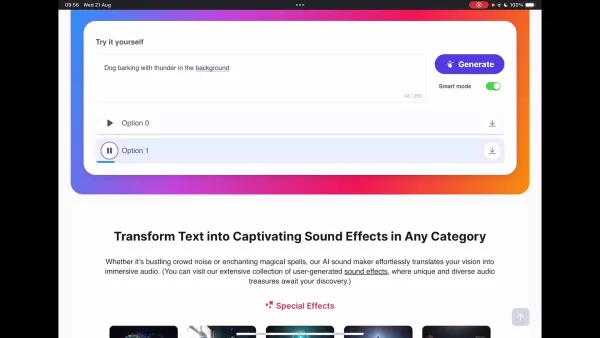
To evaluate the AI sound effect generator, we experimented with several text prompts. One example was 'Dog barking with thunder in the background.'
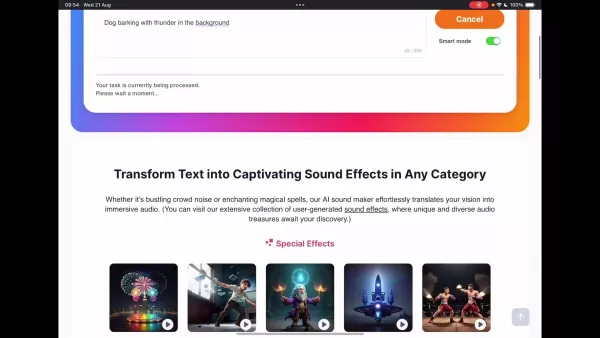
Although the tool generated thunder sounds, the dog barking was missing. This suggests the system may have difficulty handling multiple complex audio elements at once. Another test using '80s video Game' resulted in typical synth music from that era, but it couldn't produce more intricate audio layers, indicating it works better for single subjects. However, entering ‘water in the bath’ produced the sound of running tap water, showing the tool's effectiveness with certain types of prompts.
You can share the created sounds on social media or download them. The smart mode option is designed to enhance and elaborate on sound descriptions for improved results, though it doesn't always guarantee accurate soundscapes.
Examining Pre-Made Examples
PopPop.ai also presents a range of special effects and audio categories. Reviewing these helps identify the types of sounds it handles best. Categories include fireworks, glass breaking, magic, spaceship, action, gunshot, typing, bustling restaurant, doorbell, television audio, cooking sounds, street ambiance, rain, ocean waves and birds, flowing water, insect chirps, thunder and lightning, and dog barking. By clicking the corresponding images on the website, you can preview the quality of the free AI-generated sound effects.
How to Generate Sound Effects with PopPop.ai
Step-by-Step Guide
Follow these steps to create sound effects using PopPop.ai:
- Visit the PopPop.ai Website: Go to the AI Sound Effect Generator page on the PopPop.ai site.
- Enter a Text Prompt: Type a clear and concise description of your desired sound into the text box. You have up to 250 characters
.
- Engage Smart Mode (Optional): Activate Smart Mode to automatically enrich your description. You can also test without it to compare results.
- Generate the Sound: Click “Generate” and wait for the AI to process your request. The site shows a processing status.
- Listen to the Options: Once finished, the tool presents two audio options for you to review.
- Download the Audio File: If you like one of the options, download the .wav file and share it.
Pricing Structure of PopPop.ai
Completely Free Access
A major benefit of PopPop.ai is that it’s completely free.
There are no subscription fees, hidden charges, or mandatory account creation, making it available to everyone. Plus, the site is ad-free, offering a clean and focused user experience. You can create and download sound effects without financial concerns or distracting ads. This free approach is especially appealing for hobbyists and those on a tight budget.
Evaluating the Pros and Cons of PopPop.ai
Pros
Completely free to use, making it available to all users.
No registration or software installation needed for easy access.
Includes a range of AI audio tools such as a vocal remover, karaoke maker, and instrumental creator.
Supports multiple languages like English, French, Japanese, Chinese, and Korean.
Produces high-quality audio output in WAV format.
Cons
Effectiveness varies, and some prompts yield better outcomes than others.
The AI may find it challenging to process complex or multiple sounds in a single request.
Smart mode does not clarify what specific enhancements it applies.
There are no adjustable settings for parameters such as sound duration or intensity.
Highlighting the Core Features of PopPop.ai
Key Functionalities
Here are the primary features that make PopPop.ai an attractive option for audio creation:
Text-to-Sound Conversion: The main feature, transforming written descriptions into realistic and unique soundscapes.
Diverse Sound Library: Capable of producing ambient noises, human sounds, instrumental audio, natural soundscapes, special effects, and more.
High-Quality Output: Using WAV format ensures premium audio quality, ideal for professional use.
User-Friendly Interface: Designed for simplicity, allowing users to generate audio without complicated steps.
Illustrative Use Cases
Practical Applications
PopPop.ai serves a wide array of practical purposes
:
- Video Production: Elevates video content with custom sound effects, improving the overall auditory experience.
- Game Development: Gives game developers the ability to create unique sounds without recording or licensing external files.
- Music Production: Enhances musical works with custom sounds, introducing fresh and original elements.
- Virtual Reality: Builds immersive VR settings with realistic, context-appropriate audio.
Frequently Asked Questions about PopPop.ai
Which platforms does PopPop.ai support?
PopPop.ai works smoothly on all major platforms, including Windows, macOS, Android, and iOS, so you can use it on your computer, tablet, or smartphone through a web browser.
What does the Smart Mode mean?
Smart Mode automatically improves your text prompts, helping the AI generate more detailed and rich audio based on your input.
What is the audio output format?
PopPop.ai exports sound effects in WAV format, delivering high-fidelity audio, though file sizes may be larger than formats like MP3.
Related Questions
Are there any AI sound effects generators that are similar to PopPop.ai?
Yes, several AI sound effect generators offer comparable features with their own unique strengths:Boomy: This AI platform enables users to compose music and generate sound effects for different media. It emphasizes intuitive tools for music creation and sound design.Amper Music: Prior to its acquisition by Shutterstock, Amper Music offered AI-based music creation tools, including sound effect generation. Users could define attributes like genre, mood, and duration, and the AI would create original sounds and audio landscapes.Soundful: Soundful focuses on AI music generation and also allows users to create custom sound effects for videos. By entering preferences and details, users receive tailored audio elements.Loudly: Loudly is a platform that uses AI to produce royalty-free music and sound effects for different uses. It’s recognized for its extensive library of customizable audio assets.Aiva: Aiva creates music and sound effects by learning from existing compositions. Users can guide the AI’s output by providing style references and specific requirements.Murf.ai: Although Murf.ai mainly specializes in AI voice synthesis, it also offers features to add sound effects to audio projects. It’s notable for its voice cloning and modification functions.Each of these AI sound effect generators brings distinct capabilities, from full-scale music composition to targeted sound design. Content creators are encouraged to try different options to find the one that best matches their project requirements.
Related article
 Stripe to Acquire OpenRouter as AI Model Routing Gains Momentum
Stripe has agreed to acquire OpenRouter, an AI model-routing platform that gives developers access to hundreds of models through a single interface. The deal adds model selection and routing to Stripe’s existing work around AI usage and token-based b
Former OpenAI Researcher Barrett Zoph Returns to Google to Support Gemini Development
Barret Zoph, who previously abruptly left and joined OpenAI due to a disagreement with Thinking Machines Lab CEO Miriam Mularati, has once again changed employers. Alphabet's Google announced that Zoph will return as Vice President of Research, bring
How Recursive Intelligence Raised $335M at $4B Valuation in 4 Months
The co-founders of startup Ricursive Intelligence seemed destined to be co-founders.Anna Goldie, CEO, and Azalia Mirhoseini, CTO, are so well-known in the AI community that they were among those AI engineers who “got those weird emails from Zuckerber
Related Special Topic Recommendations
Design & Art
Stripe to Acquire OpenRouter as AI Model Routing Gains Momentum
Stripe has agreed to acquire OpenRouter, an AI model-routing platform that gives developers access to hundreds of models through a single interface. The deal adds model selection and routing to Stripe’s existing work around AI usage and token-based b
Former OpenAI Researcher Barrett Zoph Returns to Google to Support Gemini Development
Barret Zoph, who previously abruptly left and joined OpenAI due to a disagreement with Thinking Machines Lab CEO Miriam Mularati, has once again changed employers. Alphabet's Google announced that Zoph will return as Vice President of Research, bring
How Recursive Intelligence Raised $335M at $4B Valuation in 4 Months
The co-founders of startup Ricursive Intelligence seemed destined to be co-founders.Anna Goldie, CEO, and Azalia Mirhoseini, CTO, are so well-known in the AI community that they were among those AI engineers who “got those weird emails from Zuckerber
Related Special Topic Recommendations
Design & Art
 Top AI Illustration Tools: Create Editorial Scenes and Cover Art Faster
2026 Latest Top-rated AI Illustration Tools: Our curated list features the best powerfully designed tools for creating stunning editorial scenes and eye-catching cover art quickly. Each option has gone through rigorous real-world tests, offering a free vs paid comparison to help you find the perfect match for your workflow. Try these must-try solutions today to unlock your AI edge and boost your creative productivity. Explore now at XIX.AI.
 10 tools
 xix.ai
Education and Learning
Top AI Tutors for Exam Prep: Practice Math, Science, and English
xix.ai
Education and Learning
Top AI Tutors for Exam Prep: Practice Math, Science, and English
2026 Latest Top-Rated Best AI Tutors for Exam Prep are here on XIX.AI! Our curated list features powerful game-changing tools that offer free vs paid comparison, real-world tests, and weekly updated rankings. They help boost your writing efficiency, simplify complex topic learning, and unlock your academic potential. Explore now to Discover your perfect exam prep tool and Start creating today to Unlock your AI edge!
10 tools
xix.ai
Finance
AI Budget Planning Tools for Personal Money Management
2026 Latest Best Top-Rated AI Budget Planning Tools for Personal Money Management are here on XIX.AI! This curated collection features powerful, game-changing solutions that help you conduct real-world tests, understand spending habits, and create personalized plans to boost productivity. Enjoy a free vs paid comparison along with detailed rankings. Must-try tools designed to simplify money management and unlock your AI edge. Explore now!
11 tools
xix.ai
Health & Wellness
AI Sleep Tracking Assistants: Improve Recovery with Better Bedtime Habits
2026 Latest Best Top-Rated AI Sleep Tracking Assistants curated for ultimate recovery. This fully updated weekly guide features powerful tools that deliver real-world tests, free vs paid comparison, and detailed rankings to help you find the must-try solution that boosts sleep quality and supports better bedtime habits. Explore now at XIX.AI to Unlock your AI edge.
10 tools
xix.ai
Data Analysis
AI SQL Copilots for Product and Revenue Analytics
2026 Latest Best Top-Rated AI SQL Copilots for Product and Revenue Analytics! XIX.AI has curated a powerful, game-changing collection of must-try tools that undergo real-world tests through weekly updated rankings. These tools help users boost productivity significantly by accelerating data analysis, streamlining complex queries, and generating accurate insights to drive smarter business decisions. Explore now to Discover your perfect tool for unlocking your AI edge!
14 tools
xix.ai
Education and Learning
Best AI Homework Helpers That Teach: Learn Concepts, Not Just Answers
2026 Latest Best Top-Rated AI Homework Helpers That Teach Core Concepts Not Just Answers Powerful Tools for Students Must-Try Curated List Weekly Updated Free vs Paid Comparison Real-World Tests Accurate Rankings to Help You Unlock Your Full Learning Potential Explore now to Discover your perfect tool for smarter studying.
10 tools
xix.ai

 Comments (0)
0/500
Comments (0)
0/500
In today's digital world, sound effects play a vital role in video editing, game development, and various multimedia projects. Manually creating these audio elements is often time-consuming and demands specialized equipment. Fortunately, AI sound effect generators provide a fast and efficient alternative. This article takes a closer look at PopPop.ai, a free web-based AI sound effect generator, exploring its features and how it can be used for different creative projects. Learn how to produce distinctive and realistic audio landscapes for your work without spending a fortune.
Key Points
PopPop.ai provides a free tool for AI-generated sound effects.
This tool converts text prompts into varied and lifelike audio effects.
It also features an AI vocal remover, karaoke creator, and instrumental tools.
PopPop.ai delivers high-fidelity audio in WAV format.
It works with multiple languages, including English, French, Japanese, and Korean.
The resulting sounds are suitable for video production, game development, music creation, and virtual reality applications.
Introduction to PopPop.ai
What is PopPop.ai?
PopPop.ai is a website that offers a collection of free, AI-powered online audio tools.
These utilities let users produce sound effects, remix tracks, synthesize voices, and alter vocal characteristics. This article centers on its AI Sound Effect Generator—a feature that turns text prompts into one-of-a-kind, realistic soundscapes for diverse video and audio projects. Created by Nabia Mind, an AI tool developer, PopPop.ai aims to deliver accessible audio enhancement solutions for creators at every skill level. In this detailed overview, we explore the platform's features, benefits, and possible limitations to help you decide if it fits your sound design needs.
Features and Tools Offered
Beyond sound effect generation, PopPop.ai includes several other utilities.
Here’s a brief overview of some additional features:
- AI Vocal Remover: Accurately separates vocals and instrumentals from uploaded audio or video files, or from provided URLs.
- Karaoke Maker: Produces karaoke tracks by removing vocals from songs, letting users sing along to the backing music.
- Acapella Extractor: Isolates vocal tracks from songs for acapella arrangements or remixing.
- Instrumental Maker: Creates instrumental versions of tracks by eliminating the vocal parts.
- Instrumental Remover: Strips away the instrumental components, preserving the vocals for other creative uses. These features address a broad spectrum of audio editing requirements, establishing PopPop.ai as a flexible platform for audio manipulation. The AI Sound Effect Generator stands out for its ability to produce custom audio environments from written descriptions.
Getting Started with the AI Sound Effect Generator
To begin using the AI Sound Effect Generator, navigate to the PopPop.AI website.
The tool is free and doesn't require registration or software installation, ensuring quick and easy access. The generator’s interface includes a text input box where you can describe your desired sound effect, with a 250-character limit. An optional "Smart mode" enhances and refines your sound descriptions automatically. Below the prompt area, the site shows available sound categories and selected examples. A download icon appears once the generation is finished, letting you save the audio as a WAV file.
Using PopPop.ai is simple, but crafting effective prompts and refining sound outputs is key to success. The AI sound generator aims to produce realistic audio from simple text inputs.
A Hands-on Experience: Testing the AI Sound Effect Generator
Experimenting with Text Prompts
To evaluate the AI sound effect generator, we experimented with several text prompts. One example was 'Dog barking with thunder in the background.'
Although the tool generated thunder sounds, the dog barking was missing. This suggests the system may have difficulty handling multiple complex audio elements at once. Another test using '80s video Game' resulted in typical synth music from that era, but it couldn't produce more intricate audio layers, indicating it works better for single subjects. However, entering ‘water in the bath’ produced the sound of running tap water, showing the tool's effectiveness with certain types of prompts.
You can share the created sounds on social media or download them. The smart mode option is designed to enhance and elaborate on sound descriptions for improved results, though it doesn't always guarantee accurate soundscapes.
Examining Pre-Made Examples
PopPop.ai also presents a range of special effects and audio categories. Reviewing these helps identify the types of sounds it handles best. Categories include fireworks, glass breaking, magic, spaceship, action, gunshot, typing, bustling restaurant, doorbell, television audio, cooking sounds, street ambiance, rain, ocean waves and birds, flowing water, insect chirps, thunder and lightning, and dog barking. By clicking the corresponding images on the website, you can preview the quality of the free AI-generated sound effects.
How to Generate Sound Effects with PopPop.ai
Step-by-Step Guide
Follow these steps to create sound effects using PopPop.ai:
- Visit the PopPop.ai Website: Go to the AI Sound Effect Generator page on the PopPop.ai site.
- Enter a Text Prompt: Type a clear and concise description of your desired sound into the text box. You have up to 250 characters
.
- Engage Smart Mode (Optional): Activate Smart Mode to automatically enrich your description. You can also test without it to compare results.
- Generate the Sound: Click “Generate” and wait for the AI to process your request. The site shows a processing status.
- Listen to the Options: Once finished, the tool presents two audio options for you to review.
- Download the Audio File: If you like one of the options, download the .wav file and share it.
Pricing Structure of PopPop.ai
Completely Free Access
A major benefit of PopPop.ai is that it’s completely free.
There are no subscription fees, hidden charges, or mandatory account creation, making it available to everyone. Plus, the site is ad-free, offering a clean and focused user experience. You can create and download sound effects without financial concerns or distracting ads. This free approach is especially appealing for hobbyists and those on a tight budget.
Evaluating the Pros and Cons of PopPop.ai
Pros
Completely free to use, making it available to all users.
No registration or software installation needed for easy access.
Includes a range of AI audio tools such as a vocal remover, karaoke maker, and instrumental creator.
Supports multiple languages like English, French, Japanese, Chinese, and Korean.
Produces high-quality audio output in WAV format.
Cons
Effectiveness varies, and some prompts yield better outcomes than others.
The AI may find it challenging to process complex or multiple sounds in a single request.
Smart mode does not clarify what specific enhancements it applies.
There are no adjustable settings for parameters such as sound duration or intensity.
Highlighting the Core Features of PopPop.ai
Key Functionalities
Here are the primary features that make PopPop.ai an attractive option for audio creation:
Text-to-Sound Conversion: The main feature, transforming written descriptions into realistic and unique soundscapes.
Diverse Sound Library: Capable of producing ambient noises, human sounds, instrumental audio, natural soundscapes, special effects, and more.
High-Quality Output: Using WAV format ensures premium audio quality, ideal for professional use.
User-Friendly Interface: Designed for simplicity, allowing users to generate audio without complicated steps.
Illustrative Use Cases
Practical Applications
PopPop.ai serves a wide array of practical purposes
:
- Video Production: Elevates video content with custom sound effects, improving the overall auditory experience.
- Game Development: Gives game developers the ability to create unique sounds without recording or licensing external files.
- Music Production: Enhances musical works with custom sounds, introducing fresh and original elements.
- Virtual Reality: Builds immersive VR settings with realistic, context-appropriate audio.
Frequently Asked Questions about PopPop.ai
Which platforms does PopPop.ai support?
PopPop.ai works smoothly on all major platforms, including Windows, macOS, Android, and iOS, so you can use it on your computer, tablet, or smartphone through a web browser.
What does the Smart Mode mean?
Smart Mode automatically improves your text prompts, helping the AI generate more detailed and rich audio based on your input.
What is the audio output format?
PopPop.ai exports sound effects in WAV format, delivering high-fidelity audio, though file sizes may be larger than formats like MP3.
Related Questions
Are there any AI sound effects generators that are similar to PopPop.ai?
Yes, several AI sound effect generators offer comparable features with their own unique strengths:Boomy: This AI platform enables users to compose music and generate sound effects for different media. It emphasizes intuitive tools for music creation and sound design.Amper Music: Prior to its acquisition by Shutterstock, Amper Music offered AI-based music creation tools, including sound effect generation. Users could define attributes like genre, mood, and duration, and the AI would create original sounds and audio landscapes.Soundful: Soundful focuses on AI music generation and also allows users to create custom sound effects for videos. By entering preferences and details, users receive tailored audio elements.Loudly: Loudly is a platform that uses AI to produce royalty-free music and sound effects for different uses. It’s recognized for its extensive library of customizable audio assets.Aiva: Aiva creates music and sound effects by learning from existing compositions. Users can guide the AI’s output by providing style references and specific requirements.Murf.ai: Although Murf.ai mainly specializes in AI voice synthesis, it also offers features to add sound effects to audio projects. It’s notable for its voice cloning and modification functions.Each of these AI sound effect generators brings distinct capabilities, from full-scale music composition to targeted sound design. Content creators are encouraged to try different options to find the one that best matches their project requirements.








 Stripe to Acquire OpenRouter as AI Model Routing Gains Momentum
Stripe has agreed to acquire OpenRouter, an AI model-routing platform that gives developers access to hundreds of models through a single interface. The deal adds model selection and routing to Stripe’s existing work around AI usage and token-based b
Stripe to Acquire OpenRouter as AI Model Routing Gains Momentum
Stripe has agreed to acquire OpenRouter, an AI model-routing platform that gives developers access to hundreds of models through a single interface. The deal adds model selection and routing to Stripe’s existing work around AI usage and token-based b
 Former OpenAI Researcher Barrett Zoph Returns to Google to Support Gemini Development
Barret Zoph, who previously abruptly left and joined OpenAI due to a disagreement with Thinking Machines Lab CEO Miriam Mularati, has once again changed employers. Alphabet's Google announced that Zoph will return as Vice President of Research, bring
Former OpenAI Researcher Barrett Zoph Returns to Google to Support Gemini Development
Barret Zoph, who previously abruptly left and joined OpenAI due to a disagreement with Thinking Machines Lab CEO Miriam Mularati, has once again changed employers. Alphabet's Google announced that Zoph will return as Vice President of Research, bring
 How Recursive Intelligence Raised $335M at $4B Valuation in 4 Months
The co-founders of startup Ricursive Intelligence seemed destined to be co-founders.Anna Goldie, CEO, and Azalia Mirhoseini, CTO, are so well-known in the AI community that they were among those AI engineers who “got those weird emails from Zuckerber
How Recursive Intelligence Raised $335M at $4B Valuation in 4 Months
The co-founders of startup Ricursive Intelligence seemed destined to be co-founders.Anna Goldie, CEO, and Azalia Mirhoseini, CTO, are so well-known in the AI community that they were among those AI engineers who “got those weird emails from Zuckerber

2026 Latest Top-rated AI Illustration Tools: Our curated list features the best powerfully designed tools for creating stunning editorial scenes and eye-catching cover art quickly. Each option has gone through rigorous real-world tests, offering a free vs paid comparison to help you find the perfect match for your workflow. Try these must-try solutions today to unlock your AI edge and boost your creative productivity. Explore now at XIX.AI.
10 tools
xix.ai

2026 Latest Top-Rated Best AI Tutors for Exam Prep are here on XIX.AI! Our curated list features powerful game-changing tools that offer free vs paid comparison, real-world tests, and weekly updated rankings. They help boost your writing efficiency, simplify complex topic learning, and unlock your academic potential. Explore now to Discover your perfect exam prep tool and Start creating today to Unlock your AI edge!
10 tools
xix.ai

2026 Latest Best Top-Rated AI Budget Planning Tools for Personal Money Management are here on XIX.AI! This curated collection features powerful, game-changing solutions that help you conduct real-world tests, understand spending habits, and create personalized plans to boost productivity. Enjoy a free vs paid comparison along with detailed rankings. Must-try tools designed to simplify money management and unlock your AI edge. Explore now!
11 tools
xix.ai

2026 Latest Best Top-Rated AI Sleep Tracking Assistants curated for ultimate recovery. This fully updated weekly guide features powerful tools that deliver real-world tests, free vs paid comparison, and detailed rankings to help you find the must-try solution that boosts sleep quality and supports better bedtime habits. Explore now at XIX.AI to Unlock your AI edge.
10 tools
xix.ai

2026 Latest Best Top-Rated AI SQL Copilots for Product and Revenue Analytics! XIX.AI has curated a powerful, game-changing collection of must-try tools that undergo real-world tests through weekly updated rankings. These tools help users boost productivity significantly by accelerating data analysis, streamlining complex queries, and generating accurate insights to drive smarter business decisions. Explore now to Discover your perfect tool for unlocking your AI edge!
14 tools
xix.ai

2026 Latest Best Top-Rated AI Homework Helpers That Teach Core Concepts Not Just Answers Powerful Tools for Students Must-Try Curated List Weekly Updated Free vs Paid Comparison Real-World Tests Accurate Rankings to Help You Unlock Your Full Learning Potential Explore now to Discover your perfect tool for smarter studying.
10 tools
xix.ai












