


 Home
HomeOracle APEX Integrates AI for Streamlined Low-Code Development
Oracle Application Express (APEX) is a robust low-code development platform that empowers developers to build and deploy database-driven applications efficiently. By harnessing the capabilities of SQL and integrating an AI Assistant, APEX delivers a highly productive environment for crafting data-centric solutions. This article delves into the features of Oracle APEX, with a focus on its AI-powered tools and how they streamline application development.
Key Points
Oracle APEX streamlines database application creation through its low-code methodology.
The AI Assistant generates SQL queries based on natural language input.
Accessible within SQL Workshop, APEX supports iterative query improvement.
Generative AI jumpstarts the process of building complete applications.
APEX is a powerful platform for developers of all skill levels, enhancing SQL proficiency and troubleshooting.
Understanding Oracle APEX and Low-Code Development
What is Oracle APEX?
Oracle APEX is a low-code development platform that enables both professional and citizen developers to quickly build and deploy database-centric applications. It minimizes the need for manual coding, speeding up development timelines and reducing potential errors. Centered around SQL and PL/SQL, APEX offers a familiar workspace for Oracle developers while incorporating contemporary, intuitive interfaces.
APEX applications are fully responsive and can be accessed from any device, ensuring a smooth user experience. The platform comes with a comprehensive suite of built-in components and templates, allowing developers to create advanced applications with minimal effort. Whether you're designing a basic data entry form or a sophisticated enterprise solution, Oracle APEX provides the necessary resources for success.
Key benefits of Oracle APEX:
- Accelerated development cycles
- Minimized coding requirements
- Enhanced application reliability
- Consistent user experience
- Budget-friendly approach
Oracle APEX is well-suited for various application types, including:
- Data entry and reporting systems
- Business intelligence dashboards
- Mobile applications
- Workflow automation
- Tailored enterprise solutions
By utilizing Oracle APEX, organizations can enable their development teams to deliver high-quality applications more rapidly and effectively, driving business innovation and value.
The Role of a Data Model
The development process starts with a data model, which defines the information structure the application will handle.
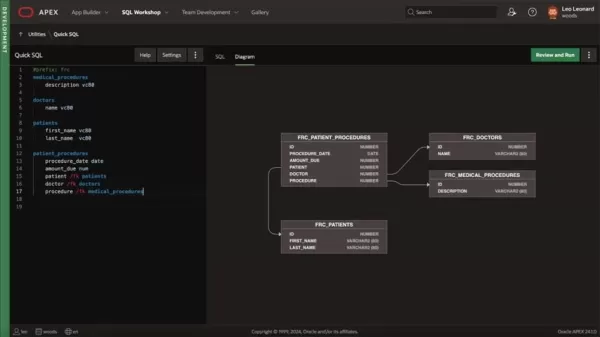
This foundational step is essential for creating a well-organized and efficient application. The data model specifies the entities, attributes, and relationships within the dataset, offering a clear blueprint for the database schema and application logic.
A properly designed data model ensures data consistency, integrity, and accuracy. It enables efficient data retrieval and manipulation, boosting overall application performance. By comprehending the data model, developers can design intuitive interfaces that help users easily locate, visualize, and update information.
Key elements of a data model:
- Entities: Represent real-world objects or concepts (e.g., customers, products, orders).
- Attributes: Describe the characteristics of an entity (e.g., customer name, product price, order date).
- Relationships: Define how entities are connected (e.g., a customer places an order, a product belongs to a category).
In Oracle APEX, the data model is typically represented using tables, columns, and foreign keys. These database objects form the physical structure for storing and managing data. A well-designed data model ensures that APEX applications are robust, scalable, and maintainable.
Data-Driven Power: How APEX and SQL Integration Works
Harnessing the Power of SQL
The core strength of Oracle APEX lies in its seamless integration with SQL, a language developers have trusted for over five decades.
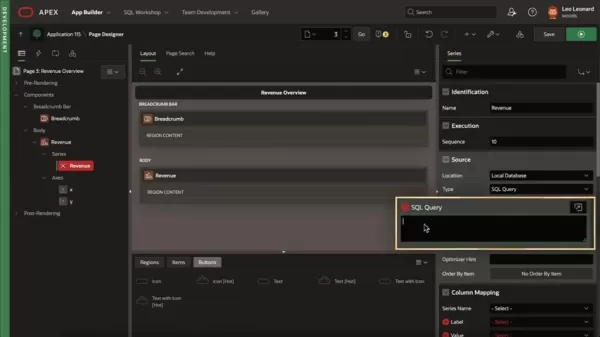
This integration allows developers to interact with databases, retrieve information, and manipulate data effortlessly. SQL's declarative nature simplifies data management tasks, facilitating the creation of robust and scalable applications. From selecting specific records to aggregating data, SQL's comprehensive command set provides the tools needed for complex data operations.
Oracle APEX uses SQL to help developers create dynamic, data-driven user interfaces. By embedding SQL queries within APEX components, developers can build interactive forms, reports, and charts that display real-time data. This integration removes the need for complex coding and simplifies the creation of user-friendly interfaces.
Examples of SQL’s Use in APEX:
- Data Retrieval: Use SELECT statements to fetch specific data from tables.
- Data Manipulation: Use INSERT, UPDATE, and DELETE statements to modify table data.
- Data Aggregation: Use GROUP BY and aggregate functions (e.g., SUM, AVG, COUNT) to summarize data.
- Data Filtering: Use WHERE clauses to filter data based on specific criteria.
- Data Joins: Use JOIN clauses to combine data from multiple tables.
By mastering SQL and understanding its integration with Oracle APEX, developers can unlock the platform's full potential and create powerful data-driven applications.
Creating a New Application with AI Assistant
Step-by-Step Guide
- Navigate to App Builder: From the Oracle APEX home page, click on App Builder to enter the application development environment.
- Create New Application: Click the Create button to initiate the application creation process. Select the option to build an application using Generative AI.
- Describe Your Application: Use natural language to outline your application's purpose, including the types of pages and specific features you want to include.
- Review AI Assistant's Proposal: The AI Assistant will analyze your description and suggest a set of pages, features, and options that match your requirements. Carefully review the proposal and make any needed adjustments.
- Create Application: Click the Create Application button to generate the application. APEX will automatically build the pages, features, and options you selected, providing a solid foundation for your development work.
- Customize and Extend: Tailor the generated code to meet your specific needs and enhance the application's functionality by adding features, integrating with other systems, or modifying the user interface.
Understanding Oracle APEX Pricing
Oracle APEX is Included with Oracle Database
Oracle APEX is a complimentary feature of the Oracle Database, available across all editions. If you're already an Oracle Database customer, you can begin using APEX immediately without extra licensing costs. The primary cost factors involve the Oracle Database license and infrastructure, which vary based on user count, database size, and deployment model (on-premises or cloud). For detailed pricing information regarding Oracle Database and cloud services, refer to Oracle's official pricing documentation or contact their sales team directly.
The AI Assistant is part of Oracle Cloud Infrastructure (OCI) AI services. Usage costs are based on the number of requests and the volume of data processed. Expenses will depend on how frequently you use this feature.
By adopting Oracle APEX, organizations can substantially lower application development costs and deliver high-quality solutions more quickly and efficiently.
Advantages and Disadvantages of Using Oracle APEX
Pros
Rapid application development thanks to its low-code approach.
AI Assistant streamlines SQL query generation and comprehension.
Tight integration with Oracle databases.
Cost-efficient solution with reduced coding requirements.
User-friendly interface for developers and end-users alike.
Cons
Dependence on SQL and PL/SQL knowledge.
Fewer customization options compared to traditional coding.
Potential vendor lock-in with Oracle technologies.
Challenges in addressing highly specific or non-standard requirements.
Requires database expertise to design effective data models.
Core Features of Oracle APEX and its AI Assistant
SQL Query Generation
The AI Assistant creates SQL queries from natural language input.
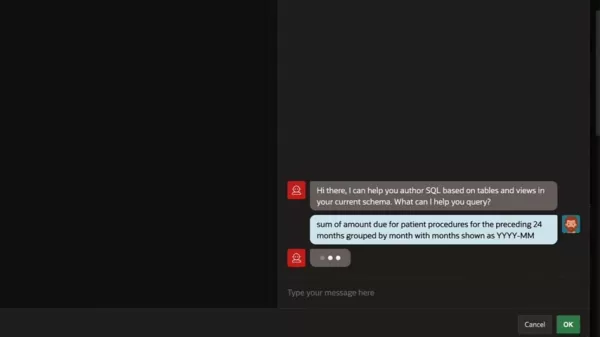
Users can type their requirements, such as "sum of amount due for patient procedures for the preceding 24 months grouped by month," and the AI Assistant will produce the corresponding SQL statement. This feature dramatically cuts down the time and effort needed to write complex queries, helping developers extract the data they need more easily.
The generated SQL queries can be customized and refined as needed. APEX offers a rich set of tools for editing and testing queries, ensuring they meet application-specific requirements. By leveraging the AI Assistant, developers can speed up query development and concentrate on other critical aspects of the application.
Key benefits of SQL Query Generation:
- Faster query development
- Reduced coding effort
- Improved query accuracy
- Simple customization and refinement
- Increased developer productivity
Natural Language Processing
Oracle APEX incorporates natural language processing (NLP) capabilities, allowing the AI Assistant to understand and interpret user requests written in plain English.
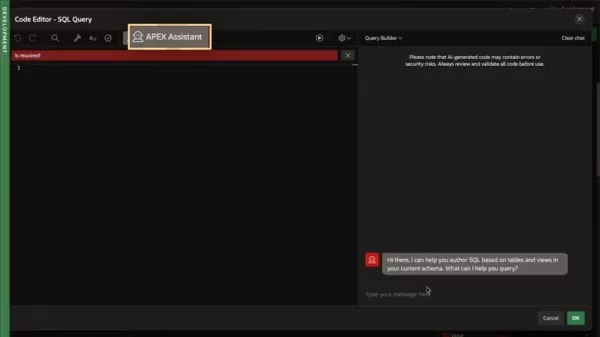
This feature removes the need for developers to memorize complex SQL syntax or comprehend intricate database schemas. They can simply state their data needs in natural language, and the AI Assistant will convert those requests into executable SQL queries.
The NLP engine analyzes the user's input, identifies relevant entities, attributes, and relationships, and generates the appropriate SQL statement. It also handles common misspellings, synonyms, and phrasing variations, ensuring the user's intent is accurately captured. By leveraging NLP, Oracle APEX simplifies database interaction and facilitates the creation of data-driven applications.
Key advantages of Natural Language Processing:
- Intuitive and user-friendly interface
- No SQL expertise required
- Handles phrasing and spelling variations
- Reduces learning curve for new developers
- Speeds up application development
Iterative Query Refinement
Oracle APEX integrates with the SQL Workshop, enabling developers to iteratively refine their queries with the AI Assistant's help.
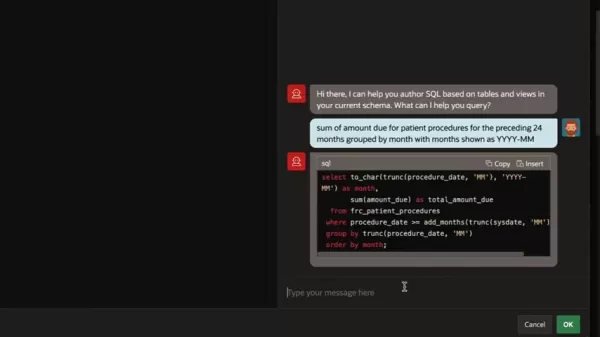
They can start with a basic query, like selecting patient names, and then ask the AI Assistant to add more criteria or calculations. The AI Assistant will update the query accordingly, offering a smooth and interactive query-building experience.
This iterative method lets developers gradually construct complex queries, testing and validating each step. They can easily experiment with different options, explore the data, and refine their queries until they achieve the desired results. By using the SQL Workshop and the AI Assistant, developers can improve their SQL skills and gain a deeper understanding of their data.
Key benefits of Iterative Query Refinement:
- Interactive and exploratory query building
- Step-by-step validation and testing
- Easy experimentation with different options
- Improved SQL proficiency
- Deeper data comprehension
Application Creation with Generative AI
Oracle APEX allows developers to initiate entire application creation processes using generative AI. By providing a natural language description of the application, the AI Assistant can propose a set of pages, features, and options that meet the user's needs. This feature significantly reduces the time and effort required to create new applications, allowing developers to focus on customizing and extending the generated code.
The generative AI engine analyzes the user's input, identifies relevant entities, attributes, and relationships, and proposes a set of application components. It also considers user preferences and constraints, such as desired interface style and security features. By leveraging generative AI, Oracle APEX simplifies the creation of high-quality applications with minimal effort.
Key benefits of Application Creation with Generative AI:
- Faster application development
- Reduced coding effort
- Improved application quality
- Easy customization and extension
- Enhanced developer productivity
Use Cases for Oracle APEX AI Assistant
Report Generation
The AI Assistant can generate custom reports based on natural language requests.
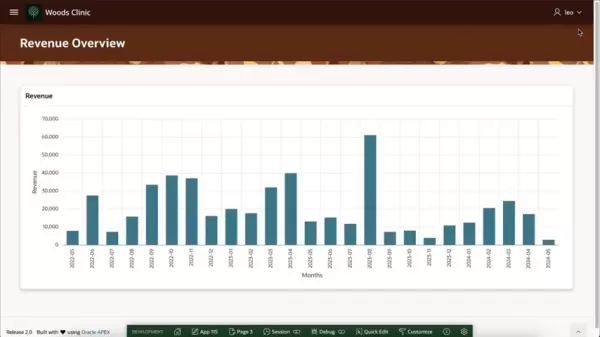
Users can describe the report they need, such as "list of patient names, procedure descriptions, total amount, and doctor names for patient procedures in the past 60 days with the most recent ones first," and the AI Assistant will create the corresponding SQL query and report layout. This feature eliminates the need for developers to write complex SQL queries or design intricate report templates, making it easier to deliver timely and accurate reports.
Key benefits of Report Generation:
- Faster report development
- Reduced coding effort
- Improved report accuracy
- Easy customization and refinement
- Enhanced user productivity
SQL Learning
The AI Assistant acts as a personal SQL coach, providing explanations and examples to help developers learn SQL.
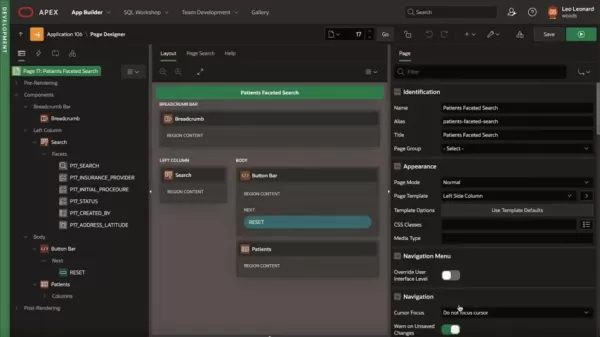
Developers can ask the AI Assistant questions about SQL syntax, functions, or concepts, and it will deliver clear, concise answers with practical examples. This feature helps new developers learn SQL and allows experienced developers to refresh their knowledge.
Key benefits of SQL Learning:
- Personalized SQL coaching and mentoring
- Clear and concise explanations
- Practical examples
- Improved SQL proficiency
- Deeper data understanding
Debugging
The AI Assistant helps developers debug SQL queries by explaining errors and suggesting solutions.
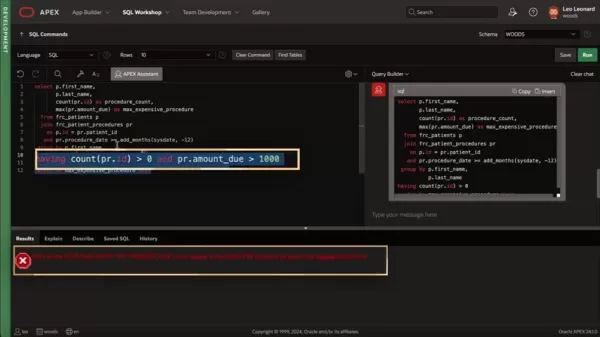
When a query encounters an error, the AI Assistant analyzes the error message and provides a clear explanation of the cause. It also suggests potential fixes, such as adding missing clauses or using different functions. This feature makes it easier for developers to identify and resolve errors, saving time and reducing frustration.
Key benefits of Debugging:
- Clear error explanations
- Suggested solutions
- Faster error resolution
- Reduced frustration
- Improved query quality
Frequently Asked Questions about Oracle APEX
What type of applications can I build using Oracle APEX?
Oracle APEX is versatile and can be used to build various applications, including data entry forms, business intelligence dashboards, mobile apps, process automation tools, and custom enterprise solutions. Its flexibility makes it suitable for both simple and complex development projects.
Do I need to be an expert coder to use Oracle APEX?
No, Oracle APEX is designed to be accessible to developers with different coding skill levels. Its low-code nature and intuitive interface make it easy for beginners to start. The AI Assistant further simplifies development, enabling developers to generate SQL queries and create applications with minimal coding. Experienced developers can also leverage APEX's full capabilities to build sophisticated, customized solutions.
Is Oracle APEX free to use?
Yes, Oracle APEX is a no-cost feature of the Oracle Database. If you have an existing Oracle Database license, you can start using APEX without additional charges. The AI assistant has separate pricing.
What are the key benefits of using the AI Assistant in Oracle APEX?
The AI Assistant simplifies SQL query generation, acts as a personal SQL coach, helps debug SQL queries, and enables application creation with generative AI. Its objective is to make it easier for developers to build and maintain database applications.
What is a data model, and why is it important in Oracle APEX?
A data model describes the information your application will manage, outlining entities, attributes, and relationships. A well-defined data model is crucial for ensuring data consistency, integrity, and accuracy, as well as facilitating efficient data retrieval and manipulation.
Related Questions About Oracle APEX Development
How does Oracle APEX compare to other low-code development platforms?
Oracle APEX stands out through its seamless integration with Oracle databases, its focus on SQL and PL/SQL, and its AI-powered development assistance. While other low-code platforms offer similar features, Oracle APEX provides a unique combination of database-centric development, AI-driven automation, and cost-effectiveness. By leveraging SQL and PL/SQL, Oracle APEX enables developers to build high-quality applications that are tightly integrated with the Oracle Database. The AI Assistant further simplifies development, making it easier to create complex queries and generate application code. Additionally, Oracle APEX is a no-cost feature of the Oracle Database, making it a budget-friendly solution for organizations with existing Oracle Database licenses.Here's a comparison table to highlight key differences:FeatureOracle APEXOther Low-Code PlatformsDatabase IntegrationSeamless with Oracle DatabasesVaries; may require connectors or custom integrationCoding LanguageSQL and PL/SQLProprietary languages or visual scriptingAI AssistanceSQL generation, debugging, app creationVaries; may offer some AI featuresCostNo-cost feature of Oracle DatabaseSubscription-based pricing modelsTarget AudienceOracle Database DevelopersBroad range of developersApplication ScopeData-centric applicationsBroad range of applicationsWhile other low-code platforms may be easier to learn or offer more extensive customization options, Oracle APEX presents a compelling choice for organizations needing to build database-driven applications quickly and efficiently.
How can I improve the performance of my Oracle APEX applications?
Several strategies can enhance the performance of Oracle APEX applications. Key techniques include:Optimize SQL Queries: Ensure your SQL queries are well-written and performance-optimized. Use indexes, avoid full table scans, and employ appropriate data types.Minimize Data Transfer: Reduce the amount of data transferred between the database and the application. Implement pagination, filtering, and aggregation techniques.Cache Data: Cache frequently accessed data to lessen database load. Use APEX's built-in caching mechanisms or develop custom caching solutions.Use Asynchronous Processing: Offload long-running tasks to background processes to prevent blocking the user interface. Utilize APEX's built-in task processing features or implement custom asynchronous processing.Optimize User Interface: Enhance the user interface for performance. Use efficient components, minimize request counts, and compress data.Monitor Performance: Regularly monitor application performance to identify bottlenecks and improvement areas. Use APEX's built-in monitoring tools or implement custom monitoring solutions.
Related article
 Anthropic Expands Claude AI Coding Tools to Japan in Push for Overseas Growth
Anthropic, a prominent U.S. artificial intelligence firm, is intensifying its global outreach. On Wednesday, the company hosted a major developer gathering, "Code with Claude," in Tokyo, drawing close to 500 software engineers. This initiative seeks
India’s Software Giant Cuts Hiring, Promises No Layoffs as AI Agents Scale Up
As artificial intelligence reshapes traditional labor-intensive business models, Tata Consultancy Services (TCS), a premier Indian software outsourcing firm, has unveiled its strategic response. During Tuesday’s annual general meeting, the chairman o
China Locks AI Models During Gaokam to Block Instant Homework Help
With the 2026 Gaokao fast approaching, rumors regarding the suspension of AI tools during the exam period have ignited intense online debate. In response to public concern, major AI platforms and educational apps have clarified their stance: rather t
Related Special Topic Recommendations
Design & Art
Anthropic Expands Claude AI Coding Tools to Japan in Push for Overseas Growth
Anthropic, a prominent U.S. artificial intelligence firm, is intensifying its global outreach. On Wednesday, the company hosted a major developer gathering, "Code with Claude," in Tokyo, drawing close to 500 software engineers. This initiative seeks
India’s Software Giant Cuts Hiring, Promises No Layoffs as AI Agents Scale Up
As artificial intelligence reshapes traditional labor-intensive business models, Tata Consultancy Services (TCS), a premier Indian software outsourcing firm, has unveiled its strategic response. During Tuesday’s annual general meeting, the chairman o
China Locks AI Models During Gaokam to Block Instant Homework Help
With the 2026 Gaokao fast approaching, rumors regarding the suspension of AI tools during the exam period have ignited intense online debate. In response to public concern, major AI platforms and educational apps have clarified their stance: rather t
Related Special Topic Recommendations
Design & Art
 Best AI Style Transfer Tools for Creative Experiments
2026 Latest Best Top-rated AI Style Transfer Tools for Creative Experiments! XIX.AI has curated a powerful, game-changing collection of must-try tools that deliver exceptional results through real-world tests and rigorous rankings. These top solutions help creatives boost productivity significantly by accelerating content creation and unlocking endless creative possibilities. Explore now to discover your perfect tool and start creating today!
 9 tools
 xix.ai
Comic Creation
Best AI Dialogue Bubble Tools for Visual Storytelling
xix.ai
Comic Creation
Best AI Dialogue Bubble Tools for Visual Storytelling
2026 Latest Best Top-Rated AI Dialogue Bubble Tools for Visual Storytelling are here on XIX.AI! This curated collection features powerful, game-changing tools that help creators boost productivity and overcome creative bottlenecks. Get a free vs paid comparison, see real-world tests, and check the latest rankings to find the must-try solutions perfect for crafting engaging visual narratives. Explore now to discover your ideal tool!
10 tools
xix.ai
Meeting Assistant
Top AI Meeting Summary Tools: Track Decisions and Follow-Ups Clearly
2026 Latest Top-Rated Best AI Meeting Summary Tools for Clear Decision Tracking and Effortless Follow-Ups. This curated list showcases powerful, game-changing solutions that boost productivity dramatically by automating meeting notes, identifying key action items, and streamlining team coordination across all projects. Get a free vs paid comparison along with real-world tests and weekly updated rankings to help you find the perfect tool. Explore now to unlock your AI edge!
9 tools
xix.ai
Data Analysis
Best AI Data Cleaning Tools: Fix Missing Values and Duplicates Fast
2026 Latest Best Top-rated AI Data Cleaning Tools for quick fixing of missing values and duplicates. This curated list showcases powerful, game-changing solutions that boost productivity significantly. Each option has undergone rigorous real-world tests to ensure reliability. Get a free vs paid comparison and discover the must-try tool that fits your needs best. Explore now at XIX.AI to Unlock your AI edge.
11 tools
xix.ai
Design & Art
Best AI Creative Ideation Tools for Artists: Break Through Visual Blocks
2026 Latest Best Top-Rated AI Creative Ideation Tools for Artists are curated by XIX.AI to help creators break through visual blocks and boost creativity instantly. These powerful game-changing tools offer real-world tests, detailed free vs paid comparison, and weekly updated rankings. Discover your perfect tool to accelerate content creation and unlock your AI edge today. Explore now!
14 tools
xix.ai
Music composition
AI Beat Makers for TikTok Background Tracks, Reels Audio, and Creator Promo Music
2026 Latest Best AI Beat Makers for TikTok Background Tracks, Reels Audio, and Creator Promo Music! XIX.AI has curated a top-rated list of powerful game-changing tools that go through real-world tests to deliver flawless music for every content need. You’ll find detailed free vs paid comparison data, weekly updated rankings, and must-try options to help you boost creativity and productivity. Explore now to discover your perfect tool!
11 tools
xix.ai

 Comments (0)
0/500
Comments (0)
0/500
Oracle Application Express (APEX) is a robust low-code development platform that empowers developers to build and deploy database-driven applications efficiently. By harnessing the capabilities of SQL and integrating an AI Assistant, APEX delivers a highly productive environment for crafting data-centric solutions. This article delves into the features of Oracle APEX, with a focus on its AI-powered tools and how they streamline application development.
Key Points
Oracle APEX streamlines database application creation through its low-code methodology.
The AI Assistant generates SQL queries based on natural language input.
Accessible within SQL Workshop, APEX supports iterative query improvement.
Generative AI jumpstarts the process of building complete applications.
APEX is a powerful platform for developers of all skill levels, enhancing SQL proficiency and troubleshooting.
Understanding Oracle APEX and Low-Code Development
What is Oracle APEX?
Oracle APEX is a low-code development platform that enables both professional and citizen developers to quickly build and deploy database-centric applications. It minimizes the need for manual coding, speeding up development timelines and reducing potential errors. Centered around SQL and PL/SQL, APEX offers a familiar workspace for Oracle developers while incorporating contemporary, intuitive interfaces.
APEX applications are fully responsive and can be accessed from any device, ensuring a smooth user experience. The platform comes with a comprehensive suite of built-in components and templates, allowing developers to create advanced applications with minimal effort. Whether you're designing a basic data entry form or a sophisticated enterprise solution, Oracle APEX provides the necessary resources for success.
Key benefits of Oracle APEX:
- Accelerated development cycles
- Minimized coding requirements
- Enhanced application reliability
- Consistent user experience
- Budget-friendly approach
Oracle APEX is well-suited for various application types, including:
- Data entry and reporting systems
- Business intelligence dashboards
- Mobile applications
- Workflow automation
- Tailored enterprise solutions
By utilizing Oracle APEX, organizations can enable their development teams to deliver high-quality applications more rapidly and effectively, driving business innovation and value.
The Role of a Data Model
The development process starts with a data model, which defines the information structure the application will handle.
This foundational step is essential for creating a well-organized and efficient application. The data model specifies the entities, attributes, and relationships within the dataset, offering a clear blueprint for the database schema and application logic.
A properly designed data model ensures data consistency, integrity, and accuracy. It enables efficient data retrieval and manipulation, boosting overall application performance. By comprehending the data model, developers can design intuitive interfaces that help users easily locate, visualize, and update information.
Key elements of a data model:
- Entities: Represent real-world objects or concepts (e.g., customers, products, orders).
- Attributes: Describe the characteristics of an entity (e.g., customer name, product price, order date).
- Relationships: Define how entities are connected (e.g., a customer places an order, a product belongs to a category).
In Oracle APEX, the data model is typically represented using tables, columns, and foreign keys. These database objects form the physical structure for storing and managing data. A well-designed data model ensures that APEX applications are robust, scalable, and maintainable.
Data-Driven Power: How APEX and SQL Integration Works
Harnessing the Power of SQL
The core strength of Oracle APEX lies in its seamless integration with SQL, a language developers have trusted for over five decades.
This integration allows developers to interact with databases, retrieve information, and manipulate data effortlessly. SQL's declarative nature simplifies data management tasks, facilitating the creation of robust and scalable applications. From selecting specific records to aggregating data, SQL's comprehensive command set provides the tools needed for complex data operations.
Oracle APEX uses SQL to help developers create dynamic, data-driven user interfaces. By embedding SQL queries within APEX components, developers can build interactive forms, reports, and charts that display real-time data. This integration removes the need for complex coding and simplifies the creation of user-friendly interfaces.
Examples of SQL’s Use in APEX:
- Data Retrieval: Use SELECT statements to fetch specific data from tables.
- Data Manipulation: Use INSERT, UPDATE, and DELETE statements to modify table data.
- Data Aggregation: Use GROUP BY and aggregate functions (e.g., SUM, AVG, COUNT) to summarize data.
- Data Filtering: Use WHERE clauses to filter data based on specific criteria.
- Data Joins: Use JOIN clauses to combine data from multiple tables.
By mastering SQL and understanding its integration with Oracle APEX, developers can unlock the platform's full potential and create powerful data-driven applications.
Creating a New Application with AI Assistant
Step-by-Step Guide
- Navigate to App Builder: From the Oracle APEX home page, click on App Builder to enter the application development environment.
- Create New Application: Click the Create button to initiate the application creation process. Select the option to build an application using Generative AI.
- Describe Your Application: Use natural language to outline your application's purpose, including the types of pages and specific features you want to include.
- Review AI Assistant's Proposal: The AI Assistant will analyze your description and suggest a set of pages, features, and options that match your requirements. Carefully review the proposal and make any needed adjustments.
- Create Application: Click the Create Application button to generate the application. APEX will automatically build the pages, features, and options you selected, providing a solid foundation for your development work.
- Customize and Extend: Tailor the generated code to meet your specific needs and enhance the application's functionality by adding features, integrating with other systems, or modifying the user interface.
Understanding Oracle APEX Pricing
Oracle APEX is Included with Oracle Database
Oracle APEX is a complimentary feature of the Oracle Database, available across all editions. If you're already an Oracle Database customer, you can begin using APEX immediately without extra licensing costs. The primary cost factors involve the Oracle Database license and infrastructure, which vary based on user count, database size, and deployment model (on-premises or cloud). For detailed pricing information regarding Oracle Database and cloud services, refer to Oracle's official pricing documentation or contact their sales team directly.
The AI Assistant is part of Oracle Cloud Infrastructure (OCI) AI services. Usage costs are based on the number of requests and the volume of data processed. Expenses will depend on how frequently you use this feature.
By adopting Oracle APEX, organizations can substantially lower application development costs and deliver high-quality solutions more quickly and efficiently.
Advantages and Disadvantages of Using Oracle APEX
Pros
Rapid application development thanks to its low-code approach.
AI Assistant streamlines SQL query generation and comprehension.
Tight integration with Oracle databases.
Cost-efficient solution with reduced coding requirements.
User-friendly interface for developers and end-users alike.
Cons
Dependence on SQL and PL/SQL knowledge.
Fewer customization options compared to traditional coding.
Potential vendor lock-in with Oracle technologies.
Challenges in addressing highly specific or non-standard requirements.
Requires database expertise to design effective data models.
Core Features of Oracle APEX and its AI Assistant
SQL Query Generation
The AI Assistant creates SQL queries from natural language input.
Users can type their requirements, such as "sum of amount due for patient procedures for the preceding 24 months grouped by month," and the AI Assistant will produce the corresponding SQL statement. This feature dramatically cuts down the time and effort needed to write complex queries, helping developers extract the data they need more easily.
The generated SQL queries can be customized and refined as needed. APEX offers a rich set of tools for editing and testing queries, ensuring they meet application-specific requirements. By leveraging the AI Assistant, developers can speed up query development and concentrate on other critical aspects of the application.
Key benefits of SQL Query Generation:
- Faster query development
- Reduced coding effort
- Improved query accuracy
- Simple customization and refinement
- Increased developer productivity
Natural Language Processing
Oracle APEX incorporates natural language processing (NLP) capabilities, allowing the AI Assistant to understand and interpret user requests written in plain English.
This feature removes the need for developers to memorize complex SQL syntax or comprehend intricate database schemas. They can simply state their data needs in natural language, and the AI Assistant will convert those requests into executable SQL queries.
The NLP engine analyzes the user's input, identifies relevant entities, attributes, and relationships, and generates the appropriate SQL statement. It also handles common misspellings, synonyms, and phrasing variations, ensuring the user's intent is accurately captured. By leveraging NLP, Oracle APEX simplifies database interaction and facilitates the creation of data-driven applications.
Key advantages of Natural Language Processing:
- Intuitive and user-friendly interface
- No SQL expertise required
- Handles phrasing and spelling variations
- Reduces learning curve for new developers
- Speeds up application development
Iterative Query Refinement
Oracle APEX integrates with the SQL Workshop, enabling developers to iteratively refine their queries with the AI Assistant's help.
They can start with a basic query, like selecting patient names, and then ask the AI Assistant to add more criteria or calculations. The AI Assistant will update the query accordingly, offering a smooth and interactive query-building experience.
This iterative method lets developers gradually construct complex queries, testing and validating each step. They can easily experiment with different options, explore the data, and refine their queries until they achieve the desired results. By using the SQL Workshop and the AI Assistant, developers can improve their SQL skills and gain a deeper understanding of their data.
Key benefits of Iterative Query Refinement:
- Interactive and exploratory query building
- Step-by-step validation and testing
- Easy experimentation with different options
- Improved SQL proficiency
- Deeper data comprehension
Application Creation with Generative AI
Oracle APEX allows developers to initiate entire application creation processes using generative AI. By providing a natural language description of the application, the AI Assistant can propose a set of pages, features, and options that meet the user's needs. This feature significantly reduces the time and effort required to create new applications, allowing developers to focus on customizing and extending the generated code.
The generative AI engine analyzes the user's input, identifies relevant entities, attributes, and relationships, and proposes a set of application components. It also considers user preferences and constraints, such as desired interface style and security features. By leveraging generative AI, Oracle APEX simplifies the creation of high-quality applications with minimal effort.
Key benefits of Application Creation with Generative AI:
- Faster application development
- Reduced coding effort
- Improved application quality
- Easy customization and extension
- Enhanced developer productivity
Use Cases for Oracle APEX AI Assistant
Report Generation
The AI Assistant can generate custom reports based on natural language requests.
Users can describe the report they need, such as "list of patient names, procedure descriptions, total amount, and doctor names for patient procedures in the past 60 days with the most recent ones first," and the AI Assistant will create the corresponding SQL query and report layout. This feature eliminates the need for developers to write complex SQL queries or design intricate report templates, making it easier to deliver timely and accurate reports.
Key benefits of Report Generation:
- Faster report development
- Reduced coding effort
- Improved report accuracy
- Easy customization and refinement
- Enhanced user productivity
SQL Learning
The AI Assistant acts as a personal SQL coach, providing explanations and examples to help developers learn SQL.
Developers can ask the AI Assistant questions about SQL syntax, functions, or concepts, and it will deliver clear, concise answers with practical examples. This feature helps new developers learn SQL and allows experienced developers to refresh their knowledge.
Key benefits of SQL Learning:
- Personalized SQL coaching and mentoring
- Clear and concise explanations
- Practical examples
- Improved SQL proficiency
- Deeper data understanding
Debugging
The AI Assistant helps developers debug SQL queries by explaining errors and suggesting solutions.
When a query encounters an error, the AI Assistant analyzes the error message and provides a clear explanation of the cause. It also suggests potential fixes, such as adding missing clauses or using different functions. This feature makes it easier for developers to identify and resolve errors, saving time and reducing frustration.
Key benefits of Debugging:
- Clear error explanations
- Suggested solutions
- Faster error resolution
- Reduced frustration
- Improved query quality
Frequently Asked Questions about Oracle APEX
What type of applications can I build using Oracle APEX?
Oracle APEX is versatile and can be used to build various applications, including data entry forms, business intelligence dashboards, mobile apps, process automation tools, and custom enterprise solutions. Its flexibility makes it suitable for both simple and complex development projects.
Do I need to be an expert coder to use Oracle APEX?
No, Oracle APEX is designed to be accessible to developers with different coding skill levels. Its low-code nature and intuitive interface make it easy for beginners to start. The AI Assistant further simplifies development, enabling developers to generate SQL queries and create applications with minimal coding. Experienced developers can also leverage APEX's full capabilities to build sophisticated, customized solutions.
Is Oracle APEX free to use?
Yes, Oracle APEX is a no-cost feature of the Oracle Database. If you have an existing Oracle Database license, you can start using APEX without additional charges. The AI assistant has separate pricing.
What are the key benefits of using the AI Assistant in Oracle APEX?
The AI Assistant simplifies SQL query generation, acts as a personal SQL coach, helps debug SQL queries, and enables application creation with generative AI. Its objective is to make it easier for developers to build and maintain database applications.
What is a data model, and why is it important in Oracle APEX?
A data model describes the information your application will manage, outlining entities, attributes, and relationships. A well-defined data model is crucial for ensuring data consistency, integrity, and accuracy, as well as facilitating efficient data retrieval and manipulation.
Related Questions About Oracle APEX Development
How does Oracle APEX compare to other low-code development platforms?
Oracle APEX stands out through its seamless integration with Oracle databases, its focus on SQL and PL/SQL, and its AI-powered development assistance. While other low-code platforms offer similar features, Oracle APEX provides a unique combination of database-centric development, AI-driven automation, and cost-effectiveness. By leveraging SQL and PL/SQL, Oracle APEX enables developers to build high-quality applications that are tightly integrated with the Oracle Database. The AI Assistant further simplifies development, making it easier to create complex queries and generate application code. Additionally, Oracle APEX is a no-cost feature of the Oracle Database, making it a budget-friendly solution for organizations with existing Oracle Database licenses.Here's a comparison table to highlight key differences:FeatureOracle APEXOther Low-Code PlatformsDatabase IntegrationSeamless with Oracle DatabasesVaries; may require connectors or custom integrationCoding LanguageSQL and PL/SQLProprietary languages or visual scriptingAI AssistanceSQL generation, debugging, app creationVaries; may offer some AI featuresCostNo-cost feature of Oracle DatabaseSubscription-based pricing modelsTarget AudienceOracle Database DevelopersBroad range of developersApplication ScopeData-centric applicationsBroad range of applicationsWhile other low-code platforms may be easier to learn or offer more extensive customization options, Oracle APEX presents a compelling choice for organizations needing to build database-driven applications quickly and efficiently.
How can I improve the performance of my Oracle APEX applications?
Several strategies can enhance the performance of Oracle APEX applications. Key techniques include:Optimize SQL Queries: Ensure your SQL queries are well-written and performance-optimized. Use indexes, avoid full table scans, and employ appropriate data types.Minimize Data Transfer: Reduce the amount of data transferred between the database and the application. Implement pagination, filtering, and aggregation techniques.Cache Data: Cache frequently accessed data to lessen database load. Use APEX's built-in caching mechanisms or develop custom caching solutions.Use Asynchronous Processing: Offload long-running tasks to background processes to prevent blocking the user interface. Utilize APEX's built-in task processing features or implement custom asynchronous processing.Optimize User Interface: Enhance the user interface for performance. Use efficient components, minimize request counts, and compress data.Monitor Performance: Regularly monitor application performance to identify bottlenecks and improvement areas. Use APEX's built-in monitoring tools or implement custom monitoring solutions.








 Anthropic Expands Claude AI Coding Tools to Japan in Push for Overseas Growth
Anthropic, a prominent U.S. artificial intelligence firm, is intensifying its global outreach. On Wednesday, the company hosted a major developer gathering, "Code with Claude," in Tokyo, drawing close to 500 software engineers. This initiative seeks
Anthropic Expands Claude AI Coding Tools to Japan in Push for Overseas Growth
Anthropic, a prominent U.S. artificial intelligence firm, is intensifying its global outreach. On Wednesday, the company hosted a major developer gathering, "Code with Claude," in Tokyo, drawing close to 500 software engineers. This initiative seeks
 India’s Software Giant Cuts Hiring, Promises No Layoffs as AI Agents Scale Up
As artificial intelligence reshapes traditional labor-intensive business models, Tata Consultancy Services (TCS), a premier Indian software outsourcing firm, has unveiled its strategic response. During Tuesday’s annual general meeting, the chairman o
India’s Software Giant Cuts Hiring, Promises No Layoffs as AI Agents Scale Up
As artificial intelligence reshapes traditional labor-intensive business models, Tata Consultancy Services (TCS), a premier Indian software outsourcing firm, has unveiled its strategic response. During Tuesday’s annual general meeting, the chairman o
 China Locks AI Models During Gaokam to Block Instant Homework Help
With the 2026 Gaokao fast approaching, rumors regarding the suspension of AI tools during the exam period have ignited intense online debate. In response to public concern, major AI platforms and educational apps have clarified their stance: rather t
China Locks AI Models During Gaokam to Block Instant Homework Help
With the 2026 Gaokao fast approaching, rumors regarding the suspension of AI tools during the exam period have ignited intense online debate. In response to public concern, major AI platforms and educational apps have clarified their stance: rather t

2026 Latest Best Top-rated AI Style Transfer Tools for Creative Experiments! XIX.AI has curated a powerful, game-changing collection of must-try tools that deliver exceptional results through real-world tests and rigorous rankings. These top solutions help creatives boost productivity significantly by accelerating content creation and unlocking endless creative possibilities. Explore now to discover your perfect tool and start creating today!
9 tools
xix.ai

2026 Latest Best Top-Rated AI Dialogue Bubble Tools for Visual Storytelling are here on XIX.AI! This curated collection features powerful, game-changing tools that help creators boost productivity and overcome creative bottlenecks. Get a free vs paid comparison, see real-world tests, and check the latest rankings to find the must-try solutions perfect for crafting engaging visual narratives. Explore now to discover your ideal tool!
10 tools
xix.ai

2026 Latest Top-Rated Best AI Meeting Summary Tools for Clear Decision Tracking and Effortless Follow-Ups. This curated list showcases powerful, game-changing solutions that boost productivity dramatically by automating meeting notes, identifying key action items, and streamlining team coordination across all projects. Get a free vs paid comparison along with real-world tests and weekly updated rankings to help you find the perfect tool. Explore now to unlock your AI edge!
9 tools
xix.ai

2026 Latest Best Top-rated AI Data Cleaning Tools for quick fixing of missing values and duplicates. This curated list showcases powerful, game-changing solutions that boost productivity significantly. Each option has undergone rigorous real-world tests to ensure reliability. Get a free vs paid comparison and discover the must-try tool that fits your needs best. Explore now at XIX.AI to Unlock your AI edge.
11 tools
xix.ai

2026 Latest Best Top-Rated AI Creative Ideation Tools for Artists are curated by XIX.AI to help creators break through visual blocks and boost creativity instantly. These powerful game-changing tools offer real-world tests, detailed free vs paid comparison, and weekly updated rankings. Discover your perfect tool to accelerate content creation and unlock your AI edge today. Explore now!
14 tools
xix.ai

2026 Latest Best AI Beat Makers for TikTok Background Tracks, Reels Audio, and Creator Promo Music! XIX.AI has curated a top-rated list of powerful game-changing tools that go through real-world tests to deliver flawless music for every content need. You’ll find detailed free vs paid comparison data, weekly updated rankings, and must-try options to help you boost creativity and productivity. Explore now to discover your perfect tool!
11 tools
xix.ai












