


 Home
HomeHow to use Oracle AI Agent Studio in 2026? Admin guide for Document Tool.
This guide provides an administrative overview of Oracle AI Agent Studio, focusing specifically on the Document Tool. We will explore how to configure and manage document integrations within the AI Agent Studio environment, covering key areas such as REST API connections, document publishing workflows, and the strategic setup of supervisor agents to enhance performance. Let's begin.
Key Points
This walkthrough examines the Data Tables Agent feature within Oracle AI Agent Studio.
It highlights the use of both the External REST and Document Tools within an agent's configuration.
The guide explains the optional, yet strategic, inclusion of a supervisor agent for enhanced prompt summarization.
You will find a detailed guide on configuring REST Data Tables, including authorization and function setup.
The process for publishing documents for use within AI Agent Studio is demonstrated.
We detail the steps for uploading and managing documents using the Document Tool.
The importance of changing a document's status from 'Draft' to 'Ready to Publish' is explained.
We cover how to run the 'Process Agent Documents' job to complete the publishing cycle.
The procedure for scheduling a document processing job is shown.
Understanding the Data Tables Agent
Data Tables Agent Overview
The Data Tables Agent in Oracle AI Agent Studio is built to interact seamlessly with data. A typical agent setup
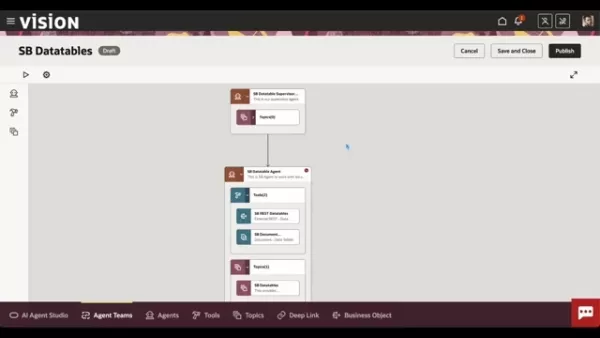
includes tools that enable efficient data retrieval and manipulation. In this example, we look at an agent configured with two main tools: an External REST tool and a Document Tool. The External REST tool is used for interacting with external APIs, allowing the agent to fetch data from various sources. Conversely, the Document Tool is focused on managing and utilizing documents within the agent's operational workflow. The agent itself acts as the core component that orchestrates these tools based on predefined workflows and user inputs. Since agents are central to process performance, optimizing their configuration is crucial.
Role of the Supervisor Agent
Supervisor agents in Oracle AI Agent Studio are an optional feature that adds a layer of sophistication, particularly for summarization tasks. They allow you to design specific summarization prompts
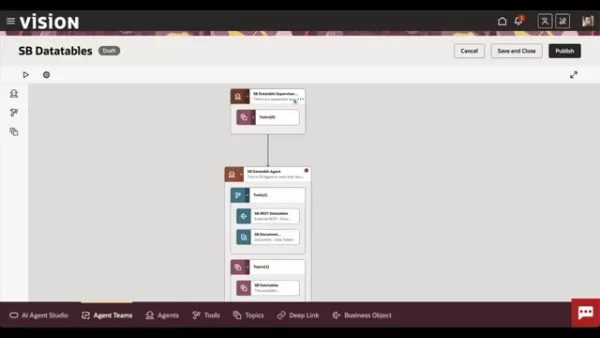
, enabling the agent to deliver responses tailored to precise requirements that go beyond default settings. While not mandatory for a single agent, using a supervisor showcases the platform's flexibility in managing complex tasks by structuring and refining interactions. Within the 'LLM' tab, you can activate a 'Summarization Mode' that utilizes a custom prompt. Pre-defined answer and additional requirement fields are provided, which you can expand upon. For instance, you can request the generation of 'properly formatted HTML' directly within the prompt.
Navigating the Vision Interface for Scheduled Processes
Detailed Steps for Scheduling Processes
To effectively manage and automate document processing in Oracle AI Agent Studio, follow these structured steps within the Vision interface:
- Accessing Scheduled Processes:Start by navigating to the 'Tools' section in the Vision interface and select 'Scheduled Processes'. This is the central hub for managing all automated tasks.
- Initiating a New Schedule: Click on 'Schedule New Process' to create a new automated task. This opens a dialog box where you can define the job's specific parameters.
- Specifying the Job Type: In the dialog box, ensure the 'Type' is set to 'Job'. Then, in the 'Name' field, begin typing 'Agent' to filter and select 'Process Agent Documents' from the dropdown list.
- Configuring Process Details: After selecting the 'Process Agent Documents' job, click 'OK' to proceed to the process details screen. Here, you have two main options:
- Process Options: Allows for immediate job submission. Clicking 'Submit' will run the process right away.
- Advanced Options: Enables scheduling the job for periodic execution. Select 'Using a Schedule' and then configure the frequency, start date, and start time.
- Submitting the Job: Depending on your choice of immediate or scheduled execution, the final step is to either click 'Submit' to start the job immediately or save the schedule for future, automated runs.
How to Effectively Use Document Tooling in Oracle AI Agent
Ensuring Document Readiness
Before the AI can perform tasks based on your documents, it is critical to confirm the document has a 'Published' status. This readiness is essential for the tool to function correctly. To achieve this state, follow a protocol that includes uploading the document, enriching its metadata, and transitioning its status to ‘Ready to Publish’
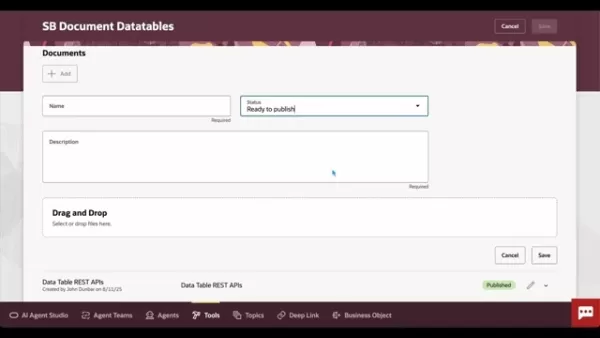
. Following this, trigger the ‘Process Agent Documents’ job. This initiates the conversion of text content into vectors, which are then stored in the entity database, making the documents ready for AI interaction and efficient processing. Adding useful and accurate metadata is vital, as it enables the AI agent to utilize the data effectively. It is also recommended to set up a schedule for automatically processing documents. These scheduled processes help maintain a consistent and reliable workflow.
Oracle AI Agent Studio Pricing Details
Understanding the Costs
Oracle AI Agent Studio operates on a consumption-based pricing model, where costs are determined by usage metrics such as the number of API calls, the volume of data processed, and the number of agents deployed. Several pricing tiers are available to suit different organizational needs, from small businesses to large enterprises. Each tier offers varying levels of service, features, and support.
Below is a simplified representation of a potential pricing model (please note: actual prices may vary and should be confirmed directly with Oracle):
Tier Description Price (Estimated) Features Free TierIdeal for evaluation and small-scale projects$0 per monthLimited API calls, basic document processing, community supportBasicSuitable for small to medium-sized businesses$500 per monthIncreased API call limits, enhanced document processing, standard supportEnterpriseDesigned for large organizationsCustom pricingUnlimited API calls, advanced document processing, dedicated support, custom integrations, SLAs, enhanced security, and scalabilityNote: The listed costs are estimates and can vary based on your specific configuration, geographic region, and negotiated terms with Oracle. We recommend contacting Oracle sales for detailed pricing information and to discuss your organization's specific requirements. Always check the official Oracle website for the most current and up-to-date pricing details.
Pros and Cons of Using Oracle AI Agent Studio
Pros
Streamlined AI Agent Creation: The intuitive drag-and-drop agent designer simplifies the development process.
Comprehensive Document Processing: The Document Tool allows you to process and extract information from a wide variety of document formats.
Seamless Data Integration: Easy integration with REST APIs provides access to diverse external data sources.
Automated Workflows: Scheduled processes automate routine tasks like document processing and system maintenance.
Customizable Summarization: Supervisor agents enable the creation of tailored summarization prompts for specific needs.
Scalability: The platform is designed to scale efficiently as your organization's demands grow.
Cons
Pricing Complexity:
Cons
The consumption-based pricing model can make cost prediction and management challenging.Integration Requirements: Effective use often requires integration with other Oracle products and services.
Maintenance Overhead: Regular scheduled maintenance is necessary to ensure optimal platform performance.
Learning Curve: The interface has a degree of complexity that may require time to master fully.
Core Features of Oracle AI Agent Studio
Highlighting Key Capabilities
Oracle AI Agent Studio offers a suite of features
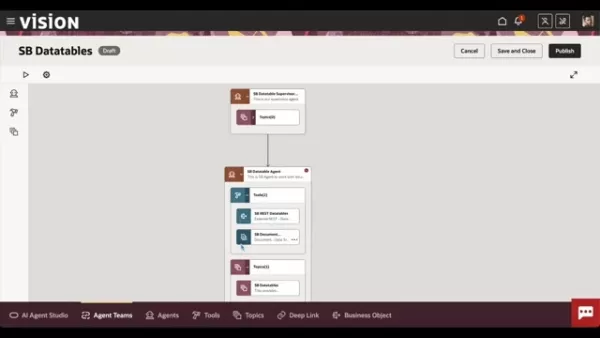
designed to simplify the creation and deployment of AI-powered agents. These core capabilities support data integration, document processing, and workflow automation.
- AI Agent Designer: A user-friendly interface for building and managing agents. Use drag-and-drop functionality to create sophisticated, customized processes.
- Document Tool: Processes and integrates information from PDFs and other common document types.
- REST API Integration: Enables seamless connections to external data sources and services via REST APIs.
- Scheduled Processes: Automates critical tasks such as document processing, ensuring timely and consistent updates.
- Summarization Prompts: Offers a summarization mode to generate concise and clear answers from large amounts of text.
Practical Use Cases for Oracle AI Agent Studio
Illustrating Real-World Applications
Oracle AI Agent Studio can be deployed across various industries and functions to automate tasks, boost efficiency, and support better decision-making:
- Customer Service Automation: Develop AI agents that automatically handle customer inquiries, resolve common issues, and provide support, thereby reducing the load on human agents.
- Data Extraction and Processing: Automate the extraction of key data from documents like invoices or contracts, and prepare it for further analysis or integration into other business systems.
- Workflow Automation: Streamline business processes by automating repetitive tasks and workflows, such as approval chains or notification systems.
- Real-Time Data Integration: Integrate live data from external sources, such as social media feeds or financial market APIs, to deliver up-to-the-minute insights and recommendations.These examples represent just a few of the many applications for Oracle AI Agent Studio to automate tasks, improve operational efficiency, and enhance decision-making. Specific use cases will vary depending on the industry and the unique needs of the organization.
FAQ
What is the primary function of the Data Tables Agent?
The Data Tables Agent is designed to work with the External REST and Document tools, helping your main agent access the correct information. Its primary role is to pull data from various sources to assist your agent in providing useful and informed responses.
Why is the supervisor agent considered optional?
In a configuration with a single agent, the supervisor agent is optional but highly useful for summarization tasks. It allows you to define a specific prompt, enabling the AI to generate responses that meet particular formatting or content requirements.
How does the Document Tool enhance AI agent capabilities?
The Document Tool supplies the AI agent with external information contained within documents, typically in PDF format. This allows you to provide key documentation and other critical information to the agent, significantly improving its ability to answer complex and detailed questions.
What steps are involved in publishing documents for use by the AI Agent?
To publish documents, you must first upload them, assign appropriate metadata to help the AI understand the content, and then change the document status to ‘Ready to Publish’. Once this is done, run the 'Process Agent Documents' job. This job triggers the conversion of document text into vectors, which are then stored in the entity database, making them available to the AI.
How can I schedule the processing of agent documents?
You can configure an automated schedule to run the agent document processing. Navigate to Tools > Scheduled Processes. Then, locate and select the 'Process Agent Documents' job. Finally, set up a recurring schedule that runs the process at appropriate intervals to keep your documents current.
Related Questions
What are the best practices for optimizing AI agent performance in Oracle AI Agent Studio?
Optimizing AI agent performance in Oracle AI Agent Studio involves a multi-faceted approach, including configuration tuning, effective data management, and ongoing refinement based on performance analytics and user feedback. Here are some detailed best practices:Data Preprocessing and Enrichment: Prioritize data preparation. Clean and well-structured data is more easily processed. Enriching document metadata helps the AI better understand and utilize the content, which is critical for agent performance.Efficient Vectorization and Indexing: Convert unstructured text data into numerical vectors and index them efficiently to minimize retrieval times. Employ suitable indexing algorithms to ensure the agent can quickly access relevant information during interactions, leading to faster and higher-quality responses.Scheduled Maintenance: Conduct regular fine-tuning of your agents. Review performance metrics to refine models and improve accuracy. Analyze chat histories to identify areas for improvement and ensure your document knowledge base remains current. This proactive maintenance is key to achieving reliable and optimal results.Continuous Feedback Loop: Implement systems to collect user feedback on agent responses. Incorporate user ratings, suggestions, and corrections into your training data to iteratively enhance agent performance. Soliciting internal feedback also helps assess the agent's value and effectiveness.By implementing these best practices, organizations can maximize the return on their investment in Oracle AI Agent Studio, realizing significant gains in operational efficiency, response accuracy, and overall user satisfaction.
Related article
 Anthropic Expands Claude AI Coding Tools to Japan in Push for Overseas Growth
Anthropic, a prominent U.S. artificial intelligence firm, is intensifying its global outreach. On Wednesday, the company hosted a major developer gathering, "Code with Claude," in Tokyo, drawing close to 500 software engineers. This initiative seeks
India’s Software Giant Cuts Hiring, Promises No Layoffs as AI Agents Scale Up
As artificial intelligence reshapes traditional labor-intensive business models, Tata Consultancy Services (TCS), a premier Indian software outsourcing firm, has unveiled its strategic response. During Tuesday’s annual general meeting, the chairman o
China Locks AI Models During Gaokam to Block Instant Homework Help
With the 2026 Gaokao fast approaching, rumors regarding the suspension of AI tools during the exam period have ignited intense online debate. In response to public concern, major AI platforms and educational apps have clarified their stance: rather t
Related Special Topic Recommendations
Design & Art
Anthropic Expands Claude AI Coding Tools to Japan in Push for Overseas Growth
Anthropic, a prominent U.S. artificial intelligence firm, is intensifying its global outreach. On Wednesday, the company hosted a major developer gathering, "Code with Claude," in Tokyo, drawing close to 500 software engineers. This initiative seeks
India’s Software Giant Cuts Hiring, Promises No Layoffs as AI Agents Scale Up
As artificial intelligence reshapes traditional labor-intensive business models, Tata Consultancy Services (TCS), a premier Indian software outsourcing firm, has unveiled its strategic response. During Tuesday’s annual general meeting, the chairman o
China Locks AI Models During Gaokam to Block Instant Homework Help
With the 2026 Gaokao fast approaching, rumors regarding the suspension of AI tools during the exam period have ignited intense online debate. In response to public concern, major AI platforms and educational apps have clarified their stance: rather t
Related Special Topic Recommendations
Design & Art
 Best AI Style Transfer Tools for Creative Experiments
2026 Latest Best Top-rated AI Style Transfer Tools for Creative Experiments! XIX.AI has curated a powerful, game-changing collection of must-try tools that deliver exceptional results through real-world tests and rigorous rankings. These top solutions help creatives boost productivity significantly by accelerating content creation and unlocking endless creative possibilities. Explore now to discover your perfect tool and start creating today!
 9 tools
 xix.ai
Comic Creation
Best AI Dialogue Bubble Tools for Visual Storytelling
xix.ai
Comic Creation
Best AI Dialogue Bubble Tools for Visual Storytelling
2026 Latest Best Top-Rated AI Dialogue Bubble Tools for Visual Storytelling are here on XIX.AI! This curated collection features powerful, game-changing tools that help creators boost productivity and overcome creative bottlenecks. Get a free vs paid comparison, see real-world tests, and check the latest rankings to find the must-try solutions perfect for crafting engaging visual narratives. Explore now to discover your ideal tool!
10 tools
xix.ai
Meeting Assistant
Top AI Meeting Summary Tools: Track Decisions and Follow-Ups Clearly
2026 Latest Top-Rated Best AI Meeting Summary Tools for Clear Decision Tracking and Effortless Follow-Ups. This curated list showcases powerful, game-changing solutions that boost productivity dramatically by automating meeting notes, identifying key action items, and streamlining team coordination across all projects. Get a free vs paid comparison along with real-world tests and weekly updated rankings to help you find the perfect tool. Explore now to unlock your AI edge!
9 tools
xix.ai
Data Analysis
Best AI Data Cleaning Tools: Fix Missing Values and Duplicates Fast
2026 Latest Best Top-rated AI Data Cleaning Tools for quick fixing of missing values and duplicates. This curated list showcases powerful, game-changing solutions that boost productivity significantly. Each option has undergone rigorous real-world tests to ensure reliability. Get a free vs paid comparison and discover the must-try tool that fits your needs best. Explore now at XIX.AI to Unlock your AI edge.
11 tools
xix.ai
Design & Art
Best AI Creative Ideation Tools for Artists: Break Through Visual Blocks
2026 Latest Best Top-Rated AI Creative Ideation Tools for Artists are curated by XIX.AI to help creators break through visual blocks and boost creativity instantly. These powerful game-changing tools offer real-world tests, detailed free vs paid comparison, and weekly updated rankings. Discover your perfect tool to accelerate content creation and unlock your AI edge today. Explore now!
14 tools
xix.ai
Music composition
AI Beat Makers for TikTok Background Tracks, Reels Audio, and Creator Promo Music
2026 Latest Best AI Beat Makers for TikTok Background Tracks, Reels Audio, and Creator Promo Music! XIX.AI has curated a top-rated list of powerful game-changing tools that go through real-world tests to deliver flawless music for every content need. You’ll find detailed free vs paid comparison data, weekly updated rankings, and must-try options to help you boost creativity and productivity. Explore now to discover your perfect tool!
11 tools
xix.ai

 Comments (1)
0/500
Comments (1)
0/500
![PaulGonzalez]()
Oracle AI Agent Studio klingt nach einem mächtigen Tool für Dokumenten-Workflows. Ich frage mich, wie gut es sich in bestehende Systeme wie SharePoint oder Confluence integrieren lässt. Die Konfiguration scheint komplex zu sein – hoffentlich gibt es gute Templates für den Einstieg. 🤔
This guide provides an administrative overview of Oracle AI Agent Studio, focusing specifically on the Document Tool. We will explore how to configure and manage document integrations within the AI Agent Studio environment, covering key areas such as REST API connections, document publishing workflows, and the strategic setup of supervisor agents to enhance performance. Let's begin.
Key Points
This walkthrough examines the Data Tables Agent feature within Oracle AI Agent Studio.
It highlights the use of both the External REST and Document Tools within an agent's configuration.
The guide explains the optional, yet strategic, inclusion of a supervisor agent for enhanced prompt summarization.
You will find a detailed guide on configuring REST Data Tables, including authorization and function setup.
The process for publishing documents for use within AI Agent Studio is demonstrated.
We detail the steps for uploading and managing documents using the Document Tool.
The importance of changing a document's status from 'Draft' to 'Ready to Publish' is explained.
We cover how to run the 'Process Agent Documents' job to complete the publishing cycle.
The procedure for scheduling a document processing job is shown.
Understanding the Data Tables Agent
Data Tables Agent Overview
The Data Tables Agent in Oracle AI Agent Studio is built to interact seamlessly with data. A typical agent setup
includes tools that enable efficient data retrieval and manipulation. In this example, we look at an agent configured with two main tools: an External REST tool and a Document Tool. The External REST tool is used for interacting with external APIs, allowing the agent to fetch data from various sources. Conversely, the Document Tool is focused on managing and utilizing documents within the agent's operational workflow. The agent itself acts as the core component that orchestrates these tools based on predefined workflows and user inputs. Since agents are central to process performance, optimizing their configuration is crucial.
Role of the Supervisor Agent
Supervisor agents in Oracle AI Agent Studio are an optional feature that adds a layer of sophistication, particularly for summarization tasks. They allow you to design specific summarization prompts
, enabling the agent to deliver responses tailored to precise requirements that go beyond default settings. While not mandatory for a single agent, using a supervisor showcases the platform's flexibility in managing complex tasks by structuring and refining interactions. Within the 'LLM' tab, you can activate a 'Summarization Mode' that utilizes a custom prompt. Pre-defined answer and additional requirement fields are provided, which you can expand upon. For instance, you can request the generation of 'properly formatted HTML' directly within the prompt.
Navigating the Vision Interface for Scheduled Processes
Detailed Steps for Scheduling Processes
To effectively manage and automate document processing in Oracle AI Agent Studio, follow these structured steps within the Vision interface:
- Accessing Scheduled Processes:Start by navigating to the 'Tools' section in the Vision interface and select 'Scheduled Processes'. This is the central hub for managing all automated tasks.
- Initiating a New Schedule: Click on 'Schedule New Process' to create a new automated task. This opens a dialog box where you can define the job's specific parameters.
- Specifying the Job Type: In the dialog box, ensure the 'Type' is set to 'Job'. Then, in the 'Name' field, begin typing 'Agent' to filter and select 'Process Agent Documents' from the dropdown list.
- Configuring Process Details: After selecting the 'Process Agent Documents' job, click 'OK' to proceed to the process details screen. Here, you have two main options:
- Process Options: Allows for immediate job submission. Clicking 'Submit' will run the process right away.
- Advanced Options: Enables scheduling the job for periodic execution. Select 'Using a Schedule' and then configure the frequency, start date, and start time.
- Submitting the Job: Depending on your choice of immediate or scheduled execution, the final step is to either click 'Submit' to start the job immediately or save the schedule for future, automated runs.
How to Effectively Use Document Tooling in Oracle AI Agent
Ensuring Document Readiness
Before the AI can perform tasks based on your documents, it is critical to confirm the document has a 'Published' status. This readiness is essential for the tool to function correctly. To achieve this state, follow a protocol that includes uploading the document, enriching its metadata, and transitioning its status to ‘Ready to Publish’
. Following this, trigger the ‘Process Agent Documents’ job. This initiates the conversion of text content into vectors, which are then stored in the entity database, making the documents ready for AI interaction and efficient processing. Adding useful and accurate metadata is vital, as it enables the AI agent to utilize the data effectively. It is also recommended to set up a schedule for automatically processing documents. These scheduled processes help maintain a consistent and reliable workflow.
Oracle AI Agent Studio Pricing Details
Understanding the Costs
Oracle AI Agent Studio operates on a consumption-based pricing model, where costs are determined by usage metrics such as the number of API calls, the volume of data processed, and the number of agents deployed. Several pricing tiers are available to suit different organizational needs, from small businesses to large enterprises. Each tier offers varying levels of service, features, and support.
Below is a simplified representation of a potential pricing model (please note: actual prices may vary and should be confirmed directly with Oracle):
Note: The listed costs are estimates and can vary based on your specific configuration, geographic region, and negotiated terms with Oracle. We recommend contacting Oracle sales for detailed pricing information and to discuss your organization's specific requirements. Always check the official Oracle website for the most current and up-to-date pricing details.
Pros and Cons of Using Oracle AI Agent Studio
Pros
Streamlined AI Agent Creation: The intuitive drag-and-drop agent designer simplifies the development process.
Comprehensive Document Processing: The Document Tool allows you to process and extract information from a wide variety of document formats.
Seamless Data Integration: Easy integration with REST APIs provides access to diverse external data sources.
Automated Workflows: Scheduled processes automate routine tasks like document processing and system maintenance.
Customizable Summarization: Supervisor agents enable the creation of tailored summarization prompts for specific needs.
Scalability: The platform is designed to scale efficiently as your organization's demands grow.
Cons
Pricing Complexity:
Cons
The consumption-based pricing model can make cost prediction and management challenging.Integration Requirements: Effective use often requires integration with other Oracle products and services.
Maintenance Overhead: Regular scheduled maintenance is necessary to ensure optimal platform performance.
Learning Curve: The interface has a degree of complexity that may require time to master fully.
Core Features of Oracle AI Agent Studio
Highlighting Key Capabilities
Oracle AI Agent Studio offers a suite of features
designed to simplify the creation and deployment of AI-powered agents. These core capabilities support data integration, document processing, and workflow automation.
- AI Agent Designer: A user-friendly interface for building and managing agents. Use drag-and-drop functionality to create sophisticated, customized processes.
- Document Tool: Processes and integrates information from PDFs and other common document types.
- REST API Integration: Enables seamless connections to external data sources and services via REST APIs.
- Scheduled Processes: Automates critical tasks such as document processing, ensuring timely and consistent updates.
- Summarization Prompts: Offers a summarization mode to generate concise and clear answers from large amounts of text.
Practical Use Cases for Oracle AI Agent Studio
Illustrating Real-World Applications
Oracle AI Agent Studio can be deployed across various industries and functions to automate tasks, boost efficiency, and support better decision-making:
- Customer Service Automation: Develop AI agents that automatically handle customer inquiries, resolve common issues, and provide support, thereby reducing the load on human agents.
- Data Extraction and Processing: Automate the extraction of key data from documents like invoices or contracts, and prepare it for further analysis or integration into other business systems.
- Workflow Automation: Streamline business processes by automating repetitive tasks and workflows, such as approval chains or notification systems.
- Real-Time Data Integration: Integrate live data from external sources, such as social media feeds or financial market APIs, to deliver up-to-the-minute insights and recommendations.These examples represent just a few of the many applications for Oracle AI Agent Studio to automate tasks, improve operational efficiency, and enhance decision-making. Specific use cases will vary depending on the industry and the unique needs of the organization.
FAQ
What is the primary function of the Data Tables Agent?
The Data Tables Agent is designed to work with the External REST and Document tools, helping your main agent access the correct information. Its primary role is to pull data from various sources to assist your agent in providing useful and informed responses.
Why is the supervisor agent considered optional?
In a configuration with a single agent, the supervisor agent is optional but highly useful for summarization tasks. It allows you to define a specific prompt, enabling the AI to generate responses that meet particular formatting or content requirements.
How does the Document Tool enhance AI agent capabilities?
The Document Tool supplies the AI agent with external information contained within documents, typically in PDF format. This allows you to provide key documentation and other critical information to the agent, significantly improving its ability to answer complex and detailed questions.
What steps are involved in publishing documents for use by the AI Agent?
To publish documents, you must first upload them, assign appropriate metadata to help the AI understand the content, and then change the document status to ‘Ready to Publish’. Once this is done, run the 'Process Agent Documents' job. This job triggers the conversion of document text into vectors, which are then stored in the entity database, making them available to the AI.
How can I schedule the processing of agent documents?
You can configure an automated schedule to run the agent document processing. Navigate to Tools > Scheduled Processes. Then, locate and select the 'Process Agent Documents' job. Finally, set up a recurring schedule that runs the process at appropriate intervals to keep your documents current.
Related Questions
What are the best practices for optimizing AI agent performance in Oracle AI Agent Studio?
Optimizing AI agent performance in Oracle AI Agent Studio involves a multi-faceted approach, including configuration tuning, effective data management, and ongoing refinement based on performance analytics and user feedback. Here are some detailed best practices:Data Preprocessing and Enrichment: Prioritize data preparation. Clean and well-structured data is more easily processed. Enriching document metadata helps the AI better understand and utilize the content, which is critical for agent performance.Efficient Vectorization and Indexing: Convert unstructured text data into numerical vectors and index them efficiently to minimize retrieval times. Employ suitable indexing algorithms to ensure the agent can quickly access relevant information during interactions, leading to faster and higher-quality responses.Scheduled Maintenance: Conduct regular fine-tuning of your agents. Review performance metrics to refine models and improve accuracy. Analyze chat histories to identify areas for improvement and ensure your document knowledge base remains current. This proactive maintenance is key to achieving reliable and optimal results.Continuous Feedback Loop: Implement systems to collect user feedback on agent responses. Incorporate user ratings, suggestions, and corrections into your training data to iteratively enhance agent performance. Soliciting internal feedback also helps assess the agent's value and effectiveness.By implementing these best practices, organizations can maximize the return on their investment in Oracle AI Agent Studio, realizing significant gains in operational efficiency, response accuracy, and overall user satisfaction.








 Anthropic Expands Claude AI Coding Tools to Japan in Push for Overseas Growth
Anthropic, a prominent U.S. artificial intelligence firm, is intensifying its global outreach. On Wednesday, the company hosted a major developer gathering, "Code with Claude," in Tokyo, drawing close to 500 software engineers. This initiative seeks
Anthropic Expands Claude AI Coding Tools to Japan in Push for Overseas Growth
Anthropic, a prominent U.S. artificial intelligence firm, is intensifying its global outreach. On Wednesday, the company hosted a major developer gathering, "Code with Claude," in Tokyo, drawing close to 500 software engineers. This initiative seeks
 India’s Software Giant Cuts Hiring, Promises No Layoffs as AI Agents Scale Up
As artificial intelligence reshapes traditional labor-intensive business models, Tata Consultancy Services (TCS), a premier Indian software outsourcing firm, has unveiled its strategic response. During Tuesday’s annual general meeting, the chairman o
India’s Software Giant Cuts Hiring, Promises No Layoffs as AI Agents Scale Up
As artificial intelligence reshapes traditional labor-intensive business models, Tata Consultancy Services (TCS), a premier Indian software outsourcing firm, has unveiled its strategic response. During Tuesday’s annual general meeting, the chairman o
 China Locks AI Models During Gaokam to Block Instant Homework Help
With the 2026 Gaokao fast approaching, rumors regarding the suspension of AI tools during the exam period have ignited intense online debate. In response to public concern, major AI platforms and educational apps have clarified their stance: rather t
China Locks AI Models During Gaokam to Block Instant Homework Help
With the 2026 Gaokao fast approaching, rumors regarding the suspension of AI tools during the exam period have ignited intense online debate. In response to public concern, major AI platforms and educational apps have clarified their stance: rather t

2026 Latest Best Top-rated AI Style Transfer Tools for Creative Experiments! XIX.AI has curated a powerful, game-changing collection of must-try tools that deliver exceptional results through real-world tests and rigorous rankings. These top solutions help creatives boost productivity significantly by accelerating content creation and unlocking endless creative possibilities. Explore now to discover your perfect tool and start creating today!
9 tools
xix.ai

2026 Latest Best Top-Rated AI Dialogue Bubble Tools for Visual Storytelling are here on XIX.AI! This curated collection features powerful, game-changing tools that help creators boost productivity and overcome creative bottlenecks. Get a free vs paid comparison, see real-world tests, and check the latest rankings to find the must-try solutions perfect for crafting engaging visual narratives. Explore now to discover your ideal tool!
10 tools
xix.ai

2026 Latest Top-Rated Best AI Meeting Summary Tools for Clear Decision Tracking and Effortless Follow-Ups. This curated list showcases powerful, game-changing solutions that boost productivity dramatically by automating meeting notes, identifying key action items, and streamlining team coordination across all projects. Get a free vs paid comparison along with real-world tests and weekly updated rankings to help you find the perfect tool. Explore now to unlock your AI edge!
9 tools
xix.ai

2026 Latest Best Top-rated AI Data Cleaning Tools for quick fixing of missing values and duplicates. This curated list showcases powerful, game-changing solutions that boost productivity significantly. Each option has undergone rigorous real-world tests to ensure reliability. Get a free vs paid comparison and discover the must-try tool that fits your needs best. Explore now at XIX.AI to Unlock your AI edge.
11 tools
xix.ai

2026 Latest Best Top-Rated AI Creative Ideation Tools for Artists are curated by XIX.AI to help creators break through visual blocks and boost creativity instantly. These powerful game-changing tools offer real-world tests, detailed free vs paid comparison, and weekly updated rankings. Discover your perfect tool to accelerate content creation and unlock your AI edge today. Explore now!
14 tools
xix.ai

2026 Latest Best AI Beat Makers for TikTok Background Tracks, Reels Audio, and Creator Promo Music! XIX.AI has curated a top-rated list of powerful game-changing tools that go through real-world tests to deliver flawless music for every content need. You’ll find detailed free vs paid comparison data, weekly updated rankings, and must-try options to help you boost creativity and productivity. Explore now to discover your perfect tool!
11 tools
xix.ai

Oracle AI Agent Studio klingt nach einem mächtigen Tool für Dokumenten-Workflows. Ich frage mich, wie gut es sich in bestehende Systeme wie SharePoint oder Confluence integrieren lässt. Die Konfiguration scheint komplex zu sein – hoffentlich gibt es gute Templates für den Einstieg. 🤔












