


 Home
HomeHow to use OpenAI's new web search API in 2026? DeepSeek integration guide.
OpenAI has introduced substantial updates to its developer platform, transforming agent development with enhanced web search functionality. The new Responses API enables built-in tool calls for web and file search, allowing models to efficiently access real-time data. This guide examines these updates, highlighting how developers can utilize the Chat Completion and Responses APIs with web search, plus a smart technique for integrating DeepSeek R1 models to achieve exceptional performance. Learn how these innovations can elevate your AI projects and keep your models updated with the latest information.
Key Points
OpenAI has released a significant platform update, embedding web search capabilities directly into the Chat Completion API.
The Responses API now includes built-in tool calls for web and file search, supporting real-time data retrieval.
Models can now fetch current information without external tools, streamlining data collection.
Using web search models through the Chat Completion API is as straightforward as calling other OpenAI models, simplifying integration.
The Perplexity Sonar models, including web-enabled versions of Llama 3.3 and DeepSeek R1, are available via the OpenAI API client.
Integrating Perplexity Sonar models requires switching the OpenAI API key and modifying the base URL.
The update provides budget-friendly options, with gpt-4o-mini model inputs priced at just $0.15 per million tokens.
Using annotations enables separate extraction of cited URLs, improving data transparency and verification.
OpenAI's New Agent Building Blocks
Understanding the OpenAI Update
OpenAI has launched a major update to its developer platform, primarily focusing on agent building blocks with integrated web search capabilities. This update centers on equipping developers with improved tools to create more knowledgeable and dynamic AI agents.
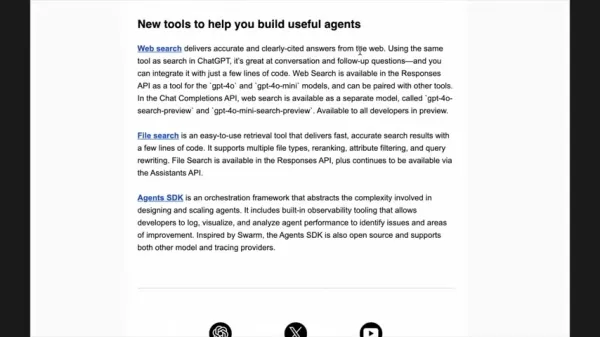
The Chat Completion API now includes models with built-in web search functionality, representing a significant advancement in enabling AI to access and use real-time data. Direct web search integration through the API offers a streamlined method for information retrieval, ensuring AI models remain current and relevant. By incorporating live data, applications built on OpenAI's platform can deliver more accurate, context-aware, and timely responses. The Responses API further enhances built-in tool calls like web and file search. This API simplifies how AI models interact with external resources, allowing them to retrieve real-time information without external dependencies. These updates make it easier to develop powerful and efficient AI solutions. These latest developments mark a shift toward more integrated and accessible AI development tools. By providing direct web search access, OpenAI empowers developers to build more intelligent, responsive, and informed applications.
Introducing the Responses API
The Responses API is a transformative tool for developers integrating real-time data into their AI models. This API simplifies built-in tool calls for web and file search, which were previously more complex to implement. It represents a powerful new API primitive that combines the best features of both Chat Completions and Assistants APIs. The Responses API's simplicity and efficiency let developers concentrate on creating innovative solutions rather than managing complex configurations. Using the Responses API is straightforward as it integrates seamlessly with the Chat Completions API. Instead of relying on external plugins or custom code for information retrieval, developers can now use the Responses API to make direct queries and receive current data within their AI models. This enables models to access up-to-date information, improving their accuracy and relevance while reducing complexity. The Responses API streamlines development and helps developers build more sophisticated AI applications with greater ease and efficiency. This API is essential for developers creating AI models that are both intelligent and adaptable to the constantly changing landscape of real-time data. By adopting the Responses API, developers can ensure their AI applications remain at technology's forefront.
Web Search Capabilities in Chat Completion API
The integration of web search capabilities within the Chat Completion API marks a substantial advancement in AI development evolution. This integration enables developers to create AI agents that not only generate human-like text but also access and incorporate real-time web information.
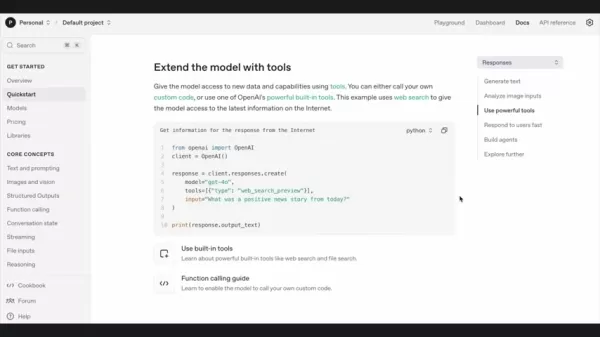
The Chat Completion API now features models specifically designed to perform web searches, allowing AI to answer questions, provide insights, and offer recommendations based on the most current available data. This integration means AI agents can be deployed in scenarios requiring real-time information, such as news aggregation, market analysis, and customer support. By reducing dependence on external tools, developers can create more self-contained and efficient AI solutions. Accessing information directly through the Chat Completion API ensures AI models always operate with the most up-to-date information, resulting in more accurate and relevant outputs. This feature makes it simpler than ever to develop informative and reliable AI agents.
Integrating Perplexity Sonar Models
Accessing DeepSeek R1 and Llama 3.3 via OpenAI API
While OpenAI's native models now include web search, Perplexity Sonar models have offered web-enabled Llama 3.3 and DeepSeek R1 access through the OpenAI API for several weeks. This provides an interesting alternative. To use Perplexity Sonar, you need to substitute a Perplexity API key and modify the base URL. The code structure remains nearly identical to OpenAI models.
from openai import OpenAIclient = OpenAI(api_key="YOUR_PERPLEXITY_API_KEY",base_url="https://api.perplexity.ai")completion = client.chat.completions.create(model="sonar-reasoning-pro",messages=[{"role": "user", "content": "Did the US House of Representatives avert a government shutdown today?"}])print(completion.choices[0].message.content)
The main differences include:
- Using your Perplexity API key.
- Setting
base_url to https://api.perplexity.ai. - Specifying a Perplexity Sonar model (such as
sonar-reasoning-pro).
This approach lets you utilize advanced models like DeepSeek R1 with minimal code changes.
Cons
Consider exploring Sonar's capabilities. Perplexity Sonar Models: Key Features and Offerings
Perplexity Sonar provides several advanced models designed for enhanced web search and reasoning capabilities. These models build upon architectures like Llama 3.3 and DeepSeek R1, delivering state-of-the-art performance in information retrieval and analysis. Here's an overview of some key features and offerings of the Perplexity Sonar models.
- Sonar Pro: Premier search solution with search grounding, supporting advanced queries and follow-ups. Ideal for complex, multi-step tasks requiring deep understanding and context retention.
- Sonar Reasoning Pro: Premier reasoning solution powered by DeepSeek R1, featuring advanced chain-of-thought reasoning plus real-time internet search and citations. Perfect for detailed analysis requiring the most current information.
- Sonar: Lightweight solution with search grounding, faster and more affordable than Sonar Pro. Best for straightforward answers with citations, balancing speed and cost.
- Sonar Reasoning: Lightweight reasoning solution powered by reasoning models trained with DeepSeek R1, also including chain-of-thought reasoning and citations. Ideal for developing investment theses for upcoming US IPOs.
How to Utilize Web Search in Your Projects
Setting Up Your Environment
To start using web search in your OpenAI projects, first set up your development environment. This involves importing the OpenAI module and authenticating your API key. Ensure you have the latest OpenAI library version installed to fully leverage the new features. Once the module is imported, create a client instance using your API key.
Key Steps:
- Import the OpenAI module.
- Set your API key.
- Create a client instance for interacting with the OpenAI API.
- Select the appropriate web search enabled model for your task.
After setting up your environment, you can begin making API calls to perform web searches and retrieve real-time information.
Using Chat Completion API
The Chat Completion API enables easy integration of web search into your AI models. Start by creating a client instance, then use the chat.completions.create method to interact with the model. Specify a web search enabled model, such as gpt-4o-mini-search-preview or gpt-4o-search-preview, and provide your query.
Code Example:
from openai import OpenAIclient = OpenAI(api_key='YOUR_API_KEY')completion = client.chat.completions.create(model="gpt-4o-mini-search-preview",messages=[{"role": "user", "content": "Did the US House of Representatives avert a government shutdown today?"}])print(completion.choices[0].message.content)
This code demonstrates how to make a web search enabled API call using the Chat Completion API. By specifying the appropriate model and query, you can retrieve real-time information directly into your AI application.
Leveraging Responses API
The Responses API introduces built-in tool calls, simplifying web search implementation. Use the responses.create method, specify the model, define the tools parameter with the web search tool (web_search_preview), and provide your input query.
Code Example:
from openai import OpenAIclient = OpenAI(api_key='YOUR_API_KEY')response = client.responses.create(model="gpt-4o-mini",tools=[{"type": "web_search_preview"}],input="Did the US House of Representatives avert a government shutdown today?")print(response.output_text)
This code illustrates how to use the Responses API for web search enabled API calls. The Responses API simplifies development and helps you build more sophisticated AI applications more easily.
Extracting Annotations and Citations
Both the Chat Completion API and Responses API allow extraction of annotations and citations from search results. This helps verify the accuracy and reliability of the model's information. By using the annotations parameter, you can retrieve URLs and other metadata associated with search results.
Code Example (Chat Completion API):
print(completion.choices[0].message.annotations)
Code Example (Responses API):
print(response.output[1].content[0].annotations)
These code examples show how to extract annotations from both APIs, enabling you to provide users with information sources.
Understanding the Pricing Structure
Cost-Effective Options for Developers
OpenAI offers various pricing tiers for its web search enabled models, providing developers with budget-friendly options for their projects.
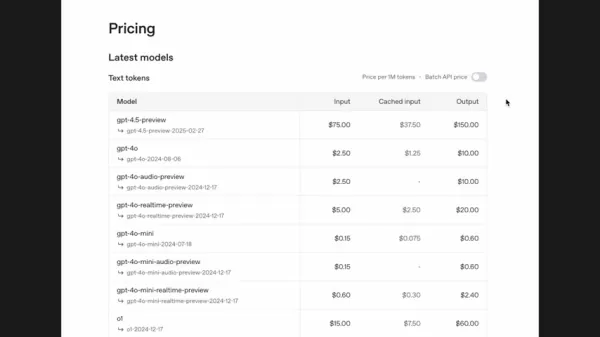
The gpt-4o-mini model costs only $0.15 per million tokens for inputs and $0.60 per million tokens for outputs, making it an economical choice for many applications. The standard gpt-4o-search-preview model is priced at $2.50 per million tokens for inputs and $10.00 per million tokens for outputs.
Here's a pricing summary:
Model Input Price (per million tokens) Output Price (per million tokens) gpt-4o-mini-search-preview$0.15$0.60gpt-4o-search-preview$2.50$10.00These pricing options let developers select the model that best matches their budget and performance needs. By choosing the appropriate model carefully, you can maximize your OpenAI projects' value while controlling costs.
Advantages and Disadvantages
Pros
Real-time data access improves accuracy and relevance.
Built-in tool calls streamline development.
Annotations and citations enhance transparency.
Cost-effective options are available.
Seamless integration with existing OpenAI models.
Cons
Higher output costs for advanced models.
Dependence on OpenAI's API and service availability.
Potential for biased or inaccurate search results.
Limited control over the search process.
Models may require more time to generate answers.
Key Features of OpenAI's Web Search Integration
Real-Time Information Access
The ability to access real-time information is a fundamental feature of OpenAI's web search integration. This feature ensures AI models always operate with the most current data, leading to more accurate and relevant outputs. By reducing reliance on external tools, developers can build more self-contained and efficient AI solutions. The integration provides a direct connection to the web, enabling AI agents to answer questions, provide insights, and offer recommendations based on the latest available data.
Built-In Tool Calls
The Responses API introduces built-in tool calls for web search and file search, simplifying the integration of these functionalities into AI models. This feature streamlines development and reduces the need for custom code. The built-in tool calls are designed for ease of use and high efficiency, allowing developers to focus on creating innovative AI solutions.
Annotations and Citations
OpenAI's web search integration includes annotations and citations, enabling developers to verify the accuracy and reliability of the model's information. This feature ensures transparency and builds trust in AI outputs. By extracting annotations, you can provide users with information sources, allowing them to verify claims and explore context in greater detail.
Practical Use Cases for Web Search Enabled APIs
News Aggregation and Reporting
Web search enabled APIs can aggregate news from various sources in real-time. This allows AI models to provide current news reports, summaries, and analysis across numerous topics. The ability to access live information ensures the news provided remains relevant and accurate.
Market Analysis and Research
These APIs can conduct market analysis and research by gathering data from multiple web sources. This enables AI models to offer insights into market trends, competitor analysis, and investment opportunities. Real-time data access ensures analysis reflects the latest market conditions.
Customer Support and Assistance
Web search enabled APIs can enhance customer support and assistance by equipping AI models to answer customer questions using the most current information. This ensures customer inquiries are addressed accurately and efficiently. The integration can also provide personalized recommendations and troubleshoot issues in real-time.
Frequently Asked Questions
What is the Responses API?
The Responses API is a new API primitive from OpenAI that combines the best features of Chat Completions and Assistants APIs. It simplifies integrating built-in tool calls like web search and file search into AI models. This API helps developers create more dynamic and informed AI applications with greater ease and efficiency.
How does the web search capability work in the Chat Completion API?
The Chat Completion API now includes models specifically designed to perform web searches. When you call the API with a web search enabled model, it automatically conducts a web search based on your query and incorporates results into its response. This ensures the AI model always operates with the most current information.
What are annotations and citations?
Annotations and citations are metadata associated with search results that provide information about data sources. By extracting annotations, you can give users access to information sources, enabling them to verify claims and explore context further. This feature ensures transparency and builds trust in AI outputs.
Related Questions
How do I choose between gpt-4o-mini-search-preview and gpt-4o-search-preview?
Choosing between gpt-4o-mini-search-preview and gpt-4o-search-preview depends on your budget and performance requirements. The gpt-4o-mini model is more cost-effective, priced at $0.15 per million tokens for inputs and $0.60 per million tokens for outputs. The gpt-4o-search-preview model costs $2.50 per million tokens for inputs and $10.00 per million tokens for outputs. If you need a more powerful model and can accommodate higher costs, gpt-4o-search-preview may be preferable. For balancing cost with reasonable output quality, gpt-4o-mini-search-preview offers excellent value. Remember that current pricing reflects 2025 rates and is subject to change.
Can I use other models besides those mentioned in the video with these techniques?
Yes, the techniques demonstrated can apply to other models that support web search capabilities or can integrate with external search tools. The key is ensuring proper model configuration to access and utilize real-time web information. By adapting the shown code snippets and techniques, you can integrate web search into various AI models.
Related article
 Former OpenAI Researcher Barrett Zoph Returns to Google to Support Gemini Development
Barret Zoph, who previously abruptly left and joined OpenAI due to a disagreement with Thinking Machines Lab CEO Miriam Mularati, has once again changed employers. Alphabet's Google announced that Zoph will return as Vice President of Research, bring
How Recursive Intelligence Raised $335M at $4B Valuation in 4 Months
The co-founders of startup Ricursive Intelligence seemed destined to be co-founders.Anna Goldie, CEO, and Azalia Mirhoseini, CTO, are so well-known in the AI community that they were among those AI engineers who “got those weird emails from Zuckerber
AI race won’t wait, nor will this TechCrunch Disrupt 25% discount
Every founder building in AI right now is asking the same question: Are we moving fast enough, and effectively enough? TechCrunch Disrupt 2026 puts you in the same room as the people wrestling with that existential question at the highest levels. Fro
Related Special Topic Recommendations
Design & Art
Former OpenAI Researcher Barrett Zoph Returns to Google to Support Gemini Development
Barret Zoph, who previously abruptly left and joined OpenAI due to a disagreement with Thinking Machines Lab CEO Miriam Mularati, has once again changed employers. Alphabet's Google announced that Zoph will return as Vice President of Research, bring
How Recursive Intelligence Raised $335M at $4B Valuation in 4 Months
The co-founders of startup Ricursive Intelligence seemed destined to be co-founders.Anna Goldie, CEO, and Azalia Mirhoseini, CTO, are so well-known in the AI community that they were among those AI engineers who “got those weird emails from Zuckerber
AI race won’t wait, nor will this TechCrunch Disrupt 25% discount
Every founder building in AI right now is asking the same question: Are we moving fast enough, and effectively enough? TechCrunch Disrupt 2026 puts you in the same room as the people wrestling with that existential question at the highest levels. Fro
Related Special Topic Recommendations
Design & Art
 Top AI Illustration Tools: Create Editorial Scenes and Cover Art Faster
2026 Latest Top-rated AI Illustration Tools: Our curated list features the best powerfully designed tools for creating stunning editorial scenes and eye-catching cover art quickly. Each option has gone through rigorous real-world tests, offering a free vs paid comparison to help you find the perfect match for your workflow. Try these must-try solutions today to unlock your AI edge and boost your creative productivity. Explore now at XIX.AI.
 10 tools
 xix.ai
Education and Learning
Top AI Tutors for Exam Prep: Practice Math, Science, and English
xix.ai
Education and Learning
Top AI Tutors for Exam Prep: Practice Math, Science, and English
2026 Latest Top-Rated Best AI Tutors for Exam Prep are here on XIX.AI! Our curated list features powerful game-changing tools that offer free vs paid comparison, real-world tests, and weekly updated rankings. They help boost your writing efficiency, simplify complex topic learning, and unlock your academic potential. Explore now to Discover your perfect exam prep tool and Start creating today to Unlock your AI edge!
10 tools
xix.ai
Finance
AI Budget Planning Tools for Personal Money Management
2026 Latest Best Top-Rated AI Budget Planning Tools for Personal Money Management are here on XIX.AI! This curated collection features powerful, game-changing solutions that help you conduct real-world tests, understand spending habits, and create personalized plans to boost productivity. Enjoy a free vs paid comparison along with detailed rankings. Must-try tools designed to simplify money management and unlock your AI edge. Explore now!
11 tools
xix.ai
Health & Wellness
AI Sleep Tracking Assistants: Improve Recovery with Better Bedtime Habits
2026 Latest Best Top-Rated AI Sleep Tracking Assistants curated for ultimate recovery. This fully updated weekly guide features powerful tools that deliver real-world tests, free vs paid comparison, and detailed rankings to help you find the must-try solution that boosts sleep quality and supports better bedtime habits. Explore now at XIX.AI to Unlock your AI edge.
10 tools
xix.ai
Data Analysis
AI SQL Copilots for Product and Revenue Analytics
2026 Latest Best Top-Rated AI SQL Copilots for Product and Revenue Analytics! XIX.AI has curated a powerful, game-changing collection of must-try tools that undergo real-world tests through weekly updated rankings. These tools help users boost productivity significantly by accelerating data analysis, streamlining complex queries, and generating accurate insights to drive smarter business decisions. Explore now to Discover your perfect tool for unlocking your AI edge!
14 tools
xix.ai
Education and Learning
Best AI Homework Helpers That Teach: Learn Concepts, Not Just Answers
2026 Latest Best Top-Rated AI Homework Helpers That Teach Core Concepts Not Just Answers Powerful Tools for Students Must-Try Curated List Weekly Updated Free vs Paid Comparison Real-World Tests Accurate Rankings to Help You Unlock Your Full Learning Potential Explore now to Discover your perfect tool for smarter studying.
10 tools
xix.ai

 Comments (1)
0/500
Comments (1)
0/500
![RaymondBaker]()
Also echt interessant zu sehen, was alles möglich wird! Die Integration von DeepSeek wirkt auf mich wie ein Zeichen für mehr Zusammenarbeit zwischen den großen KI-Firmen. Hoffentlich bedeutet das langfristig bessere Angebote für uns Nutzer und weniger geschlossene Ökosysteme, bei denen alles nur von einem Hersteller kommt. Spannend wäre, ob sich diese Art von Web-Search-API auch in kleineren Projekten wirtschaftlich einsetzen lässt 😊
OpenAI has introduced substantial updates to its developer platform, transforming agent development with enhanced web search functionality. The new Responses API enables built-in tool calls for web and file search, allowing models to efficiently access real-time data. This guide examines these updates, highlighting how developers can utilize the Chat Completion and Responses APIs with web search, plus a smart technique for integrating DeepSeek R1 models to achieve exceptional performance. Learn how these innovations can elevate your AI projects and keep your models updated with the latest information.
Key Points
OpenAI has released a significant platform update, embedding web search capabilities directly into the Chat Completion API.
The Responses API now includes built-in tool calls for web and file search, supporting real-time data retrieval.
Models can now fetch current information without external tools, streamlining data collection.
Using web search models through the Chat Completion API is as straightforward as calling other OpenAI models, simplifying integration.
The Perplexity Sonar models, including web-enabled versions of Llama 3.3 and DeepSeek R1, are available via the OpenAI API client.
Integrating Perplexity Sonar models requires switching the OpenAI API key and modifying the base URL.
The update provides budget-friendly options, with gpt-4o-mini model inputs priced at just $0.15 per million tokens.
Using annotations enables separate extraction of cited URLs, improving data transparency and verification.
OpenAI's New Agent Building Blocks
Understanding the OpenAI Update
OpenAI has launched a major update to its developer platform, primarily focusing on agent building blocks with integrated web search capabilities. This update centers on equipping developers with improved tools to create more knowledgeable and dynamic AI agents.
The Chat Completion API now includes models with built-in web search functionality, representing a significant advancement in enabling AI to access and use real-time data. Direct web search integration through the API offers a streamlined method for information retrieval, ensuring AI models remain current and relevant. By incorporating live data, applications built on OpenAI's platform can deliver more accurate, context-aware, and timely responses. The Responses API further enhances built-in tool calls like web and file search. This API simplifies how AI models interact with external resources, allowing them to retrieve real-time information without external dependencies. These updates make it easier to develop powerful and efficient AI solutions. These latest developments mark a shift toward more integrated and accessible AI development tools. By providing direct web search access, OpenAI empowers developers to build more intelligent, responsive, and informed applications.
Introducing the Responses API
The Responses API is a transformative tool for developers integrating real-time data into their AI models. This API simplifies built-in tool calls for web and file search, which were previously more complex to implement. It represents a powerful new API primitive that combines the best features of both Chat Completions and Assistants APIs. The Responses API's simplicity and efficiency let developers concentrate on creating innovative solutions rather than managing complex configurations. Using the Responses API is straightforward as it integrates seamlessly with the Chat Completions API. Instead of relying on external plugins or custom code for information retrieval, developers can now use the Responses API to make direct queries and receive current data within their AI models. This enables models to access up-to-date information, improving their accuracy and relevance while reducing complexity. The Responses API streamlines development and helps developers build more sophisticated AI applications with greater ease and efficiency. This API is essential for developers creating AI models that are both intelligent and adaptable to the constantly changing landscape of real-time data. By adopting the Responses API, developers can ensure their AI applications remain at technology's forefront.
Web Search Capabilities in Chat Completion API
The integration of web search capabilities within the Chat Completion API marks a substantial advancement in AI development evolution. This integration enables developers to create AI agents that not only generate human-like text but also access and incorporate real-time web information.
The Chat Completion API now features models specifically designed to perform web searches, allowing AI to answer questions, provide insights, and offer recommendations based on the most current available data. This integration means AI agents can be deployed in scenarios requiring real-time information, such as news aggregation, market analysis, and customer support. By reducing dependence on external tools, developers can create more self-contained and efficient AI solutions. Accessing information directly through the Chat Completion API ensures AI models always operate with the most up-to-date information, resulting in more accurate and relevant outputs. This feature makes it simpler than ever to develop informative and reliable AI agents.
Integrating Perplexity Sonar Models
Accessing DeepSeek R1 and Llama 3.3 via OpenAI API
While OpenAI's native models now include web search, Perplexity Sonar models have offered web-enabled Llama 3.3 and DeepSeek R1 access through the OpenAI API for several weeks. This provides an interesting alternative. To use Perplexity Sonar, you need to substitute a Perplexity API key and modify the base URL. The code structure remains nearly identical to OpenAI models.
from openai import OpenAIclient = OpenAI(api_key="YOUR_PERPLEXITY_API_KEY",base_url="https://api.perplexity.ai")completion = client.chat.completions.create(model="sonar-reasoning-pro",messages=[{"role": "user", "content": "Did the US House of Representatives avert a government shutdown today?"}])print(completion.choices[0].message.content)
The main differences include:
- Using your Perplexity API key.
- Setting
base_urltohttps://api.perplexity.ai. - Specifying a Perplexity Sonar model (such as
sonar-reasoning-pro).
This approach lets you utilize advanced models like DeepSeek R1 with minimal code changes.
Cons
Consider exploring Sonar's capabilities.Perplexity Sonar Models: Key Features and Offerings
Perplexity Sonar provides several advanced models designed for enhanced web search and reasoning capabilities. These models build upon architectures like Llama 3.3 and DeepSeek R1, delivering state-of-the-art performance in information retrieval and analysis. Here's an overview of some key features and offerings of the Perplexity Sonar models.
- Sonar Pro: Premier search solution with search grounding, supporting advanced queries and follow-ups. Ideal for complex, multi-step tasks requiring deep understanding and context retention.
- Sonar Reasoning Pro: Premier reasoning solution powered by DeepSeek R1, featuring advanced chain-of-thought reasoning plus real-time internet search and citations. Perfect for detailed analysis requiring the most current information.
- Sonar: Lightweight solution with search grounding, faster and more affordable than Sonar Pro. Best for straightforward answers with citations, balancing speed and cost.
- Sonar Reasoning: Lightweight reasoning solution powered by reasoning models trained with DeepSeek R1, also including chain-of-thought reasoning and citations. Ideal for developing investment theses for upcoming US IPOs.
How to Utilize Web Search in Your Projects
Setting Up Your Environment
To start using web search in your OpenAI projects, first set up your development environment. This involves importing the OpenAI module and authenticating your API key. Ensure you have the latest OpenAI library version installed to fully leverage the new features. Once the module is imported, create a client instance using your API key.
Key Steps:
- Import the OpenAI module.
- Set your API key.
- Create a client instance for interacting with the OpenAI API.
- Select the appropriate web search enabled model for your task.
After setting up your environment, you can begin making API calls to perform web searches and retrieve real-time information.
Using Chat Completion API
The Chat Completion API enables easy integration of web search into your AI models. Start by creating a client instance, then use the chat.completions.create method to interact with the model. Specify a web search enabled model, such as gpt-4o-mini-search-preview or gpt-4o-search-preview, and provide your query.
Code Example:
from openai import OpenAIclient = OpenAI(api_key='YOUR_API_KEY')completion = client.chat.completions.create(model="gpt-4o-mini-search-preview",messages=[{"role": "user", "content": "Did the US House of Representatives avert a government shutdown today?"}])print(completion.choices[0].message.content)
This code demonstrates how to make a web search enabled API call using the Chat Completion API. By specifying the appropriate model and query, you can retrieve real-time information directly into your AI application.
Leveraging Responses API
The Responses API introduces built-in tool calls, simplifying web search implementation. Use the responses.create method, specify the model, define the tools parameter with the web search tool (web_search_preview), and provide your input query.
Code Example:
from openai import OpenAIclient = OpenAI(api_key='YOUR_API_KEY')response = client.responses.create(model="gpt-4o-mini",tools=[{"type": "web_search_preview"}],input="Did the US House of Representatives avert a government shutdown today?")print(response.output_text)
This code illustrates how to use the Responses API for web search enabled API calls. The Responses API simplifies development and helps you build more sophisticated AI applications more easily.
Extracting Annotations and Citations
Both the Chat Completion API and Responses API allow extraction of annotations and citations from search results. This helps verify the accuracy and reliability of the model's information. By using the annotations parameter, you can retrieve URLs and other metadata associated with search results.
Code Example (Chat Completion API):
print(completion.choices[0].message.annotations)
Code Example (Responses API):
print(response.output[1].content[0].annotations)
These code examples show how to extract annotations from both APIs, enabling you to provide users with information sources.
Understanding the Pricing Structure
Cost-Effective Options for Developers
OpenAI offers various pricing tiers for its web search enabled models, providing developers with budget-friendly options for their projects.
The gpt-4o-mini model costs only $0.15 per million tokens for inputs and $0.60 per million tokens for outputs, making it an economical choice for many applications. The standard gpt-4o-search-preview model is priced at $2.50 per million tokens for inputs and $10.00 per million tokens for outputs.
Here's a pricing summary:
These pricing options let developers select the model that best matches their budget and performance needs. By choosing the appropriate model carefully, you can maximize your OpenAI projects' value while controlling costs.
Advantages and Disadvantages
Pros
Real-time data access improves accuracy and relevance.
Built-in tool calls streamline development.
Annotations and citations enhance transparency.
Cost-effective options are available.
Seamless integration with existing OpenAI models.
Cons
Higher output costs for advanced models.
Dependence on OpenAI's API and service availability.
Potential for biased or inaccurate search results.
Limited control over the search process.
Models may require more time to generate answers.
Key Features of OpenAI's Web Search Integration
Real-Time Information Access
The ability to access real-time information is a fundamental feature of OpenAI's web search integration. This feature ensures AI models always operate with the most current data, leading to more accurate and relevant outputs. By reducing reliance on external tools, developers can build more self-contained and efficient AI solutions. The integration provides a direct connection to the web, enabling AI agents to answer questions, provide insights, and offer recommendations based on the latest available data.
Built-In Tool Calls
The Responses API introduces built-in tool calls for web search and file search, simplifying the integration of these functionalities into AI models. This feature streamlines development and reduces the need for custom code. The built-in tool calls are designed for ease of use and high efficiency, allowing developers to focus on creating innovative AI solutions.
Annotations and Citations
OpenAI's web search integration includes annotations and citations, enabling developers to verify the accuracy and reliability of the model's information. This feature ensures transparency and builds trust in AI outputs. By extracting annotations, you can provide users with information sources, allowing them to verify claims and explore context in greater detail.
Practical Use Cases for Web Search Enabled APIs
News Aggregation and Reporting
Web search enabled APIs can aggregate news from various sources in real-time. This allows AI models to provide current news reports, summaries, and analysis across numerous topics. The ability to access live information ensures the news provided remains relevant and accurate.
Market Analysis and Research
These APIs can conduct market analysis and research by gathering data from multiple web sources. This enables AI models to offer insights into market trends, competitor analysis, and investment opportunities. Real-time data access ensures analysis reflects the latest market conditions.
Customer Support and Assistance
Web search enabled APIs can enhance customer support and assistance by equipping AI models to answer customer questions using the most current information. This ensures customer inquiries are addressed accurately and efficiently. The integration can also provide personalized recommendations and troubleshoot issues in real-time.
Frequently Asked Questions
What is the Responses API?
The Responses API is a new API primitive from OpenAI that combines the best features of Chat Completions and Assistants APIs. It simplifies integrating built-in tool calls like web search and file search into AI models. This API helps developers create more dynamic and informed AI applications with greater ease and efficiency.
How does the web search capability work in the Chat Completion API?
The Chat Completion API now includes models specifically designed to perform web searches. When you call the API with a web search enabled model, it automatically conducts a web search based on your query and incorporates results into its response. This ensures the AI model always operates with the most current information.
What are annotations and citations?
Annotations and citations are metadata associated with search results that provide information about data sources. By extracting annotations, you can give users access to information sources, enabling them to verify claims and explore context further. This feature ensures transparency and builds trust in AI outputs.
Related Questions
How do I choose between gpt-4o-mini-search-preview and gpt-4o-search-preview?
Choosing between gpt-4o-mini-search-preview and gpt-4o-search-preview depends on your budget and performance requirements. The gpt-4o-mini model is more cost-effective, priced at $0.15 per million tokens for inputs and $0.60 per million tokens for outputs. The gpt-4o-search-preview model costs $2.50 per million tokens for inputs and $10.00 per million tokens for outputs. If you need a more powerful model and can accommodate higher costs, gpt-4o-search-preview may be preferable. For balancing cost with reasonable output quality, gpt-4o-mini-search-preview offers excellent value. Remember that current pricing reflects 2025 rates and is subject to change.
Can I use other models besides those mentioned in the video with these techniques?
Yes, the techniques demonstrated can apply to other models that support web search capabilities or can integrate with external search tools. The key is ensuring proper model configuration to access and utilize real-time web information. By adapting the shown code snippets and techniques, you can integrate web search into various AI models.








 Former OpenAI Researcher Barrett Zoph Returns to Google to Support Gemini Development
Barret Zoph, who previously abruptly left and joined OpenAI due to a disagreement with Thinking Machines Lab CEO Miriam Mularati, has once again changed employers. Alphabet's Google announced that Zoph will return as Vice President of Research, bring
Former OpenAI Researcher Barrett Zoph Returns to Google to Support Gemini Development
Barret Zoph, who previously abruptly left and joined OpenAI due to a disagreement with Thinking Machines Lab CEO Miriam Mularati, has once again changed employers. Alphabet's Google announced that Zoph will return as Vice President of Research, bring
 How Recursive Intelligence Raised $335M at $4B Valuation in 4 Months
The co-founders of startup Ricursive Intelligence seemed destined to be co-founders.Anna Goldie, CEO, and Azalia Mirhoseini, CTO, are so well-known in the AI community that they were among those AI engineers who “got those weird emails from Zuckerber
How Recursive Intelligence Raised $335M at $4B Valuation in 4 Months
The co-founders of startup Ricursive Intelligence seemed destined to be co-founders.Anna Goldie, CEO, and Azalia Mirhoseini, CTO, are so well-known in the AI community that they were among those AI engineers who “got those weird emails from Zuckerber
 AI race won’t wait, nor will this TechCrunch Disrupt 25% discount
Every founder building in AI right now is asking the same question: Are we moving fast enough, and effectively enough? TechCrunch Disrupt 2026 puts you in the same room as the people wrestling with that existential question at the highest levels. Fro
AI race won’t wait, nor will this TechCrunch Disrupt 25% discount
Every founder building in AI right now is asking the same question: Are we moving fast enough, and effectively enough? TechCrunch Disrupt 2026 puts you in the same room as the people wrestling with that existential question at the highest levels. Fro

2026 Latest Top-rated AI Illustration Tools: Our curated list features the best powerfully designed tools for creating stunning editorial scenes and eye-catching cover art quickly. Each option has gone through rigorous real-world tests, offering a free vs paid comparison to help you find the perfect match for your workflow. Try these must-try solutions today to unlock your AI edge and boost your creative productivity. Explore now at XIX.AI.
10 tools
xix.ai

2026 Latest Top-Rated Best AI Tutors for Exam Prep are here on XIX.AI! Our curated list features powerful game-changing tools that offer free vs paid comparison, real-world tests, and weekly updated rankings. They help boost your writing efficiency, simplify complex topic learning, and unlock your academic potential. Explore now to Discover your perfect exam prep tool and Start creating today to Unlock your AI edge!
10 tools
xix.ai

2026 Latest Best Top-Rated AI Budget Planning Tools for Personal Money Management are here on XIX.AI! This curated collection features powerful, game-changing solutions that help you conduct real-world tests, understand spending habits, and create personalized plans to boost productivity. Enjoy a free vs paid comparison along with detailed rankings. Must-try tools designed to simplify money management and unlock your AI edge. Explore now!
11 tools
xix.ai

2026 Latest Best Top-Rated AI Sleep Tracking Assistants curated for ultimate recovery. This fully updated weekly guide features powerful tools that deliver real-world tests, free vs paid comparison, and detailed rankings to help you find the must-try solution that boosts sleep quality and supports better bedtime habits. Explore now at XIX.AI to Unlock your AI edge.
10 tools
xix.ai

2026 Latest Best Top-Rated AI SQL Copilots for Product and Revenue Analytics! XIX.AI has curated a powerful, game-changing collection of must-try tools that undergo real-world tests through weekly updated rankings. These tools help users boost productivity significantly by accelerating data analysis, streamlining complex queries, and generating accurate insights to drive smarter business decisions. Explore now to Discover your perfect tool for unlocking your AI edge!
14 tools
xix.ai

2026 Latest Best Top-Rated AI Homework Helpers That Teach Core Concepts Not Just Answers Powerful Tools for Students Must-Try Curated List Weekly Updated Free vs Paid Comparison Real-World Tests Accurate Rankings to Help You Unlock Your Full Learning Potential Explore now to Discover your perfect tool for smarter studying.
10 tools
xix.ai

Also echt interessant zu sehen, was alles möglich wird! Die Integration von DeepSeek wirkt auf mich wie ein Zeichen für mehr Zusammenarbeit zwischen den großen KI-Firmen. Hoffentlich bedeutet das langfristig bessere Angebote für uns Nutzer und weniger geschlossene Ökosysteme, bei denen alles nur von einem Hersteller kommt. Spannend wäre, ob sich diese Art von Web-Search-API auch in kleineren Projekten wirtschaftlich einsetzen lässt 😊












