


 Home
HomeWhat are the best AI features in OnePlus OxygenOS 15 for 2025 phones?
Get ready for a smarter smartphone experience with OxygenOS 15. This latest update infuses powerful artificial intelligence into your OnePlus device, transforming how you manage daily tasks. From effortlessly editing photos to taking intelligent notes and translating content on the fly, these features are designed to make your digital life more intuitive and productive. Discover the AI innovations set to enhance your mobile interaction in 2025.
Key Points
OxygenOS 15 introduces a suite of AI-powered tools to elevate your user experience.
Circle to Search enables instant, intuitive lookups from anywhere on your screen.
AI photo editing tools offer detail enhancement, object removal, and image sharpening.
The Notes app gains smart capabilities for summarizing content and converting voice recordings to text.
AI integration in the sidebar provides on-the-go functions like translation and content summarization.
Together, these features aim to simplify and enrich your everyday mobile use.
Exploring OnePlus OxygenOS 15's AI Capabilities
The Power of AI in OxygenOS 15
OnePlus takes a significant leap forward with OxygenOS 15, embedding practical artificial intelligence directly into the operating system. These features go beyond novelty, offering real-world solutions to enhance efficiency and enjoyment. The AI tools are woven seamlessly throughout the interface, learning from your habits to provide personalized assistance for common tasks. OxygenOS 15 represents a meaningful upgrade, combining AI's computational power with everyday usability.
True to its legacy, OnePlus continues to cater to users who value performance and customization. This iteration enhances core functions with intelligent features that anticipate needs, offer assistance, and refine interactions to save time across various scenarios.
As AI technology advances, OnePlus is committed to integrating these developments in a responsible and practical manner, enhancing user autonomy without compromising control.
To fully access these features, ensure your OnePlus device is updated to OxygenOS 15. Most AI capabilities are designed for recent models, typically from the last two years, ensuring optimal performance and compatibility for modern users.
Circle to Search: Intuitive and Quick Searching
A standout feature in OxygenOS 15 is Circle to Search,

a tool that revolutionizes how you find information. It makes discovering details about anything on your screen faster and more natural.
How to Enable Circle to Search:
- Open your device's Settings.
- Go to System & Updates.
- Select System Navigation.
- Scroll down and toggle on Circle to Search.
Once activated, a white line will appear at the bottom of your screen. To use it, simply tap and hold this line. This brings up a search overlay, allowing you to circle, highlight, or gesture around any on-screen element to launch a Google search. Curious about a product in a photo? Just draw a circle around it.
The feature also includes built-in AI translation, providing instant translations without needing to copy and paste text into other apps. You can even identify music playing around you. With its simple activation and intelligent design, Circle to Search redefines mobile information discovery.
AI-Powered Photo Editing: Enhancing Your Memories
OxygenOS 15 brings advanced AI-driven photo editing tools directly into the Gallery app, empowering you to perfect your images.
Accessing the AI Editor:
- Launch the Gallery app.
- Select the photo you want to edit.
- Tap the Edit button.
- Choose the AI Editor option.
Inside the AI Editor, you'll find several powerful tools:
- AI Detail Boost: Enhances photo sharpness and detail while reducing blur for optimal clarity.
- AI Eraser:
Removes unwanted objects or flaws. Simply circle the item, and the AI seamlessly erases it, filling the background realistically.
- AI Unblur: Sharpens blurry photos to restore detail and crispness.
- AI Reflection Eraser: Minimizes or removes glare and reflections, perfect for photos taken through glass or near water.
These intelligent editing tools give you the power to transform everyday snapshots into polished, share-worthy memories.
Smart Note-Taking with AI in the Notes App
The Notes app receives a significant upgrade in OxygenOS 15, integrating AI to streamline how you capture and manage information.

AI Features in Notes App:
- AI Summarization: Automatically condenses lengthy notes into key points, saving you time when reviewing.
- Text Conversion from Voice Recording: Record your thoughts aloud, and the app transcribes the audio into text stored directly within your notes.
How to Use AI Features in the Notes App:
- Open the Notes app.
- Select an existing note or create a new one.
- Tap the AI icon at the bottom.
Select your desired AI function.
These features help keep your notes organized and actionable, integrating smoothly into your daily workflow.
Sidebar AI: Intelligent Assistance at Your Fingertips
OxygenOS 15 embeds AI directly into the sidebar, offering instant smart assistance from any screen. This convenient tool lets you access powerful functions without leaving your current app.
AI Functions in the Sidebar:
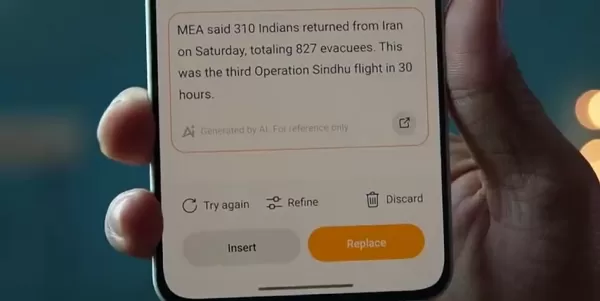
- AI Summary: Generates a concise summary of the content visible on your screen.
- AI Speak: Reads on-screen text aloud, allowing you to listen to articles or documents.
- AI Screen Translate: Translates text on your screen in real time, ideal for browsing websites in other languages.
Accessing AI Features in Sidebar:
- Open the Sidebar from any screen.
- Choose your preferred AI function.
With a simple swipe, you can quickly summarize, translate, or listen to content.
User Experience and Daily Impact
Enhanced Productivity
The AI suite in OxygenOS 15 boosts productivity by reducing the steps needed for common tasks. The Sidebar's AI Summary tool, for instance, quickly distills long articles, helping professionals and students grasp essentials efficiently. By converting speech to text in Notes and offering instant translation, the system removes friction, streamlining task management and research. Built on Android, OxygenOS ensures your productivity tools and synchronized data work seamlessly across platforms, keeping you connected everywhere.
Accessibility and Inclusivity
OxygenOS 15 emphasizes accessibility, leveraging AI to support a diverse range of users. The AI Speak feature assists visually impaired individuals by vocalizing on-screen content. Meanwhile, AI Screen Translate breaks down language barriers, providing real-time translations that open up global information. These thoughtful inclusions promote greater autonomy and participation, making technology more accommodating for different needs and learning styles.
Weighing the Benefits: Pros
and Cons
of OxygenOS 15 AI Features
Pros
Boosts productivity with instant summarization and translation tools.
Offers advanced photo editing for creating stunning images.
Streamlines note-taking with automatic summaries and speech-to-text.
Improves accessibility for users with diverse needs.
Integrates time-saving tools seamlessly into daily mobile use.
Cons
Some features require a consistent internet connection.
AI processing may have a noticeable impact on battery life.
New users may face a learning curve with AI-driven interfaces.
Raises privacy considerations regarding AI data handling.
Inherent limitations of AI technology may affect accuracy in some scenarios.
Frequently Asked Questions
Which OnePlus devices will receive the OxygenOS 15 update?
The OxygenOS 15 update is planned for most recent OnePlus models, typically those launched within the past two years. For a definitive supported devices list, please check the official OnePlus website or community forums.
Will these AI features require an internet connection?
Certain AI features, like Circle to Search and AI Screen Translate, need an active internet connection. Others, such as AI Detail Boost and AI Eraser, are designed to function offline.
Can I disable these AI features if I don't want to use them?
Yes. OxygenOS 15 provides the option to disable most AI features through the settings menu, giving you full control over your device's functionality.
Will these AI features affect my device's battery life?
While AI processing consumes power, OnePlus has optimized these features to minimize battery drain. You can further manage consumption through your device's battery settings.
Related Questions
How does OxygenOS 15 compare to other Android skins in terms of AI features?
OxygenOS 15 distinguishes itself through deeply integrated, user-focused AI capabilities. While other Android interfaces offer similar tools, OnePlus emphasizes a seamless and practical experience, weaving AI naturally into daily use. The implementation prioritizes intuitive operation within native apps, reducing reliance on third-party solutions. The objective is to enrich every interaction, providing a fluid system that adapts to your workflow for effortless efficiency.
Related article
 Stripe to Acquire OpenRouter as AI Model Routing Gains Momentum
Stripe has agreed to acquire OpenRouter, an AI model-routing platform that gives developers access to hundreds of models through a single interface. The deal adds model selection and routing to Stripe’s existing work around AI usage and token-based b
Former OpenAI Researcher Barrett Zoph Returns to Google to Support Gemini Development
Barret Zoph, who previously abruptly left and joined OpenAI due to a disagreement with Thinking Machines Lab CEO Miriam Mularati, has once again changed employers. Alphabet's Google announced that Zoph will return as Vice President of Research, bring
How Recursive Intelligence Raised $335M at $4B Valuation in 4 Months
The co-founders of startup Ricursive Intelligence seemed destined to be co-founders.Anna Goldie, CEO, and Azalia Mirhoseini, CTO, are so well-known in the AI community that they were among those AI engineers who “got those weird emails from Zuckerber
Related Special Topic Recommendations
Design & Art
Stripe to Acquire OpenRouter as AI Model Routing Gains Momentum
Stripe has agreed to acquire OpenRouter, an AI model-routing platform that gives developers access to hundreds of models through a single interface. The deal adds model selection and routing to Stripe’s existing work around AI usage and token-based b
Former OpenAI Researcher Barrett Zoph Returns to Google to Support Gemini Development
Barret Zoph, who previously abruptly left and joined OpenAI due to a disagreement with Thinking Machines Lab CEO Miriam Mularati, has once again changed employers. Alphabet's Google announced that Zoph will return as Vice President of Research, bring
How Recursive Intelligence Raised $335M at $4B Valuation in 4 Months
The co-founders of startup Ricursive Intelligence seemed destined to be co-founders.Anna Goldie, CEO, and Azalia Mirhoseini, CTO, are so well-known in the AI community that they were among those AI engineers who “got those weird emails from Zuckerber
Related Special Topic Recommendations
Design & Art
 Top AI Illustration Tools: Create Editorial Scenes and Cover Art Faster
2026 Latest Top-rated AI Illustration Tools: Our curated list features the best powerfully designed tools for creating stunning editorial scenes and eye-catching cover art quickly. Each option has gone through rigorous real-world tests, offering a free vs paid comparison to help you find the perfect match for your workflow. Try these must-try solutions today to unlock your AI edge and boost your creative productivity. Explore now at XIX.AI.
 10 tools
 xix.ai
Education and Learning
Top AI Tutors for Exam Prep: Practice Math, Science, and English
xix.ai
Education and Learning
Top AI Tutors for Exam Prep: Practice Math, Science, and English
2026 Latest Top-Rated Best AI Tutors for Exam Prep are here on XIX.AI! Our curated list features powerful game-changing tools that offer free vs paid comparison, real-world tests, and weekly updated rankings. They help boost your writing efficiency, simplify complex topic learning, and unlock your academic potential. Explore now to Discover your perfect exam prep tool and Start creating today to Unlock your AI edge!
10 tools
xix.ai
Finance
AI Budget Planning Tools for Personal Money Management
2026 Latest Best Top-Rated AI Budget Planning Tools for Personal Money Management are here on XIX.AI! This curated collection features powerful, game-changing solutions that help you conduct real-world tests, understand spending habits, and create personalized plans to boost productivity. Enjoy a free vs paid comparison along with detailed rankings. Must-try tools designed to simplify money management and unlock your AI edge. Explore now!
11 tools
xix.ai
Health & Wellness
AI Sleep Tracking Assistants: Improve Recovery with Better Bedtime Habits
2026 Latest Best Top-Rated AI Sleep Tracking Assistants curated for ultimate recovery. This fully updated weekly guide features powerful tools that deliver real-world tests, free vs paid comparison, and detailed rankings to help you find the must-try solution that boosts sleep quality and supports better bedtime habits. Explore now at XIX.AI to Unlock your AI edge.
10 tools
xix.ai
Data Analysis
AI SQL Copilots for Product and Revenue Analytics
2026 Latest Best Top-Rated AI SQL Copilots for Product and Revenue Analytics! XIX.AI has curated a powerful, game-changing collection of must-try tools that undergo real-world tests through weekly updated rankings. These tools help users boost productivity significantly by accelerating data analysis, streamlining complex queries, and generating accurate insights to drive smarter business decisions. Explore now to Discover your perfect tool for unlocking your AI edge!
14 tools
xix.ai
Education and Learning
Best AI Homework Helpers That Teach: Learn Concepts, Not Just Answers
2026 Latest Best Top-Rated AI Homework Helpers That Teach Core Concepts Not Just Answers Powerful Tools for Students Must-Try Curated List Weekly Updated Free vs Paid Comparison Real-World Tests Accurate Rankings to Help You Unlock Your Full Learning Potential Explore now to Discover your perfect tool for smarter studying.
10 tools
xix.ai

 Comments (2)
0/500
Comments (2)
0/500
![BillyLewis]()
Honestly, I'm curious if the AI note-taking actually works offline or it's just another cloud-dependent gimmick. 🤔 OnePlus always hypes up updates, but let's see if this OxygenOS 15 actually improves battery life or just adds more bloat. Anyone else worried about privacy with all these smart features? #TechSkeptic
![WillBaker]()
AI로 사진 편집까지 가능하다니, 정말 편리할 것 같아요! 음성 메모 AI 변환이 정말 기대됩니다 ㅎㅎ 그런데 배터리 소모는 괜찮을까요? 스마트폰이 점점 '생각하는 도구'가 되어가는걸 보면 신기하네요! 📱
Get ready for a smarter smartphone experience with OxygenOS 15. This latest update infuses powerful artificial intelligence into your OnePlus device, transforming how you manage daily tasks. From effortlessly editing photos to taking intelligent notes and translating content on the fly, these features are designed to make your digital life more intuitive and productive. Discover the AI innovations set to enhance your mobile interaction in 2025.
Key Points
OxygenOS 15 introduces a suite of AI-powered tools to elevate your user experience.
Circle to Search enables instant, intuitive lookups from anywhere on your screen.
AI photo editing tools offer detail enhancement, object removal, and image sharpening.
The Notes app gains smart capabilities for summarizing content and converting voice recordings to text.
AI integration in the sidebar provides on-the-go functions like translation and content summarization.
Together, these features aim to simplify and enrich your everyday mobile use.
Exploring OnePlus OxygenOS 15's AI Capabilities
The Power of AI in OxygenOS 15
OnePlus takes a significant leap forward with OxygenOS 15, embedding practical artificial intelligence directly into the operating system. These features go beyond novelty, offering real-world solutions to enhance efficiency and enjoyment. The AI tools are woven seamlessly throughout the interface, learning from your habits to provide personalized assistance for common tasks. OxygenOS 15 represents a meaningful upgrade, combining AI's computational power with everyday usability.
True to its legacy, OnePlus continues to cater to users who value performance and customization. This iteration enhances core functions with intelligent features that anticipate needs, offer assistance, and refine interactions to save time across various scenarios.
As AI technology advances, OnePlus is committed to integrating these developments in a responsible and practical manner, enhancing user autonomy without compromising control.
To fully access these features, ensure your OnePlus device is updated to OxygenOS 15. Most AI capabilities are designed for recent models, typically from the last two years, ensuring optimal performance and compatibility for modern users.
Circle to Search: Intuitive and Quick Searching
A standout feature in OxygenOS 15 is Circle to Search,
a tool that revolutionizes how you find information. It makes discovering details about anything on your screen faster and more natural.
How to Enable Circle to Search:
- Open your device's Settings.
- Go to System & Updates.
- Select System Navigation.
- Scroll down and toggle on Circle to Search.
Once activated, a white line will appear at the bottom of your screen. To use it, simply tap and hold this line. This brings up a search overlay, allowing you to circle, highlight, or gesture around any on-screen element to launch a Google search. Curious about a product in a photo? Just draw a circle around it.
The feature also includes built-in AI translation, providing instant translations without needing to copy and paste text into other apps. You can even identify music playing around you. With its simple activation and intelligent design, Circle to Search redefines mobile information discovery.
AI-Powered Photo Editing: Enhancing Your Memories
OxygenOS 15 brings advanced AI-driven photo editing tools directly into the Gallery app, empowering you to perfect your images.
Accessing the AI Editor:
- Launch the Gallery app.
- Select the photo you want to edit.
- Tap the Edit button.
- Choose the AI Editor option.
Inside the AI Editor, you'll find several powerful tools:
- AI Detail Boost: Enhances photo sharpness and detail while reducing blur for optimal clarity.
- AI Eraser:
Removes unwanted objects or flaws. Simply circle the item, and the AI seamlessly erases it, filling the background realistically.
- AI Unblur: Sharpens blurry photos to restore detail and crispness.
- AI Reflection Eraser: Minimizes or removes glare and reflections, perfect for photos taken through glass or near water.
These intelligent editing tools give you the power to transform everyday snapshots into polished, share-worthy memories.
Smart Note-Taking with AI in the Notes App
The Notes app receives a significant upgrade in OxygenOS 15, integrating AI to streamline how you capture and manage information.
AI Features in Notes App:
- AI Summarization: Automatically condenses lengthy notes into key points, saving you time when reviewing.
- Text Conversion from Voice Recording: Record your thoughts aloud, and the app transcribes the audio into text stored directly within your notes.
How to Use AI Features in the Notes App:
- Open the Notes app.
- Select an existing note or create a new one.
- Tap the AI icon at the bottom.
Select your desired AI function.
These features help keep your notes organized and actionable, integrating smoothly into your daily workflow.
Sidebar AI: Intelligent Assistance at Your Fingertips
OxygenOS 15 embeds AI directly into the sidebar, offering instant smart assistance from any screen. This convenient tool lets you access powerful functions without leaving your current app.
AI Functions in the Sidebar:
- AI Summary: Generates a concise summary of the content visible on your screen.
- AI Speak: Reads on-screen text aloud, allowing you to listen to articles or documents.
- AI Screen Translate: Translates text on your screen in real time, ideal for browsing websites in other languages.
Accessing AI Features in Sidebar:
- Open the Sidebar from any screen.
- Choose your preferred AI function.
With a simple swipe, you can quickly summarize, translate, or listen to content.
User Experience and Daily Impact
Enhanced Productivity
The AI suite in OxygenOS 15 boosts productivity by reducing the steps needed for common tasks. The Sidebar's AI Summary tool, for instance, quickly distills long articles, helping professionals and students grasp essentials efficiently. By converting speech to text in Notes and offering instant translation, the system removes friction, streamlining task management and research. Built on Android, OxygenOS ensures your productivity tools and synchronized data work seamlessly across platforms, keeping you connected everywhere.
Accessibility and Inclusivity
OxygenOS 15 emphasizes accessibility, leveraging AI to support a diverse range of users. The AI Speak feature assists visually impaired individuals by vocalizing on-screen content. Meanwhile, AI Screen Translate breaks down language barriers, providing real-time translations that open up global information. These thoughtful inclusions promote greater autonomy and participation, making technology more accommodating for different needs and learning styles.
Weighing the Benefits: Pros
and Cons
of OxygenOS 15 AI Features
Pros
Boosts productivity with instant summarization and translation tools.
Offers advanced photo editing for creating stunning images.
Streamlines note-taking with automatic summaries and speech-to-text.
Improves accessibility for users with diverse needs.
Integrates time-saving tools seamlessly into daily mobile use.
Cons
Some features require a consistent internet connection.
AI processing may have a noticeable impact on battery life.
New users may face a learning curve with AI-driven interfaces.
Raises privacy considerations regarding AI data handling.
Inherent limitations of AI technology may affect accuracy in some scenarios.
Frequently Asked Questions
Which OnePlus devices will receive the OxygenOS 15 update?
The OxygenOS 15 update is planned for most recent OnePlus models, typically those launched within the past two years. For a definitive supported devices list, please check the official OnePlus website or community forums.
Will these AI features require an internet connection?
Certain AI features, like Circle to Search and AI Screen Translate, need an active internet connection. Others, such as AI Detail Boost and AI Eraser, are designed to function offline.
Can I disable these AI features if I don't want to use them?
Yes. OxygenOS 15 provides the option to disable most AI features through the settings menu, giving you full control over your device's functionality.
Will these AI features affect my device's battery life?
While AI processing consumes power, OnePlus has optimized these features to minimize battery drain. You can further manage consumption through your device's battery settings.
Related Questions
How does OxygenOS 15 compare to other Android skins in terms of AI features?
OxygenOS 15 distinguishes itself through deeply integrated, user-focused AI capabilities. While other Android interfaces offer similar tools, OnePlus emphasizes a seamless and practical experience, weaving AI naturally into daily use. The implementation prioritizes intuitive operation within native apps, reducing reliance on third-party solutions. The objective is to enrich every interaction, providing a fluid system that adapts to your workflow for effortless efficiency.








 Stripe to Acquire OpenRouter as AI Model Routing Gains Momentum
Stripe has agreed to acquire OpenRouter, an AI model-routing platform that gives developers access to hundreds of models through a single interface. The deal adds model selection and routing to Stripe’s existing work around AI usage and token-based b
Stripe to Acquire OpenRouter as AI Model Routing Gains Momentum
Stripe has agreed to acquire OpenRouter, an AI model-routing platform that gives developers access to hundreds of models through a single interface. The deal adds model selection and routing to Stripe’s existing work around AI usage and token-based b
 Former OpenAI Researcher Barrett Zoph Returns to Google to Support Gemini Development
Barret Zoph, who previously abruptly left and joined OpenAI due to a disagreement with Thinking Machines Lab CEO Miriam Mularati, has once again changed employers. Alphabet's Google announced that Zoph will return as Vice President of Research, bring
Former OpenAI Researcher Barrett Zoph Returns to Google to Support Gemini Development
Barret Zoph, who previously abruptly left and joined OpenAI due to a disagreement with Thinking Machines Lab CEO Miriam Mularati, has once again changed employers. Alphabet's Google announced that Zoph will return as Vice President of Research, bring
 How Recursive Intelligence Raised $335M at $4B Valuation in 4 Months
The co-founders of startup Ricursive Intelligence seemed destined to be co-founders.Anna Goldie, CEO, and Azalia Mirhoseini, CTO, are so well-known in the AI community that they were among those AI engineers who “got those weird emails from Zuckerber
How Recursive Intelligence Raised $335M at $4B Valuation in 4 Months
The co-founders of startup Ricursive Intelligence seemed destined to be co-founders.Anna Goldie, CEO, and Azalia Mirhoseini, CTO, are so well-known in the AI community that they were among those AI engineers who “got those weird emails from Zuckerber

2026 Latest Top-rated AI Illustration Tools: Our curated list features the best powerfully designed tools for creating stunning editorial scenes and eye-catching cover art quickly. Each option has gone through rigorous real-world tests, offering a free vs paid comparison to help you find the perfect match for your workflow. Try these must-try solutions today to unlock your AI edge and boost your creative productivity. Explore now at XIX.AI.
10 tools
xix.ai

2026 Latest Top-Rated Best AI Tutors for Exam Prep are here on XIX.AI! Our curated list features powerful game-changing tools that offer free vs paid comparison, real-world tests, and weekly updated rankings. They help boost your writing efficiency, simplify complex topic learning, and unlock your academic potential. Explore now to Discover your perfect exam prep tool and Start creating today to Unlock your AI edge!
10 tools
xix.ai

2026 Latest Best Top-Rated AI Budget Planning Tools for Personal Money Management are here on XIX.AI! This curated collection features powerful, game-changing solutions that help you conduct real-world tests, understand spending habits, and create personalized plans to boost productivity. Enjoy a free vs paid comparison along with detailed rankings. Must-try tools designed to simplify money management and unlock your AI edge. Explore now!
11 tools
xix.ai

2026 Latest Best Top-Rated AI Sleep Tracking Assistants curated for ultimate recovery. This fully updated weekly guide features powerful tools that deliver real-world tests, free vs paid comparison, and detailed rankings to help you find the must-try solution that boosts sleep quality and supports better bedtime habits. Explore now at XIX.AI to Unlock your AI edge.
10 tools
xix.ai

2026 Latest Best Top-Rated AI SQL Copilots for Product and Revenue Analytics! XIX.AI has curated a powerful, game-changing collection of must-try tools that undergo real-world tests through weekly updated rankings. These tools help users boost productivity significantly by accelerating data analysis, streamlining complex queries, and generating accurate insights to drive smarter business decisions. Explore now to Discover your perfect tool for unlocking your AI edge!
14 tools
xix.ai

2026 Latest Best Top-Rated AI Homework Helpers That Teach Core Concepts Not Just Answers Powerful Tools for Students Must-Try Curated List Weekly Updated Free vs Paid Comparison Real-World Tests Accurate Rankings to Help You Unlock Your Full Learning Potential Explore now to Discover your perfect tool for smarter studying.
10 tools
xix.ai

Honestly, I'm curious if the AI note-taking actually works offline or it's just another cloud-dependent gimmick. 🤔 OnePlus always hypes up updates, but let's see if this OxygenOS 15 actually improves battery life or just adds more bloat. Anyone else worried about privacy with all these smart features? #TechSkeptic
AI로 사진 편집까지 가능하다니, 정말 편리할 것 같아요! 음성 메모 AI 변환이 정말 기대됩니다 ㅎㅎ 그런데 배터리 소모는 괜찮을까요? 스마트폰이 점점 '생각하는 도구'가 되어가는걸 보면 신기하네요! 📱












