


 Home
HomeAI-Powered NotebookLM Enhances Research Efficiency
In today's fast-moving world, organizing and synthesizing large volumes of information can be overwhelming. Researchers, writers, and students often struggle to distill key insights from extensive documents. NotebookLM, an advanced AI tool powered by Google’s Gemini 1.5 Pro, transforms the research and writing process. This personalized assistant enables users to upload documents, generate summaries, ask questions, and create podcasts, all within a seamless platform. This post highlights NotebookLM’s core features, applications, and benefits, showcasing its ability to streamline workflows and boost productivity.
Key Highlights
NotebookLM supports uploading Google Docs and PDFs for quick summaries.
AI-driven question answering extracts insights from uploaded files.
It facilitates creating study guides and summarizing key passages.
NotebookLM converts documents into podcasts for accessible learning.
It generates tables of contents with minimal effort.
Discover NotebookLM: Your AI Research Ally
What is NotebookLM?
NotebookLM, developed by Google, is a cutting-edge AI tool designed to simplify research and writing. It harnesses artificial intelligence to manage, analyze, and synthesize information from diverse sources.
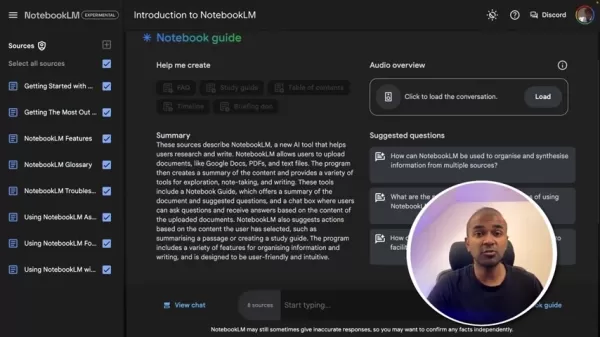
Whether you’re a researcher tackling complex projects, a writer crafting in-depth articles, or a student preparing for exams, NotebookLM provides tools to enhance efficiency and insight.
Functioning as a virtual research assistant, NotebookLM allows users to upload Google Docs, PDFs, and text files. The AI then analyzes the content, offering summaries, suggested questions, and an interactive chatbox for deeper exploration. This eliminates the need for endless scrolling and manual note-taking.
NotebookLM’s intuitive, user-friendly interface ensures easy navigation. It provides document summaries, suggested questions, and a chatbox for content-based queries. The AI also recommends actions like summarizing passages or creating study guides, making it accessible to users of all skill levels.
Core Features of NotebookLM
NotebookLM offers a suite of tools to optimize research and writing. Here’s a breakdown of its key functionalities:
- Document Upload and Summarization: Upload Google Docs, PDFs, or text files, and the AI generates concise summaries of key points.
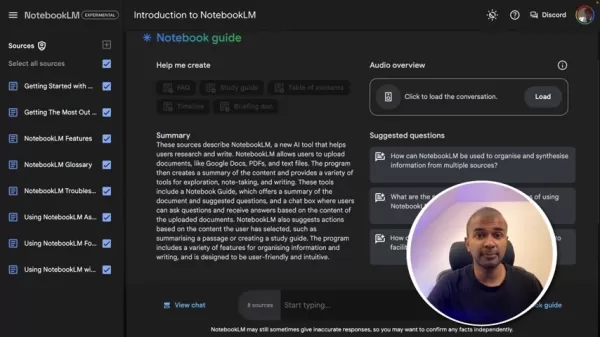
This feature saves time by distilling lengthy documents efficiently.
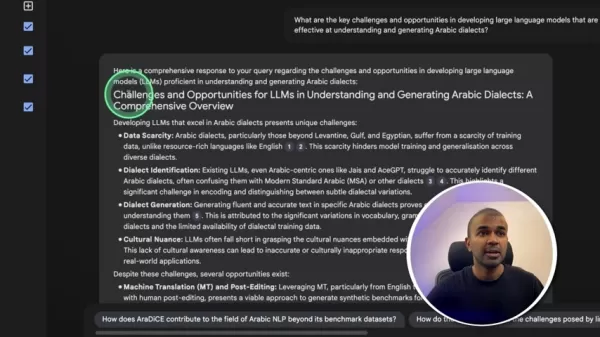
- AI-Driven Question Answering: Use the chatbox to ask questions about uploaded documents. The AI delivers accurate, relevant answers, with suggested questions to uncover additional insights.
- Study Guide Creation: NotebookLM generates study guides by summarizing content, highlighting key concepts, and creating questions to aid exam preparation or topic mastery.
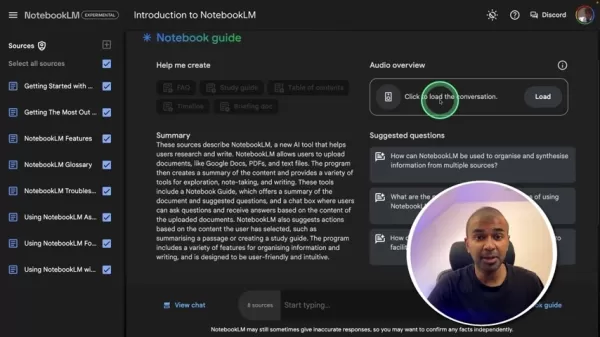
- Podcast Generation: Transform documents into natural-sounding audio podcasts, ideal for learning on the go during commutes, workouts, or chores.
- Table of Contents Creation: Automatically generate tables of contents to navigate documents quickly and efficiently.
These features are outlined in the table below:
Feature Description Document Upload Supports Google Docs, PDFs, and text files. AI Summarization Delivers concise summaries of uploaded documents. Question Answering Provides a chatbox for AI-generated answers to user queries. Study Guide Creation Generates study guides with summaries and questions. Podcast Generation Converts text into natural-sounding audio podcasts. Table of Contents Creates navigable tables of contents effortlessly.
Maximizing NotebookLM: Advanced Strategies
Collaborative Research with NotebookLM
NotebookLM excels in collaborative research. Share notebooks with colleagues to streamline teamwork, exchange insights, and enhance coordination.
- Real-Time Collaboration: Multiple users can access and edit notebooks simultaneously, fostering seamless knowledge sharing.
- Shared Insights: Easily distribute AI-generated summaries, questions, and podcasts to team members for deeper understanding.
- Streamlined Communication: Centralizes research discussions and annotations for efficient collaboration.
Getting Started with NotebookLM: A Quick Guide
Step 1: Sign Up and Access NotebookLM
Register for an account on the NotebookLM website and log in to access the dashboard.
Step 2: Create a New Notebook
Click "New Notebook" on the dashboard to start a new project.
This acts as a hub for your research documents and notes.
Step 3: Upload Documents
Use the "Upload Sources" button to add files from your computer or Google Drive. Supported formats include Google Docs, PDFs, and text files.
Step 4: Review AI-Generated Summaries and Questions
After uploading, NotebookLM generates a summary and suggested questions to help you explore key content and insights.
Step 5: Interact with the Chatbox
Ask questions via the chatbox to dive deeper into document content. The AI provides precise, context-based answers.
Step 6: Create a Podcast
Click "Generate" to convert documents into audio podcasts for convenient, on-the-go learning.
Step 7: Generate a Table of Contents
Use the table of contents button to create a navigable document outline.
Step 8: Add Notes
Click "Add Notes" to jot down insights or save chat responses as notes.
NotebookLM Pricing: Worth the Cost?
NotebookLM Is Free
NotebookLM is currently free, though a subscription model for enterprise use may be introduced.
NotebookLM: Pros and Cons
Pros
Streamlines research and writing tasks.
Offers AI-driven summaries and question answering.
Generates podcasts for mobile learning.
User-friendly and easy to navigate.
Free to use.
Cons
Accuracy and reliability may vary.
Potential bias from training data.
Limited to English language support.
NotebookLM’s Core Capabilities
Key Features
NotebookLM, powered by Google’s Gemini 1.5 Pro, is a versatile AI research assistant.
Additional features include:
- Document Summaries: Upload Google Docs, PDFs, or text files for quick summaries.
- Question Answering: Gain insights through AI-driven responses to document queries.
- Study Guides: Create guides with summarized passages and questions.
- Podcast Conversion: Turn documents into audio for easy comprehension.
- Table of Contents: Generate navigable outlines with a few clicks.
NotebookLM’s intuitive design simplifies navigation and content management, making AI-powered tools accessible to all users.
Versatile Applications of NotebookLM
Use Cases
NotebookLM supports a range of tasks:
- Research: Process large documents and extract insights efficiently.
- Content Creation: Generate content from uploaded documents.
- Education: Summarize materials and create study guides for academic use.
Frequently Asked Questions About NotebookLM
What document types does NotebookLM support?
NotebookLM handles Google Docs, PDFs, and text files, offering broad compatibility.
Can NotebookLM generate podcasts in multiple languages?
Currently, NotebookLM supports only English, with plans for future language enhancements.
Is NotebookLM user-friendly for non-technical users?
Yes, its clean, intuitive interface makes AI features accessible without technical expertise.
AI Research Tools: Key Questions
How does NotebookLM compare to traditional research methods?
NotebookLM enhances efficiency, provides deeper insights, and improves accessibility compared to manual methods. It summarizes documents, explores specific topics, and creates audio content, streamlining critical analysis.
What are the limitations of AI in research?
AI tools may lack perfect accuracy or reliability and can reflect biases in training data. Always verify AI outputs and consult experts when needed.
Related article
 Stripe to Acquire OpenRouter as AI Model Routing Gains Momentum
Stripe has agreed to acquire OpenRouter, an AI model-routing platform that gives developers access to hundreds of models through a single interface. The deal adds model selection and routing to Stripe’s existing work around AI usage and token-based b
Former OpenAI Researcher Barrett Zoph Returns to Google to Support Gemini Development
Barret Zoph, who previously abruptly left and joined OpenAI due to a disagreement with Thinking Machines Lab CEO Miriam Mularati, has once again changed employers. Alphabet's Google announced that Zoph will return as Vice President of Research, bring
How Recursive Intelligence Raised $335M at $4B Valuation in 4 Months
The co-founders of startup Ricursive Intelligence seemed destined to be co-founders.Anna Goldie, CEO, and Azalia Mirhoseini, CTO, are so well-known in the AI community that they were among those AI engineers who “got those weird emails from Zuckerber
Related Special Topic Recommendations
Design & Art
Stripe to Acquire OpenRouter as AI Model Routing Gains Momentum
Stripe has agreed to acquire OpenRouter, an AI model-routing platform that gives developers access to hundreds of models through a single interface. The deal adds model selection and routing to Stripe’s existing work around AI usage and token-based b
Former OpenAI Researcher Barrett Zoph Returns to Google to Support Gemini Development
Barret Zoph, who previously abruptly left and joined OpenAI due to a disagreement with Thinking Machines Lab CEO Miriam Mularati, has once again changed employers. Alphabet's Google announced that Zoph will return as Vice President of Research, bring
How Recursive Intelligence Raised $335M at $4B Valuation in 4 Months
The co-founders of startup Ricursive Intelligence seemed destined to be co-founders.Anna Goldie, CEO, and Azalia Mirhoseini, CTO, are so well-known in the AI community that they were among those AI engineers who “got those weird emails from Zuckerber
Related Special Topic Recommendations
Design & Art
 Top AI Illustration Tools: Create Editorial Scenes and Cover Art Faster
2026 Latest Top-rated AI Illustration Tools: Our curated list features the best powerfully designed tools for creating stunning editorial scenes and eye-catching cover art quickly. Each option has gone through rigorous real-world tests, offering a free vs paid comparison to help you find the perfect match for your workflow. Try these must-try solutions today to unlock your AI edge and boost your creative productivity. Explore now at XIX.AI.
 10 tools
 xix.ai
Education and Learning
Top AI Tutors for Exam Prep: Practice Math, Science, and English
xix.ai
Education and Learning
Top AI Tutors for Exam Prep: Practice Math, Science, and English
2026 Latest Top-Rated Best AI Tutors for Exam Prep are here on XIX.AI! Our curated list features powerful game-changing tools that offer free vs paid comparison, real-world tests, and weekly updated rankings. They help boost your writing efficiency, simplify complex topic learning, and unlock your academic potential. Explore now to Discover your perfect exam prep tool and Start creating today to Unlock your AI edge!
10 tools
xix.ai
Finance
AI Budget Planning Tools for Personal Money Management
2026 Latest Best Top-Rated AI Budget Planning Tools for Personal Money Management are here on XIX.AI! This curated collection features powerful, game-changing solutions that help you conduct real-world tests, understand spending habits, and create personalized plans to boost productivity. Enjoy a free vs paid comparison along with detailed rankings. Must-try tools designed to simplify money management and unlock your AI edge. Explore now!
11 tools
xix.ai
Health & Wellness
AI Sleep Tracking Assistants: Improve Recovery with Better Bedtime Habits
2026 Latest Best Top-Rated AI Sleep Tracking Assistants curated for ultimate recovery. This fully updated weekly guide features powerful tools that deliver real-world tests, free vs paid comparison, and detailed rankings to help you find the must-try solution that boosts sleep quality and supports better bedtime habits. Explore now at XIX.AI to Unlock your AI edge.
10 tools
xix.ai
Data Analysis
AI SQL Copilots for Product and Revenue Analytics
2026 Latest Best Top-Rated AI SQL Copilots for Product and Revenue Analytics! XIX.AI has curated a powerful, game-changing collection of must-try tools that undergo real-world tests through weekly updated rankings. These tools help users boost productivity significantly by accelerating data analysis, streamlining complex queries, and generating accurate insights to drive smarter business decisions. Explore now to Discover your perfect tool for unlocking your AI edge!
14 tools
xix.ai
Education and Learning
Best AI Homework Helpers That Teach: Learn Concepts, Not Just Answers
2026 Latest Best Top-Rated AI Homework Helpers That Teach Core Concepts Not Just Answers Powerful Tools for Students Must-Try Curated List Weekly Updated Free vs Paid Comparison Real-World Tests Accurate Rankings to Help You Unlock Your Full Learning Potential Explore now to Discover your perfect tool for smarter studying.
10 tools
xix.ai

 Comments (2)
0/500
Comments (2)
0/500
![WillGarcía]()
このAIノートブック、研究の効率化に本当に役立ちそう!でも、情報の取捨選択をAIに任せすぎると、自分で考える力が衰えないか心配…🤔 最近のAIツールは便利すぎて依存症になりそうだな。
![GaryWalker]()
AIが研究をこんな風に変えるとは…感動!🎉 NotebookLMの機能紹介、実は私も似たツールを試したけど、情報整理が全然ダメで挫折したんだよね。これなら論文読む時間が半分に減りそう。でも、AIが要約する過程で筆者の意図を歪めたりしないか心配ではある。次のアップデートで検索機能も強化してくれると助かるな。
In today's fast-moving world, organizing and synthesizing large volumes of information can be overwhelming. Researchers, writers, and students often struggle to distill key insights from extensive documents. NotebookLM, an advanced AI tool powered by Google’s Gemini 1.5 Pro, transforms the research and writing process. This personalized assistant enables users to upload documents, generate summaries, ask questions, and create podcasts, all within a seamless platform. This post highlights NotebookLM’s core features, applications, and benefits, showcasing its ability to streamline workflows and boost productivity.
Key Highlights
NotebookLM supports uploading Google Docs and PDFs for quick summaries.
AI-driven question answering extracts insights from uploaded files.
It facilitates creating study guides and summarizing key passages.
NotebookLM converts documents into podcasts for accessible learning.
It generates tables of contents with minimal effort.
Discover NotebookLM: Your AI Research Ally
What is NotebookLM?
NotebookLM, developed by Google, is a cutting-edge AI tool designed to simplify research and writing. It harnesses artificial intelligence to manage, analyze, and synthesize information from diverse sources.
Whether you’re a researcher tackling complex projects, a writer crafting in-depth articles, or a student preparing for exams, NotebookLM provides tools to enhance efficiency and insight.
Functioning as a virtual research assistant, NotebookLM allows users to upload Google Docs, PDFs, and text files. The AI then analyzes the content, offering summaries, suggested questions, and an interactive chatbox for deeper exploration. This eliminates the need for endless scrolling and manual note-taking.
NotebookLM’s intuitive, user-friendly interface ensures easy navigation. It provides document summaries, suggested questions, and a chatbox for content-based queries. The AI also recommends actions like summarizing passages or creating study guides, making it accessible to users of all skill levels.
Core Features of NotebookLM
NotebookLM offers a suite of tools to optimize research and writing. Here’s a breakdown of its key functionalities:
- Document Upload and Summarization: Upload Google Docs, PDFs, or text files, and the AI generates concise summaries of key points.
This feature saves time by distilling lengthy documents efficiently.
- AI-Driven Question Answering: Use the chatbox to ask questions about uploaded documents. The AI delivers accurate, relevant answers, with suggested questions to uncover additional insights.
- Study Guide Creation: NotebookLM generates study guides by summarizing content, highlighting key concepts, and creating questions to aid exam preparation or topic mastery.
- Podcast Generation: Transform documents into natural-sounding audio podcasts, ideal for learning on the go during commutes, workouts, or chores.
- Table of Contents Creation: Automatically generate tables of contents to navigate documents quickly and efficiently.
These features are outlined in the table below:
| Feature | Description |
|---|---|
| Document Upload | Supports Google Docs, PDFs, and text files. |
| AI Summarization | Delivers concise summaries of uploaded documents. |
| Question Answering | Provides a chatbox for AI-generated answers to user queries. |
| Study Guide Creation | Generates study guides with summaries and questions. |
| Podcast Generation | Converts text into natural-sounding audio podcasts. |
| Table of Contents | Creates navigable tables of contents effortlessly. |
Maximizing NotebookLM: Advanced Strategies
Collaborative Research with NotebookLM
NotebookLM excels in collaborative research. Share notebooks with colleagues to streamline teamwork, exchange insights, and enhance coordination.
- Real-Time Collaboration: Multiple users can access and edit notebooks simultaneously, fostering seamless knowledge sharing.
- Shared Insights: Easily distribute AI-generated summaries, questions, and podcasts to team members for deeper understanding.
- Streamlined Communication: Centralizes research discussions and annotations for efficient collaboration.
Getting Started with NotebookLM: A Quick Guide
Step 1: Sign Up and Access NotebookLM
Register for an account on the NotebookLM website and log in to access the dashboard.
Step 2: Create a New Notebook
Click "New Notebook" on the dashboard to start a new project.
This acts as a hub for your research documents and notes.
Step 3: Upload Documents
Use the "Upload Sources" button to add files from your computer or Google Drive. Supported formats include Google Docs, PDFs, and text files.
Step 4: Review AI-Generated Summaries and Questions
After uploading, NotebookLM generates a summary and suggested questions to help you explore key content and insights.
Step 5: Interact with the Chatbox
Ask questions via the chatbox to dive deeper into document content. The AI provides precise, context-based answers.
Step 6: Create a Podcast
Click "Generate" to convert documents into audio podcasts for convenient, on-the-go learning.
Step 7: Generate a Table of Contents
Use the table of contents button to create a navigable document outline.
Step 8: Add Notes
Click "Add Notes" to jot down insights or save chat responses as notes.
NotebookLM Pricing: Worth the Cost?
NotebookLM Is Free
NotebookLM is currently free, though a subscription model for enterprise use may be introduced.
NotebookLM: Pros and Cons
Pros
Streamlines research and writing tasks.
Offers AI-driven summaries and question answering.
Generates podcasts for mobile learning.
User-friendly and easy to navigate.
Free to use.
Cons
Accuracy and reliability may vary.
Potential bias from training data.
Limited to English language support.
NotebookLM’s Core Capabilities
Key Features
NotebookLM, powered by Google’s Gemini 1.5 Pro, is a versatile AI research assistant.
Additional features include:
- Document Summaries: Upload Google Docs, PDFs, or text files for quick summaries.
- Question Answering: Gain insights through AI-driven responses to document queries.
- Study Guides: Create guides with summarized passages and questions.
- Podcast Conversion: Turn documents into audio for easy comprehension.
- Table of Contents: Generate navigable outlines with a few clicks.
NotebookLM’s intuitive design simplifies navigation and content management, making AI-powered tools accessible to all users.
Versatile Applications of NotebookLM
Use Cases
NotebookLM supports a range of tasks:
- Research: Process large documents and extract insights efficiently.
- Content Creation: Generate content from uploaded documents.
- Education: Summarize materials and create study guides for academic use.
Frequently Asked Questions About NotebookLM
What document types does NotebookLM support?
NotebookLM handles Google Docs, PDFs, and text files, offering broad compatibility.
Can NotebookLM generate podcasts in multiple languages?
Currently, NotebookLM supports only English, with plans for future language enhancements.
Is NotebookLM user-friendly for non-technical users?
Yes, its clean, intuitive interface makes AI features accessible without technical expertise.
AI Research Tools: Key Questions
How does NotebookLM compare to traditional research methods?
NotebookLM enhances efficiency, provides deeper insights, and improves accessibility compared to manual methods. It summarizes documents, explores specific topics, and creates audio content, streamlining critical analysis.
What are the limitations of AI in research?
AI tools may lack perfect accuracy or reliability and can reflect biases in training data. Always verify AI outputs and consult experts when needed.








 Stripe to Acquire OpenRouter as AI Model Routing Gains Momentum
Stripe has agreed to acquire OpenRouter, an AI model-routing platform that gives developers access to hundreds of models through a single interface. The deal adds model selection and routing to Stripe’s existing work around AI usage and token-based b
Stripe to Acquire OpenRouter as AI Model Routing Gains Momentum
Stripe has agreed to acquire OpenRouter, an AI model-routing platform that gives developers access to hundreds of models through a single interface. The deal adds model selection and routing to Stripe’s existing work around AI usage and token-based b
 Former OpenAI Researcher Barrett Zoph Returns to Google to Support Gemini Development
Barret Zoph, who previously abruptly left and joined OpenAI due to a disagreement with Thinking Machines Lab CEO Miriam Mularati, has once again changed employers. Alphabet's Google announced that Zoph will return as Vice President of Research, bring
Former OpenAI Researcher Barrett Zoph Returns to Google to Support Gemini Development
Barret Zoph, who previously abruptly left and joined OpenAI due to a disagreement with Thinking Machines Lab CEO Miriam Mularati, has once again changed employers. Alphabet's Google announced that Zoph will return as Vice President of Research, bring
 How Recursive Intelligence Raised $335M at $4B Valuation in 4 Months
The co-founders of startup Ricursive Intelligence seemed destined to be co-founders.Anna Goldie, CEO, and Azalia Mirhoseini, CTO, are so well-known in the AI community that they were among those AI engineers who “got those weird emails from Zuckerber
How Recursive Intelligence Raised $335M at $4B Valuation in 4 Months
The co-founders of startup Ricursive Intelligence seemed destined to be co-founders.Anna Goldie, CEO, and Azalia Mirhoseini, CTO, are so well-known in the AI community that they were among those AI engineers who “got those weird emails from Zuckerber

2026 Latest Top-rated AI Illustration Tools: Our curated list features the best powerfully designed tools for creating stunning editorial scenes and eye-catching cover art quickly. Each option has gone through rigorous real-world tests, offering a free vs paid comparison to help you find the perfect match for your workflow. Try these must-try solutions today to unlock your AI edge and boost your creative productivity. Explore now at XIX.AI.
10 tools
xix.ai

2026 Latest Top-Rated Best AI Tutors for Exam Prep are here on XIX.AI! Our curated list features powerful game-changing tools that offer free vs paid comparison, real-world tests, and weekly updated rankings. They help boost your writing efficiency, simplify complex topic learning, and unlock your academic potential. Explore now to Discover your perfect exam prep tool and Start creating today to Unlock your AI edge!
10 tools
xix.ai

2026 Latest Best Top-Rated AI Budget Planning Tools for Personal Money Management are here on XIX.AI! This curated collection features powerful, game-changing solutions that help you conduct real-world tests, understand spending habits, and create personalized plans to boost productivity. Enjoy a free vs paid comparison along with detailed rankings. Must-try tools designed to simplify money management and unlock your AI edge. Explore now!
11 tools
xix.ai

2026 Latest Best Top-Rated AI Sleep Tracking Assistants curated for ultimate recovery. This fully updated weekly guide features powerful tools that deliver real-world tests, free vs paid comparison, and detailed rankings to help you find the must-try solution that boosts sleep quality and supports better bedtime habits. Explore now at XIX.AI to Unlock your AI edge.
10 tools
xix.ai

2026 Latest Best Top-Rated AI SQL Copilots for Product and Revenue Analytics! XIX.AI has curated a powerful, game-changing collection of must-try tools that undergo real-world tests through weekly updated rankings. These tools help users boost productivity significantly by accelerating data analysis, streamlining complex queries, and generating accurate insights to drive smarter business decisions. Explore now to Discover your perfect tool for unlocking your AI edge!
14 tools
xix.ai

2026 Latest Best Top-Rated AI Homework Helpers That Teach Core Concepts Not Just Answers Powerful Tools for Students Must-Try Curated List Weekly Updated Free vs Paid Comparison Real-World Tests Accurate Rankings to Help You Unlock Your Full Learning Potential Explore now to Discover your perfect tool for smarter studying.
10 tools
xix.ai

このAIノートブック、研究の効率化に本当に役立ちそう!でも、情報の取捨選択をAIに任せすぎると、自分で考える力が衰えないか心配…🤔 最近のAIツールは便利すぎて依存症になりそうだな。
AIが研究をこんな風に変えるとは…感動!🎉 NotebookLMの機能紹介、実は私も似たツールを試したけど、情報整理が全然ダメで挫折したんだよね。これなら論文読む時間が半分に減りそう。でも、AIが要約する過程で筆者の意図を歪めたりしないか心配ではある。次のアップデートで検索機能も強化してくれると助かるな。












