


 Home
HomeHow to enhance documents with Napkin AI in 2026? Free guide for instant AI visuals.
In today's fast-paced digital landscape, grabbing and holding your audience's attention is more critical than ever. Whether you're communicating with students, parents, colleagues, or a broader audience, dense, text-heavy documents often fail to engage. Napkin AI offers a powerful solution, using artificial intelligence to instantly convert plain text into visually compelling content. Discover how this innovative tool can revitalize your documents, making them more captivating and easier to digest.
Key Points
Napkin AI automatically enriches documents with relevant, AI-generated visuals.
These intelligent graphics boost engagement and improve understanding for diverse audiences.
You can customize the visuals to align with your preferred style and tone.
Share your creations directly within Napkin AI or export them to other platforms.
Additional editing tools like labels, freehand sketches, and custom image uploads offer further personalization.
Introducing Napkin AI: The Future of Document Enhancement
What is Napkin AI?

Napkin AI is an intelligent platform that transforms text-heavy documents into visually rich, engaging content. It uses advanced AI to analyze your text and automatically generate relevant images, icons, and diagrams that complement your message. This innovative approach not only improves the visual appeal of your documents but also enhances comprehension and information retention, making it an essential tool for educators, professionals, and anyone aiming to communicate more effectively.
Napkin AI streamlines the entire process of visual enhancement. Instead of spending hours hunting for the right images or designing graphics from scratch, you can rely on Napkin AI to produce suitable visuals in seconds. The platform is incredibly user-friendly: simply copy and paste your text, choose a visual style, and fine-tune the results to meet your specific requirements. From detailed reports and training manuals to educational resources, Napkin AI can convert any document into a visually appealing and easy-to-follow masterpiece.
Napkin AI's core mission is to make information more accessible and engaging. Visual elements are powerful communication tools, often conveying complex ideas and emotions more effectively than text alone. By automatically integrating relevant graphics, Napkin AI helps break down information into manageable sections, making it simpler for readers to understand and remember. This is particularly advantageous for visual learners and those who find lengthy, text-dense materials challenging.
The Need for Visual Enhancement in Documents
In an era of information overload, creating content that stands out and captures interest is essential. Long documents packed with uninterrupted text can be daunting and difficult to navigate, often leading to reader disengagement and poor information retention.
Visual elements, by contrast, make content more approachable and engaging. Images, diagrams, and icons help break up text blocks, illustrate key points, and create a more attractive layout. This enhances comprehension, retention, and overall reader engagement.
Furthermore, visuals can communicate complex ideas and emotions more powerfully than text. A well-selected image can evoke a specific feeling or demonstrate a concept in ways words cannot match. This makes visual enhancement a vital strategy for anyone who wants to communicate persuasively and memorably.
Here's a comparison of how content is generally perceived:
Element Impact on Engagement Impact on Comprehension Plain TextLowModerateText with ImagesHighHighInteractive MediaVery HighVery HighNapkin AI meets this need by offering a seamless, automated way to add pertinent visuals to any document. It empowers users to create engaging, easy-to-understand content that captures attention and leaves a lasting impression.
Benefits of Using Napkin AI
Using Napkin AI delivers numerous advantages, making it an invaluable asset for improving document effectiveness. Key benefits include:
- Enhanced Engagement: Automatically integrated visuals capture and sustain reader interest, making documents more engaging and enjoyable.
- Improved Comprehension: Graphics help illustrate complex ideas and break information into digestible segments, boosting understanding and recall.
- Time Savings: Napkin AI automates visual sourcing and integration, saving you considerable time and effort.
- Customization Options: The platform provides various customization features, enabling you to tailor visuals to your specific needs and preferences.
- Seamless Integration: Napkin AI works smoothly with existing document creation workflows, making visual enhancement effortless.
- Collaboration Features: Share and collaborate on documents with others, facilitating teamwork and communication.
- Export Options: Save your enhanced documents in multiple formats, including PDF and PNG, for easy sharing and distribution.
Additional Editing Features
Editing features
To further improve accessibility and usability, Napkin AI includes several other useful features. You can add labels for clarity, create hand-drawn sketches to illustrate ideas, and even upload your own images for complete creative control.
How to Use Napkin AI: A Step-by-Step Guide
Step 1: Accessing Napkin AI and Creating an Account
Start by visiting the Napkin AI website
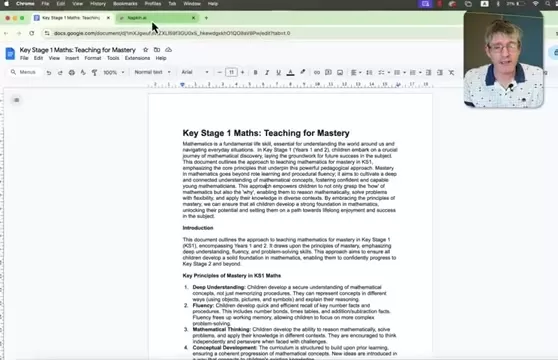
and creating a free account. The registration process is quick and simple, giving you instant access to all platform features. Napkin AI boasts an intuitive interface, making it easy to use even for those new to AI-powered tools.
Step 2: Creating a New Napkin
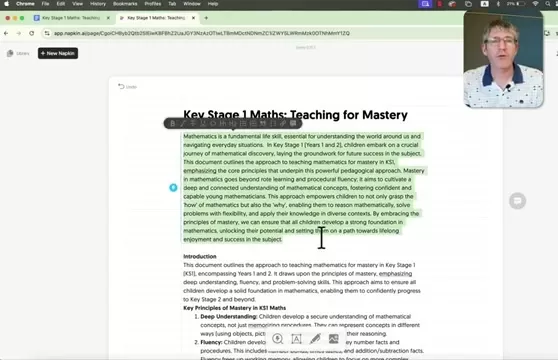
After logging in, click the 'New Napkin' button to start a new project. You can begin with a blank napkin (equivalent to a blank document) or use the AI drafting assistant. Choosing a blank napkin provides a clean canvas for your content, allowing the AI to work its magic. Simply copy the text from your original document and paste it into the napkin.
Step 3: Copying and Pasting Your Text
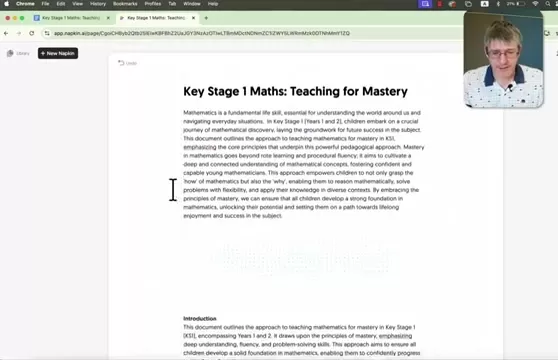
Copy the text from your source document (such as Google Docs or Microsoft Word) and paste it directly into the Napkin AI interface. You can use Napkin AI as your primary text editor and leverage any of its illustration tools.
Step 4: Generating Visuals with AI
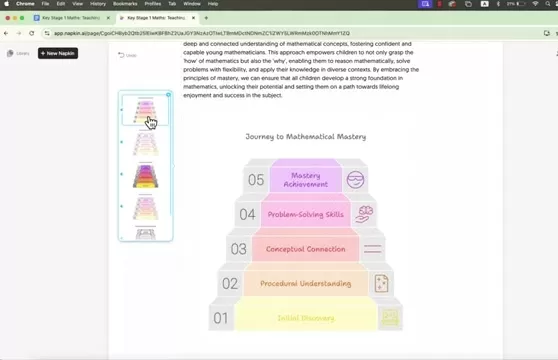
Highlight a section of your text and click the lightning bolt icon that appears beside it. This prompts Napkin AI to analyze the selected content and generate relevant visual suggestions. The AI will present a variety of options—including images, icons, and diagrams—tailored to your document's content.
Step 5: Customizing Visuals
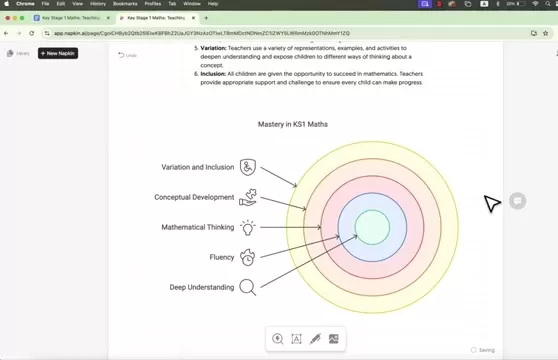
Browse the AI-generated visual suggestions and select those that best complement your text. You can further personalize the visuals by experimenting with different styles and layouts. Napkin AI lets you fine-tune the appearance of each graphic to match your desired aesthetic.
Step 6: Exporting the Enhanced Document
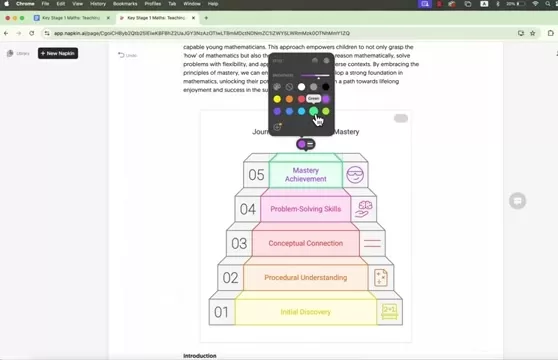
Once you're happy with the visual enhancements, export your document in various formats like PNG, SVG, or PDF. This allows you to seamlessly incorporate the enriched content into your existing workflows and share it with others. You'll now have beautifully presented documents ready to impress any audience.
Step 7: Customize elements
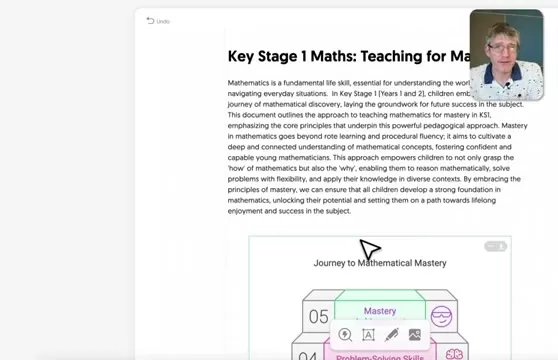
You can select any individual element, hover over it, and modify its colors for further customization.
Step 8: Adding Labels
You can also add labels directly onto your document for additional context or emphasis.
Step 9: Sketches
You can also create freehand sketches to illustrate ideas or highlight specific points.
Step 10: Uploading an image
You can also upload your own images to incorporate custom graphics or branded elements.
Advantages and Disadvantages of Napkin AI
Pros
Saves Time: Instantly add relevant visuals, eliminating manual image searches.
Increases Engagement: AI-generated images make documents more captivating.
Enhances Understanding: Visuals clarify complex concepts, improving comprehension.
Customizable: Tailor visuals to match your brand style and personal preferences.
Easy Collaboration: Share and edit documents with team members seamlessly.
Cons
Reliance on AI: Visual suggestions depend on the accuracy of AI analysis.
Limited Control: Some users may prefer more manual control over visual selection.
Internet Dependency: Requires a stable internet connection for optimal performance.
Subscription Costs: May involve ongoing expenses based on your usage needs.
Learning Curve: New users might need some time to explore all its features fully.
Core Features of Napkin AI
AI-Powered Visual Generation
This core feature automatically creates relevant visuals based on your text content, saving you the time and effort of manually finding and adding suitable images.
Customization Options
Customize visuals to match your brand or personal style. The platform offers multiple design options to choose from.
Various export options
Download your AI-generated content as a PNG, SVG, or PDF file for versatile use.
Collaborate easily
Share your project with friends or colleagues and customize their access permissions for smooth collaboration.
Use Cases for Napkin AI
Educational Material
Teachers and educators can use Napkin AI to create visually engaging lesson plans, presentations, and handouts. The platform helps illustrate complex concepts and makes learning more interactive.
Professional Reports
Professionals can use Napkin AI to enhance reports, presentations, and other business documents. The platform helps present data more effectively and creates a polished, professional impression.
Training Manuals
Training manuals become more engaging and easier to understand with visuals generated by Napkin AI. The platform can illustrate procedures, emphasize key information, and improve knowledge retention.
Marketing Materials
Marketers can use Napkin AI to create visually appealing brochures, flyers, and social media posts. The platform helps capture attention and communicate key messages more effectively.
Frequently Asked Questions about Napkin AI
What types of visuals can Napkin AI generate?
Napkin AI can generate a wide array of visuals, including images, icons, diagrams, charts, and more. The specific types of visuals produced depend on your text content and chosen visual style.
Can I upload my own images to Napkin AI?
Yes, Napkin AI allows you to upload your own images for use in your documents. This provides greater control over visual content and lets you incorporate branded or custom graphics.
Is Napkin AI suitable for all types of documents?
Napkin AI is versatile and can enhance various documents, including reports, presentations, training manuals, marketing materials, and educational content. However, the effectiveness of AI-generated visuals may vary depending on your text's nature.
Is Napkin AI easy to use?
Yes, Napkin AI is designed for user-friendliness and accessibility, even for those with little to no experience in AI-powered tools. The platform features a simple, intuitive interface that makes copying text, generating visuals, and customizing results straightforward.
Related Questions
Are there other AI-powered document enhancement tools available?
Yes, several other AI-powered document enhancement tools exist, each with unique features. Popular alternatives include: Lumen5: An AI platform for creating video content from blog posts and articles. QuillBot: An AI-powered paraphrasing tool that helps rewrite and improve text. Grammarly: An AI writing assistant that provides feedback on grammar, style, and tone.
How does Napkin AI compare to traditional document creation methods?
Napkin AI offers significant advantages over traditional document creation methods. By automating the process of finding and adding visuals, it saves considerable time and effort. It also ensures visuals are relevant and aligned with your text, improving comprehension and engagement. Traditional methods often require manual image searches, which can be time-consuming and may not always yield optimal results.
Can Napkin AI be used for collaborative projects?
Yes, Napkin AI includes collaboration features that allow multiple users to work on the same document simultaneously. This is especially useful for teams collaborating on reports, presentations, or other joint projects. The platform also offers version control, ensuring all team members work on the most current document version.
Related article
 Inside Details Exposed About Next-Gen Gemini: Strained Computing Power, Internal Teams Disagreed on Development Priorities and Resource Allocation
Reports indicate that the launch of Google’s highly anticipated next-generation Gemini model has been pushed back. Internal disagreements over development priorities and resource allocation, combined with limited computing capacity and complex approv
OpenAI Dismisses Growth Slowdown Concerns, Says Multiple Business Units Accelerating
In response to external scrutiny regarding decelerating sales growth and missed internal benchmarks, AI leader OpenAI issued a confident statement on Tuesday, April 28. The company clarified that its consumer products and enterprise services are adva
Alibaba Super Cup: Qwen3.8-Max Debuts with Boosted Coding and Office Tools
Alibaba has officially unveiled Qwen3.8-Max, a next-generation foundation large model boasting 2.4 trillion parameters. This significant AI advancement delivers substantial performance gains in core areas like coding and professional office tasks, sh
Related Special Topic Recommendations
Music composition
Inside Details Exposed About Next-Gen Gemini: Strained Computing Power, Internal Teams Disagreed on Development Priorities and Resource Allocation
Reports indicate that the launch of Google’s highly anticipated next-generation Gemini model has been pushed back. Internal disagreements over development priorities and resource allocation, combined with limited computing capacity and complex approv
OpenAI Dismisses Growth Slowdown Concerns, Says Multiple Business Units Accelerating
In response to external scrutiny regarding decelerating sales growth and missed internal benchmarks, AI leader OpenAI issued a confident statement on Tuesday, April 28. The company clarified that its consumer products and enterprise services are adva
Alibaba Super Cup: Qwen3.8-Max Debuts with Boosted Coding and Office Tools
Alibaba has officially unveiled Qwen3.8-Max, a next-generation foundation large model boasting 2.4 trillion parameters. This significant AI advancement delivers substantial performance gains in core areas like coding and professional office tasks, sh
Related Special Topic Recommendations
Music composition
 Best AI Melody Writing Tools for Song Drafts
2026 Latest Best Top-Rated AI Melody Writing Tools for Song Drafts! XIX.AI has curated a highly powerful game-changing collection that goes through rigorous real-world tests to deliver the best writing experience. You can find detailed free vs paid comparisons, accurate rankings, and must-try options designed to help you create stunning song drafts effortlessly and boost your creative productivity significantly. Explore now to discover your perfect tool!
 8 tools
 xix.ai
chatbot
Best AI Conversation Trainer Tools for Interview Practice
xix.ai
chatbot
Best AI Conversation Trainer Tools for Interview Practice
2026 Latest Best Top-rated AI Conversation Trainer Tools for Interview Practice are here on XIX.AI! This curated collection features powerful, game-changing tools that go through rigorous real-world tests to deliver accurate feedback. You’ll find a free vs paid comparison and detailed rankings to help you choose the must-try option that boosts your confidence and skills. Explore now to Discover your perfect tool for interview success!
12 tools
xix.ai
Design & Art
Best AI Style Transfer Tools for Creative Experiments
2026 Latest Best Top-rated AI Style Transfer Tools for Creative Experiments! XIX.AI has curated a powerful, game-changing collection of must-try tools that deliver exceptional results through real-world tests and rigorous rankings. These top solutions help creatives boost productivity significantly by accelerating content creation and unlocking endless creative possibilities. Explore now to discover your perfect tool and start creating today!
9 tools
xix.ai
Comic Creation
Best AI Dialogue Bubble Tools for Visual Storytelling
2026 Latest Best Top-Rated AI Dialogue Bubble Tools for Visual Storytelling are here on XIX.AI! This curated collection features powerful, game-changing tools that help creators boost productivity and overcome creative bottlenecks. Get a free vs paid comparison, see real-world tests, and check the latest rankings to find the must-try solutions perfect for crafting engaging visual narratives. Explore now to discover your ideal tool!
10 tools
xix.ai
Meeting Assistant
Top AI Meeting Summary Tools: Track Decisions and Follow-Ups Clearly
2026 Latest Top-Rated Best AI Meeting Summary Tools for Clear Decision Tracking and Effortless Follow-Ups. This curated list showcases powerful, game-changing solutions that boost productivity dramatically by automating meeting notes, identifying key action items, and streamlining team coordination across all projects. Get a free vs paid comparison along with real-world tests and weekly updated rankings to help you find the perfect tool. Explore now to unlock your AI edge!
9 tools
xix.ai
Data Analysis
Best AI Data Cleaning Tools: Fix Missing Values and Duplicates Fast
2026 Latest Best Top-rated AI Data Cleaning Tools for quick fixing of missing values and duplicates. This curated list showcases powerful, game-changing solutions that boost productivity significantly. Each option has undergone rigorous real-world tests to ensure reliability. Get a free vs paid comparison and discover the must-try tool that fits your needs best. Explore now at XIX.AI to Unlock your AI edge.
11 tools
xix.ai

 Comments (2)
0/500
Comments (2)
0/500
![DanielAllen]()
2026? Das klingt nach Science-Fiction! 😅 Aber ehrlich gesagt, die Idee, langweilige Dokumente mit KI-Bildern aufzupeppen, ist schon jetzt total relevant. Ich frage mich nur, ob solche Tools dann wirklich kostenlos bleiben oder ob es nur eine Lockvogel-Strategie ist. Die Entwicklung ist auf jeden Fall spannend, auch wenn ich ein bisschen Angst vor der totalen Übervisualisierung habe – manchmal sagt ein Text einfach mehr als tausend Bilder.
![JonathanRoberts]()
En 2025, on aura vraiment besoin d'outils comme Napkin AI ? 😅 J'ai l'impression que tout devient trop dépendant de l'IA. D'un côté, c'est pratique pour rendre les documents moins ennuyeux, mais est-ce qu'on ne perd pas en authenticité ? J'aimerais savoir comment ça fonctionne en détail avant de me lancer.
In today's fast-paced digital landscape, grabbing and holding your audience's attention is more critical than ever. Whether you're communicating with students, parents, colleagues, or a broader audience, dense, text-heavy documents often fail to engage. Napkin AI offers a powerful solution, using artificial intelligence to instantly convert plain text into visually compelling content. Discover how this innovative tool can revitalize your documents, making them more captivating and easier to digest.
Key Points
Napkin AI automatically enriches documents with relevant, AI-generated visuals.
These intelligent graphics boost engagement and improve understanding for diverse audiences.
You can customize the visuals to align with your preferred style and tone.
Share your creations directly within Napkin AI or export them to other platforms.
Additional editing tools like labels, freehand sketches, and custom image uploads offer further personalization.
Introducing Napkin AI: The Future of Document Enhancement
What is Napkin AI?
Napkin AI is an intelligent platform that transforms text-heavy documents into visually rich, engaging content. It uses advanced AI to analyze your text and automatically generate relevant images, icons, and diagrams that complement your message. This innovative approach not only improves the visual appeal of your documents but also enhances comprehension and information retention, making it an essential tool for educators, professionals, and anyone aiming to communicate more effectively.
Napkin AI streamlines the entire process of visual enhancement. Instead of spending hours hunting for the right images or designing graphics from scratch, you can rely on Napkin AI to produce suitable visuals in seconds. The platform is incredibly user-friendly: simply copy and paste your text, choose a visual style, and fine-tune the results to meet your specific requirements. From detailed reports and training manuals to educational resources, Napkin AI can convert any document into a visually appealing and easy-to-follow masterpiece.
Napkin AI's core mission is to make information more accessible and engaging. Visual elements are powerful communication tools, often conveying complex ideas and emotions more effectively than text alone. By automatically integrating relevant graphics, Napkin AI helps break down information into manageable sections, making it simpler for readers to understand and remember. This is particularly advantageous for visual learners and those who find lengthy, text-dense materials challenging.
The Need for Visual Enhancement in Documents
In an era of information overload, creating content that stands out and captures interest is essential. Long documents packed with uninterrupted text can be daunting and difficult to navigate, often leading to reader disengagement and poor information retention.
Visual elements, by contrast, make content more approachable and engaging. Images, diagrams, and icons help break up text blocks, illustrate key points, and create a more attractive layout. This enhances comprehension, retention, and overall reader engagement.
Furthermore, visuals can communicate complex ideas and emotions more powerfully than text. A well-selected image can evoke a specific feeling or demonstrate a concept in ways words cannot match. This makes visual enhancement a vital strategy for anyone who wants to communicate persuasively and memorably.
Here's a comparison of how content is generally perceived:
Napkin AI meets this need by offering a seamless, automated way to add pertinent visuals to any document. It empowers users to create engaging, easy-to-understand content that captures attention and leaves a lasting impression.
Benefits of Using Napkin AI
Using Napkin AI delivers numerous advantages, making it an invaluable asset for improving document effectiveness. Key benefits include:
- Enhanced Engagement: Automatically integrated visuals capture and sustain reader interest, making documents more engaging and enjoyable.
- Improved Comprehension: Graphics help illustrate complex ideas and break information into digestible segments, boosting understanding and recall.
- Time Savings: Napkin AI automates visual sourcing and integration, saving you considerable time and effort.
- Customization Options: The platform provides various customization features, enabling you to tailor visuals to your specific needs and preferences.
- Seamless Integration: Napkin AI works smoothly with existing document creation workflows, making visual enhancement effortless.
- Collaboration Features: Share and collaborate on documents with others, facilitating teamwork and communication.
- Export Options: Save your enhanced documents in multiple formats, including PDF and PNG, for easy sharing and distribution.
Additional Editing Features
Editing features
To further improve accessibility and usability, Napkin AI includes several other useful features. You can add labels for clarity, create hand-drawn sketches to illustrate ideas, and even upload your own images for complete creative control.
How to Use Napkin AI: A Step-by-Step Guide
Step 1: Accessing Napkin AI and Creating an Account
Start by visiting the Napkin AI website
and creating a free account. The registration process is quick and simple, giving you instant access to all platform features. Napkin AI boasts an intuitive interface, making it easy to use even for those new to AI-powered tools.
Step 2: Creating a New Napkin
After logging in, click the 'New Napkin' button to start a new project. You can begin with a blank napkin (equivalent to a blank document) or use the AI drafting assistant. Choosing a blank napkin provides a clean canvas for your content, allowing the AI to work its magic. Simply copy the text from your original document and paste it into the napkin.
Step 3: Copying and Pasting Your Text
Copy the text from your source document (such as Google Docs or Microsoft Word) and paste it directly into the Napkin AI interface. You can use Napkin AI as your primary text editor and leverage any of its illustration tools.
Step 4: Generating Visuals with AI
Highlight a section of your text and click the lightning bolt icon that appears beside it. This prompts Napkin AI to analyze the selected content and generate relevant visual suggestions. The AI will present a variety of options—including images, icons, and diagrams—tailored to your document's content.
Step 5: Customizing Visuals
Browse the AI-generated visual suggestions and select those that best complement your text. You can further personalize the visuals by experimenting with different styles and layouts. Napkin AI lets you fine-tune the appearance of each graphic to match your desired aesthetic.
Step 6: Exporting the Enhanced Document
Once you're happy with the visual enhancements, export your document in various formats like PNG, SVG, or PDF. This allows you to seamlessly incorporate the enriched content into your existing workflows and share it with others. You'll now have beautifully presented documents ready to impress any audience.
Step 7: Customize elements
You can select any individual element, hover over it, and modify its colors for further customization.
Step 8: Adding Labels
You can also add labels directly onto your document for additional context or emphasis.
Step 9: Sketches
You can also create freehand sketches to illustrate ideas or highlight specific points.
Step 10: Uploading an image
You can also upload your own images to incorporate custom graphics or branded elements.
Advantages and Disadvantages of Napkin AI
Pros
Saves Time: Instantly add relevant visuals, eliminating manual image searches.
Increases Engagement: AI-generated images make documents more captivating.
Enhances Understanding: Visuals clarify complex concepts, improving comprehension.
Customizable: Tailor visuals to match your brand style and personal preferences.
Easy Collaboration: Share and edit documents with team members seamlessly.
Cons
Reliance on AI: Visual suggestions depend on the accuracy of AI analysis.
Limited Control: Some users may prefer more manual control over visual selection.
Internet Dependency: Requires a stable internet connection for optimal performance.
Subscription Costs: May involve ongoing expenses based on your usage needs.
Learning Curve: New users might need some time to explore all its features fully.
Core Features of Napkin AI
AI-Powered Visual Generation
This core feature automatically creates relevant visuals based on your text content, saving you the time and effort of manually finding and adding suitable images.
Customization Options
Customize visuals to match your brand or personal style. The platform offers multiple design options to choose from.
Various export options
Download your AI-generated content as a PNG, SVG, or PDF file for versatile use.
Collaborate easily
Share your project with friends or colleagues and customize their access permissions for smooth collaboration.
Use Cases for Napkin AI
Educational Material
Teachers and educators can use Napkin AI to create visually engaging lesson plans, presentations, and handouts. The platform helps illustrate complex concepts and makes learning more interactive.
Professional Reports
Professionals can use Napkin AI to enhance reports, presentations, and other business documents. The platform helps present data more effectively and creates a polished, professional impression.
Training Manuals
Training manuals become more engaging and easier to understand with visuals generated by Napkin AI. The platform can illustrate procedures, emphasize key information, and improve knowledge retention.
Marketing Materials
Marketers can use Napkin AI to create visually appealing brochures, flyers, and social media posts. The platform helps capture attention and communicate key messages more effectively.
Frequently Asked Questions about Napkin AI
What types of visuals can Napkin AI generate?
Napkin AI can generate a wide array of visuals, including images, icons, diagrams, charts, and more. The specific types of visuals produced depend on your text content and chosen visual style.
Can I upload my own images to Napkin AI?
Yes, Napkin AI allows you to upload your own images for use in your documents. This provides greater control over visual content and lets you incorporate branded or custom graphics.
Is Napkin AI suitable for all types of documents?
Napkin AI is versatile and can enhance various documents, including reports, presentations, training manuals, marketing materials, and educational content. However, the effectiveness of AI-generated visuals may vary depending on your text's nature.
Is Napkin AI easy to use?
Yes, Napkin AI is designed for user-friendliness and accessibility, even for those with little to no experience in AI-powered tools. The platform features a simple, intuitive interface that makes copying text, generating visuals, and customizing results straightforward.
Related Questions
Are there other AI-powered document enhancement tools available?
Yes, several other AI-powered document enhancement tools exist, each with unique features. Popular alternatives include: Lumen5: An AI platform for creating video content from blog posts and articles. QuillBot: An AI-powered paraphrasing tool that helps rewrite and improve text. Grammarly: An AI writing assistant that provides feedback on grammar, style, and tone.
How does Napkin AI compare to traditional document creation methods?
Napkin AI offers significant advantages over traditional document creation methods. By automating the process of finding and adding visuals, it saves considerable time and effort. It also ensures visuals are relevant and aligned with your text, improving comprehension and engagement. Traditional methods often require manual image searches, which can be time-consuming and may not always yield optimal results.
Can Napkin AI be used for collaborative projects?
Yes, Napkin AI includes collaboration features that allow multiple users to work on the same document simultaneously. This is especially useful for teams collaborating on reports, presentations, or other joint projects. The platform also offers version control, ensuring all team members work on the most current document version.








 Inside Details Exposed About Next-Gen Gemini: Strained Computing Power, Internal Teams Disagreed on Development Priorities and Resource Allocation
Reports indicate that the launch of Google’s highly anticipated next-generation Gemini model has been pushed back. Internal disagreements over development priorities and resource allocation, combined with limited computing capacity and complex approv
Inside Details Exposed About Next-Gen Gemini: Strained Computing Power, Internal Teams Disagreed on Development Priorities and Resource Allocation
Reports indicate that the launch of Google’s highly anticipated next-generation Gemini model has been pushed back. Internal disagreements over development priorities and resource allocation, combined with limited computing capacity and complex approv
 OpenAI Dismisses Growth Slowdown Concerns, Says Multiple Business Units Accelerating
In response to external scrutiny regarding decelerating sales growth and missed internal benchmarks, AI leader OpenAI issued a confident statement on Tuesday, April 28. The company clarified that its consumer products and enterprise services are adva
OpenAI Dismisses Growth Slowdown Concerns, Says Multiple Business Units Accelerating
In response to external scrutiny regarding decelerating sales growth and missed internal benchmarks, AI leader OpenAI issued a confident statement on Tuesday, April 28. The company clarified that its consumer products and enterprise services are adva
 Alibaba Super Cup: Qwen3.8-Max Debuts with Boosted Coding and Office Tools
Alibaba has officially unveiled Qwen3.8-Max, a next-generation foundation large model boasting 2.4 trillion parameters. This significant AI advancement delivers substantial performance gains in core areas like coding and professional office tasks, sh
Alibaba Super Cup: Qwen3.8-Max Debuts with Boosted Coding and Office Tools
Alibaba has officially unveiled Qwen3.8-Max, a next-generation foundation large model boasting 2.4 trillion parameters. This significant AI advancement delivers substantial performance gains in core areas like coding and professional office tasks, sh

2026 Latest Best Top-Rated AI Melody Writing Tools for Song Drafts! XIX.AI has curated a highly powerful game-changing collection that goes through rigorous real-world tests to deliver the best writing experience. You can find detailed free vs paid comparisons, accurate rankings, and must-try options designed to help you create stunning song drafts effortlessly and boost your creative productivity significantly. Explore now to discover your perfect tool!
8 tools
xix.ai

2026 Latest Best Top-rated AI Conversation Trainer Tools for Interview Practice are here on XIX.AI! This curated collection features powerful, game-changing tools that go through rigorous real-world tests to deliver accurate feedback. You’ll find a free vs paid comparison and detailed rankings to help you choose the must-try option that boosts your confidence and skills. Explore now to Discover your perfect tool for interview success!
12 tools
xix.ai

2026 Latest Best Top-rated AI Style Transfer Tools for Creative Experiments! XIX.AI has curated a powerful, game-changing collection of must-try tools that deliver exceptional results through real-world tests and rigorous rankings. These top solutions help creatives boost productivity significantly by accelerating content creation and unlocking endless creative possibilities. Explore now to discover your perfect tool and start creating today!
9 tools
xix.ai

2026 Latest Best Top-Rated AI Dialogue Bubble Tools for Visual Storytelling are here on XIX.AI! This curated collection features powerful, game-changing tools that help creators boost productivity and overcome creative bottlenecks. Get a free vs paid comparison, see real-world tests, and check the latest rankings to find the must-try solutions perfect for crafting engaging visual narratives. Explore now to discover your ideal tool!
10 tools
xix.ai

2026 Latest Top-Rated Best AI Meeting Summary Tools for Clear Decision Tracking and Effortless Follow-Ups. This curated list showcases powerful, game-changing solutions that boost productivity dramatically by automating meeting notes, identifying key action items, and streamlining team coordination across all projects. Get a free vs paid comparison along with real-world tests and weekly updated rankings to help you find the perfect tool. Explore now to unlock your AI edge!
9 tools
xix.ai

2026 Latest Best Top-rated AI Data Cleaning Tools for quick fixing of missing values and duplicates. This curated list showcases powerful, game-changing solutions that boost productivity significantly. Each option has undergone rigorous real-world tests to ensure reliability. Get a free vs paid comparison and discover the must-try tool that fits your needs best. Explore now at XIX.AI to Unlock your AI edge.
11 tools
xix.ai

2026? Das klingt nach Science-Fiction! 😅 Aber ehrlich gesagt, die Idee, langweilige Dokumente mit KI-Bildern aufzupeppen, ist schon jetzt total relevant. Ich frage mich nur, ob solche Tools dann wirklich kostenlos bleiben oder ob es nur eine Lockvogel-Strategie ist. Die Entwicklung ist auf jeden Fall spannend, auch wenn ich ein bisschen Angst vor der totalen Übervisualisierung habe – manchmal sagt ein Text einfach mehr als tausend Bilder.
En 2025, on aura vraiment besoin d'outils comme Napkin AI ? 😅 J'ai l'impression que tout devient trop dépendant de l'IA. D'un côté, c'est pratique pour rendre les documents moins ennuyeux, mais est-ce qu'on ne perd pas en authenticité ? J'aimerais savoir comment ça fonctionne en détail avant de me lancer.












