


 Home
HomeMyVocal AI Launches Free Tool to Clone Your Voice for Text-to-Speech
Voice cloning technology is advancing quickly in today's digital landscape, opening up exciting opportunities for personalized content creation and improved accessibility. MyVocal AI stands out as a powerful free tool, allowing users to easily clone their own voice and apply it across a range of creative projects. This platform offers a unique approach to generating AI-powered voiceovers with your personal vocal identity—this guide walks you through how it works.
Key Points
MyVocal AI is a free platform for cloning your voice.
You can produce text-to-speech content using your cloned voice.
The tool can even generate singing with your AI voice.
It is currently available for free during its beta phase.
Features include instant cloning, cross-language support, emotion recognition, and an AI voice blender.
Introduction to MyVocal AI
What is MyVocal AI?
MyVocal AI is an innovative artificial intelligence tool that lets users clone their voice in just minutes

. This free platform lets you generate text-to-speech audio with your own AI-generated voice. Where MyVocal AI really excels is its ability to produce singing using your cloned voice.
MyVocal AI aims to make voice cloning accessible to everyone, helping creators, educators, and marketers add a personal touch to audio content. The ability to clone your voice for speech and singing unlocks numerous creative applications.
Currently in its beta phase, MyVocal AI is completely free—offering a chance to explore its tools without any cost. This is a limited-time opportunity, as the platform will eventually transition to a subscription model. Now is the ideal time to experience everything MyVocal AI has to offer.
Understanding Limitations and Future Enhancements
Acknowledging Current Limitations
Because MyVocal AI is still in beta, users may notice certain limitations. The quality of the cloned voice can vary depending on the clarity and quality of the original recording. In some cases, the AI might not capture subtle vocal nuances or emotional tones perfectly. That said, the development team is continuously refining the AI to improve voice clone quality.
Although the text-to-speech output is impressive, the AI may occasionally mispronounce complex terms or foreign words. Users may need to adjust text inputs for optimal results. Ongoing enhancements are expected as the system evolves.
Anticipating Future Enhancements
MyVocal AI has an exciting roadmap ahead. The team is focused on expanding the range of emotions the AI can reproduce, creating more expressive and natural-sounding voice clones. This will help users produce content that better conveys genuine emotion and engagement.
Cross-language cloning is also being expanded, with plans to include more languages to help content creators reach broader audiences. Future updates may also introduce more voice customization features, such as tone, pitch, and pacing controls.
MyVocal AI will eventually adopt a paid subscription model to support continued research, infrastructure, and feature development, ensuring long-term platform sustainability.
Getting Started with MyVocal AI: A Step-by-Step Guide
Registration
- Go to the MyVocal AI website.
- Click 'Sign In' in the navigation menu.
- Register using Google, Facebook, or your email and select 'Free to use'
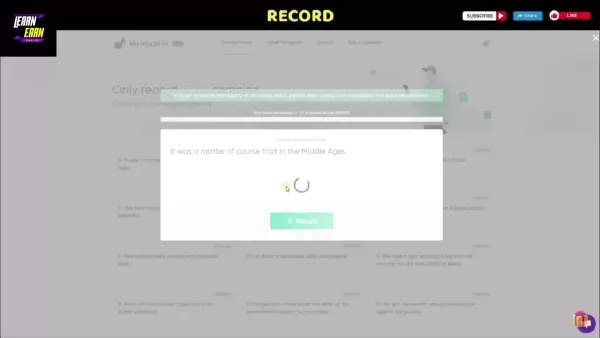
.
- A confirmation link will be sent to your email.
Recording Your Voice Samples
- After signing up, click 'Record Voice' in the menu.
- You'll see a list of 25 sentences to record
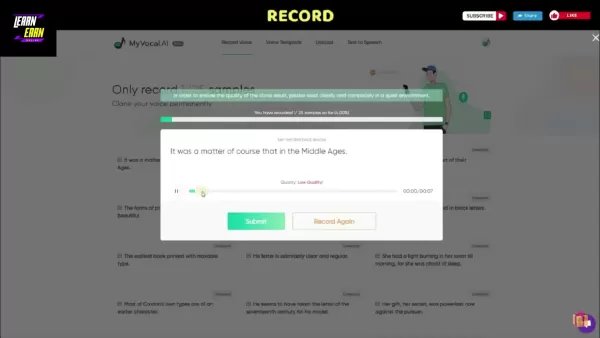
.
- Click the record button next to each sentence and allow microphone access.
- Speak clearly in a quiet setting.
- Review each recording and click 'Submit' to proceed or 'Record Again' to redo it.
- Continue until all 25 recordings are complete.
Checking Your Clone Progress
- After submitting your samples, click 'Check my clone progress.'
- Voice processing typically takes around 30 minutes
.
- You’ll receive an email once your voice clone is ready.
Using Text-to-Speech with Your AI Voice
- After receiving the confirmation email, go to the 'Text to Speech' section.
- Click the plus icon to open the text input box.
- Enter your text (up to 500 characters per day for free) and click 'Submit' to generate audio

.
Making Your AI Voice Sing
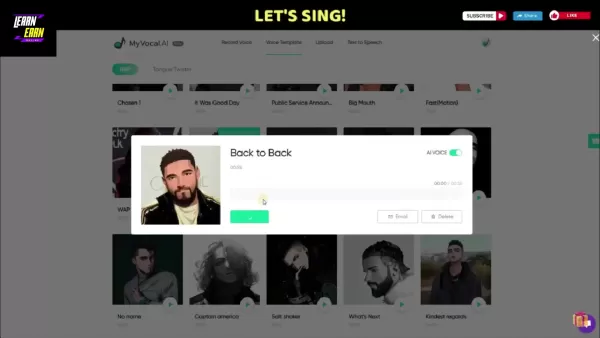
- Visit the 'Voice Template' page and choose a song template.
- Click 'Sync My AI Voice' to apply your cloned voice to the song.
- Select 'Email' to receive a download link. Due to copyright, preview may be restricted, but the final file will be sent to your inbox.
Experimenting with Tongue Twisters
- Go to 'Voice Template' and choose 'Tongue Twister.'
- Select a phrase to test your AI voice’s clarity and accuracy.
- Click 'Sync My AI Voice.' To improve quality, consider uploading a higher-quality voice sample.
Understanding MyVocal AI's Pricing
Currently Free in Beta
During the beta period, MyVocal AI is completely free. All features are accessible without any subscription fees.
Future Subscription Model
Once MyVocal AI exits beta, it will shift to a paid plan. Exact pricing details have not yet been announced.
Weighing the Options: Pros and Cons of Using MyVocal AI
Pros
Free during beta testing
Simple voice cloning process
Text-to-speech using your cloned voice
Ability to sing with AI voice
Varied and useful features
Cons
Voice quality depends on original recording
Occasional pronunciation issues
Will become a paid service in the future
Exploring MyVocal AI's Core Features
Instant Voice Clone
A key feature of MyVocal AI is instant voice cloning, letting users create a voice replica from just a one-minute recording or uploaded audio. This enables fast, personalized voiceover generation for various projects.
Cross Language Voice Cloning (Beta)
MyVocal AI supports cross-language voice cloning in beta. You can input speech in your native language and output content in American English, UK English, or Spanish.
Emotion Recognition
The emotion recognition feature detects emotional context in text and applies appropriate intonation to the AI voice, including expressions like anger, excitement, or fear.
AI Voice Blender (Beta)
In beta, the voice blender tool allows blending up to 25 different voice inputs to create truly unique vocal outputs.
Unlocking the Potential: Use Cases for MyVocal AI
Content Creation
MyVocal AI lets creators produce voiceovers for videos, podcasts, and other audiovisual content

. Using your own voice adds a personal touch that can strengthen audience connection. From educational explainers to audiobook narration, the creative uses are wide-ranging.
Accessibility
The platform helps make content accessible to people with visual impairments or reading difficulties by converting text to speech in a natural-sounding voice.
Movie Narration
Filmmakers and actors can use cloned voices for narration—whether their own or a celebrity voice—adding a unique element to film projects.
Audio Book
With the voice blender and TTS features, you can create audiobook-ready audio and distribute content through platforms like Amazon and Google.
Frequently Asked Questions (FAQ)
Is MyVocal AI really free?
Yes, it is free during the beta phase, though a subscription model will be introduced later.
How long does it take to clone my voice?
The process usually takes about 30 minutes. You’ll need to provide 25 voice samples, either via recording or upload, to train the AI effectively.
What languages are supported?
MyVocal AI currently supports American English, UK English, and Spanish, with more languages planned for future updates.
Can I use my AI voice for commercial purposes?
As with any AI voice tool, commercial use involves considerations around ethics, copyright, and potential misuse such as deepfakes. Always use responsibly and check applicable laws.
Related Questions
What are the ethical considerations of voice cloning?
Voice cloning raises important ethical questions, particularly around consent, misinformation, and privacy. Cloned voices could be used maliciously to create deepfakes or commit fraud. Transparency is critical—listeners should know when they’re hearing an AI-generated voice. Individuals should also have control over how their voice is used. Privacy protections for voice data are essential, and the impact on voice actors and audio professionals should be considered as AI voices become more common. Copyright and authorization for AI-generated content also remain complex legal areas.
What are the benefits of text-to-speech technology?
Text-to-speech (TTS) technology offers broad benefits in accessibility, education, productivity, and entertainment. It helps visually impaired individuals access written content, supports students with reading difficulties, and allows professionals to listen to documents while multitasking. TTS also enhances customer service through voice assistants and improves engagement with audio content. In entertainment, it enables personalized experiences like audiobooks and navigation prompts.
Related article
 Stripe to Acquire OpenRouter as AI Model Routing Gains Momentum
Stripe has agreed to acquire OpenRouter, an AI model-routing platform that gives developers access to hundreds of models through a single interface. The deal adds model selection and routing to Stripe’s existing work around AI usage and token-based b
Former OpenAI Researcher Barrett Zoph Returns to Google to Support Gemini Development
Barret Zoph, who previously abruptly left and joined OpenAI due to a disagreement with Thinking Machines Lab CEO Miriam Mularati, has once again changed employers. Alphabet's Google announced that Zoph will return as Vice President of Research, bring
How Recursive Intelligence Raised $335M at $4B Valuation in 4 Months
The co-founders of startup Ricursive Intelligence seemed destined to be co-founders.Anna Goldie, CEO, and Azalia Mirhoseini, CTO, are so well-known in the AI community that they were among those AI engineers who “got those weird emails from Zuckerber
Related Special Topic Recommendations
Design & Art
Stripe to Acquire OpenRouter as AI Model Routing Gains Momentum
Stripe has agreed to acquire OpenRouter, an AI model-routing platform that gives developers access to hundreds of models through a single interface. The deal adds model selection and routing to Stripe’s existing work around AI usage and token-based b
Former OpenAI Researcher Barrett Zoph Returns to Google to Support Gemini Development
Barret Zoph, who previously abruptly left and joined OpenAI due to a disagreement with Thinking Machines Lab CEO Miriam Mularati, has once again changed employers. Alphabet's Google announced that Zoph will return as Vice President of Research, bring
How Recursive Intelligence Raised $335M at $4B Valuation in 4 Months
The co-founders of startup Ricursive Intelligence seemed destined to be co-founders.Anna Goldie, CEO, and Azalia Mirhoseini, CTO, are so well-known in the AI community that they were among those AI engineers who “got those weird emails from Zuckerber
Related Special Topic Recommendations
Design & Art
 Top AI Illustration Tools: Create Editorial Scenes and Cover Art Faster
2026 Latest Top-rated AI Illustration Tools: Our curated list features the best powerfully designed tools for creating stunning editorial scenes and eye-catching cover art quickly. Each option has gone through rigorous real-world tests, offering a free vs paid comparison to help you find the perfect match for your workflow. Try these must-try solutions today to unlock your AI edge and boost your creative productivity. Explore now at XIX.AI.
 10 tools
 xix.ai
Education and Learning
Top AI Tutors for Exam Prep: Practice Math, Science, and English
xix.ai
Education and Learning
Top AI Tutors for Exam Prep: Practice Math, Science, and English
2026 Latest Top-Rated Best AI Tutors for Exam Prep are here on XIX.AI! Our curated list features powerful game-changing tools that offer free vs paid comparison, real-world tests, and weekly updated rankings. They help boost your writing efficiency, simplify complex topic learning, and unlock your academic potential. Explore now to Discover your perfect exam prep tool and Start creating today to Unlock your AI edge!
10 tools
xix.ai
Finance
AI Budget Planning Tools for Personal Money Management
2026 Latest Best Top-Rated AI Budget Planning Tools for Personal Money Management are here on XIX.AI! This curated collection features powerful, game-changing solutions that help you conduct real-world tests, understand spending habits, and create personalized plans to boost productivity. Enjoy a free vs paid comparison along with detailed rankings. Must-try tools designed to simplify money management and unlock your AI edge. Explore now!
11 tools
xix.ai
Health & Wellness
AI Sleep Tracking Assistants: Improve Recovery with Better Bedtime Habits
2026 Latest Best Top-Rated AI Sleep Tracking Assistants curated for ultimate recovery. This fully updated weekly guide features powerful tools that deliver real-world tests, free vs paid comparison, and detailed rankings to help you find the must-try solution that boosts sleep quality and supports better bedtime habits. Explore now at XIX.AI to Unlock your AI edge.
10 tools
xix.ai
Data Analysis
AI SQL Copilots for Product and Revenue Analytics
2026 Latest Best Top-Rated AI SQL Copilots for Product and Revenue Analytics! XIX.AI has curated a powerful, game-changing collection of must-try tools that undergo real-world tests through weekly updated rankings. These tools help users boost productivity significantly by accelerating data analysis, streamlining complex queries, and generating accurate insights to drive smarter business decisions. Explore now to Discover your perfect tool for unlocking your AI edge!
14 tools
xix.ai
Education and Learning
Best AI Homework Helpers That Teach: Learn Concepts, Not Just Answers
2026 Latest Best Top-Rated AI Homework Helpers That Teach Core Concepts Not Just Answers Powerful Tools for Students Must-Try Curated List Weekly Updated Free vs Paid Comparison Real-World Tests Accurate Rankings to Help You Unlock Your Full Learning Potential Explore now to Discover your perfect tool for smarter studying.
10 tools
xix.ai

 Comments (0)
0/500
Comments (0)
0/500
Voice cloning technology is advancing quickly in today's digital landscape, opening up exciting opportunities for personalized content creation and improved accessibility. MyVocal AI stands out as a powerful free tool, allowing users to easily clone their own voice and apply it across a range of creative projects. This platform offers a unique approach to generating AI-powered voiceovers with your personal vocal identity—this guide walks you through how it works.
Key Points
MyVocal AI is a free platform for cloning your voice.
You can produce text-to-speech content using your cloned voice.
The tool can even generate singing with your AI voice.
It is currently available for free during its beta phase.
Features include instant cloning, cross-language support, emotion recognition, and an AI voice blender.
Introduction to MyVocal AI
What is MyVocal AI?
MyVocal AI is an innovative artificial intelligence tool that lets users clone their voice in just minutes
. This free platform lets you generate text-to-speech audio with your own AI-generated voice. Where MyVocal AI really excels is its ability to produce singing using your cloned voice.
MyVocal AI aims to make voice cloning accessible to everyone, helping creators, educators, and marketers add a personal touch to audio content. The ability to clone your voice for speech and singing unlocks numerous creative applications.
Currently in its beta phase, MyVocal AI is completely free—offering a chance to explore its tools without any cost. This is a limited-time opportunity, as the platform will eventually transition to a subscription model. Now is the ideal time to experience everything MyVocal AI has to offer.
Understanding Limitations and Future Enhancements
Acknowledging Current Limitations
Because MyVocal AI is still in beta, users may notice certain limitations. The quality of the cloned voice can vary depending on the clarity and quality of the original recording. In some cases, the AI might not capture subtle vocal nuances or emotional tones perfectly. That said, the development team is continuously refining the AI to improve voice clone quality.
Although the text-to-speech output is impressive, the AI may occasionally mispronounce complex terms or foreign words. Users may need to adjust text inputs for optimal results. Ongoing enhancements are expected as the system evolves.
Anticipating Future Enhancements
MyVocal AI has an exciting roadmap ahead. The team is focused on expanding the range of emotions the AI can reproduce, creating more expressive and natural-sounding voice clones. This will help users produce content that better conveys genuine emotion and engagement.
Cross-language cloning is also being expanded, with plans to include more languages to help content creators reach broader audiences. Future updates may also introduce more voice customization features, such as tone, pitch, and pacing controls.
MyVocal AI will eventually adopt a paid subscription model to support continued research, infrastructure, and feature development, ensuring long-term platform sustainability.
Getting Started with MyVocal AI: A Step-by-Step Guide
Registration
- Go to the MyVocal AI website.
- Click 'Sign In' in the navigation menu.
- Register using Google, Facebook, or your email and select 'Free to use'
.
- A confirmation link will be sent to your email.
Recording Your Voice Samples
- After signing up, click 'Record Voice' in the menu.
- You'll see a list of 25 sentences to record
.
- Click the record button next to each sentence and allow microphone access.
- Speak clearly in a quiet setting.
- Review each recording and click 'Submit' to proceed or 'Record Again' to redo it.
- Continue until all 25 recordings are complete.
Checking Your Clone Progress
- After submitting your samples, click 'Check my clone progress.'
- Voice processing typically takes around 30 minutes
.
- You’ll receive an email once your voice clone is ready.
Using Text-to-Speech with Your AI Voice
- After receiving the confirmation email, go to the 'Text to Speech' section.
- Click the plus icon to open the text input box.
- Enter your text (up to 500 characters per day for free) and click 'Submit' to generate audio
.
Making Your AI Voice Sing
- Visit the 'Voice Template' page and choose a song template.
- Click 'Sync My AI Voice' to apply your cloned voice to the song.
- Select 'Email' to receive a download link. Due to copyright, preview may be restricted, but the final file will be sent to your inbox.
Experimenting with Tongue Twisters
- Go to 'Voice Template' and choose 'Tongue Twister.'
- Select a phrase to test your AI voice’s clarity and accuracy.
- Click 'Sync My AI Voice.' To improve quality, consider uploading a higher-quality voice sample.
Understanding MyVocal AI's Pricing
Currently Free in Beta
During the beta period, MyVocal AI is completely free. All features are accessible without any subscription fees.
Future Subscription Model
Once MyVocal AI exits beta, it will shift to a paid plan. Exact pricing details have not yet been announced.
Weighing the Options: Pros and Cons of Using MyVocal AI
Pros
Free during beta testing
Simple voice cloning process
Text-to-speech using your cloned voice
Ability to sing with AI voice
Varied and useful features
Cons
Voice quality depends on original recording
Occasional pronunciation issues
Will become a paid service in the future
Exploring MyVocal AI's Core Features
Instant Voice Clone
A key feature of MyVocal AI is instant voice cloning, letting users create a voice replica from just a one-minute recording or uploaded audio. This enables fast, personalized voiceover generation for various projects.
Cross Language Voice Cloning (Beta)
MyVocal AI supports cross-language voice cloning in beta. You can input speech in your native language and output content in American English, UK English, or Spanish.
Emotion Recognition
The emotion recognition feature detects emotional context in text and applies appropriate intonation to the AI voice, including expressions like anger, excitement, or fear.
AI Voice Blender (Beta)
In beta, the voice blender tool allows blending up to 25 different voice inputs to create truly unique vocal outputs.
Unlocking the Potential: Use Cases for MyVocal AI
Content Creation
MyVocal AI lets creators produce voiceovers for videos, podcasts, and other audiovisual content
. Using your own voice adds a personal touch that can strengthen audience connection. From educational explainers to audiobook narration, the creative uses are wide-ranging.
Accessibility
The platform helps make content accessible to people with visual impairments or reading difficulties by converting text to speech in a natural-sounding voice.
Movie Narration
Filmmakers and actors can use cloned voices for narration—whether their own or a celebrity voice—adding a unique element to film projects.
Audio Book
With the voice blender and TTS features, you can create audiobook-ready audio and distribute content through platforms like Amazon and Google.
Frequently Asked Questions (FAQ)
Is MyVocal AI really free?
Yes, it is free during the beta phase, though a subscription model will be introduced later.
How long does it take to clone my voice?
The process usually takes about 30 minutes. You’ll need to provide 25 voice samples, either via recording or upload, to train the AI effectively.
What languages are supported?
MyVocal AI currently supports American English, UK English, and Spanish, with more languages planned for future updates.
Can I use my AI voice for commercial purposes?
As with any AI voice tool, commercial use involves considerations around ethics, copyright, and potential misuse such as deepfakes. Always use responsibly and check applicable laws.
Related Questions
What are the ethical considerations of voice cloning?
Voice cloning raises important ethical questions, particularly around consent, misinformation, and privacy. Cloned voices could be used maliciously to create deepfakes or commit fraud. Transparency is critical—listeners should know when they’re hearing an AI-generated voice. Individuals should also have control over how their voice is used. Privacy protections for voice data are essential, and the impact on voice actors and audio professionals should be considered as AI voices become more common. Copyright and authorization for AI-generated content also remain complex legal areas.
What are the benefits of text-to-speech technology?
Text-to-speech (TTS) technology offers broad benefits in accessibility, education, productivity, and entertainment. It helps visually impaired individuals access written content, supports students with reading difficulties, and allows professionals to listen to documents while multitasking. TTS also enhances customer service through voice assistants and improves engagement with audio content. In entertainment, it enables personalized experiences like audiobooks and navigation prompts.








 Stripe to Acquire OpenRouter as AI Model Routing Gains Momentum
Stripe has agreed to acquire OpenRouter, an AI model-routing platform that gives developers access to hundreds of models through a single interface. The deal adds model selection and routing to Stripe’s existing work around AI usage and token-based b
Stripe to Acquire OpenRouter as AI Model Routing Gains Momentum
Stripe has agreed to acquire OpenRouter, an AI model-routing platform that gives developers access to hundreds of models through a single interface. The deal adds model selection and routing to Stripe’s existing work around AI usage and token-based b
 Former OpenAI Researcher Barrett Zoph Returns to Google to Support Gemini Development
Barret Zoph, who previously abruptly left and joined OpenAI due to a disagreement with Thinking Machines Lab CEO Miriam Mularati, has once again changed employers. Alphabet's Google announced that Zoph will return as Vice President of Research, bring
Former OpenAI Researcher Barrett Zoph Returns to Google to Support Gemini Development
Barret Zoph, who previously abruptly left and joined OpenAI due to a disagreement with Thinking Machines Lab CEO Miriam Mularati, has once again changed employers. Alphabet's Google announced that Zoph will return as Vice President of Research, bring
 How Recursive Intelligence Raised $335M at $4B Valuation in 4 Months
The co-founders of startup Ricursive Intelligence seemed destined to be co-founders.Anna Goldie, CEO, and Azalia Mirhoseini, CTO, are so well-known in the AI community that they were among those AI engineers who “got those weird emails from Zuckerber
How Recursive Intelligence Raised $335M at $4B Valuation in 4 Months
The co-founders of startup Ricursive Intelligence seemed destined to be co-founders.Anna Goldie, CEO, and Azalia Mirhoseini, CTO, are so well-known in the AI community that they were among those AI engineers who “got those weird emails from Zuckerber

2026 Latest Top-rated AI Illustration Tools: Our curated list features the best powerfully designed tools for creating stunning editorial scenes and eye-catching cover art quickly. Each option has gone through rigorous real-world tests, offering a free vs paid comparison to help you find the perfect match for your workflow. Try these must-try solutions today to unlock your AI edge and boost your creative productivity. Explore now at XIX.AI.
10 tools
xix.ai

2026 Latest Top-Rated Best AI Tutors for Exam Prep are here on XIX.AI! Our curated list features powerful game-changing tools that offer free vs paid comparison, real-world tests, and weekly updated rankings. They help boost your writing efficiency, simplify complex topic learning, and unlock your academic potential. Explore now to Discover your perfect exam prep tool and Start creating today to Unlock your AI edge!
10 tools
xix.ai

2026 Latest Best Top-Rated AI Budget Planning Tools for Personal Money Management are here on XIX.AI! This curated collection features powerful, game-changing solutions that help you conduct real-world tests, understand spending habits, and create personalized plans to boost productivity. Enjoy a free vs paid comparison along with detailed rankings. Must-try tools designed to simplify money management and unlock your AI edge. Explore now!
11 tools
xix.ai

2026 Latest Best Top-Rated AI Sleep Tracking Assistants curated for ultimate recovery. This fully updated weekly guide features powerful tools that deliver real-world tests, free vs paid comparison, and detailed rankings to help you find the must-try solution that boosts sleep quality and supports better bedtime habits. Explore now at XIX.AI to Unlock your AI edge.
10 tools
xix.ai

2026 Latest Best Top-Rated AI SQL Copilots for Product and Revenue Analytics! XIX.AI has curated a powerful, game-changing collection of must-try tools that undergo real-world tests through weekly updated rankings. These tools help users boost productivity significantly by accelerating data analysis, streamlining complex queries, and generating accurate insights to drive smarter business decisions. Explore now to Discover your perfect tool for unlocking your AI edge!
14 tools
xix.ai

2026 Latest Best Top-Rated AI Homework Helpers That Teach Core Concepts Not Just Answers Powerful Tools for Students Must-Try Curated List Weekly Updated Free vs Paid Comparison Real-World Tests Accurate Rankings to Help You Unlock Your Full Learning Potential Explore now to Discover your perfect tool for smarter studying.
10 tools
xix.ai












