


 Home
HomeAI Video Creation with Mootion: Craft Engaging Visual Stories
In the digital era, visual storytelling reigns supreme. Mootion AI Storyteller stands out as an innovative tool, enabling users to transform ideas into captivating visual content with ease. This platform harnesses artificial intelligence to simplify video production, making it accessible to all, regardless of technical skills. Discover the features of Mootion, an AI-driven video app.
Key Highlights
Mootion AI Storyteller empowers users to produce videos from concise text inputs.
It offers two main approaches for video creation: text prompts and existing content utilization.
New users receive ample free credits upon signing up.
Videos can be tailored with customizable styles, transitions, and voiceovers.
CreateStudio, a dynamic video editor, enhances content using your own assets.
Exploring Mootion AI Storyteller
What is Mootion AI Storyteller?
Mootion AI Storyteller is a state-of-the-art AI video platform designed to make video creation inclusive. It streamlines the process, enabling users to craft visual narratives effortlessly.
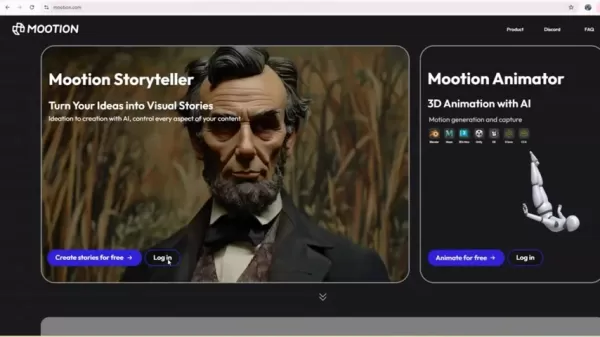
Whether you’re a marketer, educator, or storyteller, Mootion equips you with tools to realize your vision. Its user-friendly interface and advanced AI algorithms ensure accessibility for all skill levels.
AI-Driven Video ProductionMootion leverages AI to automate key elements of video creation, such as scene design, script development, and voiceover integration, allowing you to focus on creativity while the platform manages technical aspects.
Two Video Creation MethodsMootion provides two ways to create videos. The first uses text prompts, where users input ideas, and the AI generates a video. The second allows users to incorporate existing scripts or materials for personalized videos.
Starting Out: Free Account Setup
To begin using Mootion AI Storyteller, create a free account. Mootion offers generous free credits at signup, enabling you to test the platform and produce multiple videos without upfront costs.
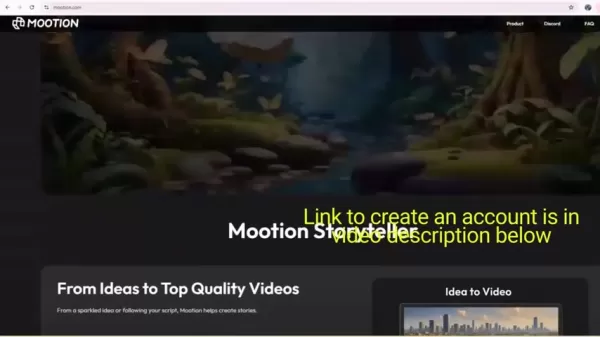
This is a great chance to explore the platform’s potential and see how it enhances your storytelling projects. Use the link in the video description for a seamless signup process.
Enhancing Videos with CreateStudio
Advanced Video Editing
CreateStudio elevates video editing, enabling the creation of compelling and dynamic content.
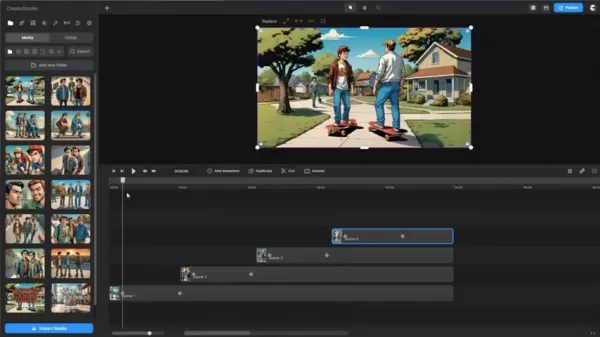
Importing Downloaded Videos: Add a unique flair by downloading and importing all 12 scenes into your video. Scenes are fully editable and manageable within the interface.
Designing Effective Thumbnails: Create compelling thumbnails to showcase your scenes and attract your audience. Utilize the provided storyboard for added impact.
Mastering Mootion: A Step-by-Step Guide
Creating Videos from Text Prompts
Mootion’s standout feature is generating videos from simple text prompts. Here’s how to use it:
Access the Generation Page: Log in and navigate to the ‘Generate’ section.
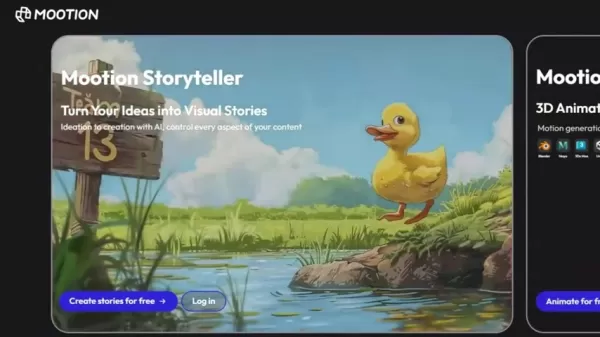
Choose ‘Generate from Prompt’: Select the text prompt video creation option.
Input Your Prompt: Enter your idea or paste reference content. Detailed prompts yield better results.
Customize Your Video: Choose styles (e.g., retro comics, 3D cartoon, anime), language, and orientation.
Create the Video: Click ‘Generate’ to start the process.
Review and Refine: Edit individual scenes, regenerate content, modify text, or upload assets as needed.
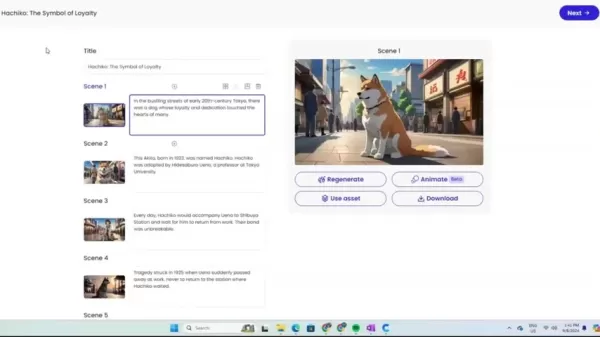
Using Your Own Content for Videos
Mootion allows video creation with your existing content for greater creative control:
- Go to the Generation Page: Access the ‘Generate’ section as outlined.
- Select ‘Use My Content’: Opt to create a video with your materials.
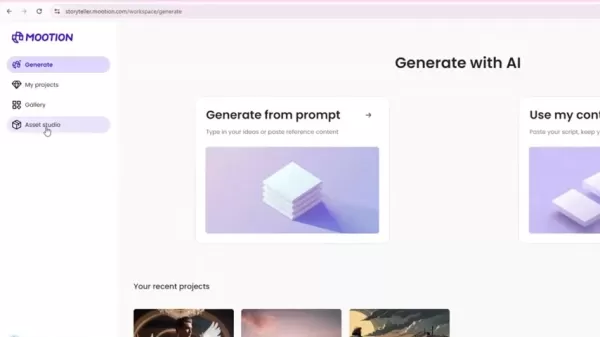
- Paste Your Script: Input your script, ensuring clear paragraph organization for scene generation.
- Customize Your Video: Select style, language, and orientation as desired.
- Generate the Video: Click ‘Generate’ to create your video.
- Review and Adjust: Fine-tune scenes, text, images, or transitions as needed.
Customizing and Finalizing Your Video
Mootion offers robust customization options to perfect your video:
- Scene Editing: Review each scene, regenerating or editing text if necessary.
- Title and Style: Choose a title style that matches your video’s theme and adjust the title as needed.
- Transition Effects: Select a consistent transition style, such as cross-blur or rotating, for smooth scene changes.
- Voiceover: Add a voiceover with customizable voice options to suit your video’s tone.
- Finalize and Download: Click ‘Composite’ to complete your video, then download the storyboard, thumbnail, and MP4 file.
Mootion AI Storyteller Pricing Plans
Cost of Visual Storytelling
Mootion provides free credits to get started. For details on pricing tiers or additional credits, visit their website to explore enhanced features and storytelling tools.
Mootion AI Storyteller: Pros and Cons
Pros
Intuitive Interface: Beginner-friendly design.
Rapid Video Production: Fast content creation.
Affordable Access: Free credits and cost-effective plans.
Customization Flexibility: Diverse style and voiceover options.
Cons
Limited Creative Control: AI automation may limit flexibility.
AI Dependency: Output quality relies on AI performance.
Transition Constraints: Single transition style per video.
Learning Curve: Advanced features require practice.
Frequently Asked Questions about Mootion AI Storyteller
Can I use Mootion AI Storyteller for commercial projects?
Absolutely! Mootion is ideal for commercial projects, but review the licensing agreements to ensure compliance.
What video types can I create with Mootion AI Storyteller?
Mootion supports a wide range of videos, including marketing, educational, social media, and personal projects, with adaptable AI for various themes.
What file formats are supported for asset uploads?
Mootion handles video and audio files. Check their website for detailed file specifications.
How customizable are voiceovers in Mootion?
Mootion offers extensive voiceover customization, including voice selection, volume, and speaking rate adjustments.
Related Questions on AI-Powered Visual Storytelling
How does AI improve video creation?
AI revolutionizes video production by automating tasks, boosting efficiency, and enhancing creativity while reducing costs.
Automated TasksAI simplifies complex processes like scene creation, storyboarding, and voiceover integration, freeing creators to focus on ideas. This reduces the need for large teams or extensive resources, making video production accessible.
Increased EfficiencyAI accelerates production, delivering professional-quality videos quickly. It automatically adjusts lighting, colors, and transitions for polished results and ensures brand consistency.
Enhanced CreativityAI fosters innovative content by suggesting narrative styles and generating ideas based on user input, adapting to preferences over time.
Cost SavingsAI lowers production costs by reducing labor and equipment needs. Affordable subscription models and AI-driven analytics optimize engagement and ROI, making professional video creation accessible to all.
Related article
 Anthropic Expands Claude AI Coding Tools to Japan in Push for Overseas Growth
Anthropic, a prominent U.S. artificial intelligence firm, is intensifying its global outreach. On Wednesday, the company hosted a major developer gathering, "Code with Claude," in Tokyo, drawing close to 500 software engineers. This initiative seeks
India’s Software Giant Cuts Hiring, Promises No Layoffs as AI Agents Scale Up
As artificial intelligence reshapes traditional labor-intensive business models, Tata Consultancy Services (TCS), a premier Indian software outsourcing firm, has unveiled its strategic response. During Tuesday’s annual general meeting, the chairman o
China Locks AI Models During Gaokam to Block Instant Homework Help
With the 2026 Gaokao fast approaching, rumors regarding the suspension of AI tools during the exam period have ignited intense online debate. In response to public concern, major AI platforms and educational apps have clarified their stance: rather t
Related Special Topic Recommendations
Design & Art
Anthropic Expands Claude AI Coding Tools to Japan in Push for Overseas Growth
Anthropic, a prominent U.S. artificial intelligence firm, is intensifying its global outreach. On Wednesday, the company hosted a major developer gathering, "Code with Claude," in Tokyo, drawing close to 500 software engineers. This initiative seeks
India’s Software Giant Cuts Hiring, Promises No Layoffs as AI Agents Scale Up
As artificial intelligence reshapes traditional labor-intensive business models, Tata Consultancy Services (TCS), a premier Indian software outsourcing firm, has unveiled its strategic response. During Tuesday’s annual general meeting, the chairman o
China Locks AI Models During Gaokam to Block Instant Homework Help
With the 2026 Gaokao fast approaching, rumors regarding the suspension of AI tools during the exam period have ignited intense online debate. In response to public concern, major AI platforms and educational apps have clarified their stance: rather t
Related Special Topic Recommendations
Design & Art
 Best AI Style Transfer Tools for Creative Experiments
2026 Latest Best Top-rated AI Style Transfer Tools for Creative Experiments! XIX.AI has curated a powerful, game-changing collection of must-try tools that deliver exceptional results through real-world tests and rigorous rankings. These top solutions help creatives boost productivity significantly by accelerating content creation and unlocking endless creative possibilities. Explore now to discover your perfect tool and start creating today!
 9 tools
 xix.ai
Comic Creation
Best AI Dialogue Bubble Tools for Visual Storytelling
xix.ai
Comic Creation
Best AI Dialogue Bubble Tools for Visual Storytelling
2026 Latest Best Top-Rated AI Dialogue Bubble Tools for Visual Storytelling are here on XIX.AI! This curated collection features powerful, game-changing tools that help creators boost productivity and overcome creative bottlenecks. Get a free vs paid comparison, see real-world tests, and check the latest rankings to find the must-try solutions perfect for crafting engaging visual narratives. Explore now to discover your ideal tool!
10 tools
xix.ai
Meeting Assistant
Top AI Meeting Summary Tools: Track Decisions and Follow-Ups Clearly
2026 Latest Top-Rated Best AI Meeting Summary Tools for Clear Decision Tracking and Effortless Follow-Ups. This curated list showcases powerful, game-changing solutions that boost productivity dramatically by automating meeting notes, identifying key action items, and streamlining team coordination across all projects. Get a free vs paid comparison along with real-world tests and weekly updated rankings to help you find the perfect tool. Explore now to unlock your AI edge!
9 tools
xix.ai
Data Analysis
Best AI Data Cleaning Tools: Fix Missing Values and Duplicates Fast
2026 Latest Best Top-rated AI Data Cleaning Tools for quick fixing of missing values and duplicates. This curated list showcases powerful, game-changing solutions that boost productivity significantly. Each option has undergone rigorous real-world tests to ensure reliability. Get a free vs paid comparison and discover the must-try tool that fits your needs best. Explore now at XIX.AI to Unlock your AI edge.
11 tools
xix.ai
Design & Art
Best AI Creative Ideation Tools for Artists: Break Through Visual Blocks
2026 Latest Best Top-Rated AI Creative Ideation Tools for Artists are curated by XIX.AI to help creators break through visual blocks and boost creativity instantly. These powerful game-changing tools offer real-world tests, detailed free vs paid comparison, and weekly updated rankings. Discover your perfect tool to accelerate content creation and unlock your AI edge today. Explore now!
14 tools
xix.ai
Music composition
AI Beat Makers for TikTok Background Tracks, Reels Audio, and Creator Promo Music
2026 Latest Best AI Beat Makers for TikTok Background Tracks, Reels Audio, and Creator Promo Music! XIX.AI has curated a top-rated list of powerful game-changing tools that go through real-world tests to deliver flawless music for every content need. You’ll find detailed free vs paid comparison data, weekly updated rankings, and must-try options to help you boost creativity and productivity. Explore now to discover your perfect tool!
11 tools
xix.ai

 Comments (12)
0/500
Comments (12)
0/500
![AlbertRodriguez]()
Ferramenta promissora para quem não tem tempo para editar. Vamos ver se os resultados são tão bons quanto prometem.
![AnthonyJohnson]()
¡Increíble! Hacer historias visuales en minutos es justo lo que necesitaba para mis redes sociales. 🚀
![DouglasAnderson]()
Schnelle Videos sind toll, aber wo bleibt die Kreativität? Mal sehen, wie gut die KI wirklich ist.
![EricRoberts]()
영상 제작이 이렇게 쉬워지면 경쟁이 심해지겠네요. 재미있는 도구인 것 같아요!
![MatthewWilliams]()
Быстро и просто? Звучит как мечта для блогеров. Надеюсь, качество не пострадает от скорости.
![CarlMartin]()
Intéressant pour les créateurs de contenu, mais je me demande si l'originalité sera préservée. À surveiller de près !
In the digital era, visual storytelling reigns supreme. Mootion AI Storyteller stands out as an innovative tool, enabling users to transform ideas into captivating visual content with ease. This platform harnesses artificial intelligence to simplify video production, making it accessible to all, regardless of technical skills. Discover the features of Mootion, an AI-driven video app.
Key Highlights
Mootion AI Storyteller empowers users to produce videos from concise text inputs.
It offers two main approaches for video creation: text prompts and existing content utilization.
New users receive ample free credits upon signing up.
Videos can be tailored with customizable styles, transitions, and voiceovers.
CreateStudio, a dynamic video editor, enhances content using your own assets.
Exploring Mootion AI Storyteller
What is Mootion AI Storyteller?
Mootion AI Storyteller is a state-of-the-art AI video platform designed to make video creation inclusive. It streamlines the process, enabling users to craft visual narratives effortlessly.
Whether you’re a marketer, educator, or storyteller, Mootion equips you with tools to realize your vision. Its user-friendly interface and advanced AI algorithms ensure accessibility for all skill levels.
AI-Driven Video ProductionMootion leverages AI to automate key elements of video creation, such as scene design, script development, and voiceover integration, allowing you to focus on creativity while the platform manages technical aspects.
Two Video Creation MethodsMootion provides two ways to create videos. The first uses text prompts, where users input ideas, and the AI generates a video. The second allows users to incorporate existing scripts or materials for personalized videos.
Starting Out: Free Account Setup
To begin using Mootion AI Storyteller, create a free account. Mootion offers generous free credits at signup, enabling you to test the platform and produce multiple videos without upfront costs.
This is a great chance to explore the platform’s potential and see how it enhances your storytelling projects. Use the link in the video description for a seamless signup process.
Enhancing Videos with CreateStudio
Advanced Video Editing
CreateStudio elevates video editing, enabling the creation of compelling and dynamic content.
Importing Downloaded Videos: Add a unique flair by downloading and importing all 12 scenes into your video. Scenes are fully editable and manageable within the interface.
Designing Effective Thumbnails: Create compelling thumbnails to showcase your scenes and attract your audience. Utilize the provided storyboard for added impact.
Mastering Mootion: A Step-by-Step Guide
Creating Videos from Text Prompts
Mootion’s standout feature is generating videos from simple text prompts. Here’s how to use it:
Access the Generation Page: Log in and navigate to the ‘Generate’ section.
Choose ‘Generate from Prompt’: Select the text prompt video creation option.
Input Your Prompt: Enter your idea or paste reference content. Detailed prompts yield better results.
Customize Your Video: Choose styles (e.g., retro comics, 3D cartoon, anime), language, and orientation.
Create the Video: Click ‘Generate’ to start the process.
Review and Refine: Edit individual scenes, regenerate content, modify text, or upload assets as needed.
Using Your Own Content for Videos
Mootion allows video creation with your existing content for greater creative control:
- Go to the Generation Page: Access the ‘Generate’ section as outlined.
- Select ‘Use My Content’: Opt to create a video with your materials.
- Paste Your Script: Input your script, ensuring clear paragraph organization for scene generation.
- Customize Your Video: Select style, language, and orientation as desired.
- Generate the Video: Click ‘Generate’ to create your video.
- Review and Adjust: Fine-tune scenes, text, images, or transitions as needed.
Customizing and Finalizing Your Video
Mootion offers robust customization options to perfect your video:
- Scene Editing: Review each scene, regenerating or editing text if necessary.
- Title and Style: Choose a title style that matches your video’s theme and adjust the title as needed.
- Transition Effects: Select a consistent transition style, such as cross-blur or rotating, for smooth scene changes.
- Voiceover: Add a voiceover with customizable voice options to suit your video’s tone.
- Finalize and Download: Click ‘Composite’ to complete your video, then download the storyboard, thumbnail, and MP4 file.
Mootion AI Storyteller Pricing Plans
Cost of Visual Storytelling
Mootion provides free credits to get started. For details on pricing tiers or additional credits, visit their website to explore enhanced features and storytelling tools.
Mootion AI Storyteller: Pros and Cons
Pros
Intuitive Interface: Beginner-friendly design.
Rapid Video Production: Fast content creation.
Affordable Access: Free credits and cost-effective plans.
Customization Flexibility: Diverse style and voiceover options.
Cons
Limited Creative Control: AI automation may limit flexibility.
AI Dependency: Output quality relies on AI performance.
Transition Constraints: Single transition style per video.
Learning Curve: Advanced features require practice.
Frequently Asked Questions about Mootion AI Storyteller
Can I use Mootion AI Storyteller for commercial projects?
Absolutely! Mootion is ideal for commercial projects, but review the licensing agreements to ensure compliance.
What video types can I create with Mootion AI Storyteller?
Mootion supports a wide range of videos, including marketing, educational, social media, and personal projects, with adaptable AI for various themes.
What file formats are supported for asset uploads?
Mootion handles video and audio files. Check their website for detailed file specifications.
How customizable are voiceovers in Mootion?
Mootion offers extensive voiceover customization, including voice selection, volume, and speaking rate adjustments.
Related Questions on AI-Powered Visual Storytelling
How does AI improve video creation?
AI revolutionizes video production by automating tasks, boosting efficiency, and enhancing creativity while reducing costs.
Automated TasksAI simplifies complex processes like scene creation, storyboarding, and voiceover integration, freeing creators to focus on ideas. This reduces the need for large teams or extensive resources, making video production accessible.
Increased EfficiencyAI accelerates production, delivering professional-quality videos quickly. It automatically adjusts lighting, colors, and transitions for polished results and ensures brand consistency.
Enhanced CreativityAI fosters innovative content by suggesting narrative styles and generating ideas based on user input, adapting to preferences over time.
Cost SavingsAI lowers production costs by reducing labor and equipment needs. Affordable subscription models and AI-driven analytics optimize engagement and ROI, making professional video creation accessible to all.








 Anthropic Expands Claude AI Coding Tools to Japan in Push for Overseas Growth
Anthropic, a prominent U.S. artificial intelligence firm, is intensifying its global outreach. On Wednesday, the company hosted a major developer gathering, "Code with Claude," in Tokyo, drawing close to 500 software engineers. This initiative seeks
Anthropic Expands Claude AI Coding Tools to Japan in Push for Overseas Growth
Anthropic, a prominent U.S. artificial intelligence firm, is intensifying its global outreach. On Wednesday, the company hosted a major developer gathering, "Code with Claude," in Tokyo, drawing close to 500 software engineers. This initiative seeks
 India’s Software Giant Cuts Hiring, Promises No Layoffs as AI Agents Scale Up
As artificial intelligence reshapes traditional labor-intensive business models, Tata Consultancy Services (TCS), a premier Indian software outsourcing firm, has unveiled its strategic response. During Tuesday’s annual general meeting, the chairman o
India’s Software Giant Cuts Hiring, Promises No Layoffs as AI Agents Scale Up
As artificial intelligence reshapes traditional labor-intensive business models, Tata Consultancy Services (TCS), a premier Indian software outsourcing firm, has unveiled its strategic response. During Tuesday’s annual general meeting, the chairman o
 China Locks AI Models During Gaokam to Block Instant Homework Help
With the 2026 Gaokao fast approaching, rumors regarding the suspension of AI tools during the exam period have ignited intense online debate. In response to public concern, major AI platforms and educational apps have clarified their stance: rather t
China Locks AI Models During Gaokam to Block Instant Homework Help
With the 2026 Gaokao fast approaching, rumors regarding the suspension of AI tools during the exam period have ignited intense online debate. In response to public concern, major AI platforms and educational apps have clarified their stance: rather t

2026 Latest Best Top-rated AI Style Transfer Tools for Creative Experiments! XIX.AI has curated a powerful, game-changing collection of must-try tools that deliver exceptional results through real-world tests and rigorous rankings. These top solutions help creatives boost productivity significantly by accelerating content creation and unlocking endless creative possibilities. Explore now to discover your perfect tool and start creating today!
9 tools
xix.ai

2026 Latest Best Top-Rated AI Dialogue Bubble Tools for Visual Storytelling are here on XIX.AI! This curated collection features powerful, game-changing tools that help creators boost productivity and overcome creative bottlenecks. Get a free vs paid comparison, see real-world tests, and check the latest rankings to find the must-try solutions perfect for crafting engaging visual narratives. Explore now to discover your ideal tool!
10 tools
xix.ai

2026 Latest Top-Rated Best AI Meeting Summary Tools for Clear Decision Tracking and Effortless Follow-Ups. This curated list showcases powerful, game-changing solutions that boost productivity dramatically by automating meeting notes, identifying key action items, and streamlining team coordination across all projects. Get a free vs paid comparison along with real-world tests and weekly updated rankings to help you find the perfect tool. Explore now to unlock your AI edge!
9 tools
xix.ai

2026 Latest Best Top-rated AI Data Cleaning Tools for quick fixing of missing values and duplicates. This curated list showcases powerful, game-changing solutions that boost productivity significantly. Each option has undergone rigorous real-world tests to ensure reliability. Get a free vs paid comparison and discover the must-try tool that fits your needs best. Explore now at XIX.AI to Unlock your AI edge.
11 tools
xix.ai

2026 Latest Best Top-Rated AI Creative Ideation Tools for Artists are curated by XIX.AI to help creators break through visual blocks and boost creativity instantly. These powerful game-changing tools offer real-world tests, detailed free vs paid comparison, and weekly updated rankings. Discover your perfect tool to accelerate content creation and unlock your AI edge today. Explore now!
14 tools
xix.ai

2026 Latest Best AI Beat Makers for TikTok Background Tracks, Reels Audio, and Creator Promo Music! XIX.AI has curated a top-rated list of powerful game-changing tools that go through real-world tests to deliver flawless music for every content need. You’ll find detailed free vs paid comparison data, weekly updated rankings, and must-try options to help you boost creativity and productivity. Explore now to discover your perfect tool!
11 tools
xix.ai

Ferramenta promissora para quem não tem tempo para editar. Vamos ver se os resultados são tão bons quanto prometem.
¡Increíble! Hacer historias visuales en minutos es justo lo que necesitaba para mis redes sociales. 🚀
Schnelle Videos sind toll, aber wo bleibt die Kreativität? Mal sehen, wie gut die KI wirklich ist.
영상 제작이 이렇게 쉬워지면 경쟁이 심해지겠네요. 재미있는 도구인 것 같아요!
Быстро и просто? Звучит как мечта для блогеров. Надеюсь, качество не пострадает от скорости.
Intéressant pour les créateurs de contenu, mais je me demande si l'originalité sera préservée. À surveiller de près !












