


 Home
HomeHow to create realistic AI voices for content in 2026 with MiloVoice?
In today's digital world, high-quality audio is just as important as stunning visuals. MiloVoice stands out as an innovative solution, offering content creators an affordable and remarkably lifelike AI voice generator. This guide explores MiloVoice's features, advantages, and real-world uses, compares it to alternatives such as Eleven Labs, and discusses its role in YouTube monetization and diverse creative projects.
Key Points
MiloVoice delivers ultra-realistic AI voices for a wide range of content requirements.
It supports more than 50 languages, helping you connect with a worldwide audience.
Budget-friendly plans start at just ₹100 per month.
It produces high-quality voice exports perfect for professional use.
Excellent for YouTube monetization, helping you meet platform guidelines and earn revenue.
Introduction to Realistic AI Voice Generation
The Importance of AI Voices in Modern Content Creation
Lifelike AI voices have revolutionized content creation by providing flexible and economical solutions. From explainer videos and audiobooks to marketing materials, AI voices enable the production of professional-grade audio without hiring voice actors. This empowers small businesses and solo creators to enhance their production quality.
With advanced AI voice tools like MiloVoice, creators can now generate natural-sounding speech in numerous languages. This is especially useful for engaging global audiences and scaling content internationally. The intuitive design of these platforms makes them easy to use, regardless of technical expertise.
Additionally, AI voices provide consistent and controllable audio elements for your projects. This is crucial for preserving brand identity and ensuring a cohesive message across all channels.

Whether your project calls for a formal tone or a casual style, AI voice generators offer the customization needed to achieve the right impact.
What is MiloVoice?
MiloVoice is an AI voice generator focused on delivering realistic, high-quality voices at an accessible price. Unlike some competitors, MiloVoice balances cost-efficiency with premium audio quality, making it a compelling choice for creators on a budget.
MiloVoice helps users produce captivating content through its diverse capabilities. Key benefits include:
- Ultra Realistic Voice: MiloVoice specializes in creating natural, human-like voices that keep listeners engaged.
- 50+ Languages: Create audio in over 50 languages to reach a global viewership.
- Ultra Quality Voice: The platform guarantees top-tier audio exports, resulting in clear and professional sound.
- Affordable Price: MiloVoice provides competitive pricing compared to other services like Eleven Labs, broadening access for more users.
MiloVoice.pro distinguishes itself as a cost-effective AI voice generator. Many creators seek ways to lower production expenses without compromising on quality, and MiloVoice meets this demand directly. Its tools are built to generate studio-quality audio, making it a sensible option for various projects.
Elevate Your Content: Expert Tips for Using MiloVoice Effectively
Mastering the Art of Realistic AI Voice Generation
Producing believable AI-generated voices involves both technical skill and creative judgment. To get the best results from platforms like MiloVoice, apply these professional tips:
Precise Text Input:Make sure your text is error-free and grammatically correct. AI models process text literally, so mistakes can cause awkward pauses or unusual emphasis.
Voice Selection Strategies: Choose a voice that fits your content’s tone and target audience.Test different voice profiles to find the ideal match for narration, character roles, or promotional content.
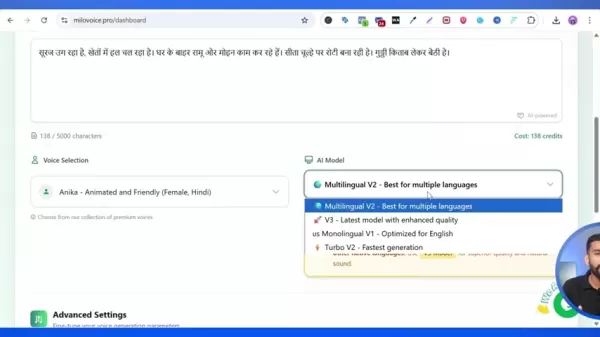
Fine-Tuning Advanced Settings:Adjust parameters like stability, similarity, style, and speed to refine the voice’s delivery.These controls allow you to subtly modify tone and pacing.
Leveraging Language Nuances:Use MiloVoice’s broad language support to develop multilingual content that appeals to diverse listeners.Ensure translations are culturally appropriate and accurate to maintain authenticity.
Optimizing Audio Export:Always export your audio at the highest quality setting to reduce the need for editing.High-quality output delivers crisp, clear sound that improves the listener’s experience.
Strategic Use of Speaker Boost and Subtitles:Apply speaker boost to increase volume and clarity, especially for playback in noisy settings.Add subtitles to make your content more accessible and engaging.
Frequent testing and Iteration:Regularly test and improve your voice generation methods.Critically listen to the output and adjust as necessary to achieve the most natural and compelling audio.
Step-by-Step Guide to Using MiloVoice AI Voice Generator
Step 1: Signing Up and Logging In
Begin by visiting MiloVoice.pro to set up your account. You can start with a free account to explore the platform’s tools before upgrading to a paid plan.

- Navigate to the MiloVoice website.
- Select the “Get Started” button.
- Provide your full name, preferred username, email address, and a secure password.
- Accept the Terms of Service and Privacy Policy.
- Click “Create Account.”
- If you already have an account, choose “Sign In” and enter your login details.
After logging in, you’ll be taken to your account dashboard, where you can manage all of MiloVoice’s features and settings.
Step 2: Navigating the Dashboard
The dashboard gives you a complete overview of your account, available credits, current subscription plan, and accessible voices. From here, you can easily reach the voice generation tools and explore the platform’s various functions.
- Available Credits: Shows how many credits you have for generating voices.
- Current Plan: Indicates your active subscription (Free, Spark, Ignite, or Blaze).
- Available Voices: Displays the number of AI voices you can use based on your plan.
- Create Voice: This area lets you transform text into natural-sounding speech.
The dashboard is designed for ease of use, with straightforward information that helps you manage your account and begin creating voices quickly.
Step 3: Creating a Voice
Generating an AI voice with MiloVoice is simple.
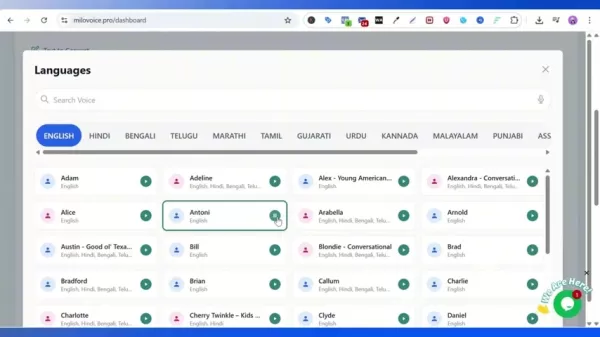
- Find the “Create Voice” section on the dashboard.
- Type the text you wish to convert into the “Text to Convert” field. MiloVoice allows up to 5000 characters per generation.
- Pick a voice from the “Voice Selection” dropdown menu. You can choose from a broad selection of voices in different languages and accents.
- Modify the “AI Model” if necessary. MiloVoice provides several AI models optimized for different purposes. For multiple languages, the V2 model is suggested. For optimal quality, V3 is often recommended.
- Customize “Advanced Settings,” such as stability, similarity, style, and speed to fine-tune the voice output.
- Select the “Generate Speech” button. The platform will confirm the credit cost for the task. If you have enough credits, click “Confirm & Generate."
- Your voice generation task will now be queued and processed.
Step 4: Accessing the Generated Voice
Once your voice generation is finished, you can retrieve the audio from the "Generation History" section.
- Click the user avatar in the top right corner and choose “Generation History” from the menu.
- Find your generated voice in the list of recent tasks. You might need to refresh the page to see completed items.
- Select the “Play” button to listen to the generated voice.
- If you’re happy with the result, click the “Download” button to save the audio file to your device.
- Files are available in both MP3 and OGG formats for your convenience.
Once downloaded, your audio is ready to be incorporated into your content!
Understanding MiloVoice's Pricing Structure
MiloVoice Pricing Details
MiloVoice provides several pricing tiers to fit various needs, beginning with a free plan that lets users try the platform’s features at no cost. There are three additional paid plans available.
Plan Name Price Credits Features FreeFree5000.5 minutes of audio, access to all voices, high-quality audioSpark₹100/month26,00026 minutes of audio, access to all voices, high-quality audio, priority support, commercial usageIgnite₹499/month150,000150 minutes of audio, access to all voices, high-quality audio, priority support, commercial usageBlaze₹999/month400,000400 minutes of audio, access to all voices, high-quality audio, priority support, commercial usageAdvantages and Disadvantages of Using MiloVoice
Pros
Highly realistic AI voice generation
Support for over 50 languages
Affordable pricing plans
User-friendly interface
YouTube monetization compatibility
Cons
Limited customization options compared to some competitors
Requires an internet connection
Free plan has limited credits
Key Features of MiloVoice AI Voice Generator
Ultra Realistic Voice Generation
The standout feature of MiloVoice is its ability to create ultra-realistic AI voices. This function produces audio that closely mimics human speech, making it perfect for content where audience engagement is key. The lifelike quality ensures listeners stay interested, whether the voice is used for narration, character dialogue, or promotional audio.
This feature sets MiloVoice apart from other AI voice generators that might produce robotic or unnatural audio. The sophisticated algorithms used by MiloVoice capture subtle nuances, inflections, and emotions, enhancing the overall listening experience.
Multilingual Support (50+ Languages)
MiloVoice supports over 50 languages, making it a highly adaptable tool for international content creation. This extensive language library lets creators develop content for diverse audiences, overcoming language barriers and expanding their global presence.
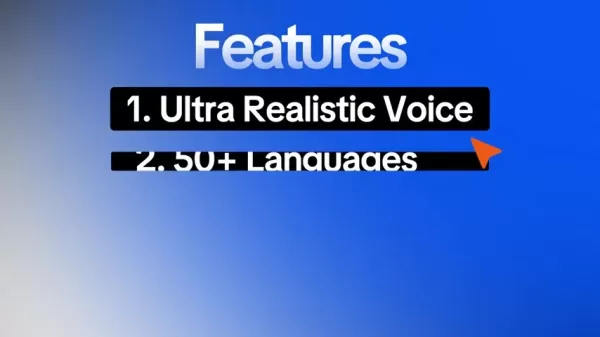
From widely spoken languages to less common dialects, MiloVoice offers a broad selection. This is especially valuable for businesses localizing their content or educators creating multilingual learning materials. Each language is optimized for natural speech patterns and accents, ensuring a smooth listening experience.
Ultra Quality Voice Exports
MiloVoice prioritizes exporting generated voices at the highest possible quality. The platform is engineered to deliver ultra-quality voice exports, providing clear and sharp audio fit for professional use. This high-standard output reduces the need for additional editing, saving creators time and effort.
Whether the audio is for podcasts, videos, or ads, the clarity and quality of the voice significantly influence the listener’s perception. MiloVoice addresses this by optimizing every stage of the voice generation and export process.
Affordable Pricing Plans
MiloVoice offers affordable pricing plans, starting at just ₹100 per month, making it available to a broad user base. The platform also includes a free plan so users can evaluate its features before subscribing.
The budget-friendly pricing makes MiloVoice a standout option compared to services like Eleven Labs. This allows cost-conscious creators to leverage high-quality AI voice generation without overspending.
The free plan provides access to various voice settings, letting users test the platform’s capabilities without any financial commitment.
Use Cases for MiloVoice AI Voice Generator
YouTube Monetization
Content creators can use MiloVoice to produce audio tracks for their videos. Its realistic and natural voices ensure the audio meets YouTube’s monetization requirements. Specifically, videos featuring AI-generated voices are 100% monetizable, making MiloVoice a great tool for creators aiming to earn revenue from their channels.

The voices generated by MiloVoice work well for narration, character dialogue, and background audio. With support for over 50 languages, you can engage wider audiences.
E-Learning Content Creation
MiloVoice is an excellent tool for developing engaging e-learning materials in multiple languages. Educators and instructional designers can use the platform to create realistic narrations, character dialogues, and interactive audio elements that improve the learning experience for students globally.
The platform’s multilingual support allows you to adapt your courses for international learners, breaking down language barriers and fostering inclusive education. By delivering clear and concise narrations, MiloVoice can boost understanding and increase student involvement.
Marketing and Advertising
Marketers can use MiloVoice to create high-quality audio ads, voiceovers for commercials, and narrations for explainer videos. The platform’s realistic voices capture the audience’s attention, communicating key messages and building a memorable brand impression.
MiloVoice’s affordability makes it a smart choice for small businesses and startups looking to produce professional-grade marketing content without stretching their budget. With its wide language library, you can design campaigns that connect with audiences worldwide.
Frequently Asked Questions about MiloVoice
Can I use MiloVoice for commercial purposes?
Yes, all paid plans, including Spark, Ignite, and Blaze, permit commercial use of the generated voices. This means you can use MiloVoice to create audio for ads, marketing content, and other commercial ventures.
Is MiloVoice suitable for YouTube monetization?
Yes, MiloVoice is fully compatible with YouTube monetization policies. Its realistic voices ensure your audio meets YouTube’s standards, allowing you to generate income from your videos.
How many languages does MiloVoice support?
MiloVoice supports over 50 languages, making it a versatile tool for global content creation. You can produce audio for diverse audiences, overcoming language obstacles and expanding your international reach.
Does MiloVoice offer a free plan?
Yes, MiloVoice provides a free plan with limited credits, allowing you to test the platform’s features before choosing a paid subscription. The free plan is an excellent way to explore the platform’s capabilities and determine if it fits your needs.
Related Questions about AI Voice Generation
What are the benefits of using AI voice generators over traditional voice actors?
AI voice generators offer several benefits compared to traditional voice actors. They are often more economical, particularly for small businesses and independent creators. AI voices can be generated rapidly, speeding up content production. They provide consistency and control over audio elements, making it simpler to maintain brand identity and deliver a unified message.Although traditional voice actors bring human emotion and subtlety to their work, AI voices are quickly advancing in realism and expressiveness. In many instances, the quality of AI-generated voices now rivals that of professional voice actors, making them a practical option for numerous applications.
How can I ensure that my AI-generated audio content is engaging and effective?
Creating compelling and effective AI-generated audio content requires thoughtful planning and execution. First, make sure your text is clear, concise, and well-structured. Select an AI voice that aligns with your content’s tone and style. Experiment with different voice settings, such as speed, pitch, and intonation, to find the best fit for your project. Incorporate background music, sound effects, and other audio elements to build a rich and immersive experience. Finally, test your audio with a sample audience and collect feedback to identify areas for refinement.
Related article
 Stripe to Acquire OpenRouter as AI Model Routing Gains Momentum
Stripe has agreed to acquire OpenRouter, an AI model-routing platform that gives developers access to hundreds of models through a single interface. The deal adds model selection and routing to Stripe’s existing work around AI usage and token-based b
Former OpenAI Researcher Barrett Zoph Returns to Google to Support Gemini Development
Barret Zoph, who previously abruptly left and joined OpenAI due to a disagreement with Thinking Machines Lab CEO Miriam Mularati, has once again changed employers. Alphabet's Google announced that Zoph will return as Vice President of Research, bring
How Recursive Intelligence Raised $335M at $4B Valuation in 4 Months
The co-founders of startup Ricursive Intelligence seemed destined to be co-founders.Anna Goldie, CEO, and Azalia Mirhoseini, CTO, are so well-known in the AI community that they were among those AI engineers who “got those weird emails from Zuckerber
Related Special Topic Recommendations
Design & Art
Stripe to Acquire OpenRouter as AI Model Routing Gains Momentum
Stripe has agreed to acquire OpenRouter, an AI model-routing platform that gives developers access to hundreds of models through a single interface. The deal adds model selection and routing to Stripe’s existing work around AI usage and token-based b
Former OpenAI Researcher Barrett Zoph Returns to Google to Support Gemini Development
Barret Zoph, who previously abruptly left and joined OpenAI due to a disagreement with Thinking Machines Lab CEO Miriam Mularati, has once again changed employers. Alphabet's Google announced that Zoph will return as Vice President of Research, bring
How Recursive Intelligence Raised $335M at $4B Valuation in 4 Months
The co-founders of startup Ricursive Intelligence seemed destined to be co-founders.Anna Goldie, CEO, and Azalia Mirhoseini, CTO, are so well-known in the AI community that they were among those AI engineers who “got those weird emails from Zuckerber
Related Special Topic Recommendations
Design & Art
 Top AI Illustration Tools: Create Editorial Scenes and Cover Art Faster
2026 Latest Top-rated AI Illustration Tools: Our curated list features the best powerfully designed tools for creating stunning editorial scenes and eye-catching cover art quickly. Each option has gone through rigorous real-world tests, offering a free vs paid comparison to help you find the perfect match for your workflow. Try these must-try solutions today to unlock your AI edge and boost your creative productivity. Explore now at XIX.AI.
 10 tools
 xix.ai
Education and Learning
Top AI Tutors for Exam Prep: Practice Math, Science, and English
xix.ai
Education and Learning
Top AI Tutors for Exam Prep: Practice Math, Science, and English
2026 Latest Top-Rated Best AI Tutors for Exam Prep are here on XIX.AI! Our curated list features powerful game-changing tools that offer free vs paid comparison, real-world tests, and weekly updated rankings. They help boost your writing efficiency, simplify complex topic learning, and unlock your academic potential. Explore now to Discover your perfect exam prep tool and Start creating today to Unlock your AI edge!
10 tools
xix.ai
Finance
AI Budget Planning Tools for Personal Money Management
2026 Latest Best Top-Rated AI Budget Planning Tools for Personal Money Management are here on XIX.AI! This curated collection features powerful, game-changing solutions that help you conduct real-world tests, understand spending habits, and create personalized plans to boost productivity. Enjoy a free vs paid comparison along with detailed rankings. Must-try tools designed to simplify money management and unlock your AI edge. Explore now!
11 tools
xix.ai
Health & Wellness
AI Sleep Tracking Assistants: Improve Recovery with Better Bedtime Habits
2026 Latest Best Top-Rated AI Sleep Tracking Assistants curated for ultimate recovery. This fully updated weekly guide features powerful tools that deliver real-world tests, free vs paid comparison, and detailed rankings to help you find the must-try solution that boosts sleep quality and supports better bedtime habits. Explore now at XIX.AI to Unlock your AI edge.
10 tools
xix.ai
Data Analysis
AI SQL Copilots for Product and Revenue Analytics
2026 Latest Best Top-Rated AI SQL Copilots for Product and Revenue Analytics! XIX.AI has curated a powerful, game-changing collection of must-try tools that undergo real-world tests through weekly updated rankings. These tools help users boost productivity significantly by accelerating data analysis, streamlining complex queries, and generating accurate insights to drive smarter business decisions. Explore now to Discover your perfect tool for unlocking your AI edge!
14 tools
xix.ai
Education and Learning
Best AI Homework Helpers That Teach: Learn Concepts, Not Just Answers
2026 Latest Best Top-Rated AI Homework Helpers That Teach Core Concepts Not Just Answers Powerful Tools for Students Must-Try Curated List Weekly Updated Free vs Paid Comparison Real-World Tests Accurate Rankings to Help You Unlock Your Full Learning Potential Explore now to Discover your perfect tool for smarter studying.
10 tools
xix.ai

 Comments (1)
0/500
Comments (1)
0/500
![JackLewis]()
Honestly, the voice quality is getting scary good. I tried a demo last week and couldn't tell it from a real person. Makes me wonder about the future of voice actors and deepfake audio... exciting but also a bit unsettling! 😅
In today's digital world, high-quality audio is just as important as stunning visuals. MiloVoice stands out as an innovative solution, offering content creators an affordable and remarkably lifelike AI voice generator. This guide explores MiloVoice's features, advantages, and real-world uses, compares it to alternatives such as Eleven Labs, and discusses its role in YouTube monetization and diverse creative projects.
Key Points
MiloVoice delivers ultra-realistic AI voices for a wide range of content requirements.
It supports more than 50 languages, helping you connect with a worldwide audience.
Budget-friendly plans start at just ₹100 per month.
It produces high-quality voice exports perfect for professional use.
Excellent for YouTube monetization, helping you meet platform guidelines and earn revenue.
Introduction to Realistic AI Voice Generation
The Importance of AI Voices in Modern Content Creation
Lifelike AI voices have revolutionized content creation by providing flexible and economical solutions. From explainer videos and audiobooks to marketing materials, AI voices enable the production of professional-grade audio without hiring voice actors. This empowers small businesses and solo creators to enhance their production quality.
With advanced AI voice tools like MiloVoice, creators can now generate natural-sounding speech in numerous languages. This is especially useful for engaging global audiences and scaling content internationally. The intuitive design of these platforms makes them easy to use, regardless of technical expertise.
Additionally, AI voices provide consistent and controllable audio elements for your projects. This is crucial for preserving brand identity and ensuring a cohesive message across all channels.
Whether your project calls for a formal tone or a casual style, AI voice generators offer the customization needed to achieve the right impact.
What is MiloVoice?
MiloVoice is an AI voice generator focused on delivering realistic, high-quality voices at an accessible price. Unlike some competitors, MiloVoice balances cost-efficiency with premium audio quality, making it a compelling choice for creators on a budget.
MiloVoice helps users produce captivating content through its diverse capabilities. Key benefits include:
- Ultra Realistic Voice: MiloVoice specializes in creating natural, human-like voices that keep listeners engaged.
- 50+ Languages: Create audio in over 50 languages to reach a global viewership.
- Ultra Quality Voice: The platform guarantees top-tier audio exports, resulting in clear and professional sound.
- Affordable Price: MiloVoice provides competitive pricing compared to other services like Eleven Labs, broadening access for more users.
MiloVoice.pro distinguishes itself as a cost-effective AI voice generator. Many creators seek ways to lower production expenses without compromising on quality, and MiloVoice meets this demand directly. Its tools are built to generate studio-quality audio, making it a sensible option for various projects.
Elevate Your Content: Expert Tips for Using MiloVoice Effectively
Mastering the Art of Realistic AI Voice Generation
Producing believable AI-generated voices involves both technical skill and creative judgment. To get the best results from platforms like MiloVoice, apply these professional tips:
Precise Text Input:Make sure your text is error-free and grammatically correct. AI models process text literally, so mistakes can cause awkward pauses or unusual emphasis.
Voice Selection Strategies: Choose a voice that fits your content’s tone and target audience.Test different voice profiles to find the ideal match for narration, character roles, or promotional content.
Fine-Tuning Advanced Settings:Adjust parameters like stability, similarity, style, and speed to refine the voice’s delivery.These controls allow you to subtly modify tone and pacing.
Leveraging Language Nuances:Use MiloVoice’s broad language support to develop multilingual content that appeals to diverse listeners.Ensure translations are culturally appropriate and accurate to maintain authenticity.
Optimizing Audio Export:Always export your audio at the highest quality setting to reduce the need for editing.High-quality output delivers crisp, clear sound that improves the listener’s experience.
Strategic Use of Speaker Boost and Subtitles:Apply speaker boost to increase volume and clarity, especially for playback in noisy settings.Add subtitles to make your content more accessible and engaging.
Frequent testing and Iteration:Regularly test and improve your voice generation methods.Critically listen to the output and adjust as necessary to achieve the most natural and compelling audio.
Step-by-Step Guide to Using MiloVoice AI Voice Generator
Step 1: Signing Up and Logging In
Begin by visiting MiloVoice.pro to set up your account. You can start with a free account to explore the platform’s tools before upgrading to a paid plan.
- Navigate to the MiloVoice website.
- Select the “Get Started” button.
- Provide your full name, preferred username, email address, and a secure password.
- Accept the Terms of Service and Privacy Policy.
- Click “Create Account.”
- If you already have an account, choose “Sign In” and enter your login details.
After logging in, you’ll be taken to your account dashboard, where you can manage all of MiloVoice’s features and settings.
Step 2: Navigating the Dashboard
The dashboard gives you a complete overview of your account, available credits, current subscription plan, and accessible voices. From here, you can easily reach the voice generation tools and explore the platform’s various functions.
- Available Credits: Shows how many credits you have for generating voices.
- Current Plan: Indicates your active subscription (Free, Spark, Ignite, or Blaze).
- Available Voices: Displays the number of AI voices you can use based on your plan.
- Create Voice: This area lets you transform text into natural-sounding speech.
The dashboard is designed for ease of use, with straightforward information that helps you manage your account and begin creating voices quickly.
Step 3: Creating a Voice
Generating an AI voice with MiloVoice is simple.
- Find the “Create Voice” section on the dashboard.
- Type the text you wish to convert into the “Text to Convert” field. MiloVoice allows up to 5000 characters per generation.
- Pick a voice from the “Voice Selection” dropdown menu. You can choose from a broad selection of voices in different languages and accents.
- Modify the “AI Model” if necessary. MiloVoice provides several AI models optimized for different purposes. For multiple languages, the V2 model is suggested. For optimal quality, V3 is often recommended.
- Customize “Advanced Settings,” such as stability, similarity, style, and speed to fine-tune the voice output.
- Select the “Generate Speech” button. The platform will confirm the credit cost for the task. If you have enough credits, click “Confirm & Generate."
- Your voice generation task will now be queued and processed.
Step 4: Accessing the Generated Voice
Once your voice generation is finished, you can retrieve the audio from the "Generation History" section.
- Click the user avatar in the top right corner and choose “Generation History” from the menu.
- Find your generated voice in the list of recent tasks. You might need to refresh the page to see completed items.
- Select the “Play” button to listen to the generated voice.
- If you’re happy with the result, click the “Download” button to save the audio file to your device.
- Files are available in both MP3 and OGG formats for your convenience.
Once downloaded, your audio is ready to be incorporated into your content!
Understanding MiloVoice's Pricing Structure
MiloVoice Pricing Details
MiloVoice provides several pricing tiers to fit various needs, beginning with a free plan that lets users try the platform’s features at no cost. There are three additional paid plans available.
Advantages and Disadvantages of Using MiloVoice
Pros
Highly realistic AI voice generation
Support for over 50 languages
Affordable pricing plans
User-friendly interface
YouTube monetization compatibility
Cons
Limited customization options compared to some competitors
Requires an internet connection
Free plan has limited credits
Key Features of MiloVoice AI Voice Generator
Ultra Realistic Voice Generation
The standout feature of MiloVoice is its ability to create ultra-realistic AI voices. This function produces audio that closely mimics human speech, making it perfect for content where audience engagement is key. The lifelike quality ensures listeners stay interested, whether the voice is used for narration, character dialogue, or promotional audio.
This feature sets MiloVoice apart from other AI voice generators that might produce robotic or unnatural audio. The sophisticated algorithms used by MiloVoice capture subtle nuances, inflections, and emotions, enhancing the overall listening experience.
Multilingual Support (50+ Languages)
MiloVoice supports over 50 languages, making it a highly adaptable tool for international content creation. This extensive language library lets creators develop content for diverse audiences, overcoming language barriers and expanding their global presence.
From widely spoken languages to less common dialects, MiloVoice offers a broad selection. This is especially valuable for businesses localizing their content or educators creating multilingual learning materials. Each language is optimized for natural speech patterns and accents, ensuring a smooth listening experience.
Ultra Quality Voice Exports
MiloVoice prioritizes exporting generated voices at the highest possible quality. The platform is engineered to deliver ultra-quality voice exports, providing clear and sharp audio fit for professional use. This high-standard output reduces the need for additional editing, saving creators time and effort.
Whether the audio is for podcasts, videos, or ads, the clarity and quality of the voice significantly influence the listener’s perception. MiloVoice addresses this by optimizing every stage of the voice generation and export process.
Affordable Pricing Plans
MiloVoice offers affordable pricing plans, starting at just ₹100 per month, making it available to a broad user base. The platform also includes a free plan so users can evaluate its features before subscribing.
The budget-friendly pricing makes MiloVoice a standout option compared to services like Eleven Labs. This allows cost-conscious creators to leverage high-quality AI voice generation without overspending.
The free plan provides access to various voice settings, letting users test the platform’s capabilities without any financial commitment.
Use Cases for MiloVoice AI Voice Generator
YouTube Monetization
Content creators can use MiloVoice to produce audio tracks for their videos. Its realistic and natural voices ensure the audio meets YouTube’s monetization requirements. Specifically, videos featuring AI-generated voices are 100% monetizable, making MiloVoice a great tool for creators aiming to earn revenue from their channels.
The voices generated by MiloVoice work well for narration, character dialogue, and background audio. With support for over 50 languages, you can engage wider audiences.
E-Learning Content Creation
MiloVoice is an excellent tool for developing engaging e-learning materials in multiple languages. Educators and instructional designers can use the platform to create realistic narrations, character dialogues, and interactive audio elements that improve the learning experience for students globally.
The platform’s multilingual support allows you to adapt your courses for international learners, breaking down language barriers and fostering inclusive education. By delivering clear and concise narrations, MiloVoice can boost understanding and increase student involvement.
Marketing and Advertising
Marketers can use MiloVoice to create high-quality audio ads, voiceovers for commercials, and narrations for explainer videos. The platform’s realistic voices capture the audience’s attention, communicating key messages and building a memorable brand impression.
MiloVoice’s affordability makes it a smart choice for small businesses and startups looking to produce professional-grade marketing content without stretching their budget. With its wide language library, you can design campaigns that connect with audiences worldwide.
Frequently Asked Questions about MiloVoice
Can I use MiloVoice for commercial purposes?
Yes, all paid plans, including Spark, Ignite, and Blaze, permit commercial use of the generated voices. This means you can use MiloVoice to create audio for ads, marketing content, and other commercial ventures.
Is MiloVoice suitable for YouTube monetization?
Yes, MiloVoice is fully compatible with YouTube monetization policies. Its realistic voices ensure your audio meets YouTube’s standards, allowing you to generate income from your videos.
How many languages does MiloVoice support?
MiloVoice supports over 50 languages, making it a versatile tool for global content creation. You can produce audio for diverse audiences, overcoming language obstacles and expanding your international reach.
Does MiloVoice offer a free plan?
Yes, MiloVoice provides a free plan with limited credits, allowing you to test the platform’s features before choosing a paid subscription. The free plan is an excellent way to explore the platform’s capabilities and determine if it fits your needs.
Related Questions about AI Voice Generation
What are the benefits of using AI voice generators over traditional voice actors?
AI voice generators offer several benefits compared to traditional voice actors. They are often more economical, particularly for small businesses and independent creators. AI voices can be generated rapidly, speeding up content production. They provide consistency and control over audio elements, making it simpler to maintain brand identity and deliver a unified message.Although traditional voice actors bring human emotion and subtlety to their work, AI voices are quickly advancing in realism and expressiveness. In many instances, the quality of AI-generated voices now rivals that of professional voice actors, making them a practical option for numerous applications.
How can I ensure that my AI-generated audio content is engaging and effective?
Creating compelling and effective AI-generated audio content requires thoughtful planning and execution. First, make sure your text is clear, concise, and well-structured. Select an AI voice that aligns with your content’s tone and style. Experiment with different voice settings, such as speed, pitch, and intonation, to find the best fit for your project. Incorporate background music, sound effects, and other audio elements to build a rich and immersive experience. Finally, test your audio with a sample audience and collect feedback to identify areas for refinement.








 Stripe to Acquire OpenRouter as AI Model Routing Gains Momentum
Stripe has agreed to acquire OpenRouter, an AI model-routing platform that gives developers access to hundreds of models through a single interface. The deal adds model selection and routing to Stripe’s existing work around AI usage and token-based b
Stripe to Acquire OpenRouter as AI Model Routing Gains Momentum
Stripe has agreed to acquire OpenRouter, an AI model-routing platform that gives developers access to hundreds of models through a single interface. The deal adds model selection and routing to Stripe’s existing work around AI usage and token-based b
 Former OpenAI Researcher Barrett Zoph Returns to Google to Support Gemini Development
Barret Zoph, who previously abruptly left and joined OpenAI due to a disagreement with Thinking Machines Lab CEO Miriam Mularati, has once again changed employers. Alphabet's Google announced that Zoph will return as Vice President of Research, bring
Former OpenAI Researcher Barrett Zoph Returns to Google to Support Gemini Development
Barret Zoph, who previously abruptly left and joined OpenAI due to a disagreement with Thinking Machines Lab CEO Miriam Mularati, has once again changed employers. Alphabet's Google announced that Zoph will return as Vice President of Research, bring
 How Recursive Intelligence Raised $335M at $4B Valuation in 4 Months
The co-founders of startup Ricursive Intelligence seemed destined to be co-founders.Anna Goldie, CEO, and Azalia Mirhoseini, CTO, are so well-known in the AI community that they were among those AI engineers who “got those weird emails from Zuckerber
How Recursive Intelligence Raised $335M at $4B Valuation in 4 Months
The co-founders of startup Ricursive Intelligence seemed destined to be co-founders.Anna Goldie, CEO, and Azalia Mirhoseini, CTO, are so well-known in the AI community that they were among those AI engineers who “got those weird emails from Zuckerber

2026 Latest Top-rated AI Illustration Tools: Our curated list features the best powerfully designed tools for creating stunning editorial scenes and eye-catching cover art quickly. Each option has gone through rigorous real-world tests, offering a free vs paid comparison to help you find the perfect match for your workflow. Try these must-try solutions today to unlock your AI edge and boost your creative productivity. Explore now at XIX.AI.
10 tools
xix.ai

2026 Latest Top-Rated Best AI Tutors for Exam Prep are here on XIX.AI! Our curated list features powerful game-changing tools that offer free vs paid comparison, real-world tests, and weekly updated rankings. They help boost your writing efficiency, simplify complex topic learning, and unlock your academic potential. Explore now to Discover your perfect exam prep tool and Start creating today to Unlock your AI edge!
10 tools
xix.ai

2026 Latest Best Top-Rated AI Budget Planning Tools for Personal Money Management are here on XIX.AI! This curated collection features powerful, game-changing solutions that help you conduct real-world tests, understand spending habits, and create personalized plans to boost productivity. Enjoy a free vs paid comparison along with detailed rankings. Must-try tools designed to simplify money management and unlock your AI edge. Explore now!
11 tools
xix.ai

2026 Latest Best Top-Rated AI Sleep Tracking Assistants curated for ultimate recovery. This fully updated weekly guide features powerful tools that deliver real-world tests, free vs paid comparison, and detailed rankings to help you find the must-try solution that boosts sleep quality and supports better bedtime habits. Explore now at XIX.AI to Unlock your AI edge.
10 tools
xix.ai

2026 Latest Best Top-Rated AI SQL Copilots for Product and Revenue Analytics! XIX.AI has curated a powerful, game-changing collection of must-try tools that undergo real-world tests through weekly updated rankings. These tools help users boost productivity significantly by accelerating data analysis, streamlining complex queries, and generating accurate insights to drive smarter business decisions. Explore now to Discover your perfect tool for unlocking your AI edge!
14 tools
xix.ai

2026 Latest Best Top-Rated AI Homework Helpers That Teach Core Concepts Not Just Answers Powerful Tools for Students Must-Try Curated List Weekly Updated Free vs Paid Comparison Real-World Tests Accurate Rankings to Help You Unlock Your Full Learning Potential Explore now to Discover your perfect tool for smarter studying.
10 tools
xix.ai

Honestly, the voice quality is getting scary good. I tried a demo last week and couldn't tell it from a real person. Makes me wonder about the future of voice actors and deepfake audio... exciting but also a bit unsettling! 😅












