


 Home
HomeHow to maximize job interview success with Lockedin AI in 2025?
In today's competitive job market, excelling in interviews is essential. Lockedin AI serves as a powerful, AI-driven copilot created to empower every job seeker. Whether you're tackling technical questions, behavioral scenarios, or case studies, Lockedin AI provides instant answers, insightful feedback, and comprehensive support to help you succeed in your interview. This article explores how to effectively use Lockedin AI to maximize your interview potential and secure your desired role.
Key Points
Lockedin AI provides interview assistance through both web and desktop applications.
Customize your interview preparation by entering company, position, and objective information.
Upload your resume and job descriptions to receive tailored AI responses.
Use the question and answer form to prepare for specific, anticipated questions.
Adjust response length, language, and accent in the copilot settings.
Utilize the Chrome extension for real-time support during coding interviews.
Getting Started with Lockedin AI
Understanding Lockedin AI's Web Version
Lockedin AI offers valuable support throughout your job interview process. Understanding its functionalities is key to leveraging its features effectively. This section focuses on using the web version of Lockedin AI during interviews.
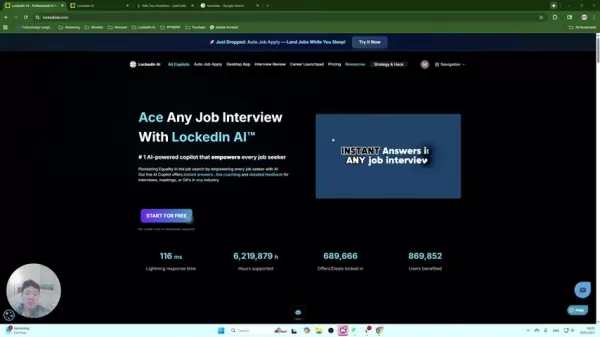
While both web and desktop versions provide interview support, recognizing their differences is important.
The web version operates directly within your browser, which is ideal for users who prefer not to download additional software. However, the web version may be visible during screen sharing. If complete discretion is required, the desktop version is recommended as it can be hidden entirely.
Consider downloading the desktop version of Lockedin AI to keep it completely hidden during screen sharing, offering a discreet advantage during your interview. Lockedin AI ensures your interview strategy remains confidential.
Key Benefits of the Web Version:
- Convenience: Access Lockedin AI directly from your browser without any downloads.
- Accessibility: Use the tool on any device with internet access.
- Real-Time Support: Receive instant answers and feedback during the interview, boosting your confidence. Lockedin AI is designed to enhance your interview skills with its robust features.
Ultimately, the choice between web and desktop versions depends on your preference and security needs during the interview.
Inputting Your Interview Information
The first step to maximizing Lockedin AI's benefits is to input your interview details. This customization ensures the AI provides responses tailored to the specific role and company. Lockedin AI customizes interview responses for each unique situation.
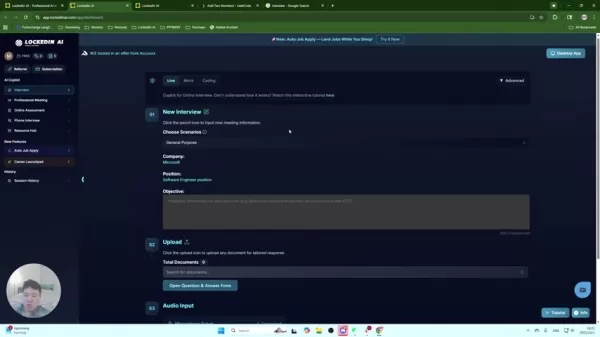
Click the pencil icon in the 'New Interview' section to begin entering the necessary information. This includes:
- Company Name: Specify the company you are interviewing with. Lockedin AI takes the time to understand the specific nuances of the company, creating custom responses tailored to those nuances.
- Position: Clearly state the job title you are applying for. Lockedin AI recognizes that different roles require different qualities, so providing an accurate job title ensures appropriately tailored responses.
- Objective: Include any additional details about the interview, such as whether it is a behavioral round with a founder or a technical round with the CTO. Lockedin AI leverages all provided information to improve response quality.
Providing these specifics will significantly enhance the relevance and quality of the support you receive.
Choosing the Right Interview Scenario
Lockedin AI offers tailored support through different interview scenarios. Selecting the most appropriate scenario aligns the AI's responses with the likely questions and challenges of your interview. Lockedin AI helps you choose the perfect interview scenarios.
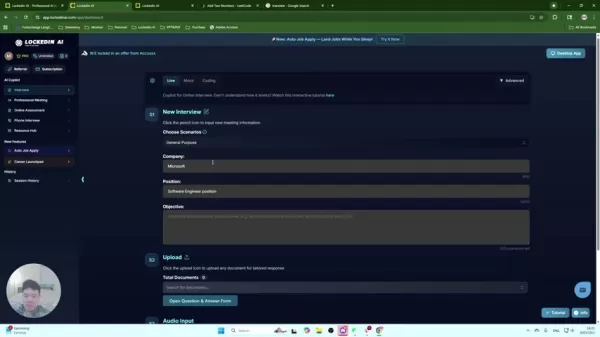
Lockedin AI is programmed to assist in various scenarios, including:
- General Purpose: Ideal for behavioral and experience-based interviews.
- Software Engineering: Perfect for coding problems and technical assessments.
- System Design: Suitable for discussing architecture and system design.
- Project Manager: Tailored for sprint planning, resource allocation, and team coordination discussions.
Each scenario addresses specific question types and challenges, leading to more relevant and effective guidance. The right choice ensures optimal responses for your interview type.
Uploading Documents for Tailored Responses
For a more customized experience, upload relevant documents such as your resume and job description. Lockedin AI analyzes these documents to extract key information, delivering highly tailored and relevant responses. Lockedin AI leverages your resume and job description to give you the edge you need.
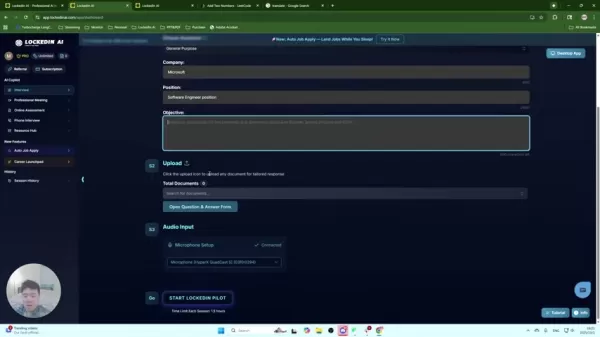
Specifically, Lockedin AI can be used in conjunction with:
- Resume: Upload your resume for responses that align with your skills and experience.
- Job Description: Use the job description to prepare for the precise requirements of the role.
By uploading these documents, Lockedin AI gains a deeper understanding of your qualifications and the interviewer's expectations, enabling more targeted assistance. Ensure all documents are correctly formatted and contain relevant information.
Using the Question and Answer Form
Lockedin AI's question and answer form allows you to pre-program answers to specific questions you anticipate. This feature is invaluable for addressing common or challenging questions with well-prepared responses. Lockedin AI helps create effective answers to difficult interview questions. Here's how to leverage it:
- Input Questions: Enter specific questions you expect to be asked.
- Provide Answers: Write detailed, thoughtful answers that reflect your experience and skills.
- Set Status to Active: Ensure each question is set to active so the AI can use these answers during the interview.
- Save Changes: Remember to save your changes to incorporate your custom answers into the AI's response pool.
Using this form gives you a notable advantage by providing precise answers to your questions.
Adjusting Copilot Settings for Optimal Performance
Lockedin AI offers various settings to fine-tune the copilot's behavior to your preferences. Adjusting these settings enhances your experience and ensures the AI delivers responses that suit your style and needs. Lockedin AI can be customized through copilot settings to create the perfect interview strategy.
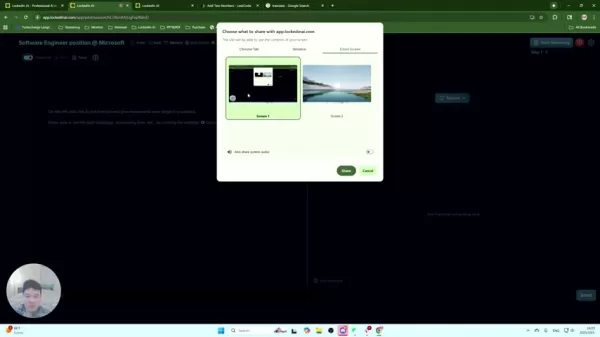
Consider the following adjustments:
- Response Length: Choose between concise and detailed responses based on your preference.
- Language and Accent: Select your preferred language and accent for more natural-sounding responses.
- Processing Time: Adjust processing time to prioritize speed or quality, depending on your interview needs.
- Filter Words: Enable or disable word filtering to control the AI's language.
Experiment with these settings to find the ideal balance for your interview style.
Optimizing Lockedin AI for Coding Interviews
Leveraging the Lockedin AI Chrome Extension for Coding Assistance
The Lockedin AI Chrome extension is an invaluable tool during coding interviews. It provides real-time assistance, helping candidates navigate coding challenges with confidence. Here’s how to fully leverage this feature: Lockedin AI's Google Chrome extension creates an ideal collaborative environment for coding interviews.
- Download and Installation: Start by downloading the Lockedin AI Chrome extension from the Chrome Web Store.
- Accessing the Coding Question: Switch to the tab hosting the coding question, ensuring the Lockedin AI extension is active.
- Activating the Extension: Press 'Ctrl+Shift+U' to send the coding question to the AI for analysis.
- Real-Time Support: Immediately receive a detailed problem description, code solution, and time complexity analysis.
This process transforms how candidates approach coding interviews, offering immediate support and comprehensive analysis.
Personalizing the Display Settings for Enhanced Clarity
Customizing display settings within the Lockedin AI interface enhances your experience, especially during coding interviews. Adjusting these settings helps you focus on key details and insights. Lockedin AI allows you to customize font size and message order for effective interviews.
- Adjusting Font Size: Modify the font size to improve readability, especially when reviewing code solutions.
- Message Order: Change the messaging order to display the latest messages at the top for quick access to new information.
- Auto Scrolling: Disable auto scrolling to maintain focus on specific sections, such as the problem description or code solution.
These customizations help manage information flow, keeping you organized and prepared during the interview.
Step-by-Step Guide to Using Lockedin AI
Configuring Lockedin AI for General Interviews
This step-by-step guide provides detailed instructions for setting up Lockedin AI for general interviews, ensuring you're well-prepared and confident. Lockedin AI is ready to help you ace your interview in just a few simple steps. Here's how to proceed:
Access Lockedin AI: Start by logging into your Lockedin AI account and navigating to the interview section.
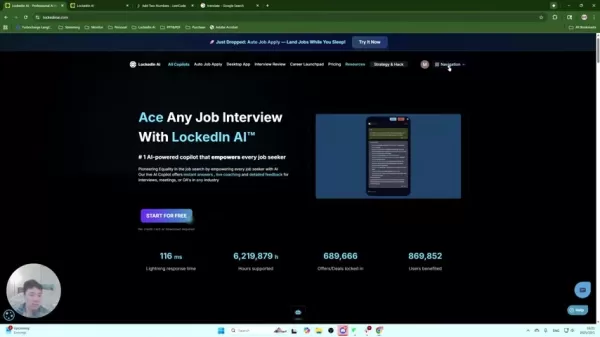
Enter Interview Details: Click the pencil icon to input the company, position, and objective of the interview.
Choose a Scenario: Select the most appropriate interview scenario (e.g., General Purpose, Project Manager) to tailor the AI's responses.
Upload Documents: Upload your resume and the job description for customized insights.
Use the Question and Answer Form: Pre-enter anticipated questions and detailed answers to ensure precision.
Adjust Copilot Settings: Fine-tune response length, language, and accent in the copilot settings.
Start Recording: Once the interview begins, start recording within Lockedin AI to capture the questions.
Monitor Responses: Review AI-generated answers in real-time and integrate them into your responses.
By following these steps, you can confidently use Lockedin AI to navigate your interview and increase your chances of success.
Configuring Lockedin AI for Coding Interviews
This step-by-step guide provides detailed instructions for setting up Lockedin AI for coding interviews, ensuring you're well-prepared and confident. Lockedin AI is ready to help you ace your coding interview in just a few simple steps. Here's how to proceed:
- Install the Chrome Extension: Download and install the Lockedin AI Chrome extension from the Chrome Web Store.
- Access the Coding Question: Navigate to the tab with the coding question hosted on platforms like LeetCode.
- Activate the Extension: Press 'Ctrl+Shift+U' to send the coding question to Lockedin AI for immediate analysis.
- Review the AI's Insights: The AI provides a detailed problem description, code solution, and time complexity analysis.
- Adjust Display Settings: Customize font size, message order, and auto scrolling to enhance readability and focus.
- Integrate AI Insights: Seamlessly incorporate AI-generated insights into your problem-solving approach during the interview.
By following these steps, you can confidently use Lockedin AI to navigate your coding interview and increase your chances of success.
Lockedin AI Pricing Plans
Understanding the Subscription Options
Lockedin AI offers different subscription plans to meet various user needs. Lockedin AI provides options to create the perfect interview strategy with a plan that works for you. Understanding the pricing options is crucial for selecting the plan that aligns with your budget and requirements.
Plan Name Features Price FreeLimited access to features, basic interview assistanceFreePremiumFull access to all features, advanced interview assistance, priority support$49/monthEnterpriseCustomized solutions, dedicated support, advanced analyticsContact UsEvaluate your needs and select the plan that offers the best combination of features and support for your job search.
Pros and Cons of Using Lockedin AI
Pros
Provides instant and relevant answers during interviews.
Offers tailored feedback based on uploaded documents and interview details.
Prepares you for various interview scenarios.
Supports real-time assistance during coding interviews with a Chrome extension.
Allows customization to suit your interview style.
Cons
The web version may be visible during screen sharing.
Requires initial setup time to input interview details and upload documents.
Effectiveness depends on the quality of uploaded documents and pre-entered questions.
Reliance on AI-generated responses might reduce natural conversational flow.
Key Features of Lockedin AI
Exploring Lockedin AI's Capabilities
Lockedin AI stands out as a comprehensive interview preparation tool. Lockedin AI's many features help you feel better prepared and more at ease in any job interview. Its core features include:
- Instant Answers: Provides immediate responses to interview questions, enhancing your preparedness.
- Tailored Feedback: Offers customized feedback based on your uploaded documents and interview details.
- Scenario-Based Preparation: Prepares you for various interview scenarios with targeted guidance.
- Chrome Extension: Provides real-time support during coding interviews.
- Customizable Settings: Allows you to adjust response length, language, and display settings.
These features collectively empower job seekers to perform confidently and excel in their interviews.
Use Cases: How Lockedin AI Helps Different Professionals
Real-World Applications of Lockedin AI
Lockedin AI is versatile and adaptable to various professional fields. Job applicants across many fields find that Lockedin AI gives them the edge needed to secure desired positions. Here are some use cases highlighting its wide range of applications:
- Software Engineers: Coding interviews challenge even experienced engineers. Lockedin AI helps navigate complex technical questions and coding assessments with ease.
- Project Managers: Project managers often need to demonstrate skills in resource management and team coordination. Lockedin AI helps prepare for behavioral scenarios and case studies.
- General Job Seekers: Job interviews can be stressful regardless of field. Lockedin AI provides support and guidance to improve interview skills. Lockedin AI offers solutions for all job candidates.
Frequently Asked Questions
Is Lockedin AI suitable for all types of job interviews?
Yes, Lockedin AI is designed to assist with various interview types, including behavioral, technical, and case study interviews. Available scenarios range from General Purpose to specialized fields like Software Engineering, System Design, and Project Management, ensuring tailored support for different roles. No matter your field, Lockedin AI has features to assist you.
Can Lockedin AI really help me ace coding interviews?
Absolutely! With its Chrome extension, Lockedin AI delivers real-time problem descriptions, code solutions, and time complexity analysis, giving you a significant advantage. Use this tool alongside your studies to create an effective interview strategy.
How secure is my data when I upload documents to Lockedin AI?
Lockedin AI prioritizes data security. All uploaded documents are analyzed to extract key information for tailoring responses. After analysis, files are securely deleted to protect your privacy. You can rest assured your data is safe with Lockedin AI.
Can I customize Lockedin AI to match my interview style?
Yes, Lockedin AI offers customizable settings such as response length, language, accent, and display options. Experiment with these settings to align the copilot’s behavior with your preferences, ensuring natural and personalized assistance. Lockedin AI strives to provide a highly personalized experience.
What are the differences between the web and desktop versions of Lockedin AI?
The web version is accessible directly from your browser, offering convenience without downloads. The desktop version provides enhanced discretion, allowing you to hide the application during screen sharing for added security. Choose the version that best fits your needs. Whichever version you choose, it will assist you effectively.
Does Lockedin AI work with any type of microphone?
Yes, Lockedin AI works with most microphones. To ensure proper setup, navigate to the audio input settings and verify your microphone is connected correctly. Once connected, Lockedin AI can listen to interview questions and generate quality responses quickly.
Related Questions
What Makes Lockedin AI a Valuable Tool for Job Seekers?
Lockedin AI provides job seekers with an AI-powered solution to enhance interview performance. Its ability to deliver instant answers, personalized feedback, and adaptive support ensures candidates are well-prepared for diverse challenges. From behavioral inquiries to technical assessments, Lockedin AI offers relevant guidance. The Chrome extension supports real-time assistance during coding interviews, while customizable settings accommodate various preferences. Lockedin AI distinguishes itself through its user-centric approach, prioritizing data security and offering versatile tools for every preparation stage. By using Lockedin AI, candidates improve their interview capabilities and gain a competitive edge. With Lockedin AI, every user can approach their next job interview with the confidence needed to secure their desired role!
Related article
 Apple Smart Glasses Could Debut at WWDC27, Highlighting Privacy Protection
Bloomberg’s Mark Gurman reports that Apple’s smart glasses, codenamed N50, are slated for a WWDC27 debut in June 2027, with a retail launch expected in autumn 2027. Originally targeted for late this year and early 2027, the device’s release has been
Inside Details Exposed About Next-Gen Gemini: Strained Computing Power, Internal Teams Disagreed on Development Priorities and Resource Allocation
Reports indicate that the launch of Google’s highly anticipated next-generation Gemini model has been pushed back. Internal disagreements over development priorities and resource allocation, combined with limited computing capacity and complex approv
OpenAI Dismisses Growth Slowdown Concerns, Says Multiple Business Units Accelerating
In response to external scrutiny regarding decelerating sales growth and missed internal benchmarks, AI leader OpenAI issued a confident statement on Tuesday, April 28. The company clarified that its consumer products and enterprise services are adva
Related Special Topic Recommendations
Music composition
Apple Smart Glasses Could Debut at WWDC27, Highlighting Privacy Protection
Bloomberg’s Mark Gurman reports that Apple’s smart glasses, codenamed N50, are slated for a WWDC27 debut in June 2027, with a retail launch expected in autumn 2027. Originally targeted for late this year and early 2027, the device’s release has been
Inside Details Exposed About Next-Gen Gemini: Strained Computing Power, Internal Teams Disagreed on Development Priorities and Resource Allocation
Reports indicate that the launch of Google’s highly anticipated next-generation Gemini model has been pushed back. Internal disagreements over development priorities and resource allocation, combined with limited computing capacity and complex approv
OpenAI Dismisses Growth Slowdown Concerns, Says Multiple Business Units Accelerating
In response to external scrutiny regarding decelerating sales growth and missed internal benchmarks, AI leader OpenAI issued a confident statement on Tuesday, April 28. The company clarified that its consumer products and enterprise services are adva
Related Special Topic Recommendations
Music composition
 Best AI Melody Writing Tools for Song Drafts
2026 Latest Best Top-Rated AI Melody Writing Tools for Song Drafts! XIX.AI has curated a highly powerful game-changing collection that goes through rigorous real-world tests to deliver the best writing experience. You can find detailed free vs paid comparisons, accurate rankings, and must-try options designed to help you create stunning song drafts effortlessly and boost your creative productivity significantly. Explore now to discover your perfect tool!
 8 tools
 xix.ai
chatbot
Best AI Conversation Trainer Tools for Interview Practice
xix.ai
chatbot
Best AI Conversation Trainer Tools for Interview Practice
2026 Latest Best Top-rated AI Conversation Trainer Tools for Interview Practice are here on XIX.AI! This curated collection features powerful, game-changing tools that go through rigorous real-world tests to deliver accurate feedback. You’ll find a free vs paid comparison and detailed rankings to help you choose the must-try option that boosts your confidence and skills. Explore now to Discover your perfect tool for interview success!
12 tools
xix.ai
Design & Art
Best AI Style Transfer Tools for Creative Experiments
2026 Latest Best Top-rated AI Style Transfer Tools for Creative Experiments! XIX.AI has curated a powerful, game-changing collection of must-try tools that deliver exceptional results through real-world tests and rigorous rankings. These top solutions help creatives boost productivity significantly by accelerating content creation and unlocking endless creative possibilities. Explore now to discover your perfect tool and start creating today!
9 tools
xix.ai
Comic Creation
Best AI Dialogue Bubble Tools for Visual Storytelling
2026 Latest Best Top-Rated AI Dialogue Bubble Tools for Visual Storytelling are here on XIX.AI! This curated collection features powerful, game-changing tools that help creators boost productivity and overcome creative bottlenecks. Get a free vs paid comparison, see real-world tests, and check the latest rankings to find the must-try solutions perfect for crafting engaging visual narratives. Explore now to discover your ideal tool!
10 tools
xix.ai
Meeting Assistant
Top AI Meeting Summary Tools: Track Decisions and Follow-Ups Clearly
2026 Latest Top-Rated Best AI Meeting Summary Tools for Clear Decision Tracking and Effortless Follow-Ups. This curated list showcases powerful, game-changing solutions that boost productivity dramatically by automating meeting notes, identifying key action items, and streamlining team coordination across all projects. Get a free vs paid comparison along with real-world tests and weekly updated rankings to help you find the perfect tool. Explore now to unlock your AI edge!
9 tools
xix.ai
Data Analysis
Best AI Data Cleaning Tools: Fix Missing Values and Duplicates Fast
2026 Latest Best Top-rated AI Data Cleaning Tools for quick fixing of missing values and duplicates. This curated list showcases powerful, game-changing solutions that boost productivity significantly. Each option has undergone rigorous real-world tests to ensure reliability. Get a free vs paid comparison and discover the must-try tool that fits your needs best. Explore now at XIX.AI to Unlock your AI edge.
11 tools
xix.ai

 Comments (1)
0/500
Comments (1)
0/500
![JonathanRoberts]()
Lockedin AI comme copilote pour les entretiens d'embauche ? L'idée est ingénieuse, mais ça ne risque pas de standardiser les réponses des candidats ? J'ai déjà vu des formations qui formataient les gens, alors une IA... 😅 En même temps, si ça peut aider à surmonter le stress, pourquoi pas !
In today's competitive job market, excelling in interviews is essential. Lockedin AI serves as a powerful, AI-driven copilot created to empower every job seeker. Whether you're tackling technical questions, behavioral scenarios, or case studies, Lockedin AI provides instant answers, insightful feedback, and comprehensive support to help you succeed in your interview. This article explores how to effectively use Lockedin AI to maximize your interview potential and secure your desired role.
Key Points
Lockedin AI provides interview assistance through both web and desktop applications.
Customize your interview preparation by entering company, position, and objective information.
Upload your resume and job descriptions to receive tailored AI responses.
Use the question and answer form to prepare for specific, anticipated questions.
Adjust response length, language, and accent in the copilot settings.
Utilize the Chrome extension for real-time support during coding interviews.
Getting Started with Lockedin AI
Understanding Lockedin AI's Web Version
Lockedin AI offers valuable support throughout your job interview process. Understanding its functionalities is key to leveraging its features effectively. This section focuses on using the web version of Lockedin AI during interviews.
While both web and desktop versions provide interview support, recognizing their differences is important.
The web version operates directly within your browser, which is ideal for users who prefer not to download additional software. However, the web version may be visible during screen sharing. If complete discretion is required, the desktop version is recommended as it can be hidden entirely.
Consider downloading the desktop version of Lockedin AI to keep it completely hidden during screen sharing, offering a discreet advantage during your interview. Lockedin AI ensures your interview strategy remains confidential.
Key Benefits of the Web Version:
- Convenience: Access Lockedin AI directly from your browser without any downloads.
- Accessibility: Use the tool on any device with internet access.
- Real-Time Support: Receive instant answers and feedback during the interview, boosting your confidence. Lockedin AI is designed to enhance your interview skills with its robust features.
Ultimately, the choice between web and desktop versions depends on your preference and security needs during the interview.
Inputting Your Interview Information
The first step to maximizing Lockedin AI's benefits is to input your interview details. This customization ensures the AI provides responses tailored to the specific role and company. Lockedin AI customizes interview responses for each unique situation.
Click the pencil icon in the 'New Interview' section to begin entering the necessary information. This includes:
- Company Name: Specify the company you are interviewing with. Lockedin AI takes the time to understand the specific nuances of the company, creating custom responses tailored to those nuances.
- Position: Clearly state the job title you are applying for. Lockedin AI recognizes that different roles require different qualities, so providing an accurate job title ensures appropriately tailored responses.
- Objective: Include any additional details about the interview, such as whether it is a behavioral round with a founder or a technical round with the CTO. Lockedin AI leverages all provided information to improve response quality.
Providing these specifics will significantly enhance the relevance and quality of the support you receive.
Choosing the Right Interview Scenario
Lockedin AI offers tailored support through different interview scenarios. Selecting the most appropriate scenario aligns the AI's responses with the likely questions and challenges of your interview. Lockedin AI helps you choose the perfect interview scenarios.
Lockedin AI is programmed to assist in various scenarios, including:
- General Purpose: Ideal for behavioral and experience-based interviews.
- Software Engineering: Perfect for coding problems and technical assessments.
- System Design: Suitable for discussing architecture and system design.
- Project Manager: Tailored for sprint planning, resource allocation, and team coordination discussions.
Each scenario addresses specific question types and challenges, leading to more relevant and effective guidance. The right choice ensures optimal responses for your interview type.
Uploading Documents for Tailored Responses
For a more customized experience, upload relevant documents such as your resume and job description. Lockedin AI analyzes these documents to extract key information, delivering highly tailored and relevant responses. Lockedin AI leverages your resume and job description to give you the edge you need.
Specifically, Lockedin AI can be used in conjunction with:
- Resume: Upload your resume for responses that align with your skills and experience.
- Job Description: Use the job description to prepare for the precise requirements of the role.
By uploading these documents, Lockedin AI gains a deeper understanding of your qualifications and the interviewer's expectations, enabling more targeted assistance. Ensure all documents are correctly formatted and contain relevant information.
Using the Question and Answer Form
Lockedin AI's question and answer form allows you to pre-program answers to specific questions you anticipate. This feature is invaluable for addressing common or challenging questions with well-prepared responses. Lockedin AI helps create effective answers to difficult interview questions. Here's how to leverage it:
- Input Questions: Enter specific questions you expect to be asked.
- Provide Answers: Write detailed, thoughtful answers that reflect your experience and skills.
- Set Status to Active: Ensure each question is set to active so the AI can use these answers during the interview.
- Save Changes: Remember to save your changes to incorporate your custom answers into the AI's response pool.
Using this form gives you a notable advantage by providing precise answers to your questions.
Adjusting Copilot Settings for Optimal Performance
Lockedin AI offers various settings to fine-tune the copilot's behavior to your preferences. Adjusting these settings enhances your experience and ensures the AI delivers responses that suit your style and needs. Lockedin AI can be customized through copilot settings to create the perfect interview strategy.
Consider the following adjustments:
- Response Length: Choose between concise and detailed responses based on your preference.
- Language and Accent: Select your preferred language and accent for more natural-sounding responses.
- Processing Time: Adjust processing time to prioritize speed or quality, depending on your interview needs.
- Filter Words: Enable or disable word filtering to control the AI's language.
Experiment with these settings to find the ideal balance for your interview style.
Optimizing Lockedin AI for Coding Interviews
Leveraging the Lockedin AI Chrome Extension for Coding Assistance
The Lockedin AI Chrome extension is an invaluable tool during coding interviews. It provides real-time assistance, helping candidates navigate coding challenges with confidence. Here’s how to fully leverage this feature: Lockedin AI's Google Chrome extension creates an ideal collaborative environment for coding interviews.
- Download and Installation: Start by downloading the Lockedin AI Chrome extension from the Chrome Web Store.
- Accessing the Coding Question: Switch to the tab hosting the coding question, ensuring the Lockedin AI extension is active.
- Activating the Extension: Press 'Ctrl+Shift+U' to send the coding question to the AI for analysis.
- Real-Time Support: Immediately receive a detailed problem description, code solution, and time complexity analysis.
This process transforms how candidates approach coding interviews, offering immediate support and comprehensive analysis.
Personalizing the Display Settings for Enhanced Clarity
Customizing display settings within the Lockedin AI interface enhances your experience, especially during coding interviews. Adjusting these settings helps you focus on key details and insights. Lockedin AI allows you to customize font size and message order for effective interviews.
- Adjusting Font Size: Modify the font size to improve readability, especially when reviewing code solutions.
- Message Order: Change the messaging order to display the latest messages at the top for quick access to new information.
- Auto Scrolling: Disable auto scrolling to maintain focus on specific sections, such as the problem description or code solution.
These customizations help manage information flow, keeping you organized and prepared during the interview.
Step-by-Step Guide to Using Lockedin AI
Configuring Lockedin AI for General Interviews
This step-by-step guide provides detailed instructions for setting up Lockedin AI for general interviews, ensuring you're well-prepared and confident. Lockedin AI is ready to help you ace your interview in just a few simple steps. Here's how to proceed:
Access Lockedin AI: Start by logging into your Lockedin AI account and navigating to the interview section.
Enter Interview Details: Click the pencil icon to input the company, position, and objective of the interview.
Choose a Scenario: Select the most appropriate interview scenario (e.g., General Purpose, Project Manager) to tailor the AI's responses.
Upload Documents: Upload your resume and the job description for customized insights.
Use the Question and Answer Form: Pre-enter anticipated questions and detailed answers to ensure precision.
Adjust Copilot Settings: Fine-tune response length, language, and accent in the copilot settings.
Start Recording: Once the interview begins, start recording within Lockedin AI to capture the questions.
Monitor Responses: Review AI-generated answers in real-time and integrate them into your responses.
By following these steps, you can confidently use Lockedin AI to navigate your interview and increase your chances of success.
Configuring Lockedin AI for Coding Interviews
This step-by-step guide provides detailed instructions for setting up Lockedin AI for coding interviews, ensuring you're well-prepared and confident. Lockedin AI is ready to help you ace your coding interview in just a few simple steps. Here's how to proceed:
- Install the Chrome Extension: Download and install the Lockedin AI Chrome extension from the Chrome Web Store.
- Access the Coding Question: Navigate to the tab with the coding question hosted on platforms like LeetCode.
- Activate the Extension: Press 'Ctrl+Shift+U' to send the coding question to Lockedin AI for immediate analysis.
- Review the AI's Insights: The AI provides a detailed problem description, code solution, and time complexity analysis.
- Adjust Display Settings: Customize font size, message order, and auto scrolling to enhance readability and focus.
- Integrate AI Insights: Seamlessly incorporate AI-generated insights into your problem-solving approach during the interview.
By following these steps, you can confidently use Lockedin AI to navigate your coding interview and increase your chances of success.
Lockedin AI Pricing Plans
Understanding the Subscription Options
Lockedin AI offers different subscription plans to meet various user needs. Lockedin AI provides options to create the perfect interview strategy with a plan that works for you. Understanding the pricing options is crucial for selecting the plan that aligns with your budget and requirements.
Evaluate your needs and select the plan that offers the best combination of features and support for your job search.
Pros and Cons of Using Lockedin AI
Pros
Provides instant and relevant answers during interviews.
Offers tailored feedback based on uploaded documents and interview details.
Prepares you for various interview scenarios.
Supports real-time assistance during coding interviews with a Chrome extension.
Allows customization to suit your interview style.
Cons
The web version may be visible during screen sharing.
Requires initial setup time to input interview details and upload documents.
Effectiveness depends on the quality of uploaded documents and pre-entered questions.
Reliance on AI-generated responses might reduce natural conversational flow.
Key Features of Lockedin AI
Exploring Lockedin AI's Capabilities
Lockedin AI stands out as a comprehensive interview preparation tool. Lockedin AI's many features help you feel better prepared and more at ease in any job interview. Its core features include:
- Instant Answers: Provides immediate responses to interview questions, enhancing your preparedness.
- Tailored Feedback: Offers customized feedback based on your uploaded documents and interview details.
- Scenario-Based Preparation: Prepares you for various interview scenarios with targeted guidance.
- Chrome Extension: Provides real-time support during coding interviews.
- Customizable Settings: Allows you to adjust response length, language, and display settings.
These features collectively empower job seekers to perform confidently and excel in their interviews.
Use Cases: How Lockedin AI Helps Different Professionals
Real-World Applications of Lockedin AI
Lockedin AI is versatile and adaptable to various professional fields. Job applicants across many fields find that Lockedin AI gives them the edge needed to secure desired positions. Here are some use cases highlighting its wide range of applications:
- Software Engineers: Coding interviews challenge even experienced engineers. Lockedin AI helps navigate complex technical questions and coding assessments with ease.
- Project Managers: Project managers often need to demonstrate skills in resource management and team coordination. Lockedin AI helps prepare for behavioral scenarios and case studies.
- General Job Seekers: Job interviews can be stressful regardless of field. Lockedin AI provides support and guidance to improve interview skills. Lockedin AI offers solutions for all job candidates.
Frequently Asked Questions
Is Lockedin AI suitable for all types of job interviews?
Yes, Lockedin AI is designed to assist with various interview types, including behavioral, technical, and case study interviews. Available scenarios range from General Purpose to specialized fields like Software Engineering, System Design, and Project Management, ensuring tailored support for different roles. No matter your field, Lockedin AI has features to assist you.
Can Lockedin AI really help me ace coding interviews?
Absolutely! With its Chrome extension, Lockedin AI delivers real-time problem descriptions, code solutions, and time complexity analysis, giving you a significant advantage. Use this tool alongside your studies to create an effective interview strategy.
How secure is my data when I upload documents to Lockedin AI?
Lockedin AI prioritizes data security. All uploaded documents are analyzed to extract key information for tailoring responses. After analysis, files are securely deleted to protect your privacy. You can rest assured your data is safe with Lockedin AI.
Can I customize Lockedin AI to match my interview style?
Yes, Lockedin AI offers customizable settings such as response length, language, accent, and display options. Experiment with these settings to align the copilot’s behavior with your preferences, ensuring natural and personalized assistance. Lockedin AI strives to provide a highly personalized experience.
What are the differences between the web and desktop versions of Lockedin AI?
The web version is accessible directly from your browser, offering convenience without downloads. The desktop version provides enhanced discretion, allowing you to hide the application during screen sharing for added security. Choose the version that best fits your needs. Whichever version you choose, it will assist you effectively.
Does Lockedin AI work with any type of microphone?
Yes, Lockedin AI works with most microphones. To ensure proper setup, navigate to the audio input settings and verify your microphone is connected correctly. Once connected, Lockedin AI can listen to interview questions and generate quality responses quickly.
Related Questions
What Makes Lockedin AI a Valuable Tool for Job Seekers?
Lockedin AI provides job seekers with an AI-powered solution to enhance interview performance. Its ability to deliver instant answers, personalized feedback, and adaptive support ensures candidates are well-prepared for diverse challenges. From behavioral inquiries to technical assessments, Lockedin AI offers relevant guidance. The Chrome extension supports real-time assistance during coding interviews, while customizable settings accommodate various preferences. Lockedin AI distinguishes itself through its user-centric approach, prioritizing data security and offering versatile tools for every preparation stage. By using Lockedin AI, candidates improve their interview capabilities and gain a competitive edge. With Lockedin AI, every user can approach their next job interview with the confidence needed to secure their desired role!








 Apple Smart Glasses Could Debut at WWDC27, Highlighting Privacy Protection
Bloomberg’s Mark Gurman reports that Apple’s smart glasses, codenamed N50, are slated for a WWDC27 debut in June 2027, with a retail launch expected in autumn 2027. Originally targeted for late this year and early 2027, the device’s release has been
Apple Smart Glasses Could Debut at WWDC27, Highlighting Privacy Protection
Bloomberg’s Mark Gurman reports that Apple’s smart glasses, codenamed N50, are slated for a WWDC27 debut in June 2027, with a retail launch expected in autumn 2027. Originally targeted for late this year and early 2027, the device’s release has been
 Inside Details Exposed About Next-Gen Gemini: Strained Computing Power, Internal Teams Disagreed on Development Priorities and Resource Allocation
Reports indicate that the launch of Google’s highly anticipated next-generation Gemini model has been pushed back. Internal disagreements over development priorities and resource allocation, combined with limited computing capacity and complex approv
Inside Details Exposed About Next-Gen Gemini: Strained Computing Power, Internal Teams Disagreed on Development Priorities and Resource Allocation
Reports indicate that the launch of Google’s highly anticipated next-generation Gemini model has been pushed back. Internal disagreements over development priorities and resource allocation, combined with limited computing capacity and complex approv
 OpenAI Dismisses Growth Slowdown Concerns, Says Multiple Business Units Accelerating
In response to external scrutiny regarding decelerating sales growth and missed internal benchmarks, AI leader OpenAI issued a confident statement on Tuesday, April 28. The company clarified that its consumer products and enterprise services are adva
OpenAI Dismisses Growth Slowdown Concerns, Says Multiple Business Units Accelerating
In response to external scrutiny regarding decelerating sales growth and missed internal benchmarks, AI leader OpenAI issued a confident statement on Tuesday, April 28. The company clarified that its consumer products and enterprise services are adva

2026 Latest Best Top-Rated AI Melody Writing Tools for Song Drafts! XIX.AI has curated a highly powerful game-changing collection that goes through rigorous real-world tests to deliver the best writing experience. You can find detailed free vs paid comparisons, accurate rankings, and must-try options designed to help you create stunning song drafts effortlessly and boost your creative productivity significantly. Explore now to discover your perfect tool!
8 tools
xix.ai

2026 Latest Best Top-rated AI Conversation Trainer Tools for Interview Practice are here on XIX.AI! This curated collection features powerful, game-changing tools that go through rigorous real-world tests to deliver accurate feedback. You’ll find a free vs paid comparison and detailed rankings to help you choose the must-try option that boosts your confidence and skills. Explore now to Discover your perfect tool for interview success!
12 tools
xix.ai

2026 Latest Best Top-rated AI Style Transfer Tools for Creative Experiments! XIX.AI has curated a powerful, game-changing collection of must-try tools that deliver exceptional results through real-world tests and rigorous rankings. These top solutions help creatives boost productivity significantly by accelerating content creation and unlocking endless creative possibilities. Explore now to discover your perfect tool and start creating today!
9 tools
xix.ai

2026 Latest Best Top-Rated AI Dialogue Bubble Tools for Visual Storytelling are here on XIX.AI! This curated collection features powerful, game-changing tools that help creators boost productivity and overcome creative bottlenecks. Get a free vs paid comparison, see real-world tests, and check the latest rankings to find the must-try solutions perfect for crafting engaging visual narratives. Explore now to discover your ideal tool!
10 tools
xix.ai

2026 Latest Top-Rated Best AI Meeting Summary Tools for Clear Decision Tracking and Effortless Follow-Ups. This curated list showcases powerful, game-changing solutions that boost productivity dramatically by automating meeting notes, identifying key action items, and streamlining team coordination across all projects. Get a free vs paid comparison along with real-world tests and weekly updated rankings to help you find the perfect tool. Explore now to unlock your AI edge!
9 tools
xix.ai

2026 Latest Best Top-rated AI Data Cleaning Tools for quick fixing of missing values and duplicates. This curated list showcases powerful, game-changing solutions that boost productivity significantly. Each option has undergone rigorous real-world tests to ensure reliability. Get a free vs paid comparison and discover the must-try tool that fits your needs best. Explore now at XIX.AI to Unlock your AI edge.
11 tools
xix.ai

Lockedin AI comme copilote pour les entretiens d'embauche ? L'idée est ingénieuse, mais ça ne risque pas de standardiser les réponses des candidats ? J'ai déjà vu des formations qui formataient les gens, alors une IA... 😅 En même temps, si ça peut aider à surmonter le stress, pourquoi pas !












